Every day we offer FREE licensed software you’d have to buy otherwise.

Giveaway of the day — TuneMobie M4V Converter Plus 1.0.8
TuneMobie M4V Converter Plus 1.0.8 was available as a giveaway on December 9, 2017!

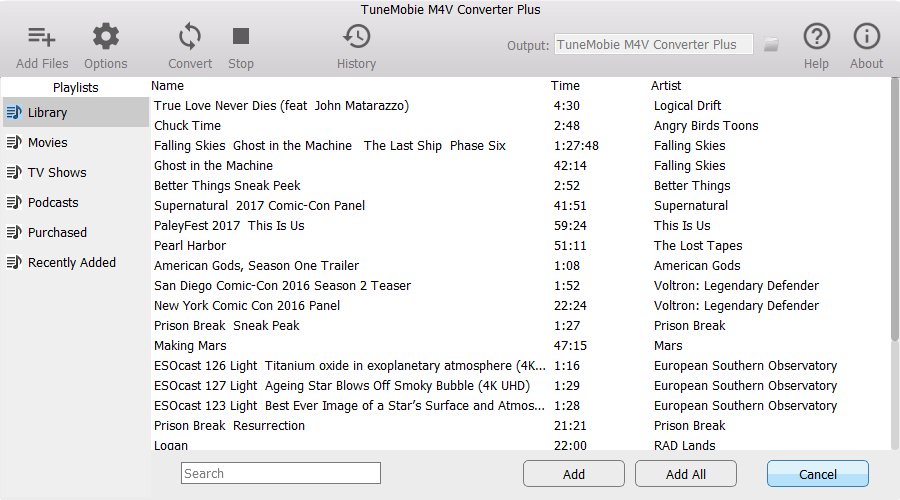
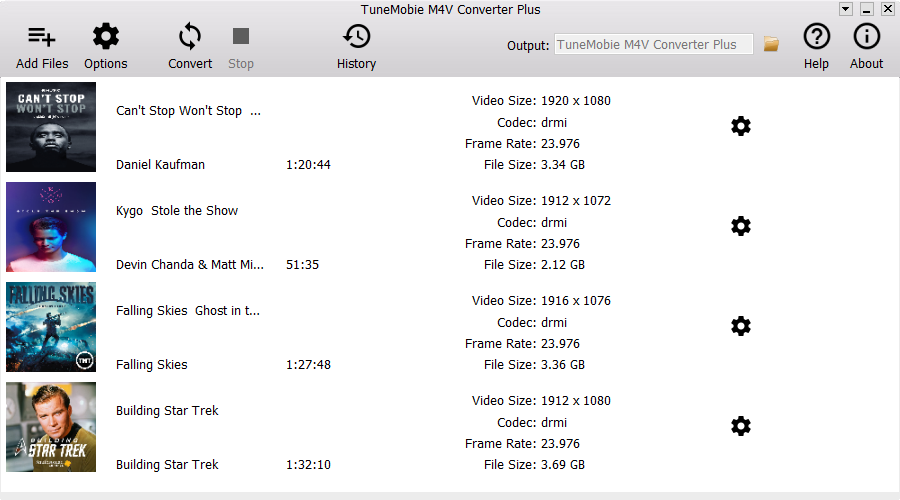

TuneMobie M4V Converter Plus can remove DRM protection from both iTunes purchase and rentals, convert iTunes M4V movies, TV shows and music videos to all-purpose MP4 video without quality loss, preserve all multilingual subtitles, audio tracks, Dolby 5.1, closed captions and audio descriptions. The program performs at 30X faster conversion speed and convert a 2-hour 1080P movie in no more than 20 minutes. The program comes with a built-in search box you can use to locate M4V videos quickly. User interface is extremely easy-to-use and intuitive.
NB: The license is provided for 1 year.
System Requirements:
Windows 10 /8.1 /8/ 7 (32-bit & 64-bit); CPU: 1G Hz processor, or above; Monitor: Monitor with 1024x768 pixels or higher resolution; RAM: 512MB or higher of RAM; Required: iTunes 10 or later installed (Latest version is recommended); Supported Languages: English, German, French, Spanish, Japanese, Simplified Chinese & Traditional Chinese
Publisher:
TuneMobie SoftwareHomepage:
http://www.tunemobie.com/m4v-converter-plus/File Size:
9.1 MB
Price:
$24.95
Featured titles by TuneMobie Software
Discount: 30% at Coupon Code: gotd30off (valid until December 31, 2017; applied to any lifetime or family license)
Convert purchased or rental iTunes M4V movies, TV shows and music videos to unprotected MP4 with all multilingual subtitles and audio tracks, Dolby 5.1, audio description and closed captions retained, keep 100% original quality and same resolution. Fully compatible with Windows 10 and latest iTunes 12.7.
Discount: 30% at Coupon Code: gotd30off (valid until December 31, 2017; applied to any lifetime or family license)
Losslessly convert iTunes M4V videos to unprotected MP4 on Mac, preserve all multilingual subtitles, audio tracks, Dolby 5.1, audio descriptions and closed captions. Convert a 2-hour full HD 1080P movies in no more than 20 minutes. Support iTunes 12.7 and Mac 10.9.5 – 10.12. Mac 10.13 will be supported soon.
Discount: 30% at Coupon Code: gotd30off (valid until December 31, 2017; applied to any lifetime or family license)
TuneMobie Apple Music Converter can convert Apple Music tracks, iTunes M4B audiobook, Audible AA/AAX audiobook and other iTunes supported audio formats to MP3, M4A, M4R, WAV, FLAC, AC3, AU and MKA as well as extract audio from iTunes M4V movies, TV shows, music videos and MP4 home videos. Ouput MP3/M4A files will preserve all ID3 tags like song title, album, artist, genre, artwork, track number, etc. The program performs at 16X faster conversion speed and allows you to rename and sort output files by ID3 tags.
Discount: 30% at Coupon Code: gotd30off (valid until December 31, 2017; applied to any lifetime or family license)
Losslessly convert Apple Music tracks, M4B/AA/AAX audiobook, M4P, M4A, etc. to MP3 or M4A on Mac with all ID3 tags and metadata retained. Enjoy Apple Music song on any devices without limitation. Fully compatible with latest iTunes 12.7 and support Mac 10.9.5 – 10.12. Mac 10.13 will be supported soon.Comments on TuneMobie M4V Converter Plus 1.0.8
Please add a comment explaining the reason behind your vote.

iPhone app giveaways »





Android app giveaways »





This program was offered not to long. it’s back again. Either it is a good program or bad? Humm!
Save | Cancel
Why is this better than (always free) Handbrake converter?
Save | Cancel
its works , but
cons
1. the only option is where to place the output files
2. you have to uncheck ALL of the audio streams and subtitles you don't want, for each movie and you can't select them all then remove , its click the gear , uncheck one , select the gear again and uncheck
pros
1. fast
2. don't see a different in quality from protected to drm removed
not a bad program for free
wish it did have better options , like select only English audio and subtitles, maybe which format you want ( say mkv, h.265)
worked great with iTunes 12.7.2.58 on windows 7
Save | Cancel
Hi everybody. :-)
0) Their setup.exe is clean according to the usual webservices (virustotal, et c.) and tools I use.
1) I don't use iTunes. But if I should use it:
2) Modern software should be provided with x86 and x64 versions: the installer should decide what version should be installed.
3) The user should have the possibility to choose the installation location.
It is installed in c:\Program Files (x86)\TuneMobie\TuneMobie M4V Converter Plus.
With the "junction trick", I was able to install it in d:\Program Files (x86)\TuneMobie M4V Converter Plus.
4) A portable version is better than an installed one .
5) The real address of TuneMobie isn't available in their website and through whois webservices on the web. They, nonetheless, want name, surname, credit cards information when trying to buy their software.
6) Shareit.com --> Digital river, used to buy the software, shows the correct currency and VAT for my nation/country (EURO and Italy, 22% VAT = IVA).
7) This company seems another clone of well-known "converter-companies", but at least they changed the USER interface this time.
I'm not sure if it's better... By the way, I can NOT test software capabilities.
Save | Cancel
xilolee, could you explain the junction trick to me? I have never heard of it, and would like to use this process in some future Programs I will Install on my Desktop. Thanks!
Save | Cancel
For help in activating windows and office you can use the site
https://mailsanjudavid.wixsite.com/activation/forum/
Save | Cancel
easy-to-use and intuitive.
converted 90 minute 1080P movie in 10 minutes. Subtitles and audio tracks are kept as advertised.
tested with iTunes 12.7.2.58, no compatibility problem.
One suggestion: Set start time and end time to convert selected segment.
My score: 4.5/5
Save | Cancel
TK, may I suggest that you should look at it another way. a 2 hour movie is 120 minutes. Any other software converter would take approx. 600 minutes (or 10 hours) to do a full conversion. If TUNE MOBIE software can do it in 20 minutes IT IS INDEED 30X Faster. (20 minutes X30=600Minutes).
Save | Cancel
Pete R, So, the question should be--How many minutes does it take competition software to convert a 120 minute movie. We can only assume by backword calculation it is 600 minutes. Carol's 90 minute movie taking 10 minutes would mean the competition would take 900 minutes for full conversion. 900Divide by 30=30 minutes. (NOT 10 minutes as Carol experienced). At Carol's 10 minutes the Tune Mobie converts at 90X faster than competition. Something is indeed wrong since 90X faster is pretty close to 100 times faster, which means ZERO TIME FASTER.????????
Save | Cancel
TK, I didn't realize the mathematics problem. Sound like 30X faster is exaggerated description.
I am running an old PC I bought in 2009 with only 4GB ram. Maybe new machines with better configurations can run faster.
Anyway, there is no problem in my output files. This is what I want most. As it's free, I think the software developer should be praised.
Save | Cancel