Every day we offer FREE licensed software you’d have to buy otherwise.
Giveaway of the day — Kryptel Standard 7.6.1
Kryptel Standard 7.6.1 was available as a giveaway on November 15, 2017!
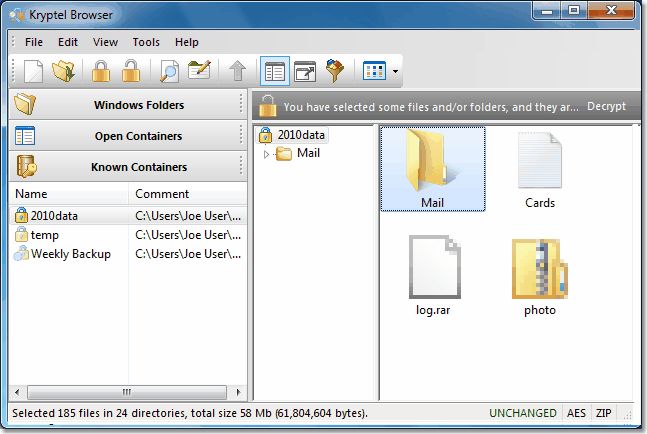
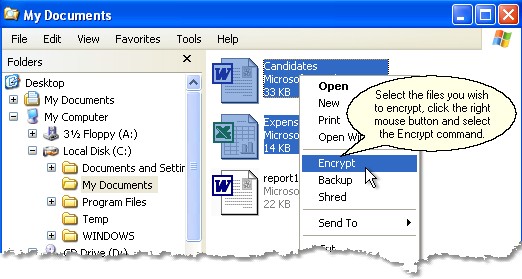
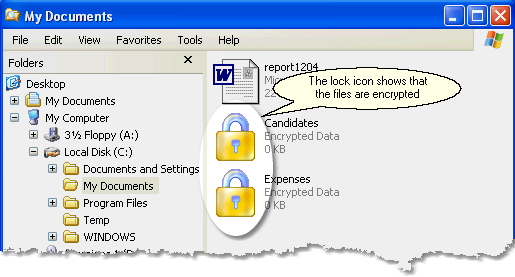
Everyone has private data, and if your data need protecting, then Kryptel is what you are after. Kryptel is an easy-to- use no-hassle solution even a new computer user will be comfortable with. You want to encrypt a file? Just drag it to the Kryptel icon, and Kryptel will do the rest. But easy-to- use does not mean simple or insecure. Kryptel is based on modern Advanced Encryption Standard and performs a full range of encryption tasks – from basic drag-and- drop file encryption to complex automated encryption jobs.
- Easy File and Folder Encryption: Just right-click a file or a folder and select "Encrypt" - or drag it to the Kryptel desktop icon.
- Strong Encryption: uses the latest NIST-approved Advanced Encryption Standard; several additional well-reputed ciphers are available for advanced users.
- File Sets: Define an encryption job and encrypt thousands of files in a single click!
- Encrypted Backups: Ideal for safe data storage. Thanks to strong encryption, Kryptel backup files can be stored anywhere - burned to a DVD, moved to LAN storage, or even sent to a remote public server.
- Failure Resistant: Even if the computer crashes in the middle of encryption step, no data will be lost. And if an encrypted container becomes corrupted due to hardware failure, Kryptel Data Recovery gives you a good chance to get your data back.
Please note the program archive also includes the portable version which might be used only on the removable media and needs to be activated with the provided key as the usual one!
System Requirements:
Windows 2000/ XP/ Vista/ 7/ 8/ 10
Publisher:
Inv SoftworksHomepage:
https://www.kryptel.com/products/kryptel.phpFile Size:
29.5 MB
Price:
$29.95
Comments on Kryptel Standard 7.6.1
Please add a comment explaining the reason behind your vote.

iPhone app giveaways »










Hello,
Great program that can be even greater.
1. Add one Virtual Keyboard to the Kryptel Standard Menu in English and Spanish.
2. Add a way to create an on the fly portable version, as is described on the docs.
Save | Cancel
Chet Amboresh,
1) Kryptel includes quite a number of virtual keyboards (Spanish too)
2) Kryptel portable version: http://www.kryptel.com/download/events/KryptelUSB.7.6.1.zip
Save | Cancel
Hi Andre,
I was just wondering if Kryptel can be used from the command line? Thanks!
Save | Cancel
Robert Garofalo, it can, but not the Standard edition:
https://www.kryptel.com/products/kreditions.php
Save | Cancel
I would like to encrypt my media server, how can this be done on the Network, the media server is not an actual computer, it is an external drive - can anyone on the network decrypt the files?
Save | Cancel
Glenn, Kryptel can encrypt files over local network. At least if your media server supports basic file operations (it should).
"can anyone on the network decrypt the files?" - they can if they know the right password (or have the right key).
Save | Cancel
Installed OK and seems to work but unable to find the "activate" window to enter the ID provided in read me. Have I done something wrong?
Save | Cancel
Amargein, it should pop up after installation. Try this: double-click Kryptel desktop icon and press 'Group'. Double-click the License Manager icon. Press 'Activate (Update)'.
Save | Cancel
Amargein,
https://www.dropbox.com/s/x13faq95jsj5c5i/Registratie.png
Save | Cancel
Hi Andre,
I have a question about encrypted backups. The encrypted backup howto on your site shows transferring the backup to Web storage. In one of the dialogs you can see "Google Drive" as the destination. Can your encrypted backup store on Amazon Drive? And for the benefit of the other GOTD patrons, can you list the web storage vendors you support?
Thanks!
Save | Cancel
Bryan, we support Google Drive, Dropbox, and Microsoft OneDrive.
Backups can be stored anywhere, but if you want to upload your backup to another Web drive, you will have to upload it yourself. Or add your own uploader if you are good with scripts .
Save | Cancel
I am using this program since the last giveaway and I find it does a great job. Very easy to install and use. I replaced a free-be that I've used for 20 years and I am very happy. and by the way, you need to install it on any computer that you will decrypt a file on. They do mention a portable version. I would not be afraid to use this program. Hope this helps.
Thank you GOTD and Inv Softworks. Luv it
Save | Cancel
Re: #5
Just a little note about backdoors: our encryption engine is open source and well documented.
Save | Cancel
Just a test; try to hack this container.
I made two containers, one with a TXT-file and one with a folder in it.
I made a zip of all and did not encrypt the zip.
Try to crack the code I used. A word of 8 letters, all small. And of Dutch origin. It had someting to do with time, calendar, days; Kryptel says that the password is weak:
https://ootjegotd.stackstorage.com/s/ti6UYa9jYWv74K9
Save | Cancel
Ootje, we don't hack anything, that's not our job. A password of eight lowercase letters is indeed weak and can be found by bruteforce. Please check this article: https://www.kryptel.com/articles/encryption_passwords.php
Save | Cancel
Re: #7
1) Kryptel can't create self-decrypting files, but Silver Key can. See https://www.kryptel.com/products/comparison.php
2) AES, Blowfish, Twofish, Serpent, and Triple-DES. Selectable in 'Settings / Cipher'.
Save | Cancel
I have 2 questions :
1) By rightclick & encrypt, does it create a self-decrypting file ? (meaning : if you awant to decrypt that file on another pc by doubleclicking on it & entering password, do you first need to have Kryptel installed on that other pc ?)
This would be a deal breaker if it does not.
2) Your website states the following : ".... several more well-reputed ciphers are also available for advanced users...".
However, it does not specifically state which ciphers are supported.
This is vital, as the only reason I'm interested in this software, would be if it offered a better alternative than AES, such as Serpent, Twofish etc.
I'd appreciate your reply !
Save | Cancel
Re: #4
Sorry, I don't quite understand your question. If a file is encrypted you have to decrypt it in order to use it again. After decryption you will get back the same original file, not changed in any way.
Save | Cancel
Once these files are enKrypted, does that mean you can only "read" them through your program? Or can you unenKrypt them? Once changed always changed?
Save | Cancel
Sunnie, you can open the container with Kryptel, like a browser.
And then you can in the normal way alter the file, by opening it in textwriter, notepad . .. .
After saving you will get a message: encrypot again?
https://www.dropbox.com/s/qgxjae56qabr41q/MeldingNaBewerking.png
And after that all is OK.
BUT, be aware that the Temp-folder may contains parts of the file, left overs of the program, used for editing
Save | Cancel
If you have any problem downloading from GAOTD, write to our support at www.kryptel.com and we will send you a direct link.
Save | Cancel
There is no response on the download link and even no email reply !
Save | Cancel