Every day we offer FREE licensed software you’d have to buy otherwise.
Giveaway of the day — Aimersoft Media Converter 1.5.5
Aimersoft Media Converter 1.5.5 was available as a giveaway on June 28, 2014!

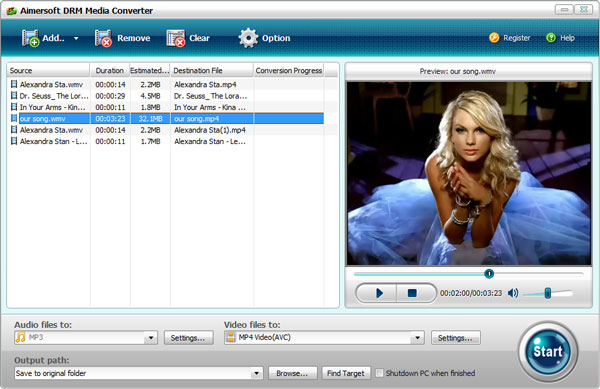
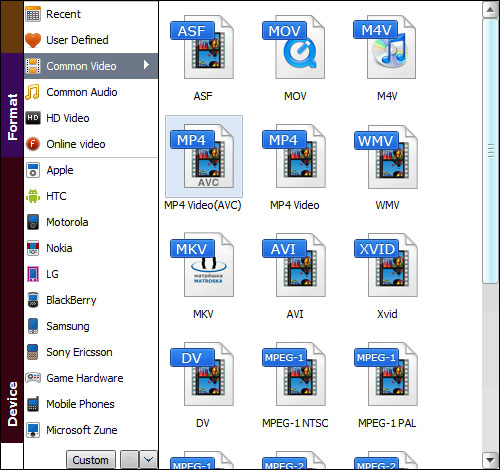
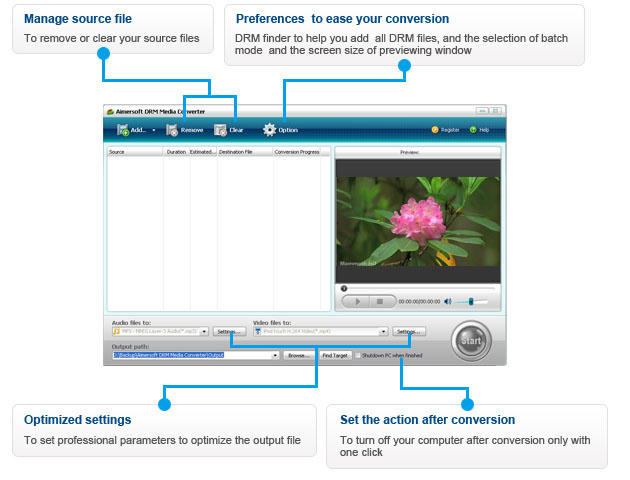
Aimersoft AlMedia Converter is an application that you can use to encode media files between numerous formats, including AVI, FLV, MOV, MPEG, MP4, MP3, MKV, WAV and FLAC. It provides presets for various portable devices, allowing you to enjoy desired files anywhere and anytime you like.
The multi-threaded conversion lets you convert multiple files at a time. Also you can adjust output parameters like resolution, frame rate, etc. One click conversion with guaranteed output quality and super-fast speed!
System Requirements:
Windows NT4/ 2000/ 2003/ XP/ Vista/ 7/ 8; Processor: >750MHz Intel or AMD CPU; RAM: 256 MB or above; Free Hard Disk Space: 100 MB or more
Publisher:
Aimersoft StudioHomepage:
http://www.aimersoft.com/drm-media-converter.htmlFile Size:
21.8 MB
Price:
$39.95
GIVEAWAY download basket




Comments on Aimersoft Media Converter 1.5.5
Please add a comment explaining the reason behind your vote.

iPhone app giveaways »





Android app giveaways »





I downloaded this and installed it, was working ok. Now I try to use it and it keeps asking for a registration code. Is there anyway to get it working again. It will only convert 1 minute of anything now. Not sure why it is doing it.
Save | Cancel
Installed w possible issue on my win7/64 system: Scotty on Patrol asked me if I wanted a file with a "helper" in the name installed and I said no. Had to say no twice but supposedly that file did not install. I feared it might be a browser redirect service. "Normally" Scotty just keeps asking if you want the file installed until you go ahead and say yes.... so its usually not much help. I decided to say Yes next time the screen appeared as I have never gotten such spam from GOTD... but the prompting stopped and the program runs just fine.
My complaint: on transcoding mp4 to lower bit rate mp4 files the lowest rate is 8000 bks. I'm used to transcoding down to 5000 bks for smaller file sizes. There is some blocking depending on the scene but I sit 20 feet away from the tv and the smaller file size is worth it. Same with the audio as its lower limit is 96 whereas I usually use 64 as its just dialogue.
GREAT INFO above regarding this is real time transcoding to remove the drm but what if there is no drm to remove? Software "should be" smart enough to speed things up in such cases?
Looks like a keeper for the drm stuff, but not otherwise.
Save | Cancel
Works by re-recording DRM video and audio using a virtual driver. Tested with an Audible file the results were very good. Note, however, that on my PC the software fires up iTunes to replay the original file and the 'conversion' takes as long as the original. In the case of an audio book that could be 12 hours or more...
You could achieve the same thing with Audacity but the use of a virtual driver means your recording shouldn't be troubled by system event sounds.
And Audacity can't capture video.
This is a useful piece of software to have in your armory.
PS: Make sure you uncheck the automatic updates in the preferences - it's ticked by default. Otherwise your registered version may become a trial.
Save | Cancel
I actually paid money for this program and was dissatisfied after day one. It does NOT work as advertised throughout the internet. I contacted the company for help, and they tried to sell me another program; since then they have been completely non-responsive. It is slow and does not convert all the company claims it does. You may or may not like. I do not like it or the Aimersoft brand.
Save | Cancel
Same problem as #3 with Vista32.
Save | Cancel
Again - My only request is (after I have used this for a few hours) - I really like to see the "A-typical" Windows pull-down "WORD" menu across the top of the window. I am finding it a little difficult to set "settings" that stay the same for each of the 'wav' files I am working with. I am digitizing all my records, cd's, tapes, & I am in the thousands of music files & combo files & having something that would "open" where you last left off would be extremely helpful - instead of going through the whole list of opening sub-directory after sub-directory until I get to the right one.
Save | Cancel
Tested only audio conversion: protected WMA OverDrive audiobook to MP3 @ 64 kbps. It works, but is slow (perhaps my fault?).
This looks very much like an old giveaway from June 2008, Daniusoft Digital Media Converter. Same type of GUI panels, similar layout of settings and buttons.
I immediately saw that this giveaway was much slower than the old Daniusoft converter. It seemed to convert at about playing speed (the input WMA file was 16.5 MB, with 1:10 playing time). At 3% conversion progress on the first file, I started up Daniusoft Digital Media Converter to stage a race between the two programs, converting the same audiobook at the same settings. Daniusoft finished converting the first file while Aimersoft had only progressed from 3% to 9%. Daniusoft converted all five parts (~6 hours of normal playing time) in 16 minutes.
How could this be? Especially compared to its obvious sibling Daniusoft Digital Media Converter. Could it be my error when installing, letting Anvir Task Manager quarantine the Aimersoft Helper Compact startup process? (I don't want to try re-installing and allow the Helper (extra crud that a Google search says doesn't uninstall normally), since my Daniusoft Digital Media Converter does the same function.)
This giveaway works as a portable app run from a USB stick, if you just copy over the Aimersoft folder from Program Files. I didn't bother copying over the helper folder, and it converts audio just as slowly as my Desktop installation.
@George, #3: I experienced the same delay when installing on Vista 32-bit, but I was extra patient since I thought the delay was due to me not installing the helper compact files. Eventually the install worked.
Save | Cancel
I am very happy with this download - thank you! Easy installation. I no longer have to watch my itunes purchases on my ipod. Now I can convert the files and watch them on my android tablet instead. Thanks, again!
Save | Cancel
Heads up on the DRM removal feature.
Apparently it's a REAL TIME Conversion, using whatever internal recording device your PC comes with, so the procedure lasts as long as the duration of the file: a 6-hr lecture will take 6 hrs to convert AND any other sounds the PC makes in the meanwhile will be included in the output audio... so, you have to leave this program as the only one working and walk away if you want to ensure a clean file.
Also, make sure the sound settings are turned to MAX if you want to get a decent level audio on the converted file, otherwise you'll be straining to hear anything.
See the discussion thread on their site if you want to get a better idea of the kinks that still need to be worked out: http://www.aimersoft.com/itunes-drm/remove-drm-from-audible-aa-aax-audiobook.html - it comes right after the article they have posted there about stripping DRM from Audible files.
Save | Cancel
It occurred to me that I should clarify what I just wrote about subs etc. -- that's when you're recording. If your source is something like a DVD, or you recorded a TV program or movie with hardware that lets you save CC or TT or subs, and you did, then a converter might let you use them. That's because you already have them saved, either embedded in the video or as a separate file.
When you record playing video OTOH you can only record what's played -- you can't access those separate streams.
Save | Cancel
"Aimersoft DRM Media Converter Giveaway" is the title when you follow the GOTD link. The key word is: "DRM". That means that it's a screen recorder basically -- that's because there's no known way to circumvent many methods of DRM.
That's not to say this is bad software or a bad type of app -- it's just a bit different than the many video converters that re-encode or transcode the original. A converter opens the media file, decodes it, optionally changes the size etc., then re-encodes it. A ripper is a converter that also manages the DRM on a video DVD or Blu-Ray disc. A DRM converter OTOH combines a player with a capture or recording app, recording the media file as it plays, using the same code more or less as a converter to save the results in the format you choose.
Advantages might include lower overhead on your system than using a browser or a regular player, where more hardware resources might be used playing the content, making them unavailable for the recording part using screen capture software. And since many screen capture apps do not let you pick & choose your encoder, you'd often have to record the content 1st, then convert it, meaning more time spent for lower quality [every time you (re)encode you lose some].
The chief disadvantage is that recording is less efficient than converting or transcoding, & that translates into taking longer for generally poorer results. OTOH using a regular screen capture app instead of something like this **might** mean you'd be able to take advantage of players that enhance the video by for example making colors more vivid.
As far as something like subs or CC or teletext go, Fran, it's maybe a bit complicated. If your source is something like broadcast or cable, & your hardware receives the original stream [e.g. an internal or external tuner], you *might* also be able to access & save the CC or TT stream -- that way you can later have subs you can turn on/off. When you're purely recording playback, *if* the player can display subs, CC, or TT, then you can record that as part of the picture, but the only way to get switchable subs in that case is to record it twice, once with subs displayed so you can OCR that copy. Of course you can always type your own subs into a special app that also plays your video [there are a few available free], & there are apps that use voice recognition to create subs or captioning, but your mileage will most likely vary using one of those.
Save | Cancel
There are a lot of free softwares in this fields. i like the format factory the most. it converts audio,video and image files to a long list of different format which are even preset and customizable as well. then $40 one must think about it???
Save | Cancel
I think this is the program I picked up early this year shortly after discovering gotd. I installed it on my more powerful work computer (my home computer had XP and was slow). I was able to convert hundreds of vob files to mp4s to save storage space. Now my new home computer has Win7 with more power so with this return opportunity I've installed the program on it. The install was easy, just had to wait 3 seconds or so for the company to send the registration key. I I was surprised the program chose to install in the Admin area, but I'm sure I can work with it there as well the next time I have something to convert. liked that the version I put on my work machine could take a series of videos and combine them into one, which Any Video Converter does not seem to be able to do.
Save | Cancel
Installation stalls at end of installation process when drivers are being installed on Vista 32 bit system. (Tells you to wait 1-2 minutes but after 20 minutes nothing has happened and I had to use Task Manager to stop the installation process.)
Icon on desktop but other than showing the splash screen for a second it does not run.
Uninstalled.
Save | Cancel
Installed easily on Windows 7/64. I find it curious that it is not possible to convert and include subtitles in the converted file. Some of the freeware available for conversion do (Freemake,Any Video Converter) so. am I missing something here?
Save | Cancel
I downloaded this last year on my old PC. It wasn't the best converter I ever tried, but it did a reasonable job - so much so I'll download again for my new PC.
I've also used Any Video Converter, Xmedia recode and Format Factory. All are freeware and do a decent job.
Save | Cancel