English
Every day we offer FREE licensed software you’d have to buy otherwise.
$29.95
EXPIRED
Giveaway of the day — Virtual Access Point 2.2
Virtual Access Point (Virtual AP) - Share your Internet through Wi-Fi.
$29.95
EXPIRED
User rating:
408
88 comments
Virtual Access Point 2.2 was available as a giveaway on August 26, 2009!
Today Giveaway of the Day

Removes imperfections from digital photos.
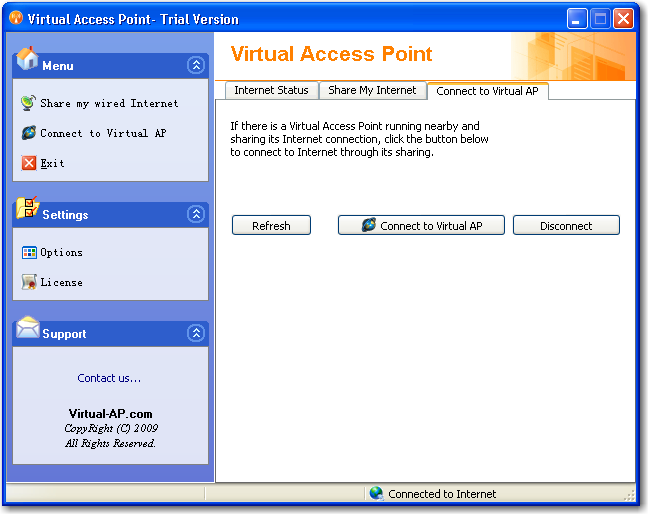
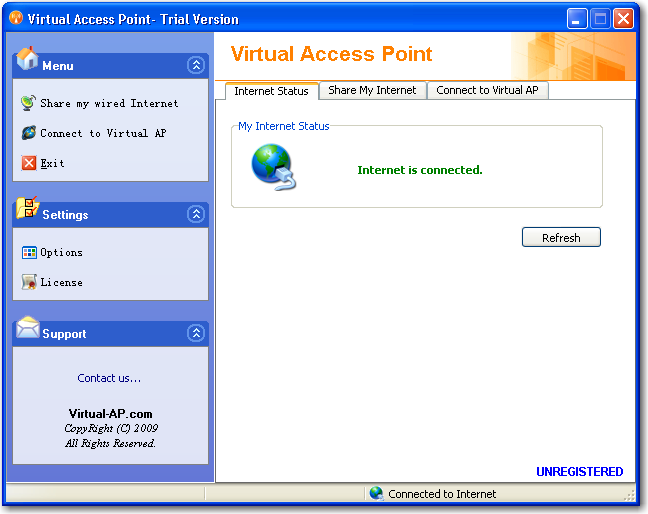
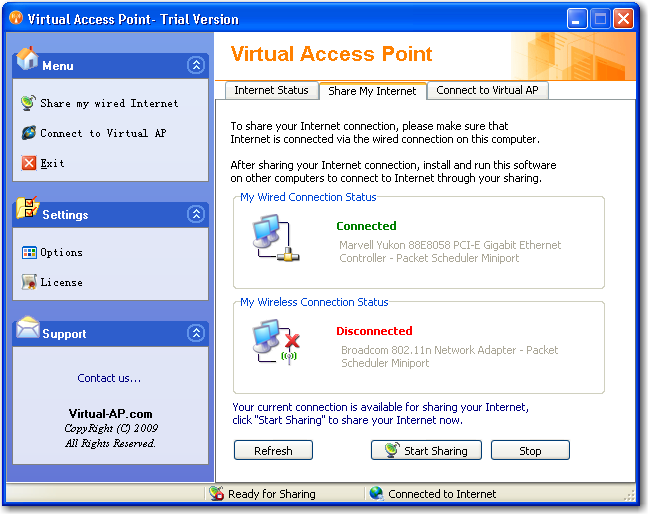
Virtual Access Point (Virtual AP) - Share your Internet through Wi-Fi. Virtual AP is an easy-to-use software that turns any LAN-connected PC or laptop into a Wi-Fi wireless access point. So anyone nearby can surf the Internet through your sharing.
Also, your iPhone, PDA, mobile or what ever, can enjoy the Internet by connecting to the wireless network broadcasted by Virtual AP. A great idea to cut down your mobile bills, isn't it?
This is also an ideal solution for setting up a temporary AP in a hotel room, meeting room, at home or the like.
System Requirements:
Windows ME/2000/XP/VISTA; Wireless Adapter
Publisher:
Virtual-AP.COMHomepage:
http://www.virtual-ap.com/File Size:
4.27 MB
Price:
$29.95
GIVEAWAY download basket

Developed by Informer Technologies, Inc.

Developed by IObit

Developed by Garmin Ltd or its subsidiaries

Developed by Disc Soft Ltd.
Comments on Virtual Access Point 2.2
Thank you for voting!
Please add a comment explaining the reason behind your vote.
Please add a comment explaining the reason behind your vote.

iPhone app giveaways »

$0.99 ➞ free today

Experience the average day of a tech billionaire by jumping over progress-hating opponents and by getting more money.
$0.99 ➞ free today

That contextual quiz, combined with audio pronunciation by native speakers, is what brings conjugation off the page.
$0.99 ➞ free today

Record the gross strokes for a fourball to track the net and stableford points for the group.
$1.99 ➞ free today

HazeLens is a filter-focused camera app built for distinctive image aesthetics.
$2.99 ➞ free today
Android app giveaways »

The ultimate stabilize video app for achieving smooth, professional-quality videos right from your phone.
$2.99 ➞ free today

$1.49 ➞ free today

Exile is an addictive survival RPG in a wild wasteland where your main goal is to stay alive.
$0.49 ➞ free today

$0.49 ➞ free today

$1.49 ➞ free today
we should leave a bunch of comments asking them to host this software again. this looks like a really cool program and i would definitely download and rate and comment if it was hosted again
Save | Cancel
Downloaded, installed it, and...WHAM!! It worked pefectly. This is a great tool for those visitors, friends and family that might need to excess a wifi and there is none avalible but your laptop with wireless connection. You are using your computer and do not want them to hog your internet for a long time. Something like that.. Be creative and you will find many uses for it!!!
Save | Cancel
To Andres @60: Use Windows XP network control panel.
1) Right-click wireless connection and select properties
2) Open the Advanced tab
3) Select "Allow other network users...." and select the Local Area Network in the "Home network..."
See, 3 steps. You can use for sharing 3G with WiFi Ad-hoc too. In 3 steps, you save 30 dollars.
Save | Cancel
After further testing the trial version I can only conclude this: this software is a total rip-off. You can't connect with anything that can't use ad-hoc (like PSP). Which means that you can achieve the same thing in Windows XP in 3 steps... And XP built-in function is more stable... this thing, on the other hand, takes so long to enable and crashed twice - I had to reboot once. The thing that can do something like this for real (turn wireless card into a virtual AP) is called SoftAP but the company don't sell it anymore. You will also need special hardware that can handle it. Or you can use Linux.
Save | Cancel
Those who do not understand how to use this or why this is needed surely has not had this problem: 3 laptops, 1 PSP, and 1 mobile 3G connection. Only one laptop can connect to the mobile. The others will have to share and this is the point of this. The real test is whether the PSP can also connect... I don't think so. You need a wireless card that can support router mode - and that's built-in in the firmware. If it can support that, then you can use the software provided by your wireless network card to share the connection. If not, then you can already use Windows' Internet Connection Sharing... although this one is probably easier to configure.
Save | Cancel
Well darn, uninstalling after all. Seems we can't really use it as I had assumed.
Big thank you's to- #49 Doug, #58 Tachyon, #66 GMman, #67, & a HUGE THANK YOU to #70 MIKE! Mike, you are terrific to share your knowledge with us, & I truly appreciate it very much! :)
Save | Cancel
#77, why don't you just get a longer ethernet wire and plug it into the back of your DirecTV box, instead of having your router wirelessly connect to your laptop, then send the incoming internet connection to the DirecTV box? It halves your internet speed on your laptop and on the direcTV box. A longer ethernet wire to your router will provide faster internet for both your laptop and your DirecTV box.
#79, the feature is built into XP and all newer OS's (Vista, 7) It's called ICS, Internet Connection Sharing. If you want to broadcast your own Wifi network, look at #76, my previous post on how to set it up.
#82, google ICS, it's built into XP and all newer OS's, it never "fails to create a network," or just look at my previous post #76 to see how it's done.
#83, if the program is at all how I think it is (in that it sets up a wireless network with it's own SSID) then no, you wouldn't, seeing as other computers would natively pick it up as a router, and the software will handle all the devices connected. The build-in XP, Vista, and 7 feature does the same thing, although I believe that if another device (it may be limited to laptops, not sure) is not connected for a set amount of time, the network stops itself
Save | Cancel
okay, i have a wired connection and a wireless network adapter. do i need to install the same software to my laptop for it to work? if thats the case then its pretty useless since not all can connect anytime because they still need to install the software.
or did i get it wrong?
Save | Cancel
Although this application had huge promise, neither my DSL nor my POTS landline backup would work with this program. Epic fail. Considering how few WANs there are in hotel rooms (none) and how the few which don't have WiFi have DSL, Cable or POTS (plain old telephone system). SO... What is the point of this when a $25 wireless router WILL work with DSL, Cable & WAN. Uninstalling. SILLY!! Thumbs down.
Save | Cancel
Can this application be run off a usb thumb drive?
As it would be ideal if it could run without installing it on the host PC, and simply run it as a portable app.
Save | Cancel
for me this software was just something i was looking for!!
for those who din't understand how it works here it is:
you have to have a wireless network card in your desktop/laptop(if you can detect wireless networks , you already have it!!)
install the software, click start sharing and then search for wireless networks from your phone/laptop/etc....(DEFAULT name of network :virtual access point , password:12345) and connect!!
this is really helpful for people with a wired local area connection who want to access net from many devices !
Save | Cancel
are there any free alternatives for this one?
Save | Cancel
Software installed OK, but I get the same error that other people have reported. How come the developer hasn't answered us back! Many of us are decision makers when it comes to software equipment in our companies; so it would be in the interest of companies giving away software here to answer!
After pressing Start Sharing I get the following error message:
"Sorry, it was failed to share the internet"
Save | Cancel
Would this work if I connect to my wifi router through wifi on my laptop, then connect my DirecTV up through Ethernet to my wireless laptop, to access on demand online on directv? Trying to avoid the wifi to Ethernet adapter for $100. Thx!
Save | Cancel
to #31, Vista can create an access point with WEP or WPA protection by default. Go to "Connect to a Network" then press "Set up a connection or network" on the bottom, finally select "Set up a wireless ad hoc (computer-to-computer) network"
It will ask for a SSID name, the type of encryption you want, then a password. All computers in about 30 feet can now see your laptop as a regular router. (Granted that your computer has a wireless card in it)
I've had my iphone data tether with my laptop, then split the connection via ethernet cable to my desktop, then set up an ad-hoc connection to my sister's mac, for basic connection while our ISP was down for a short while, it's not dependent on an Operating System, all OS's can connect to the ad-hoc
Save | Cancel
THANK YOU #49, you explained it perfectly!!! A+
Save | Cancel
#65: "I am a hardware believer."
Welll, considering it's 1) more secure, since you need physical access to break in, & 2) hard wired is so much faster, understandable. ;-)
Save | Cancel
#40: "Wondering if I can eliminate my home wireless through the cable company with this. I have a USB wireless card from Alltel that I can get on line with anywhere. Using this program with the Alltel card might give me the option to share my wireless with the rest of the family and get rid of the cable internet service with its wireless router."
You need a connection to the Internet, whether it's via one of the cell networks, DSL / ADSL / cable etc. Then you can share or split that access among however many devices you have at home, limited by how much bandwidth you have to share. That sharing part is why you have networks -- think of it like the main power line coming into your home, vs the home wiring that carries the electricity into every room. Your network can be wired or wireless, the router handles the sharing, & you can have a separate router or turn a PC/ Laptop into a router using today's GOTD or other methods / software.
* * *
#53: "Does this software (or some like it?) actually bypass your cell provider’s network altogether, allowing you to use the web on your cell phone without having to pay extra to the provider?"
You need internet access of course, & assuming you have that through a landline, then there are ways to connect *some* cell phones to a PC / laptop so your phone can use that landline connection -- the reverse is also possible, using the cell provider's network with your PC / laptop. Usually the cell provider or carrier makes money off these sorts of services however, & it's usually made intentionally difficult if not impossible. That means you often have to perform some sort of phone & carrier specific hack, though that might be as simple as accessing a hidden menu on your cell. In some cases it also means moderation -- excessive use might alert your carrier & earn you a large bill. :-(
Google on your phone make/model.
* * *
#60: "Is there anyway to use your laptop wireless to connect to the internet and share the web via the laptop’s ethernet port ? I need to connect my FTA satellite receiver and it only has an ethernet port."
You need a connection to the internet. From a router connected to a landline, if that supplies the wireless connection for your laptop, easiest would be to run a cable from the receiver to the router, if nec. using those devices that turn your home wiring into a wired network. If you get your internet connection via cell service from your laptop, or if you connect to a wired router via wireless, you should be able to connect your receiver to your laptop with an Ethernet cable & then use the wireless connection, with your laptop acting as a bridge... However your cell carrier may try to block that sort of thing -- in that case there *might* be hacks available.
Save | Cancel
Kreig,
Not true, the Wii can run off of a WPA-PSK secured network. Mine does it right now.
Save | Cancel
#9: "Also, I always wondered how secured the hotels’ wireless connection is from keyloggers and such. "
There have been several articles / features on this: it's quite common for thieves to set up their own wireless access or hotspot using their laptop, spoofing legitimate services. At the same time, legitimate wireless access points usually have poor or no security in place, & may be compromised.
* * *
#17: "run your laptop wireless off your desktop LAN cable connection and there’s no need to buy or setup a router."
Mobile yes -- at home/office, no. It's a bit much I'd imagine to expect everyone to carry a wireless router or gateway with them & plug into the wired network at a hotel etc. But at home or the office you have no excuse not to, & the NAT normally provided by the router or gateway adds a significant layer of security, not to mention you often get the capability to only allow connections by ip or mac address, keeping outsiders outside your network. It's possible to do without the NAT, which for biz can have it's own problems, but it takes a bit of effort to setup equivalent security measures, & many people are not willing to do that.
* * *
#21: "They also tell me that often other people tap into their network and can get on the internet free."
It's quite common with wireless -- most home & many biz networks are not secured properly... at home we can pick up 3 - 6 networks from neighbors, & go on-line free should we choose to do so. But it's the wireless aspect, not the connection sharing that allows this, & most often because it's not set up right. Connection sharing is no more, no less than allowing more than one PC/laptop/device to use the same hardware connection, i.e. modem, network card etc. In a nutshell you can have several devices share the network card in your PC, & have that card connected to the internet, but separately each device has to somehow connect to your PC 1st in order to access & share that card, which is where wireless often comes in -- you can buy a (often very cheap) USB wireless adapter to allow access your PC while using the PC's built-in network connection to connect to the internet.
* * *
24: "And cellphones that have internet possible, without paying another huge fee."
You need to watch that fee part though. ;-)
Internet access via your cell can be hugely expensive if you're not careful, even if you use one of the many phone specific hacks out there... too much of a good thing can get you a shocking bill.
* * *
#28: "...if your PC is connected up via ethernet then how can it dish out a wireless signal ... if your PC has a wireless antenna to dish out signals then it must be in range of the wireless router..."
You can have, & in this case need more than one network card or chip... As above, the easiest, cheapest answer for the average PC is a USB device for wireless, but many (most?) laptops already have both from the start. The average home, wireless router has one network cable connected to the modem, has 4 connectors to plug in cables from whatever devices, & has wireless access as well -- in this case your PC or laptop mimics that router.
* * *
#32: "Are u sure you can get a router for $20??? We paid $120. Office Depot."
There are many different feature levels available -- Office Depot has had decent routers on sale for $20 -- I paid $30 for a better model during the same sale. On-line I've seen them as cheap as $0 after MIR.
"AND DO WE REALLY HAVE TO have this program on the 2 laptops using it or it won’t work? So others wanting to use your connection can’t unless they have this program too???"
If you want to use this software, then yes, every device you want to use it with has to have the software installed & running. If you want to use another method or different software, than obviously no. Note that this software is separate & irrelevant to your wireless access itself -- just because your using this software to connect 2 laptops doesn't shield your wireless connection from other devices.
* * *
Save | Cancel
Well I could install this on my laptop before the giveaway ends, but it's going to be worthless if I have nothing else to install it on and it won't register after the time is up.
I was thinking this might be nice for those times when you need a connection and your friend doesn't know their WPA key. (Some people are naive and don't deal with that. One of my friends had a roomate to acted like it was such a huge hassle to give me the key.) Perhaps this would just allow me to use their connection without needing the WPA key, right
Save | Cancel
Would this work with Nintendo DS? Nintendo sells some type of USB stick that provides wireless connection to DS, but I am not sure if there is anything specific in that stick that makes it work with DS or if this giveway would do the same thing...
Save | Cancel
To all of the people asking how this works:
In reading the comments I believe some are confused as to how their hardwire connection would serve internet to these devices.
To make use of this software you must have a wireless ethernet adapter (purchased seperately),(USB or PCI) installed in your computer or laptop and the PC/Laptop must be connected to your hardwire connection by the ethernet cable.
Note: Some providers issue a USB connection to their modems. If you are one, switch to ethernet ASAP!
The software works by utilizing the wireless adapter that you are not using at the moment due to your PC/Laptop being plugged physically into your DSL/Cable connection.
After setting up the program, it will then allow that device to serve internet to other wireless products.
Personally I would not use this kind of software. I am a hardware believer. But for the purpose as mentioned earlier about the hotel rooms this would be perfect.
Save | Cancel
For those complaining about "Everyone has a router, one bother?", here's a scenario for you: Using a 3G modem. On my recent trip to China, there was no good network connection in most of the places I stayed, and the places that do have Internet don't have WiFi. Sure, I could just use the neighbor's unsecured network, but get real. So the only thing left is a 3G USB modem. That's one computer with (slow) Internet. What about my iPod touch? The only way I could connect is through a WiFi connection. Since there's no WiFi, how do I connect? Ad-Hoc through my laptop, of course. But Windows Vista requires another computer to be connected or the Ad-Hoc network wouldn't "stay alive", and Windows XP's just simply doesn't work (can't get DNS). So what do you need? Something like this. Think about it.
Save | Cancel
Why do I want to keep my laptop on just for sharing an internet connection? If I have a weak signal problem, I would buy a refurbished wireless router for 20-30 bucks and install dd-wrt on it then set it up as a wireless bridge.
Save | Cancel
#61 - I would try this at home first where you can play with the settings, etc. until it's working. Then try it on other networks.
Good luck.
Save | Cancel
I am really interested in this kind of software, possibly because i already have a home WiFi setup..
Networking is still immature, i see no need for this program as windows and linux both have their own networking capabilities which could easily be used if you tinker with it correctly.
and any routers will have their own firmwares built into them, which means this software is needless mostly.
When i say networking is immature I mean that standards for somethings like WDS is still not set
@24 : I think you are new to this, because this does not eliminate the need for a router.. The only case where that could be possible is when the devices can handle an ad-hoc network.
Save | Cancel
Could this be used with an sprint. at&t, or verizon aircard to share the signal with other devices?
Save | Cancel
Awesome idea... had me excited as my work network is private and they don't reveal the key to us. There's no other wireless access points within reach, so my iphone wi-fi doesn't work at work.
I installed... rebooted computer and iphone... everything in app says it's working and the 'Start Sharing' button confirmed that it is as well. Still.. the iphone doesn't see this network.
Doesn't work for me (XP, SP2) and therefore I must give a thumbs down.
Save | Cancel
this is a good idea, but I need the opposite...
Is there anyway to use your laptop wireless to connect to the internet and share the web via the laptop's ethernet port ?
I need to connect my FTA satellite receiver and it only has an ethernet port.
thanks all...
Save | Cancel
I am using Windows 2000. When install and activation is completed, I try launching the software and I get a .dll error. I believe this software was offered once before and I got the same error message.
Keep your money!
This may be a good idea, but has some bugs that need to be worked out.
Save | Cancel
For all of you who can't seem to understand what good this is, here's just one scenario.
Last week I stayed at a hotel with free, wired Internet. I could have used this application to setup my laptop as an access point and allowed me to use other wifi devices in my room. For example, I could have used Truphone with an iphone or other wifi PDA to make free/cheap long distance calls from my room without having to give the hotel leeches a huge phone deposit or credit card to activate phone service.
This beats dragging a router around in my luggage.
I can think of dozens of other uses, but I thought I'd stir the obviously dried up creative juices here with one example.
Save | Cancel
@48 - If your PC-livingroom has 2 wi-fi cards/usb sticks, you could use it as a range extender.
Save | Cancel
Oops! I skipped Doug A's post on extending capabilities... Sorry.
Save | Cancel
I have one desktop PC wired to a cable connection and use a router to share it with mine and my wife and kid's notebooks. Do I need this VAP app for some good reason such as: it will extend the range of my current Wi-Fi connection, getting me some extra feet/meters; or it will in some way increase the signal's strenght as to walls and stuff. And about security, what do you say?
Save | Cancel
Pfff ... after many tries on many computers, XP & Vista, Virtual AP doesn't work ... for me, at least ...
I guess it is because I have my computers too "customized" (Fixed IP, mixed topology with Ethernet, wireless & CPL) and something doesn't not work without too much thinkering ...
By the way, the very nice video from #45 (CNet TV) doesn't works too.
So, I give up ...
I'm going to keep my hardware solution from DLink (DWL-G730AP), it's not free but it's really plug & play ...
Save | Cancel
Per the description "helps cut down mobile bills"....Does this software (or some like it?) actually bypass your cell provider's network altogether, allowing you to use the web on your cell phone without having to pay extra to the provider?
Save | Cancel
# 48 if you have to install on all devices how come # 3 connected his iphone to the wifi netweork. I guess the program won't install on iphone.
Save | Cancel
This software is not the most secure and easy to use, it is 29.95, get a wireless router for 20.00 or better yet find one at a yard sale and hook it up to your existing router and use it as an access point.
Here is how. http://www.google.com/search?hl=en&source=hp&q=using+router+as+access+point&aq=0&oq=using++router+as+a&aqi=g10
Save | Cancel
Tried to install on USB drive (dongle), but there's no option of where to save the files to during the installation. It automatically installs on C drive.
Thanks anyway, GAOTD.
Save | Cancel
Summary:
Internet---wiredconnection---PCwithEthernetAndWireless-(((wireless(((-PC2withWireless
Virtual AP software sits on both PCs, and allows PC2 to access the wired connection to the Internet through the wireless cards that both PCs must have in them.
For example, perhaps your Cable Modem doesn't have wireless capability, but your laptop came with a wireless adapter built in. This software allows you to use the wireless adapter in your laptop as a wireless access point for _other_ wireless equipped PCs in your home. The Access Point PC must still use its wired connection to the Internet.
Note that you cannot use this as a range extender. Let's say that you have a wireless router in the basement that reaches your living room, but not to the bedroom upstairs. You'd like PC-bedroom to attach to PC-livingroom, which in turn connects to the wireless router in the basement. You can't do that because Ad-Hoc sharing relies on two separate Network Interface Cards.
That is, the access point PC must have two separate network connections. In the baseline case, it uses an Ethernet hardwire connection to the Internet and the Wireless to set up a 2nd Wireless Ad-Hoc network in your home (or Hotel room or wherever). If wireless is being used to connect to the Internet, you can't use that same wireless card to also set up an ad-hoc network with other PCs.
The main purpose of this Virtual AP software seems to be to simplify the process of setting up an Ad-Hoc wireless connection as mentioned by #45 (great video), especially for XP users.
Thus, while possibly helpful to some, the software does not seem to be necessary, since this capability is already available through the operating system. In fact, the company's website states that this software needs to be installed on all PCs that need to connect. If this is the case, then use of this software is even less flexible than using Window's built-in capabilities, because any gadget that supports WiFi Ad-Hoc mode can connect without having to have additional software installed.
As a final note, you should be aware that WEP encryption is fairly easily broken these days, so use of such connections in a Hotel room should be done with caution.
Save | Cancel
Thanks Virtual AP and GAOTD,...
Thanks also to the negative remarks, because I didn't realize
this was even possible- so I wouldn't have even thought to look for the information. We don't have a big house, but its solid- we have
a "wireless connection" attached to my partners computer, but I have to be physically connected to get the signal. NOW, I can run my laptop at the same time!! The only information we ever got from the provider was "it can't be done".
Martina
Save | Cancel
Tried to connect the Alltel Wireless internet card to the laptop and connect to it using this program and my Nokia N810. Didn't work. I am guessing it only works with a LAN connected computer. If only it would read there is a connection made via a wireless card (such as the USB Alltel internet card) then I could get rid of the home cable system entirely. Hope the developers are listening so they can work on this. Will keep it installed anyway. Thanks again GAOTD.
Save | Cancel
Wonder if this will work with a broadband card - the kind you get from Verizon Wireless or AT&T. We had one but quit using it because only 1 person could be on the internet at a time.
Save | Cancel
Looks like a lot of people having problem understand Virtual AP.
Most operating systems capable of doing this
Watch this CNET easy to follow guide might make it a lot clearer
http://cnettv.cnet.com/make-your-laptop-hot-spot/9742-1_53-28619.html
Save | Cancel
You do not need any software to do this. This is all standard Windows software/utilities. This software isn't worth 30 Bucks.
Cheers
Save | Cancel
Can't recognize my adsl connection!!!, useless.
Save | Cancel
Downloaded and installed but crashes when run on Windows 7 Professional (RTM, MSDNAA).
(Of course, I didn't actually expect it to work under a OS this new).
Save | Cancel
PC tell me, wlanapi.dll missing. What can I do please?
Save | Cancel
Wondering if I can eliminate my home wireless through the cable company with this. I have a USB wireless card from Alltel that I can get on line with anywhere. Using this program with the Alltel card might give me the option to share my wireless with the rest of the family and get rid of the cable internet service with its wireless router. I can save a lot of money it this works...and be able to share the wireless (via the Alltel card) anywhere as opposed to be stuck at home on wireless there or even using public access even in hotels where I cannot trust the connection (i.e., checking accounts at banks, etc. on public systems.
This would also allow me to use the Nokia N810 where there would be no other wireless available to download GPS maps to the unit.
Going to have to give this a try and even if it only accomplished one of the above it will save me money, time and headaches. Thanks for this program Giveawayoftheday.
Save | Cancel