Every day we offer FREE licensed software you’d have to buy otherwise.
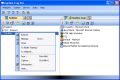
Captain Tray Pro was available as a giveaway on May 11, 2008!

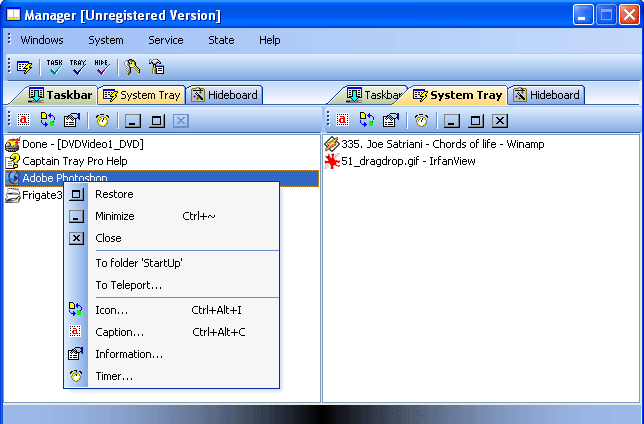
Captain Tray Pro is a simple and effective tool for tray management under Windows OS.
A lot of users need to work with several applications at once. Some of them are used quite regularly, others only when necessary. The Windows Taskbar can be fully packed - everything seems to be necessary and you have no desire to close anything.
Some applications can be minimized into the system tray (the area where the clock is), but what shall we do with 'Notepad', 'Calculator', 'Microsoft Word', 'Microsoft Excel', and our other favorite applications? Captain Tray Pro is right there to help you.
You probably have a file manager installed on your computer, which you use to manage your files. Now you can use Captain Tray Pro to manage your windows.
System Requirements:
Windows 98/Me/2000/XP/2003 Server
Publisher:
Almeza CompanyHomepage:
http://www.captaintray.com/File Size:
1.25 MB
Price:
$34.95
GIVEAWAY download basket




Comments on Captain Tray Pro
Please add a comment explaining the reason behind your vote.

iPhone app giveaways »





Android app giveaways »




Great info, I will need to research it, as we continue to grow our "responsibilities" it seems like it would be more necessary! Thanks for the info!
Save | Cancel
This Captain Tray Pro is just a toy.
I manage my files by creating shortcut folders in my "C:\Documents and Settings\Xxxxxx Xxxxxxxxxxxxx\Favorites\Links" Folder:
Accessories Folder
File Management
Creative Folder
Media
Web
Email etc.
If you right click on the task bar and tick "toolbars" then "links" the folders will be visisble there.
When I install a program I select "create a shortcut on desktop". Then, I click open a folder on the taskbar and drag the shortcut from the desktop into it. Finally, I delete the shortcut left on the desktop.
You can either choose a new icon from the the web, or capture the original program icon from the desktop with a screen capture program. Paste it into Paint Shop Pro, Animation Shop or similar and resize it to 32px X 32px and save it as an icon. Simply right click on a folder in the task tray, choose "change icon", browse for the icon, choose "apply" then "OK".
You can leave new program shortcuts on your desktop untill you want to keep them.
It's amazing how tidy your computer desktop can be.
When the desktop gets too cluttered just tidy up. Make a few more relevant folders. Remember, a folder on the task bar can hold dozens of program shortcuts just a click away from being opened.
Oh, some final points: 1) Right click on the task bar, select "View" then "Small Icons", and, 2) if you don't want to see which programs you have running choose "Customize Notifications" and hide them.
I hope this helps some of you out there in cyberspace.
Gidday!
Ty
Save | Cancel
#34 CaptainYippeee
Love your art of sarcasm. Had me thinking the same thing when people should be using programs that do the opposite.
I take it this program would be mainly for people that use like office and accounting style work programs that don't tap too much into your processor or memory ram. One way to keep your computer running fast is never to allow unnecessary programs to load in the taskbar except your volume, network, USB disconnect icons and whatever computer utility program you might be using at the moment. Every time you allow a program to load in the taskbar while your using another program you're using up memory and processor resource slowing down the computer and may lead to unwanted freeze ups and crashes. I wouldn't use this if using heavy ram load programs like video editing, DVD ripping or compression programs, or a resource hog photo editor like LivePix at the same time in the taskbar.
I can’t give a thumbs up or down. Might be good for some office workers, but not for the types of programs I use. I’d be afraid over heating my processor.
Save | Cancel
Love it! And yes, I've got Anvir which I normally allow to minimize my tray icons. But it's not foolproof. A lot of progs leave shadow taskbars that don't always move over the way I want them to. I like having a tool to "kill" them in my workspace. I don't have 1000 programs open at once, but I do like to keep a clean taskbar with only the items open that I want. I support any tool that will give me more control.
Captain -- you're a keeper!
Save | Cancel
#31: No, I think maybe you are assuming too much. It IS the same company, and the person who is pushing the book is most definitely the developer of Multiset. Still doesn't mean that there is anything wrong here. I know that Multiset does indeed do as it claims, though you may find it is not that much easier than a regular, 0old-fashioned slipstreaming to reinstall Windows, etc.
As for the spamming accusation, I don't know where that is coming from. I haven't seen any personally.
Save | Cancel
@#25:
Did you even notice that Microsoft ended extended support for 98/Me 2 years ago? Get with the times, please.
For this software... Doesn't really seem to do much and screws up things. Sorry but I'll pass on this one.
Save | Cancel
I use PowerMenu - it's free and easy to use.
http://www.brothersoft.com/powermenu-63743.html
Save | Cancel
To #38: In XP, you can (usually) hide icons that are in the system tray:
1. Right-click on an empty spot on the task bar. A menu will appear. Click on "Properties" at the bottom of the menu.
2. A screen will appear. Near the bottom of the screen, make sure that "Hide inactive icons" is checked. Then click on "Customize."
3. A second screen will appear with a list of task bar icons. For each, choose "Hide When Inactive," "Always Show," or "Always Hide."
Then click "Apply" and "OK."
NOTE!!! This is not perfect. Some icons will decide to show anyway (such as "two 'wire' connected computers".) Also, in the customize screen, sometimes the wrong icon is shown for a function. But,overall, this does work rather well.
Save | Cancel
To #30 and #33. I have copied part of the ReadMe note from Captain Tray's downloaded file. It refers to the "ctp.key":
"...register it by using 'ctp.key' file which is included in the
installation package.
This file should be copied into the program's folder, typically it's
C:\Program Files\Almeza\Captain Tray Pro.
Overwrite existing file if necessary.
Run the software once the file copying process is over."
I hope this will help you.
Save | Cancel
I found a program (not free though) that seems to have the ability to clean up the System Tray, by hiding and so reducing the number of icons in the System tray.
It's called PS Tray Factory and details are given here: http://www.pssoftlab.com/pstf_info.phtml. No use for me though as it doesn't support Vista. Maybe GOTD could feature this for the non-Vista users?
Save | Cancel
#10#5 Refers to herself in 3th person because she believes someone will ask why and as soon as someone tells something about it ,she will switch to first person.You see I was right.
Save | Cancel
Sticking everything to the system tray or the "sand box" seems a good way to suddenly find yourself out of memory with all those open items.
Another tool that I found extremely useful is Taskbar Shuffle. It's also free. It doesn't send items to the system tray, but it gives you the ability to arrange items of the taskbar simply by dragging them. Often I find the main problem is I've opened a new window which is at the end and I really want it next to another window I opened earlier. For instance, I'm editing a web page and want the browser window showing the preview page next to my web editor. Why MS never thought to add this simple option, even in Vista, I'll never know!
Save | Cancel
@ Steph #19 I fully agree with you and also thanks Joel for the tip!
Save | Cancel
Alright, finally I get to load up my taskbar to the max. This is a great application....I now have over 300 items in my taskbar. And the great thing about this feature....my computer is finally running slower-especially during reboot. I would highly recommend this software to anyone who would love to have their computer run slower-Fantastic! Thanks, GAOTD.
Save | Cancel
same as #30, can't activate it with the provided ctp key.
I get this message on Win XP Home:
"cannot import c:\program files\almeza\captain tray pro\ctp/key. The specified file is not a registry script. you can only import binary registry files from within the registry editor"
Save | Cancel
Question: Does Captain Tray Pro (or another utility) have the ability to "freeze" the icons in the tray. That is, can it keep icons from appearing that one does not wish to be in the tray, and can it keep in the tray icons that often disappear from it. I am referring to icons that are designed to be tray icons, with custom right-click, context menus.
Save | Cancel
#23 G
A little more investigating you would have come to the conclusion they are not the same person. They are 2 differant domains using the same commerce website company RegNow.com. They are like a PayPal website. They collect the money for the product your selling for a small commission and send you a check. If you have a product to sell and don't want to hassle with Visa or bounced checks they send you a link to put on your web page to send your customer to a web page on their server customized to your product and collect the money for you. If you looked at the very bottom of the buy now page you would have noticed the link to RegNow home page.
Save | Cancel
I click the key to register it and I get a message that says I can't install the key into the registry by using the key.exe.
What do I do? I enter it manually in the register now with the key and name value and it won't register.
Save | Cancel
#5 To get attention.Its hard when she is her only friend so she HAS to speak of herself in 3rd person.
#2 We are unamused by you.
Save | Cancel
Similar freeware in that it moves windows to system tray.
Trayit.
http://www.teamcti.com/trayit/trayit.htm
Save | Cancel
I don't understand what use this type of program could possibly be. I also often have seven or more applications running. My solution is simple, neat and doesn't require yet another application to be running:
Hidden taskbar. ALT + Tab
Save | Cancel
imma download for my mom.... she is constantly running outa space on the task bar... becuase she has like 20 things open at once! thanks gaotd.. my mom will be pleased.... =)
Happy Mothers Day!!!
Save | Cancel
People, if you compare similar tools to this one, please also take care if these other tools also support Windows98/ME just as this app does!
Save | Cancel
I would very much prefer something like DeskSpace (virtual desktop) or TopDesk over this. Believe me, I have a crowded taskbar, too. Mouse over in a hotspot to show a spinnable cube, with each side being a fresh desktop. Or mouse over to another hotspot to tile all windows in Expose` form. That is much better than opening yet another window and sit there (and waste more time) to drag and drop your windows to the system tray.
So, thanks GAOTD, but I think that you should take into consideration featuring one of the two I listed above.
Save | Cancel
I didn't check these guys out when they posted Multiset the other day as I has no use for it, but since I was considering trying this I did the usual due diligence...
Turns out someone who uses the same DNS registration details (street address and phone number) as captaintray and almeza also owns a domain 'actualeducation.com' which has been the source of spam: http://newsgroups.derkeiler.com/Archive/Alt/alt.support.arthritis/2007-04/msg00228.html
(By the way there is no cure for psoriasis. It can spontaneously clear up for a time, long enough to take some nice photos to show how you're "cured", but it comes back. There are some fairly effective treatments like methotrexate (actually a chemotherapy drug!) but they're dangerous drugs and have to be prescribed by doctors and very closely monitored. Although there's some promising research on the horizon, it's "10 years away from being usable" and has been so every year for the last 30 years...)
This guy may be sincere and believe what he's saying and he may not be suggesting anything dangerous, but he's still a spammer, and that's enough for me to avoid his software. I'm also slightly wary that the download from his site which is described as a book is actually a zip file containing a .exe (I haven't run it and don't intend to)
Save | Cancel
I tried it. Was expecting something like an advanced 'hide inactive icons' but found this prog difficult to grasp. Calling something intuitive is a little unhelpful - intuitive to me may not be to you, and certainly I found nothing about this prog intuitive. Some pop-up tool tips would be useful for one thing. I would also expect it to list the items in my system tray under its system tray tab, but of the 24 icons (services etc) I have in systray, a grand total of 0 were seen by this prog. Therefore, I couldn't send any off to the hideboard to free up tray real estate - assuming that's what is supposed to happen. I may be expecting the wrong thing of course, but it's supposed to be intuitive! To top it off, a little fiddling with the prog and my screen developed a white-washed appearance and the response from PC became flaky. Even difficult to reboot. Then after uninstalling it, the little fella remained in the systray. Now I'll have to flush it out manually (wish I'd used sandbox, always think of it too late). Anyway, thanks but no thanks.
Save | Cancel
It is nice and offers many features but not very easy to use for first time users and there is no easy option to minimize a new window. You have to go to manager > drag the window to system tray and after that it will be minimized to tray every time untill you remove it from systray tab in manager. Many options are not very clear(some aren't even explained in help file). There are no tooltips on toolbar buttons so finding what each button does gets a little harder.
But this program has some unique features like you can change the window icon and caption, you can see the window properties(handle/classname..), you can set up timers/reminders. You can also Turn Off/Reboot/Log off windows.., lock program, customize program shortcut keys etc..
If you want all these features and don't already have a tray-minimizer then this can be an option.
But for very simple use(just minimize program to tray), I'll recommend Iconize
Save | Cancel
#10 why do you care about #5, slow morning? and i don't have but 3 things in my system tray so i won't be needing this..thanks anyway GAOTD!!
HAPPY MOTHERS DAY all you Mothers out there!!!
Save | Cancel
#11 Gav, in answer to your question about Anvir Task Manager
To miminise apps to the tray:
Applications > (right click on app) > 'Always Place to Tray When Minimized
To remove them:
Tools > Options > Minimize to Tray > (select app) > Remove
#12 Hamstergirl, I don't think Anvir Task Manager should be described as dangerous. Powerful, yes, dangerous, no. It's an incredibly useful Swiss knife utility and I think that #3 Joel did everybody a service by pointing out that it does tray management. If you already run Anvir on your system and you don't know about this feature, which is more than possible, then installing today's offering would be cluttering up your system to no avail. (Thanks Joel!)
Here's a link to the BladedThoth review of Captain Tray Pro v6.4 in November 2007.
Save | Cancel
It wouldn't have dawned on me that I'd find this function useful, this is a program I never would have tried if it hadn't been here on GAOTD. But I think I'm going to like it. When I work, I customarily have my browser open, my file manager open and my notes database (Evernote) open. Those buttons take up a lot of room on my taskbar and thus can make working with my work programs a bit more of a hassle. Being able to shift their buttons off to the system tray cleans up the taskbar for my working programs and makes life a little easier.
The hide board just completely hides the program - no button on taskbar or icon in system tray. But you can make it visible by opening up the Captain Tray Manager and restoring the program from there.
I can't imagine why you would want to use a timer to restore a program to the screen, but maybe it would be useful to remember to check your e-mail or something?
The teleport feature is pretty nice (though strangely named) and allows you to automatically send a program to either the system tray or to the hideboard every time you run that program. (It saves your settings, so to speak.)
The program is fairly intuitive to use, though I think it would be helped by pop-up notes when you mouseover the buttons in the Captain Tray Manager.
At $35, I think they're a bit too proud of this program, but all in all I give it a thumbs up. Thanks GAOTD!
Save | Cancel
I can see no use for this program in my daily activities. I can manage my windows just fine without it.
Save | Cancel
Revo Uninstaller has a feature called Hunter mode, which is very useful to manage system tray applications!
in your start menu, open hunter mode. it puts an icon on your desktop. now drag the cross hairs to a program icon (either from desktop, quick launch, or from the start menu). a context menu will appear with several options which include: uninstall, kill process, properties, search with google, stop auto starting and a few others. i'd show you a screenshot, but not really sure how to. (hint, hint). just give it a try, i think you'll find it useful.
Save | Cancel
#13: Try WinPatrol (http://www.winpatrol.com) Go to the Startup tab, find "PC Suite Tray" (or whatever your version of Nokia Phone Suite is called), highlight it, and click on Disable. It doesn't remove the program. It merely blocks it from loading at startup. Do the same thing with any other program you don't need running constantly.
The free version will do this quite nicely.
Save | Cancel
It took a little while to even understand what this little gem actually does. In fact I'm still not sure. 'Minimise' is not 'system tray'. Surely you can't be that desperate for space / ram/ resources / whatever to need somthing like this? Like alabasterwoman, I too am not amused.
Plus if it's not Vista ready then its no good for me, or the increasing number of Vista users anyway.
Save | Cancel
Sorry, but this is about to be uninstalled. I have Vista Ultimate, with 19 icons in the System Tray. According to this program, I have nothing in the System Tray, but 2 of those icons are shown as running on the Taskbar (which they aren't).
The program also has a "Teleport" and "Hideboard", neither of which are adequately explained in the Help File - can someone explain what "Teleport provides the placing of a certain application to the needed area on startup." actually means? Try searching the Help Index for "Hideboard" and you get "No topics found". Not very helpful.
I was hoping for a System Tray manager that would easily allow me to see what is running in there and to switch off programs (e.g. Nokia Phone manager) that I don't need running constantly in the background. If anyone knows of such a program, it would be helpful to detail it here.
As for Captain Tray Pro, it's a thumbs down from me.
Save | Cancel
#3 Joel - AnVir in place of Captain Tray? Thats a bit like lighting a cig with a flame thrower when a match will do the job quicker, easier, and a lot less dangerously - can you say "overkill"? I know, I have AnVir - nice app, but for those who are technically challenged (like myself), it can be stress inducing to say the least...WAY too much information. Captain Tray seems pretty simple, and to the point - if you like to work with a lot of windows open all at once. What I don't like is that it keeps shutting down every time I make any change in the "options" screen....must be a Vista thing (crap..and I was already crabby this evening - can't you tell? LOL)
cheers,
hg
Save | Cancel
#3, how do you do this with anvir? i have it but wasn't aware it could do this, thanks
Save | Cancel
#5 ......... why do you refer to yourself in the 3rd person ??
Save | Cancel
This is already abailable in the XP OS. Well not this one but it will do the same thing. I Have as many as twenty items stacked at one time and minimized. I rarely have so much but when Ido MS XP handles it very well and gives me several choices.
For free it is worth a try if you think you need something other. Not to pay for though.
Save | Cancel
Preferably i like the rocketdock program that you can search for somewhere online. Plus it gives you that spiffy mac feel that my friends used to hold over my head.
Save | Cancel
worth the d-l easy too use too. thanks GAOTD ,was looking for something like this. great TY
Save | Cancel
The registration file is in a binarycode my machine can`t read and I have to let this Captain go down with his ship..
Save | Cancel
Alabasterwoman is not amused.
Save | Cancel
Great. I've been looking for this software and weiting for this for a long time. My taskbar is packed up
Save | Cancel
You can use AnVir Task Manager. It's better and free.
http://www.anvir.com/taskmanagerfree
Save | Cancel
This has been given before as the giveawayoftheday. I've been using since then, I have a lot of applications that I minimize to save real estate. I normally have 7 applications on the taskbar and more in the tray (especially stuff that needs to run in the background like a putty instance that I use for tunneling into the office). Nice and easy to use. Thumbs up.
Save | Cancel
sounds useful, thanks :)
Save | Cancel