Every day we offer FREE licensed software you’d have to buy otherwise.
Giveaway of the day — PDF to HTML Converter Pro
PDF to HTML Converter Pro was available as a giveaway on April 8, 2007!

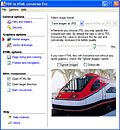
Easily make your PDF documents visible and fully searchable on the Internet, while preserving the original formatting, links, bookmarks, images, vector graphics, fonts and extended alphabet characters.
It is possible to edit document width, resize pages including images and specify custom HTML settings during the conversion process.This allows you to implement better integration of resulting HTML with current layout of your web site.
You can process several files at a time utilizing the PDF to HTML batch conversion routine.
System Requirements:
Windows 9x/ME/NT/2000/XP/2003 Server
Publisher:
IntraPDFHomepage:
http://www.intrapdf.com/convert_pdf_to_html.htmFile Size:
2.69 MB
Price:
$49.95
Featured titles by IntraPDF
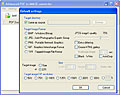
Many times you want to view or print out PDF file contents without using Acrobat reader. The simplest way to do so is to use IntraPDF's PDF to JPG converter that allows you convert PDF files to any image format you prefer: jpg, bmp, gif, png. Use PDF to JPG converter to save each page of your source PDF document as a separate graphical file. If you need to process a large number of PDF files, you can utilize the batch conversion mode allowing you to process several PDF files at a time.
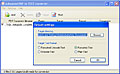
Effortlessly extract text information from your PDF files, preserving the original multi-column page layout. You can take advantage of the batch conversion utility to process several PDF files at once.
GIVEAWAY download basket



Comments on PDF to HTML Converter Pro
Please add a comment explaining the reason behind your vote.

iPhone app giveaways »





Android app giveaways »





I like your website ,and like to communicate with everyone on this issue!
Save | Cancel
Very nice. Easy to use, worked flawlessly. Nice that you can select multiple PDFs. Saves time.
Save | Cancel
Flintstones, meet the Flintstones..... Golly, I don't rmember the last time I had to go digging into an application data directory, create a new subdirectory under it, and copy a file into it from the app's package. Not for troubleshooting I mean, but as the normal procedure directed by the instructions. I'm pretty sure it was before windows v.3, maybe 20 years ago. Thanks for a flash of nostalgia, but I very much hope this isn't going to become a habit for GOTD. I can't imagine why the install routine doesn't just take care of this as it should. After a bumpy start, you had it down to a reasonable routine: activate.exe, get a browser window saying we're all done, ignore it, run setup.exe, register per instructions. Running activate before setup is counterintuitive, and the congratulatory window is misleading until one knows better, and sometimes the vital reg data is in the center of the screen hidden by one ormore other windows.... but on the whole it's been pretty cmooth.
I hope this was just a hiccup. I'm going to wait 'til tomorrow to try the app, but it looks great. I'm always up for converting documents to and from PDF/HTML/TXT/DOC/RTF/etc. Documentation a bit confusing when it said an advantage of HTML over PDF was "acccessibility," buz adobe reader has its very own reader that reads PDFs in passaable human voices, but we shall see.
Thanks and all the best!
Save | Cancel
Sounded great - but refused to install (and yes: I did follow the direction and activated first then ran appropriate .exe). Infact, I donwloaded it twice - both files "cannot be found" in Winzip. The Activation exe was fine though ....
Save | Cancel
Thanks GOTD. This is quite useful, although not perfect as a converter. It certainly made quick work of my genealogy book with all the grahics of family trees without messing them up.
Save | Cancel
Thanks Sanchay (#35)that worked perfectly! I was about ready to pull out my hair until I read your post. Thanks bunches!
Save | Cancel
I have Vista, and I followed #7's directions. It installed and registered with no problems. Thanks!
Save | Cancel
I thought that this software could be useful. However, after I read the instructions three times and followed them exactly, I found that I had the DEMO version. It seems that about every other page just prints out the word DEMO over and over and over across the entire page.
The instructions say to register the software but NO registration instructions are given in the read me file or on the software maker's website.
I was interested in one of their other software products. However, if they can't program a give away for a day, it makes me wonder if the product will work like it says it will.
A difficult experience with GAOTD makes me question the benefits of coming back. And that cannot be what GAOTD wants. So maybe they'll improve the ability to actually use the software.
I hope you (GAOTD) take this post as constructive because that's the attitude that I am presenting it.
Save | Cancel
Wow, this is great! Most pdf2html converters stink, but this one is quite accurate. I wouldn't pay $50 for it, though, because I don't have a regular need for something like this. Glad I got it for free. :)
Save | Cancel
#35 Thank you!!! Without your help, this program would have continued with it's insistance for a key. My version of notepad version would not allow me to open the data file until I renamed it to a text file. It did take a couple of tries before I excluded the $ (at the beginning) and the square (at the end) of the provided key, but after that smooth sailing.
Since I am on a T1 or DSL connection, I would be curious as to how much faster these pages load up vs. the typical pdf file download method (makes dial up connections crawl to a HALT). I have not experience the errors that others have encountered, but I have not converted very many documents. I love the ability of the software to allow me to edit the HTML to add a header or additional notes and information. Nice software.
Being in the market for website building software, I believe that the software is overpriced at $50 and would consider alternatives had it not been offered here. Thank you GAOTD and IntraPDF for the give away.
Save | Cancel
Outstanding! I converted a technical specification manual, and the result was very close to the original. It used Javascript and ActiveX to mimic Adobe's navigation--first page, previous page, next page, last page, zoom out, select zoom, zoom in, bookmarks (including nesting), direct page selection. Handled tables, diagrams, and bold text fine. IE 7's zoom keeps the layout better than the Javascript zoom.
I don't know why people have so much trouble with simple registrations. I always read and follow the Readme. If you move the file like it says before you install, it comes up registered.
Where are all the whine-babies? Especially the ones who don't download anything, but only whine about screensavers. What a bunch of wimpy cowards.
Save | Cancel
Hello everyone ;)
Thanks, but no thanks today GOTD team. ;)
I think I'll keep looking for software that achieves this goal, as the only intelligent reviews given (such as #52,) seem to give reasons as to why the software falls well short of the mark.
I'm not even speaking about all the whiners either, as I've never had an issue with activation and installation.
While I haven't confirmed this myself, (as I normally do,) the software is still buggy and definitely not worth the asking price. As I said, I do need such a program and will keep looking.
However, I do thank Intra PDF ;) for listing their software with GOTD, I always think that it's a brave move for developers - since they're sometimes subjected to some very harsh and unfairly worded criticism.
Thank you again GOTD ;) and if it's at all possible, please keep the web development tools coming (a little more often than one every few weeks?)
It's relevant to the needs of many of us that visit here - but I do understand that there are the minority for whom it's no use.
I do hope that everyone has a beautiful evening! ;)
~ Swan
Save | Cancel
Thanks for the Activation Info #72!!!
Thanks GAOTD! I'm excitedly looking forward to trying this one out! If it works, it's what I've been needing for quite awhile. I've always hated getting PDF's from my workplace because I can't ever work with them like I want to.
Save | Cancel
Loaded ok but would not activate said it was past the time peroid??????
Save | Cancel
THANK YOU #72 ... the ONLY way it worked for me.
Save | Cancel
Thanks, #35 and #72!! I had repeated difficulty trying to register according to the directions (and I'm NOT a newbie ... it simply wasn't that clear), and ALMOST figured it out on my own. I appreciate the "heads-up" on which characters DIDN'T belong in the registration boxes.
For anybody that still hasn't gotten it right, look at post #72 and all will become clear!
...and thanks, GAOTD! I haven't tried using this one yet, but it sounds very useful!!
Save | Cancel
SEE POST 35 TO REGISTER!!!
I could not find the folder it wanted so I did what post #35 said and it worked easily. I think it’s much easier than moving the file!
Thanks Program Maker & GOTD
VERY nice Program !!!!
Save | Cancel
Thank you so much Sanchay (I do not have that folder at all). Thanks GAOTD for this program as well as your hard work :)
Save | Cancel
#31, as another said, registration is difficult. I may use it, but I wanted to prove my Download Acceleration Manager would work because DAP messed me up on Alien Shooter. This did download with DAM so I could register it. I still haven't finished the process.
#92, I just downloaded Alien Shooter a few days ago, but due to DAP, couldn't even open it. I passed on the Bejeweled clone yesterday, but the site is still going fine. Just don't use DAP 8.5 to download. Older versions may work, but they have only given me autoresponder messages. :(
Save | Cancel
Seems just another trial download, not a giveaway.
Save | Cancel
Wow, this is awesome! Soo glad I got online today or I would have missed it. I feel like I found a $50 dollar bill laying on the ground! Thanks GOTD! :D
Save | Cancel
This is a great piece of software. 10/10!
Save | Cancel
Excellent Programme. Had problems with the registration at first but read the "read me" file again and had no problems.
Save | Cancel
Follow the directions that #35 gave to register. This one was tricky, but worth it in my opinion. I do a lot of webpages, so this will be useful to me. thanks
Save | Cancel
Thank you #72. I didn't know that Notepad would open that file. I also didn't know not to insert the $ in the beginning and the strange symbol on the end.
It would have been very simple to have told us the serial # and registration name. I almost uninstalled. (And just because I didn't know, doesn't mean I'm an idiot or all the other names people toss around in the comment section).
This will be a nice program to have. I needed it the other day for a PDF file. Thank you very much.
Big hug to #72.
Save | Cancel
This is a totally awesome program!!! Very simple to use and gives great results in comparison to most automated conversion programs (anyone who does conversions knows hand-tweaking is always part of the process). Thanks GAOTD! I'm going to take a look at what other programs this company has got, since they did such a nice job with this one.
Save | Cancel
I just typed the name and key (as described by #72)into the program during the installation start-up and it worked perfectly. No problems with install and no problems with use of the program. Great free program but not sure I would have paid for it if I had to.
Save | Cancel
It aint no screensaver but still pretty cool! Thanks GAOTD!
Save | Cancel
Просто The best!
Save | Cancel
Here's a cool website where people post various PDF files:
http://www.scribd.com/
Today's software isn't needed for it; I just thought I'd mention it as an aside.
Save | Cancel
It doesn't work for 2D text (scientific text).... it mangles signs and ...everything in a text like that... I've looked in documentation and on compamy site ... they don't say anything about ... normal text may be copy/pasted from pdf and put "by hand" in a html...(I'm curious to test the program against an encripted pdf with select text/copy text not allowed... but the things the soft doesn't do are allready enough...)
Save | Cancel
@ Mury (#93) If you strip and re-install on a regular base then GAOTD is not for you - except if you're able to make a working backup of each program. Officially it's not possible, but I can tell you that with a bit of planning it is. You need to get the registration details and a working setup file of each program. I can't go into details or this post will be dumped by the mods...
BTW, can't you do your re-installs with your clothes on? (LOL)
Save | Cancel
Thanks everyone for the help!
Been here for a couple of weeks now, my first download, and an absolutely perfect install on Vista thanks to those who came before me.
Cheers everyone!
eman
Save | Cancel
I strip and re-install about every 6 weeks. Can I copy these giveaways to a disk and install again each time or am I wasting my time downloading them? Most seem like programs I'd love to keep....
Save | Cancel
btw. what happened to the Game of the day? Have they stopped giving away games?
Save | Cancel
#72 A. Verage,
Thank you very much for the info on registration, well done! Now I must ask the Obvious Question why couldn't the Software Company or GOTD provide that very same information?????? Many people as seen by the previous posts are finding it difficult to do!!! I also found their set-up info a little complicated.
Now folks just follow #72's directions & all will be good!
Now got to check out if the time & trouble to do all this is worth it??
A sincere thanks #72
M8ty
Save | Cancel
BladedThoth is unavailable today. If you really need to convert PDF to Html, you can find places on the web to do so for free, such as http://www.zamzar.com/
Save | Cancel
#77 Antonio - Your post makes you look like a complete lunatic. Most people who have read these posts here have been able to register the program and enjoy the full version. The registration name and serial was given right above your nutty post. However, in your case, it would be best if you stopped using computers altogether and went back to a simple pencil and paper. Although I'm sure you will figure out a way to complain that your pencil is just a demo.
Save | Cancel
#77 - Your documents are yours, but you are outputting them thru THEIR software, and they can put DEMO on there if you haven't activated the program (reading prior posts would have shown that).
Regarding #74: This may be the folder with the files:
http://www.intrapdf.com/download/
Save | Cancel
I found it to be buggy when working with a pdf that looks like a spreadsheet. Seems it would not keep dates correctly placed in the columns sometimes and would overlap a previous column.
Save | Cancel
Nice program, certainly easier than some other PDF-to-HTML converters out there but just doesn't suit my needs. I'm looking to transfer entire books in foreign languages to HTML and that just isn't feasible with this program. It seems to generates nasty span tags for every word on the page and still doesn't give me control over the margins. Why can't a PDF converter create just nice simple HTML code with an option that says "Ignore all margins?" This one has an override but it is grayed out and unclickable for some reason. Nice program, but not enough of what I need. I guess I'm unreasonable, lol
Save | Cancel
Where's BladedThoth with his review today?
And where the heck has The Advanced Specialist gone???
Save | Cancel
Easily make your PDF documents visible and fully searchable on the Internet, while preserving the original formatting, links, bookmarks, images, vector graphics, fonts and extended alphabet characters. thankyou nice work
Save | Cancel
for those trying to go to the games site.try using internet explorer,there is a problem with firefox and maybe other browsers too
Save | Cancel
There's no "DEMO" plastered across my conversions....
but then... I took the time to actually READ the installation/registration instruction.
no problems here...
Nice giveaway GOTD, thanks
Save | Cancel
Antonio,
It doesn't sound to me like you properly activated the program. It's not a Demo. It's the full version, but you have to register it properly first.
Save | Cancel
Very functional and useful download. Great for converting various PDF documentation for easy, personal, lightweight remote browsing. Parses accurately.
Save | Cancel
As a web designer, I can tell you this will be very handy!! Thanks so much!
Also, the games site isn't loading for some reason
Save | Cancel
#77: before you blow a gasket, could you check to make sure the program is registered correctly? there's a bunch of problems with registration today (see #35 for good directions). and I can be quite certain that GAOTD doesn't care in the slightest if they are "history on your end." they've got plenty of fans who don't rant and rave at them because they can't make sure they've done everything on their part.
Save | Cancel
Utterly "WORTHLESS"! Did you read that clearly enough IntraPDF? Do NOT put a demo program mis-represented as "FREE". Because...having that LARGE DIAGONAL WATERMARK SAYING "DEMO..." MAKES ANY CREATED DOCUMENT LIKE READING THIS. That is...grating & demeaning. Ugh!! My documents are mine, and your "graffiti" all over it is NOT part of the "FREE" equation, at all. Do this again, GAOTD, and your "HISTORY" from this end. Don't "give away" DEMO Programs, ok? That's a plain LIE, no matter what Country your reading this in, yes? And wastes everybody's precious time. Great day, otherwise!
Save | Cancel