Every day we offer FREE licensed software you’d have to buy otherwise.
Giveaway of the day — novaPDF Printer Lite
novaPDF Printer Lite was available as a giveaway on December 14, 2006!
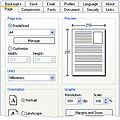
novaPDF is a PDF creator for Windows that allows you to easily create professional quality documents in industry-standard PDF file format.
Using novaPDF, everyone from novice users to professionals, can instantly create high-quality searchable PDF files, by simply selecting the "Print" command from virtually any application.
With one click you can save your Microsoft Excel, Word or PowerPoint documents or perhaps your emails and favorite web sites, into easy to share PDF files.
novaPDF gives you the ability to fully make use of all its advanced features: PDF bookmarks, PDF links, shared network printing, public profiles, PDF resolution, PDF information, compression, security, private profiles and more.
System Requirements:
Windows 2000/XP/2003 server
Publisher:
SoftlandHomepage:
http://www.novapdf.com/File Size:
3 MB
Price:
$19.95
Featured titles by Softland
Backup4all is an award-winning backup software for Windows. It protects your valuable data from partial or total loss by automating tasks, password protecting and compressing it to save storage space. Using Backup4all you can easily back up to any local or network drive, backup to FTP, backup to CD/DVD, or other removable media (such as USB drives).

Download shareware and freeware programs from Software112. This software library created by Softland contains thousands of programs from independent software vendors.
Comments on novaPDF Printer Lite
Please add a comment explaining the reason behind your vote.

iPhone app giveaways »




Android app giveaways »




Haha just after I ordered some other solution >
Save | Cancel
One of the duds this site has produced. Downloaded on 2 PCs, it used the same keycode, which cancelled out the software on both saying I had to uninstall from one of them. Did so, no go.
It's a POS, anyone saying "what do you want for free?" is absolutely correct.
Save | Cancel
Well I think that's very small, fast and useful program! Thanks so much :-)
Save | Cancel
A lot of thanks are owed to this site, it takes time, effort and resource to pioneer something as good as this.
As to the software, it's here to be freely acquired and evaluated; I can't see any better deal than that anywhere else on the 'Net.
If there's free stuff already out there which does the job as well or better than the paid-for stuff made available here, then fair enough: that's what evaluation's all about. But it's not a reason for slagging off this site or going OTT about some of the paid software on offer: that's just crass.
I've enjoyed 'road-testing' the offerings so far and hope giveawayotd long continues. Thanks, guys.
Save | Cancel
Hi,
I have the following observations:
1. You download and install only those that you need, right? Then why to crib like "This is not good ...; There is a better freeware ...; etc.". We shall only dampen the spirit of "Giveaway of the Day". They are doing yeomen service to the people who cannot afford / don't want to waste money on something. Hats off to you guys!
2. Why are we not limiting our responses to "This is good" OR "This is not working" kind of phrases?
Please have a heart and laud "Giveaway of the Day" team.
Thanks.
Save | Cancel
HOW do I get the activation key if the availiability check tells me "failed to connect"? Is this a joke?
Save | Cancel
Promotion almost ends, but having received a lot of feedback from this promotion I want to mention 3 more things:
- this is a printer driver, so there's no exe file launching the program from Start->Programs->novapdf. If you want to create PDF files you have to select Print from an application that supports that (for instance Notepad or Word) and in the Printers list select novaPDF Lite as the printer - when you'll click Ok a window will pop-up asking where to store the PDF file
- novaPDF does not work on Vista yet; we're working now on the final compatibility issues and it will be a Vista compatible version released before or right after the official release to consumers (30 January 2007)
- even if this promotion does not include support, if you encountered what would seem to be a bug you can send an email with details to feedback [at] novapdf.com and we'll investigate and reply back
Thanks.
Save | Cancel
in response to comment 48: that can't be true. pdf creator is embedded in a user's os as a printer option. once the pdf print option is selected and sent to the print queue, the process is instantaneous.
Save | Cancel
I don't manage to activate! The activation window tells me "try again later"!
Save | Cancel
Hi, Thank you! I can so use this tool but is there a tutorial on how to use the novaPDF giveaway for us computer dummies? ie Where do I get a screen like the one that appears on this page directly under the date? Thanks.
Save | Cancel
This works MUCH faster than PDF Creator. I like it better, and will switch now. Thanks for all the great giveaways.
Save | Cancel
"I think you guys are putting fake comments in here with the real ones."
Made my
daynight:)Save | Cancel
Hello Stephen, could you please leave us a comment with more details on your OS, MS Word version, etc? I don't have this problem with NovaPDF and I have Acrobat as a reader too
Save | Cancel
Thanks Giveaway team; things do seem to get heated over this for some unfathomable reason. For example i was told to get a life the other day, when I tried to explain to a particular poster that we were supposed to comment specifically about the giveaway. anyway, I have a technical problem, which I mentioned in comment 20. I'd really appreciate some feedback as I'm really keen to get this working. It has been registered.
Save | Cancel
28, what would happen when everyone is happy all the time? A stand-still I guess. No improvement anymore.
I think with a little "Bah" and "Meh" we can help the Giveaway-team to improve their (already) great site. I think criticism is a positive and constructive thing.
Save | Cancel
I think you guys are putting fake comments in here with the real ones.
Thats so lame its sick and I would be embarrassed if I were you.
When doing that, whats your mind telling you?
Save | Cancel
[27] the MS Office 2007 Beta can save documents in PDF format, but they are several times bigger in size compared to the PDFs produced by PDF printers such as this one.
Save | Cancel
Solid PDF Creator is the best creator I have found, it's free with a nag screen, but they offer great support and it does a wonderful job.(Solid also makes a great PDF to Word tool for being able to edit documents).
Save | Cancel
CutePDF is my freeware of choice.
And as for complaining about free software: As far as I know the developers want their software evaluated and get word of mouth going in "repayment" for the free offering. I don't recommend pay for software to others when a free version is as good (or better.) If there is freeware competition, there should be a comparison chart so that I can see why I would buy it over the alternatives.
But I agree that GOTD should offer it, and shouldn't be criticized for doing it. I think it's just disappointment causing those kinds of comments.
Save | Cancel
Another note from admins: rude comments will be deleted, no matter what kind of reasons you have for being rude.
If you have a technical problem - provide us with your working e-mail, we will contact you. If you disagree with other commenters or admins - be polite in your comments anyway.
Please=)
Save | Cancel
Regarding portable software, thanks all for your replies. I will look into the Altiris thing. It may be more complex than I want, but still it's good to hear about such a product.
As far as NovaPDF, it is a nice little prog. The fact that it isn't "portable" does not detract from the quality of the program, or the value of software giveaways.
In case there is any doubt, I love this site. I think it is possibly the greatest thing since sliced bread! And I bet I'm not alone in that opinion. :)
Save | Cancel
Thank you for this; I am sure it will be very useful. For those who miss out, try PrimoPDF. It uses ghostscript, but it comes with the program and gets installed with it. It has worked great for me and will do encrypted PDF files for free. NovaPDF Lite seems nice and small. My only wish was it could do links. However that is a small thing considering it's a very small and efficient program. Thanks.
Save | Cancel
"In respond to remark form Giveaway of the Day project team [27]
“since when” -
SINCE OFFICE 2007"
That is only in the beta. MS was threatened by Adobe for including it so they dropped it in the final version. They currently have a plug in on their site but I would expect it to be pulled after the recent adoption of docx as an open standard and continued threats from Adobe.
http://www.tgdaily.com/2006/11/20/adobe_microsoft_pdf_office_2007/
Save | Cancel
PrimoPDF will do the same thing (and it's free).
Still awesome for this site to be providing retail software for free. And yeah, Office 2007 Beta will export/print to PDF.
Save | Cancel
MS Office 2007 is not yet available for sale, well, at least Google says so...
Save | Cancel
number (10) u right this is a free giveaway site if peeps complain wen things are free looks like they find su other thing to complain abut .. never satisfied are they .. doh :-|
Save | Cancel
open office ftw
Save | Cancel
In respond to remark form Giveaway of the Day project team [27]
"since when" -
SINCE OFFICE 2007
Save | Cancel
Does not work on Vista - tried it just for grins & giggles - no go.
Save | Cancel
With a "bah" and "meh" whiners in here, it's starting to sound like Woot!'s forum.
Save | Cancel
"creation to pdf is available in ms word , ms excel etc itself….."
What? Since when? (just checked MS Word 2003)
Save | Cancel
creation to pdf is available in ms word , ms excel etc itself.....
so why use another software that does the same job.?????
Save | Cancel
There is a way to make any kind of software "semi"-portable. Altiris has a product called SVS which is a software virtualization environment. If you capture the software (during the installation) into a layer and export that layer to a vsa file then you can import it back to any machine that has the same OS and runs SVS. Also if you disable the layer the software disappears from the machine as if it has never been installed (including registry entries, icons and files). When enabled everything comes back.
Save | Cancel
Installed the software, activated and registered, but still keeps generating empty error windows. Anyone also has this problem?
Save | Cancel
I'm new to this and I don't know where the registration name and key are to register this product. Can someone tell me? Thanks!
Save | Cancel
It says I must have windows version 5 or higher........ what is that? I have windows 98SE.
Save | Cancel
I have a question. Why do people seem to complain about FREE things? I have enjoyed the software offered EVEN if I could find SOME of it somewhere else for free.
Save | Cancel
Everything seems/ed okay installed, registered and converted some word documents. However every one of the pdf documents gives me an error message saying could not open ....doc name....because it is either nota supported file type or because the file has been damaged
I've tried converting several different word documents and every one gives the same error message. I have adobe's acrobat reader v7.0. Can anyone suggest what may be wrong? Am I doing something wrong? Is anyone else getting the same problem?
Thanks in advance for anyones advice/help
Save | Cancel
Just curious, does "compression" work on the Lite version? If so, I may jump from PDFill freeware I've been using. Thanks.
Save | Cancel
jennifer [14] I'm afraid that's impossible. You cannot make a printer driver portable.
Save | Cancel
You know, I looked all over the net today for software like this, and could'nt find nothing!! And here you guys bring this beaut little bit of software out just for me!! Thanks a lot!!
Joash
:D:D:D:D
Save | Cancel
Claudiu represents Softland here, not our team:)
Save | Cancel
I totally agree with Seth (7).
Don't get me wrong, you have a great initiative here, but so far the software you're offering is available as freeware or Open source elsewhere with the same quality (and often better).
I think the Christmas-screensaver was a nice choice!
Save | Cancel
Claudiu (or GOTD dude), one thing that would really make this a "must-have" for me is the ability to install on a USB flash drive, without any registration entries, etc. on the host computer. This is similar to the concepts of portableapps.com and tinyapps.org, etc.
I am thinking that is probably impossible since to install a printer driver you have to write things on the host computer.
The seond impossibility is that I am pretty sure GOTD's typical method of activation has to write things to the registry to license it.
But I am hoping maybe you have some kind of magical pixie dust that makes NovaPDF a portable type of application? The app looks good, but if it could be used from a flash drive, that would be extra super killer!
Save | Cancel
I created a topic in our forums where we can discuss PDF conversion in general, here we go
http://www.giveawayoftheday.com/forums/topic/28?replies=1
Claudiu, thanks for additional clarification on registering process.
Save | Cancel
Since we're starting to receive more questions about the registration, here is a clarification on how to register it once the license is received:
>Go to Start->Settings->Printers and Faxes
>In the 'Printers' window, select 'novaPDF Lite v4' right click it and select 'Printing Preferences'
>In the 'novaPDF Lite v4 Printing Preferences' window go to the 'About' tab and press the 'Register' button (the window looks similar to this one http://www.novapdf.com/screenshots/large/about.jpg)
> In the 'Register' window, copy and paste the registration details you have received (registration name and key)
Now, it's true that there are other free alternatives, but the main difference is that most of those (if not all) use GhostScript, which means you download and install an additional program that does the actual conversion to PDF. novaPDF has its own library and as a difference, if we were to develop it using Ghostscript (and not our own library) would have meant a couple of months of development instead of 3+ years.
Save | Cancel
The Software is good. But I was expecting link/bookmarks will work. It seems that feature is only available in Pro version. Lite version is not useful than freewares like pdf creator.
Save | Cancel
Another great FREE giveaway!! How can anyone complain!! If I can use it I download it and if not I just come back the next day!!
Save | Cancel
[...] Novapdf è un software che consente di creare file PDF molto facilmente ma di qualità professionale. Anche i meno esperti con questa piccola ma potente applicazione riusciranno a creare immediatamente i Pdf con dei semplici comandi. Potete importare anche i documenti da office come word, excel e powerpoint; inoltre permette una serie di comandi avanzati come i segnalibri, collegamenti, print server, profili pubblici, ralta risoluzione, compressione, sicurezza, profili privati e molto altro ancora. A questa pagina potrete vedere tutti gli screen. [...]
Save | Cancel
OpenOffice can convert/create PDFs.......
Save | Cancel