Every day we offer FREE licensed software you’d have to buy otherwise.

Giveaway of the day — @Max SyncUp 2.9
@Max SyncUp 2.9 was available as a giveaway on August 8, 2012!

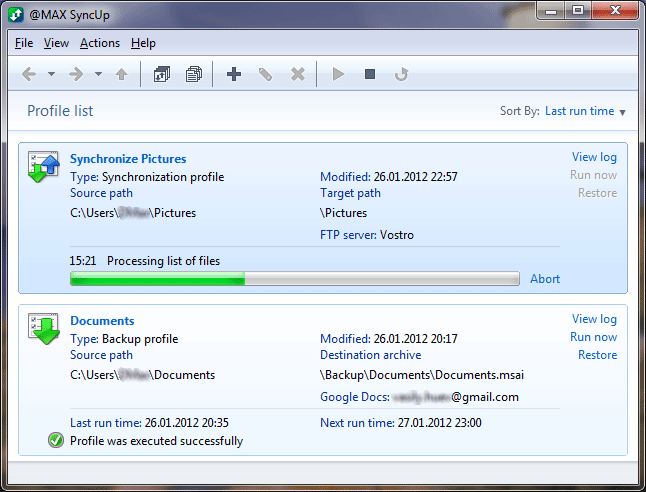
@Max SyncUp is a feature-rich utility for backing up and synchronizing your files whether locally or online. It is the easiest way to back up and restore important files or keep your documents up to date on your desktop and laptop computers.
With @Max SyncUp you can:
- back up and synchronize your files to a local folder, removable USB drive, networked computer or NAS, FTP or SFTP server or Google Drive cloud storage - all completely automatically;
- create full or incremental backups with compression and data encryption;
- perform bi-directional synchronization with the proper processing of any changes and deletion obsolete files;
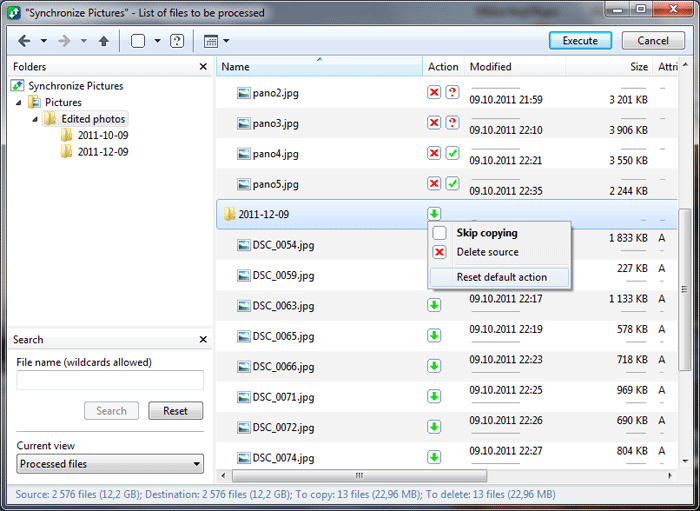
- preview files to be processed and change automatically designated actions;
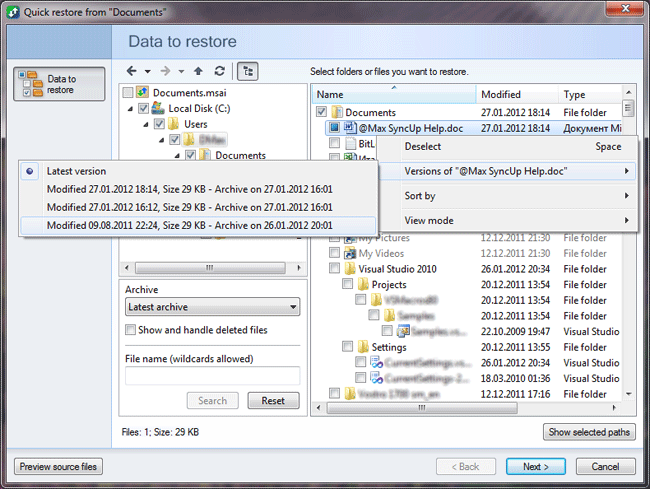
- easily browse the contents of the archives, search and select files and restore them individually in any place;
- keep multiple versions of the same file and restore it for a specified date;
- quickly compare and synchronize two folders in a few clicks right from Windows Explorer.
@Max SyncUp runs as a Windows service, can copy open and locked files, correctly handles ACL and more. It has a modern intuitive interface, low system requirements and a small sized distribution package.
Special offer from @MAX Software for GOTD users: order support and lifetime updates for MAX SyncUp at 50% discount!
Note that best improvement idea will be rewarded with tech support and lifetime license for @Max SyncUp. Use Idea Informer widget to submit your feedback and do not forget to fill in your name and e-mail – otherwise the Developer will not be able to contact you in case you are the one to win!
System Requirements:
Windows XP/ Server 2003/ Vista / Server 2008/ Small Business Server/ 7/ Server 2008 R2/ Home Server 2011 (x32/x64)
Publisher:
@MAX softwareHomepage:
http://www.atmaxsoft.com/syncup.htmlFile Size:
8.02 MB
Price:
$45
GIVEAWAY download basket




Comments on @Max SyncUp 2.9
Please add a comment explaining the reason behind your vote.
iPhone app giveaways »





Android app giveaways »



@Chris Locke: Check "Easy RoboCopy" (http://www.tribblesoft.com/Pages/EasyRoboCopy.aspx) - a user-friendly front end to Robocopy. The very good point is that it shows you the actual command line used, so you can just copy it to your script.
It did not handle well exit codes (sometimes reporting problems even if everything went well), but I've just noticed there is a new version, so maybe it got fixed.
Save | Cancel
Hey Charlie, lookup MailStore Home for yahoo mail backups. Brilliant piece of gear. http://www.mailstore.com/en/mailstore-home.aspx
As for free alternatives to this giveaway, Yadis Backup www.codessentials.com/products/yadisbackup.html
Save | Cancel
@ #20 Mikechang. The answer is easy. Use another built-in utility, Windows Backup, to protect those files. I can't believe you missed that considering you have answers for everyone who doesn't seem to like the software. If used correctly, you can already backup and have access to all you files over a network on various computers without syncing software. If you need to travel, just copy and paste the files you need from the networked folder onto the hard drive of the mobile computer. The time you spend doing that may be the same or even less than the time spent using syncing software.
Save | Cancel
@21 DD, Yes FreeFileSync can be configured. The default is file size and date, but you can opt for file content comparison. I use it all the time to sync files to Dropbox so that I can transfer files between my laptop and desktop at home or work, thus saving bandwidth, an issue because I live in a rural area.
Save | Cancel
BeyondCompare Pro (which includes folder options) is the only tool I will trust with these kind of operations. After reading all the comments here, I see no reason to change, not even for free. I rely on that backup working every time, 100%, unconditionally. And I work in a field where even one file loss is devastating.
Otherwise, can you really call it a backup? If this is more expensive than BC Pro, how come? All I'm reading is that subfolders are made, not actual syncs. Is it so afraid to do destructive operations that it loses its effectiveness? Go bold! Or go home...
Save | Cancel
@Giovanni: Thank you for being here. And thank you for your comments re: "So once again I can’t figure out why it got a very poor user rating so far (GAOTD team please: do something to fix your misleading USERS’ RATING SYSTEM or everything here will go to the dogs)." DITTO FROM ME. I never even look at the rating - it is MEANINGLESS. I find your post and start from there.
That having been said, the VOSIbiz software you suggested today is only a free TRIAL. I could find nowhere on the website that told me when the TRIAL is up, and what happens if I don't care to purchase, but still need access to files I have "moved or backed up" using their program TRIAL. Could you help me out here?
Thanks GOTD to the program of the day. I felt that I needed to speak "DOS" again to do anything with it. I would say that this program should be used by people much more skilled than I am.
Save | Cancel
X1 X2
seems that ( source ) is where you check off multiple folders you would like to keep in sync... that is.... check off X1 & X2 here....
then select as target... a folder you name.. lets say ... Synced...
at first run it copies folders X1 and X2 as subs to your Synced folder..
if you delete or add files / folders to either X1 or X2...
on next run it will replicate changes in X1 and X2 in target folder Synced......
if data removed or added in target Synced sub folders X1 and X2 .... it will add data to the source folders... and will recover the data deleted in the Synced folders from the source folders.... and place it back once again into the target folder...
I can see the value in this....
I had a bad feeling I should spend more time with it before commenting this morning... but had to run....
But..... I'm not finding any drop down rule change lists where I can select what to do in respective sync folders with data addition and deletion etc... as you find with other Synchronization software
still... as is... this program creates a safety net against accidental deletions....
unless you simultaneously intentionally delete data from both the source and Synced folders... the data will be replaced on next run back into the folder from which deleted... be it the source... or from the ( copy ) target folder structure....
seems fast... useful as far as sync...
didn't try backup features....
Save | Cancel
I have Folder A with files whose content gets edited from time to time and Folder B with files that are either kept, added to or deleted from time to time but never modified. Will today's GOTD sync both kinds of files using the same exact settings and set to run automatically? I'm looking for a backup/sync program that does not require further action besides maybe choosing the right settings in the first place. Anyone?
Save | Cancel
Sure, there are plenty other syncro programs, but @Max SyncUp can syncronize via FTP. I haven't found this option in others. Will be very handy to update our website. Having to going into each subdirectory individually to upload new files via FTP program is very time-consuming. I couldn't figure out the FTP part at first, but I watched the Youtube:
"@MAX SyncUp: How to compare and synchronize two folders"
and it's really easy.
I really like this program.
Save | Cancel
File Synchronizer by Latshaw is the best and FREE
Save | Cancel
Message to #14 CJCotter: I think your problem is that the programs you are using may not be copying all of the file "attributes" along with the file. This would include a folder entry. Make sure that the program is set to copy, in addition to the file itself, all of its attributes. Another possibility is that the programs might not be set to copy hidden files. Most folder icon changing programs, including Windows itself, put a normally hidden *.ini or *.ico file in the folder with the changed icon. Check to make sure that your copy program is set to also copy hidden and system files. In a pinch, you could go into control panel and make sure "view hidden and system files" is enabled. BTW, Robocopy, as mentioned above, will do everything you want it to. It does require setting up a batch file if you don't use a third-party graphical interface.
Save | Cancel
@16 Charley, an easier alternative option is to open a Gmail account and allow it to import mails from your Yahoo account. All your mails (in Inbox) will be transferred.
@18 Marty, You can create disk image. EaseUS disk copy is free. To make programs portable, try cameyo. With it, you can save programs on USB, even cloud.
Save | Cancel
Dany:
We are so sorry our program is very confused for you! The only reason of your situation is the program adds the source folder name to the end of the path when you specify the target path. In other words you select D:\test-two that results D:\test-two\test-one. This option is convenience for backing up. You can see the added folder in the field "Target paths" and it can be deleted easily. We will be glad if it helps you.
Save | Cancel
I've tried a number of various backup programs none of which I liked for various reasons. This little gem is exactly what I've been looking for, it works perfectly, very easy to use and once set up you can forget about it. I'd give this 10/10. Thanks GOTD.
Save | Cancel
@4, Giovanni
> However on SOFTPEDIA this program is only 1.8 MB in size and I wonder why….
Because the GAOTD "package", the "wrapper", will add ~6 MB to *every* GAOTD download. So if the program StayAwake were to be given away, even though it is only 38 KB in size, a GAOTD download of the same would be ~6 MB.
http://www.softpedia.com/get/PORTABLE-SOFTWARE/System/System-Enhancements/StayAwake-Portable.shtml
---
(Have not downloaded, as I cannot run it here. Perhaps this evening?)
Website looks relatively complete including a full set of screenshots. Something that might set this apart is the ability to handle SFTP?
I disagree with @1 & @21 on FreeFileSync. IMO FFS has a clean layout, & it is configurable, just that it is not always apparent how or where.
Save | Cancel
Max:
Source Path: D:\test-one
Target Path: D:\test-two
Expected behaviour: Copy files from test-one to test-two if missing and vice versa.
Result: test-two is copied into test-one as a subfolder, not synced.
Conclusion: I'm willing to entertain the possiblity I'm doing something wrong but in that case it just proves how counter-intuitive this program actually is.
Save | Cancel
Thank you David #19. It seems the perfect solution for something I have wanted to do for over a year. Looks a little complicated but believe I can do it. Thanks again for your help.
Save | Cancel
FreeFileSync, recommended by some, is garbage. I can copy an entire large folder to another drive (an exact copy), run it, and it will show dozens of differences for some reason. It has no configuration options, it just runs. Badly.
Save | Cancel
I just want to echo the sentiments of Thomas's (#13). I've been using the freeware version of Syncback for years. I would highly recommend it as part of your file-based (not image-based) back-up strategy. You can find it here:
http://www.2brightsparks.com/freeware/freeware-hub.html
They also offer SyncBackSE and SyncBackPro, for-sale (commercial) software. A comparison of them can be found here:
http://www.2brightsparks.com/syncback/compare.html
#17, asilaydyingdl, I think you are missing the point of this Sync software. This software allows you to have a backup copy of the files you sync'd. What happens when the disk holding your shares crashes or has a CRC error? Also how do you access the files when you are not on the network?
#16, Charley, I've read about a manual process (have not done it personally) available for Thunderbird and semi-automated process available using Zimbra and Backup4all. More info here:
http://www.backup4all.com/kb/how-to-backup-yahoo-emails-244.html
[I was not aware that Yahoo offered POP services for the free web based email. I thought that you had to upgrade to Yahoo Mail plus to get it.]
Regards
Save | Cancel
message to Charley (comment 16) The programme MailStore (free to personal users) will do this. For Yahoo, you need to move all the messages that you wish to save into the Inbox - just temporarily for the purposes of saving them in MailStore - then you can move them to another folder once all is copied (or delete them).
MailStore automatically includes all attachments. As far as I can see, there is no upper limit apart from the storage space on your computer. I saved 10 GB from my Yahoo account in less than half a day.
(BTW For Gmail no need to move messages, it will save the whole lot where they are since Gmail's folders are not really folders, just labels).
Hope this helps.
Kind regards
David
Save | Cancel
I have a question to the GAOTD population at large.
Does this or any free program that you know of copy PROGRAMS from a C drive to a backup drive or another computer?
I've installed several programs over the years and no longer have the downloaded installation files for many of the programs that I'd like to keep and continue useing.
Additionally, when I purchase or download a program can I install the program on a removable disk (to be run from ther) so that I don't have this problem again?
Thanks for your help.
Save | Cancel
The way I sync files and folders is to share the folder I want to sync through the Windows "Properties" dialog, then allow the users/computers you want to sync with permission to edit files and folders, and then navigate to the folder over the network from the secondary computer and create a shortcut so you can get to it. Then whatever you save or delete in that folder from either computer will show up the same on either computer. This is what I do. It's fairly simple, doesn't require additional software, and therefore keeps your system performance at a maximum.
Save | Cancel
I desperately need a program to back up my yahoo e mail files. I have 25 years of business records I do not want to loose. I want to change email accounts and completely drop yahoo but not a method to migrate or transfer, save email files to another account. Does this program back up e mail. Giovanni said VOSI does but would believe with all the prints etc I have, 1gb is not enough.
Would sincerely appreciate comments as big problem for me.
Thanks Charley
Save | Cancel
Hey Giovanni thanks for all the good posts. I have found a ton of good free programs thanks to you. Keep up the good work.
Save | Cancel
It's appreciated that people recommend alternative sync programs, but be aware of the following:
I have a program that changes the dull, manila folders to a different icon of my choosing. I've tried ALL of the following sync programs, below, and NONE of them preserve the folder icon change. Instead, the folders are returned back to their default manila in the target location.
The ONLY program that preserves the changed folder icons is Bounceback by CMS products, and unfortunately, you have to pay for it.
Allway Sync
Beyond Sync
Exiland Backup Free 3.5
FreeCommander
FreeFileSync
GoodSync
HotHotSoftware
Microsoft SyncToy
Plug2Sync
PowerFolder
PureSync
Second Copy 8
SyncBack4all_Portable
SyncBackPro
Toucan
Twin Folders
UltraCompare
Save | Cancel
For years I've been using the freeware Version of SyncBack without any trouble. Can handle multiple tasks and has no problems with 50 000 or 100 000 files. Fast and reliable and free.
http://www.2brightsparks.com/freeware/freeware-hub.html
Save | Cancel
Very nice software, the interface is clean and easy to understand. If I wouldn't already have a license for SyncBack SE this would have been a great giveaway.
Save | Cancel
Dany and X2 just configured the synchronization profile incorrectly. Please look carefully what you synchronize in the Target paths tab.
Save | Cancel
Giovanni - during your long 'commercial' for VOSI you don't mention that there is a maximum of 1Gb free on-line storage after which a subscription is required. So - not a 'free' service.
At least with @Max SyncUp 2.9 (and similar alternatives) you can choose which Cloud storage system to sync to.
Save | Cancel
Had the same as X2, folders didn't sync but mix. That will not do. Apparently syncing is not the same as mirroring...?
Also, the GUI is very unintuitive imho, just give me a tabbed interface instead of this weird wizardlike behaviour.
Meh. Looks very promising but the sync fail puts me off. Sticking with ol' Robocopy. Thanks anyway @Max Software and GOTD.
And no, I won't get rid of any external storage. Online storage can become gone-for-good storage after page refresh. Has happened, will happen.
Save | Cancel
Thanks to @MAX Software and GOTD.
The user interface is not user friendly.
It seems to be rule based. You set up the Rules and save it as a "profile". Sounds complicated.
As someone already said, he tested it and it backed up the wrong set of files to the other folder. Maybe it is due to the default rules that he did not over-ride.
Check some other competing products:
Beyond-Sync
Filestream-Synch-TOGO-portable
Zback-Synch-portable-Ver2-60-0a (freeware)
DirSyncPro-portable (freeware)
Save | Cancel
This is great to save files on line an is ideal! Other place chrage money to backup it on line! Thank :-@
Save | Cancel
Thanks a lot for your daily comments , Giovanni .
Save | Cancel
In case someone else found todays giveaway intresting, but a bit confusing or hard to use. I do recommend FreeFilesync, and yes, its a full free software.
Save | Cancel
Looks like a GREAT TOOL for me: excellent utility to backup all of your files & data to a portable storage or on a FTP server!!
Can even store multiple versions of the same file and restore files on a specified date!!
So once again I can't figure out why it got a very poor user rating so far (GAOTD team please: do something to fix your misleading USERS' RATING SYSTEM or everything here will go to the dogs).
2 huge THUMBS UP from me!!!
However on SOFTPEDIA this program is only 1.8 MB in size and I wonder why....
BEST (and maybe even BETTER) FREEWARE ALTERNATIVES:
* VOSI.biz Client Suite
This is an awesome software package bundling 3 great client applications into one:
- VOSI.biz File Explorer
- VOSI.biz Online Backup
- VOSI.biz Email Backup
With this stunning program, whenever you want to backup your system, you can once & for all throw any removable device (USB DRIVE, EXTERNAL HD, DVD/CD etc...) away, since it's able to do the following things in 2 mouse clicks:
- drag & drop large files and folders (max 8 GB per file) in order to download & upload them at fast speed using an extremely powerful compression data technology
- remotely access files & folders from anywhere through automatic one-way or even two-way real-time and scheduled folder synchronization (==> simply AMAZING FEATURE dudes!!)
- share files & encrypted folders with friends, colleagues or clients in remote locations
- automatically backup and restore your Business Data and an unlimited number of PCs online and offline via SSL data transfer and secure data encryption (scheduled and incremental backup options are also supported)
- drag & drop or automatically backup your Outlook Express & Windows Mail in real-time or scheduled times, as if your email messages were files
- backup & restore your emails ONE BY ONE, instead of the large and cumbersome "Outlook .pst files" as any other email backup software usually does, thus allowing you to automatically resume interrupted uploads & downloads as well as migrate your favourite emails from one PC to another (that's COOL, isn't it dudes??)
Why this startling SUITE is FREE of charges is something going far beyond human understanding....LOL!
Download:
http://www.softpedia.com/get/System/Back-Up-and-Recovery/VOSI-biz-Client-Suite.shtml
For more information, please watch the following amazing DEMO VIDEOS showing you what each tool of this awesome suite can do for you free of charge:
http://www.vosi.biz/Downloads/DownloadFileExplorer.aspx
http://www.vosi.biz/Downloads/DownloadOnlineBackup.aspx
http://www.vosi.biz/Downloads/DownloadEmailBackup.aspx
OTHER EXCELLENT FREE BACKUP & FILE SYNC RECOVERY UTILITIES, sorted according to my personal preference, are also these:
http://freefilesync.sourceforge.net/ (Portable version available)
http:/www.bitreplica.com/ (==> Cool brand new Auslogics tool)
http://veridium.net/windatareflector/
http://www.bvckup.com/
http://code.google.com/p/syncdesk/
http://www.softpedia.com/get/System/Back-Up-and-Recovery/SyncBack.shtml
Enjoy!!
Save | Cancel
Ran a test..
created two folders... X1 and X2...
placed same 200 pics in each....
removed first ten from X1
removed last ten from X2
ran the sync on these two folders...
expected program to sync... that is ... make both folders the same...
instead....it attached a sub folder named X1 to the X2 folder....
the X1 sub it made....did not contain the first ten deleted from original X1... which X2 still contained
but they did place the last ten deleted from X2 into their X1 sub folder...
I'm just flabbergasted ....
maybe I missed something here .....
anybody have a clue ??
x2
Save | Cancel
Although not as pretty, Microsoft do 'Robocopy' which comes with Vista and 7 (but can also be run on XP by just copying the .exe)
Its a command-line program, but works very well and has about a billion options, allowing you to configure just about everything.
With it being a command-line program allows it to be scripted easily, and set up in the 'scheduled tasks' with just a few clicks.
If you've an additional drive, it allows your documents to be backed up elsewhere, and if run each day, only the files that have changed will be copied.
There is also a program called 'Hobocopy' which does exactly the same thing, but backs up open files - very useful if you use Outlook for example, which locks open its .PST data files.
Save | Cancel
It looks like a very powerful and easy to use program. It's appearance is much better than FreeFileSync's.
Save | Cancel