Every day we offer FREE licensed software you’d have to buy otherwise.
Giveaway of the day — Inpaint
Inpaint was available as a giveaway on October 7, 2008!

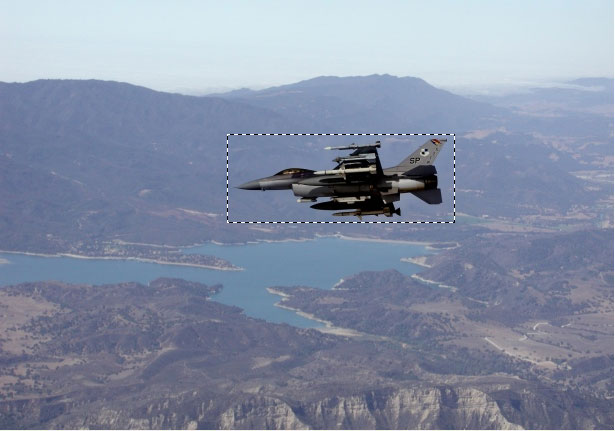
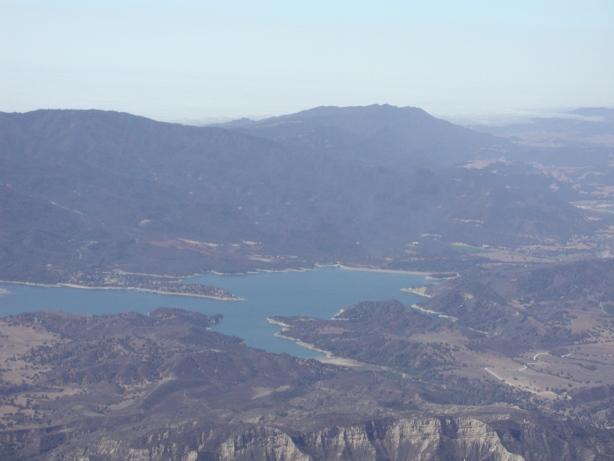
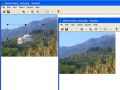
Delete any unwanted object from your photo, such as extra power-line, people, text... The program will automatically inpaint the selected area to erase it. Inpaint reconstructs the selected image area from the pixel near the area boundary. Inpaint may be used to remove undesirable objects from still images.
If some unexpected object spoils an otherwise good photograph, Inpaint may be used to remove it. Simply select the object. No need for fiddly messing about with the clone tool!
It is alarmingly simple to use. Draw a selection around the object you wish to remove from the picture, and run smart remove selection. Inpaint will fill the selection area with intelligently generated texture drawn from the surrounding image data.
System Requirements:
Microsoft Windows XP or higher; 2000 MHz processor; 256 MB RAM; No hardware acceleration is required
Publisher:
TeoreXHomepage:
http://www.teorex.com/inpaint.htmlFile Size:
494 KB
Price:
$39.99
GIVEAWAY download basket


Comments on Inpaint
Please add a comment explaining the reason behind your vote.

iPhone app giveaways »





Android app giveaways »





how to delete a snapshot accidently taken inside the pocket of my uniform, its totally black and says invalid image on it. Can you help me with this deletion project?
Save | Cancel
I just tried this out today, and it works well if you just want to remove something small from the picture. Especially if the small thing is against a plain background. I'm impressed!
Save | Cancel
great software...always wanted something like this , on the other hand-i am worried that now anyone can erase my signature from photos tasen by me ,. horror horrror :D
Save | Cancel
Takes a lot of time. Also some times does not do its job properly, just creates a big blog with matching colours. Good for removing smaller images.
Save | Cancel
I'm afraid I get the same 'Unregistered' status too.
What gives?
Vista HP. Strangely, Run As Admin doesn't appear.
Save | Cancel
well....this program is outstanding!!!!!! thank u giveaway!!
Save | Cancel
I downloaded this and tried it on several photos. Simply put, it was fun and easy to use.
It's a great program and manipulates the photo well without any major changes to the visual back ground. Best used on smaller items but does work on bigger too, just requires further manipulation and 'inpainting' of photo. All in all I'd give it 9/10
Save | Cancel
Wow, this is great for people who dont know how to use photoshop.
Here is an example of what it can do.
This took me 10 minutes of careful tracing.
Before: http://www.filesavr.com/4214183-full
After: http://www.filesavr.com/4214183-full2
Save | Cancel
FYI, I emailed support at TeoreX. Prompt reply and great service... they could teach HP and Microsoft a thing or two.
Save | Cancel
Very nice programm, easy to use, does great job, I'm very delighted to use it
Save | Cancel
Just to clarify... I completed the activations and installations b4 the time for activation and installation had expired... but did not run the programs until today.
Save | Cancel
I downloaded this software on two computers, ran the activation on each and received successful activation messages each time, then installed the software on each computer.
Yet both installations say they are "unregistered" and won't allow me to save alterations.
Registration requires a name and key. Neither are in the accompanying help file, nor the "successfully activated messages" I received from GOTD.
What gives?
Save | Cancel
To Saucy #190 - $89.99!!!!
Save | Cancel
Installed and activated with no problems on my XP system.
The software is OK, but for VERY limited applications. I tried this on several photos with poor success. For high resolution images, it can be very slow, even for smaller areas. I noticed one comment that indicated that it was area, not the resolution of the image, that slowed the process down - not sure what that meant, but I certainly did not find that to be true. I tried the same image at 2 different resolutions and the lower resolution image was much faster. For most applications, with a varied background, cloning works much better.
Save | Cancel
#219, Doc Immortal, make an effort to try the software before writing a lengthy "review".
There's no need to use undo if you want to try another fill with the same removal selection (different results every time) or if you want to resize or move the fill source area (yes, it can be moved). You can then use undo and redo to run through the results, and save the one you like best (or continue editing from that point).
Save | Cancel
Thank,s Slava.& GAOTD.
I like it ,just what i was looking for.
No complicated & touchy time wasting registration codes to bother with.
Save | Cancel
#84, Renegade, I don't know how you use your keyboard and mouse, but I usually leave my left hand on the keyboard and move the mouse with my right. Using modifier keys, such as Ctrl and Shift, with mouse operations is quite common. If you make a mistake while drawing the selection area, just click and it will disappear. You can then draw a new one.
#160, Tony, at least read the Help file and/or look at the website before blaming the tool. The fill source area can be resized and moved. Here's your before picture. Here's my after picture. I did this in two steps. I removed the dog. Portions of the woman were missing, which Inpaint can't magically re-create. In a real situation, you would crop the image. I attempted to draw something resembling the shape of a leg. Obviously, I'm no artist, and the shape is way off. I also had some difficulty finding a surface which my optical mouse would track accurately for precision work (there may be a driver adjustment to reduce the DPI, some mouse drivers have a low-DPI mode for this type of work). I basically turned the missing parts into a blob of material. Except that the proportions are messed up, it almost looks like a foot underneath. I only used Inpaint, and I didn't spend time trying to make it perfect.
Save | Cancel
Thank you for another excellent weapon to add to my arsenal of graphics Apps.
In order to get the best results, the user may need to perform multiple selections, carefully ensuring that the pixels surrounding each selection are consistent with the "fill" required. If these simple rules are followed, the result is almost flawless.
Thans again GOTD.
Save | Cancel
As an impatient retoucher that has never been able to master a photo-retouching program.
This is a gift from above.
I will most likely end up buying this as once I master it will not want to be without this amazing tool
The you GAOTD and Teorex for put this up
Save | Cancel
Final word I forgot. I don't know about reducing the size. ??? My "perfect" edit - which I said had 4 swipes, went from 200K to 500K, which ain't bad.
Save | Cancel
Always doin' stuff at the last minute, so this may be the last comment. Thumbs up. Just as hobby, want to remove text from downloaded pictures. This will do it. Previous comments apply. Good on simple backgrounds. 50-50 on more detailed backgrounds. You select what you want to blot out first. One problem I'm having is it doesn't always give you a complete outline of your box or trace, but if you can follow what your tracing with the mouse in your minds eye, you shouldn't have much problem. Help file is practically non-existant with just one simple, not fully explained example. After you trace (or draw box), you get a larger box that is the background area your sampling. This is where people are running into problems. Unless you hold down the shift key and move and/or resize this box so it is only sampling the kind of background that you need to match, you'll get a mess. On mixed backgrounds, best to use the lasso tool and trace the unwanted image only over one of the backgrounds, resizing the sample box to make sure it only captures that background, then repeat the operation on the parts of the unwanted object still left on the second background. The more complex or object laden the background, the harder this is to use. Might be best to follow the suggestion to use this in conjunction with an image retoucher for complex backgrounds, but the more times you save a photo, the more loss (though that may not get noticeable). Tried to remove text over a couple of people's pictures. One was good with some minor blurring which would require you to really look. The other was perfect. About 4 edits and all evidence of texts was removed from a young lady's picture which combined her black skirt with her relatively small upturned hand. No blurring or evidence of edit at all. Program is simple, even crude, but sometimes you don't need a scalpel, just a hammer.
If you're comfortable with clone brushes, then the freewares mentioned here (which I think is a great feature of these comments - thanks Lee for mentioning tinyspell) are the way you should go. But if you want to try the value of this alternative method, I strongly recommend it. Seems like combining the 2 methods would just make you more powerful.
I don't think it's appropriate to just say here you don't need it, but - despite those that are afraid that gotd will shut down over the slightest criticism - I think that comparing what's avalable out there and assessing whether the tool is useful for the vast majority at all IS valid. Sofware that's good for 1 in a hundred or even 1 in a thousand - good. Good for 1 in a million (because there's one in every crowd) - bad.
With those parameters:
I didn't get the Image Mender download. Considering that the full service editing suites mentioned here are in the hundreds, 40 bucks seems a good deal. Considering, though, the Image Mender is half that price, and well recommended on this and it's own giveaway page, I'd have to recommend the casual user buying that if you liked the description and only had a hobby need. From some of the descriptions here, this one might be better for a semi-pro who didn't want to whip out the full edit suite. But as a freebie, this one's a definite bargain, as evidenced by the high thumbs up.
Great giveaway gotd. I know I'll get significant use out of it.
Save | Cancel
Simple and yet superb.
Saves so much time compared to other expensive tools. Many people do not want all the bells and whistles and this is where this program does wonders. Well done.
Save | Cancel
Downloaded and installed - but it keeps crashing. Besides, from the look of things, I can do the job much better in Photoshop...
Save | Cancel
I was having runtime errors when attempting to use the program. Emailed tech support and received a response from a tech within a few minutes. He sent me an updated version but the problem persisted. But when I tried a smaller photo the problem did not reoccur. I still crash the program when asking it to work on 7MB photo but worked ok with a 100kb file.
Save | Cancel
it said Licensed to: UnRegistered copy what do i do? it is only 10pm Calif time pst.
i 1st-Activate then then Setup please help with problem
Save | Cancel
Sorry so late with the comment. In case anyone's still awake, I just used the program to remove my wife (seriouly, it was my wife!) from a photo of Great Sand Dunes. Had to tinker a bit because of the contrasting sand colors, but you'd never know she was there from the result. I know what you're thinking.
Save | Cancel
To John, #161. .msi files require the Windows Installer package. Try Googling "Windows Installer" to find a download & where to install it.
Save | Cancel
Help.
Every time I try to use the Inpaint software and attempt to remove an item I get an error message: Microsoft Visual C++ Runtime Library Runtime Error! Program: C:\Program Files\Teorex\Inpaint.exe This application has requested the Runtime to terminate in an unusual way. Please contact the application's support team for information. I am using Win xp sp3 and ran Regedit program to correct registry errors but this did not solve the problem. Any suggestions?
Save | Cancel
Straight "out of the box" - no practice - removed reflection from cable car window. Excellent result!
Save | Cancel
Again, I'm reviewing this as if I had to pay for it. It's free for us today, but no one else will get it free after today.
This application is good for simple photos. What it does in a nutshell:
1. You select the area (either with a freehand or rectangular selection)
2. The program puts a box around the area to determine what to use as fill (each time you select the same range, a different length and width is chosen).
3. [optional] You can hold the shift key and tweak the height/width of this box a box.
4. You hit the green arrow and it does some kind of fill.
Some things that can be improved upon:
1. If you select undo, the box is still there but the selection criteria is not. How about keeping the selection criteria, too?
2. Allow the user to select an area that isn't near the area being filled in. What I mean by this is if you have a photo with something on it that you want to remove (say, a ball) you can select another area if there are similar things in the photo (like a row of hedges all the same height).
3. How about a quick undo and try another sized box fill? This will revert the photo and then try a fill using a different "fill" box and thus a different algorithm. This will allow users to cycle through a couple options with a simple click.
There are parts of the interface that I couldn't figure what they do. There's a "Move" under view. I couldn't get it to uncheck or do anything with it. There's a hand. I thought it would move the selection criteria if I used it and clicked/dragged the selection. Nope. It doesn't appear to do anything. There was nothing in the help for either things.
Overall, I give it a 5 out of 10. It works for simple drawings, is faster than using clone, and is relatively easy to use. If it was more flexible, I'd give it a 6. Since it's too expensive, I can't justify giving it more than a 6 even with the changes mentioned above. For what little it does, this should be in the $10-15 price range. If I had to pay for this, I'd opt instead to spend a little more and buy Paintshop Pro which has a lot more functionality and would be considerably cheaper on a dollar per feature basis.
Save | Cancel
Having spent hours accomplishing what this exciting program does in minutes...........I'M SOLD!! Since I do a lot of photos and this works so well, and is soooooo usable. This is one I'd buy. Thank you GAOTD and Teorex, this is a keeper.
Robin
Save | Cancel
installed this on xp sp2 workes fine..results sucked un installed right away
Save | Cancel
Check out the Before and After pics here, to see what I did with Inpaint.
http://www.angelfire.com/wi2/gsd/seeingisntalwaysbelieving.html
Save | Cancel
Partially works.
I found that it will remove some stuff, but it's far from perfect. You might use this if you're feeling lazy in Gimp (or Photoshop).
Save | Cancel
this is gonna save me time and effort on cloning. if you ask it to do what it's made for, it rocks. all else is....interesting
Save | Cancel
THANKS GAOTD.. ~ maybe some expect to much. Worked great for me.
Save | Cancel
I think these "Yes" and "NO' plugs-ins are rigged?
The Thumbs up is 80%, so how come so many favourable comments get the "No" vote..?
Doesnt add up..
Anyway i found it very good,so plug that one..
Save | Cancel
Great little clone / clean-up tool. Please notice that you can move & reshape the pick-up target box by holding down the shift key. This will give you much more control & a better finished product.
Save | Cancel
I was impressed. I've used Photoshop™ and similar programs to do the same thing, and InPaint makes it simple and easy. Of course it's not perfect, but it leaves much less to be touched up later (e.g. where the part of the image to be removed lies across two or more different backgrounds, as some others have mentioned). This will certainly save me time and work — I wish I'd had it yesterday when I needed it! ;)
Thumbs up from me!
(using XP SP2 with a Wacom graphire4 tablet installed, which worked fine from the first without any fiddling with settings, as is sometimes required with other graphics-type programs)
Save | Cancel
Not so hot, cant drag & drop into it. it deceides on the area around to inpaint. cant resize exterior inpaint area ..
With powerlines, for example pulled adjecent trees into area rather than being able to use top/botom sky only. Uninstalling already
Save | Cancel
Downloaded and installed on Vista with no problem. Program works great, I like it.
Save | Cancel
For me this works just as well as Image Mender. Many others have already mentioned the background issues so I won't dwell on these. Besides it occurs on both programs. There are 2 things about Inpaint I like more than Image Mender.
First Inpaint remember screen position from one picture to the next. So if I need to scroll all the way down and all the way to the right I'm already there ready to go when I open the next picture. Image Mender requires scrolling every picture.
Second when you click save...... it saves without having to scroll through your list of pictures.
Add this to the fact that Image Mender has a tendency to lock up after you do so many pictures and I think a strong case can be made for Inpaint. Is it perfect? It's not. But it's small size and ease of use makes this a great addition to anyone's image tools. BTW I'm not a professional photographer I just edit pictures for wallpaper. This is a keeper for me. Thank You so much GAOTD team. Thank you to the publisher, Teorex.
Save | Cancel
a very nice &useful software,really very good
Save | Cancel
A brilliant piece of software -- I love it Thanks GOTD and TeoreX
Save | Cancel
Are you able to save your picture after you have corrected it with this software?
Save | Cancel
Just yesterday when i was working on some photos i was wishing that I had some sort of program that would do just what this dose. Then like magic GOTD come out with Inpaint. Made my day. The program downloaded and ran great on my Windows XP. Thanks lots this will get a lot of miles on it.
Save | Cancel
I really wanted to give this program high marks, but I can't. I tried it on three different pictures and all three came out unsatisfactory. One of those attempts was trying to remove a streetlight (low light) in a night time shot - where the light once was now appeared a strange anomaly instead of darkness like the background. And that was the simple one. Thus, sadly, I have to give it a thumbs down.
Save | Cancel
This software doesn't work with .png or .gif images, so you have to
convert it to .jpg first.
That's ok but it doesn't say it anywhere on the help file or their web
site.
Save | Cancel
@#137, it would be nice if more info was given when posting negative comments that involve malware, dangerous sites, viruses etc, so everyone knows WHAT was found.
http://www.siteadvisor.com/sites/teorex.com?ref=safe&client_ver=FF_26.6_6275&locale=en-US&premium=false&client_type=FF&aff_id=0
When we tested this site we found links to suggestsoft.com, which we found to be a distributor of downloads some people consider adware, spyware or other potentially unwanted programs
I don't like suggestsoft but that's because it is one of those sites that comes up when I'm googling for freeware only. Like brothersoft (I think thats the right name) suggestsoft and some other sites seem to have meta tags that come up near the top of a search no matter what kind of software you're searching for. And usually those sites don't even have the specific type of app you want. That is why I can't stand suggestsoft and why I have its name in the exclusion list in my advanced google searches. However, I've never gotten malware from there and occasionally have found a link to something I wanted from suggestsoft.
Teorex only has one award from Suggestsoft included in their awards collection and I don't think that's a reason to avoid Teorex...Simply don't click on Suggestsoft's award!
Save | Cancel
Took forever to remove object and then didn't remove it entirely. Great concept, just not up to par.
Save | Cancel