Every day we offer FREE licensed software you’d have to buy otherwise.

Cleanse Uninstaller Pro was available as a giveaway on March 19, 2008!

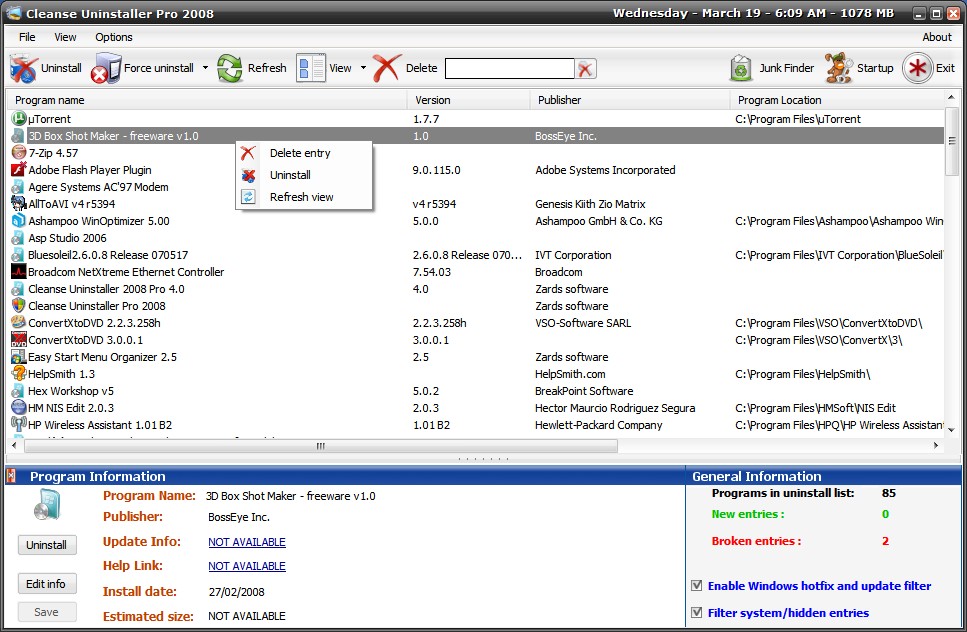
Cleanse Uninstaller Pro is a advanced uninstaller that finds and remove even the most stubborn of programs. Uninstall faster, easier and more completely than you do with other programs. Using the Auto Find uninstall function all you have to do is drag and drop the programs icon you want to uninstall onto Cleanse Uninstallers icon and Cleanse will Auto Find the program in the uninstall list and start the advanced uninstaller process.
Cleanse Uninstaller will try to find any left over files or registry entries (often left behind causing clogs which slow your computer) and help remove all of the remaining traces to optimize your computer’s performance. Cleanse Uninstaller also includes a startup optimizer to make your computer boot faster. Also included is a junk file search and remove function so you can reclaim disk space.
System Requirements:
Windows 95/98/Me/NT/2000/XP/Vista
Publisher:
Zards SoftwareHomepage:
http://www.zardssoftware.com/uninstaller/Uninstaller.htmlFile Size:
935 KB
Price:
$19.95
GIVEAWAY download basket




Comments on Cleanse Uninstaller Pro
Please add a comment explaining the reason behind your vote.


iPhone app giveaways »





Android app giveaways »





I'm a Revo user and found it excellent. After all the discussion on Cleanse, has anyone found problems in Revo? #58 would like to know also.
Only once was I dismayed when it found a couple of thousand entries [for what I can't remember now,] that seemed to have little connection to the job in hand. I left them of course, but it highlites the care to be taken.
Save | Cancel
this program can wipe out your computer in one blow
Save | Cancel
Well stephen cohen was right I used this program to remove an old program I wasnt using anymore and it deleted more than expected I lost my task bar desktop icons and then windows just said corrupted files and lost ones so I have spent two days trying to put my computer in working order again. I would have thought I knew how to use this sort of program but then never rely on guesswork what a bummer lost all my giveawayoftheday programs along with everything else had to format in the end Become wiser
Save | Cancel
I missed Cleanse uninstaller again!!! After you were so nice to bring it back, I had un-installed the original one you first sent by accident. This time my internet connection was not working and I had to contact my service provider, so by the time I came back online it was too late for the download.. What bad luck!! I really hope you will again make it available.
Save | Cancel
would love to try it but there was an internal server error so i couldnt get it...grrrr
Save | Cancel
Gave it a try,but the Glary utilities pro I got from here just works better for me.Thanks anyway,GAOTD!
Save | Cancel
Great program!!! I finally got video piggy off my pc.
CCleaner wouldn't remove it!!
Save | Cancel
Having recommended downloading the new version of Cleanse Uninstaller,
i did so myself,extracted all files,then activated,and ran the program,no problems, i have windows xp,Cleanse Uninstaller clearly marked all my program icons, better than they were described,i ran the "junk remover" it removed 100mb, it gave the choice to un tick if unsure
of what was going to be removed, i let it remove all it described as junk as i did a backup, no problems, yes its better than the old version,thanks GAOTD.
Paulga
Save | Cancel
I had Cleanse Uninstaller v3.4.0 0 way back,it proved its worth,no problems, it performed as i asked,todays give away is a better version, if you dont have a good uninstaller, you have the chance to get this one
FREE, its far better than Microsofts Add and Remove, "by far"
as with any uninstall/remove program, or performing the same actions yourself,do a back up for your own peace of mind.
Paulga
Save | Cancel
I had a nice positive review of Cleanse Uninstaller Pro then I rebooted and ran it a second time only to find that all of the stuff I uninstalled was still there. So just to make sure it wasn't my fault I uninstalled all of it again and rebooted again. The bottom line is that it takes 1 minute and 40 seconds to scan for installed programs every time I start it and it does absolutely nothing (at least for me.)I don't know how to do the thumbs up or thumbs down thing or I'd give it a thumbs down, as it is I'll just have to give it one finger.
Save | Cancel
For # 29 - Total Uninstall is most definitely NOT the best software, free or otherwise, for completing this type of task. In fact, I would go so far as to say it's a piece of cr@p.
I loaded it on a system simply to see how effective it was at doing the job it claimed to do. Once loaded, I then had it monitor the installation of an application. After letting it do its thing I then instructed it to do a 'total uninstall' - very disappointing. Over 60 entries still found and no ability to get rid of them other than manual deletion.
To top it all, I then uninstalled Total Uninstaller using its own built-in uninstall application. Result? To this day there is still an entry in msconfig start-up for TUN (yep, you've guessed it, Total Uninstall) with an unchecked box. What a pile of junk! An uninstall program that can't even remove its own entry from your start-up folder.
Trust me, people, you only need one program to do this kind of cleaning up (I'm presuming you already use the excellent Piriform product CCleaner) and that product is Revo Uninstaller. Clear, easy to use, efficient, and free. Don't bother looking elsewhere.
Keep the world clean.
Save | Cancel
Theres way too many REVO reps on this board, they are making themselves obvious!!
Save | Cancel
Well I have compared this to the free Revo Uninstaller, and found that Revo Uninstaller does a much better job at finding left over junk from uninstalls.
To compare the two programs I used the uninstall function of both programs on the same programs - but did not let the uninstaller of the programs I was removing run - therefore leaving Cleanse and Revo to try and find all of the registry entries and files used by the programs being uninstalled (not just the stuff left over from an incomplete unistaller).
Here are the results:
AutoCad 2008
Cleanse - 3 registry keys and 2,109 files
Revo - 6,580 registry keys and 1,968 files
Acronis TrueImage
Cleanse - 1 registry key and 8 files
Revo 841 registry keys, and 17 files
As you can see Revo is FAR superier (although cleanse did find a few more files for AutoCad) - and yes I did check the registry entries found and the entries Revo found for AutoCad are actial registry keys for AutoCad. I thought there might have been a large number of false posatives with so many errors found but I was wrong.
Cleanse Uninstaller takes well over 5 minutes to scan my hard drives - Revo is many times quicker.
Also Cleanse misses some installed programs which Revo shows in the list of unistallable programs, and cleanse sometimes has multiple entries for the same program.
So in short Revo is free and is much better. Also Revo in a lot better than Your Uninstaller. Your Unistaller often gives false posatives in the list of registry keys and files to removes, whereas I use Revo unstaller just about every day and have unistalled a huge number of programs with it and it has only given me false posatives for 5 programs.
Save | Cancel
Ran both the freeware - Revo uninstaller & this program.
Prefered the interface of Revo.
Revo also had quite a few more functions.
however Revo has no registry backup that I could see, but does create a system restore point automatically
Uninstalled cleanse uninstaller pro using its own uninstall function and found no leftover traces after uninstallation - makes a nice change
Save | Cancel
I see that this program is not well liked and seems to be a bust.
So I have a good question, Will this program delet it self just as good as it says....LOL
Save | Cancel
hey look! it's $20 version of the Add/Remove programs feature in the Winblows Control Panel!!
Save | Cancel
I agree with one of the first commenters... Your Uninstaller 2008 (and 2007, 2006, 2005) work fantastically. I've upgraded every year, even at a price.. (and I NEVER pay for software, so that's saying a lot) and will continue to do so.
Save | Cancel
I use Revo Uninstaller and I agree that it is very good program.
But this one is not bad too :)
Save | Cancel
Requires .NET 2 Framework. Thumb down.
Save | Cancel
This looks a good product,many suspect programs install their own versions of dll`s and you need a guardian type program like Super Geek Hero , System Sentry or both, these will warn you and in the case of easydesksoftware`s System Sentry, replace from backup those altered dll`s. As well as backing up any changes a system restore replacement Restore-it, now rewritten for Vista is a program that actually does restore as claimed!
The Vista SP1 update is alleged to help with the strange install problems of Vista and is currently available for download, though it`s a biggie!
Save | Cancel
I like the program! The only thing is it uses up a lot of CPU usage. other than that, I like it!!!!!
Save | Cancel
#15 Come on! The only honest thing to say is "Try". NO Program guarantees to remove "everything".
A good test is to install a given program. Uninstall it with Revco. Install the same program and uninstall it with CClean. Same thing with Cleaner, etc. The programs should all tell you the extra files that they removed. Compare the list.
Or, after each uninstall run "Systracer" (another Giveawayoftheday from November 2007)and compare the hard drives after the uninstall. Now you know exactly what the best uninstaller is.
If you want to be certain install a second or third program and do the same steps.
You can always do the same thing with the winner of this match with another uninstall program in the future.
Takes a little time but it can end the argument of who has the biggest and best.
Save | Cancel
VISTA USERS: It was nice of #20 to clue us in to the need to install as administrator, but after only one week with my Acer laptop I was at a loss as to what to do. The deal is - you right-click on activate and then right-click on install, each time left-clicking on the "as administrator." You do the same to launch the app. I'll take my chances with the risks; among the various things I dislike with Vista is that the 'remove programs' only lists the ones Acer pre-installed. I'll keep looking here and elsewhere for other hacks and apps to get around Vista limitations. The only thing I appreciate is that my physical drive is split in two, and I can make (slow) drive back-ups on the D: portion, so I'm not about to compromise that with an XP partition - also finding drivers (if they exist) would be a problem.
320
Save | Cancel
I asked Google for an "Uninstaller" and I got the top 10 list :)
Save | Cancel
Downloaded it, no problems with activation. Tested it on a laptop with XP SP2. I uninstalled a large complex application and it worked very well. have used a number of other uninstall programs in the past and this works in a similar manner. The only thing that seemed buggy was that when going through the 3 step uninstall process, you have to hit the next button for step 1 and 2 but then it jumped to step 3 by itself. A more general comment: I gather from the term "delete" that all it does is change the file name to mark the space as available. It would be nice to see an uninstaller that overwrites files as it works.
Save | Cancel
had this, lost this and gald this is back.
it is a big help when programs don't wanna uninstall
just be careful with it
Fabian23
Save | Cancel
#39, Vlad, definitive contact information tends to make people feel better, but in reality, with businesses all over the world, whether a company is trustworthy doesn't depend upon its physical location. For example, for people living in the US, a company which is merely in another state is very difficult to sue. Just try suing a company in another country. Whois lookup shows Zards Software to be in Australia.
Save | Cancel
To #'s 8 & 13.
Comodo can be set to let apps run, even if program was accidently set to deny access.
This Unistaller does what it says, but I have rot really had many issues to use the Brute uninstaller for, so comments will have to wait.
Save | Cancel
#38, chuck, you should take such problems to the forums, but basically, Windows gets slower for three reasons: as hard disks fill up, they generally become slower (depends how they lay out data, but most do) because there's more data to seek across, data transfer rates decrease on modern high-capacity drives as they fill from the outer tracks, which have a higher linear velocity and therefor a higher data transfer rate, to the inner tracks, which have a lower linear velocity and a lower data transfer rate (angular velocity is constant, in order to maintain largely uniform data density the number of sectors per track/cylinder and data transfer rates are higher on the outer tracks/cylinders and lower on the inner), and lower track/cylinder capacity on the inner tracks/cylinders results in more track/cylinder-to-track/cylinder seeks. Not only do regular files become fragmented, but system files, such as directories, and in particular, depending upon configuration, the paging file. Many disk defragmenters, including the built-in Windows defragmenter, won't defragment system files (especially the page file). And as you add more applications and devices to your computer, you tend to add more drivers, and startup services, processes, and applications. The registry gets a little slower as it fills (also, from what I understand, it can become internally fragmented, which is different from the fragmentation of its physical files, but I don't trust any of the internal defragmenters).
Save | Cancel
Does anybody know who these people are, where they are from, any address, country before downloading their product?
I've tried to find any location ( company info )on their web page, but I couldn't? Am I missing something? I hate to download software from unknown source (or just an e-mail address), mailing address, phone numbers, company descriptions make me feel safer.
And-do I need to switch my firewall off ( or any preventive software ) when download and install this program, what is your advice?
THX in advance.
Save | Cancel
I have used 2 different uninstallers in the past. Both times I have had problems. Had to reinstall a few programs because a uninstaller program infringed upon another program, deleting a shared .dll or something. I am very skeptical about trying a 3rd uninstall program. My XP Pro works pretty good, so dont want to fix something that isnt broken. The only thing I do notice, overtime, Windows has gotten slower and slower to do a cold boot. Programs seem longer to start. Even with defragging. I might brave another uninstall program again, dont know. Any suggestions?
Save | Cancel
My report on this under Vista Ultimate x64: Same experience as comments #10 (safetyfirst) and #16 (raj). It doesn't register. Running the register app first as per comment #20 (safetyfirst) doesn't enable registration. Each time I launch the uninstaller it says it expires 18-04-08.
http://img510.imageshack.us/img510/1517/cleansemc0.jpg
Notice also that it doesn't display correctly. There is inaccessible text and covered up buttons in the lower program frame.
Running the reg, setup and uninstaller as admin made no difference to ability to register, but did allow the program to write some information to the registry and limp to a start. (Vista had prevented it from doing so previously.)
Vista then detected that the program was not working properly, offered to try reinstalling it with different settings, and even suggested I fix it with the .Net Framework 2.0 Config tool:
http://img187.imageshack.us/img187/8906/configed0.jpg
However that also did not work and is rather an extreme approach to have to take.
One last thing I did not try was running in XP compatibilty mode. Why didn't I try that? Because the Zard's Software Website
http://www.zardssoftware.com/
prominently displays the Works With Vista logo, and I didn't think I should have to do that.
This may sound like a negative review, but it's not. The program looks like it has good features, and I bet it's great under 32-bit XP. Like other Vista x64 users I am inured to failures like this.
Save | Cancel
I gotta give this one a thumbs up. The user interface is very nice looking and fairly intuitive. I really like the program info feature that gives the websites of the programs as links, and also the feature on the startup manager that gives you a one-button Google search for what the heck the program does. Nice convenience. I think this program is probably worth the $20 they're getting for it. I too use cCleaner, which includes an uninstaller that is adequate for my needs, so I'll probably make little if any use of this program, but I'm sure going to keep it around just in case.
Save | Cancel
thank you #15 for Advanced Windows Care (Orbit) I installed and ran to fix some startup uninstalled software problems I was having that other programs where unable to fix. Added suggestions like this really help. I enjoy all of the comments which are constructive.
Save | Cancel
It would be interesting to hear someone who has tested both Cleanse and Revo uninstaller, what are the benefits with both of the programs, and what are the downsides?
I've used Revo Uninstaller for a long time, and it is one of my most cherished programs (especially if you install and uninstall a lot of software like many of those visiting GAOTD do).
Save | Cancel
Installed v3.4.0.0 when it was given away. I have Vista Business on a Dell notebook. The program installed fine and works great. I have found one instance where it missed a few registry entries on an uninstall, but other than that one instance (out of a lot of uninstalls) it has worked fine and has been stable with no problems.
Save | Cancel
This program is a genuinely invaluable tool that I would buy if I lost it from my computer. I have used it on many occasions since the last giveaway for various reasons - programs that refused to be removed (and I'm sure would have remained as such regardless of whether I threw the computer out of the window and had Dell bring a brand new one around that afternoon) been uninstalled rapidly and completely, programs that were not being found in Control Panel at all and programs that had said they were uninstalled but actually were not to name but a few times this program has been priceless. One of its other GREAT advantages is that, unlike the remove programs tool of Windows' Control Panel, you do not have to sit for an eternity "waiting for the list to be populated" - it lists all programs almost instantly.
The interface is crisp and user-friendly and it shows you exactly where it is up to, giving you options for how much removal and registry clean-up you want and the uninstallation itself is rapid.
I have recommended this program to friends I have been that impressed with it. There are freeware alternatives but I have not tried any due to this being such a fabulous program that I urge you to grab whilst it is free. Cleaning up your computer's registry can be dangerous and as such like I say I would buy this if I lost it as I have found it so reliable. You may not uninstall programs everyday but when you do, believe me, you'll want this rather than the Windows' default version.
Save | Cancel
Excellent uninstaller software. I would give 9.75/10.00 for this software. Thank you GAOD.
Save | Cancel
I find this to be the best program of this type and I have tried them all. I got this the last time it was shared here and I have since purchased it.
S33k3r13
Save | Cancel
Cleanse Uninstaller is not as bad as the rating BUT if u looking for the BEST Uninstaller, you've got to try Total Uninstall!!
Been using it for almost a year now and it is THE BEST!!! seriously! try Total Uninstall and you wont regret it :D
Save | Cancel
Well, heres the short on this piece of software. As noted in the readme file, you must do the activate FIRST and then the setup. If anyone is having trouble getting past the 1st problem of trial this would be why. Secondly after it is installed, it will still show up as a trial, unless you switch it to run as administrator mode.
Why does it seem like a Vista User has to have more knowledge on workarounds than other operating systems. Hey vendors, please I plea, lets get something straight. The end user should have the simple job of just running setup and then accessing the program itself. Not trying to figure out how to get it to work, while sometimes setting ourselves up for vulnerability.
Other than that note, this software does look rather nice. BEWARE!! It does contain extra cases of an uninstaller for features within a program. Example: I have Office 2007, it can allow me to uninstall french, spanish etc parts. Im not sure if thats entirely a good thing. Alot of programs fit the same senario.
On the otherhand, it does list some programs that i found had not been in the standard uninstaller. I bought this HP Laptop not too long ago. Lightscribe software was preinstalled but there was no lightscribe drive. The regualar uninstaller did not include this piece in removing it. Cleanse does. It will also uninstall programs that Windows fails to uninstall. Only downside is that it doesnt refresh the uninstalled program in the Windows Uninstaller, you will have to click on the removed program, hit uninstall, then it prompts that it no longer exists and that it will be removed from the list.
Nice option to backup registry, restore registry, and also the option to backup files and registry before the program is removed. Just in case you accidently remove a program that was unintended. Another good reason to try this software is because it will let you know in the info panel (View->Show Info Panel) Which programs are newly installed/added and those that have broken entries. Exceptionally good when you do a system restore to find out which programs were affected and need a reinstall.
Sorry for the long comment but i felt this software was well worth it. If i was a cheapskate and didn't feel like paying for similar software, ccleaner would have to be my next choice. Have a good day!!
Save | Cancel
A good uninstaller program logs the installation of new programs as they are installed by getting an image of the registry and hard drive before installation, and after, then comparing the two and logging the difference.
I cannot comment on this program because I have not used it. But, I have been using Total Uninstaller (martau.com) for years and I never install a new program without it. I highly recommend it to anyone who sees the value of a good uninstaller program. The program is supported and updated by its creator, Gavrila Martau. I like it so much, I PAY for it!!!
Save | Cancel
Hi oliviab (#12). That is a pretty old review. That was for v2.57 (6/15/2007). Since then, v3.4 (11/10/2007) and now Pro 2008 has been released on GAOTD. ;-)
Save | Cancel
Uses dotnet2.
Should be handled with care:
:)
**Please check 'backup registry items to be removed' and 'backup files to be removed' in the Preferences tab.**
Save | Cancel
Hi All, Have been using Cleanse Uninstaller since it was given away last June. Operating system XP-Pro SP-2 with no problems. Have not noticed that many changes in the pro version compared to the last, but did not have a "phone-home" problem like others. The UI is easy to use and understand, gives a very detailed display of programs installed and information on each. I use it on a regular basis to remove trial programs I no longer need or use. As with ANY uninstaller, caution should be used so you do not delete files that are needed by other programs. I have not had any problems in the past 8 Months using their previous giveaway. Thanks GOTD and Zards for the update. BB tomorrow.
Save | Cancel
Used this since it was last given away.
Never had any problems at all.
Save | Cancel
I went to install on one of my backup computers which didn't have Microsoft .NET Framework 2.0 already installed on it. And Cleanse Uninstaller Pro 2008 requires it. This might be important for those that doesn't want Microsoft .NET Framework 2.0 installed.
Save | Cancel
I apologize on my comments # 10 it does work on Vista but you have to run activate as Administrator and stay online and then run setup also as Administrator.
When all has been installed go offline and go to the desktop icon and click with the righthandbutton of your mouse and choose properties and mark it to run as Administrator.
The program will not give you a name or registration number but will run entirely as registered version.
After playing with the program for a little while a word of caution, this application is not for the beginners and you will have to know exactly what you are doing, check comment # 9.
Save | Cancel
Quote:
"This sounds like good software (if it does what it says)"
Revo uninstaller does do what this program says, with no calling home, no installation and no payment.
I know people have mentioned this software before but I cannot stress enough that you should try Revo before downloading this.
PS: before people start complaining that this IS free, it won't be tomorrow and any information that would stop some poor shmuck spending $20 on unnecessary software is always appreciated
Save | Cancel
Unlike Ginger (#8), didn't want to phone home for me. But I didn't turn on "Check for program updates on startup" either. Also a cool feature that I didn't see listed here yet, was the "Backup files to be removed". This plus the registry backup option should be a plus plus for newbies.
Save | Cancel