Every day we offer FREE licensed software you’d have to buy otherwise.
Giveaway of the day — Privacy Eraser Pro 4.7.2
Privacy Eraser Pro 4.7.2 was available as a giveaway on January 8, 2016!

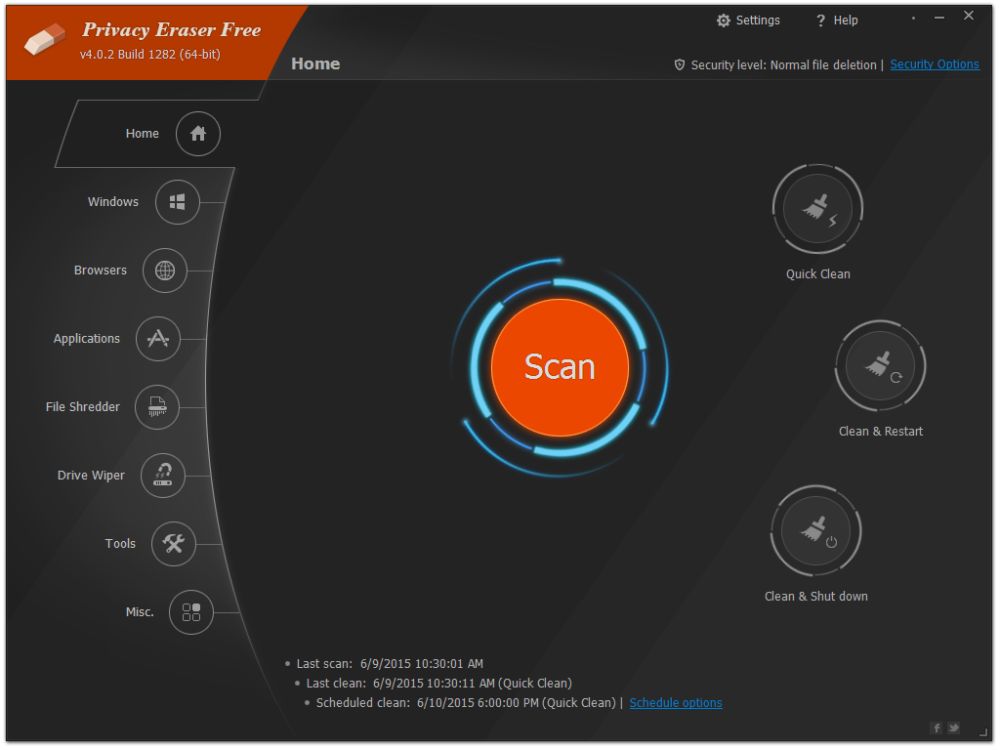
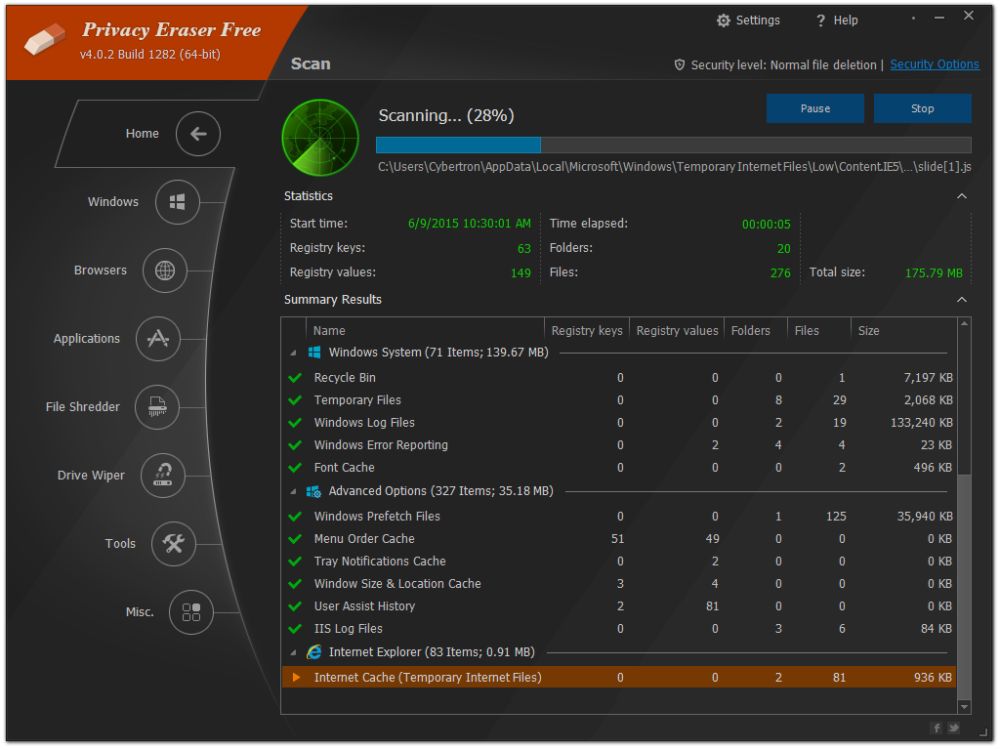
Privacy Eraser is an all-in-one privacy suite that protects your privacy by cleaning up all your Internet history and past computer activities. It supports popular web browsers, such as Internet Explorer, Mozilla Firefox, Google Chrome, Safari and Opera.
With simply one click, Privacy Eraser can quickly erase Internet cache, cookies, browsing history, address bar history, typed URLs, autocomplete form history, saved passwords and index.dat files of your browser, Windows' run history, search history, open/save history, recent documents, temporary files, recycle bin, clipboard, taskbar jump lists, DNS cache, log files, memory dumps, error reportings and much more.
System Requirements:
Windows 10/ 8.x/ 7/ Vista/ 2012/ 2008 (x32/x64); 1GB of RAM or more; 20MB of available hard disk space
Publisher:
Cybertron SoftwareHomepage:
http://www.cybertronsoft.com/products/privacy-eraser/File Size:
9.1 MB
Price:
$79.95
GIVEAWAY download basket



Comments on Privacy Eraser Pro 4.7.2
Please add a comment explaining the reason behind your vote.

iPhone app giveaways »





Android app giveaways »





Does exactly what it claims to do!
Save | Cancel
I've updated to version 4.8 and it became one version free!? why so? someone can explain.
Save | Cancel
Dear GOTD,
The Driver software you gave away recently has made it so my laptop cannot reboot to its operating system and is dismantled. Can anyone tell me what to do to save it and get it back? It only gives me 2 options at start... start normal or with repair, and neither work now. Waiting for a response.....
Save | Cancel
I'm a PC tech with over 15 years of experience. These cleaner programs don't delete anything that will cause your computer to malfunction or not operate properly. They delete temp files, browsing and search history, etc. Yes, someone could use the drive wiper to wipe your HD, but you don't need this software to do that. It can be done through Windows.
Save | Cancel
If you haven't used it before, try "Tools > Internet Options > Delete (under Browsing History) > and select your options: Temporary Internet Files, Cookies, History, Download History, Form Data, Password, Active X......"
Save | Cancel
The software developer's guide above says:
System Requirements:
Windows 10/ 8.x/ 7/ Vista/ 2012/ 2008 (x32/x64) ; 1GB of RAM or more; 20MB of available hard disk space
But some known users of XP OS have commented here, apparently after installing and running the software on their XP OS computers.
So is it official that this software CAN run on XP OS?
Save | Cancel
ric
Well.....de FACTO vs de JURE.
De fact is it runs very well under XP SP3 32 bit.
And while folk are absolutely right to point out you can go "here" and delete internet browser history...and you can go "there" and delete old activeX bits....this little util simply presents it in one graphically pleasant area.
There are many system cleaners out there - some I prefer to this & way more far reaching in capability - but this is an ok little product.
I wouldn't BUY it at USD 80 or whatever it was, but free, yes it's "nice". They would probably make some money out of it at USD10 or so. They are competing against some very good free offerings.
Some parts of the presentation are confusing - many folk have commented that they are not sure exactly what it will delete. Hope the developers take that on board as useful feedback.
Save | Cancel
It even comes with a right click on file and folder to securely delete, thank you:)
Save | Cancel
Thanks for today's offer but I will stick with System Ninja and CCleaner.
Both are free and work well with each other
I use them with Better Privacy and Glary Utilities and have never had a problem
Save | Cancel
All that you can do for free with CCleaner :-)
Save | Cancel
I use the free version of CCleaner. With the Pro version of Privacy Eraser being featured I thought I would try it. For any of these cleaners/erasers I only use them to help save time clearing stuff. I do not honestly believe they will erase/remove everything so hackers will not still some tidbit of information.
I ran both cleaners side by side to see what each found. CCleaner found a little over 500 MB, Privacy Eraser found over 800 MB. Not being a techie person I was amazed that Privacy Eraser found so much more. Well I let Privacy Eraser do its thing and when finished I ran CCleaner again. it found less than 20 kb of data that needed removing. So I thought everything would be great. I restarted my computer and started my regular running programs again.
Upon opening Firefox (my preferred and favorite browser) I noticed that all my pinned tabs were gone. Nothing was saved. I did go in and unchecked the boxes for sessions & site preference. The two that I do not want changed.
I am wondering why these two things were changed that were suppose to be left alone. Maybe I did not actually uncheck the box. So I opened the program back up and yes sessions & site preferences were unchecked. Maybe there is something different in how browsers are changed. I don't know but just beware that you will lose everything when you Erase everything.
One of my problems after starting this program was where to put the registration code. For anyone else who is looking for this click on Help and you will see Upgrade to Pro. Then click on that and you can add everything.
I do not know if I will keep this program or not. I do know that I would not pay $80 for this program. Sorry developers that price is just a little to steep for me. I mean I am just buying a program to erase some data not MS Office that I can use hundreds of different ways.
Thanks GAOTD and Cybertron Software.
Save | Cancel
Nothing against Privacy Eraser Pro, CCleaner etc., *from a more purist standpoint*, AFAIK the only way to not leave tracks on your device is to run the OS in volatile RAM [memory], so everything's gone when it's turned off. Most use a RAM disk to accomplish that -- think virtual hard disk created entirely in RAM. You can create a boot CD/DVD that loads a modified copy of Windows to a RAM disk [visit reboot.pro] -- a USB stick will work, but you cannot write to a closed CD/DVD so there's no possibility of anything being left over -- or in Windows you could copy the virtual hard disk storing a VM [Virtual Machine] to a Ram disk & run it from there. You can save a copy of a VM, then erase the VM's virtual hard disk after use, replacing it with a fresh copy next time you want to run it, but particularly if you use a SSD drive, at least theoretically you could leave some small bit of data behind. IMHO that's what lead many to use Truecrypt [or nowadays something like Veracrypt] with a *nested* hidden virtual hard disk, complete with its own OS, inside an encrypted virtual hard disk, plus that way you don't lose everything like when you destroy a virtual hard disk.
Online you'd need to use a VPN [Virtual Private Network] -- wikipedia.org/wiki/Virtual_private_network -- that did not keep records, & that had not been compromised by someone else to record who used it to go where & do what. In books & movies you see hackers etc. using public networks, e.g. Internet cafes, hacking into a network to use their online connection, or buying & paying for an Internet connection using fake names & credentials to avoid that uncertainty. The idea is that regardless who tracks what, it doesn't lead to the person's real ID.
Along those lines every network chip has its own ID called the MAC address, & it is visible online -- no matter how many devices are connected to a network that's connected to the Internet, all sharing the same IP address visible on the Internet, that MAC address IDs the specific device. There are apps or tools for MAC address spoofing, to change the ID that's reported, &/or you can change & use randomized MAC addresses used by a VirtualBox VM.
Encryption, which is often in the news with federal agencies pushing for back doors etc., is a somewhat separate approach. No one can even look for anything on an encrypted drive they can't unlock, so problem solved. Problems come from refusing to give up the key, which depending on the circumstances, e.g. who's demanding the key & maybe where you're located, may bring severe consequences.
All of which is Not to say don't use Privacy Eraser Pro or similar, CCleaner etc., but only to temper expectations. Privacy Eraser Pro may well meet your needs -- just don't expect any privacy app to be 100% bulletproof if someone with forensic expertise takes a good look at your drive(s). And/or a privacy app may be overkill. If for example your main concern is online tracking by various companies, you can set Firefox, & to a lesser degree Internet Explorer, to not retain records, history etc., with Firefox there are extensions like "Self-Destructing Cookies", and you can most always use private or incognito or InPrivate browser windows, depending on the browser you use.
That said, if you want to double check the thoroughness of a privacy app, nirsoft.net has a number of utilities like MUICacheView, ShellBagsView, & UserAssistView, that will show data stored in Windows registry re: what files, folders, apps etc. have been recently used. There's less reason to do without the convenience of last or frequently used apps or files because your privacy app deleted that stuff, if it's all there in the registry anyway. Do note however that security apps often do not like many [or in some cases any] of the free Nirsoft tools -- they're pretty popular so you should be able to vet them online without much trouble.
Save | Cancel
mike Thanks for this info. It is and will be very helpful.
Save | Cancel
If you want PRIVACY, get a VPN and a GREAT FIREWALL, like Norton, Comodo, etc.. All this does is get rid of footsteps (cache full of tracks as to where you have been, along with COOKIES that have been place on your PC)
CCleaner does a great job of doing this and it is free. The problem with some of these lesser-known tools to clean your PC of any private information, is that YOU COULD LOSE VALUABLE INFO, so MAKE AN IMAGE OR A BACKUP OF YOUR SYSTEM BEFORE YOU USE ANY OF THESE TYPES OF TOOLS.
Save | Cancel
Such software like this does nothing for your privacy, bur makes it very inconvenience next time you surf the web, I had to search and type everything again to re-visit my favorites sites.
Second, there is nothing in those cookies that identify you.
Third, your web history is permanently stored at your ISP and there you can not erase anything.
Fourth, if you want to feel better install it and think that your privacy is protected, just for your ego, nothing else.
Save | Cancel
sanchez
RE: Cookies etc., you might want to research that more thoroughly. And aside from whatever data they may or may not contain, they can be used to build useful profiles of you, your habits, your interests etc.
RE: Web History, Unless you use a VPN, ISPs certainly can keep records of every bit of the data going back & forth across your Internet connection, but you have to ask: "Why would they?" Storing data may be cheap but it isn't free -- it costs the ISP money to monitor anything, let alone store that data. IOW maybe research what your ISP retains, whether it's their policy, required by law where you live etc.
RE: using privacy tools just for ego, different people have different needs. Sometimes all that's wanted/needed is to remove stuff that might be embarrassing or cause problems at work or home -- not anything that would withstand forensic examination. Sometimes it's just to help prevent the profiling mentioned earlier.
Save | Cancel
sanchez Quote: "makes it very inconvenience next time you surf the web, I had to search and type everything again to re-visit my favorites sites." Er. . . do you know anything about bookmarking? About having a Favorites toolbar with one-click buttons that will open your favourite sites? Fair criticism of a developer or its software is acceptable, but moaning on here because you don't know how to surf the web, something else. As to your assertion that "there is nothing in those cookies that identify you" oh, please . . . Don't tell me you allow 'em to build up on your machine because they don't have your name on them????
Save | Cancel
Comment by duke:
"This type of program is unnecessary as windows explorer already built in this tool and does a great job."
Can you please elaborate on this further. Where can I read about how it works.
Save | Cancel
Get CCleaner + CCenhancer.
A lot better & free.
Save | Cancel
Alejandro
BTW if you use CCEnhancer, make sure you use its Advanced option > Trim after you've ticked off all the things you want to delete in CCleaner.
This dramatically speeds up the subsequent scans.
Save | Cancel
This type of program is unnecessary as windows explorer already built in this tool and does a great job.
Save | Cancel
duke
Can you please elaborate on this further. Where can I read about how it works.
Save | Cancel
duke That'll be news to Microsoft, then.
Save | Cancel
MikeR
Is that a question or a statement?
Save | Cancel
Curious. If this program is truly Win 10 compatible, why wouldn't they include the Edge browser in their listing? Their program caught my attention because even CCleaner seems to have an issue with Edge stating that it needs to close the browser before cleaning.
Save | Cancel
Sid CCleaner asks that all browsers be closed for it to effectively clean the cache. It's hardly "an issue".
Save | Cancel
MikeR The browser(s) IS closed while attempting to clean with CCleaner. Do a search and you'll see what I'm talking about. If that's not an issue......
Save | Cancel
"It supports popular web browsers, such as Internet Explorer, Mozilla Firefox, Google Chrome, Safari and Opera."
Does this mean that it doesen´t work with Maxthon?
A tip: I allways copy what I´ve written so I don´t have to write the same thing again if something goes wrong when sending.
Save | Cancel
"Privazer" is free and does a full system scan that is incredibly thorough in removing privacy issues as well as a thorough clean up of all activities. It also let's you decide what you wish to remove. A much safer option.
Save | Cancel
C West
Privazer also has a one-click web privacy delete that takes just a few seconds. It deletes some extra stuff that CCleaner doesn't. I use both together.
Save | Cancel
Anyone get this to work?
All I get when clicking setup.exe is failed to connect.
and I tried downloading package several times.
Save | Cancel
Brad
Try turning off your Anti-virus software temporarily. If that fails, re-download the software.
Save | Cancel
+1 WRT "Privacy Fortress" "Privacy Maximizer" "Privacy ENHANCER" "TRACK Eraser"
Definitely not "Privacy Eraser" - given the intention is opposite
Having now used it, I'd say "System Cleaner" is more accurate.
Installed OK XP SP3 (that last reasonable offering out of MS)
Privacy eraser has changed a lot since I last used it.
Very complete user interface now - pretty informative home screen.
Scans and presents info on what it has found (# of files, size etc)
No idea how you select or de-select the bits you want cleaned or excluded.
All items scanned are ticked so it suggests they all get cleaned - surely there is the ability to leave bits like "recent files" in place if thats what YOU want.
Nothing I tried would select/de-select sub items from the scan/home page.
Similar products offer a selectable tick box for this.
You can right click on a single object and select quick clean and it does appear to just do that object/group.
I selected bits left over from Google Earth and it cleaned just that area ok.
I don't have time to let it destroy my system so didn't let it loose on everything.
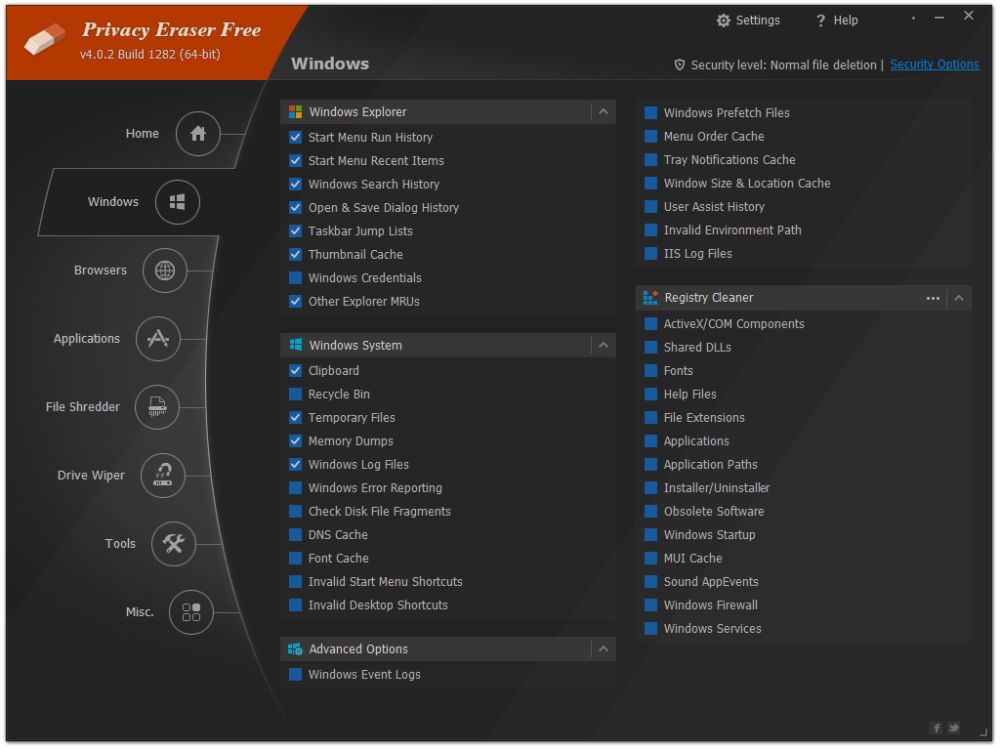
Underneath the HOME option there are sub sections - WINDOWS, BROWSERS, APPLICATIONS etc
Under those sections you CAN narrow down what you want the cleaner to look at or leave alone - so these sub areas certainly have selectable buttons.
Offers file shredder, disk eraser, startup manager, uninstaller...usual clean up tools
I didn't see any mention or offer of a backup before it cleans things like the registry - I understand that for "privacy" you probably wouldn't want that....but what if it breaks your registry, or you are not yet sure just what this code will do !
It will take some time to play with this util and see its full potential - I think it does a lot more than a quick glance shows.
I'd suggest having a backup plan (restore point) until confidence is gained in the product.
Other cleaners (some free) like Cleanup, Privazer, Bleachbit seem to offer a no fuss way of cleaning up privacy issues on a system - without destroying it.
Possibly an ok product - will take time to try it out fully - it's more than just a track eraser
- it's more of system clean-up tool too (non privacy related matters, just clutter)
The product is up against some pretty good free offerings on the net - why would you buy this? Good luck at USD80.
Well - in its defence, this does offer a little bit more.
The ability - from this one util - to see a little bit more - eg what add-ons your browser has and to deal with them as you wish very easily - so it gives a slightly more complete system clean-up kit perhaps,along with the usual privacy enhancing track erasers. In the few minutes I used it, it did highlight (clearly) some bits (activeX etc) that I had left over and I was able to easily remove them with this tool.
Ideas?
- offer backup/restore (folk can use a memory stick to take the backup off the system)
- portable version
- make items found on the home/scan page selectable
- explain more - use popup comment boxes or more informative headings
Thanks for the Giveaway - it's not bad from what I can see. Kinda like it even.
Save | Cancel
For me the best (and free) privacy protection program remains PrivaZer. Maybe not very easy to use, but cleans all kind of traces in depth.
Save | Cancel
Well, on an over crowded field as "privacy cleaners", I'll say, this piece of software is price tagged in the high end. Now, it's going to be exiting to see, what it finds, when CCleaner (with CCleaner Enhancer), PrivaZer and DiskMax (all freeware) has done their cleaning. I expect, a program like this, price tagged like this will tells exactly, what's selected for keeping my privazy intact. Thanks, to the developer and the team behind GAOTD for letting us try yet another piece of software for free. Greets from Denmark.
PrivaZer : http://www.softpedia.com/get/Security/Secure-cleaning/PrivaZer.shtml
DiskMax : http://www.softpedia.com/get/Security/Secure-cleaning/DiskMax.shtml
Save | Cancel
Hi. to find some answers to questions and points already raised about today's Software and it's Publisher - you may want to visit this link to previous Giveaway(s): http://www.giveawayoftheday.com/privacy-eraser-pro-3-5-4/ ,and to find out even more - once on that Page click Publisher. Hope it helps.
Save | Cancel
Been using the free version for about 6 months and it cleans tracks very well. The free version only uses 1 cleaning method but this Pro version offers up to 35 passes to remove tracks. Good stuff.
Save | Cancel
Rudy
Not such good stuff; the 35 pass Gutmann Method is way out of date as described by Gutmann himself.
Information available at the following link:-
http://dban.org/node/40
Was very surprised it was included in this program, this also made me wary of it.
Save | Cancel
Rudy Peter Gutmann disowned the 35-pass erasing method several years ago. Seeing as he created it, it's possible that he knows more about its effectiveness than today's developer.
Save | Cancel
Just use this wonderful FREE extension for Chrome browser
https://chrome.google.com/webstore/detail/clickclean/ghgabhipcejejjmhhchfonmamedcbeod?hl=en
You can decide what cookies you want to save and what you wish to delete. You can easily delete those cookies you do not want.
You can wipe your browsing history.
Save | Cancel
ric
The page can't be shown because of sur.ly TOOLBAR. It seems like each and every link has to be checked nowadays. Just be aware, even the intention was nice ;-)
Save | Cancel
ric
Thank you. You're probably getting downvotes not because of anything you did, but because your link goes to this sur.ly error page, where they make you click again to get to the correct page:
"This page cannot be displayed under the Sur.ly toolbar."
"Open it directly"
Save | Cancel
Allan
You can bypass Surly.
Simply copy the link.
Then go to a new tab of Google browser.
Paste in the link and press Enter.
Save | Cancel
Where is Karl ?
Save | Cancel
Mahgong
..had been 'headhunted' for His valuable and conscientious work elsewhere? If that's the case - Good Luck Mate! In a meantime He still 'exists' in past Comments of Giveays here, in Archives, but for how long?
Save | Cancel
..and relevant to today's Offer? - here for instance: http://www.giveawayoftheday.com/privacy-eraser-pro-3-5-4/ Evening All.
Save | Cancel
I'd like to address the publisher of this software:
Your software might be fabulous--I don't know, as I haven't tried it yet, although I plan to check it out later today. However, one thing that you may want to reevaluate is the name of the program itself: "Privacy Eraser" does not inspire the least bit of confidence. For one, it is semantically nonsensical. Your program is attempting to increase privacy, not "erase" it! In other words, privacy is the state we are trying to attain or achieve; it is the lack of privacy (i.e., the state of exposure, vulnerability, etc.) that we want to eliminate, or "erase." I happen to understand what your program seeks to do, however the name contradicts its underlying purpose.
I'm going to assume that English is not the development team's native language. There is, of course, no crime in that. But I see this issue all the time with desktop and mobile software, and I don't understand why a company wouldn't see it as a priority to hire or consult with someone who's conversant in the language of the country where you are attempting to market a product. (And I have some experience in this arena...I used to work at a company developing software with a large clientele in France, and we wouldn't dream of releasing major revisions before they had been vetted by a native French speaker--it was just a normal cost of business)
It's bad enough when ad copy doesn't make sense, but you are severely handicapping sales when the actual product name can be made subject to ridicule. And please keep in mind that even if others intuitively understand what the software does, as I did, just the fact that the product could be named so ineptly drastically lowers confidence in it (and the company behind it), which is particularly unfortunate if the software actually is very good.
I sincerely didn't mean to berate anyone at Cybertron or belabor the point further, but did want to make it clear that the name "Privacy Eraser" is ill-advised. It would be like a bank or financial institution coming out with an investment product called "The Money Eraser," or a diet product entitled "Weight Stimulator." Anyway, I'm no ad-man, but perhaps a step in the right direction would be a name like "Privacy Maximizer", or conversely "Exposure Eliminator." Something like... "Privacy Fortress" has a nice strong ring to it. But I respectfully suggest your team at Cybertron spend some time thinking it over and give this issue some thought.
Anyway, good luck with the giveaway.
Save | Cancel
Robert Garofalo a well-written and thought out comment. way too often there are products that do exactly as you say. they miss use words or phrases in their ads, spell incorrectly or use words that have a double meaning in english. a wise thing to do is have their copy proofread by a competent, english-speaker. thanks Robert.
Save | Cancel
Robert Garofalo
Very well written comment that hit the nail on the head.
How about renaming it to "Privacy Enhancer"
Good luck with the giveaway.
Save | Cancel
Robert Garofalo
yes well written and agree 100%. thank you.
Save | Cancel
Doug
Wow, Robert. That's a broad (and ill-advised) brush you're painting with.
Save | Cancel
Mike
Surely you mean "with which you're painting", Mike.
Word vs WordPerfect
Excel vs 1-2-3
Access vs dBase
I don't think the most apt app appellation won out in those examples, Robert.
And, of course, it's the erasure bit that conveys the privacy.
Well, that's a few more seconds of everyone's lives wasted to no-one's benefit.
Save | Cancel
Robert Garofalo
Doubt that anyone whose first language is English would have trouble understanding what was meant by the name, one of the strange beauties of the language.
Save | Cancel
Robert Garofalo
Perhaps we make cut them some slack.
In the world of I.T. (as in many other spheres of business) where products are being created; the name is often governed by trademark requirements. There are legal obligations in relation to trademarks, that control the choice of name. You may have the greatest privacy protector : but if another product is already using that name or similar : then you may need to tread carefully. The last thing a company wants, is to embroiled in a lawsuit pertaining to trademark naming rights.
In the meantime : perhaps consider it a creative oxymoron.
Save | Cancel
Robert Garofalo To be honest, Privacy Eraser Pro needs to do a darn sight more than merely getting its name right. It needs to get its pricing right, too.
This is not complex software developed to handle a complex task but a relatively simple single-purpose app whose download size from its website is a mere 4.66Mb. How on earth that relates to the text on this page:
"The program is available for $79.95, but it will be free for our visitors as a time-limited offer" is a mystery . . . not least because on its own website, Privacy Eraser PRO is listed at $19.95 for a 12-month license or $59.95 for lifetime usage.
Candidly, this kind of silliness -- by any developer -- sends me running for the hills. That's especially the case here, because if Cybertron Software can neither get the name of its product nor the price of that product right in a marketing promotion, the prospects for it getting anything else right in actual operation don't look too rosy.
What is especially baffling is that this $79.95 or $59.95 or $19.95 product is a commercial offering in a field dominated by freeware that either singly or in tandem achieves everything that Privacy Eraser claims to deliver.
CCleaner, for example, is just as user-chooser manageable: choose what you want to delete and what you want to keep -- including cookies -- and that's that. Want to ensure a deletion process that's better than standard? Simple: go to CCleaner Options / Settings and select 3, 7, or 35-pass "Secure Deletion" and that's that done, too. Want to wipe free space on your hard drive, where all the stuff you thought you'd deleted may actually still be there? Again, simple: select 7-pass secure deletion, select wipe free space, turn the computer monitor off, go to bed, and come back in the morning to find CCleaner has laundered everything.
If you'd like to undertake secure file deletion on the fly -- without having to go to the bother of actually opening an eraser program -- then just install the outstanding File Shredder from Pow Tools. Right click on a file in Windows Explorer then click on "secure delete" and that's it, the file will be instantly shredded according to however many passes you've set up in your operational preferences. Finally:
Bothered about your browsing cache? I haven't used Internet Explorer for years nor recommended anyone else to, either, and I certainly wouldn't go within a country mile of Google and its Chrome. I do know though that it took me all of 30 seconds in my Firefox settings to ensure that the browser is set to (a) never save history and (b) automatically clear cache on closure.
All the above -- CCleaner, File Shredder, and Firefox (and PrivaZer, too) -- cost precisely nothing. As today's developer must surely be aware of that, I'd assumed it would be justifying the mind-boggling prices it is asking by offering a product which out-performs existing, well-established freeware. Sadly, nothing I've seen on its own website nor from any external review indicates that.
On which basis, therefore, I'd politely suggest to Cybertron Software that it goes back to the drawing board and starts again. Whether its product's name is right or wrong is of minor consequence compared to the fact that there's never going to be a future for any paid-for software of any name which can't do better than the stuff any computer user can readily get for free, and for life.
Save | Cancel
Robert Garofalo
... how about "Privacy Guardian"?
(And as a non-relevant aside about this giveaway in general, I see a lot of negative comments despite the large number of thumbs up)
Save | Cancel
MikeR
Looks like you’ve done a restore on the specs, looking good. :-)
Save | Cancel
Installed and registered, if I recall correctly registration is done by clicking upgrade to pro on the help menu.
A readable but mud coloured interface; under Settings it is worth changing the Update selection which is under General, Automation.
A quick scan found many residual bits of information on my system, unfortunately there was not enough information about each of them to make me feel comfortable in removing them.
At $79 and more in-depth understanding of what will be removed should in my opinion the included and because it isn't I haven't the confidence to use this program.
Save | Cancel
XP-Man
Put this simply ... I am a pensioner, I don't speak 'Tech', initials baffle me and Registering anything is scary when money is scarce. I am going to try and register this software as stated, but if anything goes awry, it is out the door!
I don't often make comments though I do read them before installing because they really are helpful so, on behalf of other shybies like me, Thank You .... you're breath is not wasted!
Save | Cancel
Be careful when erasing cookies as websites save log-in info in cookies (Fortunately, it appears this software allows one to choose which cookies to delete). Also, much of the data that these privacy erasers delete is not particularly sensitive, like browsing history, search history, etc and some can be helpful to your computer. However, if there are other people using your PC and you want to keep them from poking around and looking at what websites you visit and the like this software can be useful (though the average user usually doesn't have the expertise to do so).
Save | Cancel
shegeek72
Can you tell me why it is not good to erase all cookies. I use "better privacy" addon on firefox and i erase all cookies included evercookies ie. LSO cookies. I don't think it affects log-in info. The website set new cookies when i log-in again.
My advice is to avoid these kind of software. CCleaner does the same and is much better + free.
Save | Cancel
jermin
Yes, it creates new cookies when you log-in again. The log-in info, as well as what pages you visited, are stored in cookies as a convenience so you don't have to log-in everytime and is usually encrypted. Deleting all cookies is like giving your computer a lobotomy. Websites won't recognize you, nor what products you viewed. In your case it isn't a problem since you log-in everytime.
Save | Cancel
I don't know what this software can do better than CCleaner or other free program ,but I definitely would not buy this for the price they want
Save | Cancel
Kjell
I have been using CCleaner for many years, and I would most likely never replace it. It has never failed me, and seems a lot safer to use than a lot of other "erasers". It is always FREE, but there is a paid version that is nowhere near as expensive as this offering today.
Thanks for the opportunity to try something new every day, GAOTD!
Save | Cancel
If it was portable, i would use it after using others computer occasionally. I don't need such deep cleaning at home.
Save | Cancel
hardgirl
That's nice of you. Use someone else's computer and leave it mucked up with all their log on details missing etc.
Restrict the use of this sort of program ONLY to your own property
Save | Cancel
hardgirl
For online stuff just use a portable browser -- FireFox portable is popular -- or use private browsing sessions or windows. Either way should keep any permanent data written to disk to a minimum.
Save | Cancel
hardgirl Wow! I haven't commented here for a while, but I just have to weigh in on that concept...
Hardgirl, please, please, please do not ever do what you are suggesting.
Do not carry around a thumb drive with portable system utilities on it.
And, if I allow you to use a device on my computer system, do not plug in that thumb drive and run those utilities, as you see fit? Including deleting files, as you see fit?
In my country, the law refers to such actions as "Unauthorized Physical Damage", a criminal offense. If the resulting costs to repair my computer system are low, it would be a misdemeanor offense. But, it could be considered a felony offense, if the costs were substantial. And they likely would be substantial, as you would be on the hook for the considerable costs incurred to have a professional company do the forensic analysis and other remedial measures to analyze my entire computer network and retrieve and restore my data and my computer system to its original state. You would also be liable for any damages resulting from any disruption caused to my own activities on my computer system.
Please understand, if I grant you access to my computer system, I AM NOT also authorizing you to alter or delete any cache, cookies, logs, history files, index files, etc.
And, like Lofty, I would be upset with you, as well, for mucking up my computer.
Please just leave that thumb drive at home.
Cheers
Save | Cancel
Jaywalker
I don't think anyone is suggesting using a cleaner is a nefarious fashion. The product's website claims the software allows one to selectively delete cookies, allowing one to only delete those associated with their browsing.
Save | Cancel
shegeek72
You are missing the point. It is not a matter of whether or not her actions are nefarious. Her intent is to plug in a thumb drive and run a covert utilty that allows her to capture and analyze ALL of the cookies, history files, logs, etc. on my computer. It is immaterial that she just wants to delete records that pertain to her use of my computer. Absolutely an invasion of my privacy.
Where I should draw the line about what she should be allowed to do to my system files. I dont think you don't understand what this software can do. It can do far more than just delete a few cookies.
First, please consider what you just said.
"Selectively delete".
Meaning she is running covert software on my machines that will allow her to analyze all of my system files and then "selectively delete" anything she believes should not be there.
One, she has absolutely no right to isolate and analyze all of my system files. Two, if she truly wants to remove all traces of her using my computer, we are not just talking about cookies that are used for browsing.
Save | Cancel
shegeek72
Go back to the top of this page and re-read what this software is capable of doing.
We're not just talking about a "cookie" deleter.
Save | Cancel
Jaywalker One should suppose so, when the price is tagged 80 bucks. However, when using the "new Windows" from Microsoft, you share every keystroke with a private company - unless you turn of Cortana (e.g.) Win7-8-8.1.2 and Win 10 are considered spyware - in my book :))
Save | Cancel