Every day we offer FREE licensed software you’d have to buy otherwise.
Giveaway of the day — Neat projects 2 Pro
Neat projects 2 Pro was available as a giveaway on June 13, 2023!
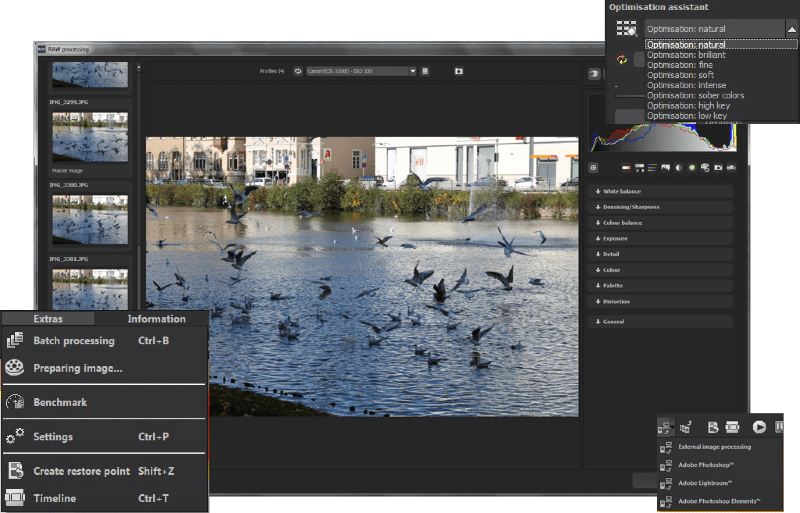
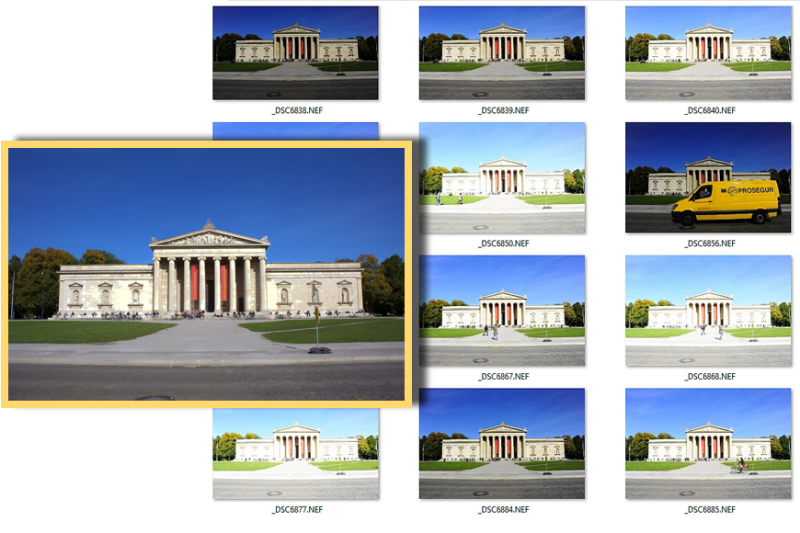

London, Paris, Rome: Hundreds of attractions with amazing photo ops. As usual, you’re not the only one trying to steal a glance or find the perfect perspective, and more often than not this means that the hopes of getting a clear shot of your subject start to look rather bleak. NEAT projects digitally removes all people, animals, or vehicles obstructing a clear line of sight to your target.
Take photos with NEAT projects 2 professional that were impossible before.
Always have a clear view of your subject, even in crowded places.
Enjoy sights, squares, parks without annoying tourists.
No image editing necessary: quick sense of achievement guaranteed!
Fits perfectly into the workflow: including plug-in for Adobe Lightroom.
System Requirements:
Recommended: Windows 10/ 8/ 7 (x64), Processor Intel I5, 4 GB HDD, 2 GB HDD,1.280 x 1024 Pixels Screen Resolution, Graphic Card: DirectX-8-compatible, 128 MB, 32 bit colour depth; Minimum: Windows 10/ 8/ 7 (x32), Processor Core Duo, 2 GB HDD, 2 GB HDD, 1.280 x 1024 Pixels Screen Resolution, Graphic: DirectX-8-compatible, 128 MB, 32 bit colour depth
Publisher:
FRANZIS Verlag GmbHHomepage:
https://www.projects-software.com/season/neatFile Size:
101 MB
Licence details:
Lifetime
Price:
$99.00
GIVEAWAY download basket




Comments on Neat projects 2 Pro
Please add a comment explaining the reason behind your vote.

iPhone app giveaways »





Android app giveaways »





Note it comes with an older version of FreeImage.dll so you may want to replace it (just the .dll is needed) with a more recent version if you are using Raw images and your camera isn't supported. It still doesn't support a lot of newer cameras though.
The latest version I have is 3.18 and 6,924,800 bytes.
https://freeimage.sourceforge.io/download.html
Save | Cancel
Unable to register. The program will not accept the registration code which I received via e-mail. In addition, the instruction says to "Enter your personal user ID and the registration code in the designated boxes of the software." There is no box to enter the personal user ID that was sent via the e-mail, just the registration code which it will not accept. It would have been nice if the option to enter the information was accessible via a menu option, vs. having to close and re-execute the program for every attempt.
Save | Cancel
Had lots of trouble Made many attempts to log in using my customer credentials. Attempted to even change my password several times. Always tells me my password is incorrect. I've successfully registered other software from this developer.
Anyone else face difficulties when attempting to register this product?
Save | Cancel
I have a fairly powerful Windows 10 computer, and this program will not load because I don't have lightroom installed. I keep getting this error message" The application was unable to start correctly (0xc000007b)
Save | Cancel
Ok,,, the registration code. came with an  at the end. Do not use the  .
Save | Cancel
I've got the Neat projects 2 giveaway from December, 2022 -- this is the Pro version. Normally the pro version comes with the Photoshop compatible plugin, but not in this case -- you get a Lightroom plugin instead. Removing people &/or objects from a photo is not new -- there are several apps that can do this -- but they generally rely on software guessing at what's behind the stuff you get rid of, to fill in the blank so to speak. With Neat projects 2 OTOH you stack multiple photos and the software merges them together. The disadvantage of this method is that you have to plan on using it in the first place, taking multiple photos so that you have a clear shot of what's behind *moving* people, vehicles etc. that you want to remove later on. Video might work once converted to images, and might be easier to take with your phone. The advantage is that there's no guesswork involved -- your photo will show what's really in the scene. Photoshop can already do this -- see tutorial here:
photoshopcafe.com/remove-tourists-photoshop-3-clicks-crowd-removal/
As usual with Franzis giveaways I installed Neat projects 2 Pro in my VM to avoid installing the old C/C++ runtime files included in the setup file. Here they're from 2014, & likely have had security patches released, but regardless don't need them -- as these runtimes are included with lots of software, you probably don't need them either, and they just wind up contributing to the HUGE size of the Windows\ WinSxS\ folder. [In my Win11 VM the setup file complained that a newer runtime file was missing?] Anyway, just copied the Neat projects Pro folder to my regular copy of Windows, also as usual, & when I ran it a dialog popped up where I entered the key and activated the software. The app automatically adds its needed files to the Users folder.
Save | Cancel
mike, Runtimes for Visual Studio 2012 or 2013? (Re my recent answer to the first post where I assumed the 2012 set was the one to pick?
Save | Cancel
Will this work on Windows 11 ?
Save | Cancel
Ron, setup showed an error that a Microsoft C/C++ runtime file was missing in my Win11 VM, but after copying the app's folder to my regular copy of Win11 it runs just fine. IOW you **might** have an issue running the setup file but the app itself works.
Save | Cancel
Ron,
Does for me
Save | Cancel
Never had a chance to use this yet but Franzis software is always high quality.
Save | Cancel
Installed and get system error message, "The code execution cannot proceed because VCOMP100.DLL was not found. Reinstalling the program may fix this issue." I have reinstalled 3 times to no avail. Any suggestions?
Save | Cancel
Johno, can't help sorry getting the same error message
Save | Cancel
Johno,
Here is the missing link download:- https://www.dll-files.com/vcomp100.dll.html
Save | Cancel
Johno,
https://www.lifewire.com/how-to-fix-vcomp100-dll-not-found-or-missing-errors-2624174
a DLL file Microsoft refers to as Microsoft C/C++ OpenMP Runtime.
Save | Cancel
Johno, I assume you'd need to install some Visual Studio runtime files, but should be included?
Save | Cancel
Johno, My assumption is that's just the first file from the (I guess) Visual C++ runtime that wasn't installed (or is a corrupt DLL - do you have one in windows\system32 and windows\SysWOW64 if x64 system?). I suspect if you add it AND register it with Windows ("regsvr32 " in a command prompt, no quotes) then it will just complain about the next missing one (unless corrupt). You really want a redistributable of the correct Microsoft installer (32 or 64 bit to match your operating system). As the program uses msvcr90.dll (worth checking your system for that BTW) then you could look here:.
https://learn.microsoft.com/en-us/cpp/windows/latest-supported-vc-redist?view=msvc-170
The Visual Studio 2012 one might work, and there's no down-side to installing extra ones except disk space use.
No promises though, but that's my best opinion. Sorry if a bit complicated.
Save | Cancel