Every day we offer FREE licensed software you’d have to buy otherwise.
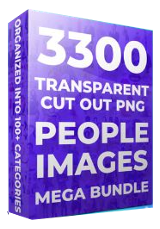
Giveaway of the day — 3300+ Transparent People Stock Images Mega Bundle
3300+ Transparent People Stock Images Mega Bundle was available as a giveaway on July 14, 2023!
Please note that the program archive includes only readme file with the download instructions!
This massive bundle features over 3300+ transparent people stock images organized into over 90+ diverse and unique time-saving categories for your convenience.
- All images are distributed into over 90 easy to browse categories so you can find images for your next project easily.
- All the images are in high-resolution quality.
- All files are delivered in transparent PNG format. These images come with a transparent background so you put them on top of any video or image and they will integrate with the background perfectly.
System Requirements:
Online membership accessible on any device
Publisher:
JasratiHomepage:
https://www.stockelementsfx.com/offers/transparent-people-images-ace/File Size:
≈ 10 GB in total
Licence details:
extended license for unlimited number of personal and commercial projects
Price:
$27.00
GIVEAWAY download basket



Comments on 3300+ Transparent People Stock Images Mega Bundle
Please add a comment explaining the reason behind your vote.

iPhone app giveaways »




Android app giveaways »




Thanks for the images
Save | Cancel
Your welcome Brian!
Save | Cancel
how to execute the file? need to download from website?
Save | Cancel
Yes that's right, download the file on to your computer.
Save | Cancel
Okay, I just had to look because of the phrase of 'transparent people'. I couldn't image what in the world use of transparent people could be. Silly me, they meant people with transparent backgrounds: Just a matter of odd phrasing
Sorry will pass however, as I don't do anything on a cloud which is just someone else computer. I also avoid all things google that I possibly can. To me they seem much much too greedy and are just every where these days. Got their fingers in way too many pies for my taste. People are using their name in place of search; reminds me of the dust up years ago between the word Kleenix and tissues or copy machines and Zerox.
I'm sure that is an opinion that many will ridicule, but that's me.
If this was a separate entity from google and the cloud I would be interested.
Save | Cancel
Google Drive folder share, not a program or zip file with images.
I am always thankful for the freebies just so others are aware what it is
Save | Cancel
My file downloaded into Google Drive. I have no idea how to get them out of there. Nothing I seem to do will let me download them, or even preview them. I didn't know I was that illiterate when it comes to Google. Anybody know where I can go to get help?
Save | Cancel
Bill,
On the folder you want to download, click on the three dots select download. Work best with a download mgr. such as IDM.
Works flawlessly every time for me.
Save | Cancel
Bill, They are stored on the provider's own google drive account. You can just download the files from there straight to your desktop. IF you are saying that you are signed into a google account of your own and it is wanting to put them into YOUR account instead of downloading to the desktop, then just log out of your account and then go back and choose download (you don't have to be signed into google to download the files). Instead of downloading individual files, you can choose "download all" to get all the files at once (in a zip archive). It will be a fairly big file.
Save | Cancel
Bill, You should have a download zip
Or
Right click and download the whole file, if multiple, ctrl and left click to choose each then right click download.
Save | Cancel
Bal, Tested it.
Click top file then scroll down to bottom and hold shift + left click, it will highlight all.
Right click on it and Download
Save | Cancel
I tried to "download all" with Chrome, but it always failed. I used MS Edge and finally succeeded. Drive recommended Chrome, which always failed and I had numerous "Network Errors" on both and had to keep clicking continue.
Save | Cancel
Worked fine for me on chrome. Maybe yours is not updated to the latest version, or you have a conflicting extension or downloader installed.
Save | Cancel
Very good collection indeed!
I have been satisfied with Jasrati for some time now, and their products have helped me out on many projects.
Never an issue.
Save | Cancel
SFLORG, that's great to hear, thanks for your support!
Save | Cancel
Thanks for the useful download!
I'm sure to find uses for many of these.
Save | Cancel
Mr 72yr old ignorant here - fairly new to 'the Cloud'.
I have gone thru the required process and can now access the files via a shared 'drive' folder.
if I now save a link to that ' iDrive ' I can see it is almost the same as access to a file on my HD.
Can someone confirm for me that those files remain in my shared folder for my personal use for ever - or for today only?
Thanks
Save | Cancel
Terry E. , 60 something old here, but moderately computer literate.
I actually refuse to get a google account but can still access the drive and download stuff.
It looks like your account will remain active indefinitely and you can always access the google drive account to download whatever you want to work with.
I don't like cloud storage because my Art computer stays offline (never has been online and never will be!) so I just grab what I want and move it to that computer or an external storage drive.
Not the exact answer you were looking for, but I hope it helps anyhow!
Good luck.
Save | Cancel
Terry E. , I can say with absolute certainty that those files will not be there forever. If you want a copy of them that you control, then you need to copy them to a local HDD and not rely on the cloud copy. If the owner of the cloud files decides to nuke them, your access will go poof!
Save | Cancel
David Jaynes, "
I actually refuse to get a google account " but google account is useful and no one said you need to put your real info. besides youre over 60, not 16 what youre afraid of?
Save | Cancel
anna, I never said I was afraid of anything.
I didn't mention my reasons because most people wont want to hear it, but since you asked : I boycott google and everything they own to the maximum extent possible (some things, like even the captcha here, require them so they get allowed for that moment then immediately blocked again).
I don't approve of their business tactics and can neither support or use them in any way.
It's already too long a story so the details are unnecessary.
Hope that helps.
Save | Cancel