Every day we offer FREE licensed software you’d have to buy otherwise.

Giveaway of the day — YouTube Music Downloader 3.2
YouTube Music Downloader 3.2 was available as a giveaway on March 19, 2010!

Download YouTube Music videos and convert them to MP3, AVI, WMV, MOV, MP4, 3GP formats.
Download Millions of music from YouTube, Try YouTube Music Downloader Now! New version added YouTube HD/HQ video downloading features.
System Requirements:
Windows XP, Vista or 2000; DirectX 8.0 or higher; Pentium Processor or better; 128MB RAM or more; 20MB Hard disk space for install
Publisher:
YouTubeMusicDownloader.comHomepage:
http://www.youtubemusicdownloader.com/File Size:
4.23 MB
Price:
$49.95
Featured titles by YouTubeMusicDownloader.com
PDFZilla is a desktop application that quickly and accurately convert PDF files into editable MS Word Documents, Rich Text Documents, Plain Text Files, Images, HTML Files, and Shockwave Flash SWF Files.
PDF OCR is based on OCR technology to convert scanned PDF paper books and documents into editable electronic text files fast and easily. PDF OCR has a build-in text editor which allows you to edit ocr result text without MS Word. PDF OCR also supports batch mode to OCR all pages of pdf file to text at a time.
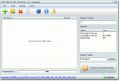
Zilla PDF to TXT Converter is a windows application to convert pdf files to plain text format files in batch mode. Zilla PDF to TXT Converter also support convert specific pages range to txt files.
JPG To PDF Converter is a windows utility that quickly convert multiple images into a single pdf document. With JPG To PDF Converter users can create pdf files from image formats like JPG, GIF, BMP, TIF, PNG and PSD.
MP3 Converter is an easy-to-use all to MP3 Converter. With MP3 Converter you can convert no matter video files or audio files to MP3 format. MP3 Converter supports WAV, WMA, AVI, WMV, MOV, 3GP, MP4, FLV, VOB, DAT, MPEG...
GIVEAWAY download basket




Comments on YouTube Music Downloader 3.2
Please add a comment explaining the reason behind your vote.
iPhone app giveaways »





Android app giveaways »





youtube is very addicting, i spend 5 hours a day just watching videos on youtube*'~
Save | Cancel
Thanks Boingo, MikeR,aRenegade, & GMMan. They pretty much said it all. Works really nice, & I like it a lot! I also have a few other aps of same type, but this works best.
____________________________________________________________________
I don't know where else to post this so.. 2 complaints NOT about this software.
1-I highly resent that button right above the download button that is actually an offer to do a PC scan for you. Too easily clicked by someone wanting to click download, & you know darn well that's exactly why they placed it in that spot!
2- Too many people here are giving comments a minus mark for no or very little reason, like for Boingo above. It's making me more irritated every day. Can't you peeps who just like to hit no please be more mature about it? I wish you'd take the yes-no about comments AWAY, GOTD. What good is it? It's never been used fairly. Thanks.
Save | Cancel
I cannot register this product...every time that I paste or type the product key nothing happens...I have Win7 32-bit...help please.
Save | Cancel
@GMan. Well, the thing that bothered me most about the websites that do it is the terrible quality they output.
Try some music in both methods. Your general Youtube Downloader website will produce something of a lower quality than this.
And price doesn't really come into it here!
It is the /giveaway/ of the day!
You just got it free, pal.
Save | Cancel
When opening the application "Loading page ..." is displayed in the bottom right corner (above "Feedback"). An increasing percentage is shown for "loading page" but.... it stops at 39%. I can download from youtube correctly.
Does anybody else have the same problem? Any idea what this is?
Save | Cancel
HELP!!!
I am unable to register this.
I keep getting Runtime Error 429
and am so far unable to fix it.
I would like to register it, and
would be grateful if anyone can help.
Thanks.
Save | Cancel
MikeR, #18, thanks for your comprehensive review.
Very helpful.
Save | Cancel
Ok, let's be honest; why the hell would you buy a $50 Youtube Video converter when there are over 100 free Youtube Video converters that can do the exact same thing?
Even if it can't convert to other formats like .wma, who cares! Like most converters converts the videos to .avi which is probably the best quality, and all you gotta do is download "VLC Media Player (free)" to watch 'em! There's even a free PORTABLE version of "VLC Media Player" that you can download onto your portable devices too!
Not only that but there are tons of video converters such as the ones from "Diagrity"!
Seirously, the guy who created this product is nutz; he has no brain at all. Do some research man! Type in "Youtube Music Converter" on Cnet.com and check out all the free ones you can download!
~Joji~
Save | Cancel
Yea seems buggy, it froze at 39% on my first download. Plus I entered the registration code and it was successful and it told me to restart the program, but when i did it was still the unregistered version, and i don't remember the serial key either =(
Save | Cancel
I'm not too amused. Sure, the interface is simple and all that, but do we really need programs that does separate parts? How about an "all video sites" to "all formats" converter? Now, I can't verify what the real price of this is (site blocked at my end), but in any way this shouldn't possibly be more expensive than $10. It's a browser and a downloader, with an external converter. Is it really worth $50 (or whatever it is)? If you want an easy way of conversion, try kickyoutube.com. No downloads except your end result, no emails to input, and you can pretty much start it and forget it (though it would be useful if they give you a notification of some sort when it finished).
Save | Cancel
I approve of this.
It made what was clunky with a couple of firefox addons independant of browser and fast. I am glad to have it in one package.
Kudos to the programmer.
(I do agree, however, that $50 is a bit much, but it is the prerogative of the seller).
Save | Cancel
After trying out today’s GOTD I’ll admit I had to say to myself this program isn’t bad, it’s not great, but it hardly deserves the bad rap that others have given it. The interface is clean and by building in a browser engine the developer made the program all that much easier to do what I wanted to do. No hassle, go right at, select a output format, name the new file, and go. It doesn’t get much easier than that.
@#6 Rear Guy – You wrote, “There’s an alternate way of downloading youtube files in ANY format; you can do it through your browser. Simply go to ZamZar.com and paste the url and select the desired format. The converted file will be sent to ur email address.”
- Allow me to take the liberty and finish that sentence of yours. “Simply go to ZamZar.com and paste the url and select the desired format. The converted file will be sent to your email address; along with a terabytes worth of spam delivered everyday for the next five years to your Inbox!” What a bargain!
@#1 hussian – I don’t want to burst your bubble, but to do the things you wrote about requires RealPlayer SP Plus; Which sells for $39.99...lol
Save | Cancel
Downloaded, activated and installed without a problem (though watch out if, for some weird reason, you're taken to the software's website purchase page: just close it.)
Kudos to the developer: this doesn't seek to slam in toolbars and other crap -- it's honest, open and malware free. (Makes a helluva change nowadays.)
Runs fine on Windows x32 (the more complaints I read on here from frustrated x64 users, the more glad I am that I never fell for the marketing hype: x32 addresses a max of 4GB RAM and 4GB RAM is all and probably more that I need for everything from video editing to Photoshop on my 'puter.)
The app loads quickly and is resource-light. GUI clear and attractive.
The categories all work well and the search facility is as fast as it's impressive: I searched for a fairly obscure artiste and five pages of fully detailed results were well-nigh instantly returned.
Converted audio v original: I've now run half a dozen music videos (flv to MP3 audio) and there's no degradation. Conversion is fast.
To the knockers on here, many of whom can't even be bothered to try this software and make the effort of reporting back to the rest of us:
* Today's GOTD is FREE. So why keep banging on about how expensive the darn thing is? (And why not try doing 30 seconds of research on the publisher's website before moaning anyway? At least you'll be quoting today's price.)
* You can mess around endlessly with changing urls to incorporate the number 3 or the letter y or anything else that comes along but in practice I've yet to find any such substitution system fast or dependable.
* You can use freeware to download and convert (of which VDownloader is pretty good, as kindly recommended by DSP at post #16) but that freeware doesn't match the instant easy-to-use one-click benefits of today's GOTD.
* Not everyone has Firefox as their browser. Or wants it.
Verdict: today's great 'bargain buy' -- this is an excellent freebie. Congrats to the developer, and thanks to GOTD.
Save | Cancel
I prefer the Firefox add-on called "Easy Youtube Downloader" which puts your download choices right on the YouTube page be it FLV, Mp3 or Mpeg4 and even HD etc. Simple and easy to use.
Save | Cancel
Thanks GOTD but VDownloader 1.12 is free & can download the original file in various formats such as avi, MP3, MP4, PSP Compatible, iPod Compatible, iPhone Compatible, Nokia N800 / N810, 3GP, VCD (PAL & NTSC) SVCD (PAL & NTSC) and DVD (PAL & NTSC). You can also download the original file as is.
VDownloader also has a search and browser option and can be used to batch download from multiple sites.
Save | Cancel
YouTube Music Downloader 3.2 is the greatest piece of software ever made. Don't kid yourself. There are a lot of things to do on your computer, but few are as productive as watching and downloading videos and only YouTube Music Downloader 3.2 can make it this easy. We should all be gushing with gratitude to the developer and sending him little thank you notes with glitter and perfume. This program would be a steal at only $50. They should charge hundreds for such a quality piece of software! And today, it's FREE!! Does life get any better?!!
Thank you GAOTD for one of the greatest freebies of all times!
I hope I have helped many make an informed decision to download.
Thank you,
Boingo
Save | Cancel
A great Giveaway of the Day. I was just wanting an easy way to download the music from some YouTube vids of vintage blues tunes and this works so danged good! I read the comments on other ways of doing this but this software just makes fast and simple. After testing it I found myself also downloading and converting some greate vintage video too. This is definitely a nice little tool to have available.
Save | Cancel
I'm happy with it. Installed without any problems WinXP SP3. I've played with a few YT downloaders and found one that has been okay (not the greatest audio quality), but like to try different ones. I've also tried Firefox Add-Ons without much success. Easy to use, does the job and does it well. I just need to know & play with the settings to fully understand them. Thanks GAOTD.
Save | Cancel
Free alternative: vdownloader.com
I use this software and I find it very easy and fast.
Can also download to multiple formats and from multiple video sites.
Save | Cancel
Another website you can use is http://www.kissyoutube.com. Just enter the full URL to your video into the address bar and add "kiss" to the URL before the "youtube.com" portion and you will be presented with download versions.
Save | Cancel
There are many Downloader's out there, they're hit and miss for actually downloading music and video. I use the Mozilla Firefox browser, completely customizable and it comes with many add-ons for grabbing music and video. Net video hunter is one of them, and this app has grabbed everything I've ever tried to get, without fail. It's worth looking into. For file conversion a good free alternative is a program called Format Factory, it does more than convert video. Video joining and separator and crop tools as well. http://www.formatoz.com/index.html
Save | Cancel
very buggy software, tried to download 3 different mp3's with no success as it crashed everytime. That is on vista ultimate 64.
much better software for free. I use http://www.onlinevideoconverter.com/
you can just copy any paste video url into the online converter and it does it all in your browser, very quickly aswell.
Save | Cancel
PROS:
* Smooth download, installation, registration on Win-7 (32-bit) OS.
* Simple, attractive, easy-to-understand, easty-to-navigate GUI.
* Complete, detailed, helpful guidance located within program.
* Very easy to use and operate.
* Program lists different music categories/genres on left-side pane.
* Program shows selected genre's music videos on right-side pane.
* Program easily, smoothly and efficiently displays "download video now" button/option upon user-selected music video.
* Program allows user to select different conversion settings and features, upon clicking on "download video now" button/option.
* Conversion is quick, smooth, and easy - I downloaded & converted a video in about 30 seconds.
* Quality of downloaded/converted video is equal to quality of original video.
CONS: - too expensive compared with freeware alternatives that are equally capable and equally feature-rich.
Summary-Despite high price tag, program is easy to use, feature-rich & works well. Two thumbs up for today's Giveaway. Thx, GOTD & Developer.
Freeware Option:
YouTube Grabber
YouTube Downloader
Save | Cancel
If you need to download youtube videos all you need to do is go to the video and change the 'y' in youtube to a '3'. then it asks you whether you want a mp4 format video or a flash(.flv) video.
For example: http://www.youtube.com/watch?v=qybUFnY7Y8w changes to http://www.3outube.com/watch?v=qybUFnY7Y8w
But i suppose if you want more variety in formats or just want the audio you can use this, or the free youtube downloader people have mentioned on cnet.
Save | Cancel
There's an alternate way of downloading youtube files in ANY format; you can do it through your browser. Simply go to ZamZar.com and paste the url and select the desired format. The converted file will be sent to ur email address.
Rear Guy
Save | Cancel
This program worth a try but it is just too expensive!!! Even the proffesional one you can find in the internet just cost about $40...
Btw it is quite good.
Rating: 7.5/10 Price rating: 0.5/10
Save | Cancel
why should i pay for this when a free software 'youtube downloader' does all this for free?
check it out at cnet.
not worth the price...but as a giveaway, go ahead and try it(i havent)
Save | Cancel
this thing costs $50?
sure, it is convenient compared to downloading with downloadhelper via firefox, then using aoa audio extractor to extract the sound.. but the above method is free.
this software is worth the cash, only when it's free. (:
Save | Cancel
very useful and good software if you want extra features of converting
downloaded youtube videos like conv to avi,wmv,mov, and so on, but if you want just basic features to download youtube and convertion to mp3..3gp..mp4..ipod..you can get it free in realplayer sp http://www.real.com/
Save | Cancel