Every day we offer FREE licensed software you’d have to buy otherwise.
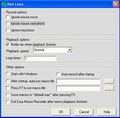
Giveaway of the day — Easy Macro Recorder 3.81
Easy Macro Recorder 3.81 was available as a giveaway on March 20, 2010!

Easy Macro Recorder is a handy utility that makes your computers automatically do tasks for you. It records all operation of mouse and keystrokes and saves them as macros, then Easy Macro Recorder can play back the recorded macros to automate your work any number of times. It works on any Windows applications.
Easy Macro Recorder is very easy to use, just three steps: record, save and playback. It doesn't require any programming experience.
Key features:
- Record all events of mouse and keystrokes of any Windows applications
- Repeat playing back macros for any number of times
- Allow you to do things that are tedious or time-consuming without actually doing them yourself
- Play back macros at schedule time
- Easy to use macro editor with several commands
- Easy to use and don't need any programming knowledge
System Requirements:
Windows 98, SE, ME, NT, 2000, XP, 2003, Vista and 7; Pentium 166MHz or higher; 32 MB RAM (64 MB recommended) plus 3 MB HD space for installation
Publisher:
GoldSolution SoftwareHomepage:
http://www.flashplayerpro.com/MacroRecorder/File Size:
2.38 MB
Price:
$29.95
Featured titles by GoldSolution Software
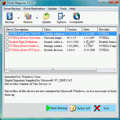
Driver Magician offers a professional solution for device drivers backup, restoration, update and removal in Windows operating system. It identifies all the hardware in the system, extracts their associated drivers from the hard disk and backs them up to a location of your choice
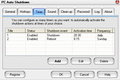
PC Auto Shutdown is a handy software that helps you automatically shutdown, power off, reboot, hibernate, suspend or log off computers at schedule time you specifies. It can shut down computers at schedule time when no user is logged in or when computers are in suspended power conservation mode. It gives you different ways to schedule the shutdown event for your needs, such as daily, weekly and only once.
GIVEAWAY download basket




Comments on Easy Macro Recorder 3.81
Please add a comment explaining the reason behind your vote.
iPhone app giveaways »





Android app giveaways »





The program is very easy to use, runs well. After recording the macro, you can easily edit it to make it runs quicker, or to add, delete or change anything you like, so you can make one macro into a number of similar macros. It should meet the needs of the majority of normal users.
Save | Cancel
To the developers: First of all, i faced a little problem with your software. I have been using the trial before the giveaway....
If you press Ctrl+Alt+R and then enter the file name and after doing the macro, After pressing Ctrl+Alt+S you get a working file.... however if i use the hotkeys and record with another file name, i still get the old macro copyed to the new file. please fix this issue....
Second thing i noticed is the Icon... The icon matches the software for sure but its very 'clumsy' seeing only 1 coloured icon in the taskbar specially in windows 7. The icon needs to be worked with... I will be happy to help out XD
btw I am using Windows 7 Ultimate 32bit edition with .NET framework 3.0+
Save | Cancel
While I have no use for this program I did try it out anyway. I can almost agree with all statements above. It is a decent program but there are better free alternatives also. The comment that I can not agree with would be where the author concludes that the program is useless because it took it 15 seconds to playback a useless macro that in no way is a test of the program like the author believes it is. So I do not understand why the length it takes to complete the macro is of relevance especially when you could schedule these macros to run at a given time maybe when you are not there to perform some task. I am sorry but stupidity is annoying and the truth of the matter is that the program most likely had more sense than you and knew that this utterly stupid "test" was useless. Again I am sorry for my rambling.
Save | Cancel
Always FREE and no problems using AutoHotKey . . . http://www.autohotkey.com/download/
Martin
Save | Cancel
Here is an alternative that is not exactly a recorder. But if you are looking for mouse automation beyond the x/y coordinate system, you should check out Sikuli at http://groups.csail.mit.edu/uid/sikuli/ . You can easily create scripts that visually interpret where your mouse should click or type should be entered. It's very unique, and it's free!
Save | Cancel
Of course I answered my own question about AutoIt3 as soon as it was posted.
MouseCoordMode sets whether MouseGetPos() is relative or absolute.
Save | Cancel
@James Smoksweedingswerth - Ashraf said, "Mouse movements/strokes are based off coordinates instead of program recognition."
I may be wrong, but I interpret that to mean that the mouse movements are locked to the screen position, regardless of the program window that may or may not be underneath the mouse at the time.
I have been using QuicKeys for Windows (v4 is only out for Mac so far, Windows is at v3) for many years. In that, every mouse movement coordinate, both start and stop, you have the choice of specifying the location by absolute screen position, relative to the frontmost window, or relative to a selected window. That means you do NOT have to have all your windows in exactly the same positions to replay a macro as you did when you recorded/edited it. The price of QuicKeys for Windows has come down in the past few years. My employer bought my first one for $100. It's now down to $60. For XP, I don't know about Vista or W7.
QK has a good recorder and a pretty good editor, although it assigns various building-block actions to categories that I don't always find intuitive.
AutoIt3 is a free Macro program that will compile macros into EXEs so you can share them without the other user needing to install the program. It's widely used and has a detailed helpfile and large community-based support forums. It's compatible with Vista and W2008. AutoIt3 allows you to create your own GUI. There's a sample image that shows all the types of controls it can create at http://www.autoitscript.com/autoit3/docs/images/SampleGuiScreenshot.png
The basic AutoIt3 does not record, but a separate program, Au3Recorder will.
I like the way QK lets you set the context for a hotkey so you can have the same hotkey (my favorite is Alt+/) do different things depending on what program window is active. To do the same thing in AutoIt3, the hotkey runs the corresponding script and you have to program a test case to determine which window is active, then run that script module. That would mean that basically all of my Alt+/ scripts would have to be in the same file into which I would add a module to add an Alt+/ action for another program.
AutoIt3 is more like programming in Basic; QuicKeys is more list-based, user friendly. The learning curve for Au3 is like any programming language. QK will let you be making macros in a few minutes. If time is money, QK is worth it.
On the other hand Au3 is EXTREMELY powerful. If increased power is worth the learning curve, Au3 is very worth it.
I have only just started with Au3 and have not been able to determine if it natively supports absolute vs. relative mouse positions. However, since you always know the coordinates of the active windows, you can program a function to do the relative conversion for you. Doable, but much harder for novices than the checkbox in QK.
I hope this helps,
August
Save | Cancel
I've had the program installed since it first showed here, but I never used - that is until I got into playing one of the FB games. At one point when I got more seriously into the game it came in very, but very handy! It easy to use and does what it's supposed to do.
There is just one thing bugging me: Sometimes a little "record" popup appears in the right-hand corner and it blocks everything else, no way to record the darn mouse movements, darn nothing until I kill it and end up doing things manually. It fixes itself re-booting the computer and starting out fresh, but well, seriously, that can't be the solution. I've even written to them about it, but never got an answer.
And at it, can't use it in full screen mode either.
Save | Cancel
#8 If you had actually tried the program, you would realize what Ashraf said was quite correct. If you record a 'macro' with an open program and then move the programs window to a different location and run the replay macro, it does not execute correctly. The program should save the window name and also adjust the x,y co-ordinates to the actual window settings.
Please do not be critical when you don't know what you are talking about! Also don't comment unless you actually try the GIVEAWAY, it doesn't provide any 'added value'!! Anyone who comments without trying, gets an automatic thumbs down from me and hopefully any other sensible person does the same. We don't want to know if you have no need of a certain program.
Save | Cancel
#8 James.
I agree that they all work that way.
Save | Cancel
@#1 Ashraf - I know of no macro recorders that don't base mouse location on an X/Y coordinate system. That's how they all work.
Save | Cancel
Don't bother! Made a simply macro of 15 keystrokes, (a click, three back spaces, F2, six deletes, a couple of tabs), and it took some 15 seconds to repeat it!
Tried several times, and re-did the macro several times just to be sure.
It was much quicker by miles to use the keyboard! Waste of time.
Save | Cancel
Can't get this to work. I've registered as instructed with the Read Me file and read the help section of their website, but can't record. Hotkeys create popup windows but nothing saves. Now, I don't know if I reinstall because of my registration.
Save | Cancel
I have a previous version. It works well for me. I like it!
Save | Cancel
Whenever I see programs like this one that records keystrokes I always wonder if there is a part of the program that would 'phone home' with my input and thereby put my passwords and any sensitive financial info at risk. How can I tell if this program or others like it are safe? I'm not knowledgeable enough to be able to make sure that it does not send out sensitive info to Lord knows who.
I can see that GoldSolution Software has offered this program since 2008 and the comments on previous versions are still available. Nowhere I looked does it have GOTD users screaming, "FOUL" and I'm sure someone would have by now. I'm sure if it was malicious in any way it would have been discovered and reported by now.
Now I ask myself do I need this program? Personally I can't remember a time that I've been forced to spend any length of time doing repetitious keystrokes and mouse movements that I knew would be repeated in the near future.
As Kelly said in the 2008 giveaway of this program, (Comment #10 - http://www.giveawayoftheday.com/easy-macro-recorder-370/ , "If you do the same thing over and over then this can be of help to you. I see no need for it on this computer.")
Due to lack of need & a touch of paranoia I'll pass on today's offering but from what I see of it's longevity and many good comments through the years this does look like a great program for those who need it and whose computer systems will accept it.
Save | Cancel
The last macro program given away here was better - you could make exes.
This one you have to install the program to run the macros. A better, more robust free program: MacroMaker. Google it.
Save | Cancel
There is a game giveaway today:
http://game.giveawayoftheday.com/star-interceptor/comment-page-1/#comment-128814
My overal score for the game is just about a 5 out of 10. Poor controls especially around planetary systems destroys this game, but those of you into space orientated games may find the game of some interest. you can find much better games of a similar nature via the free games synopsis.
And I think I’m being generous on the scoring, lol
W.R.
Save | Cancel
The Good
* Very easy to use.
* Has a macro editor if you want to create macros manually or edit them.
* Records mouse and keyboard strokes.
* You can choose what speed you want the macros to playback in.
* You can loop macros if need be.
The Bad
* You can't assign hotkeys to run each individual macro.
* Mouse movements/strokes are based off coordinates instead of program recognition.
* Default location to save macros to can't be changed.
* Can't record movements/strokes by the mouse scroll wheel.
Free Alternatives
Do It Again
For final verdict, recommendations, and full review please click here.
Save | Cancel