Every day we offer FREE licensed software you’d have to buy otherwise.
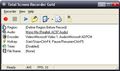
Giveaway of the day — Total Screen Recorder Gold 1.5
Total Screen Recorder Gold 1.5 was available as a giveaway on July 28, 2010!
Total Screen Recorder can record computer desktop screen to video files so you can upload them to Youtube.com, myspace, blog without format converters or editors.
It supports video recording with sound from computer sound card or from microphone. You can also set your record region and record any area of your desktop. Total Screen Recorder can be used to record webcam chat video from AIM, ICQ, MSN, Yahoo Messenger and other IM clients, make your own video tutorial, etc.
Key features:
- Support 5 capture types: random region, window, full screen, fixed size, fixed region
- Support recording audio sync from computer and microphone
- Video/Audio codec parameter adjustable
- Support user defined hotkey to start or stop recording quickly
- Support stop timer to stop recording automatically
- Support user defined file name format support
- Support hide when recording, window can be minimized to icon in system tray
System Requirements:
Windows XP/Vista/7
Publisher:
Total Screen RecorderHomepage:
http://www.totalscreenrecorder.com/File Size:
9.68 MB
Price:
$29.95
Featured titles by Total Screen Recorder
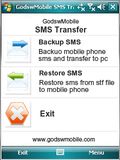
It allows you to transfer and backup your SMS messages between mobile phone and desktop computer. Only work on the mobile running Windows Mobile System with touchscreen. The #1 backup software for mobile on CNET.
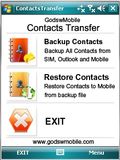
An application can transfer contacts from cellphone to pc; Transfer contacts both contain sim card contacts and mobile memory contacts; Export contact as text file(*.txt), excel and outlook file(*.csv), pc data file(*.cts) and vCard file(*.vcf); In a word, you could use GodswMobile Contacts Transfer to manager your mobile contacts on PC and transfer to other phone. It suit for all Windows Mobile with touchscreen.
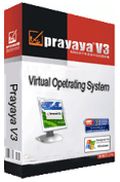
Prayaya V3 enables you to create a virtual operating system on your hard disk or any removable storage with most of your favorite software. Then you can carry your own personal system and software with you on a USB flash drive, removable hard disk or iPod device, whether you are using your friends PCs or in a Cyber bar, Prayaya V3 helps you access to the same familiar applications and data that you are used to using. It’s as if you are using your own PC.

Email Search Crawler is a quick and efficient tool that searches the Internet or your computer for E-mail addresses to enable create mass Email lists. It can find both targeted and untargeted emails, from specific countries and Web sites that you specify. It's easy to use and has the ability to extract emails from a file on your computer, or by getting sites from a search engine, or by spidering a list of URL's which you give it.
GIVEAWAY download basket


Comments on Total Screen Recorder Gold 1.5
Please add a comment explaining the reason behind your vote.

iPhone app giveaways »





Android app giveaways »





WOW It is great technology Thanks for this information
Save | Cancel
I believe the need to turn off acceleration is optional from the comments I read, so the software will work even if one cannot turn off the acceleration. However, the need to turn off acceleration is because most players use hardware acceleration overlay when playing the video and most screen recorders like TSR will not be able to capture the video at all because of the overlay.
VLC player plays videos without the need for hardware acceleration overlay, so if you can play your video using VLC player instead of real-player or windows media player, etc, then you should, I think, be able to use TSR to capture, even if you did not manage to turn off hardware acceleration, because it should still work, since you can install TSR successfully even though not able to turn off the acceleration.
If my comments is inaccurate, please let me know as I'm speaking from my past experience using CaptureWizPro, which told me such details in its FAQ.
Save | Cancel
Downloaded fine. When I went to play an already existing video (FLV), the "Easy Flash Player" came up....black. No video....nothing. Now I am afraid to delete this program for fear I will not get my old FLV player back again. Any help? (Vista 32bit SP2)
Save | Cancel
First time I tried to run the program to enter they registration key, my anti-virus (comodo) went off like crazy. Needless to say I am uninstalling it right away.
Save | Cancel
@7, what #3 said didn't apply to any kind of situation influenced by OS version!
#27, what #6 said was just a simple clear comment regarding improvements that if made, would improve the software quality and functionality. Nothing wrong with that, especially when GAOTD's usefulness to developers includes receiving constructive criticisms, ideas, bug info, etc!!!
What I don't understand, is why developers use such ridiculously long registration numbers and where they come up with these long strings of numerical nonsense!!! Seriously, what is the reason for such crazy lengthy registration numbers?
Save | Cancel
My suggestion is that among the other recording options like Fixed Region and Fixed Size you should have an option for recording region to follow the cursor instead of being fixed. CamStudio which is free already does that. I make tutorials in C Programming, and I use that feature a lot and love it. Pretty much cannot use a recording software unless it has that feature.
Save | Cancel
Do not work because I can not turn off screen accelerator on my computor (not permitted). Very hard to Set Screen Capture Region! Not easy to-use Help file are poor and of little help
Save | Cancel
Recordr has detected that hardware acceleration is enabled on this computer disabling hardware acceleration is required to record videos from a media player such as windows media player, realPlayer or quick time. Otherwise a blank screen will be recorder.
How to turn off hardware acceleration in windows 2000/xp/2003
1 right click on the desktop and click properties.
2 select the settings tab and click advanced then select the troubleshooting tab.
3 move the hardware acceleration slider to none and click ok to apply settings
Traduzido para o Português !
Recordr detectou que a aceleração de hardware está habilitada no computador desativando aceleração de hardware é necessário para gravar vídeos de um player de mídia, tais como o Windows Media Player, o RealPlayer ou o tempo rápido. Caso contrário, uma tela em branco será gravador.
Como desativar a aceleração de hardware em Windows 2000/XP/2003
Um clique direito no desktop e clique em Propriedades.
2 Selecione a guia Configurações e clique em Avançado e selecione a guia resolução de problemas.
3 Mova o controle deslizante Aceleração de hardware para Nenhum e clique em OK para aplicar as configurações
Eu consegui desacelerar os Hardware sem problemas...
Save | Cancel
Seems the programs default sound is set to "microphone"
I clicked audio, changed to internal stereo and I now have sound.
Save | Cancel
#30: I seldom comment, but I must say your review & obvious knowledge are excellent & most appreciated. Thank you very much!
Save | Cancel
Didn't work for me (Windows XP Service Pack 2, 3 gigs RAM, 3 GHz processor. That's with Hardware Acceleration off (which is a pain to have to do anyway; it should at least be automatic, as one user suggested).
Save | Cancel
re posting 30: AWESOME
I love GAOTD/GOTD.
But, as always, like others here, I don't always have the time to figure it all out.
GOTD - please give up these downloading games/hurdles/complications - (I regret to say that is what I believe them to be).
What do you/They gain by it?
Would you put up with this if you were in fact paying for them? NO!!
Our ability to comment meaningfully on the progams is being minimised/marginalised by these issues.
Save | Cancel
How do you use Total Screen Recorder to record webcam chat video from IM clients, such as Skype and Yahoo? Is it within the IM client or are you suppose to select the region where the webcam video is and record it that way?
Save | Cancel
WOW @ comment #7, if you are from the company then I wouldn't download from you if you were the last company to download from! My evaluation of the remarks you made are that your programs aren't any good either! Who ever you are I think you owe GOTD and the site people an appology for that verable bashing!
Have a great day all.
Save | Cancel
fussiest software i have ever met on GAOTD since 2007. no acceleration stoppage possible. quit but shows still running. off to bin
Save | Cancel
@#7 Garfey B.
I sense a tactical nuke coming towards you.
This program seems convincing, but I'm going to pass this. Xfire's built in screen recorder works just fine for me. :)
Save | Cancel
Does TSR capture a streaming video?
Save | Cancel
Kudos to GOTD for continuing on with a wide range of offers -- and special kudos to mike (no relation) at posts #30 and #32: it's exactly this kind of patient, comprehensive and analytical review that folks need. . . rather than so much of the junk comments quickly penned and submitted on here ("I like it!" "It's great!" etc.)
I've hit exactly the same inability to disable hardware acceleration as have so many others -- so clearly, today's developer is going to have to re-think things if hoping to bring this product to maturity. As it stands, it's unuseable on my system, so is being uninstalled.
Finally. . . many, many thanks to JimB at #25. The CamStudio link Jim's kindly provided is well worth following -- whether you're having problems or not with disabling hardware acceleration.
Save | Cancel
Looks good but I can't get the sound to work either. Using XP sp3 - soundmax card. When recording, i hear sound. On playback, no sound.
1st used default settings, then encoder set to WMW then FLV then AVI using defaults for each. No sound on playback. I'm don't know much about sound so I'm at a loss.
Thans to GOTD -I love trying out new software.
Save | Cancel
#3 here responding to #7. okay, i admit not putting up what kind of rig i have was a newbie move. But what do you have to gain by posting a comment like that?
I think its safe to assume that you crawled out from under a bridge to post that comment. Besides you could of tried the software out for your self. Thank you #27 (Diana) i agree.
By the way i Run Win 7, 64 bit. GT 120 video card.
Save | Cancel
Garfey B (#7). And who do you think you are? God? You're so vain! Maybe YOU should take classes on manners!
Save | Cancel
What a piece of crud. Installed fine on Win 7, but no sound recording. Surprise surprise, it killed all my sound drivers and now my system doesn't even recognize that I have a "sound device".
Now I'm about to do a system restore. Junk software - beware!
Save | Cancel
Re: hardware acceleration on my Win7 x64 dual core machine I had the same issue on mine and it wouldn't run the program at all. Uninstalled and re-installed and now it works and has no errors. Didn't even have to enter reg code again. Flickers madly when recording, but is fine on playback.
Save | Cancel
Downloaded, installed, activated correctly on Win7 machine.
Tried to record some demos of running programs:
- AVI format default settings record with acceptable quality, but file size is horrendously large
- WMV format doesn't work for me - after pressing start, doing the recording and pressing stop, program says that there is no recorded file!
- flash formats (SWF, FLV) - default bitrate is too low for screen activity recording; had to yank it up to 1600kbps to get acceptable quality (1280x720 capture area)
My previous experiment prove that WMV format with good codec is the best for screen activity recording on Windows - I use FastStone Capture for this purpose and TSR is unable to replace it. Also use CamStudio and Wink for screen recording - good in some cases, but sometimes not good enough.
Save | Cancel
Lots of errors on XP SP3. Upon starting, it gives a dump screen (essentially), but goes on to the software. Then it won't take copy and paste of the registration code, but pressing the button "paste from clipboard" seems to work. Looks like an interesting program, but I would imagine it might confuse computer amateurs.
Save | Cancel
I would like a button that would automatically upload the video to youtube.
Save | Cancel
It is not made to record video or movies, it is to slow and choppy and the quality is poor. If you need still screen recorder, go for it, otherwise pass it on.
Save | Cancel
#16 is on to something. I've never seen such a convoluted online retail setup in my life! I visited the website where the "contact us" email address indicated, "www.godsw.com." Our program of the day is there, along with a number of other programs, for FIVE DOLLARS CHEAPER. It seems totalscreenrecorder.com was hurriedly put together for our benefit (The layout is quite basic.) The www.godsw.com website, in contrast, is large and much more detailed.
I noticed, too, that most of the software titles have their own separate websites as well, for what purpose we can only wonder. Some have an increased price on their separate pages, but many are the same price. Each contains accolades galore. I was unable to verify if awards were accurate because I had trouble accessing the websites which gave them their recommendations.
I have to wonder what benefit there is for the consumer in a setup like this. I don't see any, and in fact, it makes me believe that they are not as forthright as a company should be. I'll try it for free, but as for purchase, I, personally, would stay clear of this jumble of programs and websites. Please, tell me I'm wrong if you have seen anything like this before in a legitimate company.
Save | Cancel
I simply cannot recommend Total Screen Recorder Gold. It's got a nice interface and easy to use options menu, but there are too many downsides to the program. Recording is choppy (for me at least), it uses around 50% CPU (on my quad core computer) and doesn't even support Windows Aero. With all these issues and a very unprofessional website, Total Screen Recorder is a definite thumbs down. At $30, it is overpriced for such a program with abilities that free alternatives can do better.
Pros:
-Clean, simple interface
-Tip of the day
-Select from multiple encoders
-Wide array of recording options
Cons:
-Activation is a pain
-Disables Windows Aero
-Extremely High CPU Usage for such a program (50%!)
-Expensive at $30
-Fails to record window movements properly
-Fails to encode properly (double speed)
For Netbooks:
-Fits under 1024x600
-Uses a lot of CPU
-Not recommended
Free Alternatives:
BlueBerry Flashback Express
Camstudio
Full Review
Save | Cancel
How did you get it to install. I keep getting that it will not authenticate; the site does not respond
Save | Cancel
Installed fairly easily, tho I got the screen accelerator message, too.
Fairly easy to use. I wasn't overjoyed with the screen resolution of the video, but you can adjust it upward.
Thanks, GOTD!
Save | Cancel
Normally I don't comment on the comments, but, in this case I just cant stop myself.
I'm going to be referring to No. 6 comment.
I think you are a mean hurtful person. If you are on the tech team or support team for this software, you are the one that needs support. Never have I heard a "Professional" speak this way to someone. It is totally uncalled for.
Take some time off and go to counseling. You need it.
Save | Cancel
hey how to registor it ...i m not getting the right key in read me text.....plz give the key....thanx....
Save | Cancel
Noticed this software bears quite a resemblance to free software CamStudio.
Now, there seems to be quite a convoluted history of who made what, but in so far as the source of the original program was apparently made public and CamStudio is being actively developed on SourceForge, I'm not particularly impressed with this GAOTD
Save | Cancel
OS : WINDOWS 7 x 64 bit
No problem in Installation/Activation.
Problem with recording SOUND from Computer... can anyone help??
"while recording i can hear the sound, but when i playback the recorded video, i cant hear any audio, although video quality is quite good"
Save | Cancel
Just downloaded to XP Pro looks very light with nice layout. Easy to understand registration, which is not always the case here. One thing I wonder about is MUST TURN OFF ACCELERATION warning. Not sure about that deal.
Kind of beside the point but anyone that expects perfect video game recording maybe completely insane. That or completely ignorant of how those things work and how much computing power it takes
Save | Cancel
This "hardware acceleration" problem affected me too. (Win7 Home Premium - Nvidia NVIDIA GeForce 6150) - Developers will have to go back to the drawing board for quite a few of us.
Save | Cancel
I also have run into the inability to shut down hardware acceleration on my Win7 x64 dual core emachine. In addition when I tried it out on a BBC news video it did great on the video but no audio was captured in either avi or wma settings. If I can get the audio working it will be a keeper, otherwise off to Revo.
Save | Cancel
Program installed and registered fine on Win 7pro x64 with NVIDIA GeForce 8800. However, the dreaded "Must disable Hardware Acceleration" warning appeared and I'm unable to do so. I started the program and started recording in Photoshop CS5. The cursor became sluggish and I was unable to do a simple marque select and modify. When I stopped the recording, everything was responsive once again.
For my purposes, recording in PS, for example, this program is unacceptably slow. I'll be uninstalling and hoping something more powerful makes its way to GOTD. The previous DemoCreator didn't work on Win7 x64 so I'm still looking for a solution.
Save | Cancel
I can't disable acceleration on win7x32,hd4600 sapphire 512 either.screen blinks so much when recording,i find it hard to see anything.So looks like does not work for my config.Thanx anyway for giveaway
Save | Cancel
Same problem as No.12. Message from TSC: Recorder has detected that "Hardware Acceleration" is enabled on this computer. Disabling ...is required....
But following instructions on how to do this, I arrive finally, under Generic PnP Monitor and NVIDIA GeForce 9300M GS Properties, at the disappointing news that "Your current display driver does not allow changes to be made to hardware acceleration settings". I am using a SONY VGC-LN2M computer, with Vista.
Save | Cancel
Couple of points regarding their website that make them look FISHY
- "Contact Us" there is no clear information, where are they located? A phone number or mailing address?
- The e-mail on the contact us page have a different ".com" address! 'recorder@godsw.com'
- At the bottom of the page "Copyright" with no year or a date when last updated.
- The star rating (Awards) on the left side is NOT legitimate! e.g. Download.com users rate it 3 stars and a half. NOT 5 stars!!
My 2cents
Save | Cancel
Not as sleek looking or as feature rich as the previous giveaway Wondershare DemoCreator but Total Screen Recorder (TSR) is a slightly different type of program. From a very quick look all it does is record screen work and it does it well (on an XP machine SP3).
What I like about this program as opposed to its bigger cousins is the simplicity of the operation and its small footprint (only under 12Mb on the Hard disk as opposed to 43Mb of DemoCreator).
It maybe unfair to compare TSR to Democreator but for my particular needs Democreator is an overkill and Total Screen Recorder just fits the bill.
Granted, TSR user interface looks a little dated but who cares! I want functionality over looks and this is what TSR does well. So those wanting pretty looking icons and buttons, etc. should be happy with DemoCreator.
If you want to edit your recording, add comments, flyouts, bubble speech, etc. sound editing then TSR is not for you. I'd stick with Democreator (which is a great program in its own right too.)
If you want a small quick program to record your screen (or a region
or just a particular window) and produce a video (in various formats) then Total Screen Recorder is perfect. It's small, quick, might not look pretty but it does the job - oh and it's free today!
Save | Cancel
Something about "acceleration" on finishing install, followed instructions to switch it off, but "change settings" is greyed out in Win 7 x64!
Save | Cancel
I have Windows Vista home edition 32 bit and the instructions that came up when I opened TSC said for me to turn off hardware acceleration but when I tried to do so, my computer said my current display driver does not allow changes to be made to my hardware accelerarion settings. The button is grayed out. Any advice?
Save | Cancel
Thanks for this software, guys! Much appreciated.
Installed perfectly on Vista Bus sp2.
Registered first time.
Absolutely no hassles.
Except for a quirk of my machine... it seems as though my video card prevents me from switching off hardware acceleration. Sigh.
But I think it only prevents me from recording from specific programs. So all should be well.
In fact.... I'm recording this screen as I type. I see it working. So yeah... I'm a happy fella.
All the best.
Blue skies
Roy
PS: Viewed playback of the recording. Perfect. Awesome!
Save | Cancel
Figured I'd give this a try.
Pros:
I saved a few minutes of gameplay footage in wmv format it came out to 10mb. Great compared to fraps outputting raw footage at a few gigs.
Record fullscreen or windows or sections of the screen
Select from a variety of output types
Cons:
Asks to disable hardware acceleration
Max output framerate 30fps
Video Quality mediocre. Game footage was choppy and displayed incorrectly with random black lines and sometimes shadowy screen
Probably would be pretty good for recording desktop tutorials but any ingame footage would be better off with xfire or fraps if you have a giant HDD :P.
Save | Cancel
Does anyone know if this will record streaming videos that I can then convert & transfer to my iPod to watch?
Save | Cancel
Well...I was looking for such software to make videos.
Thanks for giving it Free.
Save | Cancel
.
#3 says:
"I have found that it does (record video games), But quite horribly! Can’t really do anything"
For those of you who complain, like #3, but don't tell us what kind of OS you are running -- I think most of us just have to assume that it must be Windows 95 or less, and you are too embarrassed to mention it.
To All of you complainers, please, please, give us a few words of technical talk about yourself, your experience, or your PC -- so we can see you aren't some half-baked Newbie whose biggest challenge is locating the "Start" button.
Save | Cancel