Every day we offer FREE licensed software you’d have to buy otherwise.
Giveaway of the day — SysTracer
SysTracer was available as a giveaway on November 2, 2007!

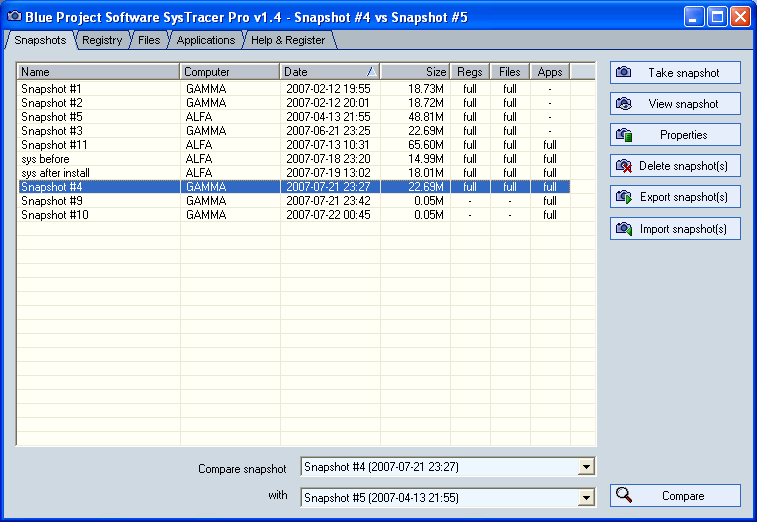
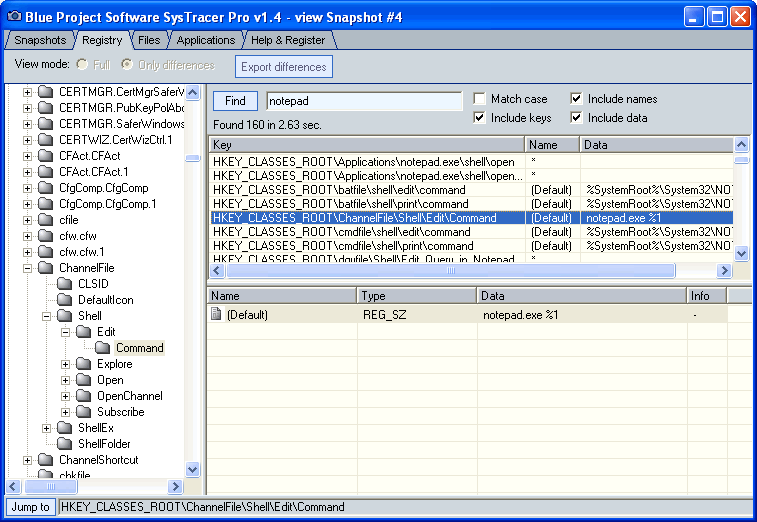
SysTracer is a system utility tool that can analyze your computer finding your modified files, folders and registry entries. Also SysTracer shows information about services, drivers and applications that are configured to run at computer startup. Each scan of SysTracer generates an overview image of your system stored into a snapshot.
Recording the snapshot usually takes a few minutes depending on your system complexity. If you want you can choose to scan only files, registry or applications, in order to speed up the recording process.
By comparing snapshots from before and after a new program installation or execution, you can determine which files or registry entries were added, changed, or deleted.
You can create as many snapshots you may want, and you can compare anytime any pair of them, having the possibility to export differences to HTML list.
System Requirements:
Windows 2000/NT/2003/XP
Publisher:
Blue Project SoftwareHomepage:
http://www.blueproject.ro/systracerFile Size:
534 KB
Price:
$29.95
GIVEAWAY download basket




Comments on SysTracer
Please add a comment explaining the reason behind your vote.

iPhone app giveaways »





Android app giveaways »





After determining that you can't manage the snapshots, I would change my thumbs-up to a thumbs-down, if I could. The snapshots are huge, so I was going to look into placing them under external version control. The first problem is that the snapshots are numbered, their filenames don't include the names that you give them, which in itself makes them difficult to manage. Next, I wanted to see how it would handle missing snapshots, and how it would number new snapshots when some snapshots were missing. I renamed a couple of the snapshots, and when I opened SysTracer, it simply acted as if those snapshots had never been taken, which was good. I started to take a new snapshot, and the default name indicated that it wasn't trying to re-use the missing numbers, so that was also good. Then I named the snapshots back. Unacceptable problem--it won't use them. Apparently, when it thought they were deleted, it removed them from its unreadable configuration file, and it won't add them back. Blue Project apparently went out of their way to force you to buy the Pro version, which has snapshot import/export, and to make snapshot management as difficult and convoluted as possible, rather than as simple as possible.
Save | Cancel
A bit more automation would be nice. When taking a snapshot, an option to compare it to the previous snapshot and export the differences (preferably as a single HTML file) for data of the same type (registry, files, applications) present in both snapshots would be handy.
Performance on my system is highly variable depending upon the state of the disk caches, etc. A scan can take half a minute or several minutes.
#42, Hempman, the problems you're experiencing appear specific to your system. While it could be anything, you might check for a conflict with your security software--perhaps it doesn't like the registry scan.
Save | Cancel
Milleniums away from usefull,more introspective computering with no goal.
Save | Cancel
Hi Folks,
Of programs not yet mentioned, or lightly mentioned,
one should definitely be mentioned, from the very excellent
Donation Coder folks.
Tiny Watcher (donationware)
http://www.donationcoders.com/kubicle/watcher/misc.html
It has a more limited purpose, however it can do some excellent snapshot work.
Also File Checker from Javacool (freeware)
http://www.javacoolsoftware.com/filechecker.html
And worthy of some interest:
Filemap (freeware)
http://www.dogkennels.net/filemap/
Testrun (Freeware)
http://dogkennels.net/testrun/testrun.htm
SilentNight Inspector (freeware)
http://www.silentnight2004.com/
InstallSpy and Fingerprint- 2BrightSparks (authors of Syncback)
http://www.2brightsparks.com/downloads.html
RegProt - DiamondCS (freeeware) http://www.diamondcs.com.au/freeutilities/regprot.php
RegDefend - Ghost Security
http://www.ghostsecurity.com/regdefend/
Other than Filemap and SilentNight all are from companies known positively to me from other products -- and some are more immediate HIPS-ish protection, especially the last two for the registry.
Shalom,
Steven
Save | Cancel
Hi Folks,
Nice GAOTD.
There are a fair number file monitor programs, and this one seems to stand up well,
a bit more comprehensive and possibly more usable. At normal cost it might be
hard to justify, but as a medium-term freebie (GAOTD) it can be tried at leisure.
Also the registration was pleasantly easy.
In general there is more activity now in active intrusion (HIPS) defenses, however these
more static post-facto monitors have a place in augmenting the defense. Possibly
Regshot and/or Erunt are good to use for the registry issues, thanks for the Regshot
heads up. WinPatrol is an ok freebie that has some monitoring functions, and on the
freeware level I have used spy-the-spy, that tells me right away of some changes.
http://www.mediachance.com/free/spythespy.htm
Here was a Wilders thread about a few products 2 years ago (this is only a 1-year-old
software) yet nothing stood out.
http://www.wilderssecurity.com/showthread.php?t=99318
And a couple of years ago kareldjag discussed them here.
http://kareldjag.over-blog.com/categorie-69557.html
Amyway, thanks, I loaded it on my two machines and will give this SysTracer a good run.
Shalom,
Steven
Save | Cancel
This program looks and in theory is very useful, sure its lacking full on abilities, but hey aren't they all.... It works well to troubleshoot and narrow complications on the pc down a whole lot, but as for follow through and "INTELLI-GENTICALLY SOUND"; of course it lacks, hey even the all might Acronis True Image Home Edition V11+ has its short comings and little bugs as well as not being full on intelligent abuot its doings, anyway I have a freeware that blows all the rest of the installers i have ever used and i do mean "ALL OF THEM" it's called "Revo-Uninstaller" and it has yet to dis-satify me, its swift, very thorough and totally abolishes an application and all of its registry, file(s), and any remaining pc tracks it would have left with other half-crocked installers, I rate REVO-INSTALLER a 9.9 of 10 STARS its hands down the best piece of software i have ever used on any pc since 1982 thanks enjoy all, peace out!
Save | Cancel
ProcessMonitor shows only realtime activity.
Systracer keeps entire history. Also with systracer you can see how it looks the previous data.
Save | Cancel
Continual crashing while simply scanning during snapshot makes this program unusable.
Save | Cancel
A nice techy program. I did find some mild instability, but I can not consistently reproduce the problems. I tried several times today to intentionally reproduce instabilities (it suddenly crashed while performing varied duties), but could never get it to reproduce the exact same crash close in time so I could trace the action and/or cause.
Other than that minor problem, it worked ok.
Some of the functions can be reproduced using Process Monitor (that is what the save, load and filter are for). However, for beginning techies, this is far simpler.
Not to change the topic, but there is a new version of Process Explorer, along with a video by Mark Rasmussen explaining how to use it to trace malware. The new ProcEx can also replace the more primitive Task Manager.
I can never get the link embeding to work right, so here is the direct link to the DL page:
http://www.microsoft.com/technet/sysinternals/utilities/ProcessExplorer.mspx
Here is a link to the video (you will have to install a new MS streaming video codec to play it).
http://www.microsoft.com/emea/spotlight/Mark_Russinovich_Advanced_Malware_Cleaning.aspx
Nice new techy stuff. Enjoy!
Save | Cancel
Thanks for all the great games and programs without any strings attached. However this one seems to have a big string since it wants your e-mail. I get enough junk mail so do not need any more. I was looking forward to it for it would have given me as much control as in days of yore (win3.1)
Save | Cancel
Didn't have much time today for evaluation, but this appears to be the best program of its kind that I've tried yet. And I've tried a lot of them over the years. Everybody should learn how to use this so they can better understand how their computer works. It is confusing at first, but worth the effort in the long run.
Thanks Blue Project Software and GAOTD for this excellent offering!
Save | Cancel
When I get the Activation Key, I enter it and click "Register". Nothing happens, and it still says that it is unregistered. Please help!!!!!
Save | Cancel
Hello All, Download, Install and activation went fine (xp sp-2). Did a complete scan of my system, It scanned 240704 reg keys, 2602 folders, 101196 files, 307 applications in 1:43. I was impressed with the results of the first snap-shot as I found reg keys associated with a deleted program. I ran Glary Utilities and did a reg clean to solve 270 problems. So far I say this is a keeper, easy to use and compare changes...but still, watch what you delete. Thanks GAOTD, be back tomorrow !
Save | Cancel
Thanks to all that provided links to alternative/similar apps. I also want to add one, called InCtrl5. It's a bit older, but it works fine for me.
http://www.pcmag.com/article2/0,2704,9882,00.asp
Save | Cancel
I'm with No. 16. I find the Comments often very helpful in evaluating and calling to my attention not just today's giveaway program, but the whole field of related programs. Of course, some Comments are more helpful than others . . . .
Save | Cancel
#26, ts, clearly, you've never used version control software. The ability to rapidly regenerate selected versions has been around for decades; a great deal of thought has gone into the algorithms used by the best packages, but they all use some form of differential version information (the good ones use inverse deltas). Of course compression requires CPU. Some version control packages use differencing and compression.
I suspect you rarely snapshot your software installations. I always snapshot mine; it's essential to know just how much damage they do, and all but the most trivial programs nearly always do damage. I rarely pay attention to total file sizes under 1 GB. Multi-gigabyte hits are relevant even with > 1 TB of storage. If I were to compress my snapshots without version control, they would presently consume around 10 GB (about 30 GB uncompressed).
#31, stefan, Regshot isn't too bad for freeware, but it's buggy (or was, I haven't checked out the newest version--I didn't realize TiANWEi did some more work and bugfixes on it after no development for more than three years), it needs to be run with System privileges, which is a nuisance, it doesn't fully snapshot your computer, and it doesn't record as many registry entries as SysTracer. The correct link to regshot is
http://regshot.blog.googlepages.com/
Save | Cancel
The registration web page FINALLY came up after refreshing for about 20 minutes. They must have been having some problems with the site.
Save | Cancel
I installed the package but when it loads my browser and attempts to go to the web page that I assume will give me the activation key, I get an "Internet Explorer cannot display the web page" error. I have never had any difficulty with any software that I have downloaded from GAOTD before. Is the web site down? Has anyone else had this problem?
Thanks.
Save | Cancel
Very useful utility!!
Save | Cancel
#17 An alternative freeware that I've used fot years:
"REGSHOT" i.e. http://www.majorgeeks.com/download965.html
Takes a snapshot from registry and selected directories.
Typical time 1.8 - 4 seconds.
After installation take another one, click compare, and
you have a report of changes made, for installation, or
for whatever reason. You may cancel changes made into
registry with as small and fast a program "UNDOReg" from: http://majorgeeks.com/UNDOReg_d966.html. Both work fast
and do not leave much time for Windows housekeeping.
Save | Cancel
#5 - If you really need "PFConfig", Buy it. My understanding is that the purpose of GAOTD is not to save people money, but rather to expose people to different software packages, thus generating word of mouth publicity, and thus more sales. Support the software developers!
Save | Cancel
@ #7 ( Ishtov ),
Thanks for your post about FingerPrint.
BYE.
Save | Cancel
Hello all! Today's 15-Minute Review is up! Check it out!
http://www.bladedthoth.com/reviews/15mrs/systracer-v1-4/
Save | Cancel
#17 Click on "View mode: Only differences" (top-left of the screen).
#21 Differential version control of the snapshots is not possible, because SysTracer can compare ANY 2 snapshots. Compression can reduce snapshots sizes but it will slow-down comparisson.
Save | Cancel
I forgot to mention, snapshot utilities such as this capture all activity on your system. This is very different from utilities which attempt to record software installation changes only. For programs of the sizes typically offered by GOTD, on my system the majority of the differences captured are either unrelated to the software installation, or are Windows "housekeeping" changes which, although they may be related to the installation, are not relevant in terms of useful information, nor do they need to be backed-out on an uninstall. So, you need some basic computer knowledge in order to interpret the snapshot comparisons.
Save | Cancel
I like seeing useful alternatives posted, but it's annoying when people post completely unrelated software, and worse yet, claim that it's "better", and still worse, people give them a thumbs-up. If you use alternative software, you should download and try the offered software, read its help file so you know what features it actually has, and then post an intelligent comparative review.
Save | Cancel
#17, Phil, that's not "old" and "new" windows, the differencing has already been done in the example; it's similar to a file comparison routine which is only showing differences between two files.
Save | Cancel
Great piece of software !!
1 snapshot: 50 MB, less then 10 minutes,
I tried others similars performing conventional buckups: Ashampoo Magical Unistaller, InstallRite (no links, you should need plenty of time to run them... eventually you can google)
I will keep SysTracer hoping the next "shot" will be the Pro version.
Thanks to GAOTD and BluProjectSoftware, Frank
Save | Cancel
As far as generating snapshots and performing comparisons, this does a good job. I find drilling down through differences within the program to be tedious, but the HTML export with auto-view is handy. Since this isn't the Pro version, it lacks some UI features and won't snapshot drivers. Naturally, full snapshots can take a while and can be quite large, but you have some choice in types of things to snapshot (registry; files; "applications", which is actually services and startup routines, includes drivers in the Pro version). The comparisons are extremely quick. The downsides are the lack of full auto-expansion capability in the UI when viewing, no ability to export registry changes in RegEdit format, no compression of the snapshots, and most importantly, no differential version control of the snapshots, which would significantly reduce their size. You could run them through external version control software yourself, but there would be no integration with SysTracer, and you would have to manually extract the snapshots you wanted.
#15, kamallneet, the type of question you're asking sounds reasonable but is actually pointless, since it's totally dependent upon your particular hardware and software environment. On my Athlon 64 3500+ with 1.3 TB on 3 almost-full SATA drives, a full snapshot found 383,772 registry keys, 786,684 registry values, 20,675 folders, 253,603 files, 429 "applications", and generated a 59.54 MB snapshot. The time wasn't typical (0:04:46) because one of the drives was being actively defragmented at the time; I would guess a couple of minutes is what I could expect on my system.
Save | Cancel
I can't find the start button. It just sits there with a blank screen. If I can make it work, it should be incredibly useful for me because sometimes something is wrong with my system and I either can't find it or fix it.
Save | Cancel
PLEASE HELP!
Was - until now - not able to get it registered on german versions of Windows XP ?!!! - Had anybody else this problem - and got a solution/workaround?
... on a machine with an english version of XP I got it to register.
___________________
(german)werwölfchen
Save | Cancel
29,95? No, thanks. Freeware snapshot: WhatChanged http://www.majorgeeks.com/What_Changed_d5018.html
Save | Cancel
The second picture down shows 160 root classes entrys identified, which is from a fairly new system. I have around 380 on my system, so I guess this means that just to check out my registry I'd have to scroll and compare two images at the same point on each scroll then scroll down and compare two more images. Seems like I'd have to take a lot of images just to record and compare one area of my registry alone. Even if both the saved registry window and the new image window could be scrolled, it would still take forever to locate any changed entries. Can anyone shed some light on this?
Save | Cancel
I Just want to Thank you...gotd...and all of the commentators to this site. I am an older(?) puter newbie and have learned so much just from reading your suggestions and comments. The endless resources you have enabled me to find are priceless. Keep posting links to alternative software. I read every word, every day and have sent links to this web site to all my family and friends.
I get the best software from this site and everyone in "our little family" here makes it all so easy to install and work with by your examples and reviews.
I don't usually post because by the time I read everything....and figure out exactly how everything works it would be a review of Give away of yesterday..(every once in awile it takes a week) .lol...I even download install and wait a few days before testing what I've learned....I'm slow but steady. Thanks to all the regular commenters...and thanks to gotd for making it all possible....I go to the game site as well and Double thanks for it.
Save | Cancel
If anyone has tried, can u please tell how much is the size of a snapshot created by this tool, and how much time it takes to create one?
Save | Cancel
I'm sure this program has useful features, like so many of you have done for me for giveaways I have missed, here is a powerful free version in case you miss this giveaway:
Karen's Computer Profiler 2.5.3
http://www.majorgeeks.com/Karens_Computer_Profiler_d1508.html
Save | Cancel
Very useful.
Save | Cancel
Good programming.
It reminds me of Inctrl 5.
But I always hated being told "only available in the pro version".
Doesn't keep the customer satisfied ;-)
Thumbs halfway... up.
Save | Cancel
Imagine what use it really has(!) - ECPECIALLY for you guys, who often use the GaOTD software... (try to think about, just for a moment!)
There are other tools around which can serve the same funtions but it seems to be easy to handle -even for not as experienced users.
Have fun(success...) using it!
@4 (YUP): ProcessMonitor serves a nearly complete different goal...
- rather TotalUninstall - www.martau.com - can serve a similar aim ( last FREE version: http://www.aplusfreeware.com/categories/util/files/tun235.zip )
____________________
Greetings from
(german)werwölfchen
Save | Cancel
ProcessMonitor shows only realtime activity.
Systracer keeps entire history. Also with systracer you can see how it looks the previous data.
Save | Cancel
A similar program, which is small, free, and very stable, is available from 2BrightSparks http://www.2brightsparks.com/freeware/freeware-hub.html
It is called "Fingerprint", [it is no longer in developement, the link is towards the bottom] and is recommended over this paid software.
GAOTD still deserves Kudos for finding usefull system tools, if for only the fact that this way the freeware gets a chance to be shown off!
Hopefully they'll give out anti-virus subscriptions next (think.. Nod32)
Save | Cancel
All 3 screenshots here on GOTD say SysTracer Pro 1.4. However the one offered here normally costs $29.95 which is the normal -i.e. non pro- version price; SysTracer Pro 1.4 is $49.95 .
So which of the 2 versions do we really get today?
Save | Cancel
Please put PFConfig up on GAOTD tomorrow :L Supposed to host a server tomorrow and I can't figure out how to fix it up
Save | Cancel
There is a free program called Process Monitor, has all these features, plus a lot more. Get it at microsoft.com, it's way better than this crap.
http://www.microsoft.com/technet/sysinternals/utilities/processmonitor.mspx
Save | Cancel
Some people may find this app completely useless, but it comes in mighty handy if you want to know what garbage is being installed on your system by any "freeware" software that you install. That way you can easily identify and delete the trash left behind after uninstalling it.
Way to go GAOTD!
Save | Cancel
I really like this tool. Make sure you select the activation when you install the sofware, as it is difficult to do it afterwards. Many thanks, GOTD!
Save | Cancel
So far I can see no reason for me to keep it and use it. I will check more. If I find there is a real value to this I will post the value.
Save | Cancel