Every day we offer FREE licensed software you’d have to buy otherwise.
The competition is over.
See the widget below to check the list of winners.
Visit our main page for more free licensed software.

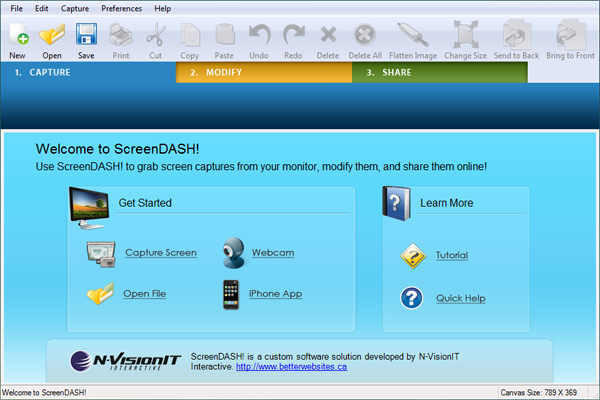
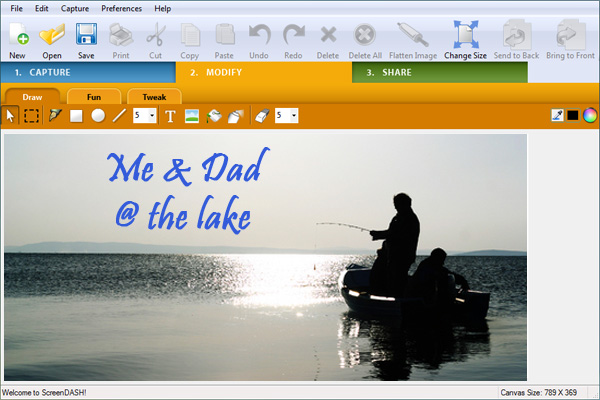
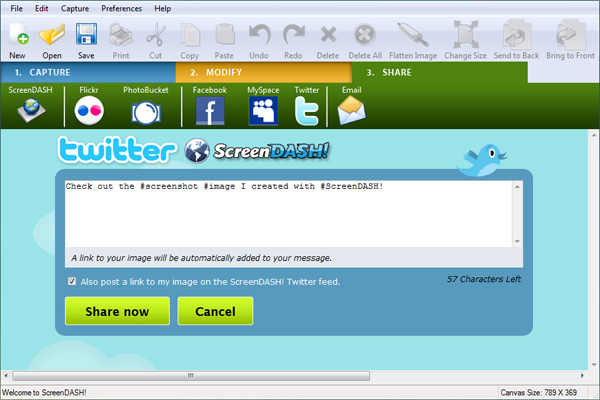
With the click of a button, you have the power to capture images from your computer screen - including web-pages, PDFs and anything else you can see on the screen. Get creative and enhance the images with ScreenDASH's easy-to-use drawing tools, powerful photo adjustment tools and hysterical built-in clip-art.
Save time and increase your productivity using its convenient annotation tools to provide effective feedback to your colleagues and clients. When your masterpiece is done, ScreenDASH's convenient sharing functions allow instant posting to the web, email, Facebook, Flickr, Twitter and other online communities.
Download ScreenDASH! today to share your ideas at the speed of the digital age!
If you are 64bit system user follow the link here.
System Requirements:
Windows Vista SP1 or Windows 7; 2000, 2003 Server, XP Home or Professional Edition (SP2 or SP3)
Publisher:
N-VisionIT InteractiveHomepage:
http://screendash.com/File Size:
45.9 MB
Price:
The program is available for $29.95, but the winners of our contest will get it for free.
GIVEAWAY download basket



Comments on ScreenDASH
Please add a comment explaining the reason behind your vote.

iPhone app giveaways »





Android app giveaways »


![[365fun] Running Man Giveaway](https://android.giveawayoftheday.com/wp-content/plugins/gotd_googleplay_plugin/images/100/2026/06/com.whitewind.runningman_app_icon_1780400784.png)

Why will program overwrite the last saved screenshot when I save the next? What good is a progarm if it will not save anything? Why is there no way to close the picture one was working on? You must have the window you want to screenshot from up so How do you open this program?
Save | Cancel
Here's an alternative I just remembered:
http://www.bugshooting.com/web/
Save | Cancel
#48 Bob,
Whatever happened, most probably is the manner the software is coded.
However, the resoluation to your problem is this.
Go to Start (bottom left of your screen), look for Adminstrative Tools, click on Event Viewer, you will see a few log categories, for example, Application, Security, System, Internet Explorer, etc,.
Right click on Application, then click Clear All Events. You may like to save the existing logs before clearing it. After that, install the software again. It should install well now.
For me, I cleared all the logs of the various categories, as I hardly do any diagnostics analysing on my own. So, it is nice to have those logs, but if you're not a techie, you may not need these logs.
Save | Cancel
Free 12 Months Bullguard Internet Security 8.7 License
Read more: http://www.techno360.in/#ixzz0VlwvnCGx
Save | Cancel
If you like TechSmith's products, then you might want to try Jing, which is their free screen and video capture program.
To the people who suggest using the Print Screen key, you can also drive a Daewoo, why spend money on a Mercedes? The reason you pay for programs like this and Snag-it is that you have a professional need for it, it saves time over using the print screen, and has considerably more features. Snag-it allows you to define a persistent screen area to capture, a save area, and automatic file naming. Try copying 500 screen shots with Print Screen, then try the same thing with Snag-it. Well worth the small price.
Save | Cancel
Can you set it to take 1 picture every second?
Save | Cancel
Sherri #28 This is what someone wrote about Jet Screenshot.
Jet Screenshot @ http://www.jetscreenshot.com/ is for instant screenshot sharing, and is excellent software. It is small, powerful and very easy to use with no known troubles. Everything is integrated in one app, and it works very intuitively, copies parts of your screen, annotate and publishes, all in a few clicks.
What you typically will be doing: click on the tray-icon and you are ready to select a part of your screen. Click right in your selection and choose if you want to draw arrows, lines, put words etc. Click right again and the screen copy will be send to an arcticline server which you can use for free. That is all. While the transfer was finished an URL of your published screenshot will be ready in your clipboard, ready to paste it anywhere like in a browser to see the result. It’s just great how easy this works.
When you are testing giveaways from GAOTD, and you find some strange things happen, use Jet Screenshot and put the URL in your comment. One picture will tell a 1000 words.
So what is the catch, how does arcticline earn something from this. Right now not much I guess, the strategy is to create a large installed base and when you’re addicted, they probably will shutdown free access to the arcticline server. Either you pay to continue the use or you’ll be content you could use it till that moment. NO.. there is more…
You don’t have to go through all kind of settings to set it up and the arcticline server is there by default, but it is also possible to configure to send to some other server. As soon Arctic cuts you off, just find some other place to FTP to for free on the internet and you’re set to continue. You might even send to a server you own if you have that possibility.
Many words, but bottom line is Jet Screenshot is a gem, a must have, and nothing is keeping you from not trying it and find your own likes and dislikes about it. It will be easier then many giveaways. Visual communication really adds to only words.
Joe T #35
I would be grateful if you would go into more details of exactly how to use this 'Alt/ print screen function', as it seems a nice simple option.
Regards Bill3.
Save | Cancel
It looks as though this one is a little too faulty. I have used PicPick but I've found that on deep scroll captures that it can't act quickly enough and it misses slices as it scrolls down. And consistently, too. And this isn't on a slow machine. But thanks.
Save | Cancel
Hey Lovely bunch of pessimists ...I just gotta tell ya ... this application is just what I need to brighten up my pictures and appearance in a well known online world ...It has so many nice templates ... and works so EASY !!!!! And that all absolutely FREE !! Thanks GAOTD ... U MADE MY DAY ! And maybe my year as well ...HUGZ !!!
Save | Cancel
I appreciate the discussion here, and always like to know the alternatives to the GAOTD. I use an oldie: Prinkey2000, version 5.10, the freeware version. Does everything I need, prints whole screen, object, or rectangle. I use it daily. I've used it under both WinXP 32-bit and Win7 64-bit. After reading the comments here, I will not be trying this rather large program but will stick to Printkey.
Save | Cancel
Thanks Fubar,
for your in-depth review and your warnings.
Though I'm a graphics-tool junkie, I didn't install this programme. It is in deed more than a little annoyance when a programme changes the file associations. Again a hijacker :(
Another thick minus is the lack of features and the much too high price. Some MB of "hysterical built-in clip-art" won't outweigh the drawbacks.
A nice gimmick would have been the sharing functions (I think that's the reason why the tool calls home).
graylox
Save | Cancel
I really liked the earlier version of screendash..
This one is nice too, but they should work on a way to try and not make it more than it needs to be. Sometimes less is more.
It is really nice to be able to grab a photo or a screen section do some funny editing or mark-ups on the fly and them share that with friends or colleagues.
The earlier version was far more easy and quick to use "on-the-fly", and I think they would be wise to rethink this and move back in that direction rather than getting more complex.. I have really enjoyed this program, it's fun and quick and useful.
Save | Cancel
I beg to differ, dear Ashraf...SnagIt is THE BEST i know but this is not a "freeware".
I am a admirer of Picpick but support #2, Titus, that Gadwin System's Gadwin printsecreen is an excellent choice.It takes just two key-strokes to save a screenshot[printscree>enter and you are done!].
And there are more choices - Jet screenshot and Screen to exe...just use all of them to say -WOW!
Save | Cancel
This is Screendash Pro--far from just a screen capture. I have used many screen captures listed above and by far favor picpick--use it almost every day (save pdf to image with PDFfill free software, switch to picpick, open image and import signature file, move or add text, save image as pdf in PDFfill and voila--a signed document). I LOVE that little program.
Screendash Pro appears more versatile than a standard screen capture. Compare it with Jetscreenshot, Irfanview, and Snagit here http://screendash.com/compare. I do not work for this or any related company, but am a technical writer and use this kind of software frequently. The download is large (graphics library), but the categorized graphics appear handy.
The PROBLEM--I have tried to install this program 3 times, and each time, I see NOTHING. When I click on the icon, nothing. When I try to open the app file, NOTHING. Then I get an error message saying Screendash has encountered a problem and needs to close.
I am using XP with administrator rights. How can I get this working so I can do an adequate review?
Save | Cancel
This is a nice and easy to use software. You can make some money with its Adsense integration too. It has features which are not found in other capture software.
Jetscreenshot is free and is another simple alternative, if you like to host the images in your own account.
FastStone Capture can capture larger than screen and it does a great job where Snagit fails. But each software has its pros and cons.
I especially like CaptureWizPro, because of its rich features and the its ability to hide itself on the side of the screen, always on standby.
Another free capture software is VMN. It has features other capture software do not have, including color picker, ruler, magnifier, sticky note and a radio.
Finally, for those using Firefox, try Fireshot addon. It is a great capture software.
For those who think PrintScreen is all you will ever need, you are really missing out on loads which these capture softwares are having to make your digital experience so much more creative and convenient.
Save | Cancel
#26: "The people using Firefox can try also “ScreenGrab” add-on for Web screenshots."
True, but if you use a PDF printer you not only get the entire layout like a screenshot, but you also have searchable text you can copy.
* * *
#34: "...how to register this program..."
1st thing you see firing it up is a registration screen where you type or copy/past the serial number.
* * *
#39: "at 45.9MB, this is just too huge considering its function."
The vast majority of that is the included templates. If you can manage the download, & if you like the app, you can always get rid of the templates, though that's one of it's major selling points I'd imagine.
Save | Cancel
ScreenDASH is a nice enough app, & seems to work OK in win7 64, but as Fubar noted, it takes over file associations for the extensions: .bmp, .gif, .jpeg, .jpg, .png, & .tif. This in itself wouldn't be an absolute deal-breaker for me, except ScreenDASH grabs these graphics file associations every time it runs. If I could put them back where I want them, it would be a PITA, but worth checking out the app further -- that right there does it for me. :-(
Otherwise it's setup & activation might be annoying, but it's something you can live with... GOTD's setup file opens the WinRAR self extractor once it phones home. The WinRAR extractor expands the actual msi install file, by default in the wrong place, so make sure to set the location to where you want it. Once you enter the serial number ScreenDASH itself phones home to activate. Every time you run the app it also wants on-line access, though blocking it with your firewall would obviously break the image upload features. [Please note that msi setup files are a rather poorly designed problem in & of themselves -- I just got done fighting an msi installer prob in XP, & have my fingers crossed I solved another in 7 64. With msi files, backups or at least system restore points are well worth it. I had prob because I wasn't willing to give up the apps that caused them.]
RE: snapshots of video windows...
It can get confusing nowadays because video can be displayed a few ways. In the old days [win 3.1 -> win98 SE] an overlay layer was most always used -- it was a hardware supported workaround because PCs & Windows just weren't up to the task. XP supports overlays, Vista does not, & 7 re-introduces them with some changes -- video can be displayed quite well without using overlays in all 3, with overlays actually slowing things down in many (most?) cases, though some players might continue to use them. Unless you use an app that specifically supports taking video snapshots [advertised as being able to take these snapshots] your mileage is going to vary a bit depending on what app you're using to play the video, & how it works. The best way IMHO is to take snapshots from inside a video program itself, using players such as VLC or Power DVD [it plays all sorts of video files], or a video editor [VirtualDub can work quite well, & with AviSynth &/or using the mod version, open most video files.]
Save | Cancel
at 45.9MB, this is just too huge considering its function.
Save | Cancel
@19, Happy Person:
I am using Revo and it didn't display the program. Browsing the start menu also didn't show anything. I believe it's because the 64-bit installer is a .MSI file. Going to Programs and Features found the app and suscessfully deleted it. Thank you for the help.
Save | Cancel
Two final comments:
For #30; Snagit (see Asraf's comment #1) PARTIALLY captured my example "overlay" from Music Coach. For some reason the video portion of the screen was shown off-center, but at least it was partially captured.
For ScreenDash! Pro, one editing feature missing that I wish it had was a free-Rotate for the clipart. You can rotate at 90-degree increments, but that's it. Especially for things like arrows and the body enhancements (hair, mustache), an ability to rotate to any degree would be most helpful.
Save | Cancel
#1 and #4
If this is true: "It changes jpg asociation ",
you should DEFINITELY have mentioned this in "CON's"!
Save | Cancel
#18 DJRob,
You suggest "Print Screen." That copies the entire screen.
For those who may not know, ALT-"Prt Scr" copies the topmost window only.
Save | Cancel
Unable to find out how to register this program with the information provided in the Read Me file..
Save | Cancel
#30: Overlays.
I had this problem with Music Coach; the instructional screen includes a video in the lower corner of the screen. When trying to capture with MWSnap, the screen shows up fine except for the video "overlay", which is just a black screen.
I just tried it with ScreenDash! Pro, and got the same result, so it seems at least in this example that ScreenDash! does not support these "overlays".
Save | Cancel
Just a few comments:
1. The large size of this download is because of the over 100 (over 42 megs total) well-done clipart images that you can use to enhance your screen captures. This is the main advantage of using this program - the clipart. Clipart categories include animals, arrows, callout bubbles, Birthday and Holiday symbols, and much more.
2. The weblink for PikPick is incorrect in #14 above, it should be: http://picpick.wiziple.net
3. I still use the old but reliable MWSnap http://www.mirekw.com
Save | Cancel
The free alternative fastone capture 5.3 runs from usb, is fast, allows minor editing and allows a print or save directly from the capture screen or portion. Does not require admin rights to use - it is my recommendation.
Save | Cancel
OVERLAY's ?????
I can't find any mention of overlay-parts of the screen.
Have tried a zillion of printscreen pgm's.
They all end up with a black field where an overlay is.
If I use the term correctly (?) Overlay = e.g. where my TV-card plays the TV program. Also e.g. where GomPlayer plays a movie-file.
This pgm???????????
Although I would hate using it, if only for the mentioned stealing of .JPG extension.
Cas
Save | Cancel
I tried this software to see if it is better than other screen capture utilities. It is not. First, it requires Dotnet 2.0, which is a 22 MB download. The program itself is a massive 46 MB. Ridiculous.
My suggestion is to look on the internet for the last free version of FastStone Capture (version 5.3). I prefer the portable version. It is slightly over 1 MB and has lots of options. It does not rely on Dotnet.
Save | Cancel
Has anyone compared it to JetScreenshot yet?
P.S. GAOTD people, would it be possible to add those percentages back to the format? At times it was helpful to me (and maybe others) in deciding whether that was something we wanted to try or not. Just a thought. Thanks for all that you do.
Save | Cancel
Irfanview (www.irfanview.com) is still my favorite free image app. It does almost everything. For capturing, you can set a hot-key or timed interval, choose foreground window-client area only, foreground window-full, desktop-current monitor and full desktop=all monitors, include / exclude mouse pointer, and show on screen or save to disk using your file name pattern.
In addition, it can convert almost any image format, lots of screen effects, +++
Save | Cancel
The people using Firefox can try also "ScreenGrab" add-on for Web screenshots.
Save | Cancel
#14's recommendation of picpick should read: http://picpick.wiziple.net/
Save | Cancel
I have used SnagIt 7.2.5 for free for many years and then upgraded to latest version for half price. SnagIt has done wonderful job clipping images from any windows (not just web) and I wouldnt trade it with any other s/w.
Save | Cancel
@14 link does not work...
picpick download center
extra character in url. Thanks for the tip
I just downloaded 'picpick' it seams to do
everything I need and more without the heavy
download.
Thanks,
Willieg
Save | Cancel
Installed and registered successfully at my Vista.
ScreenDash support basic capture features, lack the feature to capture scrolling window, capture screen video.
More powerful alternatives:
PCHand Capture - http://www.screen-capture-record.com
Snagit - http://www.snagit.com
Save | Cancel
I think pchand screen capture easier to use.
It provides several modes to easily capture screen. Just one click!
you could even easily capture scrolling windows, automatically add edges, caption and edit with built-in editor.
It's worth the money.
Save | Cancel
Snagit is hard to beat and with v7 being free, IIWY I'd try that first. (later versions were an improvement, but not enough to pay for.)
As for this, the Win7 problem is a deal-breaker and I'm not in a mood to coax it into compatibility. Guess that's why it's being offered for free
Save | Cancel
Fum (#7 comment, as of this posting) - you say the following:
"The 64-bit version does not have an uninstall option!!! I found out that this program does not allow for selecting which area to screenshot and wanted to uninstall, but there is no way to get rid of it. I strongly advise against it."
My advice/guidance - The 64-bit-version of this program (which is installed on my 64-bit Vista system) may be uninstalled using the below options:
1. Windows Control Panel, Programs & Features, uninstall process - this is the standard removal method for all windows programs.
2. Revo Uninstaller Freeware - this software easily, efficiently, and successfully uninstalls windows programs that have (and do not have) their own, built-in uninstallers.
In summary - two simple solutions to address the concern you mention.
Save | Cancel
Looking for simple screen shot?
Try pressing "Print Screen" button (you know, those three unused keys on your keyboard)...
Then use any edit software (i.e. Windows Paint, Photoshop, etc.)...PASTE
This feature is embedded in ALL Windows! Not extra cost.
Just sumptin' simple FYI.
Save | Cancel
#7, Fum, I didn't test the 64-bit version, but I don't believe you. Add/Remove or Uninstall Programs is a basic feature of every version of Windows. Placing uninstall options in the Start menu is poor programming practice. Since this uses the Microsoft Installer, it will show up in Control Panel, Uninstall a Program.
Save | Cancel
Installation changes several file associations without your permission. Requires Internet access to activate. On every run, tries to access the Internet without your permission (apparently to check for updates, but of course, any information can be sent out over the Internet). Crashes when it's opened via a picture (since it sets itself to be the default viewer), although you can open images successfully within it. Doesn't support PNG transparency. Clumsy interface. The developer needs to do a lot of work on this, I question their business model, and there's no guarantee of privacy (read the Privacy Notice on their website).
Changing file associations is a big deal. Not only is the default associated application affected, but so are associated context menus. I absolutely hate applications which change file associations without your permission, and I hate applications which don't tell you whether they're merely associating themselves, which is OK, versus setting themselves to be the default, which isn't.
Since people are mentioning other screen-capture utilities, I like NTWind WinSnap (commercial). It works well, as does everything from NTWind (competent programmer), it has a few effects, but doesn't scroll-capture (most utilities which claim to which I've tried screwed up), nor does it do annotation. If you don't think that basic features are valuable, compare this Vista capture via WinSnap, versus what Ashraf used on his novaPDF review, which also contained Vista captures. Note that WinSnap captures the title bar, buttons, and rounded corners correctly, and clears the Aero background. I also like WindowSpace. VistaSwitcher, in beta, has some useful features (read the TaskSwitchXP documentation), but note that activating the right-click plus mouse-wheel feature will break right-drag.
Save | Cancel
You can use PrtScr :D
Save | Cancel
Screen capture software is always very useful, and there are a couple things that ScreenDash has over much of its competition - Uploading to social networks, and adding other images. I won't use it because of its "ginormeous" size, and that it is using .Net (Why so big, Especially if it is programmed in .Net).
PicPick (http://picpick.wirziple.net) is freeware (donationware), small (1 meg in size), and except for the uploading, appears to do everything that ScreenDash is doing, except for the upload function. Being small, and filed with multiple presentation tools (colour picker, screen magnifier, ruler and protractor, whiteboard) it has replaced not only my last Freeware version of Faststone Capture, but many other tools as well. It is not limited to rectangle capture, but even has scroll capture for longer web pages. Not a few of my colleagues have dropped SnagIt after discovering PicPick.
Save | Cancel
Does this software offer anything that can't be achieved using the "PrintScreen" button and any regular photo editing software?
Save | Cancel
For all of you Windows7 users, please note there is a special link to download the 64 bit OS compatable version...... It is right below the program description and above the system requirements......
I find downloading a 46mb file and a $30.00 pricetag a little hard to swallow. I'm sticking with my tried and true freeware: MWSnap and Hoversnap. Both are very small downloads and do the job as well as anything out there.
Save | Cancel
PrtSc (Print Screen) key then copy to Paint.NET and play around with it there.
Save | Cancel
Installed fine and works on both Windows vista 32 and 64 and Windows 7 32bit had no problems. I have used this program since its last giveaway in March of this year and its great for the websites that dont allow you to right click on them Thanks GOTD
Save | Cancel
It is necesarry to have dotnet.It change jpg asociation and i don't like this.At me,even i have web camera,don't work web camera capture.Maybe i have some problems?I like annotation function.
Save | Cancel
Installed and Ran without any problems. @ #1 ashraf it works perfectly on Windows 7 x 64 7600 RTM
I have used most of the functions and it has not crashed at all.
Thanks GAOTD and thanks publisher
Save | Cancel
The 64-bit version does not have an uninstall option!!! I found out that this program does not allow for selecting which area to screenshot and wanted to uninstall, but there is no way to get rid of it. I strongly advise against it.
Save | Cancel