Every day we offer FREE licensed software you’d have to buy otherwise.
Giveaway of the day — Inpaint 2.0
Inpaint 2.0 was available as a giveaway on November 3, 2009!

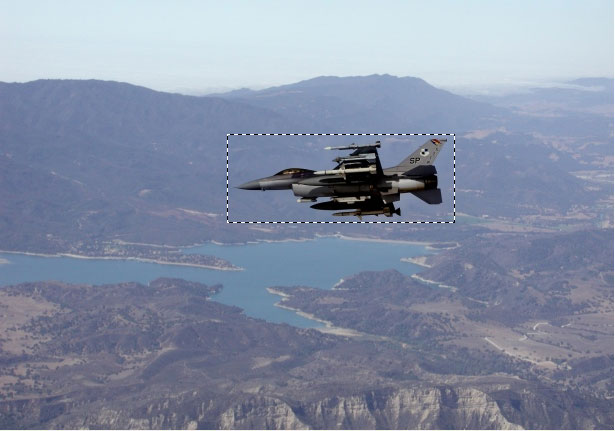
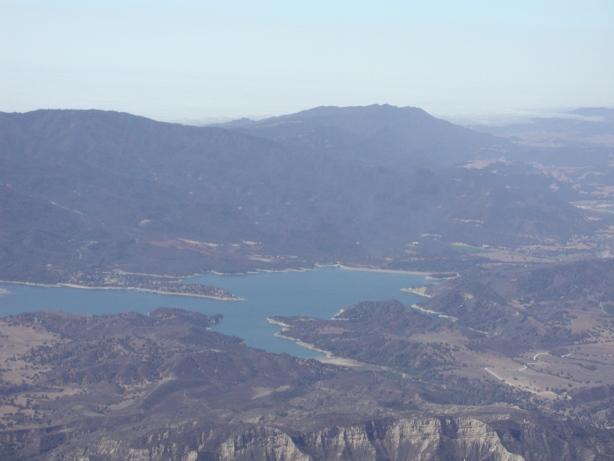
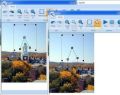
Inpaint reconstructs the selected image area from the pixel near the area boundary. Inpaint may be used to remove undesirable objects from still images.
Delete any unwanted object from your photo, such as extra power-line, people, text... The program will automatically inpaint the selected area to erase it.
If some unexpected object spoils an otherwise good photograph, Inpaint may be used to remove it. Simply select the object. No need for fiddly messing about with the clone tool!
It is alarmingly simple to use. Draw a selection around the object you wish to remove from the picture, and run smart remove selection. Inpaint will fill the selection area with intelligently generated texture drawn from the surrounding image data.
System Requirements:
Windows Vista/2003/2000/XP; 2000 MHz processor 256 Mb RAM
Publisher:
TeoreXHomepage:
http://www.teorex.com/inpaint.htmlFile Size:
2.22 MB
Price:
$39.99
GIVEAWAY download basket




Comments on Inpaint 2.0
Please add a comment explaining the reason behind your vote.

iPhone app giveaways »




Android app giveaways »





#10 & all interested in trying EASY BACKGROUND REMOVER: IT’S WORTHLESS!!! You can NOT save the result. 100% waste of time. Ignat Titus: Your feedback value = 0.
Save | Cancel
It does certain fixes with amazing quality - and it's fun to watch it perform the pixel-fill. Beware, however, in border-regions. This can fail mightily. The source-area for the fill can be adjusted (hold down SHIFT and move the outer box boundaries).
My usual photo cleanup is with GIMP 2 (always free), but I made real use of InPaint 2.0 on the first day I installed it.
One thing: the output files are substantially larger than the orignal, at least for .jpg (and one would thing they'd be smaller, since they're more repetitive).
Save | Cancel
To #95 (and #61) Jimmy: Sorry the cut/paste method for the entire key didn't work for you as it did for others. Having to cut/paste four characters eight times is a pain in the a**, and your point about different settings is well taken.
Save | Cancel
@ Digitalkryme (post nr. 21) you seem to have missed 1 point while you zoomed in the cockpit: The goggles of the pilot, being mirrored, reflect a sandy landscape, so the picture of the jet was clearly cropped out of a different picture.
If you zoom a bit further you can see that the sand grain size, content, shape and coloring would indicate the original location of the jet to be somewhere in the Southern Sahara desert, just as indicated by the GPS coordinates (23'87601 North 97'24517 South) if you zoom properly the cockpit instruments!
Apologies for going off-topic but I just couldn't resist :D
Save | Cancel
Many thanks to GOTD and the developer for this amazing program!
After testing v.2 I have concluded that v.1 is better:
1) Ribbon = No thanks!
2) Lasso tool (real freehand) beats 10 to 1 the Polygon tool
3) Footprint: v.1 = a few kb vs. v.2 = a few kb... shy of 3 mb!!!
4) The progress bar of v.1 is visible the one of v.2 is not!
5) The undo last command should apply to the LAST dropped dot of the Polygon tool and NOT to the entire Polygon selection: If you misplace 1 single dot you must restart from scratch!!!
6) The dotted area boundary can be re-sized and that's fine but it is one more passage that slows the process down iro v.1 without noticeable improvement in the final result
7) Recent Documents in the ribbon seems to be lacking memory ;)
Bottom line: v.1 stays in my PC and v.2 goes... An eventual v.3 would be welcome any time to "My favorite programs" if some REAL improvements will be implemented.
Thanks again to GOTD and the developers for having given us the chance to test this program ;)
Save | Cancel
#42.
I know what you mean that once you've done your polygon and done the removal, anywhere you click on your picture starts a new polygon, even if it's nowhere near where you need it.
Once you've done the removal, hit Esc and that releases your cursor from the polygon tool.
Save | Cancel
For the Developer to improve: Adding a 'Free Transform' would be helpful rather than limiting the rectangle side-to-side or up and down. Just th limited time that I have been playing with it this issue has already made itself known.
Save | Cancel
Great tool and can give great results once you get to grips with it but version 1 was superior in my opinion as it had the more accurate freehand tool and didn't have the huge icons taking up screen space for the pic you're working.
Save | Cancel
Just tried the software it's very good. Been using healing brush in photoshop but this is simpler and very very good.
Save | Cancel
This program is not a background remover or image extractor. It would be more useful if it allows a user do an invert selection and instead of removing the object, to remove the background. Then instead of replacing the pixels with the likeness of its vacinity, to allow for a color palette to select transparent or a white background. Better still, if the selection to remove is an object in the picture, then to have the ability to extract the removed object and paste it to another canvas in another program or Inpaint itself.
Save | Cancel
Wow. I've used Inpaint 1.0 since it was offered here last year and loved it, and this one does not disappoint. It blends the backgrounds a lot better than the previous version and it's kinda cool to see the object disappear before your eyes. 10/10 from me, I love this program.
Save | Cancel
Actually doesn't seem to be too stable. It just died on me yet Again! --once each of the last 2 photos. "Sorry for the inconvenience" --Yeah, Me TOO.
"Sorry for the inconvenience" doesn't get the job done. I'd be really upset to pay $40 for NOT getting the job done!
Save | Cancel
I've been throwing challenges at this program, and the program is victorious.
Save | Cancel
The more I work with it the better I like it
Sans:
1. Kind of s-l-o-w
2. Sometimes the cursor gets stuck in the 'working photo' window and will NOT allow cursor out into the task pane, which is inconvenient.
3. Just died on me and closed down requesting an error report
I have 3 suggestions for improvements:
1 Keep the previous free-hand selection tool, preferably in addition to the polygon
2 Thumbnail selection in the 'open' panel to see what photo you are opening, without the trial and error method.
3 The progress bar is somewhat hard to see, make it more pronounced.
Save | Cancel
Paintshop Pro does this and lots more.....but free is free!
Save | Cancel
@#74...In case they decide to post this and in case you come back to read it... I tried copy/paste of the entire thing.. in three different browsers... and it did NOT work, at least not for me. There's a ton of configuation/security settings that can alter browswer behaviour, so I don't doubt it worked for you. But it didn't for me. I had to copy/paste the 8 quadrets separately.
--Jimmy
Save | Cancel
Now I have both versions of the inpaint program. The old one does a few things better than the new one and the new one does many things better than the old one. Both are well worth paying for but free is even better.
If you have the old version then keep it.
Save | Cancel
downloaded and installed. tried to run program and got this message:unable to locate dll the dynamic link library gdiplus.dll could not be found in the specified path c:\... etc
Save | Cancel
Useful little programme, although I am a firm photoshop fan, this is easy and fun to use. Hats off to the programmers.
Save | Cancel
Wow! I just had a chance to try it and it works perfectly! I'm impressed! I'm going to go find some more pics with things I'd like to remove. :)
Save | Cancel
To #74, I'm with #61. Entering the key is unnecesarily complicated. Yes, I too copied and pasted 8 4 char groups, I would have been happier copying and pasting only once.
About registration, is there any way of telling that it was successful. I don't get a confirmation message, and I don't see any change in the "About" dialog box. I would be sad to find out that registration didn't "take" (it's happened with other GOD apps).
Ribbon, and how is that an advantage? There is only 1 tab, so the tab line is wasted space. There are only 11 "buttons" on that tab so the 5 group names are wasted space too. Thanks to the earlier comment mentioning that "File" handling is in the "office" button. Granted it is consistent with the ribbon gooey, and I suppose I might have eventually found it, but it would have been "user friendlier" to simply put the 3 items on the ribbon, there is lots of room.
Yes, I really hate the Ribbon. Compared to the menus it replaces it is a design that wastes screen real-estate that I pay for in the name of a design with over-sized, incomprehensible icons aimed a "new, inexperienced" users. I am not in the target group! If MS, and now these guys had simply offered an option to select Ribbon Gooey or Menu, I would be perfectly satisfied. They already had menus from earlier versions, it would be trivial to offer the option. Sorry for the rant, buy I really hate the Ribbon.
There is a help file. That is good. It's really, really!, light weight. It actually looks incomplete since there is more peripheral info under the "Product Info" heading than there is "help", so there is nothing to index. The text search does work.
Save | Cancel
3.InPaint1.0 had free-hand selection tool.
Hopefully this updated version does too
...why don't you TRY it before reporting. Then you might KNOW if it had the features you want. Such imbecilic "reviews"
Save | Cancel
I find its processing alogerithm significantly better than Inpaint 1.0 that was offered here some time ago. 1.0 was very crude, this seems much smarter.
Save | Cancel
It DOESN'T overwrite GOTD version 1 - installs to a different Folder.
Save | Cancel
To the developers:
Thanks a lot to TeoreX and GOtD. This is a very nice application, but it has some issues. I suggest to add contour lines or borders, to make it possible to segment the area around the object that should be removed. In Anglestar's photo: it would made it possible to indicate the edge of the sack, and thereby help the algorithm to know where to fill inn "sacking", and where to fill inn "black" from the interior of the car. One could have use of several such lines, and they should have a sharpness or rigidity property. Some lines, like shadow, and walls are very strict, while other, like the edge of a bush, is very diffuse. That would give the user a lot more control over the outcome of the Inpaint process. One other nice feature would be to be able to choose areas with similar texture as in each region in the are we want to Inpaint. I tried to remove a door phone, but I got two light switches, because the algorithm picked up the strong pattern of the light switch on the smooth wall, and made a ghost light switch. I had to remove the light switch temporarily, to avoid this.
Save | Cancel
Everyone says this is wonderful and easy to use. I installed it and looked into the helpfile. It was empty: no topics. I reloaded and reinstalled it with the same result. I loaded a photo with a minor imperfection I wanted to remove. I outlined the area freehand but couldn't get my cursor out of the frame. Eventually I had to close the program to get my cursor back. So call me a dunce or a newbie or anything you like but --- how do I get this 'simple, self-explanatory program' to do what it is supposed to?
Save | Cancel
Wow! I seem to be the only one who is having a problem downloading this. Actually,it downloaded initially pretty well and I was trying to register it when the building electrify went off. I could not get it to continue so I uninstalled and tries to redownload it. It downloads fine but I can't register it and without registering it,I am sort of stuck. I wrote them in their feedback page but have not heard from them.
I have an "Untitled Inpaint" program. When I try to use it, I get a message that says "C:\Documents and Settings\Compaq_Owner\Desktop\Carol.jpg is not a valid Win 32 application. I have no idea what that means. Can anyone tell me what I have done wrong?? Pleae!
Save | Cancel
GOTD and TheroX thanks for this great tool. This is a real gem. TheroX I will will most definitely recommend this tool to others.
Does anybody know of software that has the features of Vreveal for cleaning / enhancing gif and jpg pictures. See www.vreveal.com
TheroX if you can add in this kind of capability to Inpaint you will
have a tool that is a real winner used by the people in the imaging world.
Save | Cancel
I uninstalled and then installed again. This time I didn't even have an option to enter the key. It must activate automatically. The first time I had to enter the key although I pasted it in and it still didn't say registered. Now that isn't an option. So I figure that even though you uninstall , there are registry entries left. Oh well it's not the end of the world but I would have liked to have kept this. Hope it is auto registered. Sorry to be so stupid.
Save | Cancel
I was thrilled to see InPaint today, because my old copy had expired, but I can't seem to get the software to download. Every time I try I come up with this:
"The process cannot access the file because it is being used by another process."
Then the setup closes. I tried the mirror link, and it does the same thing. I still had the old InPaint on my computer, so I uninstalled that, hoping that would solve the problem, but it didn't help, even after I rebooted the computer.
I tried downloading directly from Tenorex, and that seems to work just fine, but the software won't recognize the key. Nothing happens when I try to register the product, and it won't let me save anything, so it obviously isn't registered.
I noticed that the version on the site says 2.0, but when I downloaded it, the version number is 2.1.0, so that may be what is stopping it from registering, but I'm not sure.
#71: delhidada said you could use the one on the site, but they don't say if they got theirs there or were just going by past experience. I know that sometimes works, but it didn't work for me today.
Any suggestions?
Save | Cancel
#27 Angelstar958: "I tried it on a very old photo of a baby in a truck with sacking behind it, I decided to take out the round wing mirror which took up a fifth of the photo in the corner using the polygon shape not only did it remove the mirror but what amazed me more was it left behind the sacking that was obviously behind the mirror and couldn’t be seen."
I'm sorry but I have to point out that InPaint did not find any sacking behind the mirror that you removed. If you look carefully at the picture you can see the edge of the sack going from top to bottom of the picture just at the right hand edge of the mirror. The sacking pattern that InPaint filled in after removing the mirror is just a the way the algorithm works. It takes elements of the area around the area you remove and use that texture to fill inn and heal the wound in the picture. Most of the surrounding area was just black, so it seams to have fancied the sacking texture and used that to fill the hole, even though one can see that it should have chosen mostly black to match the void inside the car.
Save | Cancel
Happy i have succes.Translate Client program have a buttom:copy(lock on my jet Screnshoot image-who copy this translation (from a language to other language) to clipboard.From here(clipboard) you can introduce with paste your translation if you open notepad,so you have translated text from web and converted to txt easy and save.Here is this soft:
http://translateclient.com/
You must to make same settings to work on web only with selection and instant translate from a language to other language.This is for web.For:pdf,documents,office is necesary to select text and using copy/paste/translate to put in open (double click on icon from tray)Client for Google Translate-Free.
Save | Cancel
http://my.jetscreenshot.com/demo/20091103-msvz-296kb
This is my first trial to see how work:Jet Screenshot and Translate Client(Client for Google translate).It is possible to make setting to instant translate what i selected navigating with my browser;for pdf,office,documents it is necesary to use copy and paste.This is my experience,so ignore me.
Save | Cancel
This is a great program, I'm still learning all of the features,but I wanted to thank the testers. Your before and after pictures conviced me to try it.
I was weary after several simailar programs caused me a lot of grief on Vista but this works just fine and does a outstanding job.
Thanks to GOTD and TheroX
Vidimo Se!
Save | Cancel
The tool does a good job, as can be reasonably expected. I don’t think any simple & automatic tool can deal with the really tough situations, for those you’ll need something more sophisticated that demands more work on the side of the user.
I have 3 suggestions for improvements:
1 Keep the previous free-hand selection tool, preferably in addition to the polygon
2 Enable image drag & drop
3 The pointer is sometimes hard to see, make it more pronounced.
Save | Cancel
To #61: "EIGHT sets of characters that have to be entered (perfectly) to register ... ? – and you can’t even copy/paste the registration key b/c the developer made them EIGHT SEPARATE FIELDS."
I thought the same thing. Then I decided to copy/paste anyway, and guess what? That worked too, because the hyphens were already in the key that we are given, and they pasted fine, between each set of characters.
Save | Cancel
What this really needs is a paste as new image function for it to be more useful. I would like to be able to paste an image I got off the internet without having to save that image as a file and then search for it to open it.
Another feature that would be useful is a way to undo a step when trying to remove an irregularly shaped object. I don't want to have to start over in the middle of marking a 20-point image. Ctrl+z logically would perform this function while using polygon tool instead of undoing the last image edit.
Furthermore, the polygon tool really shouldn't force people to stay within the borders of the image. This would allow the user to click a "undo last point" button. It really isn't that hard to write a few lines of code in the program to tell it to ignore all selections outside the image border.
Additionally, there is a bug that can traps users and prevent them from moving their mouse outside the image. If you use the polygon tool and click outside of the image as your first point, then you're trapped forever until you press "esc" or crtl+alt+del. As mentioned above, there shouldn't be any reason for it to stop users from clicking outside the image.
And one last suggestion: It would be helpful if users could scroll while using the selection tool. I don't want to reselect with the polygon tool from the beginning if a small part of the section I want to select is not in my window. The arrow key (up, down, left right) should be assigned for this function. (I should get paid for all these suggestions)
Save | Cancel
To #61 James Dombfauck: Perhaps you are a Dombfauck, I was able to cut and paste the registration key into the fields just fine. Did take two tries (not clear on why that was) but it pasted in just fine on the second try with just a single paste. I can certainly agree with the $30 one trick pony statement, and overall I'm not sure the program is even worth the free download, but your complaint completely misses the mark.
Save | Cancel
The code works w/o GOTD. Download program from the original vendor's website and register with the code (readme file) after installing. Also the original file is 0.5MB smaller than the GOTD version. So if you keep the code, may be it can be used later if you loose the program. I tried to remmove the incorrect date on 7MP picture and it did a real good job.
Save | Cancel
Unbelievable!
I create ads for magazines and have several background remover tools including Corel Knockout.
Never can quite get everything out.
This program performs miracles on removing things.
I use stock photos for many ads and if it is an object they always have white backgrounds. Hard to remove things at the edge which are only a few color values off from white.
This program does the impossible and with ease.
It is less than 2 mb and outperforms Knockout which is over 100mb.
I will gladly pay them $40 for this program.
Again I say UNBELIEVABLE!
Good going GOAD Guys and Teorex!
Save | Cancel
If anyone would like a before/after (only used Inpaint 2.0), then check out these screenshots below. Forgot to say last time, Thanks GAOTD. :)
Before: http://img39.imageshack.us/img39/5726/clipboard01uj.png
After: http://img253.imageshack.us/img253/3471/clipboard01inpaintj.png
Save | Cancel
Is there a freehand tool in this version? If not, I'm sticking to version 1 and glad I installed it on my test computer first.
Save | Cancel
Nice program, easy install on XP..Thank you GAOTD
Save | Cancel
I have used version 1.0. As long as the area that is selected has the same texture and color surrounding the selected area, the program in-fills the selected area beautifully. However, if the area around the selected area is different in any way from other areas outside the selected area, the in-fill result will be disappointing.
Save | Cancel
I honestly love this program! I had version 1.0 from the previous giveaway. I'm glad I can get the upgraded version now. Program has always worked beautifully! thanks GAOTD
Save | Cancel
I do have version 1.0 of this software backed up.
I see that v2.0 is far better than v1.0.
Tried it on screenshot of my desktop and tried removing some icons, it did that nicely.
I rarely do image editing so I don't think this program will be useful to me but I will keep it anyway.
Thanks GAOTD.
Save | Cancel
Well, my expectations were low, and I was not surprised with the result. The program does install and activate fine, and it tries to remove things from pictures. But it just can't do a good job of it in most cases, particularly on any object of larger size. In my tests it failed to see patterns in the background texture, and so, when deleting a long thin image (a person), it brought down colors from high in the picture when the much better choice would be to bring in colors and textures from the sides, resulting in a removed person replaced by a very obvious blotch that didn't match what was on it's sides.
I've seen some amazing stuff on the web, so it was worth testing this, but the software is just too basic for my tastes. I think I'll stick with the cloning tool brush to do this type of function in the images that I edit.
Save | Cancel
EIGHT sets of characters that have to be entered (perfectly) to register this POS ? - and you can't even copy/paste the registration key b/c the developer made them EIGHT SEPARATE FIELDS.
ARE YOU FREAKING KIDDING ???? - For a $30 one-trick pony utility ???
Microsoft Office CD-Keys are easier to enter than this.
ABSOLUTELY... FREAKING... RIDICULOUS.
Save | Cancel
I LOVE InPaint, BUT...
...really, v.2's "overblown-sized buttons" are a hindrence to getting the work done. At 56, I'm not THAT blind, ok? :-) Now, this is at 1024 x 768-monitor size.
I feel like I should "boost" the resolution, if only to reduce those too-glaring buttons to reasonable size...ugh!
Let me know when v.3 comes in, which oughta be pretty soon, after this. GUI's are vital for a program's "feel", and usage. Especially, the sometimes-tedious work of image-correction, right? Get that right, please!
Regardless, tanx for dis, as it works TERRIFICALLY!!
Save | Cancel
Help...please...once I click the Run and it finishes how do I get rid of the select boxes? If I click somewhere else I get a red box. How do I just have the finished photo without any of the programs tools on it so I can save...thank you
Save | Cancel