Every day we offer FREE licensed software you’d have to buy otherwise.
Giveaway of the day — Ringtone Maker
Ringtone Maker was available as a giveaway on February 15, 2009!

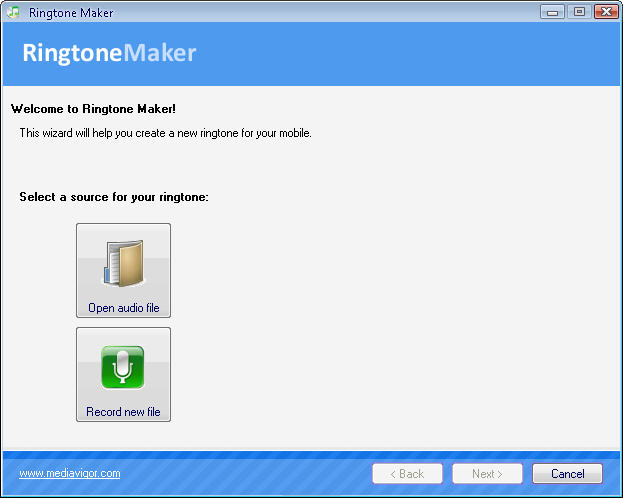
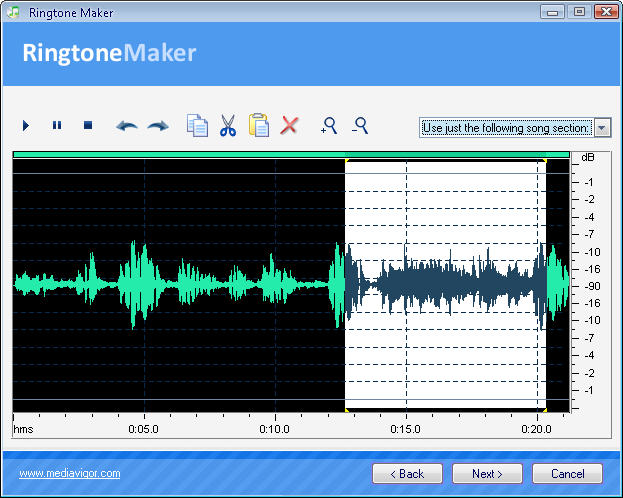

With Ringtone Maker, you can create professional ring tones from any audio files no matter whether it is your favorite song, your relatives', friends' or pets' voices, an online radio, etc. It is easy and convenient to use the program due to the built-in New Ring Tone Wizard. Ringtone Maker has a built-in visual audio editor, audio recorder and audio converter. And you can upload the created ring tone to your phone both manually and automatically right from the program - using WAP or ActiveSync.
Ringtone Maker was made with the ease-of-use in mind. All you have to do is to follow 3 easy steps, the whole process should not take more than 5 minutes to complete:
- Step 1: Select Song or Record new;
- Step 2: Make Ringtone;
- Step 3: Send to Phone.
System Requirements:
MS Windows 9x/Me/NT/2000/XP/2003/Vista
Publisher:
MediaVigor SoftwareHomepage:
http://www.mediavigor.com/ringtone-maker.htmFile Size:
7.28 MB
Price:
$19.95
Comments on Ringtone Maker
Please add a comment explaining the reason behind your vote.

iPhone app giveaways »





Android app giveaways »





i downloaded this program onto my vista, but when i opened the package the file was EMPTY!!! not a thing in it. it keeps telling me...the compressed file ( unzipped ) is invalid... thanks, but no good to me.
Save | Cancel
Well, even though I want this and have already downloaded it, I guess, after reading the comments, I'll just junk it, since I've got Vista Business and all the Vista users report that it freezes their system. I'm wondering, though, the description does say it uses a lot of system RAM, so, I'm wondering, how much RAM do the crashed Vista users have? Maybe, it hogs too much and the system freezes? I've got 4gb, but I'm still not willing to chance it. Thank God for this comments section!
Save | Cancel
I have Vista home basic and got the same errors about the windows registry process has stopped working. However after hitting close several times I was able to get it installed. I have since made a few ringtones. Great program! Thanks!
Save | Cancel
Well it worked for my 32bit Vistas system
Save | Cancel
#41 - Ashraf
GAOTD uses a software "wrapper" or "container" to wrap and encrypt either the downloaded program's registration info (as in "Activate.exe") or the program's installation file (as in "Setup.exe"). This encrypted container is used so you can't extract the contents with something like "Universal Extractor" and bypass the Internet verification of the giveaway.
Since this wrapper encrypts the contents of the Setup.exe file so the files can't be extracted, it will do you no good to scan it with an Antivirus program or a site like Virustotal. Antivirus programs need to extract the files from within the container file before they can be scanned.
- Scenario #1 - the giveaway ZIP file contains the files Activate.exe, Setup.exe and Readme.txt. Activate.exe is the encrypted container file. Setup.exe is the developer's installer and it may be possible for an Antivirus program to extract and scan it's contents.
- Scenario #2 - If the giveaway ZIP file contains the files Setup.exe and Readme.txt, then Setup.exe is the encrypted container file. An Antivirus program can't extract and scan the contents of this Setup.exe file.
Quote of the day: "Why is it drug addicts and computer aficionados are both called users?" - Clifford Stoll
Save | Cancel
Alsong is much better than that. It's a freeware for individual(not commercial) user. It's mainly a mp3&flac&wav&ogg&CD play S/W but anyone can make a ringtone file from any of these music files. Even you can set up your ringtone file for free using your own datacable, not using the 'cingular network' You can get it from http://aldn.altools.co.kr/altools/ALSong1981.exe
Save | Cancel
Have used "The Ringtone Maker" for over two years. Never an issue or a burp.
http://www.theringtonemaker.com/
Save | Cancel
#41, Ashraf, GOTD has an obligation to protect software developers who post their wares here from theft. GOTD isn't a freeware site (although there is a freeware section), the terms are that the offerings are commercial products, and that they must be installed within the one-day giveaway period. That's why I never post information on circumventing the terms. In exchange, GOTD says that they pay the developers, but I have my doubts that this site generates enough revenue to pay full licenses, and it wouldn't make sense to pay for every installation, considering that many are immediately uninstalled, or aren't used after the first day. But that's between GOTD and the developers.
When there's a separate Activate.exe and Setup.exe, the Setup.exe is generally just a renamed installer from the developer. The Activate.exe will contain encrypted registration information (unless the developer has chosen to allow open information in the Readme). When there's only a Setup.exe, it contains a combined GOTD activation module, and an encrypted installer from the developer. Anti-virus and anti-malware scanners can't see the developer's installer while it's in that encrypted state. When the combined Setup.exe runs, it decrypts and runs the developer's installer.
Save | Cancel
did have lots of runtime errors on my XP sp3.
not worth it
Save | Cancel
Unadulterated rubbish! The only feature that worked was that I could play and pause the music. Couldn't cut a section, couldn't zoom in on my selection, went to the next page of the wizard, the damn thing just fell over when trying to export using various options, had to kill it with Task Manager every time.
Instant uninstall! Though, given how well this has been coded, I'm sure it's left a urine stain somewhere on my OS.
Save | Cancel
Wow... well it does make an audio file you can use as a ringtone. That's good part. It's all downhill from there.
- It did install, but only after a ton of dicey and confusing error messages. I just ignored them and kept pushing forward.
- It's hard to screw up a Wizard interface (next...next...next...) but this one definitely is. You're actually done... but there's still a grayed-out "Next". What is that about? At that point your only option is "close" (no "make another ringtone..., listen to your ringtone.... etc )
- Absolutely no "help" link, no "check for update" - no menu items of any kind, aside from a buried link to the publisher's website (homepage... not help/support/ect). Not much more on the site.
- Quality of the finished file ain't great either -either yeilds huge files at high bitrates.... or scratchy/tinny files at even moderate bitrates. Note that this company's audio engine was called on the carpet with other products that have appeared here. Since it's a "ringtone" I guess that's not a big deal in this case, but you definitely don't want monster sized files for that.
Even if I paid myself US federal minimum wage, I've already spent more time on this reveiw than the software is worth. Assuming it's not malware and/or so poorly written it creates other problems on your computer there's no harm in trying it I guess, but I would not pay a dime for it, and i think I'll go looking for something better in the freeware world. I'm thinking Audacity, which I already have installed, probably has some well-designed add-ins to do ringtone conversion.
Save | Cancel
#21 - I have my whois details anonymized also. It's a safety measure for people who don't want their site ownership hijacked and/or personal details made public. Why a company should do that is a bit strange but it may be a one-man operation, so I wouldn't let the lack of detail sway my opinion of the software one way or another - unless the payment options were suspect.
Save | Cancel
#39: You need to know some basic HTML to "inject hyperlinks".
See here
Save | Cancel
#15: You need a third-party e-mail program in order to use the "e-mail ringtone" feature.
Save | Cancel
#39 Lu Hulu
Running Firefox?
Select a portion of text you are interested in with mouse, right-click and find '' view selection source'', compare, this might help you figuring out why ...
Happy surfing!
Save | Cancel
Use Audacity, does more, simple to use, completely free.
Save | Cancel
#39 Lu Hulu
You use HTML. Here is a quick crash course:
In HTML when you want to link something you use the code
<a href="[INSERT URL HERE]">[TYPE WHAT YOU WANT TO APPEAR HERE</a>
Just replace [INSERT URL HERE] with the URL you want to link and replace [TYPE WHAT YOU WANT TO APPEAR HERE] with what you want to appear.
For example, in my first comment above, in the [INSERT URL HERE] part I entered http://politicallymotivated.net/category/gotdreviews and in the [TYPE WHAT YOU WANT TO APPEAR HERE] I entered Verdict + Recommendations + Full Review - click here. The result is what you see above.
However, be careful in how many items you link. While the settings vary from website to website, spam filters may label your comment as spam if you have too many links.
Hope that helps.
Save | Cancel
try tonethis as free alternative
http://www.tonethis.com/
Save | Cancel
#20
Fubar, how come? I am not saying you are wrong, you obviously are more knowledgeable then me in this area, I am just wondering why.
Save | Cancel
nice kit,
made some nice ringtones for myself and my family' they are much better than the naff one's that came with my new phone sony ericsson c905 plus four more older sony ericsson's in my family
great program easy to use
thankyou GAOTD keep up the good work
Save | Cancel
Now, how do you guys like Ashraf get the hyperlinks injected into the titles? Mine is just plain text.
Save | Cancel
Like what Ashraf said, there are free alternative that can do everything and more.
Free Alternatives
FormatFactory
Audacity
Wavosaur
Save | Cancel
Appeared to install on both of my XP sp3 computers and had the same MS register problems on vista sp1. Tried to use ring tone maker on XP sp3 and no music would load. Pity, my wife and I would have liked this one.
Save | Cancel
This is pretty sad. I have Vista Home Premium 64-Bit OS, and as soon as it tried to register, the program froze. Finally got it to work through a series of trials and errors, and it was just not worth it. Audacity has many more features than this program, and it installs/runs very well.
Save | Cancel
#9 Thanks John. Now if only I had the USB wire in the video. I'll try emailing it to my phone in the meantime.
Save | Cancel
Oh what a pity read the thumbs down for Vista so not even attempting to install. Would have loved this software though. Been wanting to make some ringtones
Save | Cancel
Does this work FOR Verizon cell phones ONLY?...
..and do you 'have' to have a USB cable?
Thank you
Save | Cancel
Installed fine on XP Pro SP3 although there is no tutorial or help file to figure out what you're doing. I found a site online that had free ringtones which worked for me. However I'll keep this for my kids to play with.
Thank you as always Ashraf for your reviews,
Thanks GAOTD,
Sadie
Save | Cancel
I had the same trouble as #16 TK. Error installing. A useless bit of software
Save | Cancel
any program that requires me to "send" to my phone, through email, text message, call or what ever is automatically a NO WAY!!! to easy to get your phone nailed with spam from telemarketers, I already get calls from auto warranty people and I haven't had a warranty on my car in years.
I use a program called DataPilot by Susteen,
http://www.susteen.com
it's not free, but with it you can make your own
Backgrounds,
ringtones,
backup your contacts,
transfer your photos and music
and you can do it with either bluetooth, or via their cables which they have for just about any phone out there past and present.
cost is between $30 and $70 for universal kits
and one phone only kits for $30 to $50
and all with out ever once makeing a call or giving out your phone information
Save | Cancel
This program is not worth the money.
Some free audio editing software (eg. Audacity) can do this for free with a little more effort.
And if you want to email your audio files, just attach them to your email, you don't need this program to do that.
Thumbs down.
Save | Cancel
Won't have time to play with this much till later, but in case it helps anyone out, & as always FWIW...
While the GOTD setup file is encrypted, often the downloads from the developer site are not. While this is not fool proof, virus scans on that alternate download may work, if that puts anyone's mind at ease.
Ringtone Maker uses/includes several common VB (Visual Basic) files, plus NCT brand media handing code libraries. Several other GOTD featured apps also use the same NCT & VB files, only they will have installed them in your Windows System32 folder, & they may be newer versions (mine are). This ***May*** be the source of some problems people are having installing/running Ringtone Maker, though I haven't/won't have a chance to check this out right now.
Save | Cancel
~Robert~
Thanks for your update on the ADVpack.dll file. I wonder why the author named it something that smacks of an ADVertising PACKage instead of VerifyINF.DLL. Curious.
Save | Cancel
Another good free alternative would be Bitpim. http://www.bitpim.org/
Save | Cancel
Will this work for Alltel phones? In the past, only THEIR software would work to do anything on their phones. I have the Samsung HUE. Please advise.
Save | Cancel
Seems like it can't help me to "build" looped sequences of music. So, this ain't any better than other - but free - audio editors.
Save | Cancel
Vista doesn't like the install, error messages...won't run properly.
Save | Cancel
I was just about to put a thumbs down...
This software is easily replaced by "Audacity" and it even lacks the software to send it directy to the phone by BT. BUT!
Then I remembered that not everyone knows how to deal with audio editing software (no matter how easy they are). This program tries to simplify the process, and at least by the screeshots it does that.
Sending an MP3 file is capibility that usually people do have...
So I do think certain people do find this program usefull.
(but definitly doesn't worth 20$)
Save | Cancel
Very simplistic software BUT it does what it says .
Without beeing paranoid ( after all it is not a security software ) - Why would a software developer like MediaVigor chose to be anonymous ( whoisguard protected) ? They may have objective reasons but it is obviously wrong from a marketing point of view .
If you want something more complex ( allowing mp3 legal downloads for free, among others ) there are 2 free deals - with powerful built-in ringtones generators - in proffesional tools from Audials .
Radiotracker
MP3videoraptor
Hope that helps !
Save | Cancel
#2, Ashraf, when there's a separate Activate.exe, you can sometimes run Setup.exe through VirusTotal. In cases like this, where there's only Setup.exe, you won't accomplish anything by trying to scan Setup.exe, as VirusTotal won't see the encrypted actual installer.
Save | Cancel
Great, another program that creates annoying ring tones. Though I did hear a woman who had a bear growling when her phone rang that captured my attention.
Save | Cancel
Does not include a format suitable for iPhone
Save | Cancel
# P.E.
Be aware that Spybot warns that advpack.dll will be installed - I denied this. Program runs anyway.
Advpack.dll is a windows system file that assists with hardware and software installs by reading and verifying .INF files and it was probably already installed on your system.
So you don't need to worry about that.
Save | Cancel
The "email ringtone" feature does not work.
Save | Cancel
Nothing special about this one. It will make ring tones for you nd it will email them to other peope.
If you try it and like it then for you it is good no matter what As..af says.
Personally Iwon't keepthis program as i have no need for ring tones. My phone sounds like an old rotery phine and that is ok by me.
Save | Cancel
Works well for me. Thanks GOTD :]
Save | Cancel
1.Installed OK
2. Opened ok
3. found to be absolutely NOT intuitive
4. NO HALP FILE
5. CRASHED
6. Need I say more: you get what you pay for......
Save | Cancel
Followed the install instructions, which wasn't much.
Program fails to run.
Error: Can't initialize device
error code: 0
http://i42.tinypic.com/e00lkw.jpg
Save | Cancel
I think we've had this one before too. And it doesn't run on vista (after installing perfectly), so I won't even bother to try and download.
Save | Cancel
It went ok. Using XP - and have had no problems
Even got a ringtone i actually like on my phone now. Yes!
No virus either.
Save | Cancel