Every day we offer FREE licensed software you’d have to buy otherwise.
Giveaway of the day — RemoteObserver 2.0
RemoteObserver 2.0 was available as a giveaway on November 29, 2008!

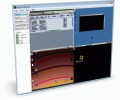
RemoteObserver is a client-server application that is intended for the supervision over computers in a local network or via the Internet. You can watch that your workers, kids or students are doing, and record screenshots for the further viewing.
Additionally, you can send messages, run applications, restart or shutdown remote computers if neccessary. Client or server side is protected by password that allows you to keep confidentiality. Server-side application has one interesting feature that allows you work and also watch at the same time.
Features:
- Simultaneous supervision of up to 64 computers;
- Recording screenshots for the further viewing;
- Exporting screenshots into BMP format;
- 'Bring to desktop' function that allows you to work and also watch at the same time;
- Run applications, send messages, restart or shutdown on the remote computers;
- 8x8 grid;
- Server-side full screen function;
- Using password for safety on the server and client side;
- 3 levels of compression at your choice;
- Application tray icon.
System Requirements:
Windows 2000/XP/2003/Vista
Publisher:
ValixSoftHomepage:
http://valixsoft.com/remoteobserver.htmFile Size:
393 KB
Price:
$19
Featured titles by ValixSoft
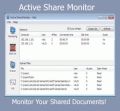
Active Share Monitor is the application to watch your shared files and protect you from unauthorized access. When a user remotely opens shared files on your computer, application detects it and displays information about that file. All details will be logged to file for further analysis. Also you can add computers to blacklist to block access your shared files. You can specify hotkey for application for quick access to necessary information about sessions or opened files.
Features:
- Protect from unauthorized access.
- Notify you if there are opened files or sessions.
- Log information to a file for further analysis.
- Export sessions and opened files information.
- Block remote computers.
- Tray icon.
- Hotkey feature.
Comments on RemoteObserver 2.0
Please add a comment explaining the reason behind your vote.

iPhone app giveaways »


Android app giveaways »





I got this last time it was offered here.
This is a GREAT program! Works just as stated, and you can clearly see everything on the other desktop.
Also, if you use Logmein on the other pc, then you can keep up with the IP address on that. Then simply enter it into this program.
Highly recommended.
Save | Cancel
Anyone thinking of using this to spy on a teenager should consult 5 psychologists first. I think it would eventually cause more harm than good.
I won't even bother with the company spying except to say that some companies would be glad to control their workers' every waking hour.
As for helping fix a computer, cool if it can do that.
Save | Cancel
Worked fine for me. Allows me to keep an eye on the little one. Took a little fiddling to figure it out but works well IMO. I did reboot after installing although not sure i needed to. Thanks for the free app.
Save | Cancel
#44 - thank you very much, the software work for me after followed your detail instruction.
Save | Cancel
What's the problem?
If I'm paying you to work for me, and paying for your computer equipment... and the bandwidth... then you should be doing MY work (your job) and NOTHING else online. Perfectly legit for me to know what someone is doing on MY time. If law requires me to tell you I'm going to monitor you... fine. Consider yourself told.
If you're my kid and are a minor... you have no rights whatsoever... I own you and if I want to monitor you... Oh well. When You become an adult (which you will have a better chance of happening if I protect you now) you can do whatever you want. But right now - I'M GOING TO WATCH YOU - Too bad, so sad... sucks to be you.
I see totally NOTHING wrong with using this kind of software. Company IT policy should be spelled out in an employee manual (signed by the employee) however.
Save | Cancel
The Download DOES NOT work
sorry for the caps
Save | Cancel
BTW..The software works fine on XP Pro to XP Pro, Vista Ultimate to XP Pro, Vista Ultimte to Vista Home Premium, XP Pro to Vista machines (Both Ut. and Home Premium). There is other software that does similar things, but this is the first one I have found that lets you watch multiple computers at once. Now if it works from outside to in, that will be sweet but I'm too lazy to test that right now. I don't see why it wouldn't though as long as I forward the correct port on the router. Thanks GotD!
Save | Cancel
This software its a little old, the most recent one is the 3.5 which means if you want to get the new features you will have to pay.
Save | Cancel
You guys that think that this software should not be on this website under any circumstances are seriously whacked in the head. First of all, all employers have the right to watch anyting their employees are doing on the companies network, using the companies computers while they are being paid to work. Second, I have the right to snoop on my children any time I want. That's the best way to fid out if they are doing something that they shouldn't be doing. And if you dont tell them about it and nothing bad is going on, then they don't need to now you are watching them so that they think you trust them. Now if you sneak into your neighbors house and install this on their compute to spy on them, then you're being bad not to mention breaking the law. I'm so sick and tired of you complainers who feel like GOTD owes you something. It's free software. Be thankful when they post something that interests you or is useful to you and when they post something that you don't need or want, move on and kmeep your BS comments to yourself.
Save | Cancel
Somehow I suspect the ones who feel like monitoring is "immoral" are the children being monitored. If not, then I suspect they are just past the age of majority, have never raised children or both. My experience suggests they are the offended performing the offensive. So the more monitoring, the better.
Having said that, my kids have grown up and moved out and if I didn't go to the wifes PC when she had a problem, I would be banished from dinner. This offer sounds good, but not for me.
GOTD - thanks again for having a great site. I probably try out 30% of the offers and keep maybe 10% for a while, some long term. Most of the software is high quality which without a site like yours, I would never try out. A sincere and well deserved thanks from me.
Save | Cancel
Why not use TeamViewer Free non commercial edition?
It's free for personal use..My friend from Philippines often controls my PC for fixing something..
www.teamviewer.com
Save | Cancel
LOL this is really lame... I'm sticking with poison ivy it's got better features and a built in keylogger...
Save | Cancel
Thank you but no thanks. I'll rather leave family and friends before i'll spy on them. My opinion is, that it's perverted peeping
Save | Cancel
I just cannot resist passing this on:
Do you-all mean to say that it's OK for the government to spy on us?
Ever since telex machines, certain key words have been monitored and the complete message text "captured" for later analysis.
Words like: "oyl, petrrolium, hassasinachine..." (I am deliberately misspelling, not that I am paranoid or anything) trigger the process.
Today of course it's a program called Carnivore. Nobody uses telex much but I am sure PC's provide a wealth of info for the N.S.A.
Save | Cancel
THANK YOU!!!! Love this software GOTD. I have a teenage daughter that is going through some tough times and I'm helping her navigate the inevitable and normal teenage rebellion without compromising her safety. The hell with "oh we shouldn't be watching over our kids shoulder" bs. Yes, we should. For some children at least. Not all are mature at the outset.
Save | Cancel
Whenever this sort of offering comes up, the open-source iTALC - Intelligent Teaching And Learning with Computers is often recommended as an alternative, but it may not support Vista yet.
Save | Cancel
So, will this work if I have a D-Link modem, and both computers connected to it wirelessly? Like, its an internet modem, not an access point, will it still work?
Save | Cancel
I have to side with those who recommend the various flavors of VNC. They are free, updated frequetly, tested, and work well for both busiess and personal use.
Save | Cancel
"Run applications, send messages, restart or shutdown on the remote computers" ... these are the only reasons I would get this. However, the comments so far (that actually pertain to use of this software) say it doesn't work. Too much to install only to find out it may be worthless. If someone with XP systems comments later that it works, I may try it. If there is time left.
Save | Cancel
This looks like some sort of monitoring and VNC tool. Maybe it will be useful to me although it will not replace RealVNC which I'm currently using, because using RealVNC you can directly control the mouse and keyboard of a remote computer.
But this offer has some features not present in RealVNC so it might be useful to me.
I give this offer a thumbs up.
Save | Cancel
Here are my $0.02
Pros:
-Free (for today)
-Light weight on RAM and CPU usage. The software doesn't affect the client or server performance at all.
-Simple interface for "server-side" installation.
Neutral?
- The core Client installation is just a service that runs at boot.
- Very limited client configuration - clients can setup/change their password, change the port number and configure the service.
- No way to tell someone is "observing" your computer. There isn't a way to configure the wall-paper to change or provide any notification/pop-up.
Cons:
- The client configuration only showed up on my Vista (32-bit) machine. Nothing showed up for the two other XP SP3 machines I have.
-Firewall has to be manually configured for the native XP/Vista firewall
-Server software doesn't allow for keyboard/mouse interaction (hence the name "RemoteObserver").
-No encryption (that I could see) to prevent eavesdropping.
Final Verdict:
Stick with the free open-source software like TightVNC (or any of the VNC alternatives). XP Pro, Vista Business/Ultimate,Server 2003/2008 users can use the built-in remote assistance or Remote Desktop. You can also secure VNC (and windows RDP) using the free Hamachi VPN. LifeHacker has a post for those that are interested.
If you are looking for other remote desktop alternatives, wikipedia has an excellent comparison.
-TPU
Save | Cancel
This is a strange program... on the one hand I can see it being useful for parents with small children, as a form of inexpensive baby-monitoring, but aside from that I don't see the use of it.
Thanks anyway, GOTD! It is nice change from screen savers, but this software is not for me at this time.
Save | Cancel
My school uses a program like this and it is very helpful for the teachers. Teachers and other administrators can keep their students on task and freeze everyone's screens so they can point out or explain something.
This probably isn't helpful because I'm talking about the program concept and not the program, but upon downloading it may work.
It isn't for personal use, #6, it's for networks and it has nothing to do with morals. It is from a business/working perspective and keeping people on task.
Save | Cancel
yeah this does not install lol...u try to run it and it says searching for the exe
Save | Cancel
install the server on one computer and client on the other computer. both run on XP sp3. Did not seem to pick up the connection.
Btw, my server one is on wireless and client is on coax. Does this imply that wireless won't work as indicated by #3? Can anyone confirm this please...
Save | Cancel
UltraVNC is a freeware program I have used for several years to access and control remotely computers. I works very well for me. http://www.uvnc.com/index.html
Save | Cancel
RealVNC works much better and you can work on that watched computer. Remote has no uninstaller, must be thru the control panel. Only acces is thru the task bar icon. In all the program SUX
Save | Cancel
#6 Kelly:
What?
Do you ever look at what you are writing? Never have anything to say but you say it anyway. You and Ashraf - Babble always babble.
Save | Cancel
What a waste of time! Come on GAOTD, don't you ever check out the stuff you are giving away? No instructions, no help. I wasted about an hour and a half trying to get this crap to work. Loaded the client on a laptop, then the server on a desktop. Could never get anything.
Stay away from this program!
Save | Cancel
Why would you install this unknown app fro an unknown developer which monitors your network? Unless I could see and understand all the code I wouldn't risk allowing anyone to open up a potential back door into my system. Stick with known vendors!
Save | Cancel
Okay, after spending a couple of hours playing around with this program, I have found out the following:
My above instructions work if you do not install Client.exe as administrator. But if you do not install client.exe as administator, you will miss out on a few features such as password protection + you will experience a few bugs.
That being said, you should install server.exe and client.exe as administrator, regardless of if you are on Vista, or XP. For Vista, right right click -> run as administrator. For XP, Shift + Right Click -> Run as.
Save | Cancel
If anyone would like to help me out please feel free. I would be very much appreciated. Thanks.
Save | Cancel
What is this? It doesn't even work!!! When I did finally get an icon on my desktop, well it doesn't even open. No can do. When I tried to delete it, I couldn't even delete the program from my hard disk. Trying to re-install it, is just hell. So what am I suppose to do now? I'm fairly new here but it's not the first time it's happened that I couldn't use what I had downloaded. It's one thing to complain here but is there someone who actually gives a hoot and helps out when people need help??? HELP!!!
Save | Cancel
It's a nice and professional program which does exactly what the blurb says!!
However I do not see this program being very useful to most GOTD visitors for what it's aimed for: how many people here are EMPLOYERS keen on watching what their workers really do at work?
I think no more than 1%!!
So who can use this GAOTD?
Maybe jealous husbands, wives, boyfriends or girlfriends to check their partners' online habits?
What about PEOPLE's PRIVACY? Can this SW be considered legal in the office environment?
In ITALY a recent sentence of the High Court has decreed that spying employees at work with SW like this GAOTD (for instance by monitoring their private E-Mail)is not legal!
A few days ago I read that a British couple had divorced after the husband was caught having a “virtual affair” with a female character in an online game.
eh,eh,eh...I'm not joking guys!!
To have a good laugh take a peep at here :
http://women.timesonline.co.uk/tol/life_and_style/women/relationships/article5151126.ece
So SW like this could even cause regrettable "side effects", such as an increase in DIVORCE RATE....LOL!!
I think that it's bad enough if people peek into your private affairs or online habits and it seems to me that this GAOTD has been designed exactly for this purpose.
What do you make of it guys?
Caution: Big Brother May be Watching You...LOL!
Source: CNN
Studies by the American Management Association (AMA) and ePolicy Institute found that three out of four major U.S. companies record and review employees' communication activities on the job -- including phone calls, e-mail, Internet connections and computer files.
If that's not enough to scare you, 25 percent of those surveyed said they had terminated an employee for inappropriate use of the company's e-mail system.
Yet despite the growth in electronic monitoring and frequency of disciplinary actions, just a little over half of the organizations surveyed train employees about the risks, rules and policies pertaining to e-mail and Internet usage.
Cheers from Italy!!
Giovanni!!
Save | Cancel
Quite simply, if you don't trust them, then restrict their access in the first place. No need to spy on people like this.
Save | Cancel
Some of you guys have no clue how useful a program like this is. I have been using one similar for years. For personal use....
I can check my house and 5 dogs while I am gone with my laptop in a motel.
Save | Cancel
Rename this the Bush-Cheney Patriot software package and you've got a winner. Well, I'm hoping for something better than this in the future.
Save | Cancel
Okay, I admit; I downloaded this thing out of curiosity. However, when I tried to launch it, it didn't work. So I tried to uninstall the piece of crap and then I found that it had a corrupt, irremovable file.
I am DISCONTENTED.
Save | Cancel
Problem solved....
My firewall was blocking port 9499. I allowed access to it and it's working fine.
My anti-virus poped up with a warning about a trojan, but this is really a false positive. Any type of monitoring software is going to give you this message.
As for monitoring employees, this is most likely against company policies unless they have some type of information that the empoyee is doing something illegal.
Regarding comment by Kelly, this does the same thing as Parental control software, so what's so bad about that?
I give it a thumbs up
Save | Cancel
Oh I forgot to mention - after you install client.exe on your computer, restart it.
I have found out that this program only turns on while windows bootup - no shortcut or anything will launch the program otherwise (this on XP Home Edition).
Save | Cancel
RemoteObserver 2.0 = Big Brother 19.84 and beyond.
Save | Cancel
I did not like this program offered. But I do love https://secure.logmein.com/products/free/ it is Free and I can log into my computer at the office or my personal laptop when I am working on a project with out having to save it to a disc. It eliminates multiple versions of my projects. It is really cool to log into my computer when I'm traveling in a different country and still go and find what I need on my work computer. Very cool....
I do thank Give Away of The Day, I have been blessed with so many wonderful programs I would never been willing to try out or would have heard of. So I pass on today's but I look forward to the up coming software you will offer.
Have a Wonderful and Blessed Day!!!
Save | Cancel
I installed the client and when starting the program nothing happens..
Disappointed....
Save | Cancel
Interesting program.
Well it works. I installed the client on my XP desktop and the server on my Vista Home Premium laptop.
I can view the desktop activities from my laptop, send a message, lock the workstation, shut it down, etc.
Install order of server/client does not seem to matter.
Full instruction on how to get it to work:
Install server.exe onto a computer. Run activate.exe (if you are installing on a Vista machine, you must run server.exe as Administrator).
Install client.exe onto a computer. I am not sure if you also need to active client.exe (I do not think you have to), but it will not hurt to run Activate.exe just in case.
Go to Server.exe -> File -> Add Client.
Under caption, type in whatever you want to name that computer.
Under IP type in the IP of the client computer (the local ip of the client computer - you can find this out by: Run CMD, type in ipconfig. To run CMD, on an XP machine go to Start -> Run and type in CMD. On Vista, Start -> Search and type in CMD.) Usually the IP address will be something like 192.168.1.1XX.
Under Port, you can leave it at 9949 or change it to whatever you want (just remember what port you used - we will need it later!)
Not 100% sure what "password" does (I entered a password thinking it would prompt me for a password when I try to monitor the computer but it did not). I am working on it an will update you guys once I figure it out.
At this point, if your client computer does not have a firewall, you should be able to connect to that client computer (if you are not connected, right click on the client computer's name -> re-connect).
If it is not working for you, it means that computer probably has a firewall. Logon that client computer. Add the port (9949 is default) that you set when you were setting up the connection on server.exe as an expection in that firewall. What I mean is open that port. TCP should be enough.
Now it all should work.
Full review on this program will up at GOTDReviews.info in about 30 mins.
Save | Cancel
yeah, installed and activated, used the server and haven't installed the client on my other computer yet. But there is no icon, and no evidence whatsoever that this program even installed on my computer (even did a search). This seems kind of sketchy to me. I will update when I install the client on my other computer and test it out.
Save | Cancel
First off, I haven't installed it. Yes, I hate it when people comment on something that they haven't tried but I'll explain below.
It looked interesting for monitoring my kid's activities (like WebWatcher) so I wanted to investigate further. I went to their website. It was totally useless IMHO. I can't get any information on how the thing is supposed to work. It looks like it just grabs screenshots at some time interval (that you can adjust). That can be a huge hog with computer resources and speed. I'm not saying that it is because I haven't tried this particular program. Still, without more information on their website, I'm not going to try this one.
Save | Cancel
not understanding the concept? does this program have to be installed on both the the home computer and the remote computer? If so, how to get all your friends or office computers with an installation within the 24 hour period. this is friday night. I do not go to the office until monday. a lot of my friends whom I may want to help with problems are away for the weekend. so if it is only on my home computer what use it?
Save | Cancel
I don't usually leave a comment, but I've noticed that there are over 300 votes and only 7 comments. I'm not sure why I even check the comments as most of them aren't helpful. I wish there was a way to just allow comments about the product and only allow those that comment to vote.
Save | Cancel
keeping track of what your teenagers are doing is hardly bad manners or immoral. Not everyone can put the kid's machines in the same room as the parent's machine. This has potential if it works.
Save | Cancel
Installed on XP Pro, was unable to change the destination folder, when I opened the program it remained "Demo Version". No registration or license key to enter. Uninstalled.
Save | Cancel