Every day we offer FREE licensed software you’d have to buy otherwise.
Giveaway of the day — Reminder Commander
Reminder Commander was available as a giveaway on October 30, 2007!
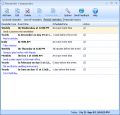
Reminder Commander will help you create a system of reminders for important events such as birthdays, anniversaries, appointments, important phone calls and much more. Reminder Commander has been designed on the basis of user opinions and suggestions. This is the reason for the program’s intuitive interface, which is extremely easy and comfortable to use.
You will no longer feel pressured about remembering everything as the computer will do it for you. Free your mind for more important tasks, and make your life more efficient!
Main features:
- Intuitive and easy-to-use graphical interface;
- Unlimited number of reminders;
- Popup reminders;
- Various reminder types – one-off and periodic;
- Reminding in advance;
- Postponing reminders;
- Disabling reminders;
- Tracking missed reminders;
- Separate reminder lists;
- Reminder history;
- One file for all reminders;
- Automatic launch at Windows startup;
- Access to the program via the icon in the system tray.
System Requirements:
Windows 2000/XP/2003/Vista
Publisher:
Abaiko SoftwareHomepage:
http://www.remindercommander.comFile Size:
5.58 MB
Price:
$24.95
Featured titles by Abaiko Software
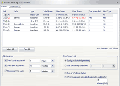
Abaiko Disk Space Monitor is a program monitoring free space on the disks of your computer. The news that there is not enough space on the disk will not take you by surprise in the worst time any more and you will no longer have to worry about it. The tool is intended for both regular home users and system administrators that need space for quickly growing logs of various systems, enlarging databases, data backups, or for software caching data.
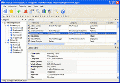
Advanced Phonebook allows you to keep it all in one place. It is designed to provide quick access to any contact via the alphabetic index and contact categories. Additionally, Advanced Phonebook can search by any criteria. Also, it is possible to create a report or export data to an HTML or CSV file.
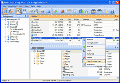
Smart CD Catalog is software designed for organizing and managing CDs, DVDs, and other digital media collections. It will allow you to catalog your disks and create an ordered CD/DVD database.
GIVEAWAY download basket



Comments on Reminder Commander
Please add a comment explaining the reason behind your vote.


iPhone app giveaways »





Android app giveaways »





Mr. Boyce, you should really try TimeTo for Windows... www.timeto.org... I think it does everything on your wishlist.
Save | Cancel
Best I've found so far is freeware Stickies. Already mentionned, but here are my comments on it:
Strong points:
- compatible with PDAs: PocketPC and Palm; this alone makes it a gem!! Read/edit your notes on your PDA.
- attach an alarm/reminder to any note.
- skinnable
- has tools (see relevant menu item) like webchat, etc.
- choose text size, color and backgroud color
- desktop version is free forever for home and office use (PDA version is only $5)
- extensive FAQ page
- support forum
A few images are worth a few thousand words:
http://www.zhornsoftware.co.uk/stickies/ss.html
Save | Cancel
Installed. Icon on desktop. Program wont open. Uninstalled, reinstalled, same thing.
Save | Cancel
i know it's late in the posting, but i've just read all the posts and wanted to add my $.02
i fully stand by google calendar. i run my life on it, as well as organize friends' and coworkers' lives. i can set a reminder to pop-up, email me and/or text message me. for example, i can set a reminder for all Friday's at 4pm to mail out a check to a coworker in a distant land and have it text me so i remember even if i'm out of the office on errands. you're also given the option to set a monthly reminder by date or by day (i.e. the 3rd friday, or always the 29th) i can have it email me my entire day's schedule at 5am so when i wake up, I see exactly what i have to do all day. i can invite friends to the events on my schedule, or (given their online permission) edit their calendars if we all have a meeting coming up. my favorite thing is that, not only can you includes friends' calendars (everyone appears in a different color so that you can tell who's events are who's) but you can create separate calendars for yourself as well. i have a calendar named 'Life' for my social events, a calendar named after one of my jobs, showing its hours, and one for the other job. i also have a 4th, which is the one i share with everyone, that shows events from all 3. Not only can you share your calendars, but you can choose, BY PERSON, how much information they do or don't see. handy for privacy, while still letting people know that you're busy.
basically, you can use google calendar for as little or as much as you want. it can simply be a small personal reminder service or an 'MMO' calendar of sorts. whatever your needs, it can do what you want. all of your information is available anywhere you have an internet connection (who doesn't, nowadays) and it's all free. you can sign up here: www.google.com/calendar enjoy ;)
Save | Cancel
Right now, I use Miranda's Notes And Reminders and Rainlendar (the old version) as well as Sunbird for such things.
Sunbird's a little bit big at the moment to keep running at all times, so I only run it about once a day to check if I've anything to do, and it automatically exports to Rainlendar; Rainlendar runs at all times and so does Miranda, so I never miss anything.
Save | Cancel
Here's my entry to the free category. Kana Reminder http://kanasolution.com/ is a simple, popup reminder program. 300k-560k download, depending on if you want the installer or not. You can set the alarms by the hour, day, week or year. The only customization it doesn't have is the every third Thursday that #17 wants.
Save | Cancel
Great! :P Least it's not another screensaver! ^_^ Only joking, I like the screensavers, just can't run them ^_^. As for this piece of software, it gets 7 out of 10 points from me. It's really useful for anyone - business man to house wife, everyone has someone they need to visit, or a call to make!
Save | Cancel
I think free RICOlmer (http://ricolmer.actuary.pl) beats this Reminder with easy. There is a lot of free software so why GAOTD show us this piece of stuff?
Save | Cancel
Been using NotesHolder and Rainlender (For the desktop calender feature) for years now, to happy with them to try something new now....
Save | Cancel
#17 I too have numerous appointments like the 2ed Tuesday of every month. I have not found a program that will do that. A program that allows imports, assigning emphasis to entries by having a variety of fonts, SMALL size with user interface that directly calls these specific functions from a menu with a single click would sell.
If the program came with the single click choice of weekly and monthly calenders configured for the first day of the week either beginning with Sunday (call it "Classic Format) and Monday ("Modern Format")user choice with a single click - the program would really stand out. Add an email reminder and the program would be perfect. It would make the Microsoft operating system after thought utilities look pale - and it would make the existing third party programs fall to the wayside because of its uniqueness.
The above would be a useful program that a decent developer could put together easily. I think I will. Thanks for the ideas.
Save | Cancel
@(German)Wehrwölfchen et all:
How about a very nice calendar from your own soil... Ulrich Krebs' UK Kalendar? Not bloated, and still looking nice and above all: Functional! Available at: http://freenet-homepage.de/ukrebs/
Save | Cancel
Let's look at the FEATURES of Reminder Commander
* Intuitive and easy-to-use graphical interface;
So what! It would be a pity if it bloody well wasn't
* Unlimited number of reminders;
Yes, so what? In this day and age of computers that run on multiples of gigahertzs if would be a darn pity if it was limited to 5 reminders.
* Popup reminders;
Isn't that the entire idea behind a program like this? To have it actually notify you in one way shape or fashion?
* Various reminder types – one-off and periodic;
Ooooh you have the possibility to have it on or off. Whoa, and it can even be periodic!!!! Oh my.... get the smelling salts.
* Reminding in advance;
Whoop tee do. What good would be reminding you after the time/date needed?
* Postponing reminders;
Just like any other program that can help you remind stuff
* Disabling reminders;
Why the .... is this a feature? What's the next feature : that you can start the program? Sheesh.
* Tracking missed reminders;
Words fail me.
* Separate reminder lists;
Pleaaaseeee.
* Reminder history;
Can someone give those guys some money to buy a clue?
* One file for all reminders;
For crying out loud, how else would one program it and still be able to look into a mirror?
* Automatic launch at Windows startup;
SIGH, a reminder program that you have to remember to boot up would indeed not be a good idea.
* Access to the program via the icon in the system tray.
How innovative. I'm surprised that they didn't mention as a feature that you control it by means of mouse and keyboard.
To any newbies out there.... try the programs mentioned here or google alternatives but please give yourself a break and don't bother with this.
Save | Cancel
mylifeorganized pwns version 1.9 or whatever. check it out.
anotehr one called timeto is good
they have POPUPS that remind you for sure! and at lesat my life organized as a TODO list (looks nice) that you can cross off things when done.
Save | Cancel
@ Oldphart,
If you would actually take the time to look at the alternatives offered you might just have installed something on that elderly couples computer that wouldn't make you look bad to their family members and friends who, unlike you, can recognize bloated junk.
A novice isn't well served by it because badly programmed software will mess up his system one way or another at some point and will use up more of the resources then it should.
Not everyone like you enjoy programs that will bog down there computer, fill up it's memory and hard disk and generally mess up the register with way to many freaking entries because the programmers couldn't figure out how to make it work properly.
To those that have no knowledge of programming let me suffice to say that a big program is never better then a small one if the two do the same things or if the smaller of the two does even more. Just as it isn't difficult to write a 1.250 page book but it ask lots of craft and skill to be able to write a short story it isn't difficult to make a 5 MB program but it asks skill to make a program that is far smaller in size.
http://atnotes.free.fr/features.html
Save | Cancel
#45 - Actually it was a colander (which sounds very similar to calendar! that was my attempt at a pun, sorry... it was getting late and I was tired, etc)
Save | Cancel
I didn't download this one because I don't like programs that run in the background ... I use memotome.com for everything I see this thing doing for me, and I don't have to run background software to do it.
Save | Cancel
to: werwölfchen
Remember, we are not running a Commodore64 anymore and using Basic. I downloaded this program and installed it for an elderly couple who barely know how to use a computer to play solitaire. Since it runs on startup, it gives the user with limited experience a program that loads at startup. The novice is well served with this program.
Thanks GOTD
Save | Cancel
#16 #17 #50 The name is Task Orhcestator and not Task Scheduler
Save | Cancel
#20 Is there a free edition?
Save | Cancel
#26 The RUN AS is fine for older programs. But if I'm going to install a new program, I DO NOT expect to have to use the Compatibility option.
Save | Cancel
I have been using the ATNotes for several years and it is excellent. Although it doesn't send email reminders, it does show a popup message for the alarms.
Save | Cancel
16 17 Task Scheduler I think can do these. It will also launch url's, copy, downlod, send folderd or files. It's a PC Mag utility. I think $16.00 for 1 years subscritption to all their programs. $7.00 for single download.
They do have some good programs.
Save | Cancel
# 17....see #15....Rainlander does all that and a lot more....Been using it for over a year with great success..
Save | Cancel
One i use is called "EverNote" i have it on my zip/pen drive 4GB USB removable and it stores all my notes including all webpages with all links and all HTML including hold CTRL to goto the link, i have found none better than EverNote maybe for removable look into EverNote Portable as well. www.evernote.com
Save | Cancel
46#, I was commenting on the type of software, which is close enough and potentially useful for someone.
In any event, I did try the software (see #39) and now I have a further comment: It's hard on RAM. No less than 22MB is currently used on my machine, and the program is almost empty of content at present. To compare it with NotesHolder (again, sorry), which only uses 6MB while being full of information (reminders and notes). That's bad, but no deal-breaker for me, so it's still thumbs up, but a little less up.
Save | Cancel
Why not try Ecco pro:
ftp://ftp.netmanage.com/support/pub/utilities/EC401/Ecco32/
And check out the active discussion forum on Yahoo:
http://tech.groups.yahoo.com/group/eccopro/
Save | Cancel
#11 - I thought that #3' thingy was Swiss Cheese...
bb
Save | Cancel
How does this differ from Outlook and other e-mail system reminders? It really does not seem to add much of a difference.
#17 - If you have Outlook on your computer, you can schedule a recurring appointment for every 4th Tuesday, etc - I have several networking events that take place on the 3rd Thursday of the month, and I just have a recurring appointment in my calendar to remind me of the event.
Good luck!
Save | Cancel
As an alternative, here's what I use:
http://www.minireminder.com/home_en.htm
It's free.
Save | Cancel
I would suggest: NNCRONlight, FREEWARE: http://www.nncron.ru/#nncronlt
Although this belongs to a different category of applications, it can be used for all the Tasks which Remind Commander says it does...
.. BUT within just a few KB of code and with a minimum of RAM usage!
nncron can run applications and run (open) documents (texts/images/PDFs... - all kind of files with the associated aplication)
You could - for instance - daly/hourly/in_any_intervals open an image of the next birthday person, beginning from 14 days in advance to this event; or open a text file; and; and; and...
----------------
nnCron LITE is a small, but full-featured scheduler that can start applications and open documents at a specified time or with specified frequency. nnCron LITE is a perfect freeware Windows clone of a well-known UNIX scheduler Cron (including all the useful Anacron features).
Here are the most important features of nnCron LITE:
+ it can be started as a system service or as a regular standalone application
+ it understands cron table format (Unix) and is managed with easy-to-edit
text crontab files that are fully compatible with Unix crontabs
+ it can handle and restart so called missed tasks
+ it can set and use environment variables
+ it can run applications authorized as currently logged user (WinNT/2000/XP)
+ it can be extended with plugins written in Forth language
+ it can be easy tuned up to answer your current needs
+ it is not resource demanding, and it can run even on very older PCs without
any noticeable performance degradation. (We have never seen nnCron LITE service
to allocate more than 150k of operative memory.)
greetings from
(german)werwölfchen
Save | Cancel
Thanks GAOTD but I don't have any CPU or RAM τηατ Ι δon't need.
I believe this program will keep running in the backup and I don't like those programs.Anyway,thanks again.
Save | Cancel
Some really good alternative progs being posted.
Here's one that might be useful to someone. It covers a lot and it's fairly comprehensive.
They also have some "tutorial movies," in-case you'd like to learn more about it.
Task Plus
Save | Cancel
OK, I said I wouldn'd try it, but I did anyway. And I like it -- nice clean interface, intuitive to use. I think I'll try it out for my reminders, and keep NotesHolder strictly for notes.
25$ is a little on the expensive side (NotesHolder is 15$, and is better if I had to choose only one. But NH is brilliant, so there is no shame in being worse), it's more of a 15$ app I think. Still, I like it so far. Thumbs up.
Save | Cancel
#17: You are looking for “4th Tuesday of the month” or “Every third Thursday”, so you might want to take a look at Info Select, a PIM from Micro Logic. This program has been doing this for several years now.
The downside to buying Info Select at www.miclog.com? The price! It's way more than just a reminder program, and the price is way more than what you would pay for a reminder program, to buy it outright. There is an annual subscription version that seems somewhat reasonable, though.
I don't work for them, I have just been using various versions of this program since their 1.0 version, which came out back in the days of DOS 3.3 (back when, so it seems, ALL software cost a lot less than now).
Info Select is also an electronic organizer that is a lot like a digital version of "little slips of paper" that become searchable. What worked for me in the beginning of using it was instead of writing things down and taping them to my monitor, I'd start typing them into this program instead. Then when I needed to find something I'd just do a search of the program, and everything I needed would pop up related to the words searched for.
Through the years as the program has grown it has added structures for those who need it, so there are sample databases and you can create your own as well as modify what's already there fairly easily.
But I doubt this is for most of the users on GAOTD due to pricing. I have upgraded about once every three versions or so, give or take. Also, be aware that they usually don't release a version every year, so doing the annual subscription means you might not come out ahead in the long run.
Also, the program runs from an external or thumb drive if your flash drive is big enough. Including all my data (quite a bit considering I had the program so long) It comes in at under 50mb. The one downside to running it from a flash drive is that you have to keep inputting the program serial number every time you launch it. Runs in Windows 98/2000/Vista (probably XP, too...just haven't tested it). Only downside I've encountered with external drive is, I couldn't run it at Kinko's. But I think that has to do with their security protections, since it executes a .exe file to start the program and their system blocked it.
There is also a separate Palm version, but nothing for Windows Pocket PC (don't think it's coming up in the future, I asked about a year or two ago).
Save | Cancel
Number 25: Thanks very much for the idea about Stickies. It is very good. I used to have something like it on my home computer for keeping information that I would copy/paste, e.g. long library ID numbers and passwords. The handy thing about a post-it note program is that the little note stays on top unless you direct it not to. I'm glad to have Stickies.
Save | Cancel
I find that there has been a very good one of these installed on windown for many years already. Yes it will even let you know in voice and other ways now. I have no need for any more of these dalenders.
Save | Cancel
Hello all! Today's 15-Minute Review is up! Check it out!
http://www.bladedthoth.com/reviews/15mrs/reminder-commander-v2-00/
Save | Cancel
anyone heard of "mobiles" ... ;)
this isnt for me im glad to say but if you find it useful then its worth GAOTD offering it .. we cant all be satisfied all the time can we .. and id of thought this would only be useful to someone constantly on their computer .. ;)
im so glad i like my "local" so much :):)
Save | Cancel
#15 Very nice tip about the Rainlender http://www.rainlendar.net/cms/index.php?option=com_rny_download&Itemid=32
The appearens is like a widget, very nice.
Save | Cancel
Thanks for all comments, suggestions and bug reports! :)
Save | Cancel
I use a free program called "Stickies" (A software version of those little paper thingies) for reminders. I don't use half the features of the program but what I do use (Mostly reminders and to-dos) is awesome. Very flexible, intuitive and highly user friendly. This software really doesn't come close.
But thanks anyway GOTD!
Save | Cancel
1-I'm constant customer to GAOTD & I really appreciate the service.
2-I downloaded today's & It works fine on both XP & Vista
3-It's just a reminder & not a calender so don't mix the comments & suggest a calender to the readers.
4- Yes it does take a lot of space in the memory RAM 20MB
5- The only free similar option that I know of is a Firefox extension that works the same functions ( That if you are a Firefox user )
6- Thanks again GAOTD for a wounderful addiction to go to your site the 1st. thing in the morning.
Save | Cancel
#4
Probably the Explorer is opened on the folder named Reminder Commander. You need to go away from this folder. And then you can install it without any problem.
Save | Cancel
Downloaded and installed fine on XP Home/SP2......now, what was I saying?.......oops, I've lost me thread.....must get one of them reminder programs.......where was it I saw all those great free ones up for grabs.......never mind, I'm sure it'll come to me....
Save | Cancel
@Eve: The program installs, but it won’t run. COuld it be becauseI am running VIsta?
-- No it's because your name starts with E.
Also, these programs are so dumb in my opinion. I'd rather just put a post it on my monitor. Way less cpu usage and way more accessible >:|
Save | Cancel
Daily, I'm reading about Vista-compatibility problems. It is certainly useful to know about them, but if there is no statement about Vista, or even after the first Vista complaint, I don't understand why people don't simply install in XP-compatibility mode. I'd be expecting to read a lot more comments along the lines of, "Had to install in XP-compatibility mode to get it to work with Vista." Yet, I don't.
The only reason I can imagine is that people don't know about compatibility mode. There are any number of tutorials that can be found by entering the words "Vista" "compatibility" "mode" into any competent search engine.
Save | Cancel
See also...
http://www.zhornsoftware.co.uk/stickies/
BYE.
Save | Cancel
The program installs, but it won't run. COuld it be becauseI am running VIsta?
Save | Cancel
#17 - Time Calendar can do repeat reminders such as third Sunday of month . They have a free version (Time Calendar LE) which I used for a long time before buying the full version. The only restriction that I remember for the LE version was a limit of 2 "layers". Layers can be used to set up different colour-coded reminder schedules for different people or personal/business etc. You can view individual layers or all layers at the same time.
Save | Cancel
Thank You GAOTD. Like #3 I too have a memory like a sieve. So i was glad to see a program like this come along. I already use MS Outlook calender and google sidebar, to-do, gadget for my must do's. But this program saves me trying to REMEMBER to look at my reminders! I like the way it settles into your taskbar and Quicklaunch for easy access. Thumbs up.
Save | Cancel