Every day we offer FREE licensed software you’d have to buy otherwise.

Giveaway of the day — Process Lasso 6.0
Process Lasso 6.0 was available as a giveaway on January 4, 2013!

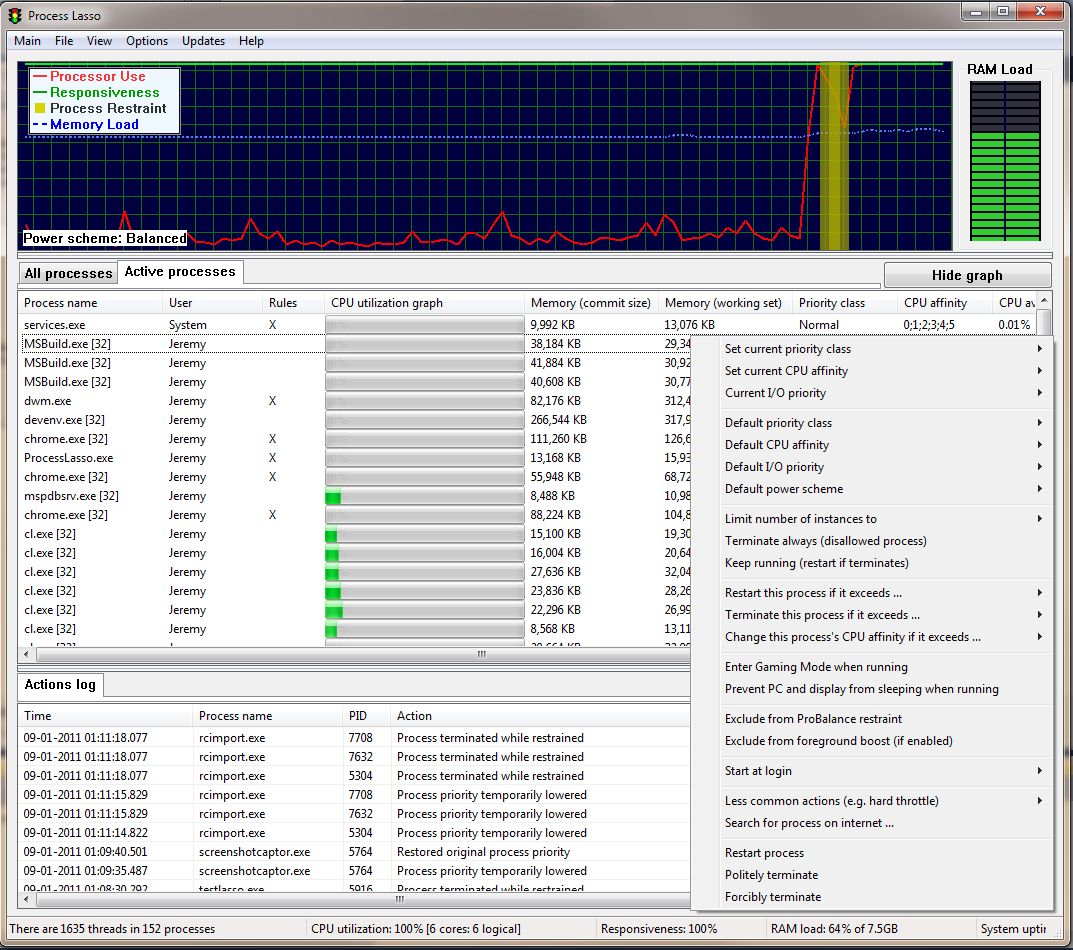
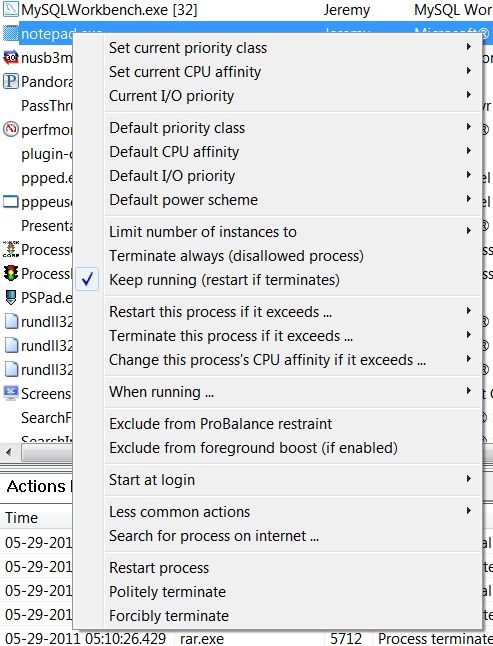

Automate - Optimize - Take Control! Process Lasso is NOT yet another task manager. It is a process, power profile, and CPU optimization utility. One of Process Lasso's most popular features is a unique technology called ProBalance (Process Balance). It can improve your PC's responsiveness and stability during high CPU loads. Windows, by design, allows programs to monopolize your CPU without sufficient restraint - leading to hangs and micro-lags. ProBalance intelligently adjusts the priorities of running programs on-demand so that badly behaved processes are less likely to negatively impact the responsiveness of your PC. It does this NOT by raising process priorities, but instead by temporarily lowering the priorities of background processes that may be interfering with PC responsiveness. It can also perform other operations on these processes, such as adjusting their I/O priorities or CPU affinities.
Another popular feature is called Energy Saver. It switches the active Power Profile after you have gone idle for mere seconds (configurable). This allows you to run your PC in the High Performance power profile, yet conserve power when you aren’t active.
Want to disallow a process from ever running? Done.
In addition to these, there are countless features allowing the user to take full automated control of the processes on their PC. You can have a wide range operations performed, or settings applied, each time a process is run.
Most recently added are memory priorities (Vista+), along with the ability to set them permanently.
If you are x64 OS user, please follow the link here (file size: 7.74 MB).
System Requirements:
Windows 2000, XP, 2003, 2008/R2, Vista, 7, 8, and 2012
Publisher:
Bitsum TechnologiesHomepage:
https://bitsum.com/prolasso.phpFile Size:
7.68 MB
Price:
$32.95
GIVEAWAY download basket




Comments on Process Lasso 6.0
Please add a comment explaining the reason behind your vote.

iPhone app giveaways »





Android app giveaways »





I have extended this a little longer, due to the popularity. It will end shortly though. If the page is still there, then it is still active. The page being: https://bitsum.com/giveawayoftheday_registration.php
Save | Cancel
NOTICE: Some of you may have had your emails queued up for a considerable amount of time, but they should be flowing through nicely now. For a minority of others, you may have seen an error about the activation code being for an older version. This has also been resolved.
Save | Cancel
Can not activate the software
---------------------------
Process Lasso
---------------------------
It appears that your activation code no longer is eligible for newer versions. Licenses have a term, during which you can use any version released in that term. To simply continue using this version and not receive the advantages of new updates, click NO. To start the short process of renewing your license, click YES.
---------------------------
Yes No
---------------------------
Save | Cancel
Unable to register in due time, due to those people's default for sending a registration number to my address.
I,m gonna check later but should they fail to provide a valid registration key within the next hour, the process will have failed.
They don't tell why they do NOT send the key but they warn me that I shall not try to register than once.
I made a second try, with the same result. I guess this will invalidate my first registration attempt.
Are those people silly, or what?
Save | Cancel
Just found my registration key on the Gmail.com web site under spam.
Everyone may need to check that for the registration email.
Save | Cancel
II been waiting 12 hr. for the activation code. what up with that? there only 2 hr left
Save | Cancel
#87, I did not uninstall the previous version. This installed and showed that it was registered to my name.
Save | Cancel
I spent quite a bit of time learning a previous version of this app and eventually stopped it from running at all. It was THE most resource intensive app on my system and slowed things to a crawl. It IS useful as a troubleshooting aide but not for daily use. Even exempting system and security apps from the lasso did not help, it still throttled my computer to a standstill. I'll keep it for the intel it provides when I have troubleshooting to do but, never run it as a service.
Save | Cancel
#82 - gloney:
"The Readme tells me to be sure to extract the .gcd file to the same folder as the others. I did, but is that all I need to do? Does Setup.exe use it without my doing any more?"
Yes, exactly. Once you have extracted all the files to the same folder you can use setup to activate the software. The extraction should be an automatic process. For example, the Extract function, which is accessed by right clicking on the zipped foler in later versions of Windows, will put all zipped files in the same place anyway. As will most archivers, unless you tell them differently. That instruction in the read me is just an extra precaution to make sure people don't separate them by extracting them one at a time to different places. Sometimes it makes people overly cautions, but it's nothing to worry about.
The .gcd is the actual software inside a security wrapper which prevents it's code from being hacked by people who think they're entitled to something free even without the permission of the developer. The setup file just activates the actual software and releases it from the wrapper so it can be installed.
Save | Cancel
@robert, #87: you can install this GOTD over the old version... no need to uninstall previous version, it would be updated correspondingly!
Save | Cancel
Was wondering if I need to uninstall a previous version or if this will update the installed previous version. Anyone know?
Thanks
Save | Cancel
Please do an overhaul on the website, it will leave an better first impression. (the homepage seems a bit cluttered, use modern font, etc...)
Thank you for this different kind of offer instead of all those registry or dvd tools from other companies and such!
Like stated earlier:
- Portable version here: http://bitsum.com/prolasso_portable.php
- from post:#13 , it stores the key in the registry so you have to register again when using the portable version on another machine
I really like this offer because:
- The developer reacts in this giveaway page AND does it in a very respectful and professional and polite manner
- The developper offers a tool that you CAN reactivate after a reinstall of your pc, at least that's what I read here: https://bitsum.com/giveawayoftheday_registration.php
------
As Chas thankfully clarified, the version you have at the end of the month you can use indefinitely. You can even come back and download it later, and activate it 10 years from now. This was poorly presented :o
------
- The developer offers an program that seems to be actually useful
Again my thanks!
Save | Cancel
I've found Process Lasso very useful in the past few years I've been using it. I had questions, wrote, and Jeremy Collake responsive and helpful.
He refused however to make an on site tech call for free. :)
Process Lasso can cleanly terminate processes for programs that misbehave which won't shut down without a crash.
I use it often to shut down overhead when I scan for malware or Defrag, so they go much faster. It would take a LOT LONGER to go into MSCONFIG, and processes turning things off and REBOOTING.
I have a license. I'm afraid if I take today's GAOD, and later need a reinstall or rollback, I'll have to go find my last version at an inconvenient time.
I'd love to see some tutorials for those of us (me of course) who need more knowledge to use all the power of the product.
Whomever said there are many thumbs up but mostly negative or neutral comments: Every time Process Lasso is given it's very happily received by the most knowledgeable users. I've always installed it before I upgraded.
Today I was busy and ALMOST did a thumbs up with NO comment. I usually do the opposite, comment and keep my thumbs to myself.
When there's a simple program everyone understands, the moaning starts about a one trick pony.
Today we have a sophisticated product. Knowledgeable, specific comments were made on how it works, what it does and the learning curve. What does that tell you? People invested their time (an unrenewable resource) working with this product long before today. They're trying it or it's a staple.
If today's offer was a BACKHOE, someone would try to eat soup with it and say, "It sux. I tried it, but it slowed me down."
And I'd say, "The problem is their mouth isn't quite BIG enough". lol.
Thank you Jeremy Collake and GAOD. ;)
Save | Cancel
from comments I thought this would be excellent for my win xp sp3 system.
Initially I installed it to not start on startup , but it crashed immediately. After reinstalling with defaults, it still crashes immediately. It says there is a a minidump file, but I cannot find it. the log has zero size.
any thoughts appreciated
Save | Cancel
1.Hello Everyone,
Well, With the Pros and the cons being all over the place on here today I really didn't know what to think? (o; I could not believe that may people where having all that many problems with an application that everyone or the majority seems to love? SO I figured I would try it myself and find out.
First of all I have never really used Process managers all that much as for me anyway they didn't seem to do much and caused more problems then fixed anything. Well, I am very happy to say that I am a Believer now!
I am Running a AMD Bulldozer 6 core CPU @ 3.4GHz that is unlocked but not over clocked! On a Gigabyte GA-990FXA-UD3 MB. With 16GB of RAM, The usual HDDs and DVD R-W-RW Drives etc. It runs very Good, Or I have no complaints, and I am Running Windows 7 Home Premium 64-Bit I use it for browsing the Internet, E-Mail and Processing photos, and Videos and even some music. And I Play some Games too! Now I did not expect much from Process Lasso 6.0 As most said the it is NOT a optimization program and will NOT speed up your PC? SO, I figured I would just let it run in its default configuration and see what happened?
I was Very Pleased as soon as Process Lasso 6.0 Launched and began doing its thing it listed all 6 processors in its own performance window and started managing memory and what programs could do and not do and how fast! I let it run all day and I can tell you its Does a Fantastic job! Internet Explorer opens faster, does NOT Hang! and FireFox loads faster and opens WEB Pages much faster! Most all my programs open faster! Not like "Oh My Goodness" Faster, but noticeably faster! Everything seems smother and no hesitation! I thought this PC was Running GREAT! but I do have a lot of tasks running and with Virus, Mal ware, and Trojan protection running and all kinds of stuff I didn't realize just how much a task manager that really does something could improve an already GREAT running machine! I am VERY Happy I decided to try this out! and did NOT Miss it! The event logs and the window that show everything that's going on and what happened is fantastic also. It divided up the load of everything that's running in the background and spread it very evenly across all 6 cores of my CPU! and now there are not any programs hogging all of the CPU or any one core! Looks like I just took my sports car in for a total tune up and its hitting on all cylinders evenly and smoothly! Even my Games, Like WoW Open faster and run smother! I really am impressed and for $33.00 Bucks I can get Process Lasso 6.0 for 5 Home PCs and Lifetime registration and updates etc! Not bad at all in my opinion. (o;
I don't know why so many people had or have had trouble Downloading and or registering software from GOTD? I just followed the instructions and down loaded the app, Unzipped it and read the "README" text file and followed that? It installed fine and I went to Bitsum's WEB site, Read all there information and registered the program and before I could get my E-Mail opened the registration file was there! I copied the numbers into the line in the app to register it and it was Done! It did ask me to shut the program down and restart it to get the full version running, Did NOT have to Re-Boot the PC!
It seems to me most of the people that where having problems where running Norton Anti virus or AVG, I Would suggest turning your Virus program off if its set to NOT Notify you before rejecting a request to except a file download or information from a WEB Site or another-words your Anti Virus and/or Firewall is set to "auto" its most likeley blocking your download and or your E-mail depending on what your are using Etc. Norton I would get rid of completely As we tested that some years back and it didn't even make the top 10! and let many, Many bad things walk right on past! But That's just My Opinion you have to do what you know or feel is best! I run Avast and Malwarebyte as part of my Internet defence and It always asks me before it rejects something just in case I want it? even when it Strongly Advises against letting this or that happen, It leaves the final decision up to me. I usually listen to Avast unless I really know the program is safe, and as soon as a new program is downloaded it gets thoroughly scanned before I can have access to it to open it! Works for me! (o;
I would also like to Thank Ashraf for his time and trouble to bring very concise and easy to read Reviews and he WEB site is most informative! Thank you! And for anyone who does Not like it? You are NOT forced to Go to his Site or Read anything he has to say! I for one think he does an invaluable service to the users of GOTD and others as well, I always like to read his material and sometimes I learn something! you might too, Try it.
Please Don't Miss this GAOTD! Play with it and see what you think, But for me it gets 2 thumbs Up! Thank you Bitsum, for Process Lasso 6.0, A truly remarkable application, And GAOTD for another Fine FREE Product for us to use and play with. I for one Will be Buying the full 5 PC Lifetime Licence, Thank You, Everyone Have a Great and wonderful evening, Rick D..
Save | Cancel
I used the paid version and it added nothing and throttled the big CPU consumers that I wanted to accelerate (e.g., Browsers with multiple open tabs; that along with videoediting, alone, or multitasked). I had to shut it down to be able to operate my computer the way I wanted. Instead, I tried the free program Hacker2 and it is incredibly useful. It offers a range of very useful process options, my favorite of which is setting different ranges of priority (speed/execution) for different programs, so that I can slow the useless CPU/Memory hogs and speed up the ones I want to use (like multiple open tabbed browswers and the programs I am trying to multitask with). It allows assigning processes to cores, killing stuck programs, etc, and is extremely easy to use. Lasso developers should get a copy of Hacker2 for instruction in how to program process control.
Save | Cancel
#75, TD: " ... I am running Version 5.0.0.26 from an earlier GIVEAWAYOFTHEDAY offer.
Is it necessary to ‘upgrade’ to version 6.0 — as I am still running XP on a 2006 computer with 3 GB of RAM."
I also run XP on a 2006 computer with 3 GB of RAM, and have been 'upgrading' every time that Process Lasso has been offered here. Each upgrade is an improvement from the last so, although it's not "necessary" to upgrade, I do, and would recommend that you do as well.
Save | Cancel
After the great comments - decided to try;
Went to the site - to activate; got a response, that I would get an email to activate - IT DID NOT COME - anyone else have this problem?
Save | Cancel
Seems very nice. Works so far.
P.S., the original link worked fine for me, the installer just recognized my 64 bit OS and offered to download the 64 bit version.
@#4 "Interface lacks creativity"? Who cares? As long as it does what it says it does, has a learnable interface, and is FREE, I'm happy with it!
@#8 The registration page worked fine for me too. My key ended up in my SPAM bin, but that's OK. If you read the instructions on the page, it says if it doesn't show up after a bit, try registering again. You could also try a different email address.
When I put in the key it removed the button to buy a key.
I think it's very nice that they also offer you older downloads, and lifetime service / upgrades for $9.95.
Save | Cancel
I never received my registration code but installed it in the same folder as did #76. How may I tell it is still validly registered?
Save | Cancel
This program is excellent IF, and I stress IF, you take the time to understand its purpose. It is NOT an optimizer, you don't install it and expect it to automatically to to turn your system into a light speed machine. It lets you work to prioritize, disable, delay and otherwise tinker with the multitude of processes running at any given time on the machine. Can it speed things up? Yes, absolutely, can it screw things up, YES, if you do not bother to learn how to use it correctly, even then it tries its best to prevent you from killing a process that is critical. It has allowed me to identify rogue programs, find remnant processes that should have been eliminated with uninstalled programs, turn of dozens of unnecessary services and processes that were eating cpu cycles. Yes it can slow things down, especially when identifying what is going on in the system. BUT, after you have set processes, or whatever,YOU CAN TURN IT OFF. It does not need to run constantly if you don't want that option. Read how to use the program correctly and you will find it to be an outstanding tool to have available.
Save | Cancel
The Readme tells me to be sure to extract the .gcd file to the same folder as the others. I did, but is that all I need to do? Does Setup.exe use it without my doing any more? Thanks.
Save | Cancel
1 hour and any registration code came! I also need to sleep! Good-by software!!!
Save | Cancel
Hi,
This installed fine on a win7-64 system (make sure you install the correct version). However, like others reported, I registered on the web page a while ago (30-45 minutes??) and no email has arrived. I have check the junk and spam filters, it isn't there. What is going on with the registration process???
Save | Cancel
#10 - hopefully and theoretically you're not doing that. This is a targeted type of management program. You can set the parameters. Hopefully you're not going to allow it to "manipulate the system-resources that our security-programs requires and needs, as antivirus and firewalls et cetera, espacially under a threat or during an attack?" That said, this is not novice software, so caution is strongly advised. Like many repair, cleaning, or control utilities offered here; if you don't know what you're doing, you probably shouldn't do it.
As #13 , Zorgon said: there is a portable edition offered on the developers website which can be registered with the key, after u get it. Though he makes a valid point about it's true portability, there's another potential advantage to installing the portable version instead. It could be primarily or completely free standing, which means that adding the portable version could minimize your risk by having very little or practically no impact on your machine - other than the adding of the key to your registry. Extra safety for those concerned about changes this program may make.
That said, this developer has been a friend to this site in the past and has a strong support track record here.
Thought I'd post that info., if it helps, while I'm still trying to decide for myself.
Save | Cancel
Dear Dev,
Process Lasso is a great program that I have used with joy. I installed it on my computer during a previous GAOTD. Thankfully, it is being offered again, giving me the opportunity to get it back. I had uninstalled it from my computer in an attempt to declutter my computer of programs. It looked like one of the assorted photo editors often given away on this site. Please consider changing the name to prescribe what it does. Thank you for offering your software for me to try. Thank you for offering a proof of concept so users know its not snakeoil like so many other programs out there. I will purchase it after trying it out this time!
Save | Cancel
EVERY time I tried this it has slowed my computer after a few days/weeks, deleting it returned functionality immediately.
Saw NO speed increases that could be quantified.
Placebo effects?
PoS
Fool me once, fool me 4X, ...
Won't get fooled again - Who
Save | Cancel
I had a prior GOTD version of Lasso (5. something), and just installed this in the same folder. It recognized my prior registration from GOTD and I didn't have to request a new registration ID. Sweet!
Save | Cancel
May be an obvious question, but I am running Version 5.0.0.26 from an earlier GIVEAWAYOFTHEDAY offer.
Is it necessary to 'upgrade' to version 6.0 --- as I am still running XP on a 2006 computer with 3 GB of RAM.
Thank you for any help with my question!
Save | Cancel
I had this running from the last GAOTD offer. I uninstalled the previous version and installed this new version. It's been six hours and I still haven't received an e-mail. I hope it comes soon. :)
Save | Cancel
Like others here, I downloaded and installed it last go round on my desktop and laptop. Both 64bit windows machines.
My experience was that it did nothing to improve the responsiveness of either system but at times actually decreased responsiveness for me. While most of the time I noticed no difference at all, a few times the system became almost totally unresponsive, and, when checking Process Lasso to find the culprit, it gladly told me Process Lasso itself was the cpu hog using 80-90% of cpu which was maxed out running at 100%. I wondered if there were some compatibility issue with firefox [b/c it was normally using the rest of the cpu cycles], or the fact that I almost never reboot my machines, but didn't have time to troubleshoot so I just uninstalled from both machines.
I love the idea, and wish it worked for me [and it may work wonderful for you], but it seems from the mixed reviews here that it has an incompatibility with some systems.
Save | Cancel
If you have not received your registration email, and your email service is Gmail, definitely check your spam folder. That's where mine went to.
Save | Cancel
without specific reference to any comment made thus far ..
~ process lasso is a complex application and can't be properly evaluated in a few minutes or even a few hours.
~~ default settings for any application are based on generalities and won't provide best performance in every case.
~~~ you'll get out of it what you put into it .. process lasso isn't the easiest application to learn but it's worth the effort.
~~~~ no if's, and's, or but's .. developer support and customer service for process lasso is the best i have ever experienced.
.
Save | Cancel
What a major pain in the ass just to install. Really really wants to be resident right away and does not want to take NO for an answer. Deleted
Save | Cancel
Hi Jeremy,
I have 3 PC's that are slow. Do I use the same licence to activate the PC's or do I request a different licence for each one?
Save | Cancel
So this ProcessLasso60 only does 32bits? No 64Bits?
Save | Cancel
Second Attempt to get this published; and in turn, CORRECTED!!!
Today's Alert:
"Installer integrity check has failed. Common causes include imcomplete download and damaged media. Contact the installer's author to obtain a new copy. More Information at: http://nsis.sf.net/NSIS_Error"
"BitDefender has blocked a virus!
Virus Name: Gen:Variant.Symmi.8289
Accessed by: mbamservice.exe (NOTE: I believe this is the key to this issue with GOTD - Malwarebytes just changed their configuration - v1.70 - and since I installed it, this 'Virus' issue started.)
Location: C:\Documents and Settings\user\Local Settings\Temp\{XXXXXX}\pih.dll" (Yes, I know, this .dll is part (integral part?) of GOTD)
Please get one of the 'Twinkie' swilling programing geeks to fix this!!!
Save | Cancel
I can't stress enough...Get this!!!!
We love you too, Jeremy. Err..your software. :)
Save | Cancel
I have used this software in the past and have really liked it. The last few updates over the months have caused a problem that made me remove it from my system. I don't know why it now gives me a message that it can not run on my system. Conflicting software may be the problem and so I am going to have to trace it down. XP32 here and wondering if anyone is having a problem or getting a notice about possible conflicting software. Thanks. KOR-
Save | Cancel
Outstanding program! I just bought a license after trying the new version and finding that it corrected the only issue I had from prior versions and greatly improved my system responsiveness. Win7 X64, Mobile DualCore Intel Core2 Duo T9400, 2533 MHz with PGP whole disk encryption. I had previously had conflicts between PL V5.x and Symantec Endpoint Protection(SEP) tamper protection, causing my logs to get flooded with warnings. This has apparently been corrected now - logs were clean after my testing this morning. The disk encryption has been causing some severe lags in some disk-intensive cases - this seems much improved now. I also tried my worst case lag scenario - using flash player on a music web site - which was dramatically better after installing Process Lasso. I was not expecting this level of performance after my mediocre results from V5 and earlier - so I figured I'd buy a license with the current special price offering.
Save | Cancel
I'm baffled that so many people like this program. I've tried it twice and both times I was faced with unresponsive programs and freezes, and regular alerts telling me what had been deprioritized - usually exactly the program I wanted prioritized. This is one of the most incomprehensible and irritating pieces of software I have ever come across.
Save | Cancel
Process Lasso is an ESSENTIAL Windows Utility
I used Lasso in XP SP3, Vista, and now W7 x64. It is one of the first software installed after a clean installation. (I bought the lifetime license.)
I am convinced Lasso makes my PCs run smoother, perform better, and remain responsive. Lasso restrains software apps that attempt to use too much PC resources. It oversees and regulates Windows processes. And, no, I don't fully understand all that Lasso does nor how it does it. But I am absolutely confident that my PC works better with Lasso than without it. (And Lasso itself uses very little resources.)
The developer Jeremy is awesome. He devotes himself to constantly improving Lasso. Updates are released regularly. Jeremy provides old-fashioned superior customer service and tech support.
I rave about Lasso because it EARNED my highest praise. Grab this free GOATD copy while you can.
Save | Cancel
This isn't a program for casual, general optimizing, for that I don't find it works so well, in spite of its claims.
What it does well is allowing you to corral your system resources for the sake of specific processes which you understand well enough to give more juice to them. Examples that come to mind include video editing and sound recording mastering and mixing, among other huge resource huggers.
If you don't ever do anything on your computer that can cause it to bring it to its knees, so to speak, then don't bother, this is a power user program.
Save | Cancel
I downloaded a previous version of this a few months ago from GOTD. After I installed this version I was ready to enter the licence key that I was e-mailed but the program showed that it was already registered to me. Is there any reason to enter the new license code?
Save | Cancel
I've read through ALL the comments and if you do you'll notice, they are all pretty negative or neutral, BUT the positive rating for this download is around 71%. Something is wrong here. Read the comments before you download this. As I recall, when I had this program before, it did NOT help my system in any way.
Save | Cancel
I like #11 am still waiting for my code to activate. I recall trying this program which may have been on a 30 day trial as I do not have it on any of my computers at the moment.
I hope they send the code.
Save | Cancel
Download & installed w/o any issues. Supplied my junk e-mail address at the website and had the reg code in less than the time it took me to flip over to my inbox. Program seems to run smoother than the last version offered here. I am happy with it - especially since it was FREE!
Save | Cancel
#40, Ron Lewis - I have been using it for months now and getting free updates (after verifying that my (free) license is eligible every time). In fact my copy is up to the same version number as today's GOTD offer, so I don't need to download or install this one again.
While I am here, let me also say that it may be great for single cores, but I have noticed that on my multi-core it seems to run everything through its software "funnel", which slows the cpu performance down.
If someone will tell me how to simply turn it off, I may keep it, otherwise, I'll probably uninstall since it has not helped any.
Save | Cancel
@Rick Frog: registration for some people is instant. Why others don't get emails as quickly is more likely due to their own ISP's handling of incoming mail - if they implement "grey listing" (an anti-spam technique which temporarily rejects mail from sites it hasn't received mails from before) then all incoming mail has an initial delay and depending on how exactly your mail system is configured that delay can be huge (eg if the sender resends from a different IP and hits the greylisting again).
Save | Cancel
As a user of Process Lasso for some years (with a single, double and quadruple processors, XP SP 3 and Win7), I could repead almost all what Giovanni said in favour of the software.
Negative comments may seem to originate from a simple fact: in order to use anything (from a knife, through a car to a piece of software) you need first to learn what it is for and how to operated it to be useful. (For instance, a user who sais that Process Lasso cannot stop or initialize a process, which is, of course, not true, or that the software did not speed up the computer, may seem to have failed to examine what options are available and what they are for. Or he/she is concurrently using another software of similar functions, which will obviously cause conflicts between PL and similar software, and eventually make your system get unstable.
My rule is that I NEVER, NEVER use many software piecees concurrently for the same purpose to control the system and the machine. Otherwise, they concurrently running software will cause nothing, but unpredictable problems!
Learning curve seems to me very clear, logically designed and easy to learn. It’s true that there are many options (and that’s a plus, isn’t it) and you need to know what they offer, and that’s normal in IT, isn’t it?
The interface (God’s grace!!!) is free from any useless gadgets, niceties, "fireworks" etc. in the style of "modern softare". It may (and does) look "oldfashined" to some users, but – in my opinion – it’s a plus, not a minus.
My thumbs up to PL!
Save | Cancel