Every day we offer FREE licensed software you’d have to buy otherwise.
Giveaway of the day — MobiKin Assistant for Android 4.2.46
MobiKin Assistant for Android 4.2.46 was available as a giveaway on July 28, 2025!

Looking for a simple way to manage your Android device? Then this MobiKin Assistant for Android could be the ideal solution for you. Just get it to learn its powerful management ability now.
System Requirements:
Windows 7/ 8/ 10/ 11
Publisher:
MobiKinHomepage:
https://www.mobikin.com/assistant-for-android/File Size:
23.1 MB
Licence details:
1 year license
Price:
$29.95
Featured titles by MobiKin
The best Android data recovery software to help you recover deleted contacts, text messages or call logs on Android phones and tablets. The best Android file recovery tool to retrieve photos, videos, music files or documents from overall Android devices.
Switch to a new phone and wish to move data from the old phone to the new one? Or simply wish to share something between two different devices? MobiKin Transfer for Mobile can help you finish the data transference easily.

A flexible iOS data recovery tool to recover lost data from iPhone, iPad, iPod touch, and iTunes backup files, making it the most comprehensive iPhone data recovery solution you may ever find.
There occur many circumstances where users might face incident, which makes data loss from Android devices. This is where users need the top-rated MobiKin Backup Manager for Android to flexibly back up and restore Android files so as to avoid data loss issue.
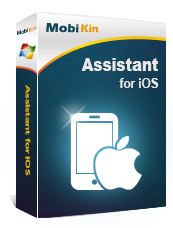
As the World's most powerful assistant software for iPad, iPhone and iPod users, MobiKin Assistant for iOS allows users to transfer, backup and manage all contents on your device with one simple click.
GIVEAWAY download basket



Comments on MobiKin Assistant for Android 4.2.46
Please add a comment explaining the reason behind your vote.
iPhone app giveaways »




Android app giveaways »





Dear all GOTD users,
Firstly, many thanks to the GOTD team for providing us with
this opportunity, and to you all for taking part in this Giveaway
of the MobiKin Assistant for Android.
To give you a better understanding of this Giveaway,
here are some tips for you.
How to Take Part in This Giveaway:
1. Download MobiKin Assistant for Android from the GOTD promotion page.
2. Follow the onscreen prompts to install and register the software
with the license code. MobiKin Assistant for Android works
perfectly in both the Giveaway version and the Full version.
https://www.mobikin.com/assistant-for-android/
50% Discount Coupon Code for GOTD users: MobikinGOTD
Contact Us:
Have any questions or suggestions about the software?
Please leave it here or contact our Support Team
via email at support@mobikin.com.
Sincerely,
Mobikin Team
https://www.mobikin.com/
Save | Cancel
seems to run under vista too.
Save | Cancel
I really can't see any useful function for this app now from GAOTD for one year licence, when you can do all this with the Windows Phone Link, on both Windows 10 and Windows 11...
The extra of Phone Link by Microsoft is that you can also make calls and send texts with it as well!
Save | Cancel
Daryl Lees , thank you for your feedback!
Save | Cancel
Daryl Lees , thank you for your feedback!
You're absolutely right that Microsoft's Phone Link is a great built-in tool for many users, especially for basic functions like texting and calling on Windows 10/11. However, MobiKin Assistant for Android is designed with a different focus — it's a dedicated data management tool that offers features like:
Granular Data Backup and Restore: You can selectively back up and restore various data types, including contacts, messages, call logs, photos, videos, music, apps, and even books, with support for multiple export formats (e.g., CSV, HTML, VCF for contacts and SMS). This offers more control and flexibility for data archival and migration.
Advanced File Management: Beyond simple syncing, MobiKin Assistant allows for detailed file organization directly from your computer, including batch installation/uninstallation of apps, copying, cutting, pasting, and deleting files, as well as managing internal and external storage contents.
Multi-Device Management: For users with multiple Android devices, MobiKin Assistant allows you to connect and manage them all simultaneously from your PC.
It's a great option for users who want more control over their files and need to manage data offline or without relying on Microsoft’s ecosystem.
We appreciate your thoughts — your comparison is helpful for others to decide what best fits their needs!
Save | Cancel
Daryl Lees, there is at least one advantage: this app also works under wine (windows emulation) with Linux ;-) .
Save | Cancel
PeMo, does it really? I'd be surprised if it did considering it requires the simultaneous execution of multiple executables, including a service and a server and adb.exe.... there is not just one single executable that can be run under wine and provide the full functionality, as well as drivers that need to be installed. to communicate using android debug mode. Or were you trying to be funny?
TK
Save | Cancel
PeMo, MobiKin Assistant for Android is primarily a desktop application (for Windows or Mac) designed to manage, back up, and transfer Android data—contacts, messages, media, apps—but it does not emulate Windows apps or provide Wine-like functionality.
Save | Cancel
TK, Thank you for your comment. Our MobiKin Assistant for Android does not support that. There are only two versions: Windows and Mac versions.
Save | Cancel