Every day we offer FREE licensed software you’d have to buy otherwise.

Giveaway of the day — MultiSet 6.7
MultiSet 6.7 was available as a giveaway on September 18, 2009!
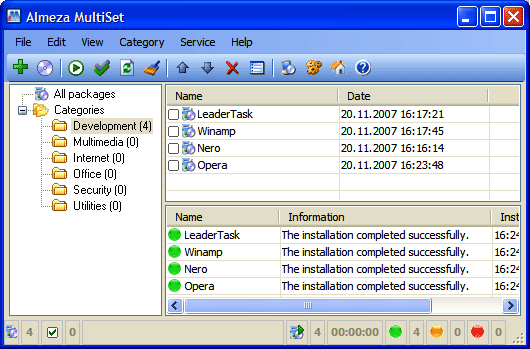
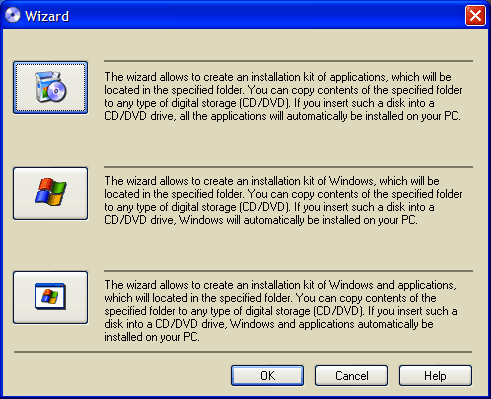
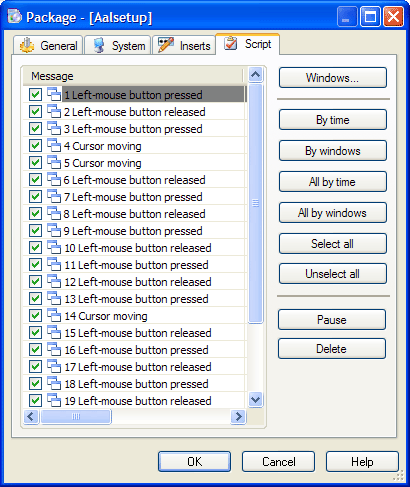
Want to create a WindowsXP installation disk that will automatically install the OS Windows without asking questions about username, product key, time and locale settings? At the same time your favorite applications are automatically installed, the necessary keys are entered into the registry, drivers are updated, new patches (service packs) from Microsoft are installed. It's possible and you can do it easily with Almeza MultiSet!
Almeza MultiSet will automatically install all the applications you require, either onto your original computer or onto a new one. It's an ideal solution for rebuilding your systems quickly!
Besides, Almeza MultiSet can create bootable CDs/DVDs. Such disks can be used as a rescue means after a system crash. To completely restore the system, you will only have to insert such a disk into the CD/DVD drive.
System Requirements:
Windows 98, ME, XP Home Edition, XP Professional, 2003 Server, Vista
Publisher:
Almeza CompanyHomepage:
http://www.almeza.com/File Size:
6.09 MB
Price:
$99.95
Comments on MultiSet 6.7
Please add a comment explaining the reason behind your vote.

iPhone app giveaways »





Android app giveaways »


![[VIP] Mr. Balcan Idle Giveaway](https://android.giveawayoftheday.com/wp-content/plugins/gotd_googleplay_plugin/images/100/2024/11/com.superclay.vipbalcan_app_icon_1731830562.png)


We're having a Unreal tournament competition Saturday evening (well Sunday if you're living in Europe). Steam has one of their specials, that is a free weekend of unreal tournament. You’ll need Steam installed and an account, all of which are free. You can download the Steam client via the following link.
http://store.steampowered.com/
There will be a link to set up a free account, then all you need to do is download the free Unreal tournament 3 game in time to play. The game will be free all weekend. Then will revert to the demo. I've posted the following on the giveawayoftheday Steam group page:
The game will be just a knock around. There is a competition, but it's really just to introduce newcomers to Unreal Tournament. If you already own any Unreal Tournament games I'd ask you to be honest and let me know if you have any of the games. If no new comers turn in or there are any unclaimed prizes I’ll give then to who I think deserves them. Though I reckon most players who have UT3 will have most or all of the previous games. :) The reason I ask this is that I want those who don’t own any Unreal Tournament games to get these games. Though the last two (Tom Clancy and Babo Invasion are negotiable, lol). The games include Unreal tournament 2004, Unreal Tournament 2003, an X-Box copy of Tom Clancy's splinter Cell chaos Theory and a Quest Pass for the newly released Mad Balls in Babo Invasion. Plus there may be other surprises. Not sure yet about the latter yet. ;) The winners will be chosen for enthusiastic play, the length of time they play for and in small measure the points they score. Let me make it clear, points are the least important aspect of the game. It's all about having FUN.
The way I'll be working out who wins what will be points will be scored for every ten minutes of play, enthusiastic play, which will be determined by communication with other players will also be scored.
As I doubt I'll be able to stay up all night playing the game The competition will run from the start of play at 2am GMT (9am Eastern time, 7pm Mountain time and 6pm Pacific time) till the time I need to crash. Though I will be leaving the servers open for further play until around the giveaway change over which is 8am GMT, that’s six hours from start to finish.
if you're interested and need more information, please post over in the forums in the following thread:
http://www.giveawayoftheday.com/forums/topic/5232
Save | Cancel
I have used XP-ISO-Builder to do the same thing as Multiset. Only XP-ISO-Builder isn't a macro recorder. You have to enter all your passwords, serial numbers.. whatever. A much simpler option is to use DriveImageXML. Image my primary harddisk (C:\), copy onto a spare partition, using "split large files" then burn them onto 4 or 5 DVDs. Sure, it takes 40 or so minutes but it WILL restore your "system" as it was before the crash.
Search for BartsPE, download and burn a recovery disk, use DriveImageXML to "Image" your operating system disk (and all GAOTD and other installed software), then exit out of the disk and burn the resulting files (C_Drive.xml, .dat. 001 etc) to CD/DVDs.
In case of crash, fix problem, boot BartsPE and use DriveImageXML to restore your system "like it was"!
Thanks anyway GAOTD!
Save | Cancel
@9: What I meant was that the developer couldn't implement a key check because of the lack of public routines that do so. I did not say that the program incorporates illegal key generators. Please read more carefully next time.
@8: All Windows keys that are validly entered will allow the OS to install, unless a secondary check is implemented. Of course, that's in the days of real OEM Windows discs, and is subjected to activation. However, this edition is designed to restore one PC, not every PC in a workgroup.
Save | Cancel
I use Windows 7 as I am a Technet user and I found this software to work with the latest version of Windows 7 RC, as for Vista and xp it also works, so I ave to give a good Thumbs up on this one Thanks GOTD
Save | Cancel
@17
You bad-mouth XP like there's a viable (Windows) alternative - please enlighten us?
I think it's safe to assume that real Windows users - until 7 is released (wink wink)- all use XP. If you are using Vista you likely wanted a new machine and had no choice, and are too lazy to reformat and stick XP in that thing. Because any "Vista" machine, once you've removed Vista, will run like a raped ape.
Vista has it's defenders, but so do most problematic, troubled children - you know, they're "misunderstood" and "have their strong points". Sure, but usually not worth the trouble.
So far, I like this giveaway - although I too possess the freeware to achieve the same result - and am going to put together an SP3 disk and test this puppy out tonight.
Save | Cancel
#28 Cheak out EASEUS Todo Backup
Save | Cancel
days before i had download wondershare video converter platinum , but now i formatted my pc again, and try to re install that software again but it was not responding, how can i get it again.
it was one of the best software in video converters, my best choice.
Save | Cancel
Sherri #28
Try this one http://www.runtime.org/driveimage-xml.htm
I think this is what you need.
Save | Cancel
I could never get any of these tweak/integration CD creation apps to work properly. They all seemed to have some problem if you tried to heavily modify an installation. nLite was the worst, for me. I never got that to work right. Yeah, make one that works right for Win7! I've already moved on.
Save | Cancel
@#28: Check out HDClone. There are various pay versions with more options but the free version has always served me well. Will make a bootable reinstall of your entire drive, works on XP and Vista and handles most types of hardrives.
Save | Cancel
Ashraf, your good work is always appreciated by me and, i suspect, 99% of us on here... :)
@ #8 - hit the road loooser.....
Save | Cancel
Two things... I'm not understanding... is this software for
use on WindowsXP only? If yes, why???? We are less than
a month away from Windows 7 - which makes this software
two OS behind?
If I misunderstand, my apologies.
Second.... I'm running Windows 7 - 64 bit.
Each time I try to download software from the internet,
I get this message: <>>
If anyone has any suggestions on how to fix this, I will greatly appreciate them. Thanks Karen
Save | Cancel
#15: " I prefer to just clone my hard drive and keep one hard drive as a backup in case the one I’m using fails ... imho the only option if you want to avoid cumbersome backup or reinstall sessions. In my case one such session would take 5 hours at least."
FWIW, a backup drive image, like you get using Paragon's prior offer on GOTD, compresses everything so a disk with 40 GB of data takes up ~28 GB of space. It takes ~20 - 30 min writing to a 2nd drive -- maybe 40 min to an external drive via USB. Restoring that image, after booting to a LiveXP USB stick, takes the same amounts.
I don't like burning backup image files to DVD in the backup program, because any errors mean having to start the backup over again. Because of that can't give figures for DVD media directly, which at any rate depend on your DVD drive's speed. [If you use MediaCodeSpeedEdit to remove your drive's copy speed limits (DRM) (& if it has it), reading a DVD for restore shouldn't add more than a few minutes per DVD]
I back up systems a few times/week, so those figures are consistant & reliable -- extrapolate to get a rough guess of what it'll take you, i.e. 80 GB used on a hard drive should take maybe 40 minutes to/from a 2nd, internal drive. With content (pix, video, tunes etc) stored on other partitions/disks & removable drives/media, that 40 GB represents loads & loads of software.
* * *
#21: "Will this backup software like giveaway programs without backing up the full OS? If not is there any means to do this so I don’t lose giveaway programs is HD crashes and I need to reinstall OS? Thanks."
MultiSet only helps you set up installations -- I like Ashraf's calling it basically a macro program. Otherwise, there are backup programs (many have been on GOTD) that let you backup whatever files/folders you choose, so you don't have to backup Windows. The problem with that though, is many programs make entries in the registry, & many add files to the Windows' folders, and these apps usually won't work without those... long story short, if you want to preserve installed software, you have to backup everything. If there's stuff you don't want included in the backup, move it off the partition before you backup.
* * *
#22: "So if you wish to have a fresh installation with all favorite programs installed then just make a clone and you are done in no time."
FWIW...
Clone or disc images [a backup image restored to another drive/partition is a clone or copy] work well when hardware's identical -- otherwise you have problems with the drivers & settings required by the 2 different motherboards. Sometimes it matters more than others -- if the only big difference is the on-board network chip for example, it shouldn't be a big deal... just update the driver.
Installed software is a different matter. A portable app can just be copied from one drive to the next. A *nearly* portable app writes everything it needs to the registry the 1st time it's run, & also copies well, one drive to the next. When you have a program that adds files to a Windows' system folder, &/or has entries all over the registry, almost the only way to copy it is as part of a disc image including Windows, & if the hardware's changed, that can mean a lot of problems... When you change PCs, upgrade motherboards, or change versions of Windows, it's always recommended to start from scratch -- on-line you'll find this advice from countless pros.
Save | Cancel
I have an older free version of Multiset and think that is a simple way to slipstream your install. However, most PC's these days are preloaded and do not include a full Windows install disk. This renders Multiset and others, as well as most tips on repairing an install, less than helpful.
What is truly needed is a program that can take the Windows info from the Recovery sector to effect the same results. As it stands, any serious error in Windows leaves no alternative but to wipe the drive and start from scratch, losing anything that could not be properly backed up, like these jewels from GAOD.
Save | Cancel
I have not tested multiSet completely yet, but if your looking to upgrade to Windows 7 or Vista your probably better off using a program like SoftRescue Pro that copies your applications/software, settings, and stuff so you can put it on another computer without having the original CDs and product keys. Plus you can compress the data/files/applications so that it takes less space.
One of the main benefits to this software is it creates virus/malware/spyware free transfers of your information to your new PC. This is a huge advantage over clone/iso image software. With clone software, if your old PC has a virus/malware/spyware, your new one will to once you install the image. I agree with Jeff - cloning the hard drive is great for backup purposes...not reinstallations or for new PCs
I'm not sure how it would work with GAOTD software as I've never tried. It would be interesting to test. It's worked well for me in the past with other software.
Save | Cancel
@33
backing up the data is useful u can back up let's say all ur program files folder ... then restore the data of the programs u want when u reinstall windows ... however u would only be copying the files of the program doesn't mean they would work cz there is another important factor . the registry which stores the reg information and settings of the program ...
what i do is backup the files using any backup software .. i use acronis ... and backup the registry too ... but be sure u don't have any spyware or viruses before u back it up ... for backing up the registry i use a little free utility called MzRegistryBackup ...
and that's it :) u restore the files from the backup and restore the registry and ur programs work again ...
I personally don't like this program cz it's juts a recorder to save me a few mouse clicks ... and the trouble it puts u thru to use it while installing the programs isn't worth it in my opinion .
Save | Cancel
the main difference using this (and the like nLite vLite) vs. clone/image is GAOD ! if you want to restore asis/aswas system that has many GAOD goodies, you use clone/imaging/Ghost. and it usually apply to you're restoring to the same hardware, as XP may fail to boot.
On the other hand, when you want to "install" same thing over and over, sometimes in different system, that's when you need this unattended assistant.( hint, one time deal GAOD not included :-)
So compare result-duplicate with process-replicate isn't right.
XP is good, put Windows7 in the list also important, don't you think we'll more likely repeat W7 install at the beginning?
Save | Cancel
Isn't this program compatible with:
System Requirements: Windows 98, ME, XP Home Edition, XP Professional, 2003 Server, Vista ??
This text appears directly the comment section for today's utility; the Download page on the manufacturer's site says exactly the same. Could the manufacturer be in error?
But, there is comment after comment 'complaining' that this utility limited to XP.
Has "XP" now become a generic term for "almost any Microsoft operating system"? What am I missing??
Save | Cancel
Hi- I'm a newb.. I understand this prog. "records" your software installs..
So if you already HAVE INSTALLED software, this Almeza program will not work for this.... ??
If someone could respond to a confused newb.. Thanks Gaotd !!! :)
Peter s..
Save | Cancel
#28 It isn't free but my preference is something called Disk Snapshot. I tried Norton Ghost, Acronis True Image and Paragon Backup which all yielded less than satisfactory results. I heard about Disk Snapshot from the Leo Laporte radio show and tried it out. Since then I've had one hard disk failure and Disk Snapshot restored everything just as before. You'll also need something like BartPE to boot the machine so a restore (or cloning) can be done.
Save | Cancel
#33: "Also those who are saying that backup and clone is better than this method, they are assuming that you want all your videos and photos and other kind of data files to migrate to your new installation as well. What if I just want to have a fresh installation with only Windows OS and my programs in that new systems."
It's all about preparation... Put/store all your content (pix etc.) on a separate partition or drive. Makes lots of things more efficient, like defragging, & whatever you do with your system drive, your content is uninvolved.
That said, Windows is not like a program you add later -- it's very much system specific. You *Might* be able to get away with copying a Windows install to a new system, & rely on Windows to spot the new hardware & let you track down drivers & such... you *might* get away with a repair install after copying. But even if it works it's often not the best route -- even in-place Windows version upgrades are often prone to glitches.
Save | Cancel
@17 rob
What about this Benchmark:
Win.XP = 64,26 %
Vista = 32,11 %
Win.7 = 2,95 %
Others = 0,68 %
see: http://benchmarks.ashampoo.com/wo6/en/stats/
Save | Cancel
#28: "Aside from Norton Ghost that was mentioned earlier, any suggestions for (preferably FREE) quality software/company for cloning?"
All you need is to restore a backup drive image to whatever different drive/partition. Easeus has free software -- Paragon's great drive backup software has been on GOTD -- Western Digital & Seagate (not sure about others) provide free software -- there are a few image backup apps on-line for free [check GOTD archives for suggestions -- there usually are a few on the days GOTD has offered backup software].
Save | Cancel
Could this be what I have been looking for?
I have a computer I want to upgrade to Win7. The current vista configuration will only allow me to do a custom upgrade. The problem is that I have programs which will have to be reinstalled after the process. Not a problem for most, but there are some programs which only allow a finite number of "activations" (like RoboForm, which I refuse to live without).
So, this program will allow me to "record" the existing programs in my computer to be reconstituted after a clean install without losing those I can no longer re-activate?
Also, is it compatible with 64-bit? Lastly, is it compatible with Windows 7 in any capacity? (i.e. to restore a program previously installed in Vista).... So many questions, I know. I appreciate your time and patience.
Please advise.
Save | Cancel
#31: Actually I am sorry I don't think I asked the question right way. I wanted to ask if there is any way to backup all the programs on my system (only the programs no OS) and then install them on my other existing computer and all the programs work there magically?
Save | Cancel
Ashraf "hit the nail on the head" calling MultiSet a Macro Program -- that's essentially what it is, though a very powerful & specialized one at that. In a nutshell it takes all the installation / set-up files you give it, along with your directions, like run this 1st, that 2nd, and packages it all together. You take that package and use it to automatically set-up a [probably new] PC, so you don't have to waste valuable time just sitting there, watching for any prompts during installation. It's a pretty mature product, with features to let you highly customize any install package you put together, & judging from past appearances on GOTD, it works without major problems or headaches. The program itself can also be set-up as a portable app, to run off a USB stick etc. MultiSet also has some useful forums.
The downside: it can be rather tedious setting up an installation package, if/when you essentially go through several different program installs -- this is true of most all automated installation methods, which are most often used for setting up or restoring multiple PCs... set things up once, duplicate your efforts later.
Alternatives:
Many IT shops buy in bulk, so the new PCs they have to set up are all identical. They'll set one up, then create a disk image that's simply restored to every other PC hard drive. PC companies use this method too, & might take it a step further, packaging different software & drivers on a separate partition, in a way that it can be used to repair/restore several different models.
Microsoft for years has provided different methods to make installing their software on more than one PC much easier. To start with, keys Do Not have to be manually entered on install -- they might be supplied by a script or data file, by a store on the network, or it can be set up so the serial is requested when the software's 1st run, or soon after. Many of the OEM versions of their apps require no serial at all. You can of course make use of this stuff with MultiSet.
For Windows itself scripts are often used to fill in the blanks during installation. For Windows 7, Microsoft has expanded on something they started with Vista -- the use of Windows images that are copied, rather than their old approach expanding & copying individual files, one at a time, to build a working copy of Windows. Using tools like their new (downloadable & free) AIK, you can do quite a bit of customization.
Some prefer software like Nlite, which can be used to customize and save time/effort with a Windows install... it's somewhat popular to prepackage & include Windows updates & the latest drivers, so after a fresh XP install you're not spending hours at Microsoft Update & hunting down & installing needed hardware drivers. It's also handy when for example you need certain drivers during install that aren't in Windows set-up -- easier & more practical than the only alternative of having them ready on Floppies.
------
There's nothing to prevent you from using any of those alternatives with MultiSet, which is one reason it's so powerful. Unfortunately there's still no great, easy, & free program to bundle everything you've got installed on your PC/laptop & apply or transfer it to a new one, where restoring a disk image won't work because of different hardware. Microsoft was working on just such a thing, but one of the Vista Service Packs broke it so it was pulled from their site. Laplink does have a program to do this, but it's far from free.
You can find tips for OS installation from IT regulars on-line... many of these folks put installation setups on flash memory drives [USB sticks or flash memory cards] & post how they do it along with other tips/tricks.
Save | Cancel
@#21: Exactly my question. Is there any way to backup all the softwares stored in my system (mainly the GAOTD softwares) onto a DVD or HD, and then use it to install on top of a brand new Windows installation, and they all magically work. The reason I ask is that if my current system becomes obsolete and I upgrade to a new system I would like to be able to get all the installed softwares over there without waiting for them to reappear on GOATD :-)
Also those who are saying that backup and clone is better than this method, they are assuming that you want all your videos and photos and other kind of data files to migrate to your new installation as well. What if I just want to have a fresh installation with only Windows OS and my programs in that new systems. I can continue to access my data files in the current computer and hence would like to leave them there.
Save | Cancel
This program seems to promise benefits only to those with a fair number of commercial programs requiring registration/input of codes. If i understand correctly, it can't transfer ones GAOD apps.
And of course, it adds its own layer of complexity, its own potential for disaster.
Also, the documentation [typically] lacks a global tutorial [has only a terse/brief Express-Guide] so if you're un- to semi-skilled it looks like a mess.
I'm no fair judge of its benefits to its target user-group [owners of many commercial apps needing registering] so i won't comment on that.
But i think it's useful to first ask yourself if you're in that group, if you'd save any time by using it, if it's worth the risk...
Save | Cancel
I have been using the previous version (6.5) and it has really save me a lot of time. I do new computer setups for my clients with about 30 free programs. I have recorded the installations with MultiSet and then burned it to a flash drive. The time difference to install the 30 programs is about 1/3 as long. Another great thing is it does work in all versions of Windows (XP, Vista, and Win7 RC). This is NOT an operating system setup. The only thing to be careful of is doing the recording at a low graphics setting, otherwise it will not “play” on all the versions only the one you recorded on. The last advantage I found is, once it is installed you can just copy the directory to save it, you do not need to install it again. This means I will never lose it through formatting my hard drive.
Save | Cancel
I agree with #8, #15, and #22. If this is 'your' system and you are concerned about immediate availability, buy a second hard drive in case of SMART failure (mechanical) or take the 5 hours+ for a clean install on your own system and use Norton Ghost for the 'annual' re-install that many of us do to get back to a glitch-free system. Just remember if you are swapping hard drives though you need to make a note of the VOLUME ID and change that to the original 'failed' drive once you swap or XP will count this against you as -1 having changed hardware.
If this is NOT 'your' system and you are a small system builder or re-seller then this program could account for various hardware configurations installing the same group of drivers and programs on different systems, just let it go overnight and in the a.m. you have a running system. I usually use nLite for this but have found that certain systems reject certain installs. I end up having 4 different versions of the same install and as soon as the PC rejects the install I just change out the CD/DVD and try again with a different disc. Works like a charm and it is great for when you don't have one large drive but two smaller ones for example and you want to place the documents and settings folder on the second drive during install (just make sure it is formatted first)
I will download this and give it a run.
Just my $0.02
Save | Cancel
Aside from Norton Ghost that was mentioned earlier, any suggestions for (preferably FREE) quality software/company for cloning?
Thanks,
Save | Cancel
@8: If you have no concept as to who is posting (re #1, Ashraf), keep your opinions about them to yourself. Ad hominem arguments have nothing to do with the software.
Wow. 40 GB of information? What about those of us who have 500GB or 1 TB on our C: drives? Kind of makes it hard to clone a drive, n'est-ce pas?
I haven't installed this yet, but it sounds like, from the description, that you need one (1) CD or DVD, for recovery. Why don't you try it before you make negative comments?
By the way, the word you're searching for is "computers"!
Save | Cancel
Concernint #3, @GMMan. I agree. This is a good example where experience and learning from your mistakes is more important that the newest ides. Many companies hire new graduates because they are cheaper than experienced developers. Microsoft included. But there are good reasons to hire experience. When I was in mainframe development, we often had to re-write the code of brilliant consultants so that we could maintain it. They had never lived with the consequences of their work.
Save | Cancel
17. it does support vista
Save | Cancel
Is there any kind of compression? My C: has 147gb and that is just my programs drive. Will I have to use like 30 dvds?
FYI: This question is only for curiosity. I am running windows 7 and will not be using this software.
Save | Cancel
I agree with many here, this program is practically of no use, Installing takes a lot of time so it's way better to clone.
Clone from one hdd to another hdd is the fastest way and is used in all companies with multiple computers.
So if you wish to have a fresh installation with all favorite programs installed then just make a clone and you are done in no time.
p.s. don't misunderstand please, this is a nice software indeed, but is useless comparing to clone option we have with many freeware programs or payable ones like legendary Norton Ghost.
Save | Cancel
Windows XP is still the most popular operating system today. Even if it was released 10 years ago, it still makes sense to have a program that supports it.
Save | Cancel
@EB GB -
You new around here? Ashraf's opinions are well appreciated by many of us. You got a problem with his opinions, stick to that and cut the crap about, "If you have no concept of how computers work" as those types of statements are not helping anyone decide on the software. Those statements tend to backfire as they point out character flaws in the speaker.
As for the software, I have used the old version, also a GAOTD, to help a friend who downloads all the time, constantly gets viruses in spite of Kaspersky and the Multiset works well.
Save | Cancel
It appears to me that nLite and vLite require the addition of "addons" in order to install non-Microsoft standard programs. These can be manually entered by modifying some settings in one of its .ini files but it's a bit more complex than the average user will care to do and so isn't something that I recommend for everybody. I only used nLite once years ago so I may be wrong on this and am only going by what I read on the nLite website pages.
MultiSet tries to "record" your input while installing any non-Microsoft standard programs or components, thus making it much more user-friendly. I have not tested this out yet but it *sounds* more useful to me.
XP is 10 years old but certainly not dead! Some of us are running old machines and are slow to spend money for upgrades that can handle Vista/Windows7. Why, a few of us are still using the good ole VCR to record our shows!!! :D
As for copying an image of a hard drive, that's a good backup option but this isn't for backing up a system. It's more suited for a fresh, clean reinstall which is great to wipe all the clutter from a bogged down machine with defunct registry entries and possibly virus and malware remnants.
Save | Cancel
windows xp? a 10 yr old operating system. Really how many new installs are there going to be on xp. everything will be win 7 or vista. This program made sense 3-5 yrs ago not now. I cant see this ocmpany selling any copies of a prgram like this.
Save | Cancel
In May/2009 this software was already offered by GAOTD.
At that moment the version was 6.5 build 170.
Which are the differences to this version 6.7?
I will pass this time.
Thanks GAOTD.
Save | Cancel
#8. I prefer to just clone my hard drive and keep one hard drive as a backup in case the one I’m using fails.
Now THAT may be lazy but imho the only option if you want to avoid cumbersome backup or reinstall sessions. In my case one such session would take 5 hours at least. I really want to enjoy using my computer as I intended on purchase in stead of wasting time and accumulating frustrations. I totally agree with you :)
Save | Cancel
I use nLite or vLite, which are freeware and have the exact same functions.
Save | Cancel
#10, VLite freeware does this, as does nLite for XP. The latter worked well for me in the past & I presume the former would, as well. When it comes to this category, this offering appears about as useful as teats on a boar, given the free alternative. Guess that's why they're giving it away.
IMHO, a disk image is still far easier and quicker
Save | Cancel
So how much memory is needed to create what sound like a backup disk and what would happen that I needed this program?
Save | Cancel
I had used this software in giveaway few months back.. this is the new version.. liked the previous version.. will test this version...
Save | Cancel
Multiset is pretty good, but it would be SWEET if they came out with a version with the same functionality for Vista/Win7.
(hint, hint, wink, wink)
;)
Save | Cancel
2. BMMan, this does not create new validation codes it uses the one you already have and if your copy is not legal it will not make it legal. This is good for those that need to reinstall a program or set of programs or for a company with multiple licence to install a cmplete set of programs on its other computers.
This is not a theif program as some think it is.
Save | Cancel
#1 If you have no concept of how copmputers work then do us a favor and hold back from commenting. I know of a good many programs that copy information into a temp folder before letting you burn the information. When you're burning a disk or disks it's faster to burn from a single folder than to search out and burn the information. Look at the system requirements and you won't see any mention of supporting Windows 7 now do you? So why put it down as a bad? Oh that's right, it makes your "Bad" list look longer.
#2 If the program copies the Product Key and tries to install it on another system with a different Product Key then the install will be rejected.
#3 So what's the point?
I wonder how many disks this program requires when you create a complete Windows and Application recovery setup disks. Seeing as how I have over 40GB's of information I could go through a mountain of disks and fry my burner in the process. I prefer to just clone my hard drive and keep one hard drive as a backup in case the one I'm using fails. Thanks anyway GOTD but I'm passing on this one.
Save | Cancel
Nice program if i can get it to work..Has anyone managed that yet?? I am trying to creat a disk with my software and can not see any catagories to choose..has anyone manged that.
Save | Cancel