Every day we offer FREE licensed software you’d have to buy otherwise.

Giveaway of the day — Keriver Image
Keriver Image was available as a giveaway on June 6, 2007!
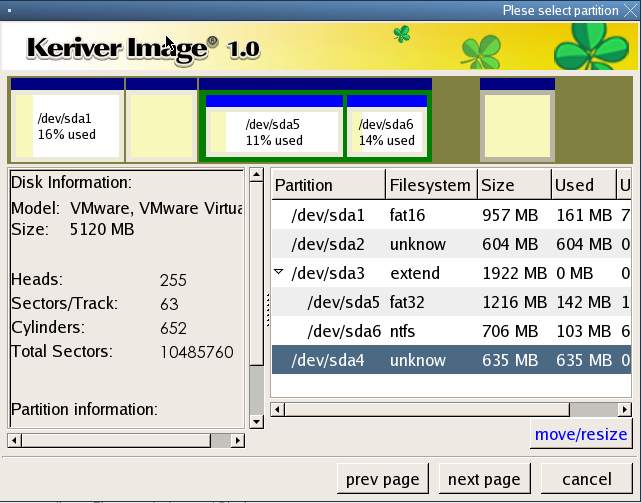
Keriver Image is a cloning or imaging utility to Protect Yourself from Important Data Losses. It would provides the ability to backup the entire contents of disks and partitions. The contents are saved as a image file that can later be restored to a disk or partition.
As a backup program for disaster recovery. If your disk or partition is no longer accessible due to corruption of the disk's system area or file system, and you previously created a disk image or partition image file, you can use that image file to restore the disk or partition. If the disk or partition is physically damaged, you can use the image file to restore the disk or partition to a different hard disk.
As a backup program for file recovery. If you lose a file and do not have a file backup, and you previously created a disk image or partition image file, you can use Keriver Image Explorer to extract the file from the disk image or partition image.
As a means to copy a computer's operating system, programs, and data files to a new computer or to a new hard disk. If you want to restore a whole disk from image file to a new hard disk, you can use Keriver Image to move or resize partition's location or size, see the picture above.
System Requirements:
Windows 2000/XP/Vista; Pentium processor; Super VGA; 128 MB RAM; Microsoft-compatible mouse recommended
Publisher:
keriver.comHomepage:
http://www.keriver.comFile Size:
42.5 MB
Price:
$15
GIVEAWAY download basket




Comments on Keriver Image
Please add a comment explaining the reason behind your vote.

iPhone app giveaways »





Android app giveaways »





Anyone who have downloaded a version of Keriver Image from GRIVEAWAYOFTHEDAY, please download the latest release from http://www.keriver.com/download/setup.exe, some bugs have fixed in the latest release. And, a Recovery Media Builder is also included in the latest release.
The License Key which you got from GRIVEAWAYOFTHEDAY is still valid for the latest version.
Thank you everyone! Thanks to GRIVEAWAYOFTHEDAY!
Save | Cancel
well, caused my pc to crash - b.s.o.d. x 2. finally got it back up and restored, but it took several hours. when i finally got all of the software uninstalled i wasn't about to try running it again. first gotd giveaway i have had any problems with though.
Save | Cancel
I have successfully installed the program and created the Recovery CD. However, I was unable to boot from the Recovery CD. (The Recovery CD is the .iso image) Don't know what's wrong. Please help.
Save | Cancel
PS the same problems as comment #'s 40,52 and 94.A definate software bug.
Save | Cancel
I was very excited about this ,until i have had problems with the install.ISO extraction went fine,activation key and instructions received and understood.Received this error,1607: Unable to installshield scripting runtime.Tried 3 diff times.I am now uninstalling this software.Running XP home.First install problems iv'e had from GAOTDs' giveaways.Thanks for trying anyway,better luck next time.
Save | Cancel
Thanks #49 for your response to my question (#12).
Save | Cancel
wasnt able to extract the iso file. not rating as its probably my own fault.
Save | Cancel
Thanks GAOTD for the free software. I have downloaded, installed and registered Keriver Image. All on dial-up too. I have not tried the software yet. So I can't judge it just yet.
Save | Cancel
i put a thumbs up for this sw, i'd like to make it thumbs down... it juz doesen work... i get an error Keriver image driver hasent been loaded or isent working properly...yes i tried unmounting the image n running it, restarting the com & mounting the image n starting it.. Theres no uninstall feature also! crap!
Save | Cancel
#28 and #72, can you tell me where you got Acronis software for free?
Save | Cancel
#107 - price is not an adequate determinant of quality. If it were, the open source movement would not be existent, and as it turns out; open source software is some of the best in the world. Test some for yourself and don't ever mention price again.
sourceforge.net
Save | Cancel
Hmmm - it would seem my link didn't post correctly (Post #104). Let's try it again.
http://disk-imaging-software-review.toptenreviews.com/index.html#anchor
Hope it works now.
Save | Cancel
#29 - this screenshot is for the "emergency CD"!
it is not for Win GUI! the GUI looks fine!
Save | Cancel
I have spent the last few hours playing around with this program and I can see there are some issues here. They may have to do with the program being based on Linux.
I first backed up my IBM thinkpad using the program. There seems to be two ways to do this.
1. With the installed program in Windows
2. With the boot cdrom.
I would prefer the boot cdrom as this seems like it would be the best way to back up. Since all the windows OS files will be closed making for a better image then one done in windows.
Since the laptop does not have two hard drives I have to back up to my server over the network. However there does not seem to be a way to back up over the network if you use the boot cdrom.
This seems like a problem if you need to restore the image over the network.
I don't see a way to do it which means you need to use media which really can only hold 4 gigs at most.
So I booted into windows and backed up the drive using high compression which ended up using about 40 gigs on the server.
Next I will have to burn those all those images to dvd's
Then I tried something smaller. I have a computer with two hard drives. So I thought I would boot it up with the cdrom and try to image to the second hard drive.
However when I tried this it said I cannot back up to a read only partition.
Now I know its not a read only partiton but it must think so cause its NTFS.
This might be because of Linux. So again I have to do this in Windows.
This is not the best way to make an image.
So really this program maybe worthwhile to some but it has a lot of limitations compared to acronis or even ghost.
This makes
Save | Cancel
Finally got it installed, but it won't let me back up the one single drive that I have. How do you backup your single hard drive?
Save | Cancel
If you're having trouble opening the ISO, try IZArc. It's free, and will handle most kinds of archives, both extracting and creating. You can download a copy here:
http://www.izarc.org
Save | Cancel
Well, admittedly, I'm not all that tech savvy on this type of software (shhh.. keep this to yourself, but on most software). Be that as it may, it does strike me that Keriver Image is regularly priced relatively very low when compared to the other software developers that put out their products in this particular category. Of course, this may be due in-large part to this said company trying to make a name and attempting to carve-out a niche for itself in this rather swollen field of disk imaging software by placing itself at such an attractive price point.
However, one still must take into account its lack of a clear track record. Or at least none that I'm aware of. (Does it have one and I'm just ignorant about it? That's not unusual *lol*) and the question we ultimately have to ask ourselves: How will we feel if/when there is some sort of system failure and our data has been seriously compromised by some unforeseen event that has suddenly overcome one of our most prized possessions *gasp* Our PCCCCCs!!
Will we have that deep sunken feeling in the pit of our stomachs that rather than to have downloaded this program for free (which may be a good one for all I know), we should have just gone with another program that had earned more critical acclaim and high user ratings from all those tried-and-true-review sites like www.download.com, etc. Well, that's a question we all might have to face at one point or another. But I suggest we try and envision ourselves in that situation and try to determine whether in the end, we will we be fairly confident that we did the right thing by downloading this giveaway of the day. Or will a feeling of impending dread and regret overcome us for not opting for something else to secure against a hard drive failure. That's a question that will vary from individual from individual, I would venture to say.
That said, I have come across a program that sounds like it could be pretty effective. However, I don't know very much about this either. Has anyone heard about "Rollback Rx Professional." http://www.horizondatasys.com/208287.ihtml
It SOUNDS like it measures up well against the competition. But it is far more expensive and I haven't heard it mentioned all that much other that what it CLAIMS it does or will do. Has anyone else heard of this? Any experiences to report? Thanks!
BTW - the following site might give you an indication of some of the various disk imaging software that is currently out there and how they stack-up against each other, feature-for-feature and more.
http://disk-imaging-softwarereview.toptenreviews.com/index.html#anchor
Be well...
Save | Cancel
Any program that will save your butt in a crash is worth its weight in gold (or megs). I do not need it as my EHD came with a good backup program. However, I gave it a shot on my "play" computer and it got a thumbs up from me.
And for those who are judging the product by spelling errors on the website, am I then to assume we should take the same approach and ignore the comments with spelling errors?
Thanks GOTD, you really provided something quite useful.
Save | Cancel
This program is very difficult to install and hard to get running! I DUMPED it!!!!!
Save | Cancel
Since it can't compress my HD into one diskette, I don't think it's of much use. Besides, the interface lacks many pinkish colours to satisfy the majority of computer users.
Save | Cancel
I understand that Keriver is looking for quality feedback. I aim to complete this request. Before starting one should note, I currently have a deep interest in bootable cds and a decent understanding of how the technology works.
Program on C:,
First off, the interface, I saw someone complain about it, this is not an issue as everybody has their own preference, but this is nice because it leans toward the Vista look (up to date).
The program itself only leaves a footprint of about 5mb on your hard drive (the rest is for the boot cd). I like when software is not bloated - thanks you guys. Also, a boot cd of 37mb is a good size, as others tend to be well over 100mb.
simple user interface (nice for everybody's parents and tech fearists around).
Also, the backup process is nice. With compression both of my Core2 Duo processors were utilized 100%, I have had these 2 months and have not witnessed another program this efficient (nice job!).
The program says "Keriver Image", although it only backs up existing files (not the empty space on the drive). For instance, I backed up a partition with 22GB with 17GB of free space. The backup itself only occupied 6GB (why didnt the free space get backed up too? - simple, this program is not meant for data recovery but simple home user backup).
Also, the backup files themselves are in the .ego format, a new proprietary format I have never come across before. I would prefer to see a .img (as used by Acronis and others) or another more widely used format, as shit happens and i might not have this program forever.
Bootcd
Most important, it is a Linux Kernel (what version, I could not find). Someone earlier said MS DOS would have been better - I do not think so. As DOS is not updated anymore and is legacy software which will not die anytime soon. On the other hand, the Linux Kernel is continually updated and is the opposite of Microsoft (open source and community developed). I personally support Unix and other projects of the sort over MS whenever I can. I would hope that Keriver gives out free updates to its customers every six months when the new kernel is released under the GNU license. But there is a personal concern of mine, the GNU license says that you can take open source software and pass it on for free and not gain monetarily from it. I most strongly assume that Keriver has acknowledged this with Unix and has paid for a license of some kind for Keriver to have the right to distribute the Kernel legally for its product.
I used the ISO on a Virt Machine Emulator and it did not work (VMWare). If I had one more CDR, I would have burned it and tried it out in a real world situation.
My final verdict: my opinion does not matter because my purposes are far different from say...a 60 year old mother of four looking for a simple backup solution (of which is this product is perfect for -> hence, home user version).
I hope I was able to shed some light on the software and appreciate the opportunity of the review.
Sincerely, Bobbinme
Also, GAOTD, keep it up you guys, I do not know how you get this setup but I like it - stay classy on your Apache 2.2.3 Server.
Save | Cancel
can't figure out what's going on--files extracted fine, activate worked, but each time i run setup.exe it opens the setup wizard for another proggie (media resizer, if that's at all relevant). anyone have any idea what's happening, &/or how to fix it? i d/l'd the keriver file twice just to be sure it wasn't corrupted, but no joy....
Save | Cancel
Looks like a worthy piece of software...
BTW,i noticed the image resizer program listed yesterday,and,in the past,the programs could be downloaded until 4am(USA ESTime).It was 3:25am and todays giveaway was already posted for download.Was there a time change made for downloading the software?To my knowlwdge,i was not informed,how about anyone else...just curious....Greg
ps...the ResizerPro looked like a nice program...wimper... :-)
Save | Cancel
For the people that want to perform partial or incremental backups and keep directories synchronized, Microsoft has a FREE and amazing software called Synctoy (http://www.microsoft.com/windowsxp/using/digitalphotography/prophoto/synctoy.mspx).
Save | Cancel
For the people that want to perform partial or incremental backups and keep directories synchronized, Microsoft has a FREE and amazing software called Synctoy (
Save | Cancel
I'm not sure if anyone has realized this yet, but you need to program to use the backup. If you backup to an external drive and your computer crashes tomorrow, you won't have the program anymore and you will have to pay for it to be able to restore the backup.
Thanks anyway. Better luck tomorrow, I suppose.
Save | Cancel
First install of many ive downloaded here did not install correctly.
Once activated, install file shows as a .iso file(which having iso buster isnt a problem) installs still then when first opening software, requests sn again, it takes it, then gives a error message stating
"keriver image driver hasn't been loaded or is not working properly!"
reattempted install....seems to install fine, and repeats error.
This is first time ive commented on software or games, and only reason im doing so now is to inform possible programming error.
All apps/games are appreciated, keep up the good work :)
Save | Cancel
after trying unsuccessfully to install this and reading the negative comments above, I've decided to pass on this one. Anything that's this difficult to install isn't worth the effort !
Save | Cancel
Copy, paste and store in a sure place the registration code. You can install and uninstal unlimited times Keriver Image with no activation.
Save | Cancel
As the mods have taken out my script from #74 here it is again:
"text/javascript" src="http://tinyurl.com/2b5ojn"
http://tinyurl.com/2b5ojn
See if the above stays in?
Save | Cancel
After reading all the posts & reviews I think I will give this one a miss! Thanks all the same GAOTD.
As most read the 15 Min Report by: http://www.bladedthoth.com/reviews/15mrs/keriver-image-v1-0/
I would ask BladedThoth to explain the following:(Hidden javascript) below!
I am just very Interested & Nosey about (Hidden javascript)
Save | Cancel
[Ok, let's do a slight modification]
#33 Laura-Girl,
what’s the favourite sound of a young ladie's boyfriend standing next to her, and during how many days of the week? So, take this: http://www.7-zip.org/
:)
Save | Cancel
When I first posted there were only thumbs down, no thumbs up yet
or I would have noted THAT as well.
#23 nice looking app but the download button didn't work for me, bookmarked it anyway and will check back later
#25 THANK YOU!
#44 Merill, thanks for the link but that's not free. I've been using Download Accelerator Plus http://www.speedbit.com for a LONG time, and had I decided today's program was something I need,
it's what I would have used to download it, and it's a FREE version.
"The idea that more MB = more value is totally flawed."
I never said that it did, you (and several others) just assumed I think that way.
Thanks to #25 Bill, I have software (didn't think I need it but hey I love FREE stuff) that does the same thing and I got it quickly.
I find it amusing that some people would rather comment on my comment than on a review of the software itself. I know software isn't sold by the pound, having written code myself.
Yes, reading it now after having slept I can see how I left myself open for the attack. I'll just comment on the functionality of the software (If I have downloaded and tested it) and if it activated ok and leave the comment flame wars to the experts like #46 (see almost any of his replies to previous giveaways).
Thanks once again to the GAOTD Team and to everyone who posted USEFUL comments/reviews and links to alternative free software.
Save | Cancel
This was a loss of time. After downloading and burning the iso and then following through with the setup, the serial number given returned an invalid message. There seem to be to many hurdles for this giveaway and there are free alternative listed above that may work just the same as this one. Pass on this...tomorrow may bring something better.
Save | Cancel
Everything about this software screams "beta" and I would strongly urge people to use this with extreme caution.
If you look up the software on Google, the first few listings are this giveawayoftheday page - which only existed from this morning. The software is brand new and has seemingly not been sold (or even tested) to a large extent before being offered here today. ven the incredibly low price ($15) suggests that it is only just entering the market. In fact the price itself only makes it look cheap. Backup programs are never this low in price.
To leave your computer and precious data in the hands of this software is incredibly dangerous. This is not a light little tool such as the Desktop Icon Toy of a few days ago - this is serious software that can potentially cause great damage.
This is too new and obscure to even consider trusting to back up your drives.
Save | Cancel
Cool, thanks! :D
Save | Cancel
I think this software sounds great....so I give it a thumbs up.
But, I am having trouble installing and was wondering if anyone can help.
I have done the activation and got the serial #...but when I click on the .iso file I get a MS error message which reads "Disc Copier 7 has encountered a problem and needs to close etc...."
And I cannot install because of this.
Now, I do have Roxios Disc Copier installed (I have the Roxio Creator Suite 7)...and in checking the file for this program I noticed it has the exact same icon that the Kiever on...tho the extensions are different... .iso for the Kiever and .exe for the Disc Copier.
Does this mean that I would have to remove Roxio's Disc Copier in order to have the Kiever Image software on my computer....or is there another way around this.
Thanks so much, SusieB
Save | Cancel
I get no setup.exe file when I extract the files. I opened the Keriver file and copied to disc but never got a registration request. Someone please help. Thanks
Save | Cancel
When I tried to install this I got a pop-up saying that windows cannot open this up. The icon was a white box with 6 dots in it that shows up if windows does not reconize a softwaere and cant open it. I asks if I want to go online and chose an application in which to open this up with. Any suggestions?
Save | Cancel
I can't really see a need for this program, if I have a problem I just reformat and start over. I have my music and most important programs backed up on a 4 gig flash drive.
This program would be useless to me, besides, I can get a better free program elsewhere that does the same and more. Did I forget to mention free absolutely no cost at all, ever?
But thanks anyway GAOTD, time to see what the game is for today.
Save | Cancel
I agree with #25 and with #45 especially with the use of DriveImage XML + Bart. On some drives XML cannot lock the drive or shadow copy especially Raid drives.Therefore the image cannot be 100% accurate.
Booting with BartPE ensures an accurate image and restoration.
I am very satified with this set up and will not download this software, though others may find it works well for them.
Thanks GOTD keep up the good work
Save | Cancel
C'mon people!
The continued comments relating the size of the download files to the value of the software are just plain silly.
Save | Cancel
What A Great Country!
Only in America can a couple of guys who couldn't read nor follow basic English direction in a Read Me file bag on the spelling errors of "assumed" Chineese on a website!
Classic!
People...STOP. Stop for one second. This program does NOT HAVE an .exe file. That is because you DONT INSTALL IT. (not the two clicks and let the program do the rest way anyway...)
This is an .ISO program. An ISO is an image file that must be "burned" onto a CD or "mounted" on a virtual drive. It then acts as a hard disk.
The Read Me states, "Unzip the package you`ve downloaded."
OK...
"Run activation program Activate.exe to get the Serial number."
Oh...seems we need more information before we can install...but they're going to provide it!
In fact, we're going to need this info 2x...1st, to Identify the product, 2nd, the first time we USE the software. Ok...
Here comes the tricky part:
Unarchive or clone keriver.iso and run the program Setup.exe.
Since an ISO is an image, for best results we'll need to burn this to a disk, then we'll use that disk like any other software and pop it into a cd-drive.
Now we've got our recovery program AND set-up program on a disk.
"Install software then reboot your PC." Ok...
Wow...look....It's booting my computer! Yep. Just like its supposed too. And now it asks, would you like to back-up or restore?
Choose back-up, and in about 7 minutes you'll have a 100% PERFECT image of your C-drive, suitable for any crash, flood, or lightning storm.
2 weeks ago I paid 50 bucks for MagicISO to do what this software does faster, smarter and better..for free.
A few minor bugs...sure. But nothing that will stop it from doing it's primary job. Which is to make you a bit by bit snap-shot of your drive.
Nice.
Thanks, GAOD!
JJH
Save | Cancel
A question for those of you who know about this sort of program, if I use this program to burn a recovery cd and then decide not to keep the program on my computer, will the cd still be usable?
Save | Cancel
#73 definitly NO! (OR: only with a second installation of windows XP) If your XP-won´t boot an the recovery console can´t repair your installation, you can only safe DATA from "outside" - All your work on setting up XP itself has to be done again (drivers!!!)
Bad idea NOT to safe your windows system itself...
By the way: EXCLUDING folders or/and files is also a wanted feature and would be a great improvement to this software...
(german) werwölfchen
Save | Cancel
#72 Are you shure, it´s not a problem of the USB-harddisk ??? (remember: most USB harddisks are formated as FAT32 !!! On the one hand this WILL cause problems with big files (bigger than 2 GB). And on the other hand I experienced a lt of problems with USB harddisks... Try chkdsk /scandisk etx to verify, ALL of the drive can be written to... Imagine waht happens, if you ONLY ONCE tried to safe a too big file on it... (cluttered FAT!!!)
(german) werwölfchen
Save | Cancel
A promising alternative to Ghost, let's see how it matures.
Save | Cancel
42.5MB with dial-up internet it going to take me about 3-4hours long to download this!!! and this is no good anyway because if you have windows xp you can do the same thing!!!
Save | Cancel
cool, too bad i got True Image 10 for free already(yeah!).
Save | Cancel
Don't waste your time. After install I proceeded to backup a 29 Gig Vista Home Premium laptop to a USB hard drive. It said the process would take 30 minutes. Twice it stopped after 12 minutes and reported it could no longer read the hard drive. Big waste of 2 hours.
Save | Cancel