Every day we offer FREE licensed software you’d have to buy otherwise.

Giveaway of the day — Keriver Image 4.1
Keriver Image 4.1 was available as a giveaway on September 22, 2009!

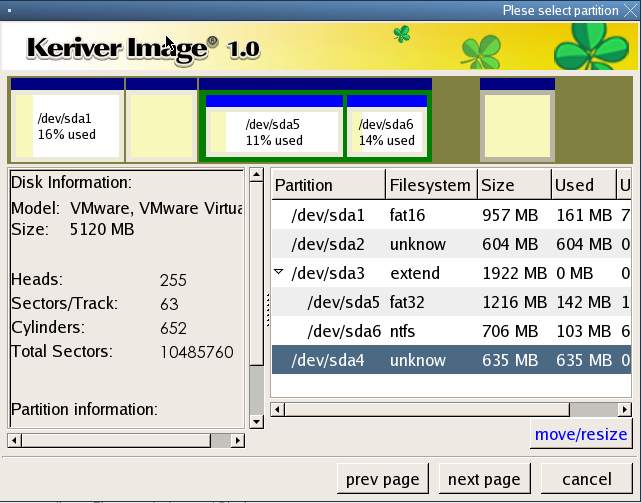
Make an exact backup of your hard disk for restoration in the event of a system failure.
As a backup program for disaster recovery, Keriver Image is simple and efficient. If your disk or partition is no longer accessible due to corruption of the disk's file system or operating system, and you previously created a disk image or partition image file, you can use that image file to restore the entire disk or partition. If the disk is physically damaged, you can use the image file to restore the entire disk.
As a backup program for file recovery, Keriver Image is quick and to the point. If you lose a file which does not have a backup, your previously created disk or partition image can be used with Keriver Image Explorer to extract just the file you need from within the image file.
System Requirements:
Windows 2000/XP/2003/Vista/Win7
Publisher:
keriver.comHomepage:
http://www.keriver.com/File Size:
69.7 MB
Price:
$29.90
GIVEAWAY download basket




Comments on Keriver Image 4.1
Please add a comment explaining the reason behind your vote.

iPhone app giveaways »





Android app giveaways »





Does AllwaySync 9.2 copies files based on VSS (Volume Shadow Copy Service) for open and lock files? I always have problem with any copy software that halts when it encounters an open or locked files.
Another thing here. Does AllwaySync handle long filenames?
Save | Cancel
#84 - Macs-PC,
Does AllwaySync 9.2 copies files based on VSS (Volume Shadow Service) for open and lock files? I always have problem with copy software that halts when it encounters an openor lock file.
Another thing, does the softare handles long filenames? Long filenames is a problem quietly shoved one side by Microsoft as it has no useful solution to the problem it created in the first place.
Hope you check back here.
Save | Cancel
hi all,
I need help. I installed and activated.
Burned the Boot-CD. And now my HDD is not recognized.
It is a newer SATA Notebook.
How can I inegrate the SATA Driver into the Boot-CD?
Otherwise I have to look for an other backup software.
Thanks for your help
cu
dasacom
Save | Cancel
#75 Johnno "#34 – Mike.
I am not running a network to Sync to ….. will these sync to an external HDD?"
Hi Johnno
I know that this response is a day late BUT I'm in the UK & we're 8 hours AHEAD of GAOTD so I was probably asleep at Ur time of asking !!!
I'm just hoping U read back for the reply !!!
To answer U'r question - YES - They will sync to a USB Drive or Internal or Network & WELL WORTH the 5 minutes it takes to setup !!!
In the LEFT COLUMN is Ur ORIGINAL Documents folder to be backed up & in the RIGHT COLUMN - the DESTINATION to back up to & these can be "Browsed" for so U don't need to remember & type the PATH in :o)
I hope U get to see this !!!
Always Happy To Help :o)
- - Mike - -
( Macs-PC )
Save | Cancel
# 55 Saul making a bootable xp cd is not a easy task.According to M$ it is not even possible.
Well this is only partly treu.But for wat you like to do just goolge for a Linux live cd ISO.
Make a live CD of it and look what files you can recover this way.If the CD drive does not work annymore make a booteble live usb stick lots of info on linux live CD/USB you can find here.
http://www.pendrivelinux.com/live-ubuntu-810-usb-persistent-install-windows/
I hope this helps.
Save | Cancel
#45 Tez.
It looks like that a few people do not like it that you try to save some $$ (looking to the useful counter).
I am only wondering about your question.
The offer here is one of these Imaging ore if you like backup programs and it is free today.
I recommend try this one and may be even one of the free alternatives store the backup and hope you never need it.
Enjoy you new used PC hand and have a nice day.
Save | Cancel
To #45- Just use an ISO Image backup program, preferably 1 that tests what it has created & verifies that all is well. I myself prefer Acronis True Image, but you might give this giveaway a try anyway. Macrium reflect is also good but I hear it doesn't verify that all was done well, not corrupted somehow. This offering today does that.
No backup is good if you can't EASILY use it to restore your PC. we were actually offered 1 here that you to buy the program later if you needed to use the backup it makes, to restore your pc. Useless.
Save | Cancel
Another free alternative: PING (PartImage is not Ghost)
It is also OS independent and can backup to (multiple) DVD amongst other things. The only thing it cannot (I think) is to extract one single file from an image. Also, it doesn't have a graphical GUI, it resembles more of a DOS gui, but it's linux based.
Save | Cancel
My personal experience, contrary to consensus hasn't been as good. A while back I bought a copy of Acrontis and used it on my old XP PC. Came the day XP died, and oops, Acrontis decided it didn’t want to restore the full image copy I made. Gosh, darn, shucks! YMMV
I'll be giving the tool a try now. Clean install in Vista Business SP2 32 bit. Ran full copy of my 23 GB drive in roughly 40 minutes to a 1TB external USB drive. Max compression down to 13 GB. Verify of backup file took less than 10 minutes. Full copy of 29 GB data drive in 1/2 hour, max compressed to 17 (or no compression to 29 GB?). Verify took 15 minutes. I appended the data drive into the same “container” file as the early OS drive. It appears to have created a new file, copying old one backup files and appending new backup files. Strange because now I have 2 files (folders?) with similar names (program adds a number suffix) that appear to be linked, I couldn’t rename the earlier one because it as in use by some other program, I suspect the other program is the virtual drive that was created with second file/folder name. I created and booted successfully from the Bootable Recovery CD. Didn’t do a recovery since it was full image.
For the initial install, if the readme.txt file had used the label “Product ID” to match the registration dialog box, instead of the more logical “License Key” it actually used, things would have been clearer. Which ever way you go, match the terminology, make it a little more idiot proof
I don’t like the UI, where is the built in Help? I found a HELP.CHM in the installation, but no link/button to it in the app! Lame!
- Where is option to create Bootable Recovery CD/DVD? I saw option to automatically to split backup onto multiple CD/DVD (good), but no mention of downloading executable program to run restore in future. Help file mentions a “Recovery Media Builder” is needed to do this. I found Installed file name is “Builder.exe”. There should be a link/button to it in the app. Build recovery includes option to bundle recovery app and a set of backup files with it (GOOD!).
- Where is option to see what version is running (not in Help!). OK, found it, a stupid little “A” next to the close app “X”. Totally non standard, where did that come from.
- Where is Option to explicitly define Include/Exclude files/folders. Only the predefined exclude page and hibernation files (good start, better than nothing).
- Where is Option to automatically perform verify as part of backup? Have to restart app and run verify step separately.
- App automatically closes after backup and/or verify process, ie have to re-start it after backup to do a verify …
- The verify function implies that you can put more than one backup into a single backup EGO file, haven’t seen indication of how to do that, and why it is a good idea?
- in Verify process there is a point where it indicates 100% done, but is not yet fully complete, giving you option of “accidentally” cancelling it just before it finishes.
- I would really like to be able to specify a default backup location (and other config options)
- I tried to Explore a backup, but the app just said it image was loaded in read only mode, then it closed (at first I thought it crashed!). After it closed, it left the virtual drive open, but it wouldn’t access the image from the app. The help file implies that you can use Windows Explorer to now read the backup as specified virtual drive (I: in my case). It would be nice if the app made it clearer, better yet if it opened explorer with the virtual drive selected. When I used the app to close the virtual drive, the app closed too. Very annoying.
While backing up my data drive I watched the CPU usage, it looked like a seismograph of an earthquake constantly zigging between 30 and 90% usage, with occasional prolonged peaks at 100%. But even so, I was still able to do other simple use. Simple wordprocessing writing this review, web browsing, without many noticeable delays. The interesting part is that I have a dual core CPU and the app was running on BOTH cores at the same time. That is unusual, all other apps I’ve seen only use 1 core at a time. That apparently makes this the first multi-threaded application I’ve run. Cool! (From a programming point of view.) Given that, if it became too CPU intensive (interfering with other use, but I doubt it will due to inherent bottleneck of HD access) I think it would be nice to be able to limit it to 1 core or an upper limit of CPU usage, from within the application setup.
Given the points I’ve raised above, as an application builder myself, I really have to question that this is an application that has had 4 major releases. It looks incomplete (non standard User Interface, missing links/buttons). And I have to wonder why the app is called “Keriver Image” while the program file is called “Cloverwin.exe”.
#34 Sync tools are a good strategy. I also use an additional strategy. I've repartitioned my HD, C: for Windoze (or other OS) (D: defaults to installed Optical Drive) E: becomes my personal DATA drive and a small F: drive for the Windows Swap file (just to get it out of the way of the OS). I've been able to redirect many of the "Personal" userid related folders, ie desktop, favorites, documents etc. The idea is that if windows takes a dive my personal files are not impacted. I can re-install the OS and applications without impacting/losing data. If need be I can even reformat the C: drive. Combining your sync suggestion with my partitioning scheme provides an additional layer of protection. I was able to do this type of repartition on my 220gb drive using the Disk management tool provided with Vista.
#40 Installing apps to an external drive location will not work the way you hope. It will allow the apps to run, but after re-installing the Operating System (Windows), most apps will not work because they require specific entries in the Windows Registry. That being said, there are tools that track application installations, including the registry entries, and that can generate a file that will recreate those entries. Sorry no names handy.
#45, Yes, you need a backup tool that will do an "Image Copy" of the drive. And tool will have to be able to create a "Bootable Recovery Disc" (CD or DVD) that will allow you to run the backup tool from CD/DVD and restore the "Image copy" from the external drive to your local drive. Several have already been named by other postings.
As others have pointed out, Windows System Restore is a weak tool to rely on. My experience has been that it has let me down at least as often as it has helped. Here is a tip on how to get some control over the space it uses: http://blogs.techrepublic.com.com/window-on-windows/?p=1077
http://blogs.techrepublic.com.com/itdojo/?p=933 – this tip tells how to redirect the USERID personal folders (ie desktop, documents, pictures etc) in XP/Vista/Win7.
I’ll keep it for now, and see how it works out. I’ll continue to run my other backup app alternately so I have a fallback. This app has potential, but there are better free options out there (that others have already mentioned)
Save | Cancel
Registration code never comes up for me; tried it several times.
Save | Cancel
I keep getting a message failed to connect when I try to open the program. What should I do? Thanks
Save | Cancel
Hi all!
#34 - Mike.
I am not running a network to Sync to ..... will these sync to an external HDD?
Cheers
Save | Cancel
Mozy Online Backup is WAY better. (www.mozy.com)
Save | Cancel
Yes. Everyone needs to learn to consistantly backup. Each needs to try several different brands to see which works best for them. Also, it is wise to have offsite back up, in case of fire, theft, etc. Many business people use Carbonite in addition to their in office backup. It's is only $55 per year. That's pretty cheap insurance, if you have irreplaceable files. If anyone knows of other offsite options, I'd like to hear your favorites. San Diego Granny
Save | Cancel
Downloaded and registered fine on a computer with win xp pro. Using the wizard, selected disk/partition to backup, chose full backup, chose cd drive for target directory and entered backup file name. "Next" is grayed out! Can not proceed! Program seems to be useless.
Save | Cancel
Installed and runs fine on Win 7 x64. Using a Pent E8400 @3.0, the CPU usage ran from 3% to 27% during the backup process. If it's higher, it may be due to your AV watching every breath it takes. Unlike other big brands like Acronis, this isn't loaded with a lot of bloat and features "that no one really uses anyway". The interface is simple, as is the backup and restore feature. As stated earlier, you'll need to make the bootup disk via Start Menu>Programs>Keriver, etc. It took a long time to back up an 11 gig system (about 45 minutes). True, I was backing up to a thumb drive, and we all know those aren't the fastest things happening. As a side note, it's a joy to read a "program description", (like that on top of this page), that's presented in nice clean simple English. (Poorly scripted, hack job descriptions are a red flag IMHO.)
Save | Cancel
#45, you can back up all your stuff legally so it reinstalls on a new hard disk. But if you want to install a new copy of the operating system you'll have to buy one. (Are you sure there isn't a recovery partition on your present disk? Try making CD backups from it, if it lets you.) Now, it's ridiculous to spend #80 for a OS that's two generations old, and soon will be unsupported. If it dies, install Linux! That old PC will fly. You will be enlightened. (Hey, why wait?)
Save | Cancel
After downloading the Keriver file, Windows tells me that Windows cannot open the file because it is invalid. I've never seen that happen before. Do you know what might be going on. The size was shown to be less than what you displayed on your web-site by over 10 MBs also.
Save | Cancel
#45-Terence A Bryan, I would suggestion You purchase Norton Ghost v14+ and backing up Your OS (Image) with it. just type it in your search bar browser and download it for about 30-40$ well worth it. and You can copy it to USB Pendrive (the Norton Ghost V14+) and always have it for when you reinstall windows you can then install it and restore the image backup from external drive with it see. Hope this helps it works for me!
NJOY
Save | Cancel
Keriver Image is good. It works well on my portable Windows Vista 32.
Check out at http://www.keriver.com/tutorial.html their video tutorials which are usefull.
Save | Cancel
#37 PNO --- Its a well known fact that the more you try to excuse yourself for what you are doing, the more you bury yourself in. Why? because in reality you are trying to do exactly the opposite of what you are saying. Your good-old-man didn't tell you that when he introduced you to "real life'? A shame! On top of everything, the size of your comment gives you away too!
In the Ashraf debate it's a clear-cut case: ENVY is eating you up. You found a reason to "flame" him because of the daily invitation to his website. Shall I fill you in s/thing? I've been reading him every single day for the last 6 months and I still didn't visit his site. One more thing: have the manhood not to answer this comment otherwise the Ashraf debate will get out of hand and he will stop servicing selfessly this wonderful GAOTD community.
# 15 --- No, you cannot install the GAOTD after the deadline as you need to get the activation from the publisher's website (automatic) before the deadline is over.
#43----you made my day with this word: FACILITATIVE. Love it! Its not English but makes sense, bravo! Terry must be Quebecoise obviously.
Save | Cancel
Most operation systems on new computers can be backed up only once by using a link on your computer that indicates it is for the backup of the OS system by creating your own disks using your own DVD's or CDs. Look in "Help" and see if it directs you there or look for that icon which will say create OS Disks. Remember, you will only be able to do it once so store those disks in a safe place and label them and put your own system's code on it so it can easily be identified. Hope it helps. Mine had a link in "System Tools" in the "Start" and "Programs" when I bought it.
Save | Cancel
May I suggest "reflect" as an alternative to creating a complete image of your system? I wrote about it a while back here:
http://www.freewareguy.com/2009/04/reflect-has-your-back/
On the other hand, if Keriver uses a lot of CPU during the process of creating a backup, that shouldn't be pointed as a drawback, because during a system backup, one shouldn't be working with files or with the computer anyway.
Save | Cancel
#45 google for "free hard drive image software". I found this:
http://www.downloadsquad.com/2008/09/05/5-free-apps-to-clone-your-hard-drive/
You can also use Nero or Acronis True Image.
Save | Cancel
I have tried reinstalling, running in Compatibility mode. Istalling Keriver on my VistSP2 x64 and 7x64 partitions.
In all cases - keriver will not list any drives or partitions in the window where it says "please select disks or partitions to backup".
Utterly perplexing.
There is nothing unusual about my system - and have never before come across a app. that cannot see the drive.
Infuriating.
Sent an email to Keriver support 8hrs ago - no response yet.
Save | Cancel
I'm experiencing the same problem as others with this. My drives are not recognised we I try to do a backup. The window where they can be selected is completely blank. What gives?
Save | Cancel
ashraf what are you talking about? uses 95% cpu time? i have an 8 core system it surely does NOT use 95% not even 20%, get a primitive pc and get with the times and stop calling programs BAD terms because your pc is a dinosour... this program does as stated so give it full credit for that alone, no problems here it works well. sure there are better but whos comparing anyway? not me... enjoy!
Save | Cancel
Thumbs up from me!
1. on my testing seems as fast as paragon/macrium - within winxp cpu usage was 25%
2. WinPe worked very well - via this i backed up a 4gb partition in just over one minute - good stuff
3. Mount/dismount of image works well
4. Works from within ulimate boot usb for windows
thanks guys
Save | Cancel
@#45 -Terrence
Usually, there is a routine built right into the PC's utilities that will let you burn the OS disks. Every vendor has their own method.. Dell, HP, Lenovo etc... Usually the OS cab files are stored on a small "recoverY" partition on the hard drive, and somewhere... either in "Administrative Tools".. or in the boot menu... or in the BIOS menu.... you can launch a utility that will take you through burning the physical disks. It's usually not a big deal once you know where to go. My advice would be to contact the manufacturer or their website and search on "recovery CD" or similar. Good Luck
-Ric
Save | Cancel
To answer my own question no it doesn't, offers you to backup the whole system but it's not an actual bootable disk then is it?
Save | Cancel
All I want is a xp boot disc. Am making a recovery one here, don't what a full recovery, just want to boot into windows so I can get at files from knackered laptop. Don't want to delete these files whilst doing it, whats the easiest way to make an XP boot disk or will this do the job.
Save | Cancel
I am sure today's giveaway is a very fine program but I prefer MozyHome Online Backup at www.Mozyhome.com you get 2gigs of storage free and unlimited backup for $4.99 a month and it is automatic just install configure it with it's configuration wizard and forget it and you can restore any or all files from your online backup, no more backups to worry about.
Save | Cancel
#45 - This is a super-over-simplified response to your question, because any detailed answers can be found with a simple search.
Download today's GOTD and use it to create a disk image, aka backup, which is what your seller told you to do. If you don't want today's GOTD, or it does not work for you, do a search for disk imaging software.
A "genuine xp pro disk" will not restore your computer to its current state if things go wrong, it is just an installation disk for an operating system, and what you want is a backup of your hard drive, which already has all the necessary drivers installed for your hardware. There are many good reasons for having a genuine installation disk, and a search will tell you that also.
Save | Cancel
To #45: How to create a bootable Windows XP setup CD from a preinstalled system — http://www.howtohaven.com/system/createwindowssetupdisk.shtml
Save | Cancel
#45 Hi from New Zealand, Nice simple answer.
1 The supplier should have provided an XP installation disc with the PC, and the license key, it is yours by right as the purchaser, so you can achieve a clean install, should you have a system failure. Remember to do a deep format, NOT a smart one.
2 Any decent tech will provide a disc for $5 + cost of disc, as they are worth nothing, and totally useless without the license key.
3 Same tech will extract license key for $10, or google it, to get a program to do this, as its easy.
4 Try to get a retail XP, then you can transfer it to your new computer, and it is yours. An OEM version is only good for that particular computer. XP is a very good investment, as 7 will have its problems, and only necessary for power users.
5 Finally, go to Autopatcher,com, and build yourself up a DVD installation disc, of all the updates etc. This MUST be done with a fresh install. so you get all the updates, because the Autopatcher can see what you already have in your system. Now you can reinstall XP, real fast, and omit all the updates you don't need. Remember to update and install your drivers.
6 Remember that computers are real simple, once you get through all the BS, and find the magic secrets.
Regards Bill.
Save | Cancel
Most of comments are unfair. Ive used Acronis for 5 years and found it very successfull but this software good aswell.
Save | Cancel
To #45 (Terence A. Bryan)
How to create a bootable Windows XP setup CD from a pre-installed system: http://www.howtohaven.com/system/createwindowssetupdisk.shtml
Save | Cancel
Hi, I first heard about Macrium Reflect (free version) from Gizmos freeware
http://www.techsupportalert.com/best-free-drive-imaging-program.htm
I like it. Gave up using ghost 2003, because of problems imaging to usb.
Acronis 10 free download. had problems with HP laptop & recovery partition.
Save | Cancel
To #37
Well said. I have looked at Ashraf's website and found it
to be very professional. IMHO he does a great service for the web community at large .
I have used the Macrium Reflect image backup that Ashraf had
recommended. It worked very well and I was able to get my OS
back the way I had it prior to almost messing it up by using
an all-in-one utility and being very cavalier in fixing Registry
" errors ". Now , I will be fixing these errors with CCleaner
which has not given me any problems.
Using Win XP Home sp3.
Acemann
Save | Cancel
Watching the posts, I noticed on a refresh that a "slammer" has again gone down the list and given everyone a negative. This happens often and serves to skew the user opinions. Perhaps both the positive and negative votes for each post could be shown, because the actions of childlike "slammers" tend to bias the reviews against the offered software. And today's giveaway is a very useful utility.
Save | Cancel
I recently bought a used PC with xp pro installed. The person told me to make a back up of the OS in case of problems. I have no idea how to do this so asked the price of a GENUINE xp pro disk. His prices have jumped from £25.00 when he had none in stock to £80.00 now that they are in stock. Can anyone advise how I can legally back up the OS pre installed so as not to have to pay this robber. Many thanks
Tez
Save | Cancel
I made a boot DVD from program of C: partition and it booted fine with the
authors menu choices. However didn't format C: to really test it, but see no
reason why it would not do a disaster recovery fine. It does not require the
program to be installed on the computer. Tried on an XP Home SP2 system.
Even if you don't keep it, you could make a
recovery CD / DVD before uninstalling.
Save | Cancel
It seems that Ashraf has brought his fan club to the site today; although I find his reviews facilitative, there are others who are equally informative, (Fubar, Happy Person, Bubby, and Mike to name a few) that do not use this site to direct traffic to their web site.
As always, thank you GAOD and everyone who contributes their reviews, suggestions and comments.
Save | Cancel
I too had problems registering it. Doing exactly the same procedure worked the third time!
The included Help file isn't very helpful. If you're familiar with this type of app i guess it's sufficient. If you're not, the absence of a tutorial, an overview or run-through of the steps involved in creating and recovering an image, is depressing. Another maze.
Thanks go to GAOD for listing the free alternatives- i'll check the list for an easier program.
Save | Cancel
@ #31
Make sure you enter a filename for the backup and it should work, unless you are using a file format other than FAT32 or NTFS on the external drive. Works fine on my USB external drive
Save | Cancel
Hey, can I use a prog. like this (or similar)-
make a clone disk, copy to external drive, attach external drive to
new computer I'm buying (erase drive of old one),
and thereby keep all my GOTD programs for use on the new computer..?
I've heard there may be incompatibility problems if I image the old comp. and try to use the image on the new hardware.. ie different motherboard/ chipsets etc..
Well, instead of copying the image from the external USB to the main internal laptop drive... what if I run the programs direct off the USB? Would that work...?
I'm a tech newb and I'd like to keep my GOTD progs... surely there are others out there, who are the same ?? :)
Thank you in advance for any help on this :)
Sincerely,
PS.
Save | Cancel
To #18
I've used the Seagate version several times. The thing to remember is that AT LEAST ONE of your drives must be a Seagate/Maxtor. I've had no problem transferring the contents of a WD drive to a new Seagate drive. I haven't tried the Acronic WD version, but would image the same requirement works.
Best idea is to have BOTH the Seagate and WD version on a flash drive. I've been leery of any HDs besides Seagate/Maxtor and WD. Seagate is now my favorite because of WD's atrocious customer service. If a new WD drive goes bad within warranty, they don't send you a new replacement - they send you an often beat-up (rebuilt) return that wouldn't work for someone else.
Their external MyBook drives overheat and often burn up within a few weeks (at least their earlier versions did) because of inadequate venting. I buy the empty cases (I love the ones that handle 4 drives and have a big fan), then install my own choice of HDs inside. You get better HD warranties than if you buy the same HD in a manufacturer case (e.g. MyBook).
Save | Cancel
Ok as I stated in #31 this tool will not reconize my HD and now it will not reconize my blank CDs as well. Whats up with this thing? I dont have a ghost tool and really hoped this would work for me. GREAT!
Save | Cancel
re: Jeeem: Try not to take everything Ashraf, or anyone else, says as if it's "gospel";
(And be aware that he doesn't represent anyone other than himself, which he fails to mention; He's NOT a Professional Tech Reviewer for some periodical, or anything like that).
Along with another User of this site, (who seemed rather upset one morning, but spilling hot coffee in one's lap can do that),
I'd also been "counting mistakes", in 'whoever' had made the first "review-styled", "First-Post", over a month-long period;
(I didn't want to "zero in" on any one person, unlike the other User, whose Comment seemed to concentrate on Ashraf, and which may have been removed after it was reviewed by the Moderators, I'm not sure; I saw it while seated next to someone who was a very good typist, at a nearby eatery that has a "Free WiFi Hotspot"; I wasn't trying to be "nosey").
...But I, too, counted what were likely the same 5 errors-per-post as the other User had, in EVERY ONE of Ashraf's "first-posts" during what was likely the same period of time.
I can't emphasize enough, that I'm NOT trying to "flame" anyone here, I'm just letting you know that you should read ALL of the comments & keep an open mind;
And Ashraf DOES seem to be pretty good on most of the major points, most of the time. He's got a reference to his own site in his "first-posts", and where he says: "For final verdict, recommendations, and full review, please Click Here", with a link to his site - you may want to go to that linked site of his to have a look at it, since he also lists some "alternatives" to other free & for-fee programs there as well, along with other info, just FYI.
(I don't want this to get "86'd" by the Moderators because they think it's just a "flame", 'cause that's NOT what I'm trying to point out)...
"The ultimate decision if something works well for YOU lies with YOU, and no one else"; (quoted from my father's teaching me about "real life"),
"Always THINK for yourself, DO for yourself what you CAN do for yourself, and exercise Due Diligence";
(Quoted from someone famous whose name I'm not 100% sure of at the moment, so I don't want to "name names" when it may not be true; My apologies to the person I quoted).
re: To the person who had problems with the laptop image not working with an external backup HDD;
Did you make sure your BIOS settings are going to "look for" the external drive first?, and I know that there were "issues" with other programs, involving modern machines & drives: In particular, SATA drives using AHCI; Someone suggested changing the setting in the BIOS to "Legacy" or "IDE" if the backup, especially an external USB HDD that's got a SATA drive in its housing, isn't "seen" by the system on bootup, (and I'd make sure that the BIOS is capable of accessing any USB devices before any "drivers" are loaded; you may need to get your mobo's firmware updated if not, so try going to their site to make sure you're running the latest firmware for everything).
I haven't had that problem with my own system, which has an internal SATA drive using AHCI, (and also starts a Service at Windows startup, and possibly some kind of "driver", even without Windows itself starting, that will initialize any connected SCSI drives or devices), but when I check my "Removable Storage Properties", my external HDDs all report using the setting for "(E)IDE/ATAPI", even though the drives inside the cases of my External HDDs are SATA drives, and they're USB 2.0-interface units, so I'd guess that my external drives use a "translator" or similar that's within the housing of the external drive, or some other method that makes it work OK, since I HAVE heard of that problem a lot from others...
Just thought you may want to give that a try, & remember to set everything back to the way it was, after you've tried any changes to the BIOS, etc.
And always make a Full backup-set BEFORE trying anything that could put your system or data in jeopardy! The time spent is WELL worth it!
(I USED to rely on the "System Restore" in XP & Vista, but when I really NEEDED it in XP, all of my Restore Points had suddenly "disappeared", so I put a backup program on all of my machines).
"Backups are like Insurance; The more you've got, the less likely you'll need any, but if you don't have any, that's when you'll need it most, while if you've got a lot, then you'll probably never need it" (Quoted by myself AND my Insurance Agent)
Now, I've got to see if I can get the "program du jour" to run on MY system, and if it's better than what I've already got for imaging a system HDD, etc.
Keep Smiling! They'll wonder what you're up to!
PNO
Save | Cancel
- Works for me on Win7 x64.
- In Win7 it takes about +/- 12min to make full backup.
- Booted with usb stick and it takes about +/-32min to create a full backup. (High compression 11Gb -> 5.15Gb), (Acronis 11 home takes +/- 8min 11Gb -> 4.05Gb)
- Restore takes about +/- 4 min.
- Is there an option to disable pop-up when Incremental backup is done?
It does what its say but very slow.
regards,
Save | Cancel