English
Every day we offer FREE licensed software you’d have to buy otherwise.
$29
EXPIRED
Giveaway of the day — iPrint 6.0
iPrint Version 6: Eco-Friendly Printing that Saves You Time and Money
$29
EXPIRED
User rating:
469
58 comments
iPrint 6.0 was available as a giveaway on August 24, 2009!
Today Giveaway of the Day
Flexibly back up and restore Android files so as to avoid data loss issue.
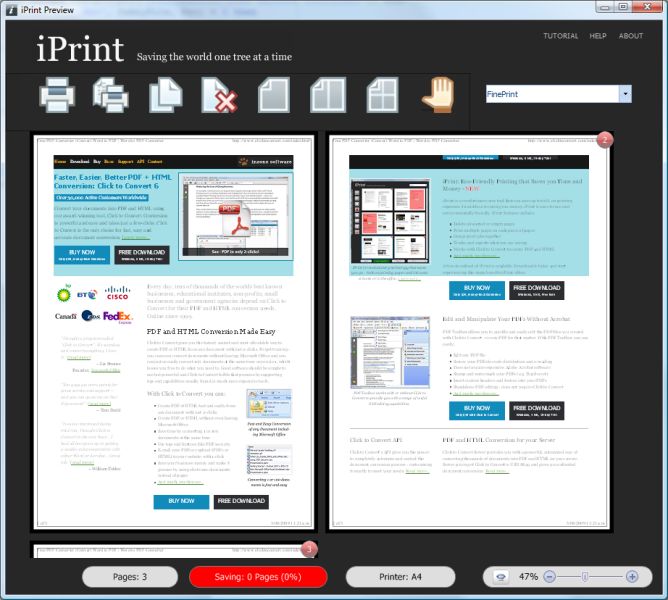
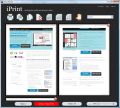
Eco-Friendly Printing that Saves you Time and Money. iPrint is a revolutionary new tool that can save up to 60% on printing expenses. In addition to saving you money, iPrint is easy-to-use and environmentally friendly.
iPrint features:
- Delete unwanted or empty pages;
- Print multiple pages on each piece of paper;
- Group print jobs together;
- Tracks and reports what you are saving;
- Works with Click to Convert to create PDF and HTML.
System Requirements:
Widnows XP, Vista, Windows 7
Publisher:
Inzone Software LimitedHomepage:
http://www.clicktoconvert.com/iPrint/File Size:
7.78 MB
Price:
$29
GIVEAWAY download basket

Developed by Adobe Systems Incorporated

Developed by Microsoft

Developed by Foxit Software Inc.

Developed by Microsoft
Comments on iPrint 6.0
Thank you for voting!
Please add a comment explaining the reason behind your vote.
Please add a comment explaining the reason behind your vote.

iPhone app giveaways »

$0.99 ➞ free today

Turn your iPhone into a living color light that reacts to music beats and your hand waving.
$0.99 ➞ free today

$0.99 ➞ free today

Tap a group of two or more touching spheres of one colour to select it, tap again to clear it.
$0.99 ➞ free today

$0.99 ➞ free today
Android app giveaways »

$19.99 ➞ free today

$1.99 ➞ free today

$0.99 ➞ free today

A stunning action RPG filled with heroics, adventure, and a diverse assortment of creatures and fiends.
$0.99 ➞ free today

$0.99 ➞ free today
The program works well and makes a good organisational tool. The 1 problem I found was that if you change the printer options after you've selected pages to delete it loses your selections, which is a PITA
Save | Cancel
Hi Guys,
If anyone has problem with the full version reverting to the trial version then please contact us for a complimentary license key at:
mike.stokes@clicktoconvert.com
Thanks,
iPrint
Save | Cancel
An excellent print job manager
I have lots of clients who print oodles of documents and are always complaining about blank pages, advertisement pages, etc... They have a desire to be more environmentally friendly, but no way to implement their desire. I'm happy to recommend this.
And no, print drivers don't allow you to select individual pages scattered throughout a print job, and preview and filter the output.
Yes, I remember the Novell product of the same name, that makes two of us in the known world.
Save | Cancel
First time used iprint made the mistake of clicking on the update it prompted me with, as soon as that loaded I reverted to the trial version good for only 15 days. Oh well there are other ways to do the same thing in windows
Save | Cancel
A quick and easy little program. I recently had to buy a new laptop and am stuck with Vista until Win 7 is released. Even with drivers, Vista doesn't play nice with my printers. This program jumps in and makes life - and printing - much easier.
Save | Cancel
To those of you who can't get the program to work, try this: Right now, in your browser, go to File, then click on Print. Your Print dialog box will pop up. At that point, you can use the drop down arrow at the Name section (should be at the very top), and select iprint. This will bring you to the iprint program.
Save | Cancel
Installed program alright, re-booted , no desktop icon , program will not open or work, troublesome ,time wasting junk.
Save | Cancel
To the dev:
having a multiple page option without being able to control the size of the margins between those pages is very limiting. There are some pages where I need more margins between them (bold black text), and some pages where I would get rid of the margins entirely and just use a line to demaracte (such as the git book, which has these huge margins already).
Please consider this. Also, a print-like-a-book option would really be appreciated, and was actually kind of expected for this sort of software (definitely if I was paying $30).
Save | Cancel
Installs easily, then directs to an update page. The update did not appear to destroy the license.
The program does not have a GUI that can be accessed when not printing (as far as I see).
There is no way to see if it is a registered copy or not.
In about->enter key it does show the giveaway key, but it doesn't say if that key is accepted. [it would be better if it said "registered, or at least "change key"].
Have not used it yet.
Save | Cancel
I tried it under Windows 7, but nothing happened. Restrat my windows, but nothing. Delete it.
Save | Cancel
Have uninstalled again. The programme did not appear automatically when i pressed 'Print', neither did it appear when it's 'application.exe' was run as administrator. Seems an interesting programme.
Save | Cancel
Same problem as #44. Installed as per instructions, received Activation confirmation and webpage, rebooted, nothing. Uninstalled using Revo Uninstaller, restarted, reinstalled iPrint, restarted, activation,confirmation again, nothing. Am on Vista 32bit. Strange.
Save | Cancel
Can anyone please compare this program with the HP Smart Web Printing mentioned in #16, Is it worth trying as an alternative or not.
I also want to thank ASHRAF for sharing with us every day his recomondations, they are extremely helpful. Thanks
Save | Cancel
This downloaded, installed, and activated fine. I turned my computer off just after doing that this morning. When I turned it back on this evening, my computer hung and wouldn't start. I had to go to safe mode in order not to have a blinking cursor on a black screen staring at me. I'm on Vista Home Premium 32 bit. The program itself seems to run just fine, but I'm not sure it's something I'll want to keep if it continues to make my computer hang up.
Save | Cancel
Useless since most of the Printers these days do this & let you select which pages you want to print or multiple pages on a single piece of paper.... with No page clipping & the ability to re-arrange what's on a page..... Like I said.... this is kindda useless since all it does are already built-in in the printers.... All you have to do is just look into your different printers options BEFORE you print & I'm pretty sure it'll do the same if not more what this $30 software provides.....
PS..... I LOVE the fact that the Demo has No Sound.... and how there's a TYPO "Getting Stated" instead of "Getting Started" on the VERY 1st Screen.... That surely gives me A Lot Of Confidence on the software..... :-(
Save | Cancel
~john wayne said:
"hmm… iPrint – not to be confused with the novell print server solution"
------------------------
I was thinking the same thing!
Save | Cancel
I forgot to mention another feature of iPrint, which is useful if you're using n-up or duplex printing. You can print multiple (presumably related) things to iPrint, leaving it open (if the floating buttons are a problem, minimize it). iPrint will print the group as a single print job, generally saving wasted blank pages due to alignment.
Save | Cancel
OK, never mind, Its been that kind of month, crazy, I just decided to open up my program that came with my printer and there was iPrint. Do I feel red. Sorry to bother you.
Save | Cancel
Well, I am sure scratching my head. I know that this utility is exactly what I need _TODAY_ but I have installed, activated, rebooted twice and still can not get it to work. I put a short cut on the desktop, as well as gone to my programs and tried to start it from both places. Nothing???? What did I do wrong????? Or did I?
Save | Cancel
#32, john, the iPrint UI only shows up when you print to the iPrint virtual printer. If the iPrint virtual printer doesn't work, contact the developer, they're very responsive, but they're in New Zealand, if I recall, so there can be substantial time zone differences.
#33, mike, saving ink/toner is a somewhat different issue from saving paper. I'm mostly paperless, but others, such as my elderly parents, are more comfortable with printouts. Many people here seem to be missing the point of applications like iPrint. Yes, most printer drivers support n-up printing, duplexing, etc. Many apps have some form of print preview. It's true that iPrint is mostly useful for web pages. The big advantage of iPrint and similar apps is that you can easily deselect scattered pages from printing, and you get a common print preview function. However, iPrint should not be used when high quality is desired, such as printing photos, as its graphics color processing and resolution aren't designed for quality.
Save | Cancel
installed this iprint and did not like it because it doesnt work right with my older pc.tried uninstalling it and uninstalled it but the remains are messing up all the other printers on the pc
Save | Cancel
I sometimes do website printing and not all websites have "print" option, so I might try this tool.
Thanks GAOTD.
Save | Cancel
#17.Yes this is update that i have for my HP printer.
Save | Cancel
Hi Guys,
Thanks so much for all your great, positive and constructive feedback... we're the developers of iPrint and to get this kind of detailed information from people who understand what makes software good is really valuable... we're taking your comments seriously and trying to ensure we make iPrint better and better.
Hey for anyone who wants a free copy in the future and has commented here, just let us know and we'll make that happen.
I noticed and few people have had installation issues - normally installing under an Admin account and rebooting resolves this. The iPrint installer restarts the spooler service so the restart shouldn't "technically" be necessary but it does seem that about 15 - 20% of people need to do this. We're trying to find a way around this so we can tell those people to reboot without annoying most users who don't require a reboot.... hair being pulled out!
Regarding GreenPrint (printgreener.com - not greenprint.com) and fineprint - we're trying to make the software right for most people without cramming too much stuff into it, that's why ours does more than greenprint but less the fineprint.. we think it's the sweet spot for most users... but, of course, we're on a learning curve and will be adjusting the feature set to best match what users really want... not what we think they want.
A far as "green/eco" goes... yes, the best way to be green is to stop printing and go electronic. But for most users around the world this is not a 100% option by any means. Software like iPrint and Fineprint are designed to make things as eco as possible in todays world. Although we'd be happy to bin iPrint if everyone went electronic :)
A lot of programs and printers allow 2-up and 4-up printing, this is totally accurate. However from what we've seen, it's mostly tech-savvy power-users (no offence intended) that know how to use these features and do actually use them. iPrint and FinePrint give a unified way of doing this from any app and to any printer, which we think is one of the products best features. In the best testing phase we saw an average of 46.7% saving over all testers (over 1000), since we could track it then as part of the beta. So I think it's working in that way, fingers x'd.
I'm sorry if I haven't commented on your post directly - I need my morning coffee ;)
Please anyone who wants to comment do, this feedback is invaluable to us as developers! If you want to talk directly to us to, we'd love to hear from you, my direct e-mail is: mike.stokes@clicktoconvert.com and all comments, discussion is very warmly welcome.
Thanks GOTD :)
Mike
Save | Cancel
I, too, have been a FinePrint user since v.3 (it's at 6.1 now), and think its price (and upgrades) worth paying for (http://www.fineprint.com/); besides what earlier posts have said, I'd like to comment on what, to me, is one of its main attractions: The ability to print to a 'print-image' file (in a proprietary format), which can, anytime in the future, be used to actually print out that 'printing job' (editing any way wanted before doing so); that way, for most possible printing needs, I just 'print to file' and, if in the future I do need a printout, it's always available (and back-upable) -- the economy in ink and paper exceeds 90% that way, with no loss in functionality. Unfortunately, the description and posts didn't let me see if iPrint does something similar -- but, if it does, I'd say it's a worthwhile download and installation; thanks to GotD for this, too.
Save | Cancel
installed iprint as instructed...on vista w/sp2...upon 2nd install rebooted computer...tutorial opened but not software...uninstalled iprint....it said it left contents that could esily be removed..my file manager cannot remove it...adjusted properties...couldnt remove it...at the command line i couldnt remove it...my uninstaller program couldnt find it....tried sending it to a flash drive access denied...did a system restore....AND THAT DID NOT REMOVE IT!!!!
Save | Cancel
#31 (John) - to answer your question...
The iPrint program installs as a "soft printer utility" (i.e., as another printer option) from within your office programs' printer function menu. It does not operate as an independent program.
Hope this helps.
Save | Cancel
Works great for what I use it for. It is a great little program best of all it stands alone. Installed runs great on Windows Vista.
Save | Cancel
I have been using Fineprint for many years (in various versions) and it is a superb product! I highly recommend it if you need a full featured product that works well! As mentioned already, it doesn't run in the background, but comes up as another "printer" to select in your printers folder.
Although I won't be downloading today's offering, I highly recommend ANY program that gives added flexibility when printing, and I love the ability to save LOTS of paper. Fineprint was worth every cent I paid for it because over the years it has saved me literally thousands of pages of wasted paper (and expensive ink/toner). I've long since recovered the purchase price.
Regards,
Steve
Save | Cancel
At IPrint is not write with wich browsers work.I loock here and on their site.
Save | Cancel
If is is printing ONLY what you want off of certain web pages, there is a program that is basically a "cut and paste" kind of thing. I originally discovered this in a program called OneNote by microsoft (also an excellent program; not sure of any free alternatives to that one). You select the option, create a shadow box around the section you want to cut, and there you go. Not just for web pages, but could be anything that appears on the desk-top. I know there are some simple versions of this for free on the net, so just try googling it if that is what you are interested in doing.
Save | Cancel
#15
you can download GreenPrint from Softpedia - rated Very Good (4.0/5)
by 14 users:
http://www.softpedia.com/get/Office-tools/Other-Office-Tools/GreenPrint.shtml
Save | Cancel
All my Epson Printers (Stylus C120, Stylus C42UX, Photo R200, & Stylus NX400) have these features in the Printing Preferences, plus more... dont need to waste HD space on a program like this when I have more features available to me already through the Epson drivers.
Save | Cancel
I have been using FinePrint for many years. Excellent piece of SW which seems similar to this one...
Save | Cancel
Thank Ashraf for Printee,is what is missed from my printing arsenal.It is a perfect combination with my update for soft for HP.With Printee elimine background and images and change font to eco font and with my HP update i can select even one word from a page next click on clip to copy just i select on clipboard and go to others selections and at finish print everything i select,without backround,images and with economical fonts.In conclusion i print only information that i want and most perfect work is that this soft work togethers without bad interaction.Only one problem i have:work only with :Internet Explorer that is most slow that my preferated Google Chrome portable so if you find something similar and free announce here and again i thank you.
Save | Cancel
As #4 says, I have used Greenprint at www.greenprint.com for a couple of years and it has worked well for me.
Save | Cancel
If you don't want to install a program to accomplish this, you can use the website:
http://www.printfriendly.com/
I've used it several times and it sounds like it accomplishes what this program does without having to install more software.
Save | Cancel
Good morning everyone,
PROS:
*** Smooth download/installation/activation on Vista Home Premium ex64 SP2 system, without need to usng Run As Administrator privilege.
*** Smooth program access/operation without need to use Run As Administrator privilege.
*** Compatible with Vista x64 bit system, which is not always the case with every software program on the market.
*** Simple, clean, intuitive, easy-to-understand, easy-to-navigate Graphical User Interface (GUI).
*** Easily and accurately captured an exhaustive list of my available printers, and included them within its own program interface.
*** Registration information (license key and Giveaway name) are accurately and prominently listed in both the About section and the Help Registration section.
*** Complete, thorough, useful help guidance located online via developer's site.
*** Available print-job formats include: printing to one page, printing 2 pages for each printed page, printing 4 pages for each printed page.
*** allows for editing/formatting of print job via its own print-dialoge/editing menu.
*** allows for choice of available printers for use with print job.
*** has a zoom feature to zoom in and out of displayed print-preview pages.
*** has a button feature to allow user to delete selected pages from print job, prior to printing.
*** has a button feature that displays savings statistics/information, such as pages saved, cents-per page saved, total dollar amount saved, and percentage savings using the iprint program.
*** Smooth, automatic, seamless integration and operation wtihin internet explorer.
*** Overall easy, simple, intuitive program operation.
*** Help-option and Support-option links are displayed both in the About Section and the Help Section of the program.
ACTUAL PROGRAM OPERATION:
I successfully created a 1-page document using my microsoft works document processor sub-program, edited the page using the iPrint program (specifying my desired print preferences) and then printed the resulting tailored document to my regular HP printer (which was listed, along with all my other printers within the iPrint program). The result was successful and satisfactory, as expected.
The iPrint program also automatically started up as soon as I clicked on the "print button" via the Microsoft Works program.
CONS:
*** GUI could be much more visually appealing and attractive (IMHO).
*** No Help Guide contained within the program itself. Help instructions are located only online, via developer's site.
*** No support contact information located within program. This information is located only online, via developer's site.
*** Contains relatively few editing features and options. Could use a bit more beefing up in the way of utilitiies (maybe in a future version, hopefully).
SUMMARY: Program operates smoothly, as expected and as per stated description and specifications. For this reason, I give today's GiveAway a two-thumbs-up. Thanks much, GOTD and InZone Software, for a very nice and useful software program.
Freeware Options (for those who may miss today's GiveAway) include:
Printing Monitor
This program is compatible with Windows NT / XP / 2003 / Vista / XP X64 / 2008 / 7
Print Service Manager
This program is compatible with Windows 2K / XP / 2003 / Vista / XP X64 / 2008 / Vista64 / 7
_______________________________________________________________________________
Please note - these freeware programs have varying capabilities, features, and functions compared with today's GOTD offering.
Till tomorrow,
Happy Person
Save | Cancel
Funny–I always had all these functions on my regular printer (HP Deskjet 930C) and so assumed everyone did….:-)….Also, I can do 2-to-a-page or 4-to-a-page AND decide if I want them Portrait or Landscape. I can print only the pages I want–not sure if that if the same as not printing the pages you don’t want….:-)….Maybe all you need is a more ‘advanced version’ driver for your regular printer….
I got rid of SpamFighter because it has to be on all the time. That’s a real flaw in a program you only use for very specific actions…..
Save | Cancel
I have downloaded this and can see great uses for it when on web pages. However programs like Clickbook (and I assume FinePrint) enable you to print ANY document in reduced size and x-up per page AND in the right print order to produce a folded 4-page (or more) brochure at the end of it. So it's 'horses for courses' - different programs for different uses.
Save | Cancel
@ Dave K
Grab it from here:
http://greenprintdownload.s3.amazonaws.com/WorldEdition-Setup-x86.exe
Save | Cancel
#15, Dave K, you're right that there's a problem when using the Download button with IE8, however, it presents you with a link to download manually after you press it, which works. Firefox 3.5.1 (3.5.2 is downloading as I type) downloaded it fine. I have a purchased copy of GreenPrint, which probably had a separate download link.
GreenPrint has more features than iPrint, however, I foolishly upgraded (only $10) to 2.0 without checking it out (I have the paid version, which has no ads and theoretically has more features and is faster than the free version). It's so slow as to be useless (on a quad-core processor), and its PDF printer is no longer available without going through GreenPrint. It also has UI bugs. I haven't contacted GreenPrint; I'm happier with iPrint, which has some UI bugs but is quite quick on my PC.
Save | Cancel
Here is another free alternative.
http://www.hp.com/global/us/en/consumer/digital_photography/free/software/smart-web-printing.html?jumpid=ex_r602_go/swp
Save | Cancel
For those that use printers for home use and not for a lot of layout work this is just fine and it does work qauite well with my two pronters
I print a lot of work for so called university students and have a couple of very good programs that will do all this and more but they do cost a lot more than this one even if you pay for this.
You do need a good printer and be sure to use the correct paper to get quality work.
Save | Cancel
@fubar Sadly the PrintGreener download button doesn't work. I've tried Firefox and IE7 but it does nothing.
Save | Cancel
Obviously a re-boot or you can manually restart your pooler
service manually if you wish.
Gave a nice test page, better than fineprint pro.
Will be off to buy myself a copy so to benefit from future upgrades.
Save | Cancel
I agree that FinePrint, a commercial product, is a great solution for those who want more features. It creates a virtual printer so it doesn't require a service to always be running in the background.
Save | Cancel
I'm using FinePrint which is a great tool! It does the same but alot better (just my opinion :D).
But unfortunately FinePrint isn't free :(
If you're going to buy something, I would advice FinePrint, but today I will advice iPrint 6.0 (because it's free).
Save | Cancel
#4, ems, your link is incorrect, see my previous comment for the correct link.
Save | Cancel
Ignore the greenprint.com crap link - it's neither free, nor is it software; it's a printing service.
Some ways you can save paper now without adding software:
- use 2-up/4-up printing in Word
- check to see if your printer driver supports 2-up/4-up printing(after you click Print..., click on Properties next to your printer name and look around the options)
- try using the duplexing feature that is on many office printers(double-sided printing).
Combining 4-up printing with duplexing allows you to print 8 pages on one piece of paper, and can be very convenient as well.
Save | Cancel