English
Every day we offer FREE licensed software you’d have to buy otherwise.
$29.95
EXPIRED
Giveaway of the day — Hide Wizard
Hide programs automatically when they start up or using a hot key.
$29.95
EXPIRED
User rating:
328
61 comments
Hide Wizard was available as a giveaway on October 16, 2008!
Today Giveaway of the Day
Recover your forgotten software keys or login details!
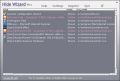
Hide Wizard is an easy-to-use and smart software for hiding not only windows and applications, but also just about any process, file or folder. A variety of settings allow you to specify how and when programs get hidden, to custom-automate the Hide Wizard process, to add transparency effects, to mute sounds.
System Requirements:
Windows 2000/XP/2003/Vista
Publisher:
SeapsoftHomepage:
http://www.seapsoft.net/File Size:
703 KB
Price:
$29.95
Comments on Hide Wizard
Thank you for voting!
Please add a comment explaining the reason behind your vote.
Please add a comment explaining the reason behind your vote.

iPhone app giveaways »

Life is messy. Keep it together with Clear, an amazing new app for list-keeping that is unbelievably simple.
$4.99 ➞ free today

$1.99 ➞ free today

$0.99 ➞ free today

$0.99 ➞ free today

$3.99 ➞ free today
Android app giveaways »

The must try game for any real hack and slash fan who already got bored with just mindlessly smashing buttons.
$0.99 ➞ free today
How many words will you find in our original word search game Words Everywhere?
$1.49 ➞ free today

$1.99 ➞ free today
$0.99 ➞ free today

$1.99 ➞ free today
What a joke, it says it installed right, but then after 30 uses it quit on both of my computers. I like the idea but this is ridiculous.
Fix your stuff before you release it.
Save | Cancel
#23, Gravy, if a 26 year-old male is turning off your computer's anti-malware apps, the probability is that he's surfing porn sites, which are extremely likely to be engaged in criminal activity. You should assume your computer's security has been severely compromised, and that any confidential information on the computer--credit card numbers, social security numbers, bank accounts, passwords, etc., has been stolen. Cleaning a computer is very much more difficult than keeping it from getting infected. Once you get your computer disinfected, you should put some real security software on it which cannot be disabled by any means, and requires a password for any changes. A good place to start is the Matousec Firewall Challenge results.
#33, Pandine, your website info is useless. Full information is available here. Note that the first time I ran a whois, their server location came back as Beijing - China Railway Telecommunications Center, but later queries came back as California - Woodland Hills - Abacus America Inc.
#40, Renegade, see #47, Ravius. I try to strike a balance between non-discrimination and real-world security issues. The nature of this class of software falls squarely into the extreme-risk category. As with most countries, the Chinese people are fine, but their government has an active cyberwarfare program against the US. This has been widely reported in the US media. As I stated before, the US government actually warned US citizens visiting China for the Olympics not to bring computers or communications devices of any sort with them, due to the risk that they would be compromised, and would would bring malware and spyware back to the US.
As usual, I disagree with #45, mike, on most issues. Any employer who caught you installing this sort of software would fire you immediately. Further, it would be an extreme risk to the company's security. Software designed to monitor other people's computer activity hide themselves anyway. Encryption is always the best way to keep private information private. Rootkits can be in anything. Sony sold audio CD's to consumers which contained rootkits.
Save | Cancel
Finding useful at first,after a short while using this program,
When I used to hide [icon]:"Program Name" and put it in Quick Hide(A).
I hold the mouse hotkey to hide and try to unhide, it didn't came out[unhide].
The other problems is when I log in into my profile. It's all blank screen. What up with that?. When I log out using the Task Manager, it came out Hide Wizard ain't responding even though I not using the the "Hide entire desktop for "#" sec at windows login available in the program. I do it over and over again. It still said the Hide Wizard ain't responding. Had to use other administrative account to remove. guess what? it WORKED!
the got thing about this program is it easy to REMOVE!
Best Regard.
Save | Cancel
#41, instead of criticizing, have you ever considered politely emailing the developer and helpfully giving them the correct way to write the English?
Many other languages use different sentence structuring and grammar. For example many Eastern languages do not use tenses and/or prepositions. This is responsible for many of the errors you see in English written by native users of other languages, Eastern languages especially, such as "I go store" instead of "I am going to the store."
Personally, although I am a native English user, I like the way Spanish uses the question mark before (upside down) and after a sentence that asks a question, making it very clear when a question is being asked.
English is very confusing even to many native English speakers. Spell checkers cannot differentiate between words spelled the same and used differently, and one often sees "there" used for "their" and the wrong form of "too, two, to" used by spell checkers in sentences.
Save | Cancel
There are some things I want to be able to hide just because they get annoying!
Save | Cancel
@24.......Yes truecrypt does hide things! It hides things in a "truecrypt container" that no one can access without the password.
Save | Cancel
There is a freeware program that hides individual windows. It's called Chaos Crystal: http://www.elgorithms.com/downloads/chaoscrystal.php
I use it to set transparency of individual windows or groups of windows. Very useful!
Save | Cancel
As someone who's posted here cautioning against Eastern block and Chinese software, I feel obligated to post again so as not to mislead. There's nothing inherently wrong with Russian or Chinese software. I've used some and will continue to. The best advice for newbies is the best advice for everyone else. No need to be paranoid, but a little precaution is always a good thing.
The more established a site is, the more likely it is to be trustworthy. The more software it has, (especially) the more detailed reviews the software has from credible sources, if it uses download sites that prescreen for viruses and malware, if you can get what looks like real feedback from users, the more straightforward and clear the contact info. is (like a good whois among other things) - the more likely it's the real deal.
Screening the software before you install with your anti-virus and malware scanners is always a good precaution, even if occassionally it's overkill. After all, how long does that take. Being careful about granting administrator rights and allowing firewall access is, of course, also important.
I wouldn't want to deny anyone, anywhere the chance to make an honest living. But, in theory, someone in America that, say, steals your personal information through malware has a better chance of getting caught than someone in a country with a questionable legal system. But, again, I'll try the software, so it's just a question of being a little extra cautious.
Don't get me wrong. It's like politics. What those in all parties often fail to realize is there's no magic plan. There's no substitute for diligence and oversight. As a politician once said, "trust, but verify".
Of course, if you're reading the good comments from people who diligently test or comment on this stuff like fubar and Mike first, you're already showing your ahead of the game. (On the other hand, if your reading my crazy ramblings, you may need your head examinied. :) )
Thanks GOTD for bringing good software from all over the world.
Save | Cancel
@40 (Renegade)
"What does being Chinese software have to do with anything? What is your point with bringing up a nationality? The way you worded it sounds very much like a put-down." LOL lololol... I have a friend from Nigeria who agrees with you. And she has a deal for you.
@45 (mike)
Let me ignore that 90% of network attacks on my computer are sourced to IPs in China... The liberal creed of idiocy declares I'm a racist unless I unquestioningly install software from anonymous sources there. Yayyyy!
Save | Cancel
So far I have hidden quite a bit. By tommorrow, everything will be hidden. Only drawback it will not hide your bratwurst, but no problem there if you have a girlfriend. Thanks a lot, GAOTD!
Save | Cancel
TrueCrypt can actually create and hide, whole partitions & drives, much less files and folders. You can create virtual drives with it also and then just mount them to create a new.
Just create a new volume and give it a drive letter(a unused letter)
The program already has several pre-made letters waiting for you to tinker around with.
Ta-da; a new volume. After that,you can make a hidden volume inside of this, just make sure you leave enough room for what ever you're hiding
in the new volume. If u make a new one and put it on your c:/ or h:/
drive, then you'll need to set the size of the whole volume.
BE CAREFUL!!!!!!!!!!!!!!!!!!! Once you've created the new volume,any info or data in the directory where you wanna put the new volume, will be lost..............so be warned.
Save | Cancel
#35--- I thought that was funny, too....Maybe he wants to hide emails from his mistress...or worse..his boyfriend...heheheheh
Save | Cancel
#23...If you're using Firefox, download No-script from the Firefox addons page. This program is the best in my eyes as far as paranoia and
constantly having to clean everything and protect myself.
This program is not a anti virus!!!(So you dont have to worry about running it with your anti virus on.) It basically stops cross site scripting and it stops others from using code (Java&others to send you virus's. It also STOPS people from redirecting you @ all!!!
I think it's essential to safety and it's one of a kind, the BEST.
Try it & good luck:)
Save | Cancel
Friday's free game of the weekday has been posted. There are several pinball games with links to over 300 more:
http://www.giveawayoftheday.com/forums/topic/4066
Save | Cancel
I haven't installed it yet, but I've got some useful info for u guys.
#37 Check out Clean MemXp,
Futures:
-Watch CPU Usage (Support 4 CPU cores).
-Watch RAM and Virtual Memory Availability. Defrag Physical Memory when Memory reaches a limit.
(Option to show Free RAM and CPU usage in an icon to System Tray, in graphic and numeric mode).
-Show information for all system disks and drives.
-Watch Active Processes and Programs (Show detailed information about Modules and Registry Keys used by each Process).
-Watch Netwotk Bandwidth Traffic (Support all Network types e.g Internet(ADSL)/Ethernet/Wireless Speed and Traffic).
-Watch Processes accessing Internet (TCP Protocol).
-Manage Windows Services (Start, Stop, Pause, Restart, Remove, Change StartMode).
-StartUp Manager. (Manage Programs that are automatically executed when windows start.)
-Program Launcher. Easily run your Favorites Programs and open your Files from System Tray.
-Show and explore Special Folders of Windows.
-Access hidden commands of Windows, like hide/show desktop, taskbar, enable/disable Start button .
-Run installed Screen Savers, enable/disable Screen Saver.
-Change Screen resolution.
-Empty Recycle Bin, Clean Recent Documents, Run Menu Commands, Search Files, Internet Explorer typed URL's.
-Access Control Panel items.
-Lock PC.
-Easy access from an icon to System Tray.
-Hot Keys for defraging RAM and appear Main Window Program
Clean MemXP can be translated in all languages.
(Currently has been translated in English, French, Deutsch, Spanish, Hungarian, Russian, Greek)
Clean MemXP supports skins. Choose between 20 skins.up to 4 cores, network monitoring(including internet, bandwidth, also traffic/speed...all types-ADSL,Ethernet & wireless. Plus TCP Protocol.
You can also see the services, start up and u can optimize
Save | Cancel
If you want a security tool try TrueCrypt which is freeware (www.truecrypt.com). It not only provides high level security, it can completely hide folders so no one knows they are there. Program works fast, reliably, and is free. A much better choice.
Save | Cancel
I don't normally post, but @fubar has some major points that less sophisticated user may have missed. The Chinese and Russians are both countries with a high level of "hackers" who have penetrated many of the most secure networks to some degree or another. Installing this software could potentially allow some guy (or gal) halfway across the world full access to your system as an ADMINISTRATOR as well as possibly any other systems on your network depending on the configuration.
I do not mean to imply that any software written by a Chinese company is bad, quite the contrary. They have some excellent programmers. It is just this program could potentially be used in ways a user may not expect. Once you give it Internet access most firewalls keep that permission. Because it can hide processes, programs, windows, etc... it is possible this program could be used to gather any kind of info on a system including passwords (hooks the keyboard) to any sites a user might use such as banking. It can also potentially install other software remotely on your system (again, as ADMIN).
If this company is legit I sincerely apologize for warning off users, but the reality of the Internet is the crooks are getting smarter and they don't want you to know they have penetrated your security. I'm going to give this one a pass.
I can think of several legitimate uses for this software, such as hiding key-loggers on a child's account to track their usage, but I feel the risk outweighs the slight benefits.
Again, I mean no disrespect to the developers who are hopefully a young group of entrepreneurs trying to make a living. I'm just warning there could be some serious unintended security issues if they are not.
Thanks GOTD, I visit this site almost every day and have found programs that I use everyday, which is a rarity for me since I have almost 20 years as a sysadmin and generally already have sofware that I use all the time. You guys are great and it is a great way for new companies to generate some buzz about there products, get some name recognition, and gain new customers. Thanks again GOTD!
Save | Cancel
I use something called WatchCat which was originally designed for W98 but still works great in WXP (except for unhiding the console windows, so don't hide them). I don't know if it would work on vista, but if you are using WXP, you could consider it. The software is free and source for the last public version is available on the net. Unfortunately the author went aloof so no upgrades in a while, but the last version still works great for my need. You can set several rules with parameters such as:
- Option to hide or minimize or even close.
- Ability to set a timer for inactivity (applies only to that window).
- Ability to hide windows to system tray.
- Set optional password to unhide (per rule).
- Regular expression to match against title/window class/process name etc. (with an option to fill in the regex automatically to match any existing window).
This also has options that serve some of the concerns that people expressed here.
- The watchcat (wcat.exe) tray icon itself can be hidden with a customizable hotkey to display the tray menu.
- A master password can be set to protect the watchcat menu (to prevent unauthorized people from unhiding windows).
- Hide additional items such as desktop items, taskbar etc.
- Has a number of customizable hotkeys such as hide current window and hide/unhide all windows.
It has a lot more features that were very useful back in W98 days (and the interface was pretty advanced for those days, on par with the current applications), but with improvements in WXP the main thing useful is the hide/unhide feature. With all this said, I currently use it only for one reason: hide some of less used windows (both using timer as well as hotkey), just to get rid off them from my already huge Alt+Tab list.
I have it installed on every computer that I ever worked on since 1998 and it rarely (if ever) crashed on me, so it is a solid code base. BTW, if anyone is good with windows programming, you may be able to fix the bug with unhiding console windows very easily. I was able to build a debug version and set breakpoints, but due to the lack of familiarity, I couldn't really make out much.
Save | Cancel
FWIW...
Q)why would you want to hide a program/process?
A)If you wanted to run some sort of spyware, or maybe some net nanny sort of program to monitor, control, or catch what someone was doing.
Q) Why the hot key hiding features?
A) You're playing a game, watching a movie etc when you're supposed to be doing something else - you can hide your activity when the boss, parent, etc. approaches.
Q) Why hide files/folders?
A) If you just encrypt them you raise curiosity, suspicion, & possibly demands to know what's in there. As to why have anything on your PC's hdd you want private - get real... we're not all Mr. Rogers.
Q) If the developer(s) are in China, is that relevant?
A) Not at all. Coders of any nationality, including Americans, are equally capable of creating good software, or performing shoddy, deceptive, incompetent, or otherwise undesirable work.
Q) Why isn't this program completely invisible or undetectable?
A) Such software exists, often in the form of a Root Kit, but is so potentially dangerous I don't imagine you'd sell it to anybody for their own use - it's normally reserved for malware or sold to companies for extremely intrusive, unethical, & even evil copy protection.
Save | Cancel
I use a free program called Icondesk. It hides icons on the desktop but also has a feature(among others)to hide windows as well which is good enough for me.
Save | Cancel
Useless over a network as it simply doesn't work! Useless on our home PC's as nobody else uses each others machines. The lady of the house has her own.
Useless because it comes from what could be a shady vendor! Oh heck! Not very useful to me at home or the shop period, so I just pass!
Sorry folks but today, I have no freeware options to offer as this is the type of program I have no need whatsoever for so I never bothered looking!!! "Imagine that"!
Save | Cancel
With the comments here talking about this program's potential baggage, if you want only windows transparency, it seems to me you'd be better off with a program that does only that. And those are much smaller, sometimes less than 100K. I have used any, because I haven't had the need, yet, but...
Here's a couple of freewares:
PowerMenu was written in 98 and the developer is still around, saying it will work all the way up through Vista (adds transparency and a couple other options to right click menu):
100K.http://www.abstractpath.com/powermenu/
ChaosCrystal was designed for 2K and XP, but, as has been said many times on this page: just because it wasn't designed for Vista, doesn't mean it won't run on Vista. Especially with the compatibility mode option:
http://www.elgorithms.com/downloads/chaoscrystal.php
This next link is to a ChaosCrystal download page at digg.com that also has user comments and provides a lot of other options, but almost all are no longer supported:
http://digg.com/software/Transparent_Windows_in_XP_and_2000
Also, I understand some later video cards - I've seen this shown on a video on NVIDIA GEForce 6200 series - will do this for you. Those particular cards are 2 or 3 years old.
And of course, there are other sharewares for transparency, if you miss this one and don't like the freewares.
This is not a judgement on this software, just alternatives to those who don't want to download a whole 'nother type of software just to get one function. :)
Save | Cancel
I don't wrestle with any software company that cannot speak plain English. Ex. "hide folders you desires; bring the window you desires to foreground." And another problem I noticed was this: "When set, Hide Wizard starts ahead of all other auto start programs, hiding all defined items right from the beginning." Does this mean that all these hidden programs start ahead of my security software? There's nothing I have to hide that badly.
I still love you GAOTD!! I think, though, that every computer user should learn to discern whether a program is safe and appropriate for themselves. Nobody else can really assess these factors for individual computers.
Save | Cancel
Most office workers will quietly spend their entire careers in an 8x8 or 9x9 foot cubicle. A means of keeping some semblance of their sanity is to play cat and mouse games with the bosses and office gossips. So programs such as these allows them to hide their “non-work” related activities, saving them the trouble of having to close down a process, then starting it up again because of a call to the restroom, attend a meeting, or go to lunch and such. Or as others mentioned preparing a surprise project for someone (such as a nice photo album or a video). It’s a matter of convenience. As for today’s GAOTD it looks remarkably similar to “OuttaSight v3.2” which is a freeware program.
http://www.rosafamily.org/
@#19 Fubar - What does being Chinese software have to do with anything? What is your point with bringing up a nationality? The way you worded it sounds very much like a put-down. “Just so people are clear about what they’re installing, this is Chinese software”. I have never noticed any of your previous comments here at GAOTD bringing up that this is American, German, French, Russian, Canadian, British, Italian, Japanese, Korean, Belgian, Jewish, etc, software. Dude I think today’s GAOTD is right up your alley!
Save | Cancel
Thought that this would mute the program individually when 'hiding', but it just hits Windows' "Mute all". An XP app that mutes on a program-by-program basis (like Vista does) would be very useful. (Ex: To stifle flash app's sounds yet let Winamp play in the bg)
Save | Cancel
I don’t have a need for it. I have nothing to hide as no one else uses my computer.
...do you really think the world is just waiting to hear this news from you?
Save | Cancel
This program does NOT hide folders from people at another computer on the network, so if you have people who can access your computer across the room or building, they can see any folder that would otherwise be hidden on your computer. It only hides things from a computer user who is sitting at your desk or using remote desktop.
That makes it useless as a security tool unless you don't have a network.
Save | Cancel
#18 - "your wife?" ... this is who you need to hide stuff from?! Might want to check into some marriage counseling prices.
Has anyone tried this when booting up in safe mode? Older programs that attempted to hide things never worked in safe mode. Just curious...
Save | Cancel
Very Cool, I started Internet Explorer on the main desktop, and another instance of it on the Virtual Desktop and had them both loading different sites at the same time, just a quik hotkey and I can switch back and forth.I also like the Transparency, but the hotkey seems a little awkward, may take some practice to be comfortable to use.To the developers: There are a few spelling errors both in the help and on the Hide Wizard interface. Could use more help details too.To #'s 7 and 27 above, alot of developers worldwide have & use Gmail accounts because of the development tools available there. At least these guys did not hide their email account from view.It doesnt look like Window-Hide (#30 above) does transparency, but thanks anyway I'll try it too.Thanks GAOTD and Seapsoft, I'll give this one a try, at least for a little while.
Save | Cancel
Your Choice of course: But checking out their Domain, it doesn't appear to be a company to have dealings with. (P.S. I do this check for questionable software sites) I don't think I'll let this one behind my firewall, thanks anyway.
www.seapsoft.net
Current Registrar: XIN NET TECHNOLOGY CORPORATION
IP Address: 66.226.89.239 (ARIN & RIPE IP search)
IP Location: US(UNITED STATES)-CALIFORNIA-WOODLAND HILLS
Record Type: Domain Name
Server Type: Indeterminate
Lock Status: ok
DMOZ no listings
Y! Directory: see listings
Secure: No
E-commerce: No
Traffic Ranking: 4
Data as of: 14-Jun-2005
Save | Cancel
I use Captain Tray Pro, offered here previously. You minimize to system tray, or hide completely. You can also change a program's icon or title. I have used it to disguise Firefox as volume control. You can even run CTP in hidden mode, so no one can get it open. It also seems more trustworthy than this one.
Save | Cancel
#23 - If I had a 23 yr. old stepson who unprotected my computer, he would find my computer with a password. I'm surprised he can turn those programs off, and know why he wants to turn them off and yet still doesn't know about task manager??? Sounds more like he is telling a bit of a fib, playing dumb.
I had a computer crash a few months ago, and my firewall program would not reinstall because (they said) it was a little bit too old. So when I quickly ran to the web to get a new one, my open computer was hit immediately. I don't know how it was found so fast, but it was. No way I hit the web without being protected. He needs his own computer, and when it gets hit and he loses everything and has to fix a crash and waste all that time, maybe he will develop a bit of respect for what others ask of their computers.
Save | Cancel
window hidie does it better
www.window-hide.com
Save | Cancel
Usefulness: I have a Zune and I use it to subscribe to podcasts. In order to receive the feeds, the program must be running. Which means there is a space constantly in use on my task bar. I don't think I'll download this because it seems like quite a lot for just one program but thought I'd chime in on why someone might want this.
Save | Cancel
I find it quite odd that when I brought up the page today that a-squared (previously released here) popped up a warning about a link in the page here from a known phishing site. Hmm... I think i'll pass on this rather useless and potentially harmful program
Save | Cancel
I agree with #7, if you go to thier website, the contact email address is a gmail account. I personally would be cautious with this one. There are some types of programs that you only intrust to known and trusted companies.
Save | Cancel
Oh Wow GGGOTD (Gary Glitter Giveaway Of The Day) ;-)
I would'nt really trust this program, As mentioned before here...What happens if a few weeks down the line you uninstall this program?
Would the hidden icons/folders suddenly reappear again or would we have to reinstall then (worse still format the Hard Drive and re-install everything from scratch?
I'm also a little wary that this could be used to install programs with a virus or spyware that none of us can see...Worse still our protection programs can't either!
No thumbs down though as I'm sure people like #23 Gravy who needs to hide his AV and anti-spyware programs.
Save | Cancel
Why anyone would want to hide applications and processes is beyond my understanding. The only question that really troubles me is what happens to what ever you're hiding if the program fails (And some do)? Does what ever you're hiding stay hidden, or does it automatically show its self again? I'll pass but thanks anyway GAOTD.
Save | Cancel
@15 ("I use ‘truecrypt’")
TrueCrypt don't hide items!, it's encrypt items and thats totaly diffrent !
Save | Cancel
Perfect for me, my 26 yo stepsone likes to turn off my antivirus, spyware prog and pop up blocker when he gets on my machine. It drives me crazy knowing that my pc is surfing the net unprotected while I am at work. Now I can hide those progs and he won't know the difference.
Oh, no need to hide the task manager for me, he has no idea how to call it up nor what he is looing at if he stumbles upon it.
Thanks for this one thumbs up.
Save | Cancel
A few years ago, Microsoft released a Folder with a Lock (this wasnt available very long before MS took it off the market) I tried that and liked it, but is THIS Software anything like that? Or does anyone have a suggestion of something that would be? thanks in advance.
Save | Cancel
It has a use as long as there is no way anyone can find the name or anyother item that may lead to an item. This also means you do have to remember just how to find them. anything else makes this worthless.
Save | Cancel
Useless for me.
Save | Cancel
Just so people are clear about what they're installing, this is Chinese software, which must be run as an Administrator on Vista, which hooks your keyboard, requires Internet access to register, injects components, modifies other processes memory, and is intentionally designed to hide applications, processes, files, folders, and windows.
Save | Cancel
WHat a stupid program. A hide wizard that sits in the system tray. Like your wife isn't going to notice that. I mean come on you have to be kidding right.
Save | Cancel
There are two games for today, called Facewound a 2D shooter and Action Doom 2: Urban Brawl a 3D FPS game. Both have received excellent reviews on the net. i.e. for Facewound’s excellent ragdoll physics and the cartoon nature of the FPS environment in Urban Brawl. These games are definitely not for the children:
http://www.giveawayoftheday.com/forums/topic/4056#post-43531
Save | Cancel
i use 'truecrypt', 'winguard pro' both are free
Save | Cancel
I have no time for software that calls itself "Microsoft Appliation" when it pops up on my firewall, and can't access the Internet without locking up half my PC and crashing Explorer. Uninstalled.
Save | Cancel
First, everybody got something to hide (except for me and my monkey). Second, it does not need to be porn or something obscure, you may be preparing a surprise project for someone (such as a nice photo album or a video) and you don't want that person to see it before you have finished. Sometimes you don't want some information to be seen by certain people at the office (different departments have different need-to-know schemas). Etc., etc.
I use FolderCastle since it was a GOTH some time ago. It works pretty well, but cannot protect you from a network connection (id est, if your PC is connected to a network, another networked PC can look into a protected folder nevertheless... big flaw).
Anybody knows if this product provides protection against remote access like these from networked PCs?
Thanks
Save | Cancel
Hmm..
I have similar program that can hide process..
It is required to bypass anti cheating software on some online games..
Named Jamilah
Still it BETA..Crash often and BSOD come LOL..
I Hope no BSOD for this..
Save | Cancel