Every day we offer FREE licensed software you’d have to buy otherwise.
Giveaway of the day — Startup Defender 1.5.9.9
Startup Defender 1.5.9.9 was available as a giveaway on October 17, 2008!

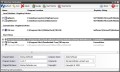
Startup Defender is a small program that sits in your Windows tray and constantly monitors the startup locations on your PC. If a program tries to write itself into any startup location Startup Defender will pop up a windows and ask if the program is allowed to place itself to start automatically with Windows.
Also you can disable/enable any programs that are currently installed to startup automatically. If there is an entry you are not sure what it is then you can Google it to see if it is needed or even harmful and choose if you want it to load at startup or not. For the annoying programs that try to repeatedly place themselves in the auto run for Windows you can click the auto block so that Startup Defender stops them with out you having to bother with them any more.
System Requirements:
Windows XP/Vista
Publisher:
Zards SoftwareHomepage:
http://www.zardssoftware.com/startup/startup.htmlFile Size:
559 KB
Price:
$9.00
Featured titles by Zards Software
Cleanse Uninstaller is a program uninstaller that finds and remove even the most stubborn of programs. Uninstall faster, easier and more completely than you do with other programs. Using the Auto Find uninstall function all you have to do is drag and drop the programs icon you want to uninstall onto Cleanse Uninstallers icon and Cleanse will Auto Find the program in the uninstall list and start the uninstall process.
GIVEAWAY download basket




Comments on Startup Defender 1.5.9.9
Please add a comment explaining the reason behind your vote.


iPhone app giveaways »





Android app giveaways »





For those of you commenting on the aloud / allowed...
I agree ...
my take:
"it's the education system"
it has been for many years and I've been saying that for many years
either that or it was just an honest mistake in proofreading (benefit of the doubt)
Herb
Save | Cancel
I decided to install this despite some of the excellent advice above as I seem to remember being pleased with it the first time I installed it. However since yesterdays installation I've had several blue screen crashes; so deleted the program this morning when I first booted up and got another blue screen. Since then it's been okay.
If anyone else has been getting BSOD's (Blue Screen of Death) since installing Startup defender, it could be this program that's causing it.
Save | Cancel
If you have the full version of AnVir, in addition to startup monitoring, startup control, services control, and everything else, it has startup delay, startup guard (auto-remove), blocked processes (auto-terminate), run as service, etc. By the way, they just released version 5.3, but unfortunately, they don't have any version history or help for it yet. I noticed that the tray icons are more informative, the system menu enhancement kills IE7 (at least on Vista), and they added an XP/Vista Tweaker, which I haven't tried because my System Restore is broken (I might try it via Returnil).
#61, Shellyddd, make sure you have the latest version of CallingID, and try their support if necessary (via email or the forum). It looks interesting, but I'm not going to try it because of their privacy policy (I use TrendProtect).
Save | Cancel
#32. I said: "msconfig is recommended for troubleshooting only and not to be used as a general purpose startup utility these days" - of course,as we all know, it CAN be used for disabling/enabling startup programs but most of the top security help forums advise against it nowadays.
Save | Cancel
Even Ccleaner allows you to disable programs from starting up, as well as delete them.
Completely unneccessary.
Save | Cancel
Wow! 74 votes and 13 comments in less than 48 minutes. Some real serious software testing going on out there; I think not!
Comment by Tezzaw — October 17th, 2008 at 3:51 am
Mate , i agree.. I have watched the "Yes" "No" votes for some time , and i am convinced someone is manipulating the outcome significantly.
Save | Cancel
Thanks everyone for the good info. Come to GAOTD for the programs but only after read comments as to how people have found it working. Really appreciate the alternatives offered as would never have thought to look and on dial up, a single Google takes 20 minutes.
Don't know if going to install this one since noticed The Ads by Google "Having a problem uninstalling Defender ....."
Save | Cancel
I'd rather use MSconfig, together with Windows Defender and HiJackThis to control my startup. Plus, with Windows Defender, hidden processes can also be eliminated (which are probably viruses like global.exe) which don't show up in Task Manager or tasklist. But if all else fails, I use a trial of Kaspersky Internet Security 2009/v8. And some viruses or processes do not run in startup the usual way, some run with that shell startup (which I forgot) registry key.
Save | Cancel
I would think this is the type o program that has to be installed with a fresh install of Windows? Otherwise . . . .
Save | Cancel
Christina #20, I gave your comment thumbs up for a simple reason.
Namely you called it.
Phil (see comments 21 and 31) has proven in the past just how much his tech certification means. After all wasn't he the bloke that thought that RAM could mean something different then Random Access Memory.
LOL
Writing down numbers to keep track of stuff? The sad thing is that he means it.
Phil wrote :"I’ve never been fond of programs that “Kill” startup programs, especially if one’s not computer savvy."
In other words because he doesn't know that he's doing he isn't fond of it.
If a program helps you make you computer behave and stay safe then it is most likely a good thing unless you have another program running that full fills the same function. This because it can cause more harm then good. E.g.: have more then one anti-virus program running doesn't mean that you will be more protected.
This program "Startup Defender" is not only a dime a dozen program it is even worse because of it's very limited scope. There a lot of programs, freeware, that give a far better level of protection (e.g. Spyware Terminator) against programs installing themselves and not only in the startup folder.
On top of that you can use the free tools that you can find here
http://technet.microsoft.com/en-us/sysinternals/bb795533.aspx
to see what "autoruns". Additionally there you can also find the good taskmanager replacement Process Explorer which gives you far better control and lots more info over any running process.
Unless of course you are a real certified tech of the Phil kind, and his fan club, who thinks the above mentioned tools on Microsoft Technet is for wimps and you are far better of counting and writing down numbers.
*STARE*
Save | Cancel
You never are satisfied with what you are being given to. Can't you see that you are given these fine softwares for FREE??!!?? Doesn't it mean anyghing to you? In Russia, if you are given frindly gift, you say thanks with humble mind and respect what you have received. So simple is that, and everyone can be happy. But you americans... nothing means to you anymore. Become numb?
Are you so used to get everything that you want that you can't respect a solid gift given to you? I really wonder you americans.
Save | Cancel
Program isn't bad, but I don't really need it. However, if your are a beginner and needs a program that can help you with your start-up programs, you can use this program. It has an easy to use and clean interface as well as nice buttons.
Signed--
Save | Cancel
I highly recommend Glary Utilities! Advanced windows Care V2 Personal is also a really useful program, a must have!
With these two programs and a anti-virus, with a backup utility you should be good.
If you don't mind paying twenty bucks,(previous give away) buy the program Clean MemXP V9.4 and it will do everything for you.
Save | Cancel
A handy offering but not really needed for vista users as windows defender with spynet enabled will do the same job.
Save | Cancel
this is a repeat post. I had problems with my first post.
Save | Cancel
I won't install or judge this program. But I would like to point out something I was not aware of. I got Advir Task manager here as a giveaway. I tried the update function. It updated me to version 5.3 and was still registered to giveawayoftheday. I would recommend you skip this offering and update your Advir. That is just my opinion. Thanks GAOTD team. We love your offerings.
Save | Cancel
@ 18....I have become completely engaged with http://www.anvir.com/ since it was a giveaway here. I use it for everything. And on that note, I've let my Norton Internet Security subscription expire and completely uninstalled it. Now I only use A-squared Anti Malware, another giveaway here, with complete satisfaction. GAOTD is a daily routine for me now.
Save | Cancel
This utility would be great for those sweet auto downloads of virus and trojan hunter spyware programs you cannot ever remove from your computer. Had one on sons and if I had this would not have taken me 2 hours to get rid of it. When you hit uninstall on this XP Virus Scan which looks like your XP Security shield it would install it again, msconfig would allow unmarking, but it would still over ride and load it. Setting the XP back to before it was forced downloaded did not also get rid of it. Also Add and remove when you used it would aslo reinstall the program not uninstall. So all the points above can be invalid for many reasons... I myself am going to try it.
Save | Cancel
Hi eveybody!!
GAOTD has offered once again a SW which can be easily replaced with FREE (and better) ALTERNATIVES freely available on the web without any annoying key licence issue.
Giveaway of the day is a win-win solution for both publishers and clients.
The idea behind this initiative is that many sites and publishers offer trial downloads; but only we offer giveaway downloads. What does that mean?
Basically, every day we nominate one software title that will be a Giveaway title of that day. The software will be available for download for 24 hours (or more, if agreed by software publisher) and that software will be absolutely free. That means - not a trial, not a limited version - but a registered and legal version of the software will be free for our visitors*.
The software product will be presented in its full functionality, without any limitations save for those mentioned in Terms and Conditions.
We will pay the software publisher for the Giveaway license, and our visitors will only receive those after downloading a special verification program and agreeing to the Terms and Conditions, thus protecting software publishers’ interests and making our initiative beneficial for both clients and publishing companies.
We believe that Giveaway of the day will allow both publishers and clients to meet each other and win together with our initiative.
I was wondering what's the point of giving away such kind of SW every day by paying the licence to their developers if there are plenty of more useful programs for users which unfortunately cannot be downloaded for free.
For instance why not offer, at least once, something more useful for the mass of the PC users whose alternatives cannot be found on the web for FREE such as software for eCommerce or editors to write and publish professional eBooks on the web or even better a professional online translator application to translate a whole website in different languages?
If I'm not mistaken such kind of programs are just SHAREWARE and are never offered here for free by GAOTD, aren't they??
Save | Cancel
Question/Help please.
About a week ago I got a new laptop (runs Vista). This is
the only MS operating system I can't totally understand, like
what's in what file finding and using some hidden files, etc..
I know it will take awhile I will (maybe) learn it all.
My question is, I do have Winpatrol & love it. I do have
Spybot & I do understand it. Now, I am on dial-up (I have no
choice, I live in the country & that's all we have). If I get
connected at 40 k's I'm getting whiplash!!!!! I have a program
I like called "Calling ID" it tells you who owns the web site
your going to & their address. I've used it for about 3 yrs..
Since I put it on my new laptop (Vista) I always get a lil pop-up
on any web site (even if I click on a link on their site) that
says on the top lil edge, "Microsoft Windows" and then in the
message part it says, "Calling ID has stopped working. A problem
caused the program to stop working correctly. Windows will close
the program and notify you if a solution is available". Then I hit
the lil red X on the top right corner & the lil pop up goes away
until I click on another link or web site, then it pops up again.
I can NOT find where I can kill that lil pop-up. Can anyone give me
a hint of any of the programs listed above can find that blasted
pop up ???? Or is there a way on Vista that can stomp on it ??? The
program does & always works, I have no problem with Calling ID,
it works on any link or web page, but the pop up is making me nuts.
I don't want to get rid of the program, I like it. I can guess that
the pop-ups pop up cuz the web pages don't open fast because
of my slow dial up. I just need to find on mhy computer or through a program how to stop the dang pop-ups.
Thank you all for any help & or advice anything is
appreciated, Shellyddd
Save | Cancel
hi. i have installed the program. but i cant register it.
first i installed activate exe and it was successful. and than run setup exe it has installed and finihed.
but when i run the program it says unregistered program. what can i do ? is there anyone that faces same problem ?
Save | Cancel
Love my Scotty from WinPatrol for the best of the best.
Truly you just cannot get any better and its free.
Save | Cancel
This sounds like a good program (maybe the price isn't so good), but if you miss it or can't install it, I highly recommend getting Spybot Search & Destroy and installing "TeaTimer". It monitors registry changes, including startup changes. If you're surfing online and it pops up with unusual name, it lets you block it.
and Spybot S&D is a really good spyware killer as well :-)
Save | Cancel
lol this program runs on startup =) hehe it makes sense that it would but just kinda ironic =) lololol
Save | Cancel
CCleaner by Piriform will also allow you to disable/enable any programs that are currently installed to startup automatically, basically the same thing, except it does not startup and hide in the system tray, and it is always freeware.
Save | Cancel
spelling errors below
you can click the auto block so that Startup Defender stops them with out you having to bother with them any more.
you can click the auto block so that Startup Defender stops them WITHOUT (ONE WORD) you having to bother with them ANYMORE (ONE WORD).
They mean something else in individual words.
please correct gotd in your item description in the very last line.
Save | Cancel
NOW that's something really useless! And dangerous over that, because it gives a false sens of security.
Save | Cancel
BEEN THINKING ABOUT IT AND JUST REALIZED THAT WINDOWS VISTA ALREADY HAS THIS BUILT IN... BUT ILL STILL TRY THIS APP NEVERTHELESS BECAUSE IT MIGHT BE BETTER THAN THE ONE VISTA COMES WITH..
THANKS AGAIN GAOTD
Save | Cancel
THANKS GIVEAWAYOFTHEDAY AND ZARDS SOFTWARE! THIS IS AN APPLICATION I WILL REALLY USE! ILL RECOMEND IT TO MY FRIENDS! AND TO ALL THE PEOPLE THAT GET ANGRY AND SAY YOU CAN GET THIS IN FREEWARE... JUST BE HAPPY! THIS IS FREE TOO! YOUR COMPLAINING THAT THIS COST MONEY WHEN YOU CAN GET A FREEWARE APPLICATION THAT DOES THE SAME THING... BUT THE WHOLE POINT IS GETTING THIS FREE! =D THANKS GAOTD ONCE AGAIN FOR QUALITY SOFTWARE...
Save | Cancel
I have to agree with the majority here. I don't doubt that this software is good, but is not needed for a price. Scotty from winpatrol and countless others do the exact same thing for free. It would be like paying for a web browser when that market is clearly free/open source ware.
Save | Cancel
winpatrol is free and does more than this program says it can do. There's also a plus version, but even the free version is more comprehensive than this. Useful features: starts programs at specified times after boot, blocks IE adons if they are automatically installed with software.
Save | Cancel
@31: Oh, I don't know, Phil; Microsoft thought so much of SysInternals and its AutoRuns (op. cit.) program that it bought the company. Have a look: temporary disabling and deletion, too.
Save | Cancel
First praises: to # 14 and to Fubar, both comments very much of my liking. I'm coming here sporadically and remember Funker as my "liebling" but lately not to be seen, hope he's doing well. Maybe JL is taking his place?
#43 is hitting the nail on the head: Apple's apps and Real's are not shenanigans....they are intruding, invading, yes, abusive! Is there a way to stop them once and for all? Programmers that shovel apps down users' throats should be locked up and away (wow, i'm being a bit too harsh). I'm struggling for many years with these issues, but again, this is not the scope of GAOTD, who is doing an excellent job. Bravo !
Save | Cancel
Glary Utilities has a pretty good startup manager built into it. Its start up manager block such things as mentioned in post #43 that happen every time you reboot your machine. It has tons of other utilities built in as well and also has a free personal version.
Another utility that's good to use in combination with this is Returnil. With these 2 utilities and a good virus protection (I use Avast) your computer will sing for a very long time without any worries.
Glary Utilities also has:
Disk Cleaner
Registry Cleaner
Shortcut Fixer
Uninstall Manager
Memory Optimizer (Still believe these are worthless)
Context Menu Manager
Registry Defrag Utility
Track Eraser
File Shredder
File Undelete
File encrypter and decrypter
Disk Analysys
Duplicate File Finder
Empty Folders Finder
File Splitter and Joiner
Process Manager
Internet Explorer Assistant
Windows Standard Tools
Product Links:
Glary Utilities:
http://www.glaryutilities.com/gu.html?tag=download
Returnil:
http://www.returnilvirtualsystem.com/
Avast (Anti Virus)
http://www.avast.com/eng/download-avast-home.html
Save | Cancel
Regarding "Why you need this kind of program."
Programs like today's offering can help you keep your system stable and running like YOU want it to. They consume negligible resources and protect your system from having startup processes initiated without your knowledge and consent. Thus they defend you against all kinds of malware, but they also defend you against nasty invasive software like Real Player or Apple software or Adobe Reader or other apps which try to insert themselves all over the place so that your computer delivers their ads and services.
If you don't know what you are doing, you should not use startup defender or startup monitor or whatever to delete processes.
That said, when you install a new program and your defender asks you to grant permission to the new program that wants to start itself up in ways you might not like, you can take great pleasure in refusing the new program (or, in many cases, the malware) permission to change your registry or startup folders.
Question is not whether you need this kind of defense but rather Why haven't you been using it since forever?
Save | Cancel
This is redundant.
Windows already lets you determine what starts at boot up simply by using the system configuration utility. Click, start, run, type msconfig and hit ok. Click start up tab and remove checkmarks from any unnecessary programs. Click apply and ok. You don't even have to reboot immediately if you don't want to.
If you're unsure about removing a checkmark from something in the startup list, just go to http://www.sysinfo.org/startuplist.php to see if it's necessary or optional.
Save | Cancel
I'm happy with Spybot, though I'll check out other suggestions.
I have somewhere over 220 apps loaded on this XP box, and I only use about a dozen on a regular basis.
I have no problem with autostarting those few, but every program out there seems to expect that you will want immediate access--and most don't give you the option to NOT autostart.
It would be nice if the industry would realize that just because someone bought their program, it doesn't mean that it will be the primary application and all just gave you the option to autostart or not.
The worst offenders in my book are the autostarts for things like Adobe which exist only to check for updates. Let the ^&*% program look when it's run.
(Oh, the reason I load this machine is that it is my "average user" machine and I install lots of junk on it because it breaks more often that way and I find problem apps before my customers.
This particular app is not something I would recommend. What it does is too commonly part of other security apps.
Thanks anyway GAOTD
Save | Cancel
While everyone is correct that this program is one of many that will stop malicious programs from adding themselves to the start-up, there are several programs, Real Scheduler, Quicktime, itunes helper.. others? That are part of programs and when you use the program, they put themselves back into the start menu (msconfig) and start with the computer the next time.
I also have AppleMobilDevice that is running in my processes right now and I don't even have one of those. If this program stops these shenanigans I'd be ecstatic!
Save | Cancel
(I meant "Startup Monitor")
Save | Cancel
I agree with the many posts about Mike Lin's site (www.mlin.net). I have used his Startup Control Panel and Startupcop utilities so much that I have left a few shekels in his tip jar.
Prang!
Save | Cancel
This may be a nice program to try, but Startup Monitor has been on my pc for years, and I would just donate to Mike Lin if I was going to pay for an app like this.
Save | Cancel
Totally useless, for me at least. Seriously, just get a HIPS (like Threatfire) which is far better, and smarter at protecting you than some software that asks you about EVERY startup. If you need to stop some programs/services from autostarting, just get a startup manager (like Starter),or simply use Run, type msconfig, and press the startup tab. Not a program that's even worth being free, unless you're paranoid, and definitely not worth $9.00.
Save | Cancel
There are other programs that do this type of thing, of course, and some are free, so this one needs to offer something extra for the price such as choosing the order in which programs start up or being able to set a time at which a certain program will start up, etc. If anyone know a good program that does these things for free, please post it here today if at all possible, since I need to choose one right away. Thank you in advance to whoever can help me fix my Dad's XP pro SP3.
Save | Cancel
#21-31:Phil,thanks for your point of view.
This program does seem to have an interesting 'auto block' feature.Just in case a start up item can't be disabled the normal way.
Save | Cancel
A quick note...
Damaging your system from killing autostart programs is perhaps over-hyped IMHO. If you turn a service from automatic to manual, just keep track of what you changed, though you'll find *safe lists* at blackviper.com. If you delete an entry from the run keys in the registry, just right click the run key & export 1st to save a copy just in case - double clicking this reg file will put things back. If you want to save a copy of your entire registry use Erunt (free) - all around quicker, & in XP much more certain it'll put things back. If you want to be a bit safer when you remove a shortcut from the Startup folder in the start menu, drag it out of that folder - you can always drag it back. Relying on Task Mgr. is a bit iffy since so many MS processes show the same name, & others are often pretty cryptic.
Save | Cancel
I have no objections to using a Startup manager provided you use it on programs only & don't mess with running processes. Killing processes can lead to big troubles for the less experienced computer user. I bought "Ultimate Startup manager" a few years ago when I had XP only & still use it on XP today.
Vista has one built in thats quite easy to access. Go to Control Panel, click Performance Information. In the left side pane you will see "Manage Startup Programs". Click that & it will open "Software Explorer" in "Windows Defender". You can take it from from there but use a little common sense as theres a few host processs listed there also. I find that a simple, safe & effective way to manage my startup programs in Vista.
Save | Cancel
If it helps...
Start-up programs will be one of 3 places: The "Startup" folder in the start menu, or else one of the 2 Run keys in the registry - they're a hassle to navigate to, but once you find them set a book mark in regedit.
[HKEY_CURRENT_USER\Software\Microsoft\Windows\CurrentVersion\Run]
&
[HKEY_LOCAL_MACHINE\SOFTWARE\Microsoft\Windows\CurrentVersion\Run]
Some services & drivers starting can be a bit harder to find - System Internals Autoruns [free d/load at microsoft.com] will show you those with an option to turn on/off.
Microsoft Windows Defender also has options to check out auto-start programs.
For Services, in XP you can *usually* get away setting *most* services to manual from automatic in Administrative Tools -> Services, though it's a little bit more iffy in Vista. Blackviper.com has a lot of specific info. While it's debatable whether you'll benefit or not from turning services to manual, or just plain disabled, I've personally had enough problems from Sony, Roxio, Cyberlink, & yes, some Microsoft services I've found keeping an eye on them worthwhile.
FWIW, most autostart entries in my experience are designed to pre-load parts of a program so it starts faster when you click the icon in the start menu. Having one or two isn't that bad, but when every program wants to do it, Windows can take longer & longer to fire up.
Save | Cancel
People, people!
Use your heads for once in your lives will you?
1) WinPatrol is for kids! Kind of like the Tricks cereal. Highly recomended for newbies only.
2) After all these years Spybot S&D is still not without it's quirks.
3) msconfig is the worst thing I've ever seed offered here as an alternative & surely not for beginners. (bad advice)
Theres many more but I'll point out two free alternatives:
1) "Startup Monitor"! System requirements: Startup Monitor works on all modern versions of Windows through XP. I haven't tried it on Windows Vista yet.
2)"Startup Control panel"! System requirements: Startup Control Panel works with all modern versions of Windows through Windows XP.
Both of these tools are offered by, Mike Lin. A well respected developer of freeware & can be downloaded at his website, here:
http://www.mlin.net/
Microsoft has, after all these years, finally added a very good startup manager with their OS. It's built-in to Vista and it's simple, safe & easy to use. Go to Control Panel,click Performance Information, click Tools, and then click on Manage Startup Programs on the left.
Now, I have no objection to using a startup manager. I use the one built into "Tuneup Utilities, but it, to the best of my knowledge does not have the ability to permanently stop something from adding itself back to auto start the next time you use it. Like "Windows Live Messenger", which ticks me off to no end.
I haven't tried this offer yet & won't on my Vista system. I will later on when I load XP. This is one of those that you like or don't like depending on your personal preferences. But in truth, it's a good concept and a useful tool for any that can stand the extra memory use which all newer PC's should have more then enough of.
Save | Cancel
#20 your comment is wrong about msconfig, it's not for trouble shooting only, you can manage your program,s you want to start when you switch on your PC
Save | Cancel
# 27 No I'm not a "Geek" but a certified tech. Why do you find it so hard to write down one number? Why use a program to do what Windows does for free without the worry of "Killing" a needed startup program and adding another program to your registry? Not to mention the dangers of "Killing" programs. I find running utilities to do this are far more intrusive on a system than using what apparently Windows has designed for the task. Yes I'm very much computer savvy, I just wish others were. Messing around with programs like this when you don't fully understand the workings of a computer can lead one into major problems, but you knowing so so much do realize this don't you?
Save | Cancel