Every day we offer FREE licensed software you’d have to buy otherwise.
Giveaway of the day — Genie Timeline Home 2.1
Genie Timeline Home 2.1 was available as a giveaway on July 21, 2010!

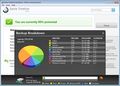
Genie Timeline Home 2.1 is a simple, innovative solution for Windows users that will revolutionize the way people handle backup. The purpose of Genie Timeline 2.1 is to offer all Windows users a simple and easy, automated, powerful solution to perform continuous data protection. With just three simple steps you are able to set up an automated, seamless backup.
Prominent features of the software include:
- Zero maintenance, zero scheduling, zero performance impact
- Disaster Recovery: You are also given the option to create a bootable startup disk
- Now supports iPhone/iPad/iPod and Blackberry phone backups
- Versions: Backups are kept for the past 4 hours, hourly backups for the past 48 hours, daily backups for the past week, and weekly backups onwards
- It runs in different performance modes: Turbo mode, Smart mode, Game/Movie mode, and Power Saving mode
Simply, Genie Timeline 2.1 is the solution to keep users protected at all times with the ability to go back in time to view and restore files as they existed in the past.
System Requirements:
Windows Vista/XP/7
Publisher:
Genie9 CorporationHomepage:
http://www.genie-soft.com/Home/Genie_Timeline_Home/overview.aspxFile Size:
146 MB
Price:
$39.95
Featured titles by Genie9 Corporation
Genie Timeline Professional 2.1 includes all of the features that Genie Timeline Home 2.1 contains, as well as extra options that will allow you to have more control over your backup. These options include being able to edit your Smart Selections (where you determine what files are to be backed up) by providing specific file types. You are also given the option to encrypt your backup with 256 Military Grade AES Encryption. With Genie Timeline Professional 2.1 you are able to limit the amount of drive space that Timeline will use for backups. It is a backup/restore tool that is designed to meet the data protection needs of all users.
GIVEAWAY download basket




Comments on Genie Timeline Home 2.1
Please add a comment explaining the reason behind your vote.

iPhone app giveaways »





Android app giveaways »





Very nice backup program! I only wish I'd bumped into it earlier.
So far my only big wish-list item would be a more user-friendly way to browse docs during a restore. Many of the users I support don't know where their docs live, so providing a direct link to "my docs", libraries, etc. would be helpful. Overall though the program looks promising and I guarantee it'll land on customer systems.
Good job! (both to Genie-soft and GoTD)
Save | Cancel
Ben #87 - try freeware prog 'TrueCrypt'. Not only can you encrypt files and folders, you can encrypt your entire system drive. If someone steals your pc they won't be able to access any of your data without a password.
Save | Cancel
During install balloon messages were going off and it looked like it was getting really deep into my system--made me nervous. I then initiated a test backup.
I personally like the ease of use and the interface is ok to me. However, I was disappointed I couldn't figure out how to customize my backup jobs. I know what I want to back up but couldn't figure out how to selectively add paths and files (e.g. Outlook command bar, menu customizations, nav pane settings, the drop-down previous address list; office dictionary; etc).
I like the snapshot approach, VSS implementation, and slow/turbo modes for backing up.
Today, the day after, my system feels sluggish. GTP is still working on my initial test backup job in non-turbo mode that I initiated last night (I selected system and office to backup--I got gobs of stuff but couldn't tell how many GB it was backing up, just # of files [~15K IIRC]).
In light of that I couldn't figure out how to customize which files to backup, concerns over the depth of system integration, and sluggish computer performance (which, again, I could not definitively attribute to GTP), I decided to uninstall.
For non-DR backup (non-partition imaging, boot record, etc) I've not yet tried Paragon or Acronis or Macrum. I use BeyondCompare for my data backups and may look into creating and schedule jobs. What I will miss from GTP is no versioning backup, minimal performance impact, loss of copying open files (via VSS) and partial PST data copy as mentioned in comments above.
Save | Cancel
I really don't like the fact that you can't terminate the program by right-clicking the tray icon. There were 4 or 5 processes I had to delete from the task manager to get it to stop.
Save | Cancel
@guppy
Try running the backup job in Turbo mode and leave it running overnight to finish the initial backup. After the initial backup finishes consecutive backups will take not time and will have no impact on system performance.
Save | Cancel
@JP stone
Timeline does not cause my Chrome browser to hang its working fine. Try checking for an update
Save | Cancel
To MarkACraig#89 - what in the word 'Day' do you not understand?
If, upon further reflection, you come to understand what is going on with these limited free giveaways, then you will also understand that no commercial software developer can afford to give away an unlimited number of free licences.
That's not how this effort/reward universe works, is it?
Finish up with your own thoughts on the ideas inherent in the words teaser, trial, evaluation, marketing strategy.
FWIW I'm having shell troubles too, with Explorer (rather than Windows Explorer)(the former is Windows itself, the GUI) crashing with a rightclick. So now it's off to the developer's site to see what they can offer in the way of solutions. Win7.
Save | Cancel
#51, James Smoksweedington, I've previously listed some of the numerous reasons for using the Microsoft Installer. It was required (or ClickOnce) prior to Windows 7 for Windows Logo certification. The MS Installer handles rollback during or after installation very cleanly via System Restore (i.e., it sets a Restore Point prior to installation). It can repair installations, when used correctly it's much better at handling software updates than most other installers, it can install and uninstall components on-the-fly as needed, etc.
There are a number of freeware MSI developer tools, there's WiX, etc. The commercial Caphyon Advanced Installer is popular (and it was on Bits du Jour some time ago). A crippled free version of Advanced Installer is available. Advanced Installer addresses the issues raised by #27, Mahmoud Al-Qudsi. The MS Installer may be slower than others because it does set a System Restore Point and it maintains critical Registry entries and other system files which some other installers appear to mess up.
Save | Cancel
@John
Just wanted to point out that Timeline also does Incremental/differential Disaster Recovery backups of your system.
Save | Cancel
This product is apparently poorly designed and incompletely tested for conflicts. It conflicts with one or more of my shell extensions, such that I can no longer open Windows Explorer, AT ALL, not even My Computer: it just sits there and thrashes the disk(s) perpetually without ever even displaying the Explorer GUI. I tried terminating the processes and stopping the service, but that alone isn't enough to stop the behavior; in a moment I will be rebooting with the service disabled to see if I regain some Explorer functionality, then I will be uninstalling this product. At that point the Giveaway-of-the-day offer will have been over, so I presume I won't even be able to reinstall it later, since the EXE actually checks with the site to verify legitimacy before proceeding, and since I also can't request support then I'm simply left having to declare this software to be the entire cause of the problem and give up on it.
This was the first Giveaway of the Day offer I had actually downloaded and installed, and now that I can see how it functions it will also be my last. I have no interest in anything that I can only install ONCE and which will instantly become useless the moment I need to reinstall it for any reason. This is not a kind of "free" that I appreciate.
Save | Cancel
@Tony (# 53)
Limiting the backup size is a feature found in Genie Timeline Professional
@Gene (# 58)
Please refer to response 50: #46, Yes you can use the registration number on your machine if you formatted your computer, there should be no problem
@Christo (#62)
Make sure you copy and pasted correctly. If it worked on XP, it should work for everything else - they all share the same key.
@BeeGee(#71)
Genie-soft constantly provides offers. Currently there is a 20% off offer on our site for any piece of software. If you download the trial of Genie Timeline Professional (30-day trial) from our site we constantly send out offers for those users as well (there should be a nice offer being sent out within the following week)
Save | Cancel
@Just Me (#26):
Very true. Microsoft recommends frequently archiving excess old emails to other PSTs due to instabilities at large sizes. But we've tested Genie Timeline with PSTs over 6GiB in size (emails accumulated over a 10 year span, random attachments, etc) with no problems :)
@Oneiros (#29):
"Backup engine failed to load" means that GTL service crashed. I'd advise trying a reinstall followed by a reboot. You can try posting your logs on the forums to find out why. The crash of XYplorer and WinExplorer may be due to their incompatibility with certain Shell Extensions. I'll have someone in the QA team test it for future reference.
@toris (#44), @jjs510 (#54), @UniverseTraveller (#55):
It does not affect your GRUB boot in any way. GTL adds an entry to the Windows boot menu, which comes after the GRUB menu. I've tested it personally.
@Marcus (#57):
I'm sorry to hear that you uninstalled GTL. We're hopefully adding an option to selectively disable components in the next version. In the meantime, I hope you'll re-consider. GTL utilizes the webserver you speak of to take advantage of the power and flexibility of certain open source technologies to provide a lightning-quick search and indexing service. If you hate Windows Indexing Service for quirky results, slow searches, etc. you'll love the speed and power of the web-based search in GTL. And it's not a security compromise - everything is locked down, the webserver is only available from the local PC on the 127.0.0.1 loopback address (and not to other network computers), and all unneeded components have been stripped out for both performance- and security-related reasons.
Save | Cancel
It's amazing how I'll see a program online when I'm browsing that I like the look of then that very same day it comes on Giveawayoftheday.com
I was looking for a backup program and this is brilliant.
As it says,
It backs up without reducing system performance, way better than other backing up programs I've used, this one you wouldn't even know its there, a little angel in your taskbar.
It may not backup Windows Mobile stuff, but I don't normally bother backing up my windows mobile phone anyways, because I don't have that much on it, all my contacts are on my sim.
But for users that use Windows Mobile and store alot of important data, such as for business, I can see where the program can faulter.
Overall I find the program to have a good User Interface, easy controls and setup instructions, and good backup controls.
WITH THE EXCEPTION OF ENCRYPTION,
But then again, no files are safe these days despite encryption, If something wants something they will get it, your computer may have a password, but if someone takes off with it and unscrews the hard drive they can access all the stuff anyways.
Save | Cancel
To #80
Yes I found Firefox hanging last night but this morning it was working okay, so my theory is that some files were not working for a short time due to this program?
Save | Cancel
I found that you CAN install without having an external drive attached...
when you get to the 3-stage window to select which drive to use for backup, click out of the window with the [x] at upper right...
then right click the little circle icon by the clock, pick Register, and paste in the registration code.
You can worry about setting up the external drive later.
Save | Cancel
GARBAGE! Unstable. [tech, software developer, author, instructor] Genie Timeline is sloppy and invasive, poorly written software, containing unnecessary and potentially harmful components. In my initial test, Genie crashed predictably with only a few minor actions. A few adjustments to the system environment (which users will generally make on a daily basis) brought about a Windows Explorer crash caused by Genie. It may work for non-technical users with minimal number of programs installed in their system. For the rest of us, it's not a backup solution, but a disaster waiting to happen. Clearly not worth purchase and not a good choice for reliability. Stick with stable solutions like Acronis (paid) and Paragon (free).
Save | Cancel
What a HORROR registering this and it is installing all kinds of things, wants to shut my computer down all before activated. I hope it works and does not screw up things. Geeze.
Save | Cancel
Seems like a reasonable program.
I use W7 backup and I'll use this to back up my data as well.
Darn it,I cannot encrypt my data, need to upgrade for that and lack of funds.....
Very slow (W7 backup does it in an hour!)at writing the data to the backup drive, even in Turbo Mode.
Save | Cancel
I installed this at 7AM before running to work. Got home after work and classes at 9:30PM and the backup I kicked off before I left was still running, and at a pathetic 13% complete. I have no idea the size of the backup, but I can say for certain that Windows 7 own backup did a full back up of my entire hard disk (320GB) in under 8 hours to my external NAS box.
I don't know if it'd be going any faster if I hadn't selected the option to compress the backups, but if it doesn't get any faster after I cancel this and start over with an uncompressed backup, this is getting removed.
Save | Cancel
I have read all of the comments and haven't seen what is happen to me. Since installing Genie Timeline. Google Chrome hangs every time I open it I reinstalled Chrome and it still hangs. Thankfully I have IE as my default Internet Explorer. Running Windows 7, 4 gb ram, and two 500 gb hard drive. It's backing up to an external hard drive. Any sugestion?
Save | Cancel
I had installed Paragon backup recently that been offered here. What's the difference between this 2 anyway? Should I need to dismantle Paragon in order to set up Genie?
Thanks.
Save | Cancel
#61 that method, right clicking on Taskbar icon, select "register' worked for me. Just copy and paste the serial No from the e-mail they sent me.
Save | Cancel
If you have a raid array disc system DO NOT INSTALL THIS PROGRAM.I asked earlier and was told it would be ok.After installing and starting to make my backup everything on my computer went haywire.I had no control.Programs were opening by themselves band I was unable to access my system restore.So I tried rebooting and have been locked out for the last 6 hours.I was finally able to access safe mode.I went straight to my programs and deleted Genie Timeline.Rebooted and all was fine.Thanks for that great advice # 34.Yeah I'm pissed but slowly cooling down.Glad I got back in time to warn others.
Save | Cancel
I have 149 Gb of used space on my hdd and this thing wants to take 258Gb on my external drive to backup using compression...are you kidding me.
Save | Cancel
For my post above, I forgot the link to the free version:
http://www.macrium.com/reflectfree.asp
Save | Cancel
@webranger
My fav for system images is Macrium reflect, there is a free version of it too.
With it you can make full disk images, and also file backups too.
You can do the whole system, or choose just partitions you want.
I have used it to recover my system, and it worked very well. My computer was perfectly restored :)
Here is the page: http://www.macrium.com/
Save | Cancel
1. HOW MUCH MEMORY DOES Genie Timeline USE WHILE RUNNING IN THE BACKGROUND?
2. Can Genie Timeline be installed on an external HD (with the backup going to a 2nd HD)?
Thanks!
Hope someone answers soon, as it is 2AM here....:-)....
Save | Cancel
I am interested in the Pro version. Is there a discount available today for GAotD on a Pro version?
I am willing to buy untried based on excellent reviews and comments by knowledgeable regulars and the unusual attention (and very clear answers) by the developer staff to many questions by GAotD visitors.
Save | Cancel
can the same external hard drive be moved between PCs for backup, or does each PC need to have a dedicated hard drive for its backup?
Save | Cancel
Read every comment posted here with interest but then decided that as i keep all my important files on DVDs i didn't realy need it taking up more space on my already overloaded hard drives.
Looks and sounds ok for those that need it though.
Good work GOTD.
Save | Cancel
I have been using V1 of Timeline for a few months now... and it has saved my bacon a couple of times, once you set the options just forget about it, it works away completely in the background and if PC is rebooted etc just carries on again when up and running. I have installed this version on Win& 64 bit and at first it would not run, uninstalled and re-installed with my antivirus active scanner turned off and it's running fine. Restarted the Active scanner and registered the program with no problem, just copied the reg code from the email Genie sent (making sure of no spaces before or after) and then click the paste link in the registration window.
Save | Cancel
The zip file is not working for me. It won't let me open it as an archive or extract it.
Save | Cancel
This looks like a great pgm considering its design goals, but what I am looking for is the best disaster recovery backup pgm. I want to be able to take a snapshot of the current system and archive it. At later times I want to take another snapshot, etc.
Then at some point if there is a major problem I want to be able to choose and restore one of the snapshots from a DVD recovery boot disk.
Suggestions please.
Save | Cancel
was able to install and register with s/n on my XP so there is nothing wrong with my methods.
Save | Cancel
no matter what method I use to enter the s/n, Genie says the password is incorrect. I tried send forgotten password too, same s/n but it is still incorrect either typing or pasting in all possible permutations. Very frustrating.
Save | Cancel
no matter how I try to register with the s/n, Genie tells me the password is incorrect. most frustrating.
Save | Cancel
Prog seems to work w/o registeration number. Is that right?
Cant "right click "Genie Timeline" icon in the task bar and choose "Register" to enter the number" anyway. ????
Save | Cancel
i don't know. it sounds great, but i already have acronis true image in case on disaster scenarios... i think i'll stay to that because it saved me few times and i am used to it, but if i didn't had that, i would definetly try Genie Timeline
Save | Cancel
Comment # 46 has hit probably the most important question.
If you can't use the same registration number it is an ABSOLUTE waste of your time using this program.
Save | Cancel
It's a smart and nice app, but I uninstalled it.
I didn't like the idea of having a PHP server running in the background. Somehow I can't seem to recall to have seen any information about the program running a webserver in the background, and somehow that made me feel like having my security compromised.
Save | Cancel
Intelligent comments, criticisms and clarifications today. Especially appreciate Genie-Soft posting responses -- based on those, and the favorable comments by Fubar and Ashraf, among others, I will download and try this one out. It was important that the comparison to Comodo Time Machine was "debunked".
Thank-you GOTD, for another great program.
Save | Cancel
Like #44 toris, I have had problems too with GRUB bootloader and Paragon System Backup. Is Genie Timeline works with GRUB without problems?
Save | Cancel
I also would like to know what 44 asked. I have XP and Grub on the MBR - and I also have GoBack.
Save | Cancel
I used a trial of this on my netbook as it is the computer I experiement with. It worked well, but it would maximize normally. In other words, it would make you scroll the screen up and down which was annoying. I am glad this is a giveaway as I want to try it again. How does it limit the backup size?
Save | Cancel
This is one of those programs I think a person will either love or hate without much middle ground. The interface is a bit overwhelming and the Help file isn’t what I would exactly call ”Helpful”. However, a person can’t objectively make a full review and recommendation simply based on the trial version to be posted one minute after the full version was released by the giveaway team. To do so would only be nitpicking so it can be posted before anyone else. I’m going keep today’s GOTD and work with it longer because I think it has a lot of potential for turning out to be an indispensable program. Thank You GOTD for this opportunity!
@#1ashraf - Why do you always make people leave this site to read your so called “full review and recommendations”? Doing that is a trick used by people to plant Spyware and Trojan Virus’s. Is there some reason why you can’t you just finish your comment at the GOTD forum or isn’t it good enough for you to use?
Save | Cancel
@Fubar - I appreciate your reviews because they're not the Clueless Pro/Con "fairly large... somewhat slow.." blind-leading-the-blind drivel.... but I personally am not a big fan of the Microsoft .MSI installer.
I dislike it as a developer, and I really dislike it as an end-user... so I'm wondering why you're advocating its use ? Maybe I'm just used to InstallShield or InstallWise - The .msi UI just seems strange to me.
I'm being serious - could you elaborate why you like it and think we should all be using it? I'm willing to switch if there's something better and someone presents a good argument.
Thx
James Smoksweedington
Save | Cancel
#46, Yes you can use the registration number on your machine if you formatted your computer, there should be no problem
Save | Cancel
When I did the install I got a warning from Spybot that it was attempting to install 2Search. I searched on the internet and this is a malware program. Did anyone else have this issue?
Save | Cancel
Does this program back up all of a drive? Can I back up all of my C drive reinstall all C drive back to C drive and get all my windows, programs, registry keys etc all working again? Of is this just for files, word documents and spread sheets etc?
Save | Cancel
#20, Dave: where did you find the free Pro deal?
Save | Cancel