English
Every day we offer FREE licensed software you’d have to buy otherwise.

$39.95
EXPIRED
Giveaway of the day — FLV Mate 1.3
FLV Mate is high quality video to flash converter and player for the web.
$39.95
EXPIRED
User rating:
160
21 comments
FLV Mate 1.3 was available as a giveaway on July 22, 2010!
Today Giveaway of the Day
ThunderSoft PDF Converter Pro is a powerful PDF converter, editor and toolbox.
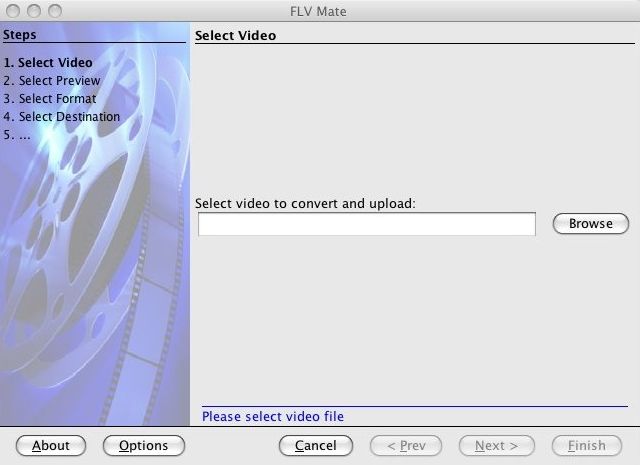
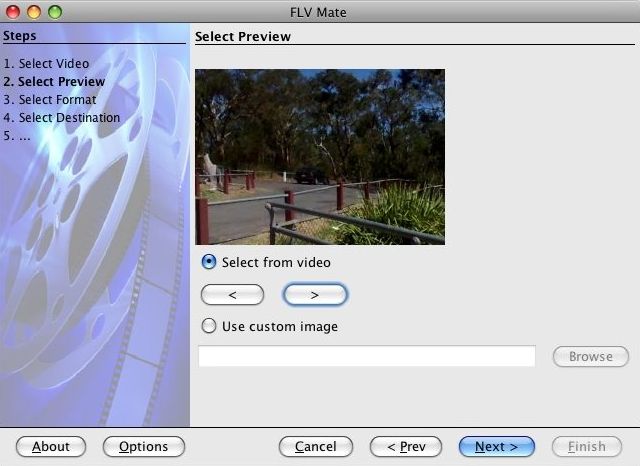
FLV Mate is high quality video encoder and player for the web. Convert almost any video to Flash and create a web video player for your web site, blog or forum. It is an easy to use, wizard-like application that allows you to publish any video online in few easy steps. Publish marketing promotions, video advertisements, software demonstrations, tutorial videos, screencasts, video blog posts and more.
FLV Mate includes high quality royalty-free web video player compatible with Flash 8.0 (or later version) and supports Amazon S3 for video hosting and steaming.
System Requirements:
Microsoft Windows XP/Vista/7; x32;
Publisher:
Eneset Technology Pty LtdHomepage:
http://www.flvmate.com/File Size:
69.1 MB
Price:
$39.95
How would you improve FLV Mate 1.3?
Comments on FLV Mate 1.3
Thank you for voting!
Please add a comment explaining the reason behind your vote.
Please add a comment explaining the reason behind your vote.
iPhone app giveaways »

$2.99 ➞ free today

Fasting Space helps you stay focused on what truly matters — building healthier habits.
$0.99 ➞ free today

$0.99 ➞ free today

$0.99 ➞ free today

$3.99 ➞ free today
Android app giveaways »

Prepare for an adrenaline-fueled mobile gun shooting games experience like never before with Strike Royale.
$0.99 ➞ free today

Epic Heroes War is a real-time strategy game, online side-scroller defense combines RPG.
$0.99 ➞ free today

$1.99 ➞ free today

Team up and fight for glory in the best free to play PvP online battle royale experience on mobile!
$0.99 ➞ free today

$0.99 ➞ free today
i own at least 3 video blogs and i love to video blog myself and do some crazy stuffs--;
Save | Cancel
FLV Mate doesn't work!
"FAILED TO CONVERT FILE: Program 1"
is what I get no matter WHAT I try to convert.
Ordinary XP Pro system with 2GB DDR2 RAM and three HDD's, 2.4 Ghz
AMD 64 proc. Nothing out of the ordinary.
Consider this a bug report. :)
Save | Cancel
Didn't have a chance to run this yesterday, so gave it the first try today.
This has some issues and it's a shame because I really like the player and that's pretty much what I was interested in.
It doesn't handle raw avi files well at all. Raw uncompressed .avi's I fed it are not in color but black and white and totally messed up with funky diagonal lines.
Secondly...there is NO WAY I should have to change Flash Player permissions in order to play something locally on my hard drive! I've never ever seen an .flv converter do this, and it's totally ridiculous!
Not only should I NOT have to do this, but each time I do a conversion and save in a different location I'd need to give Flash Player permission to play it locally all over again from a new location? This is hogwash! And totally not worth the aggravation!
It should just play on my own PC. Period.
It's too bad...the player is quite nice and the ability to add a preview image of your choice and a logo would be wonderful!
Unfortunately the bad things here outweigh the good, so I'm giving it a thumbs down.
If the vendor fixes the issues, they could have an excellent program here.
Save | Cancel
#11.Mike,
Thanks.I always enjoy reading your reviews.
Just for the record the FFmpeg licensing is mentioned in the EULA of FLVMate (and as a part of the online manual)
3RD PARTY COMPONENTS
FLV Mate utilises the FFmpeg libraries (Copyright (c) 2000-2010 Fabrice Bellard, et al.) for part of the conversion process. FFmpeg is free software licensed under the GNU Lesser General Public License (LGPL). FFmpeg is a trademark of Fabrice Bellard, originator of the FFmpeg project. You may obtain the complete Corresponding Source code by visiting flvmate.com/opensource
Save | Cancel
Should anyone want to read the manual first, go to
flvmate.com/support/manual
:)
Save | Cancel
@aRenegade. What Ashraf writes is often misunderstood, because he gives here only a short summary. Therefore he writes this text at the end of his very appreciated commentaries: For final verdict, recommendations, and full review please click here.
And if you click on his homepage link you will find an universe of very valuable advices of a very experienced user.
By the way - that software is really missing even basics, how nice the idea of the program may be.
Save | Cancel
The first commenter writes it’s “straightforward and easy to use”, But later writes ”lacks proper documentation”,huh? Well if it’s “Straightforward and easy to use” how much explicit documentation is required? Next, “The program allows any user to “publish directly” then later, “lacks the ability to publish directly”. And rambles on and on only to lure someone into leaving GOTD because the GOTD Forum isn't good enough to post a full review and recommendation (unlike Whiterabbit who selflessly does)!
That so called "review" was done hurriedly and without putting in sufficient time to be fair to this Developer. The full version of this program was released at 3:00am. The first comment was posted at 3:01am based solely on the trial version. Since working with this program for several hours I found it delivers as advertised. The comment by #1 is no more than an exercise of a race to post first and serves as an excellent example of nitpicking. It’s my Recommendation that today’s GOTD be tried out because you just might find it as I did, to be a diamond in the rough. Thanks GOTD...
Save | Cancel
@ #10 Wendy Peterson,
You clicked on an advertisement.
The true link is the blue link that says "Download FLV Mate 1.3 now"
Save | Cancel
Installede fine on win 7 64.
I have pahaps found an error in this program. If you load a file wich you want to convert, and discover that it's the wrong file, then when chosing another file, it's still the first file showen in the preview miror.
after trying ths program, i must say that, if i had payed money for this software, i would have been disapointed. It need some posibilities, like a feature to remove the originaly sound and/or add music to the outcome movieclip.
It's a nice player thats installed..
All togther it get 3 out of five stars.
Save | Cancel
It is amateurish program, sloppy and it seems unfinished project.
I just uninstalled it.
Save | Cancel
#5 Sherwood
As stated above, there's no support for x64.
System Requirements: Microsoft Windows XP/Vista/7; x32
Save | Cancel
Okay, this is weird. On this page there was a huge green button with Download FLV Player Here up the top towards the middle of page. I obediently hit the button and was waiting for the site or whatever to load, when up came a Microsoft popup message saying that the site has been reported as unsafe, and it has blocked the site from opening. When I made it back to this page again, the large green button was not to be seen. What on earth happened?
Save | Cancel
I Have noticed lately there have been a Couple of applications that have used Open Source Code given away by GOTD.
As Fubar #8 mentions, The legality is somewhat dubious,
As for FLV Mate 1.3; Too Heavy-Weight: Code very weak, not utilising the potential of Java.
That Said, I'm an old sod, and still stick to VB6 & C++.
Save | Cancel
This uses a bunch of open-source code (I didn't check the legality). It's huge because it uses its own Java Runtime Environment (and people complain about .NET). It's very sloppy for a version 1.3--spelling errors, problems with default folders, shows the output folder as a link but it isn't, dumps preview JPEGs into the source folder, etc. The biggest issue for me is that it only supports the largely obsolete FLV format--no H.264, WebM, etc.
Save | Cancel
This is a Java application, it will install all needed Java Runtime files in the program installation folder. (Installer: 69.1 MB, After install: 153 MB) The FLV Mate it self only cost about 20 MB of disk space, the rest 100 over MB is used by Java Runtime files. The question is... does it really necessary to use Java Runtime for this kinda application? Maybe the author should consider to use other programming language. You can't really trim down the needed Java Runtime files for the application to run.
The price of this software it's not worth for $39.95 at all, coz it's seriously lack of features. The author should consider lower down the price.
Save | Cancel
Excellent program other than the missing qualities it needs Worth the grab hanks GOTD and Eneset Technology
Save | Cancel
Win7 x64 when searching for file stops working and closes...
Save | Cancel
@3 Garfey B.
Maybe this will work:
iWisoft Video Converter =
dottech.org/freeware-reviews/12483
For final verdict, recommendations, and full review please =
dottech.org/shareware-reviews/17198
Ootje
Save | Cancel
.
". . . and supports Amazon S3 for video hosting and steaming."
So wonderful. Who among us has not at some time wished to steam his videos?
BTW, Ashraf, your link isn't working,
at least not for me. All I get is a 404
Error message.
Good review, tho.
.
Save | Cancel
Installed and registered perfectly on Windows 7 Home Premium 32bit.
Overall it seems like a very nice program. Easy to use and attractive, albeit pretty simple, interface.
It would be nice if there were more player skins, but the one that comes packaged with it is very nice. This program is perfect for someone who wants a super simple way of putting a video on the Internet.
Not a half bad program & the price seems withing the range of acceptable. Thumbs up from me.
FLVMATE should come up with a more advanced version of this. I think they are on the right track so far. ; )
Save | Cancel
The Good
* Straightforward and easy to use.
* Allows users to convert multiple different types of videos to FLV format.
* Gives users the option to publish directly to an Amazon S3 account, or publish locally.
* Allows users to customize the "preview" image.
* Allows users to watermark videos.
The Bad
* Cannot merge multiple videos together.
* Lacks the ability to publish directly to a website, such as via FTP.
* Needs better organization in output folder when publishing locally.
* Needs an option to either automatically take users to output folder or to allow users to open output folder easily via a button when publishing locally.
* Lacks proper documentation/Help section.
Free Alternatives
iWisoft Video Converter + Youtube (or any other video hosting service)
For final verdict, recommendations, and full review please click here.
Save | Cancel