Every day we offer FREE licensed software you’d have to buy otherwise.
Giveaway of the day — Easy Start Menu Organizer
Easy Start Menu Organizer was available as a giveaway on January 15, 2008!

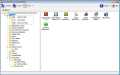
Easy Start Menu Organizer is a tool for arranging and removing start menu items with ease. The software makes it easy to sort applications into target groups. The software also allows copying and deletion of application icons from the Start menu. All this saves your time and helps you to keep your business in good order!
Features:
- Drag and drop arranging of start menu;
- Group copy and paste of startmenu icons;
- Easy creation of group folders;
- Simple GUI;
- Small size;
- Fast loading of all menu items.
System Requirements:
Windows 98/Me/NT/2000/XP/2003 Server/Vista, Microsoft .NET Framework 2.0
Publisher:
Zards SoftwareHomepage:
http://www.zardssoftware.com/eso.htmlFile Size:
328 KB
Price:
$12.95
Featured titles by Zards Software
Cleanse Uninstaller is a program uninstaller that finds and remove even the most stubborn of programs. Uninstall faster, easier and more completely than you do with other programs. Using the Auto Find uninstall function all you have to do is drag and drop the programs icon you want to uninstall onto Cleanse Uninstallers icon and Cleanse will Auto Find the program in the uninstall list and start the uninstall process.
GIVEAWAY download basket




Comments on Easy Start Menu Organizer
Please add a comment explaining the reason behind your vote.

iPhone app giveaways »





Android app giveaways »





Sweat, just what I have been looking for! Well Pleased...
Save | Cancel
I thought this program may help me, but it falls far short of anything I need. It says it makes it easy to alter your "Start Menu". I had more problems than before, 1 - It crashed 3 times, 2 - Some of my menu items did not show up (both folders & programs), and 3 - it sometimes did not make the changes it said it did.
I would not recommend this program to anyone. I am sorry that GAOTD got suckered into putting it out. You couldn't even pay me to use it.
Save | Cancel
correction to #61--meant to say Vista START MENU Creator, not repeat SA
Save | Cancel
Hi Folks,
One quick point. On Freeware that has a separate pro version, look at the limitations. On Tidy Start Menu, unless you go to the $ version, it looks like you can't define your own categories, which makes the freeware version far inferior to setting up the Start Menu on your own. (I use a Total Commander type program for this.)
However the Freeware version of the Vista Start Menu program looked fine, not what you might call Tidy .. crippleware.
Caveat emptor.
Let the non-buyer beware.
Shalom,
Steven
Save | Cancel
Just to clarify what I said in my previous 2 posts, I already knew about deleting unwanted files/programs (#53, Belgian Dude), but I didn't know about organizing/alphabetizing them. :)
Save | Cancel
Okay, I decided to download and try this program out, and it is just like you all have said; nothing you can't do already by following above given instructions. When I first saw today's offering, I thought, "Oh boy, just what I need since I have thinking how I would like to get my Start Menu cleaned up". Of course, then I read the comments, and so on. I may decide to try Tidy Start, as well, just to see how it works. At either rate, thanks GAOTD for the software. :)
Save | Cancel
#13, oliviab, hee hee...I must be one of those "who are a sandwich short..." because though I knew I could clean up my desktop I didn't know I could do the same with my Start Menu (and I have been thinking about that very thing this past week, too) - learned that form the first 4 posters, whose comments I read early (now) yesterday a.m. Hee hee...I can't believe all these years we have had computers in this house and I never heard anything about cleaning up the Start Menu.
#29, rojo, your first sentence...I didn't know that either. I just did that and it did just as you said.
See 'guys', one can learn from just about any comment posted here, even if it's a 'who needs that when you can just do/download...?' Of course even those comments should be made nicely, as rojo's was. :)
Save | Cancel
Wow this looks useful.
*installing
Wow this looks utterly useless.
*uninstalling
What the hell, why would anyone make such a pointless program? Thank god for freeware like Tidy Start Menu. (D'oh, I clicked the wrong vote button XP)
Save | Cancel
#58; 59
Many thanks, I'll try!
Save | Cancel
Was going to try, but remembered that I got Zard's "Cleanse Uninstaller" from GAOTD and it died after a TRIAL period. Who is to say, but this one probably will as well. Not worth the time to set up and the headaches after it dies.
Save | Cancel
I do a lot of rearranging of my start menu options, so I figured I would give it a try. So far I've found one problem - it doesn't work. After installing, I tried to move the start menu folder for this program to a new location. It didn't move it. I shut it down, tried it again. Pressed all the buttons in the menu bar to see if I was missing something. Nope. Uninstalled...nice idea, just doesn't work.
Save | Cancel
This software is much worse than windows exployer and would not register to boot
Save | Cancel
I don't think I've ever seen so many thumbs down for a product before. But after seeing that, and reading some of the replies, I will pass on this download.
I know that this product is free for today, but there is no way in that really warm place due south of Heaven that I would pay $12.95 for a utility that is already included on my machine as a basic part of Windows. Thanks anyway, GAOTD team.
Save | Cancel
@21--my McAfee SiteAdvisor says Toggle (Vista Site Advosor Creator home website) will hijack your browser home page, so I won't be going there.
Save | Cancel
Another no vote for this program, another yes vote for Tidy Start Menu that a few other people have already mentioned. My start menu had so many entries, most of which were dead links after one of the utilities I picked up here OVER-cleaned what it thought were unnecessary files and left me with a start menu full of empty folders that took up a full screen. After downloading several different programs, Tidy Start Menu was the only one to do what I needed easily, weed out all the dead links and resort the ones remaining into some semblance of order. It would have taken forever to do that same thing manually with THIS program, which really IS just like the Start Menu Explorer. For once I'm in agreement with the majority on this one. Thumbs down for me. Thanks anyway GAOTD! As always, I look forward to tomorrow's offering. :)
Save | Cancel
#51
You could try copying the iso files to a separate partition.
So you can restore your system with your bootable recovery program or in the worst case after you made a clean install of Vista.
Save | Cancel
# 51 Kiril SOS
Sorry to hear you are in trouble!
I suppose the only thing you can do now is to make a clean install of Vista and try to restore separate files from your image DVD's.
I recommend making your images on a separate partition or a external hard drive instead of DVD's.
Sorry...
Save | Cancel
If there is a prize for being the one millionth person to point out that Windows already does this, please send it along to my Gettysburg address.
Save | Cancel
First let me say I really enjoy this site i'm here every day i really like reading the comments even when i dont download the program offered. Today however i need help, downloading and everything went as always no prob. it says activated, butt it is not registrad. please help? Thank You.
P.S thanks for everyday
Smile
Save | Cancel
As #1 states, just explore to the start menu and organize it all customized yourself, (NO PROGRAM NEEDED!) I have tried all start menu programs and yet customizing it myself in windows explorer is always the best way of doing it.
Save | Cancel
@ Mike MSS , Bigun and other Xp users like them...
1. slide mouse pointer over the start button
2. click right (not left mind you but the r i g h t button)
3. Low and behold ... a menu appears
the second one of them being "EXPLORE"
If you click it (left) it will open windows explorer already positioned on the sub-folder Start (menu items)
Alternatively you can just left click on START - mouse over the programs item until it folds open and by then using right clicking on individual items you can delete, sort, etc...
If you can't figure out this.... you need to take lessons in using a computer and reading the help files.
MailStan, I wouldn't voice the lack of computer skills of your brother-in-law to loudly if I was you.
Having a program doing the exact same thing that one can do without it is plain stupid. Having a program like that which on top of it needs .NET is not only stupid but shows that the programmer needs to stop deluding himself and go and apply for a job that doesn't require intelligence or skill.
Don't believe me? Look at the other marvelous programs that he have made. A mp3 player for 21 Euro (never mind the scores of wonderful do it all mp3 players that are completely free - open source - gratis) and an Uninstaller for 20 USD (never mind that there are tons of programs that can do that are freeware for those that have reason not to be satisfied of the windows own removal capabilities)
Besides all that... it really looks very cheesy to see a forum where all the entries are dated 13th and 14th Jan. 2008.
Not to mention it looking ridiculous when looking at the top poster list of the forum it becomes clear that even the one person that could be bothered to register couldn't be bothered to put up a post.
http://www.zardssoftware.com/forum/topposters.asp
(for those wondering, the 204 claimed post by Zard is because he is the moderator and wanted to make sure he had 5 stars next to his name)
Save | Cancel
S.O.S.
I know I must to post comments concerning only software here, but I'm in a big trouble. This is the only site I visit.
The problem
Because of my stupidity and of Glary Utilities new free edition I crashed my Windows Vista system. Good thing I had an image of the system, but I can't restore it on Vista. The image was created with RSJ HD Image Creator and consists of two DVDs. The first DVD was accepted and restored on my system, but the laptop doesn't accept the second DVD \the second ISO file\.
Please, tell me what to do! Does somebody have an experience with restoring images on Vista?
P.S. Glary Utilities is a brilliant tool for XP, but a dеadly gun for Vista.
Save | Cancel
Just his the windows key and e, thats the shortcut to explorer
Save | Cancel
#12 and #45... VistaStartMenu isn't bad. But if you want to step up a bit, IMHO I believe Aston2 Menu is better.
http://www.astonshell.com/a2menu/
Save | Cancel
The Best Offer of GAOTD in two years … say no more, squire!
Joey.
Save | Cancel
Hmm, I wish there was something like this to manage the desktops of PCs with multiple users. My wife and I share a PC with different ids and we want different sets of icons on our desktops. Managing it via Explorer is cumbersome.
Save | Cancel
Don't Windows Vista do this for you?
Save | Cancel
#12-Thanks for the info on VistaStartMenu which is really kool and much better than windows own effort.
http://www.vistastartmenu.com/index.html
Save | Cancel
This morning I was having trouble booting up due to startup programs. I said to myself "I need to find a good program to help get rid of some of these programs"; then I checked my emails & found your daily giveaway.
What can I say but I hope it works and thank you so much for one listening to my brain vives....
Maria
Save | Cancel
Well it's not a bad program, but neither a useful one. I completely agree with about 99% of the comments here. This is a plain cut of an explorer. I would use if it offerd extra features, but sadly it does not. It's a WYSIWYG program. Just do it yourself! Even people who are not tech-savvy, or Geeks can do this with no risk of injury to the system. In other words, there is no point for such a program as this.
Heres a tibit from Wikipedia:
Thanks anyway GAOTD!
Save | Cancel
It appears that very few of those making negative comments today (at this point in time - thumbs down is approximately 80%) have spent any time using this program. It is not just like MY Windows Explorer (WE). My version came with Win XP Pro. With programming I can make WE almost do any file maintenance job I want it to do. I just have to program it anew for each individual job. I seldom use WE. Apparently others do.
I have used "Easy Start Menu Organizer" to work on a Start Menu that had so many entries that I could not read anything after the letter "M". The GOTD program has a clean interface, opens to the correct point for Start Menu editing, and most of the program (but not all) works.
With the above, there is enough to this program for me to keep it and to continue to evaluate it. I can't say that I used it for hours so I know all about it. I didn't. I finished my work in about 15-minutes
I don't know if my version of "Easy Start Menu Organizer" is registered. The "About" function is one of the functions that does not work.
Save | Cancel
I think I understand all the criticisms of this program, BUT when I click on my Start Menu there is no Explore option. I have Windows XP.
Does everyone mean "Window Explorer" instead of "explore"?
By the way, Windows Explorer doesn't show up on my Start menu either.
Save | Cancel
This program sucks. I installed it and I couldn't even create a new folder.
I read some comments and did it by exploring the start menu. Thanks for that tip, I didn't know you could do that. =o]
Save | Cancel
This is the first download that seems like it might do me some good, and I've been checking for at least a couple of weeks. Point #1: Give these folks a break, if you don't like it, fine, but stop the bloody complaining about free software.
Point #2: My brother-in-law, a fantastic guy and a Sound Recorder for CBC (no techno dummy there), still hasn't gotten use to the fact that erasing a desktop icon simply removes the shortcut. Navigate through Explorer? I don't think so.
Point #3: I don't use Explorer (Power Desk fan), so a freebie that takes me directly where I want to go. Thanks very much.
Save | Cancel
Net framework 2.0 to use this super app? Your kidding, right?
Cannot use it cause I like to right click instead.
Save | Cancel
I downloaded and tried it out just to get a feel for it. I'm afraid that I prefer to take care of my start menu manually. As others have said I don't feel this program offers enough improvements over explorer to warrant the install. That being said I think this program may be useful for those that have no computer knowledge. May also be useful for those that let their start menu get away from them and just want to get a handle on it. I will pass on this offer but thank you GAOTD for your efforts. Thank you also to the publisher, Zards Software.
Save | Cancel
SMOz does the same thing, does it better and is freeware!
http://smoz.sourceforge.net/
Save | Cancel
Apologies #12 - here I am thanking #6 and in fact it was you ...
Try again - Thank you #12
Save | Cancel
I have to agree with most here - I just don't see the use of this program - at least I don't see any improvement in workability, however, as usual the issue of this has raised various comments about other similar programs and this is one of the great things about GOTD.
Thanks to #6 above I have installed the free version of the Vista Start-up program and that is a real improvement on the Vista supplied alternative - if only in readability. No longer will I "SWITCH OFF" by accident when I meant to "REBOOT".
Thanks #6 - now I wonder it if it works on XP as well!!
Save | Cancel
I just got finished submitting a bug to microsoft for Vista. The drag and drop works fine with the default Start Menu style. But you have the option of using the old Start Menu. WHen you do this and then try and drag-n-drop, after reboot, menu items that you moved just disappear. So yes... this type of software is OUTSTANDING as microsoft can't even do it right.
Save | Cancel
The free and open-source SMOz does the same task, but makes it just a bit more useful than using Windows explorer. It's faster, because it doesn't actually perform the changes until you click apply. It combines the global (all users) and user shortcuts into a single view, but still keeps them in the separate folders (that you don't have to worry about).
http://smoz.sourceforge.net/
Save | Cancel
I honestly don't get it.
Can anybody say what is different from rt-clicking on the START button and organizing that way?
Save | Cancel
I tried right clicking my start button, clicking explore, as explained above, and what I see, I have never seen anywhere. In "programs" there is a list of programs, and I have never seen these programs in another list or ordered as they are. It definitely is not what I see, when i click on "START". So i guess no sense sorting out something I never see anyway
Save | Cancel
Wow. Ummm... Yeah. Just go to your Start menu --> All Programs, right-click on any entry and choose "Sort by Name." If you would like to delete any entries from your Start menu, right-click said entry and choose either "Delete" or "Remove from this list," whichever option appears. This advice is available for $12.95, but it will be free for our visitors as a time-limited offer.
Save | Cancel
#22 Hi CMMReyes... No you can't register it with activate at a later date, but you can re-register it with System Restore or the freeware ERUNT. Or you can make a backup of your system like what most experts tell you that you should anyway.
Save | Cancel
Hasn't anyone got it yet.
The developers of this have made their home page just a landing page for Google ad-sense. Even the uppermost tabs are carefully placed adds from Google.(the "developers" of this easy start crap, home page).They look like they are just after add click revenue.I think the started like yesterday.
Save | Cancel
Windows key + E
Why waste time right clicking on the start button?!? ;)
Save | Cancel
I bet either this is direct copy of anothers software or this the other trying to sell what it already gave all of us free.
Save | Cancel
You're kidding right? Come on folks:
Right click - Start > click Explore > double click Programs and clean the start menu up from there. All programs will be listed, just right click the file you want to remove and click Delete.
This does not remove the program from your computer, just the shortcut from the start menu.
Save | Cancel
I downloaded and installed Easy Start Menu Organizer without trouble. But when I experimented by clicking the "REGISTER" button and entered an invalid serial number it reverted back to the unregistered version. It only went back to the registered version when I run ACTIVATE.EXE again. One implication of this is- WHAT IF somebody messed with the "REGISTER" button when this GAOTD offer had already expired. YOU CAN"T REGISTER IT ANYMORE.
Save | Cancel