Every day we offer FREE licensed software you’d have to buy otherwise.
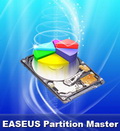
Giveaway of the day — EaseUS Partition Master 9.0 Professional Edition
EaseUS Partition Master 9.0 Professional Edition was available as a giveaway on August 17, 2011!

As Partition Magic alternative, EASEUS Partition Master Professional Edition is an ALL-IN-ONE partition solution and disk management utility. It allows you to extend partition, especially for system drive, settle low disk space problem, manage disk space easily on MBR and GUID partition table (GPT) disk.
The most popular hard disk management functions are brought together with powerful data protection including: Partition Manager, Disk and Partition Copy Wizard and Partition Recovery Wizard. Moreover, you can create Linux based bootable CD/DVD in case of system boot failure.
What's new:
- Safely merge two adjacent partitions into a bigger one without data loss;
- Support dynamic disk - resize and copy dynamic volume, convert dynamic disk, etc.;
- Wipe data on unallocated space.
System Requirements:
Windows 2000/ XP/ Vista/ 7 (SP1 included)
Publisher:
CHENGDU YIWO Tech DevelopmentHomepage:
http://www.partition-tool.com/professional.htmFile Size:
50.7 MB
Price:
$19.95
Featured titles by CHENGDU YIWO Tech Development
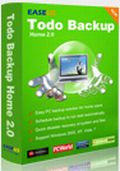
Files can be accidently deleted, damaged by a virus or a hard disk failure, etc. However, less than 20% users back up their computers regularly. EASEUS Todo Backup Home is a free file backup and disaster recovery software, protecting your data, including photos, music, videos, documents, financial data and applications. Back up what you want, when you want.
Comments on EaseUS Partition Master 9.0 Professional Edition
Please add a comment explaining the reason behind your vote.

iPhone app giveaways »




Android app giveaways »





Great software but:
1. WinPE tool directs to site for purchase
2. Backup tool directs to site for purchase
3. Programs can't be re-installed from zip file if you loose it.
Cheers
Save | Cancel
Thanks, What I meant was that since I have moved the partition boundary by resizing, but still only 2 partitions, If I have to use the recovery options will the recovery commence? I understand it all goes back to factory condition.
as described by someone earlier, I placed a new folder in the recovery D drive to hold a load of data away from the c:windows drive. I am backing this data up elsewhere on a usb disk
Thanks again.
Save | Cancel
RE#80, Linux is free to use, that's one good reason.
DOS 3 files boot disk still useful in some case(such as flash BIOS), but not much use to boot up WXP. WinPE is one of the method (1 CD).
If you don't like to pay extra for it, BartPE could get you there (use your existing license)
Save | Cancel
ref 66 "PLEASE Don’t Touch the Hidden Partition or the Recovery Disk is useless !!!"
When I got my vista laptop I used PM to resize the C and recovery D partitions, in order to give me usable storage space on D. The recovery information is still there. Will it still work, or will the new partition boundary mean it will fail. Thanks in advance, and for all of the useful info so far. I missed this latest Gotd, but have the previous version.
Save | Cancel
This is a very good piece of software, used it before and it delivers! worth the price. the only problem I had with it is was when tried running it on a HDD with bad sectors, when I did, Partition Master crashed and all the information on the HDD was lost to a state of not recoverable ever again. I guess this is not the limitation of Partition Master, and probably all partition applications will have that risk, but I do recommend to check the drive BEFORE using any application meant to manipulate it. in short, be careful and Partition master will serve you well.
Save | Cancel
Please pardon my naivete: Can this software be used to clone my hard drive?
Save | Cancel
I simply don't get it !
Why on Earth should I use a LINUX boot CD on my PC
when I have WIN XP Pro SP3 ?
In the old DOS days a rescue diskette could be made
with just 3 files
How many (and which) files are NECESSARY for booting
a WIN XP ?
Then it should be possible to create one with the
system files from your own computer, which can't be
a breach of one's license
Tobiasson, Oslo, Norway, Europa
Save | Cancel
http://www.partition-tool.com/easeus-partition-manager/comparison.html
Thumbs way up! This is a good program for the $20-40, and a great program for free! The link compares the editions. I used a VERY old edition previously, and this looks FAR better. BTW, if you have a ro ot kit problem, you will find the mbr capabilities very handy. Thank you, GOTD and Easus!
Save | Cancel
How do I get key manually if I don't want to install it today. Is there way request key for todays GOATD from Easus.
Save | Cancel
Wow, what a wonderful series of comments and advice. I have been using a PC as long as they have existed, and although not a technician, I am fairly knowledgeable, yet I learned a lot from your comments. Thanks to all! The EASUS software is great, I had used a previous version with great results.
Save | Cancel
@26,of course I don't expect to get propriety software for nothing,one of the reasons why this is a great site but I was confused earlier as my copy of EaseUS ALLOWED me to burn BartPE and the LINUX disk(I checked,definately BartPE).Anyway as several other commentators have pointed out it can be downloaded for free from Microsoft.
So why not install the software and give us the benefit of your wisdom as opposed to pointing out the bleeding obvious.
Save | Cancel
Hi to everyone at GAOTD and this great forum.
I'm very grateful or the useful tips,advice, and recommendations that appear.
My reason for writing is firstly to say this Easus version and the previous one both work without a flaw. I would also like to praise the Easus Support Team (don't know about the USA group).
I had trouble with activating the Easus TODO Backup software offered here a couple of months ago. Easus Support contacted me no less than eight times until I was up and running.
All this support from a company that GAVE me the software in the first place.
We all have horror stories of trying to get even the minimum of help from other companies where we have dropped a couple thousand Pounds into their laps.
Absolutely nothing to do with Easus or GAOTD, just very grateful.
Save | Cancel
I use freeware MiniTool Partition Wizard Home Edition.
It has three "how to" videos actually showing each step to make sure
everything is done correctly and accurately. ...Chinese accent but clear spoken English...
Save | Cancel
ginz
My apologies for a less than adequate explanation of using MaxBlast, but I was somewhat distracted by Windows playing up.
When I transfer one system to another drive, I do so from the system I want to transfer, on to the new drive via a USB port. MaxBlast having been installed on the original drive initially.
mike
Just like to take this opportunity to thank you all the excellent comments you post, I really look forward to reading them and learning from them.
Save | Cancel
Thanks GOTD for this awesome software!
Is this version includs a Built-in bootable disk ? If yes, which one, the WinPE bootable disk or the Linux bootable disk ?
Save | Cancel
Well the setup wizard is badly designed - while it was running, explorer was VERY slow to respond, even if the setup wizard is waiting for me to respond and the CPU usage is about 20%. Sure, this is on a netbook with an AMD E350 CPU, but still... (also windows 7 64-bit and 4GB RAM)
Save | Cancel
Did not work on my external partition. Could not recover it. I think that its fix disk recovery manager is rather poor, otherwise nice software.
Save | Cancel
This is a great program that I've had for many years and one of the main reasons I'm subscribed to GOTD's email notifications. It looks like there aren't a lot of reasons to get the pro version over the free home one (previously you got 64-bit support, but now free includes that), though now you can resize dynamic volumes in pro. See this. Note: this requires SP1 (Windows 7 anyway).
Save | Cancel
EASEUS Partition Master is still my prefered partitioning program, even the freeware version! Thanks GAOTD!
Save | Cancel
I just installed it on my Win XP (SP3). It had to uninstall my old version (which was not working for unknown reason!)
The installation and registration were smooth.
I have a flash memory stick with 16GB that I almost was sure it was dead. I tried everything I know to revive it but nothing was able to fix it.
I tried EaseUS Partition Master and it managed to remove the existing partition and allocate a new one then format it. My memory stick is back to life. GAOTD and EaseUS made my day!
Thanks
Save | Cancel
EASEUS PERSON: Can your program CHANGE THE CLUSTER-SIZE of a hard disk? (WITHOUT DESTROYING any data?) - or what program can do this? Alter the clustersize of a drive volume without deleting any files.
Save | Cancel
As a computer tech I don't have many problems but one time Paragon trashed 2 partitions on 2 drives. EaseUS saved the day by recovering everything from Paragon's bug. Since then I only use EaseUS. Thumbsup big on EaseUS.
Save | Cancel
mike - thanks for great post. Follow-up Q -
You wrote "As far as connecting stuff goes, all that depends on what you’ve got to work with — while you could certainly use an external dock, there are many, Many ways to accomplish what you’re after. If for example all you’ve got is your laptop, do a disk/partition image backup to DVD, swap drives & restore."
Could you drop here a few links to how-to's for both methods - external (with, I suppose, a USB cord), and image? Just that I never did it.
Also, if I do the image thing, when I put the new, blank hard drive into the laptop, how can I even turn the laptop on to "restore" the image onto the hard drive? Or does EaseUS put an automatic app-thingy on the DVD itself so that the machine automatically boots from the DVD and prompts me to restore the image onto the blank HD?
Thanks again!
Save | Cancel
I am using the free version of this software and it works without any problems and is very easy to use. I would like to know though can i download this and uninstall the free version without any problems with what i done with the free version. thanks
Save | Cancel
I know that this is a highly-user rated program and I praise GAOTD for making it available, But as the kind of person they write "X for Dummies" books for, I have two basic questions before I download and intall this:
(a) If we avail ourselves of this offer, will we be forced to buy the product after the free use period if we want to access and maintain/tweak any partitions we use this to make and maintain?
Will it revert to a free version with limited abilities and without update privileges after the first year?
(b) My past experience with another-developer's partition manager which I purchased for their customer service caused me to lose all my data. Will using this app without customer support risk a similar situation? I don't think I have enough knowledge to solve problems on my own that may arise.
Save | Cancel
If i use this on a window vista 32 bit drive laptop will it mess up my rebootable drive that was installed with the operating system ?
I would like to set it up like Mike commented on to put my GOTD programs into so i do not lose them each time i reboot to the beginning.
Thank you for the info.
Edward
Save | Cancel
I've used the free version of the program to re-size the partitions on one of my laptops with no problems but where Easeus really came to my rescue was in a rather unexpected way.
Suddenly both of my laptops stopped displaying most external USB drives under My Computer even though they appeared under Device Management where it said they were working properly. Auto run didn't work either. They didn't open an Iomega media player with a hd, too. One machine had Vista and the other Windows 7. My XP PC had no such hiccups. I suspect the culprit was a Windows update. I'd appreciate it if you let me know what the exact problem is.
Easeus Partition Master did recognise the external hard drives, and using it to change their letter forced updating of the system information and the problem was fixed permanently for each drive on each laptop.
Save | Cancel
Mike Macrae @25. Could, and how, your multi-partition system be used to modify my XP two partition 250GB hard drive?
Save | Cancel
ginz #39
Maxtor was taken over by or joined Seagate so I'm pretty sure it works on Seagate drives. However, if you wish to transfer to other drives it will work if it sees the correct type even if only plugged in to a USB port. As for the step-by-step it couldn't be easier simply a matter of instructing it to transfer from one to the other. I have used it many times with out the slightest difficulty, anyway the best luck!
Save | Cancel
I manually uninstalled Home V4 before trying to install this. It starts to install but then says it can't continue as the file is in use by another program. I rebooted and tried again... same error. What do I do now?
Save | Cancel
I would be wary of using this on any disk that has Linux partitions. In June, in a forum posting, they said that v8 only supported ext2 and ext3. I can't find any indication this has changed in v9, and it just shows my ext4 partitions as "other" on my disk.
Save | Cancel
@23
Your process is very clear but I have some question:
1- If the crash is logical no problem; But what happens if the crash is physical? (the one and single HD partitioned in C to I) Why not simply have an image of the HD on an external one ?
2-If you have only one physical HD logically partitioned (from c to I) the C is more efficient than the others. There is not so much difference between a directory clearly defined on C and a logical partition.
3- The waste of space due to the logical partitioning and the lost of performance of the applications not stored in the primary one seems to consider.
In my opinion if you have a single HD back up on by imaging on an other physical disk is to consider.(with an acronis like true image it is possible to retrieve specific files eg MBR...).
Please, since I'm neither an IT guru nor an ayatollah, I would like have your return on these ^points . TK
Save | Cancel
Hello! I have used this program before for resizing partitions on my active hard disk and it works wonderfully. The program has been around for many years, so it is definitely worth adding to your system. My opinion is, don't let this one slip away!
@Gonzo (comment#41) - I'm not sure what you mean - Easusus does have an option in its Tool menu for creating a WinPE bootable disk. I haven't tried it, but it is one of those things you don't get in the free edition.
Save | Cancel
Windows Preinstallation Environment is now widely available free of charge via the Windows Automated Installation Kit (WAIK).
Automated Installation Kit (AIK) for Windows 7
http://en.wikipedia.org/wiki/Windows_Automated_Installation_Kit
Automated Installation Kit (AIK) for Windows Vista
http://www.microsoft.com/download/en/details.aspx?displaylang=en&id=9085
The Win 7 download file is 1GB
Save | Cancel
Always good software to have, but to be honest the professional features dont bother me. The home edition which is freeware is adequate for most in my opinion.
I personally use the home edition from time to time and never have any problems with it.
Save | Cancel
mike, fubar
you should better mention, which kind/group of users you address!
only some hints/examples:
::For partitioning a drive you should know about boundaries or/and use a software, that assists you in managing this optimized.
:: Of course it MIGHT be usefull (e.g. for often changed documents) to do ADDITIONAL quick-backups on a 2nd partition: If you don´t have an 2nd HD built in and if the external drive can not/is not continuously attached.
as you can see - erverything depends...
And no - I don´t want to discuss about this ( especially not with you, fubar ;-) -- )
Save | Cancel
2 cents - great program, GREAT comments - I'm updating to this version, wow, thanks GOTD!
Save | Cancel
Too bad it doesn't allow for the creation of a WinPE bootable disk. As far as licensing goes, what's wrong with using the license for the copy of Windows that you already purchased from Microsoft and are running on the machine whose disk you want to repartition?
The WinPE disk you create could check whether its license key matches the license key on the hard drive you want to alter. Programs such as Magical Jelly Bean Key Finder can tell you what the license key is for the version of Windows installed on a disk, so why can't software be put on the created WinPE disk that compares license keys?
I haven't looked into whether the Linux bootable disk you can create with this giveaway is as powerful as the free GParted bootable disk that anyone can make for free. Go to http://gparted.sourceforge.net/download.php to get GParted.
Save | Cancel
If you work a lot with HDD partitioning then this is THE software for the job. I have been using EaseUS PM for many years now and each version just gets better IMO. To me the best part of this software is the ease of use, its straight forward approach leaves nothing unanswered and makes it easy even for novices to correctly set up partitions. If you don't have this in your utilities arsenal then you need to grab it today and put it in the top drawer of your PC toolbox.
Save | Cancel
Old Scotty - will MaxBlast work on non-Maxtor disks? Again, if you see my post above at # 30, what's the step-by-step for MaxBlast or this EaseUS product? Thanks.
Save | Cancel
#25, Mike Macrae, Microsoft recommends against needlessly partitioning drives that have an NTFS volume, doing so generally slows access and results in horrible space management issues. Backups should always be done to another physical drive, preferably external.
Vista+ have special handling for special folders. Program Files cannot (at least without hacks) and should not be moved, doing so will break security and may mess up System Restore (changes with every version of Windows, I've never found a Microsoft document which describes exactly what it does, can be quite bizarre on older versions of Windows). Most standard user folders (Documents, Music, Video, etc.) can be moved, not just elsewhere on the drive but to other drives and even to other networked computers (at least on Windows 7). Select the folder Properties, if it can be moved there will be a Location tab.
Save | Cancel
Have downloaded the program four times. Each time I get a different file size, and so far none of them will open. Can someone tell me the exact file size of the zip file?
Save | Cancel
1. boot with linux cd live
2. choose gparted
3. do what you have to do
4. exit
Save | Cancel
A very welcome piece of software giveaway.
Used V8 on a few occasions and it was flawless in it's use.
As far as creating a WinPE bootable disk, perhaps Easeus could provide the same functionality within their imaging and backup software, Todo backup whereby if you install the freely available Microsoft AIK then you can create a WINPE disk without any requirement to pay an additional cost for it for either vendor or purchaser.
Save | Cancel
Those wanting WinPE for free can get it from Microsoft at:
http://www.microsoft.com/downloads/en/details.aspx?FamilyID=696dd665-9f76-4177-a811-39c26d3b3b34
Save | Cancel
Mike @25: Why would you create a partition for backups? If you lose the drive, you've lost your backups as well. That needs to be dropped on a separate device - internal or external or tape for that matter.
Save | Cancel
GREAT and very easy tool to manage partitions of the HD.
Highly recommended!!! THUMBS UP from me!!
However, if you need a good and professional disk management tool, I believe that FREE PARTITION ASSISTANT PRO EDITION 3.0, GPARTED and above all PARTITION WIZARD (Bootable CD/DVD & Bootable Flash Drive Version Available)are also great Partition Magic alternatives exactly as EaseUs Partition Master!!
...but guess what?? They are all FREE, unlike today's giveaway...LOL!!!
* Free Partition Assistant Pro Edition 3.0
http://www.softpedia.com/get/System/Hard-Disk-Utils/Extend-Partition-Professional-Edition.shtml
* GParted
http://gparted.sourceforge.net/download.php
http://gparted.sourceforge.net/liveusb.php
* Partition Wizard
http://www.partitionwizard.com/free-partition-manager.html
Bootable CD/DVD & Bootable Flash Drive Version:
http://www.partitionwizard.com/partition-wizard-bootable-cd.html
http://www.partitionwizard.com/bootable-flash-drive.html
Enjoy!!
Cheers from Italy!!
Save | Cancel
EaseUS,
Thank you for responding. I really wish to see EaseUS solve this problem. Previous version ( before v8) can do that. I need to depend on Aomei because I hide truecrypt partition with EaseUS in v7 and after upgrade to v8, I cannot unhide it. Luckily Aomei come to rescue, otherwise all my previous data may be gone.
" the product of Aomei also cannot support encrypted partititon very well. if you hide it forcibly, there may be data lost."
Thanks for the info. I do not know about this, but so far no problem with Aomei. All work very well. Please give it a test run to confirm since EaseUS is in the same business direction as Aomei.
Save | Cancel
NEED STEP-BY-STEP INSTRUCTIONS HOW TO USE THIS EASEUS PRODUCT TO COPY-CLONE A LAPTOP DISK TO A NEW, BIGGER DISK so that the new disk will work flawlessly after I slip it into the laptop. Never done this before. First, how do I connect the fresh "Destination Disk" to the laptop? Must I put it in an external enclosure and connect it by USB? Before copying the source disk over to the Destination Disk, must I first "format" the destination disk to NTFS? (The laptop is WinXPPro SP3.) I like EaseUS, but is this better than a pay disk copy program like Acronis (which I have never used)? Please provide links and steps. MANY THANKS.
Save | Cancel
Home --> Products --> Features --> Partition Manager --> Create Bootable CD/DVD
How to create EaseUS Partition Master bootable CD/DVD?
Clear answers and differences:
http://www.partition-tool.com/easeus-partition-manager/bootablecd.htm#I3
Save | Cancel