Every day we offer FREE licensed software you’d have to buy otherwise.
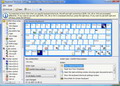
Comfort Keys Pro 3.1 was available as a giveaway on August 30, 2008!

Comfort Keys is a powerful multifunctional hotkey manager for Windows Vista, XP and 2000. Intended for a wide range of users, from novices to demanding power-users, this software provides a surprising level of flexibility in terms of creating custom hotkey combinations and assigning them to a plethora of available actions.
The software also features an advanced clipboard manager, task switcher, sound control tools and a virtual keyboard that facilitates the choice and configuration of your hotkey combinations.
System Requirements:
Windows 2000/XP/2003/Vista; 10 Mb of disk space
Publisher:
Comfort Software GroupHomepage:
http://www.comfort-software.com/hotkey-manager.htmlFile Size:
3.37 MB
Price:
$ 29.95
Featured titles by Comfort Software Group
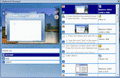
Comfort Clipboard is a safe clipboard manager. Now you don't have to worry that copying one thing will erase something else! It keeps the clipboard history that you can use to paste any selected fragment again. The clipboard contents will be saved, even in the case of a system crash or power failure. Best of all, Comfort Clipboard supports all known data formats, including text, graphics, Rich Text Format, HTML, Excel, etc.

The software displays a unique virtual keyboard on the screen and enables you to use the mouse cursor or the touch screen to type text in any available language. The rich functionality and ergonomics of Comfort On-Screen Keyboard will be especially appreciated by the owners of ultra-mobile PCs (UMPCs), tablet PCs and e-kiosk creators, as it provides an easy way or facilitating user input and making it more efficient.
GIVEAWAY download basket




Comments on Comfort Keys Pro 3.1
Please add a comment explaining the reason behind your vote.

iPhone app giveaways »





Android app giveaways »




Looks nice but consistently crashes an otherwise very stable computer when you do "About" Comfort keys and then hit the X (not the close button the the window close X) - totally crashes with no way to recover - scandisk comes up and I had lost files and truncated stuff. Uploaded the Setup.exe to Virustotal and 1 of 32 reported a trojan in the setup - not sure on that but the crashing makes it suspicious.
Save | Cancel
Lots of many freewares available to do these things.
Virtual keyboard is in built into windows 2000 onwards. just run osk.exe (on screen keyboard).
This program consumes a bit of RAM. so may need a RAM optimizer running in some systems.
Save | Cancel
@ # 17 , perhaps you need to re-read what I wrote.
I SAID...... it is released ONCE per day. there are 24 time zones on this planet.
that single releae time is DIFFENERENT "local apparent" time per time zone
but the release time is the same, and only once a day
lol sheesh
Save | Cancel
To #71. Just a FALSE POSITIVE.
Save | Cancel
#71, giovi 69, you should note that the review you quoted is for version 2, as #42, harpo2448, did for BladedThoth's review.
#38, Karl, #53, Celt42, it shouldn't be necessary to run Comfort Keys Pro as an Administrator under Vista. The Readme for the giveaway said to run Activate as an Administrator. I always like to trace what's happening, so I first ran Activate normally. The trace showed virtual and real keys with the same value (the real keys were probably created from an earlier Comfort Software giveaway). Since there were real keys, I decided to go ahead and do the Setup. It wiped the real keys, and came up unregistered. That's why I ran Activate again, as an Administrator, as I noted in comment #19. I don't like to run programs as an Administrator unless they really need to be run as such. It's possible that there may be some cases where Comfort Keys Pro needs to be run as an Administrator, due to Vista security, but that would be in relation to other applications (i.e., Comfort Keys Pro itself should run without Administrator privileges).
Save | Cancel
Thanks for the program, works great!
Eldad
Save | Cancel
There is something associated with this program that I found annoying. The on-screen-keyboard kept popping up almost constantly.
I checked the options settings and found that multiple keys had been setup to bring up the on-screen-keyboard. Not surprising but still annoying, I found that the on-screen-keyboard could not be blocked. I unselected all of the hot-keys but the "Windows Key" (today is the first time I have ever used it). Since I never use that key, the keyboard will stay out of sight. Just in case I might want to use the keyboard some day I changed the "disappearance delay" setting to 7000 msec.
Save | Cancel
#19 Fubar
Fubar: There might have been a change in the activation script between the times you and I activated and installed this program.
I ran "activate" before the setup file and checked the registration information immediately afterwords. It showed that it was registered:
"License agreement issued GiveAwayOfTheDay"
Good Day,
Bigun
Save | Cancel
Anybody here tried to use Comfort Keys Pro while running Sandboxie? CKP sure does bitch a lot under DefenseWall, another sandbox program.
All the nasty messages from Comfort Keys stopped as soon as I turned off DefenseWall 2.45. I'm surprised, mostly because no other program has evoked this response before, after six months of using DefenseWall. Usually DefenseWall just asks for permission to complete whatever action is requested and gives you an option for the same action to trigger no permission request next time.
Save | Cancel
In this website the EDITOR gave this sw a VERY GOOD rating.
http://www.soft32.com/download_211964.html
He said:
The application is easy to use. You can select the shortcut keys by clicking them with your mouse. If you want to select a key combination, you can easily do it because the SHIFT and CTRL keys remain highlighted when clicking them. An action can be assigned to each key combination. Supported actions include running a program, opening an URL, pasting text, or performing a system action. You can adjust the sound volume, minimize, close, or hide the active window, and so on.
Another nice thing is that this program supports recording and playback of keyboard macros. The playback speed can be adjusted, and you can choose to repeat the macro a number of times. Also, when playback begins, the program can activate a certain window.
The only FLAW this EDITOR/USER found about this SW is that when recording a keyboard macro, the program doesn't intercept clicks on the function keys. For example, it's impossible to record key presses like CTRL+C, CTRL+V, ALT+X, and so on. Also, when the program is not minimized, combined key presses (CTRL+C, CTRL+X) don't work in any other application.
But he ended his report saying that this SW is definetely worth its price (30 $) because it does exactly what it says, namely:
- Launch the necessary programs and open web pages by pressing a single hotkey.
- Insert predefined texts (email templates, signatures, passwords, greetings, phone numbers, addresses, etc.) using hotkeys or the built-in template manager.
- Change the language and case of the typed text.
- Control the sound volume in a quick and convenient manner.
- Record key press sequences and play them back as many times as you need.
- Block some keys or simulate the press of a specific key when another one is pressed.
Hope to have been helpful!!
But what about the TROJAN issue?
Just a FALSE POSITIVE or something more serious to deal with?
Save | Cancel
I would rather use AutoHotKey.
http://www.autohotkey.com/
Save | Cancel
I went according to the read me file and did activate, then setup, looked at the "about comfort keys" and saw that it's licensed with GOATD--is that all that's needed for continued use? Or does it need the registration key, etc, so I would have to uninstall and reinstall as per #19?
Save | Cancel
The program does what it says it does. Works great on XP pro SP3.
One little bonus I got, after I selected the keyboard that matched mine, the function buttons, (that have never worked) started working.
Save | Cancel
To #5, Kelly
If you're not ken kelly, then you went to the same university.
Save | Cancel
#64 - Dude, it's not all that amusing - have you ever run a-squared? The first thing it does is ask you to close Firefox windows if it detects any such entities. Maybe that's what happens when you don't.
That doesn't exactly strike me as a fatal flaw.
Save | Cancel
nevermind. But thanks anyway. I found that they put 2 desktop icons. 1 for game 1 for their website
Save | Cancel
Thanks #31 for saving me the trouble of having to do a virustotal scan. And to those of you with a-squared, I've found a-squared is giving a lot of false positives (something the developer should try to improve upon). Panda almost always gives a false positive when a-squared does, Ikarus sometimes, a couple of others have given the vague "suspicious file"alert, but the majority of the scans have been clean, for all the programs lately that have been questionable.
Some may find this amusing...
from a-squared's support forums...
http://forum.emsisoft.com/Default.aspx?g=posts&t=2816
Posted : Friday, November 16, 2007 2:07:20 AM
Filename: C:\Program Files\Mozilla Firefox\firefox.exe
Diagnosis: Program Behaves in a similar manner to a backdoor
Link to main forum list of topics for a-squared antimalware...you'll find a number of discussions re: false positives
http://forum.emsisoft.com/Default.aspx?g=topics&f=2
Save | Cancel
This is my 1st time commenting. I have not used a program of this nature before. I like what I see and I think I will find it very handy and useful. For whatever reason I do not see a way to post a thumbs up and or yes vote. Guess I will figure that out before I post again. Thanks
Save | Cancel
Enough with the rating system rants. Just read the comments and judge it yourself from that.
To get upset about that doesn't seem to make sense. I am more concerned about the constant malware spyware virus etc.
Lets take care of that. Just my opinion of course.
Save | Cancel
#31(za) - You are a good citizen of this web site for submitting and posting the Virus Total link showing 36 different up-to-date antivirus scans of the Comfort Keys zip file. Thanks for eliminating the need for the other 500 of us to do the same thing individually.
It'd be great it one of the habitually early commenters here did that every day for the group's benefit.
Save | Cancel
@Nicholas Burgy #56 and other a2-squared users.
There is nothing wrong with a2-squared, it just has to learn what is save and what not. You will have to assist a2-squared, there are settings to define something as save.
Like today you know that 'comfort-keys' is save and only false positives showed up. This is probably due to the keyboard hook. a2-squared might think this could be a key-logger. Just teach it 'comfort-keys' is save.
After first installation of a2-squared, it has much to learn, but in time a2-squared will be a trustworthy partner (but you have to teach it).
This is the same problem with HIPS, you have to teach it, what is good and what not. The same with many spamfilters.
You just have to understand the tool. Just be aware of this, it is as good as you handle it (or don't use a hammer to paint your house).
Some protective utils have to many false positives (scary), others have to many false negatives (dangerous) and some can be balanced like a2-squared but here you will be the main factor for the security level implemented.
Save | Cancel
To #56 Nicholas,
You are right, I had the same problem with the program and also removed it.
I have found that several programs that are offered here cause problems but I do not know if the programs are still in BETA phase and they want us to test them for them, OR the companies are just making a "problem" piece of software for I DO NOT entirely trust many of the overseas companies.
On a positive note, I downloaded Easeus Data Recovery Wizard Professional 4.3.6 as a "just in case" situation and unfortunately I just had to use it to recover over 600 GB on a 1 TB external hard drive and it worked flawlessly. I save over $1200 (estimate by the lowest cheap company) by recovering the data myself and I was able to get back all the data that was not damaged by the hard drive failure, which was maybe 80% of the data. Some companies wanted as much as $3500 to recover 600+ GB!!!!!!!!!
If it ever comes available again, I strongly suggest everyone to get it next time for you never know when you are hit with "Murphy Law" and all hell breaks loose.
Save | Cancel
@56 - i read that some guys had problems coused by avast - lol
dont be silly
Save | Cancel
I havn't tried this program out and although it seems useful I'll give it a pass. My reason for this is that i use hotkeybind for opening up different programs, and as for opening multiple web pages, i just create a .bat file and direct hotkeybind to that file and assign a keyboard shortcut, So having all these advance options might not be all that advance, at least for me, and other users will find this helpful if they don't have another hotkey program. But at any rate, this is free so there's no complaining hehe. Thanks GAOTD!
Save | Cancel
For those of you still running a2 Squared anti malware that was published a little while back. I strongly advise you take it out. This program is more of a pain then then not, it will delete programs that are safe, in the end i ended up reinstalling windows on my machines that the program was on. It block programs from running that were needed for me to do my business and personal work. The program works great if you want to lose complete control of your system.
Save | Cancel
Yay! Thanks SOOOOO MUCH!!! :) This program is WAY better than any macro program I ever used, & I am a macros NUT! I love macro programs, & THIS BEATS THEM ALL! It has so many features I can't even recall them all, it blows me away! Even has hotkeys for doing stuff you can't access if your pc is having a problem, lr if you just wanna be lazy, etc. It has a multi-clipboard that rocks, & on & on & on! I also use Keytext & Textomatic, my other 2 favorite macro programs, which I will still keep & use, as they are somewhat different & I've had them so long I can't function without them now. ALL 3 are definitely worth buying! If I ever lose this 1, I will HAVE to buy it, cause it has features I have really needed!
TRY IT SO U CAN SEE FOR YOURSELF! You will love it!
I am very happy to be able to use this!
If you don't try it, you will be missing out bigtime!
Save | Cancel
~ About the software rating: This debate will continue ad nauseum unless a change is made.
There needs to be at least two separate ratings:
Are you happy GOTD is offering this software? (or Is this software useful to you?)
If you have used this software, do you consider it good (easy to use, problem free, etc.)?
A third rating might be helpful:
If you have used similar programs, how does this software compare? (Use a 1-5 rating scale)
.
It would help explain the early votes before comments are posted. And it would significantly cut down the off-topic kibbitzing.
.
GOTD, please feel free to move this to the Voting forum. I suspect it will get more feedback there than halfway through the day on an offering page. I'd post there myself, but I'd have to register; sorry to say, I've been bitten too many times to trust any registration these days. Please delete this paragraph directly to you instead of your fans. Thanks again for your wonderful mission to the world.
Save | Cancel
The download showed no malware warning on my VistaHPx64 laptop, but - for the first time EVER - the registration failed, so many thanks to you, Karl (#38), for your timely advice.
My Acer keyboard has a couple of keys either side the arrow keys that repeat the "$" and "€" keys further up. To me they're superfluous so I'd like to give them other functions. So far, though, I can't see how to do that.
One problem might be that I can't find this particular keyboard with those two keys, which seems common among laptops, anywhere among the 35 keyboards layouts shown (btw, 35 proves it's the pro version).
Also - HORRORS! - it commandeered my WordWeb hotkey so that it called itself. I scribble for a living and WordWeb is akin to oxygen. Granted I was able to use Comfort Keys to recover that hotkey but I wonder what else it changed.
Comfort Keys is not yet a keeper, but I'll give it a go for a while. - Celt42
Save | Cancel
Wow, I needed this and POOF! There it was. Works great too!
THANKS!
Save | Cancel
No comments before this and yet 39 out of 64 people have given it the thumbs down. Why?
Perhaps because the comments here are moderated so they don't show until approved? Quit moaning about the thumbs down thing on every damn giveaway, getting seriously annoying and totally useless.
Save | Cancel
it seems that this does nothing more than my zboard. might be useful for my other comp though.
installed and ran well on vista home premium (32bit), i would continue to use it if i didn't already have multiple things that manage hotkeys.
Save | Cancel
Update to my previous post, I found out if I put in quotes in the first part of the command line it will work.
Exe: "C:\Program Files (x86)\Microsoft Office\OFFICE11\OUTLOOK.EXE" /select outlook:calendar
Save | Cancel
About the ratings. Yes there is a rating yes/no by each comment. I don't think those are what is tallied at the top of the page. The ones at the top are set by clicking on the thumbs up or thumbs down icon in the box, next to "User rating". Those using NoScript with Firefox won't be able to get the vote counted unless you tell NoScript to allow Javascript on this page.
The problem with the "user rating" of the product, is most ratings are from people who haven't tried it; that is, they are evaluating the description as to whether it is something they need. That's helpful information, particularly to the company making the software or writing the blurbs. It would be nice to have a second evaluation limited to people who have succeeded in registering it and who have used it for more than 15 seconds, but that would be a completely different kind of evaluation.
As for tying comments to evaluation: for one thing, there is a delay after submitting your comment before it is moderated and posted. Particularly during the wee hours of the morning (assuming it is the wee hours where the moderators live), it appears that the moderation is infrequent, whereas the evals go right through. So it might be that there are lots of evals counted before the first comment is moderated. Again, not a huge mystery.
As long as people think of the user rating as rating the blurb instead of rating the software, I think it is relatively accurate.
Save | Cancel
I have had nothing but trouble with Trojans all week and was wondering where they had been coming from ... by the sounds of things, they are coming from here or at least a few of them. It's such a pity as this is a great little site!!
Thanks to GAOTD for the all the effort and time you put into this site, it's very much appreciated by us all.
Cheers, ag
Save | Cancel
Pls Ppl, just neglect the votings. It's just rubbish. For one thing people can have multiple votes for the same.
Don't tell me that this isn't true, because it really is true.
If you know what to do, you can fool the system and have multiple votes.
I will not explain how, because I love this site and don't want to wreck it! But please chill a bit about the votings! Just don't care and neglect.
Save | Cancel
Keyboard display is great with descriptive icons displayed on the associated keys. Also included a nice task switcher and a launcher for recently launched programs. Option to disable keys in full screen, non-full-screen, or all screen modes. Default setup has helpful system actions such as open "Safely Remove Hardware", open Internet Properties, and Empty recycle bin. Control many keyboard setups via easy to manage xml configuration files, Confort Keys Pro Files (*.cka).
Clipboard manager is weak when compared to ClipMate. But could be useful for those that don't currently use one. The preview window only display the first 100 or so lines of content :o( Not really sure how the encryption works. If you don't set a password, it does encrypt the text in the preview but then pasts in plain text. Not much of feature there. Adding a password (Options > Advanced) pastes the encrypted text, but never asked for the password. ?
On-Screen Keyboard does whats it supposed to and included a fantastic layout editor (Edit keyboard type).
Save | Cancel
How does this program compare with "Auto Hot Key" which is free and smaller?
Thanks
Save | Cancel
@25 Ok, let's close the textbook and look at this real-world. Even if we all get it at the same moment, it is still affected by timezones. For example, the new giveaway appears at 2AM my time, I'm asleep. I usually don't check it until a good 6 hours after it's posted. Many people have already tested it before me. I think that may be what #11 meant.
Save | Cancel
Previous version Comfort Keys v2.0.3.1 was offered nearly a year ago; read comments here:
http://www.giveawayoftheday.com/comfort-keys/
The Pros and Cons of that version were reviewed by BladedThoth as one of his "15 Minute Reviews" (thanks again!):
http://www.bladedthoth.com/reviews/15mrs/comfort-keys-v2-0-3-1/
Generally, except for that version not recording mouse movements/clicks as macros (and maybe today's version as well?), he and other commenters had favorable ratings for this utility.
Save | Cancel
I have macro maker right now, it has hotkeys as well as other things, is it any better, what kind of features does it have?
Save | Cancel
Nice program.
I have an older office / multimedia keyboard whose software has long been unusable in the last couple of versions of Windows. I was able to program the special function keys to access some quick start programs.
I had some trouble setting up outlook to open with the calendar view, because the program does not support the standard method of command line switches. Normally you would use C:\Program Files (x86)\Microsoft Office\OFFICE11\OUTLOOK.EXE /select outlook:calendar, to start the calendar. I have found out that you can use "outlook:calendar", to start it that way.
Thanks GAOTD and Comfort Software Group
Save | Cancel
Wellll... ladies & gentlemen - in the interests of logic I feel I have to point out on #11's behalf that what he could be meaning is that we all sleep. And for others the release time is prime time.
While a lot of the world is asleep GotD's (sic) release can generate quite a few opinions that others awake to.
That having been said, the voting system IS broken and in the interest of their website's credibility it needs to be fixed.
IS GOTD LISTENING?
Too many people are voting their interest in the day's offering - nothing to do with the program's efficacy nor its place within the competition.
I say that voting needs to be disabled until activation from the IP address has been requested and the follow-up web page has been raised. At least then we know that people actually have the program installed.
Save | Cancel
NOTE TO ALL VISTA USERS:
After running and finishing SETUP, if the program starts, exit it first (Right click the icon on the taskbar near the clock and click 'Exit')
Run the ACTIVATE program
Look for the program under the start menu at:
Start > All Programs > Comfort Keys
Right click 'Comfort Keys Pro', and select PROPERTIES. Select the COMPATIBILITY tab, and tick the RUN THIS PROGRAM AS AN ADMINISTRATOR check box.
This ensures that next time you exit the program or start up your computer, the program will not forget it's registration info and tell you that it is unregistered.
Save | Cancel
Dunno much,
considered Comfort Keys for simple hotkey tweaks.
Looking up on Softpedia, freeware HotKeyz, looks like that fulfills my immediate desire, for pasting current date & time.
Softpedia rates Hotkeyz better (3.5/5) than Comfort (2.7/5).
Also, hotkeyz comes in a portable app...(woo-hoo all you studentz)
Thanks anyway!
Save | Cancel
HI ALL,
FIRSTLY SORRY ABOUT CAPS.
I HAVE BEEN PLAYING WITH THIS SUPERB DOWNLOAD ON MY XP2 MACHINE AND AM HAVING A GREAT TIME PLAYING WITH IT. I KEEP FINDING OUT NEW THINGS THAT IT DOES AND HAVE NOT GOT THE TIME ON A SATURDAY TO SPEND MORE TIME PLAYING.
I HAD NO PROBS REGISTERING OR ACTIVATING (Before running prog - as usual) AND IT HASN'T CLASHED WITH ANYTHING. DID A RE-BOOT AND STILL NO PROBS SO A WINNER HERE.
GET THIS AND HAVE LOADS OF FUN WITH IT.
HAVING RUN OUT OF TIME TODAY I CAN'T QUICKLY SEE HOW TO GET RID OF THE CAPS. I'M SURE IT'S EASY, BUT NOT HAD MUCH TIME TO LOOK.
IF ANYONE IS ABLE TO FULLY INVESTIGATE TODAYS OFFERING THEN WELL DONE M8.
DOUBLE THUMBS UP FROM ME AND BANG GOES MY WEEKEND.
Save | Cancel
#3 et al. There is a lag before comments appear on the page because they are being moderated. However, it would be a good idea to allow to rate only after they have made a comment.
I suspect that most sensible people will decide on whether to install on requirement and issues, if any, raised in the comments.
Save | Cancel
Not for me but some might like & find use for it. I just don't need anything that will bury/hook itself so deep into my system & that might overwrite the hot keys associated with some programs I already have, am used to & have been using.
I don't care for even the slightest risk of a security breach. I'm not saying it is associated with todays offer but as it hooks itself into Windows, it might!
Save | Cancel
If it ain't broke don't fix it!............ Comes to mind!
Save | Cancel
Could not agree more,For starters if all of these so called intelligent folk would take the time to read they would KNOW the rating numbers are actually from people rating whether previous comments were useful they have nothing to do with the actual program!
Me personally this program was of no use to me so I chose not to take it this time around I just had to comment because I too and fed up with the constant dribble about ratings when they obviously do NOT even know what they are talking about!
Save | Cancel
None of my anti-malware software detects anything bad with the file. For people that are having a detection the file was scanned on VirusTotal and only Ikarus and Panda are detecting anything.
The scan results of ComfortKeysPro.zip:
http://www.virustotal.com/analisis/32ef8c83086a6b70007ff15beeac44b3
Save | Cancel