Every day we offer FREE licensed software you’d have to buy otherwise.
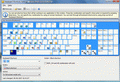
Comfort Keys was available as a giveaway on October 25, 2007!

Stop typing the same text over and over again! Now you don't need to go through numerous menus to find the necessary program or web page. With this new generation hotkey manager you can leave your mouse alone and configure hotkeys for all of your actions - just like real pro's do.
Comfort Keys will allow you to:
- Launch the necessary programs and open web pages by pressing a single hotkey;
- Insert predefined texts (email templates, signatures, passwords, greetings, phone numbers, addresses, etc.) using hotkeys or the built-in template manager;
- Control the sound volume in a quick and convenient manner;
- And much more.
System Requirements:
Windows 2000/XP/2003/Vista; 10 Mb of disk space
Publisher:
Comfort Software GroupHomepage:
http://comfort-software.com/page.php?3File Size:
2.60 MB
Price:
$24.95
Featured titles by Comfort Software Group
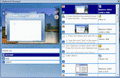
Comfort Clipboard is a clipboard manager. It supports all known data formats. It keeps the clipboard history that you can use to paste any selected fragment again. It automatically save the clipboard fragments to the hard disk and display additional information about saved fragments.

Comfort On-Screen Keyboard is an application displaying a virtual keyboard. It has additional advantages as compared to the regular keyboard: displaying the icons of shortcuts for Windows and popular applications; displaying characters actually typed in any language.
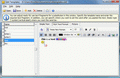
Template manager you can use to quickly paste frequently used text fragments or images. Comfort Templates Manager will allow you to quickly paste frequently used messages, phrases, signatures, smiles, addresses, greetings, passwords, etc.

Comfort Lang Switcher is a tool helping to control and switch the language when you are working with text. With Comfort Lang Switcher, you can switch the language or layout for the recently typed characters; change the case of the selected characters; show the language flag next to the caret.
GIVEAWAY download basket




Comments on Comfort Keys
Please add a comment explaining the reason behind your vote.
iPhone app giveaways »





Android app giveaways »





Professional program, better than most of those we've been seeing lately. Going to need some time to check out all its features. Thanks Comfort Software Group & GAOTD!
Save | Cancel
:) Yesss! Finally found an application to be able to Paste-As-Text in MS Office apps. I just setup a hotkey Ctrl-Shift-V to paste as text... perfect! Thank you
:/ Is anyone experiencing problems with their Mouse Wheel not scrolling any screens after installing this application?
:o Comodo Firewall has reported this application attaches a DLL to all exe files you run. Wonder if this is ok?
:D It has inbuilt keystrokes macro recorder and editor too, this tool is pretty cool!
Thank you :)
Save | Cancel
here's a better alternative
called Launchy
it's way better and more professional looking.
and it's FREE
http://www.launchy.net/
Save | Cancel
IMO most of the people who really need this are already familiar enough with their computers to be capable of using more powerful free alternatives, such as Autohotkey/Autoit.
Save | Cancel
Horror story
That will teach me not to forgrt ,Backup registry, Set restore point,Run it in sandboxie. I must be getting old ,just 60,i forget sometimes.
Just not for me this time.
Thank anyway GOTD Tesm
The Grouser
Save | Cancel
No need to reboot. For me, simply restarting the program got rid of the 'buy now button'. Thanks for the app, GAOTD.
Save | Cancel
I have bounced around from onscreen keyboard to onscreen keyboard trying to find the best one. I went from the Windows Onscreen keyboard to Click-N-Type to this one. I need to use an onscreen keyboard because I have no use of my hands. I use a sip & puff mouth controlled mouse called a quadjoy, www.quadjoy.com. I love this. Thank you GAOTD.
Save | Cancel
I am SOOOOOOO grateful....yes the text stuff is a great time saver but for me (one who looks at the keyboard to type) the hotkeys to change ALL my mistakenly typed capital letters (and vise versa) is an absolute blessing. Maybe Windows had it or some other program but I never knew about them. I am one very happy person.
Save | Cancel
First program I have had time to download, install & use. Limited use to photos only. It found images that had been downloaded as many as 5 separate times! Compared all images listed & all were identical. Left earliest image, checked later download dates for deletion, later emptied from Recycle Bin duplicates not needed. This program allowed me to reclaim over 15% of one drive alone, just from photo pic downloads. Be sure to verify files prior to emptying Recycle Bin. Very useful program for me.
Save | Cancel
Seem OK but will give it a miss, many thanks anyway.
Save | Cancel
I'm not sure how much I shall use this one, but it definitely looked worth a try. Like others, I have had to reboot to get rid of the "Buy now" option, but that is no big deal.
Thanks, gaotd - I am so glad I found this site! Most things that you offer are no use to me, but one or two are (usually the one programme I should have liked, or game on your sister site, is given on the one day I don't check it, but that's life!).
Save | Cancel
Anybody that is having problmes activating: you need to run activate.exe once unzipping Downloaded file. If that doesn't work or if there is no activate file, you should open the "readme" file for instructions or key.
Save | Cancel
it doesn't work with most games :( got it removed.
Save | Cancel
A question I have about programs of this type is how much resources it takes and is it easy to set it up so it doesn't startup automatically until you have had time to figure out how to use it.
It is easy to think one of these utility programs would be useful, download and install it, and then find it is using system resources even though you are not using it (probably because you have not had time to figure it out and set it up).
Save | Cancel
Comfort Keys looks like a very helpful bundle of utilities, though I'll have to work with it for a while before deciding on its usability. It certainly seems worth trying. Those of you who commented that Windows enables shortcut hotkeys should recognize that this utility packages the shortcut keys more conveniently, and offers much more besides.
I avoid shortcut-key program and macro launchers (such as Launchy and Clavier) because I can't remember all the shortcut key combinations. Today's giveaway enables the Windows key, and offers an on-screen keyboard "cheat sheet" that should help a lot. It even reminds you of the shortcuts for various specific applications.
Also, I use a free clipboard manager (such as ArsClip or Clipboard Help+Spell) both for multiple copy/paste operations and for boilerplate (what Comfort Keys calls "templates"). But I see an advantage in splitting the clipboard and boilerplate functions into two modules of one utility; both seem to be quite versatile.
I hope this is helpful.
Save | Cancel
For somebody who has no experience setting up or using 'hotkeys', this program and programs like it can look pretty intimidating. But when this site offered Direct Access, creating shortcuts to just about everything, it looked easy enough that I downloaded and tried it....and now I can't imagine how I ever worked and played without them. Even my husband uses hotkeys....and it usually takes him ten years to try anything new. This program offered today is going to allow me to do so much more and all without constantly having to input the same information or clicking the same series of buttons time after time after time, I am so looking forward to getting everything set up. One two hotkeys and I'll be doing what I want to be doing, not waiting to press five more buttons or to input this or that bit of information to open the program, I think that's great!!!
For all you newbies out there, give this program a try, once you get comfortable using it you'll wonder why you didn't try hotkeys sooner.
Save | Cancel
Ummm.. Windows does this already. I'm going to pass on this one. I would think the best hot-key for this program is . It's a giveaway for those that don't know their Windows operating system functionality. Back to my speech writing.
Thx anyway GOTD! You guys rock!
Woot! Yea baby...YEA!
2-SHEDS '08
Save | Cancel
Great freeware program I have used for years that also allows you to do multiple commands with one hot key, sound, shut down options, macros, calender, count down options, change case and more.
Save | Cancel
Want a freeware of the same type and a dang good one too? http://www.autohotkey.com/ This should help some of those requesting such or having problems with this one [which also looks like a goody :)]
Save | Cancel
I have no need to complicate my life or clutter up my computer with unnecessary items like this, it also slows down the computer, the more you add.
But, I'll keep waiting for a good usable program to come along.
Thanks anyway.
Save | Cancel
I've been using a program called Short Keys for years. It works in my emails, Word, all my programs. These programs help when you have to send things out (as in emails) that are repetitive so you don't have to type the same thing over and over and over. I also use it for my sig. on all my emails. Just wondering if I download this one to try it out, would/could there be a conflict between the 2 programs?
Save | Cancel
Hello all! Today's 15-Minute Review is up! Check it out!
http://www.bladedthoth.com/reviews/15mrs/comfort-keys-v2-0-3-1/
Save | Cancel
#24,25.. Try to use hotkeys with Ctrl or Alt or so on.
Save | Cancel
This program seemed ok until I used it. I set my "hot keys" to some of my most visited websites, but found that when I manually typed in a new site in my browser window if I hit a "hot key" letter it re-directed me to the "hot key" site. Anyone find a way around this problem? Otherwise I'll just take the extra two seconds and use my "Favorites" to get there.
Save | Cancel
This seemed like a great program, until I tried to use it. I was able to set my hot keys to regularly visited web sites, but found that when I typed in a different site in my browser window that when I hit a hot key letter it automatically redirected me to the hot key site instead. Because of this problem I uninstalled the program, and will return to the two second longer approach of using my favorites.
Save | Cancel
#3-HotkeyP is a freeware alternative.no need to install,just run it.i am not a power user,so no idea if it will suit your needs.
Save | Cancel
ideal for umpc without keyboard, far better than standard windows onscreen kb which came with my asus r2h. Now using small mini keyboard great! thanks!
Save | Cancel
#14 (to #2) Re: Activation
As someone mentioned upstream, this one seems to be a little different. As usual I ran activation.exe before setup.exe and was still seeing the "BUY" button. I reran activation.exe and was still seeing the "BUY" button (after closing and restarting the application)
I rebooted and now the buy button is gone and About says registered to Giveawayoftheday. Not sure which was the the action that worked but it seems fine now!
Regards ... Alec
Save | Cancel
WireKeys is better :)
Save | Cancel
TO ANY BODY THAT HE CAN'T REGISTERED & ACTIVATE HIS PROGRAM!!
see the comment number (7) by (Increase)!!
as he said:
ACTIVATION: didn’t work at first. You have to run the Activate.exe tool AFTER installing the program.
And thank him very much!!
Thanx Increase!!
Save | Cancel
Always read the READ ME that comes with every program! Sometimes you run setup 1st, often you run activate 1st.
Macro programs are great for many things, & although I have 2 I bought, I can use every free 1 I can get! I use them for pasting tons of things mostly. Chat works so much easier & faster with a macro for some of what I say, & I keep things like html code on them so when someone asks how to do..I just hit that macro! Also, passwords,URLS, cute or funny signatures or those with a url attached, whole paragraphs I type often, or even if I only need to type it once a month, it sure saves time!And my memory too! In Cybertown we use macros a LOT! Even for doing vrml 3D coding, it is my best bud!:) TY, TY, THANK YOU!
Save | Cancel
You can get any of Comfort-Software products absolutely for free..
if you do one of them requests!!
See that at:
Get your FREE ComfortKeys today:
http://www.comfort-software.com/page.php?25
Save | Cancel
Doesn't Windows already do this?
1. Right-click on any shortcut
2. Select Properties
3. Shortcut key:
Save | Cancel
#2: Look at the GAOTD home page and you should see the following red text: "Active Giveaway time left: ........".
"Free for our visitors as a time-limited offer" means that you are given the opportunity to install the full version of the software for free, BUT...it must be both downloaded and installed prior to the expiration of the offer.
Hopefully, the following will eliminate the numerous posts like "I can't register..."I have a trial version"..."How do I get a registration #"...yada, yada, yada:
READ. You should read all instructions carefully.
SAVE. If you are given a Reg#, User Name or any other info in any pop-up window during the process it is imperative that you cut, paste, and save all data to a text file.
The usual procedure is something like this:
1. Download and save the app
2. Read any text file
3. Unzip the app
4. Read any additional text files
5. "Activate" the software (you'll see the "activate.exe" file)
6. Install software
7. Register immediately, if necessary
You will then "own" a full version of the software IF installation and registration was completed prior to expiration of the free offer. The catch is that no support or updates are usually available--and most apps can't be reinstalled should they or your computer crash.
Save | Cancel
I use Launchy instead, so thanks but no thanks!
Save | Cancel
i am no sure about this. it looks pretty cool program. i will try to download. thanks gaotd
Save | Cancel
I downloaded this software and thought it would be useful. However, even though I followed directions: activate and then set up, I still get the "BUY" on the bottom of the opening page. I have closed and reopened the program several times and also receive the activation from GOATD, however, I cannot find where this is listed on the software, and cannot get rid of the "BUY" box at the bottom of the opening page.
Any suggestions would be appreciated.
Save | Cancel
My copy is looking for registration key. About says I have a 30 day eval copy.
Where do I get reg key?
Save | Cancel
Seems to be a very good program. But as many other similar programs lacks support of Unicode fonts (which already in use for 5 years).
Save | Cancel
Great program, but be forewarned clicking on the update button tries to update this version (2.0.3.1) to a seemingly older version 2.0.2.40 (the "update" fails). Shouldn't detract from the program's usefulness.
Save | Cancel
Thank for offering this great program.
ACTIVATION: didn't work at first. You have to run the Activate.exe tool AFTER installing the program.
This is one of the best productivity tools offered on GOTD.
I am a writer/translator and this program makes it easy to access some Text Typing/Editing Windows features in a matter of seconds, and therefore saving you a lot of time.
My favourite features:
Language Switcher, with "Current Language Flag"
Clipboard Manager
On-Screen Keyboard, for easy Shortcut Key setup
Being a multi-functional tool it will probably take some time to master, but is a definite keeper.
Save | Cancel
@ #4... see...
Clavier+ 10.6.1
http://utilfr42.free.fr/util/Clavier.php?sLang=en
BYE.
Save | Cancel
after regitering it and opening it it ask you if you want to buy it and you have a 30 day free trial , not a good giveaway today , not try it just unistalled it because of the 30 limit
Save | Cancel
Although all of these programs are exaggerated in their descriptions, this actually looks like it could be quite handy. I'm not sure if I'll be able to load this on my PC today, however, so if anyone has a freeware alternative it'd be greatly appreciated.
Save | Cancel
WOW!! absolutely fantastic macro tool!! I can easily add new macros, and the customization of text is unlimited! Not sure that I would ever pay $25 for this, but it is a great app nonetheless.
Simply by pressing Win+Space, I can access an infinite number of tags i have created, quickly inserting lines of text with just a few keystrokes.
Unfortunately, it doesn't allow customization of input. For example, win+space will always and only pull up the text insertion. Other than that, however, fantastic! 9/10!
Let's start a r3vo┘ution!
Ron Paul '08
Save | Cancel
What does time limited offer means? Even on GAOTD ... it is free for a limited period of time?
Save | Cancel
Hmmmm...it seems like a useful program but also at the same time it's useless...if you are that lazy to move the mouse or type a website...do your self a favor and download this program....lol
Save | Cancel