Every day we offer FREE licensed software you’d have to buy otherwise.
Giveaway of the day — Cleanse Uninstaller 3.4
Cleanse Uninstaller 3.4 was available as a giveaway on November 10, 2007!

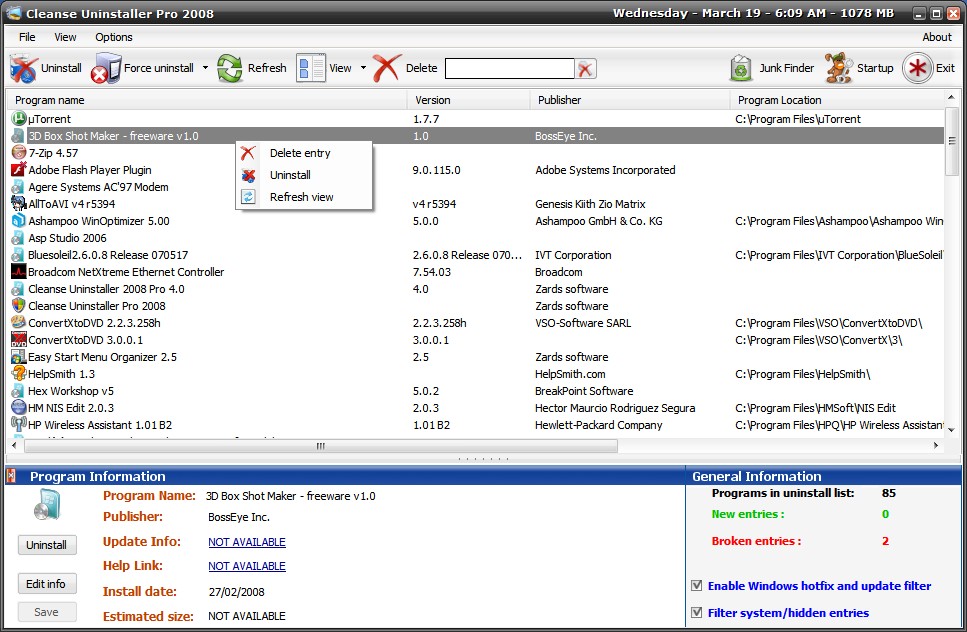
Cleanse is a program uninstaller that finds and remove even the most stubborn of programs. Uninstall faster, easier and more completely than you do with other programs.
First, Cleanse Uninstaller will try to use the original uninstaller that came with the software; then, Cleanse Uninstaller will do its own search of the system registry and local drives to find any left over files or registry entries (often these are left behind causing clogs which slow your computer) and remove all of the remaining traces to optimize your computer s performance.
Cleanse Uninstaller also includes a startup optimizer to make your computer boot alot faster and by removing any Trojans or adware that might startup with your computer you are able to make your computer safer for every day use.
System Requirements:
Windows NT/2000/XP/Vista; .NET Framework 2.0; 256 MB RAM; 500MHz processor or higher; less than 5 MB of hard drive space
Publisher:
Zards SoftwareHomepage:
http://www.zardssoftware.com/uninstaller/Uninstaller.htmlFile Size:
862 KB
Price:
$19.95
GIVEAWAY download basket




Comments on Cleanse Uninstaller 3.4
Please add a comment explaining the reason behind your vote.


iPhone app giveaways »





Android app giveaways »





It does the job very well 2 thumbs up great product
Save | Cancel
Damn! I missed it! I loved this thing! It got rid of anything I didn't want!
Save | Cancel
Slowed down my computer to a crawl! What a POS!
Save | Cancel
I have downloaded and tried to install the program but keeps on getting this message:
your .NET Framework no found.
Please help. I use Windows XP
Save | Cancel
Hi Roger Moore (#92). It froze my computer during the first scan it does. Well it isn't frozen, just very busy scanning and it appears locked up. Repeated scans are far faster. Hopefully that is all it is on your end too. Thanks again GAOTD and Zards Software.
Save | Cancel
negative side is that it doesn’t scan registry for errors. Or can’t scan hdd to delete folders which were left after earlier uninstalls
Save | Cancel
having trouble downloading free give software, freeze's up my p c
Save | Cancel
# 80 Steven
I gave you the link (#12) and I also got Avast (free home edition)!
I can assure that Unistall Manager is clean, I use it everyday: it's my first choice unistaller because of the speedness in loading.
Bye frank
Save | Cancel
Even though I tried several times I can't register it - it will expire december 12. And several others have the same problem.
Rather disappointing that there is no help on this problem, GAOTD-team??
Save | Cancel
Oops. Apparently my misunderstanding of how your timelag works, here the top shows 67 comments and my three I thought were missing are 68-69-70. A bit confusing. However no removal and thanks and apologies for jumping to contusions.
Shalom,
Steven
Save | Cancel
Excellent Uninstaller leaves the standard Windows "Add/Remove Programs" for dead.
Thanks again Zards
Save | Cancel
Don't know if this will die after 30 days or not...have run activate.exe several times, the "about/register" never has anything in it but blank spaces. Oh well. I can always get freeware revounistaller to replace this if it turns out to be only the trial version.
Save | Cancel
terima kasih atas kiriman hadiah hari ini, kalo mungkin tolong di kirim software mickrosof frontpage gratis agar bisa mendukung saya dalam pembuatan website.
terima kasih.
Save | Cancel
negative side is that it doesn't scan registry for errors. Or can't scan hdd to delete folders which were left after earlier uninstalls.
Save | Cancel
Will not activate with key provided. I've tried to download this twice and onto 2 different computers. Activation returns the same notice every time. Key is invalid. :(
Save | Cancel
downloaded and ran cleanse uninstaller.
it removed files that i needed to run my computer, had to reinstall windows, still files missing, games won't play, error messages all the time. I am not happy as you can well imagine. Looks like the computer shop will be working on my computer Monday.
Save | Cancel
Hi Folks,
Ok, looking at snapshot uninstall programs, yes Z-Soft does have a monitoring function. Total Uninstall is generally considered more thorough and strong but it is not freeware in the current version, some use the last freeware version. And another snapshot uninstall monitor may be Advanced Uninstaller PRO - but at a $40 hit.
I would say that snapshot uninstallers and post-facto uninstallers are really two distinct categories (although the snapshot will likely do the post-facto as well if there is no snapshot).
I just tried Revo again on a program, and it nicely caught many files and registry entries missed by the official uninstaller (including a delete files after bootup option for some locked files related to the tray) ..
However be careful (!) to only accept delete on registry entries that you can see belong to the program .. a few looked like they were there incorrectly .. and that is the big 'gotcha' in all these registry-delete-entries programs. As long as you take a minute to really read the registry entries that you accept for delete -- and see if they have the program name involved -- you should be ok.
Shalom,
Steven
Save | Cancel
Two problems:
Same problem as 53 above. How do I fix?
53 says:
1. Even though I’ve activated it, when I start it, it asks me to register.
2. From Vista error message: “Application attempted to perform an operation not allowed by the security policy. To grant this application the required permissions contact your system administrator, or use the Microsoft .NET Framework Configuration Tool”.
I’ve looked at the .NET configuration tool, but I’m not sure what to do. Both issues are ones I’m hoping someone can help me fix.
Save | Cancel
Hi Folks,
Incidentally on the Uninstall Manager, Tony's Freeware, my Avast! claimed a trojan (blocking the download/install which I was considering). I sent an email to Tony a few hours ago but I would be cautious unless there is real indication of an FP .. false positive.
Shalom,
Steven
Save | Cancel
Hi Folks,
The recommendations above for Revo are appreciated, nice simple shell around the Windows uninstaller with some additional junque removed.
Yes there are products that are "deep uninstall" by the snapshot before-and-after method .. one article recommended Total Uninstall, Trash It, Ashampoos and Tenebril being that way, with Total Uninstall particularly recommended (above Z-Soft is said to run by that method, that is news to me).
However such thoroughness comes at a cost of extra time and effort .. in the best case, taking a full-ish system snapshot before and after the install. If Windows XP had a real monitoring tool that would not be necessary :).
I tried that route and found it overkill, so Revo seems to be a good overall compromise. While Cleanse may have some differences they do not seem to justify getting involved with a non-born-free product, also the mention of Zard forums of silence also makes it hard to justify.
Anyway, good discussions above.
Decent giveaway, it sounds.
Shalom,
Steven Avery
Save | Cancel
Here's an other freebie from Ashampoo to reclame some 'al(l)otment' on your hard drive:
http://www2.ashampoo.com/webcache/html/1/product_2_0803__.htm
Different approach, takes snapshots of registry and files as you install. Bit tedious but it seems to do a thorough job if you use it when installing.
Cleanse is good for programs you've already installed, doesn't monitor. You should check the registry entries it wants to delete before you finish the job.
Revo seems nice also. Haven't used it yet, but I recon I will give it a try too.
CCleaner and Glary are registry cleaners. Although good at what they do they're not specifically directed at the program you want to uninstall. Thus, they can be somewhat confusing for the purpose of uninstalling. Also here goes, that you need to be knowledgable about registry's.
Thanks a bunch Zard Software
Save | Cancel
Be warned, when you force uninstall something like Opera, it will pick up system "Operation" registry entries and remove them.
Make sure the registries you remove are 100% related to that program.
Save | Cancel
GAOTD is the best! I really like this program better than CCleaner. Thank you for being you, and happy no screensaver Saturday!
Save | Cancel
asc3550.sys file is corrupted. Thats the message when I get after I uninstalled and restarted the system. Never in the past 5 years of installing/using/uninstalling hundreds of softwares has this happened... Please help me get back my system.
Save | Cancel
I just finished uninstalling a few softwares using this. Restarted. System won't come back up. WTF!
Save | Cancel
this is a gr8 software. i was having trouble with my browser so i decided to uninstall it normall but it did not work. so i tried this out and it worked
Save | Cancel
this is a gr8 software. i was having trouble with Opera so i decided to uninstall it normall but it did not work. so i tried this out and it worked :)
Save | Cancel
One of the most useful things about the comment section here is the mention of alternative freeware that is similar to the giveaway. What isn't useful are raves about completely different programs (CCleaner), or programs that have a an uninstaller as one part of them (Gary Utilities). Also, tips about high-priced programs that work better than free ones. Duh.
Add to the list things like lessons lessons in English usage. And endless drone-alogues from people who think that just because they have nothing but time on their hands everybody wants to read about what kind of computer they have, or how expertly they use it, or their memories of "back in the day"...
Find me a "Crap Cleaner" that does away with that nonsense and you'll have my business.
Save | Cancel
#30:
LASSE: thanks for highlighting the little ZSoft removal software here. From my experience with it -- having tried various uninstallers -- it really does deserve to be known much more widely, especially as it puts "safety" right up there with "ease of use" (which not every program does.)
I've always felt confident with it -- which is pretty high praise for any software -- so am off now to compare today's GAOTD with ZSoft's.
Save | Cancel
#53 & #61: I had the same problem using Vista Home Premium. I resolved the problem on my computer by right-clicking on the Activate icon AND the Setup icon (both icons); click on the Compatibility tab; click on "run this program as an administrator". Everything worked fine after that.
Save | Cancel
While I am sure that this program means well, it should be avoided at all cost. The way this program uninstalls programs on Vista is not really safe at all. It does not have the proper permissions unless you right click on the program and select run as administrator every time.
Not reccomended for computer novices either.
Find something safer to use.
Save | Cancel
#13 Meta one tip for you:
I use to put in one folder on the desktop named "GAOTD" all the schortcuts of the programs downloaded from this site expecially for the well known limitations in their use (for example: no automatic updates etc.)
Again on "Unistall Manager" (#12)it loads much faster respect all the others competitors freeware or not !!
Save | Cancel
I got the earlier version of this here when it was offered before. It worked great, so I'll be downloading this for sure!
Save | Cancel
#49 The Feb 6, 2008 date given on the download page refers to the file download NOT the Program expiration. The Program does NOT expire.
Save | Cancel
As I write this,there are 80% "Thumbs UP",BUT,MOST of the written comments put it DOWN.That is VERY confusing.!!
Save | Cancel
#61 If you activated it, it will be registered and you don't have to do anything else. To check if it is registered just click on About just above where it says Exit on the right and then click About again that will open a window that will say if it is registered to GAOTD. If it is not, then close program and activate it again.
Save | Cancel
Hmm - installed OK on my Vista Ultimate X64 but it is till showing up as a trial copy despite having hit clicked the activate icon prior to installing..
Save | Cancel
Hi! I've just downloaded your giveawayoftheday, activated it but can't register the product. Please help me by telling me how to do this. The user name should be: giveawayoftheday. BUT the serial number????
Thank you and may God bless...Roger Willett
Save | Cancel
Used before but somehow lost it, very happy to get it back. The program is very easy to use, and does a pretty good job. Just a little scared to use the start up function. I also use RegSeek, and Wise register cleaner, both programs found a couple of things this program missed. But overall I really like it and would recommend it to even a rookie. I did create a restore point before running, just in case, but no problems have occured.
Save | Cancel
I will pass on this on. I agree with other comments and use the uninstaller in Glary Utilities. I like this because it shows the path
that it will use for a chosen uninstall. That way I can be sure it will uninstall what I intend to. Maybe other programs also do this I'm not sure. I'm sure this is a good program but I'm comfortable using Glary. Thank you GAOTD for the offer and thank you to the publisher, Zards Software for your contribution.
Save | Cancel
I really like the program but #10's freeware picked up a lot more programs when I compared them. However, 10's is slower. I have a lot of junk programs I just HAD to have over the months and some I have no clue where they are so both programs were able to bring them up for me. Conflict, conflict, conflict!
Ok I will keep them both. :}
Save | Cancel
44: Try MemTest86, it's designed to do exactly what you need, and works great. Click my website for it.
Save | Cancel
#21 to help you clarify
alot is more than a lot
just as awholebunch is more than a whole bunch
mucho- depending on how it is used can mean less than a lot OR more than awholebunch.
however calling shotgun still means you get the passenger seat regardless of which other terms might be added
:)
Save | Cancel
I'm an avid user of ccleaner and I love it. Still, Cleanse Uninstaller is somewhat different and I can see using it for a different purpose than ccleaner.
I use ccleaner mainly for maintenance, running it about once a week. With Cleanse Uninstaller, I would use it instead of the built-in "Add/Remove Programs" to delete software that I no longer use. It's faster than using "Add/Remove Programs". First, it runs the original uninstaller for whichever software you are uninstalling (assuming it's available), then it cleans the registry and deletes folders which is something that those uninstallers never quite seem to take care of.
Sure, ccleaner can do this but Cleanse Uninstaller has a nicer interface with icons that help you find the software that you want to remove. It is faster and more user-friendly. Plus, at least in my mind, I look at ccleaner as a maintenance program whereas I would use Cleanse Uninstaller as needed to initiate program removal.
Save | Cancel
awesome alternatives. This programjust like all others can be either free or charged. Screen readers and such are doing that too. Anyway, interface is accessible enough to get me through. Thanks
Save | Cancel
Two problems:
1. Even though I've activated it, when I start it, it asks me to register.
2. From Vista error message: "Application attempted to perform an operation not allowed by the security policy. To grant this application the required permissions contact your system administrator, or use the Microsoft .NET Framework Configuration Tool".
I've looked at the .NET configuration tool, but I'm not sure what to do. Both issues are ones I'm hoping someone can help me fix.
Save | Cancel
Agree with comment #16--Revouninstaller(http://revouninstaller.com/)is a great freeware program that works as advertised in cleaning up the registry after the basic uninstall. Can't see any reason to replace it with Cleanse.
Save | Cancel
I can only recommend this program - thanks!
I have installed on a desktop with XP - here it is registered. And on a laptop with Vista - here it is apparently UNregistered and will expire in December.
I have tried to activate again. And I have uninstalled (!) and tried all over again. Same result.
Unregistered...
?????
Save | Cancel
Did anyone happen to notice the expiration date of Feb 6, 2008?
This gives you a full 5 months to try this prog (IF you don't uninstall it before then)
THNX GAOTD for this update!
Save | Cancel
net framework 2.0? your kidding, right?
no way!
Save | Cancel