English
Every day we offer FREE licensed software you’d have to buy otherwise.
$69.95
EXPIRED
Giveaway of the day — iCare Data Recovery v3.5
Try iCare Data Recovery to take your lost files back!
$69.95
EXPIRED
User rating:
260
84 comments
iCare Data Recovery v3.5 was available as a giveaway on January 30, 2010!
Today Giveaway of the Day

Create your website now!
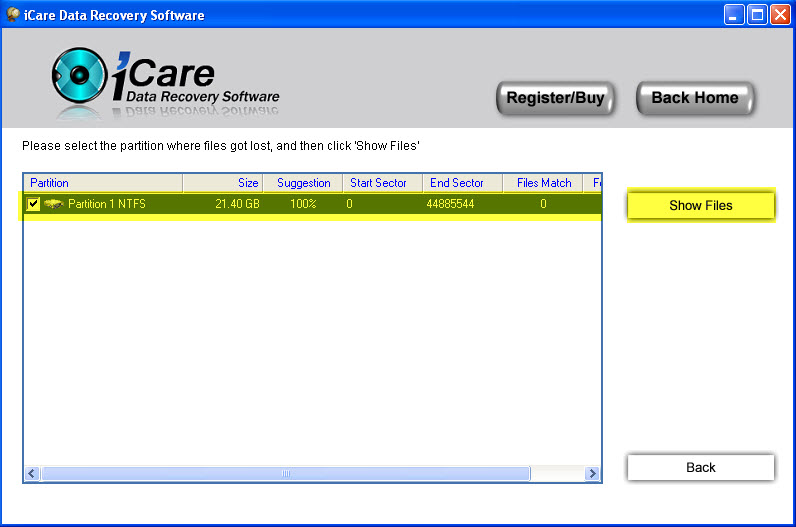
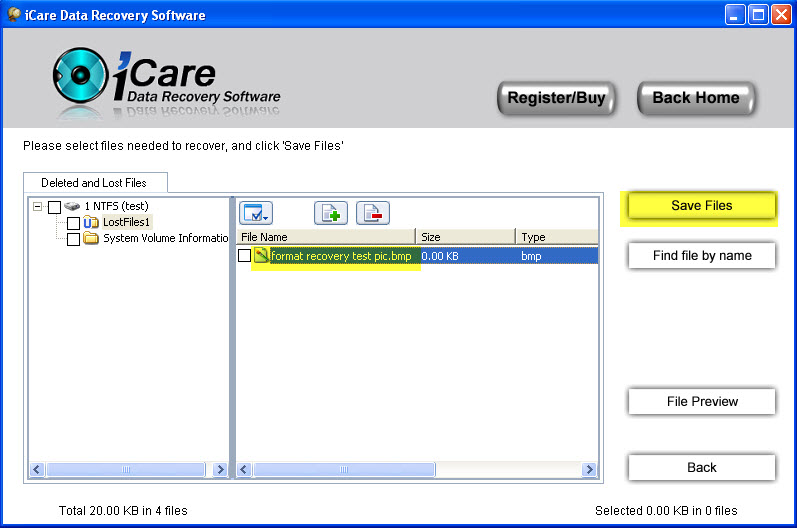
iCare Data Recovery Software is a unformat, undelete and comprehensive recovery tool to help users recover files from formatted drive like hard disk drive, external hard drive, sd card, memory card, flash drive. Besides unformat, it can bring files back when partition is unreadable, inaccessible, partition deleted, mbr damged, boot sector damaged, virus attacked.
It provides four recovery wizard:
- "Partition Recovery" to recover deleted partitions;
- "Deleted File Recovery" to recover accidentally deleted files, files in inaccessible partitions, RAW file system file recovery, boot sector damaged, mbr corrupted;
- "Deep Scan Recovery" to have a full scan of lost and existing files and find files as much as possible;
- "Format Recovery" to recover files from formatted hard disk, external disk, flash drive, sd card etc.
System Requirements:
Windows Vista, XP, 2000 pro, Server 2008, 2003, 2000
Publisher:
iCare RecoveryHomepage:
http://www.icare-recovery.com/File Size:
3.60 MB
Price:
$69.95
Comments on iCare Data Recovery v3.5
Thank you for voting!
Please add a comment explaining the reason behind your vote.
Please add a comment explaining the reason behind your vote.

You can also add comment viaFacebook

iPhone app giveaways »

$4.99 ➞ free today

$0.29 ➞ free today

$0.29 ➞ free today

$2.99 ➞ free today

Ever wonder how long until your next vacation, how many shopping days until Christmas, or how long until your birthday?
$0.49 ➞ free today
Android app giveaways »

The application is for those who love to practice gym without the time and ability to visit gym.
$1.49 ➞ free today

An AI-based study App for learning and memorizing Spanish vocabulary.
$6.99 ➞ free today

$0.99 ➞ free today

Asterisk is a powerful and elegant two-factor authentication code generator.
$0.49 ➞ free today

A choice of three fun and engaging mini games in addition to a regular math trainer mode!
$2.99 ➞ free today
^^^^ Windows Vista 64bit
Save | Cancel
Install went fine, registration went fine...but when I go to use it, its not finding ANY drives, I just get a blank page with nothing to select to make any type of recovery. All of the buttons work, because when I click one it tells me to select a drive...but there are none to select. Cant figure out why its doing that, but as it sits it worthless, just a blank screen with some buttons.
Running Windows Vista.
Save | Cancel
---sorry if this goes thru twice...would like to blame bad gateway, but it was me---
this program reminded me of prior giveaway "Easeus Data Recovery Wizard Professional 4.3.6"
tested on XPSP2, MCE, 32
iCare Data Recovery:
required direct disk access; fixed window size on opening, can resize to fullscreen after choosing recovery type;requested internet access during recovery process; options to filter, find file by name/type, preview, choose list or thumbnail; blue "u" for unknown, red "d" for deleted; if a help file was included, i didn't see it (sorry)...
Easeus Data Recovery Wizard Professional 4.3.6:
required direct disk access; resizeable window on opening; RPC request during recovery process; options to filter, find file by name/type, preview, choose list or thumbnail; blue "u" for unknown, red "d" for deleted; help file within program; ability to view state (text/hex/image); ability to save prior scan results, so re-scan is not required (i only tried this with deep scan)...
these two programs were quite similar to me...
Recuva:
on my pc opens fullscreen, can be resized; does not ask for direct disk access or internet access (unless update check is selected); options to filter, find file by name/type, preview; ability to view state (text/hex/image); at-a-glance views (red/unrecoverable, green/excellent, etc), filename, path, last modified, size, state, comment (EX: No overwritten clusters detected); if a help file was included, i didn't see it (again, sorry)...
file recovery, light scan, 1gb flash drive:
iCare Data Recovery:
just under two minutes; 77.42mb; variety of files (png, ogg, zip, etc.); zips were corrupted, mileage varied on the others, but overall good...
Easeus Data Recovery Wizard Professional 4.3.6:
just over two minutes; 57.36mb; and again: variety of files (png, ogg, zip, etc.); zips were corrupted, mileage varied on the others, but overall good...
note: iCare recovered file "$RmMetadata"---@20mb; Easus recovered "My Music", "My Pictures", "My Videos" that i had copied...which accounted for the size difference (the iCare files were larger)...
Recuva:
@2 seconds!; 57.3mb; and again: variety of files (png, ogg, zip, etc.); zips were corrupted, mileage varied on the others, but overall good...
note on recovery: iCare and Easeus placed everything in same-named recoved files (EX: images, music, etc.); Recuva placed everything in the selected file, unsorted (you can choose & sort them then recover to a specific file---a little more work, but probably sorted better for you in the future)...
file recovery, deep scan, same 1gb flash drive---formatted to FAT from NTFS after moving files to pc (too much coffee tonight...):
iCare Data Recovery:
two flash drives showed up to select from: both showed FAT, & contained the same files (?); @two minute scan (each); 685mb & 685.26mb; this recovery also included CAB files; results the same: zips were corrupted, mileage varied on the others, but overall good...
Easeus Data Recovery Wizard Professional 4.3.6:
@five minute scan; showed one drive, two results to choose from: NTFS & FAT16; @1.40gb; again: this recovery also included CAB files; results: not all zips were corrupted, mileage varied on the others, but overall better...
note: the NTFS file (744mb) contained the files that were moved to my pc before format---these had the best results (zips seem ok on quick test, .exe ok, images good, one unidentifiable file); the FAT file contained the items recovered during the light scan...
note: no, i do not have any idea how i recovered over 1gb from a 1gb flash drive...
Recuva:
@two minute scan; 9.97mb : ( ; JPG, PNG, mp3, one ZIP: all ok, CAB: clueless commenter does not know (sorry), all numbered (no names recovered)...
note: i do not know if this is because of Recuva being the only of the three that does not get direct disk access...i will leave that to Fubar whenever he returns, as i expect him to be his usual Frank self and correct any errors i've made (i blame the coffee, oreo's, & 5am time...lol...)...
my preference until today was Recuva (freeware) & Easeus (paid), tho' i was pleased with iCare...i was hesistant to test it until reading the comments about portability (haven't tried that yet), & mike's comment about what hits the OS (i look for the OS impact comments the most---usually Fubar & mike are great with this)...
light scans: freeware Recuva is way faster, results as good...
deep scans: still looks like Easeus...
iCare needs more testing, but portable is always good...and would appreciate any comments concerning the direct disk access question...
thank you iCare & GOTD
Save | Cancel
Installed and activated ok on win xp sp2
use the GOTD download and nothing is required — you don’t have to do anything to register although that 32kb thing makes you think it isn't.
The readme file usually has an Activate.exe in it, this one automatically activates even if you think it didn't, don't knock GAOTD for an overlook on the developers part.
I get a lot of stuff from here and have for years, some good, some not so good but always free on the day it's given away.
Thanks iCare Recovery Software Ltd
Keep up the good work GAOTD team
~TJ
Save | Cancel
Even the best online tutorial can't help me, when I am not able to go online, or when I have only a slow connection.
So it is an absolute requirement to attach a tutorial and help function to the programme. Especially for such a complex process.
Save | Cancel
***Though the software says it is not registered, it can recover files of any size***
Save | Cancel
This program does not work when I click on an option like deep scan all I get is a blank screen were the I am supposed to select a drive or partition, I can reinstall it and it will work one time and then it does not work if I try it again! anyone else having this problem?
Save | Cancel
@17 - Ray H
If you click on DOWNLOAD,
and then go down to where it gives a choice of DOWNLOAD or LEARN MORE,
and then click on LEARN MORE, then scroll down, you will see on the left had side that it says “Compatible with Windows 7″.
Ray, You are clicking the wrong link - The "Download or Learn More" links refer to: Advanced SystemCare package, as is explained on the "Learn More" Page. Yes, the developers will support Advanced SystemCare on Windows 7.
BTW - I have got iCare to work on Windows 7 - but the fact that it doesn't crash or display error messages, doesn't always mean that it is problem free. There have been several "versions" of NTFS released over the years - and Windows 7 comes with a newer release of NTFS than shipped with XP, for example. The new version of NTFS is backward compatible with previous versions (XP, Vista etc) - but iCare Data Recovery could break when when trying to recover data stored using new NTFS features/attributes that the program doesn't know about. So a Windows 7 version doesn't necessarily mean a new install program, nicer buttons, and flashy progress bars, but what it probably will include is the ability to recognise storage features and attributes that were only introduced with the new release of NTFS that came with Windows 7.
In terms of the registered/unregistered problems - I'm not sure what I did wrong or right - but I just downloaded the GOTD giveaway version and installed it on Windows 7 x32, I have not seen any dialogs, buttons or prompts requesting registrations, and have had a 100% success rate at undeleting several files (over 50MB in size) across multiple drives.
It seems some users are having less success, running the setup and getting a "trial version". I'm leaving that problem for somebody else as I cannot reproduce it (After 4 separate & successful installs)
Save | Cancel
Tried it again and program worked properly. Folks this one works after all but be patient. Thanks GOTD.
Save | Cancel
Registration does not work. Bummer, Folks don't waste your time with this one .
Save | Cancel
Installed fine on Vista Home Premium 32 bit.
Save | Cancel
Hello from Romania ! I use Vista Home Premium 32 bits. ICare installed very well and on the final phase, it was automatically activated. I used it to recover data from a Hitachi external HDD of 30 GB. My OS see the HDD, but could not open it anymore, because of some corrupted files. Even that iCare interface suggest that is a trial version, everything work OK. I was able to recover and save 27 GB of information (pictures, video, software kits, games, etc.) Everything in about 2-3 hours. Thanks iCare and GOAOTD !
Save | Cancel
Thanks, mike, that you put things straight.
I nearly was going to listen to all the complaints.
However, now I'm glad, I installed the programme and will install it on every external drive; as you wrote, you never know if Recuva will find just THAT file you need most.
I put it on my external K: drive and and scanned a USB-stick with a wonderful outcome :)
The programme recovered: jpg, png, zip, 7zip, rar, exe, pdf, txt, avi. Only 2 files (png and pdf), the oldest from 2006, were defect. This stick was in heavy use all the years.
There was no restriction of the file-size.
I installed it with the "right-click-administrator" on my VISTA 32 system.
Thanks to GOTD and the developer iCare
graylox
Save | Cancel
No Good,
Wont recover more than 32KB without registration. No clue how to register for free. Deep scan of a corupted drive quoted 197 hours to complete. when stopped after 2 hours to view retrieved files, all files were empty.
Complete waste of time!
Save | Cancel
I just installed it on 7 x64.
It recovered a 86mb .wim file perfectly.
No need to use compatibilty mode. Seems to work well from that one small test.
Save | Cancel
@ 54 cheeky
I agree with your "special version" interpretation / diagnosis. It appears to be a common practice for developers to post special versions for GOTD giveaways. When a special version being offered, usually that is noted early on in the download day - why not just indicate that a standard version is not being offered?
Save | Cancel
The Grouser Says "it`s A DUD"
My new Vista laptop refused to activate any GOTD downloads for over a year until yesterday after a system complete reinstall.
Install & activated,restart, OK.
First run seemed ok.
All recovery programs run rather slowly.I Have tried many.
II
I stopped the program after A few minute sand tried the next option
The program came up, but after clicking the next button "deleted file recovery" the interface came up with no information displayed.
All other buttons gave the same result.
Your results May vary.
Conclusion "A promising app , Not ready for primetime"
The Grouser
Save | Cancel
@Canuck - Thanks, it worked as you said :)
Save | Cancel
#44: "First the program was installed but did not offer any place to register. There is no place to register on the website and no “Help”, “About” or other common places to register."
Provided you use the GOTD download, nothing's required -- you don't have to do anything to register. Fire up the trial & you'll see the big BUY buttons.
"...the developers have taken measures to hide their information from the public, it does not include standard user interface items ..."
I didn't (& won't) bother to check their ID one way or another, as 1) GOTD has fully earned my trust over the years, & 2) the app doesn't have a big enough impact on Windows (in fact as a portable app, none) that I'd worry about it. As for any missing Windows elements, it's not an uncommon trade off for small program size &/or portability. If it took up far more disk space &/or made hundreds of reg entries *then* I might notice.
* * *
#45: "cant find if there is a bootable disc, to start with a bum hdd"
No... look up BartPE, LiveXP etc. In fact there are several projects for putting bootable, minimal Windows setups on USB sticks etc. Then again, the reason to boot from one of those in this case would be to make sure you don't overwrite the file(s) you're after [it's not like you're going to bring a drive's failing components back to life] -- if you have a drive fail, 1) replace it, 2) restore a backup to the replacement drive, & 3) depending on how critical any missing files are, either use recovery software while running Windows from your new drive scanning the old one, or scanning a sector by sector image backup of the failed drive that's been restored to another drive/partition.
Save | Cancel
Seems to be a pretty powerful app. Does what it says. All vista and win7 users stop complaining, it's your fault you upgraded. Xp sp2 only is good!
Save | Cancel
The program gives the impression that it is not registered, however it acts as if registered.
It recovered files lost ages ago on a drive that had been re-partitioned, and defragmented on many occasions, I was very impressed.
To give it a really good test, I used a program called Eraser to overwrite the unused space and then tried to recover files. It had no difficulty recovering hundreds and hundreds of valid files.
To my mind this makes it a very useful tool to have and I shall be keeping it for certain.
Save | Cancel
iCare Data Recovery is obviously one of those apps you hope to never try. As an *in case* sort of thing, the developers at least have made it painless today to add it to your toolbox -- the only impact from/of installation in XP Pro SP3 32 was ~5.5MB in the program's folder, & 19 entries in the registry from the Inno Setup installer. The GOTD version is different from the trial, & no key or registration is necessary -- if you fire up the trial, & select one of the buttons, the new window shows a big Buy button. All in all there's really no reason not to get today's GOTD.
Next question might be: "Why bother when we already have the free Recuva, &/or some brand X recovery app already"? Wellll... my reason for hanging onto iCare Data Recovery is that in a worst case scenario, it's algorithms may work when something else doesn't, & there's really no way to test for that AFAIK short of de-compiling the app & comparing the way it works to whatever competing app.
Now a worst case scenario is IMHO when you just have data scattered in random clusters on a drive, & **Really** want/need to piece that together into some sort of files. IN that case I feel it's like when do you give up all hope & turn off life support. If you really, Really need those files, if the 1st app you try isn't completely successful, are you willing to try a 2nd app, or a 3rd or a 4th?
Not working in 7 yet is less a problem with a recovery app, since ideally you're not running anything on the drive you're looking at, & it's even better if you're running off a mini version of Windows like the LiveXP I use & have on a bootable USB stick, or BartPE or WinPE. If it's not the system drive/partition you're in better shape, but best practice if you need a file (or files) back is to fully back up the drive in question, with a sector by sector disk image that you can restore to that drive/partition or another -- this guards against further loss if the drive is failing, & reduces risk of something overwriting data as you attempt recovery.
Data recovery itself can be as simple as opening the recycle bin, restoring what you need. Or the physical location of clusters making up a file can be lost with a normal delete, & just has to be re-entered in the drive's table of contents -- the catch there is you have to do it before something overwrites those clusters (holding the file's data) -- if you accidentally delete a file on your system drive, flick the power switch to off... don't go through Windows shut down, & don't boot to that system drive until you have whatever you need recovered. If you delete a file on a purely storage drive/partition, AND you don't have any software using that for a temp drive, usually you can just run recovery software then & there, but if the file's critical, shutting down can't hurt. A quick drive format deletes that table of contents, so again providing the files aren't overwritten, a new one can be generated. Partition Table Doctor has worked well for me, as has it's capability to back up that table. A regular drive format writes all 1s or 0s, same as a single pass erase. As I mentioned, worst case to me is when parts of files are missing because of physical drive problems, or maybe you didn't notice a file was gone right away & it was partly overwritten... and that's not cause to give up, depending on how badly you want that file(s), & how hard it would be to replace. A partial Word doc with 90%+ of the text, minus a little formatting can sometimes be almost invaluable, & that's when you might not mind the time it takes to run 3 or 4 recovery apps.
Save | Cancel
Apologies to people who know this already. Regular GOTD users may be interested to know that BillP Studios are offering the WinPatrol PLUS upgrade for only 99 cents. It was a 24 hour opportunity, which has been extended until January 30, 12:01 AM EST.
They're calling it the Great 99 Cent Software Experiment of 2010.
:-)
Save | Cancel
Every time the "Save Files" button is clicked in one of the recovery windows, the program phones home to their website with some data.
Save | Cancel
#44: Thanks, Harold, for the most enlightening comments I've seen here re this giveaway. I am more than leery to install anything like this for which the developers paid to have their domain information and information about them hidden - kinda makes one stop and wonder why. Seems to me that a legitimate company would not undertake such an effort. I'll take a pass on this one!
Save | Cancel
Anyone else having this problem:
When I first run the program, it searches for "Volumes/Partitions" from which I wish to recover files. I can then recover with no problem.
However, if I then close the program & re-open, the "Volumes/Partitions" windows is blank and there is no place to initiate a second search.
Save | Cancel
I am running XP and am getting the same message that it is a trial version and need to register?
Save | Cancel
There's gotta be some bugs hiding in this critter! It runs on my Win 7 x64, but not on others Win 7's. Finds stuff--loses stuff. Saying it's activated, and then still get "trial version" headings. Either it is, or it's not--time to poop or get off the toilet with the coding. Some say it works, and others say it does not. Tried installing 3 times under various conditions (no firewall, run as admin, etc, etc.). Originally installed on XP 32, then retried on Win 7 x64. No difference with activating--it says you are, along with the trial version message. Yes, you can drag the ICare programs folder onto a Thumbdrive and run it from there. I tried recovering many MB's worth of pics and programs. It said every pic was corrupted, and that every program was incompatable with my OS--even though that's where they're installed. Needs a lot of work, but may be promising down the road.
Save | Cancel
@37 Damian:
:)
You're quite right:
Even though the misleading message “The trial version can only recover file less than 32 KB for test. To recover lost files. please register.” is displayed, it recovers files that are much bigger.
So it seems to be the full (registered) version after all.
Save | Cancel
#18 et al.
If you are using Vista X64 and get the message “The process cannot be accessed because its being used by another process” unload your virus protection when installing the software. After the load is complete reload your virus protection.
Save | Cancel
Nothing = to Paragon. Period.
Save | Cancel
JOHN
Looking forward to your results. I have several drives with unallocated formats. Several got wiped out in one night just sitting on the shelf - not even installed. Have no idea how. Tried several programs, nothing worked.
Save | Cancel
Hopefully when the Windows 7 support version is available we can see it here also. Tried to run in compatibility mode and still did not work Thanks GOTD
Save | Cancel
To Number 1, BuBBy - "iCare Data Recovery Software does not support to use on Windows 7, but will be upgraded to Windows 7 compatible in a few months."
I have Windows 7 myself and it indeed would not work UNTIL I did the following; as such this WILL work in Windows 7 if you follow the following procedure -
* Install the program with an icon on the desktop;
* Right click on the icon and choose Properties;
* Click the "compatibility" tab
* Choose from the dropdown list "Windows XP SP3"
* Click apply and OK
* Run the program, et voila!!!
The compatibility feature is in all computers since Windows XP for this very reason - most programs that will not run with new operating systems can still be run if you use this feature. It is a relatively little known trick that is incredibly useful.
Save | Cancel
I tried I recovery and it says, it is a trial and can only recover a certain file size not really a give away i.e. you can download the trail on their site. Another fail from giveawayoftheday.com!!!
Save | Cancel
Sorry . How to register this one?
Save | Cancel
@7 - BuBBy
The readme.txt file just says to run setup. The software may be fully functional, but it still indicates "To recover lost files, please register" on the undelete pages. The "REGCODE" entry in the registry is empty, even after following all the instructions. So, maybe this is a specially crafted version for GOTD that need no regcode and still displays "please register" warnings.
Save | Cancel
Hoe moet je deze nu registreren?
Save | Cancel
BTW:
Is fully portable: copy just all files to your usb-drive/cd/dvd as there are:
iCareDataRecovery.exe
iCareViewer.exe
aaaamon.dll
acledit.dll
admparse.dll
adptif.dll
adsmsext.dll
batt.dll
gdiplus.dll ;might already be in system folder...
mfc80.dll ;might already be in system folder...
mfcm80.dll ;might already be in system folder...
msvcp80.dll ;might already be in system folder...
msvcr80.dll ;might already be in system folder...
+ .manifest files
Save | Cancel
Regarding 6. - Joe Birley
How do I register it . . . I just downloaded and had the same experience. I then tried to recover a 1.3MB file, had no problem and therefore think (and hope) no registration is necessary.
Save | Cancel
Sorry, GOTD, this one appears to be a loser. Setup.exe installs and activates the program, exactly as readme.txt says. But the program says I have to register it to recover any files over 32 KB -- and for the life of me, I can't find anywhere to register the program. There's no button or menu, and not even a clue on the publisher's Web site (unless I want to pay $69.95).
This trial version does recognize my trashed USB flash disk, which is one step better than many other recovery tools I've tried, but doesn't find any files on it -- and says it wouldn't recover them if it did find them, unless I can figure out how to register it.
I will appreciate any advice from GOTD, Bubby, iCare, or anyone else about how to register this program.
Save | Cancel
Update - not only does it not register, the 2nd time I ran it, it lost all my 'Volume' info' and there's no provision to re-search for them. This is a loser program.
Save | Cancel
I had to get this download after a person I know said they tested it and was able to go back 60 formats and still recover data.
Way to go icare and GOTD
Thanks
Save | Cancel
@6
Though the software says it is not registered, it can recover files of any size
Save | Cancel
To #7 BuBBy: same problem as #6. Readme has no instructions on hopw to register. Just says to install today. Program has no place to register.
Save | Cancel
cant find if there is a bootable disc, to start with a bum hdd?
Save | Cancel
As a forensics expert I thought I would take a look at this for the home user. It did a good job of locating both lost and deleted files, previewing them, etc. However, I did not do extensive testing as I was unable to do so.
First the program was installed but did not offer any place to register. There is no place to register on the website and no "Help", "About" or other common places to register. If I could not find it reasonably quick how do they expect regular users to do so?
Although it does have a "preview" button to see selected files so you can decide if you want to recover them or not it does not preview many common file types including pdf and rtf. It did open some doc files but would not open any xls files. When I tried to recover a small deleted file it appeared to work correctly but when I checked the file was not where it was "saved" to.
In short the problems of user interface are so pervasive as to raise serious questions about the developers. So I checked to see who they are. Their domain information and information about them is hidden (a service that you have to pay for to get). So they paid to make sure you can't get information about them. This is extremely unusual for a commercial business.
In short it does not appear to work as advertised, the developers have taken measures to hide their information from the public, it does not include standard user interface items (like About, Update, Register, etc) and appears as a whole to be poorly done. The one good thing that I can say is that it does appear to have provided a list of deleted files. After my initial experience I did not even bother to test it on lost partitions and the like (I have a standard test drive for that with known deleted, formatted, scrubbed, etc files to test new software). There just did not seem to be any point in spending the time.
Save | Cancel
it is no a trial though stated :
"the trial version can only recover file less tahn 32 KB for test.
To recover lost files, please register"
the reason might be that it is not a "normal" version. that means that the app comes without registering a password, it maens that this app is a kind of retail. if this app were to be registered there would been an activate.exe file. so do not worry, it is working.
Save | Cancel
How do I register the software?
Save | Cancel
Perhaps this comment will be more useful.
After installing the software and seeing this message ("The trial version can only recover file[sic] less than 32KB for test. To recover lost files, please register."), it occurred to me that this might simply be poor coding which did not remove a misleading message from the registered version. Despite the message, I proceeded to attempt recovery of a 3MB file and the recovery succeeded.
Product performance: thumbs up.
Product informational text: thumbs down.
Save | Cancel