English
Every day we offer FREE licensed software you’d have to buy otherwise.
$29.99
EXPIRED
Giveaway of the day — Ashampoo Backup 2020
Backup and restore files extensively in just a few clicks!
$29.99
EXPIRED
User rating:
97
58 comments
Ashampoo Backup 2020 was available as a giveaway on October 6, 2019!
Today Giveaway of the Day

Control remote desktop or laptop from any device and anywhere!
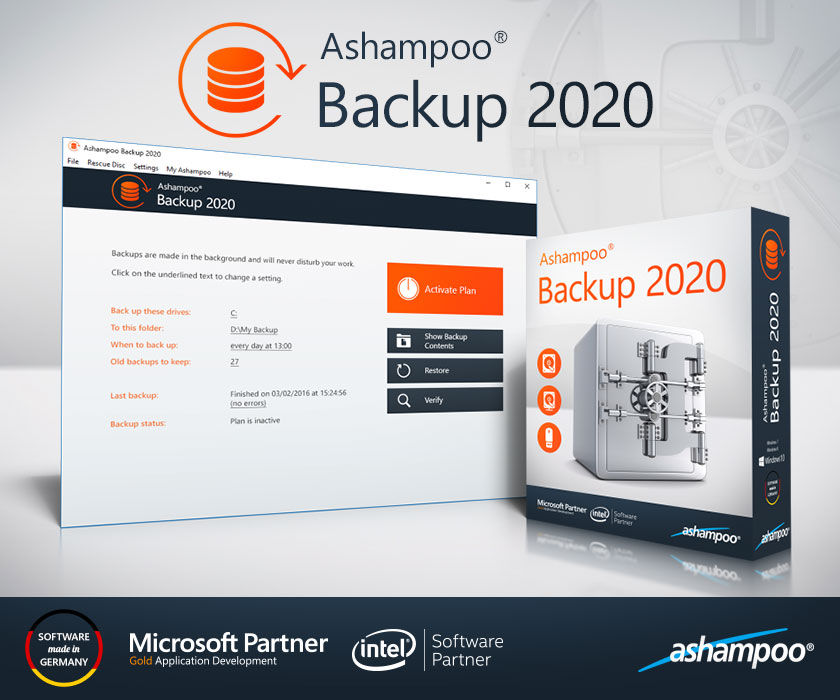
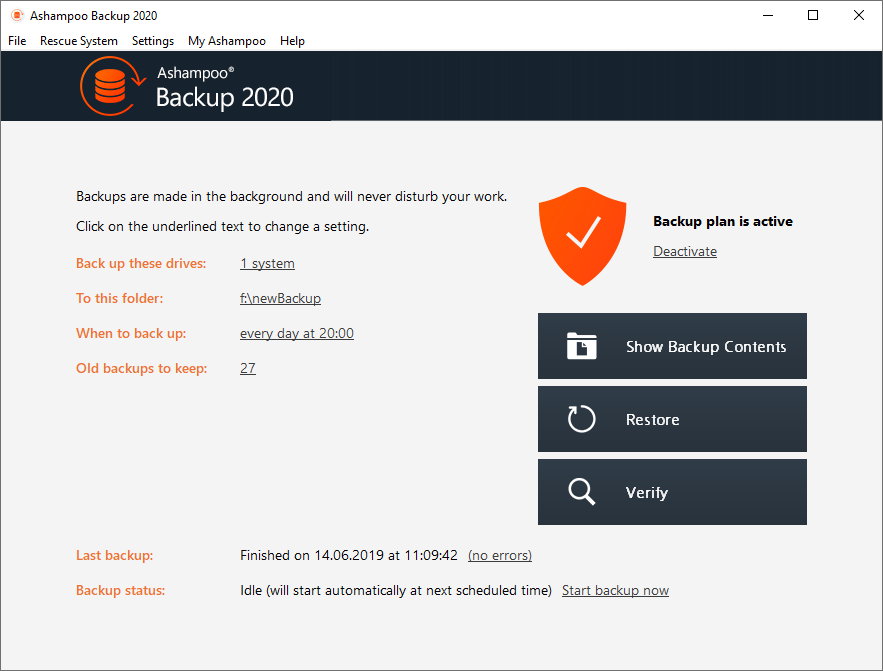

If you've ever stared at a black screen because your Windows refused to boot, you'll appreciate the value of regular backups. And it can be so easy!
Only backups will protect you against impending data loss, as caused by ransomware, corrupt operating system or disks. Ashampoo Backup 2020 is the fool-proof backup software to save your files. The program backs up and restores entire partitions and disks in just a few clicks.
Benefit from automated backups and fuss-free file recovery through the built-in rescue system!
System Requirements:
Windows 7/ 8/ 10
Publisher:
Ashampoo GmbH & CoHomepage:
https://www.ashampoo.com/en/usd/pin/1459/security-software/Ashampoo-Backup-2020File Size:
87.3 MB
Price:
$29.99
How would you improve Ashampoo Backup 2020?
GIVEAWAY download basket

Developed by Informer Technologies, Inc.

Developed by IObit

Transfer data between your computer and Garmin devices.

Developed by Baidu, Inc.
Comments on Ashampoo Backup 2020
Thank you for voting!
Please add a comment explaining the reason behind your vote.
Please add a comment explaining the reason behind your vote.

You can also add comment viaFacebook
iPhone app giveaways »

$19.95 ➞ free today

$0.99 ➞ free today

Every Day Spirit is a collection of beautiful, original, hand-crafted wallpapers created to make your phone look amazing.
$0.99 ➞ free today

$4.99 ➞ free today

$1.99 ➞ free today
Android app giveaways »

$0.99 ➞ free today

$0.99 ➞ free today

Spelling Right is a new challenging educational spelling game that will test your English spelling skills.
$2.29 ➞ free today

$0.99 ➞ free today

$1.49 ➞ free today
Takes about 1 hour to create Bootable CD/DVD (includes download of PE from Microsoft).
Save | Cancel
This program seems very basic. I was hoping that it would backup the files that have changed since my last backup but I have not seen an option for this.
Save | Cancel
I have the same problem as #24 and #25 Comments. How do you get the free password since it does not show up in my Ashampoo account I have unless you buy the program?
Save | Cancel
No problem installating. Register with your e-mail and makeup a password Ashampoo will activate your software without a registration code to enter.
Question:
1 ) Will the backup be as big as your target drive that needs to be backup? For example if I have a 1TB drive with an OS and Apps taking 250Gb and 750Gb free will the backup be 1TB, or 250Gb ?
2) If I buy a 2TB drive and partition it as 2 drives of 1TB each and then use the image or restore option in this Ashampoo to image the old 1TB drive will it erase and reformat my new 2 TB drive eliminating the 2 partitions and any data in it ?
Save | Cancel
I have an account for years at Ashampoo.com After installing Backup 2020 and run it, I see a long vertical ribbon asking me to fill in my login information i.e. email and password to that account. I did that and nothing happens. The white ribbon then grays out and freezes. Basically, I cannot register this program at all. I've tried several times and end up having to shut it down using task manager because of the program always freezing on me.
Save | Cancel
The Setup file of this offering identifies itself as version 12.6.0.0, i.e. the now obsolete version 12 (the newer version 14 has recently been released). The amazing arithmetic therefore is: 2020 = 12.6.
I assume it is the standard (non-profssional) version 12.
It would have been nice if Ashampoo would have offered this information themselves, instead of wasting the time of their customers.
Save | Cancel
To activate your free copy, run the program and enter your Ashampoo account email and password.
Refuses to see the backup prg and will not give a password?
Save | Cancel
You can get a download link via push notifications. To receive it, please click here. (This link did not work for me)
Alternatively you can get a personal download link via email. (This link did not work for me either)
Save | Cancel
First I need to say that I like Ashampoo products and use several or their programs so I thought I check this one out.
Installed on Win7 box without problems. Once I opened the program I found that there are very few options that can be changed without buying "Pro" version. It can make a bootable rescue disk or USB in case of a total HD failure so you can restore from another internal or external drive. Seems that the backup are either Incremental or Differential not user wick and it doesn't tell what kind. Scheduling is monthly, weekly or daily and the number of copies that it keeps defaults to 27 if I remember right. Can select to do a full system backup or selected drives. I backed up my boot drive, a 500GB SSD, containing 94GB of info. System is an AMD FX-8350 with 32GB memory. Backup took 29 minutes and just over 28GB of space on my storage HD. Added a 1k text file and ran the backup again. Still took 29 or so minutes but backup size increased to 34GB. I could find no option to delete your backup to regain your HD space.
Next I used the free WD Acronis backup, which is also limited in options as it makes only a single full backup, either complete system or single drives, and over writes old backup each time. WD backup also makes bootable rescue media. It took just 5 minutes to do and the size was a bit over 18GB. Added the 1k file and backed up again. Results were the same.
Seagate/Maxtor also provide the free stripped down version of Acronis and it can found on their website.
Even though I like Ashampoo products, I can't recommend this one.
Save | Cancel
1) How is this different from Macrium Reflect Free?
2) Can this clone a complete hard drive, including all its hidden partitions?
3) Can this program make bootable media (like a USB stick) so that if my hard drive fails, I can get a new, blank hard drive and use the USB stick to boot and then to restore from my clone?
4) Where is this company located?
Save | Cancel
glnz, I clone my hard drive so when (not if) it fails I just swap the dead one for the clone and I am back up and running. Can todays offering do this?
There is some confusion over backup, image and clone!
Save | Cancel
glnz, because there comes no response from Ashampoo, I' ll try to answer your questions.
1. Macrium Reflect Free, Easeus free and Aomei free all have some limitations (f.e. cloning and cloning options); you can check which ones on their sites.
2. As far as I can read on reviews and on the program description by Ashampoo, there should be no cloning option. Cloning involves a bit by bit copy of a (system) disk to another disk, including hidden system and boot files. In case of disk failure, you only have to manually replace the original disk by the clone.
3. Yes, the program can make a bootable media. Of course, you have to boot from the media and then restore the backups you made. This will take a lot of time, as all system and data files must be restored to a new disk. You don't restore from a clone cfr point 2), but from backup files, which is not the same !!!
4. Not sure, but I think Ashampoo is a German company.
Save | Cancel
Can it perform a full image backup?
Save | Cancel
Can I use this program to backup my laptop, then restore to a new laptop?
Save | Cancel
Is there a comparison chart between the regular and pro versions?
Save | Cancel
Am I missing something? Couldn't you just make a copy of your HDD on to an external HDD, update it as need be & if your internal hard drive fails, simply swap it with the external HDD? They should be exact copies of each other up to the last update. As for emails and explorer, Explorer stores a copy of your emails online, that way you can reinstall Explorer & it will reload your emails from that file when you restart the program. At least it has for me in the past using the MSN version of Internet Explorer.
Save | Cancel
Ron Dunn,
The difference between a disk/partition image backup & a clone of the same disk/partition is that the backup takes up less space.
RE: Email, if you store your emails locally on your hard drive(s), rather than keep them online, e.g. acccess Microsoft's or Google's email servers only through your web browser, then they're included in any clone or disk/partition image backup.
Save | Cancel
Can Backup 2020 backup to dissimilar hardware? i.e., if I make a system backup on PC "X" can it restore to PC "Y"?
Save | Cancel
dan,
You can restore a backup anywhere there's enough space, but that's different than migrating an installed copy of Windows to a different device. The biggest problem is the hardware drivers that let Windows talk to the hardware -- those drivers are specific to the hardware where Windows was installed. Win10 is much better than prior versions in that regard, & will look for & add needed drivers the first time you boot on different hardware, and that will **often** work [though not always -- Microsoft is dropping their Windows to Go drives]. Migration utilities, which are included in some backup apps, e.g. Macrium, Paragon, AOMEI -- but not listed for Ashampoo's bacckup app -- try to remove registry entries for existing drivers, and often have some provision for adding new drivers that are not in Microsoft's database.
Save | Cancel
mike,
I've had success with AOMEI PRO restoring an AOMEI backup to a different PC. Apparently, the Windows P.E. environment (not the backup itself) that AOMEI provides is what allows the restore to successfully occur. This feature (called 'universal' restore) is only available in their PRO version. Acronis offers it as well.
Thanks for your reply. I wasn't hopeful that Ashampoo provided it since it would have been a feature they certainly would have boasted about. That being the case, I see no need to install this giveaway offer since you never know when you may need to restore to different hardware.
Dan
Save | Cancel
What is the difference between Ashampoo® Backup Pro 14 vs Ashampoo Backup 2020?
Save | Cancel
Can it backup Linux File Systems and restore individual files?
Save | Cancel
Phil,
There's no mention of anything but Windows. You can mount backups as VHDs however, so you should be able to copy individual files from a mounted VHD.
Save | Cancel
this is a really nice software to have but.. i just create a system image on a external drive using windows own built in application and use it to restore my OS and files; So I'll pass on this offer.
Thanks Anyway..
Save | Cancel
If your disk fails and you've used an external disk for backup, if you do a complete backup, including the OS, and install a new hard disk can you then copy everything to it, including the OS, and basically re-create a new primary hard disk that is an exact copy of the original that is "bootable"?
Save | Cancel
Dennis W Comito, You need something that will allow you to boot from that new hard disk, before you can recover the copy of the OS from the external disk. It is not clear this product will have the capacity to make the external drive bootable. I have also not seen an answer as to the need for this program to reside on the new HD before a complete recovery can be made.
Save | Cancel
Dennis W Comito, if you copy a complete drive, the new drive will have the same bootable system and partitions as the old drive. If you restore just a partition, then you need to take some extra steps to make that partition bootable. If you install the new disk in the same hardware system it originally came from, you shouldn't have any problems with drives or with Windows nagging you to re-authorize. But both of those things will happen if you attempt to boot your copy of Windows on a different system.
Save | Cancel
BobbyA, no, this program can't make external hard disk bootable, you are right
Save | Cancel
"If your disk fails... you do a complete backup... install a new hard disk can you then copy everything to it, including the OS, and basically re-create a new primary hard disk that is an exact copy of the original that is "bootable"?"
That's the way backup & recovery works. A disk/partition image backup is basically just the raw data stored on the drive, and when you restore that backup the data's copied to the destination drive exactly as it was on the original.
"You need something that will allow you to boot from that new hard disk, before you can recover the copy of the OS from the external disk."
Normally you would boot to a special USB stick or drive that's been prepared by the backup app, & you can create that USB stick/drive with Ashampoo Backup 2020.
"It is not clear this product will have the capacity to make the external drive bootable."
The data stored in a disk/partition image backup is generally not readable as-is by Windows, so that image backup would not be bootable -- there are maybe some few exceptions, e.g. Macrium Reflect will let you boot an image using Hyper-V.
"I have also not seen an answer as to the need for this program to reside on the new HD before a complete recovery can be made."
The backup app you used to create a backup needs to run to restore that backup. This can be done in 3 ways... Usually you'll boot to a USB stick or drive prepared in the backup app that includes a mini version of the program, e.g. Ashampoo Backup 2020. If you initiate restoring a backup using the backup app itself while running the copy of Windows you intend to restore from backup, many backup apps will copy the same files/folders that would be used for that bootable USB stick/drive to your hard drive, and boot to that to perform the backup restore, and many of those backup apps will also let you copy those files to your hard drive proactively -- since it's often necessary to download WinPE files from Microsoft, and that download can be quite large [WinPE is just a small part of it], this can be very handy. The Ashampoo Backup 2020 site doesn't mention any of this. The 3rd way would be to have another drive, internal or external, with Windows and the backup app installed, e.g. a Windows to Go drive with backup & other software installed.
Save | Cancel
Dennis W Comito,
I currently use the free Seagate disk Wizard
WD also have a free version of this.
For it to be free, it must 'see' a Seagate disk.
After installing it, you can get it to create a bootable CD
I only ever use the bootable CD, as I do NOT want Windows running whilst I am creating the backup (of the whole disk)
The CD has 3 options that I use -
1) Create an image
2) Verify/validate the image
3) Recover the image
I believe '3' is the answer to your question
You replace the drive, and run the bootable CD.
Navigate to find your image on your external drive.
And choose Recover.
Keep an eye out for a checkbox that also allows the new drive to copy the original drive's disk signature
Rob
PS I am curious as to whether today's giveaway can do the same (as my 1, 2, 3 above)
Save | Cancel
Ok, Windows 10 has already a built-in backup function.
What would be the benefits using Ashampoo Backup 2020 instead?
Save | Cancel
kuld, Great info. Question: Suppose after having backed up to an external HD, when and if the computer crashes, how do we restore using the external HD?
Many thanks.
drv
Save | Cancel
I just found out that you can make a recovery dvd and use it to reinstall the image file.
drv
Save | Cancel
drvajra, basically what i learned is that starting with Windows 10 version 1709, Microsoft is no longer maintaining the System Image Backup feature. You can still use the tool to create backups, but in the future, it may stop working.
https://www.windowscentral.com/how-make-full-backup-windows-10
Save | Cancel
"Windows 10 has already a built-in backup function.
What would be the benefits using Ashampoo Backup 2020 instead?"
Because the legacy backup in Win10 [it's a holdover from an earlier version] is designed & built by Microsoft. Not being a smart a**, but entirely serious. When it works, it's great, the key word being "When" -- I've had it fail, & I've had many, many of the bootable USB sticks win10 creates fail to boot the hardware it was created on.
" Suppose after having backed up to an external HD, when and if the computer crashes, how do we restore using the external HD?"
Usually, regardless the backup app you used, you boot to a special USB stick that runs a mini version of the backup app, then have it restore the image on the external drive.
"I just found out that you can make a recovery dvd and use it to reinstall the image file."
The bootable DVDs you can create have the same software on them that would be on the USB stick, BUT, you very often will not want to use a DVD rather than that USB stick. The reason is that there are 2 ways that the device BIOS can function -- UEFI & Legacy mode. Very many BIOS jump into legacy mode booting from a DVD, even though they normally use UEFI. In theory that should be OK, but too often it is not.
Save | Cancel
It is critically important for the vendor to watch forum comments and respond. Before installing new programs, I like to have answers to legitimate questions, such as #5: "I backup with Ashampoo Backup 2020. Disaster strikes taking out my hard drive including Ashampoo Backup 2020. Now what do I do?"
Many thanks.
drv
Save | Cancel
drvajra, you restore your backup to new hard disk if old one is dead or can't be recovered.That s main reason to backup and/or disk imaging.Dont forget to make bootable cd or USB flash drive
Save | Cancel
Full disk backup only, or can you back up selected folders?
Save | Cancel
dave c,
Full disk or partition images only.
Save | Cancel
A long time user; I have paid for the PRO version 12 (and previous versions)
Save | Cancel
Does it do incremental Outlook email backups like EaseUS Todo can with PST files?
Save | Cancel
How are files stored? That is, is the format proprietary? Can I restore without having the program available? For example, I backup with Ashampoo Backup 2020. Disaster strikes taking out my hard drive including Ashampoo Backup 2020. Now what do I do? The program I'm currently using allows me to make backups using the file's native format. The few times I've needed to recover something, I did nothing more than a copy (from the backup) command.
Save | Cancel
JerryWithaJ, Yes, you can have the files stored with no compression. That way you can restore them without the program (current user of version 20)
Save | Cancel
Harold Drabkin, sorry I meant VERSION 12.05, not version 20; I upgraded to 12.05 this year. So not the 2020 version; still works well.
Save | Cancel
Does that mean that the default setting is a proprietary format? Knowing that there's a "no compression" setting is a big help, but I'm curious.
Save | Cancel
Harold Drabkin, the question was about the format, and if the format is proprietary; not about compression. The question surely makes sense, as many manufaturers like Acronis, Easeus, Aoemi, Paragon, Macrium and others use proprietary formats. Anyways, I think you can never restore a system backup without a (proprietary) boot disk that is always provided with the backup software (but not always free of charge).
Save | Cancel
Sean, the files stored without compression are not in proprietary format. I can and have opened up the backup drive and go through the folders and drag a file into my machine. Did not have to use the program.
Save | Cancel
JerryWithaJ,
"That is, is the format proprietary?"
The raw data stored in a disk/partition image is not readable by Windows as-is -- usually the archive has to be mounted as a VHD [Virtual Hard Disk]. The file format for that VHD is usually proprietary, though some backup apps like Paragon give you the option to use Microsoft's .vhd format. Once you mount the VHD containing the image backup you can of course copy one or more files from it -- it's as if the backup was restored to a separate partition(s).
"The program I'm currently using allows me to make backups using the file's native format. The few times I've needed to recover something, I did nothing more than a copy (from the backup) command."
Then it's most likely not a disk/partition image backup app, but one that copies the files/folders rather than the raw data stored on disk.
Save | Cancel
Harold Drabkin, You state that files CAN be stored with no compression -- but I can find NO indication of that with the initial screen. ie. "Settings" does not give you any selection for that -- unless it is at the moment of backing up?? As I am not doing that right now, IS it presented at the time of actually backing up?
Thanks for any confirmation -- because having used other backup programmes, like Easeus, Macrium or Paragon, the last thing I want is yet another proprietory compression system. Nowadays, I ONLY store native, uncompressed, backups.
Anyone able to confirm that compression (or the lack of it) is set at the actual moment of backing up??
Thanks a lot!
Save | Cancel
Tranmontane, the option comes up as I was creating a backup plan. I just notice now, however, that this giveaway does not say PRO at the end, so I wonder if it's an option only for the PRO version.
It displays in my backup plan summary also.
Save | Cancel
Downloaded and activated without any problems on Windows 10 (64) and took it for a test drive and sorry to say wasn't very impressed. after setting up and running the program started to backup as it should, but with only a 2% CPU load the program paused the backup, reporting it had paused due to heavy system load. I have a 8 core processor, with 32GB RAM so a 2% CPU load is hardly a "heavy load". However, if you go to settings you can disable the Automatic Pause, other than that small annoyance it seems to do what it is supposed to do with little drain on system resources.
Save | Cancel
It is free today, but when I will have to recover a broken systemdisk, I will have to reinstall it.
Or is this only usable for datadisks ?
Save | Cancel
Wyns, you can create a Rescue Medium by going Rescue System - Create Rescue System. Use USB stick or CD/DVD and use that even when your computer does not start anymore.
Save | Cancel
What version is this, please? This isn't the pro version is it? There is an always free version of this program too, this isn't that., right?
Save | Cancel
Shane Cory Potter, you can say this is "stripped" version of Ashampoo backup PRO. There is no free version of this program except giveaways
Save | Cancel
dears
Can one use this backup program to backup and restore a systemdisk ?
best regards
Save | Cancel
Wyns, you certainly can. Kind regards
Save | Cancel