Every day we offer FREE licensed software you’d have to buy otherwise.

Giveaway of the day — Zoner Photo Studio 11 Xpress
Zoner Photo Studio 11 Xpress was available as a giveaway on April 22, 2009!

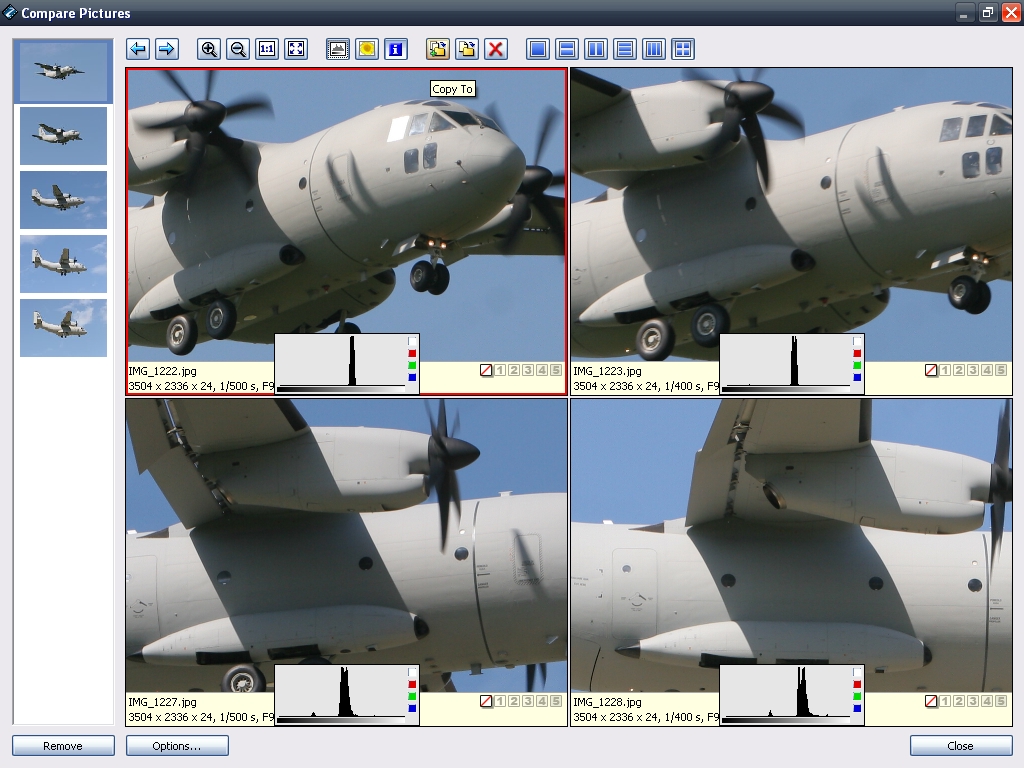
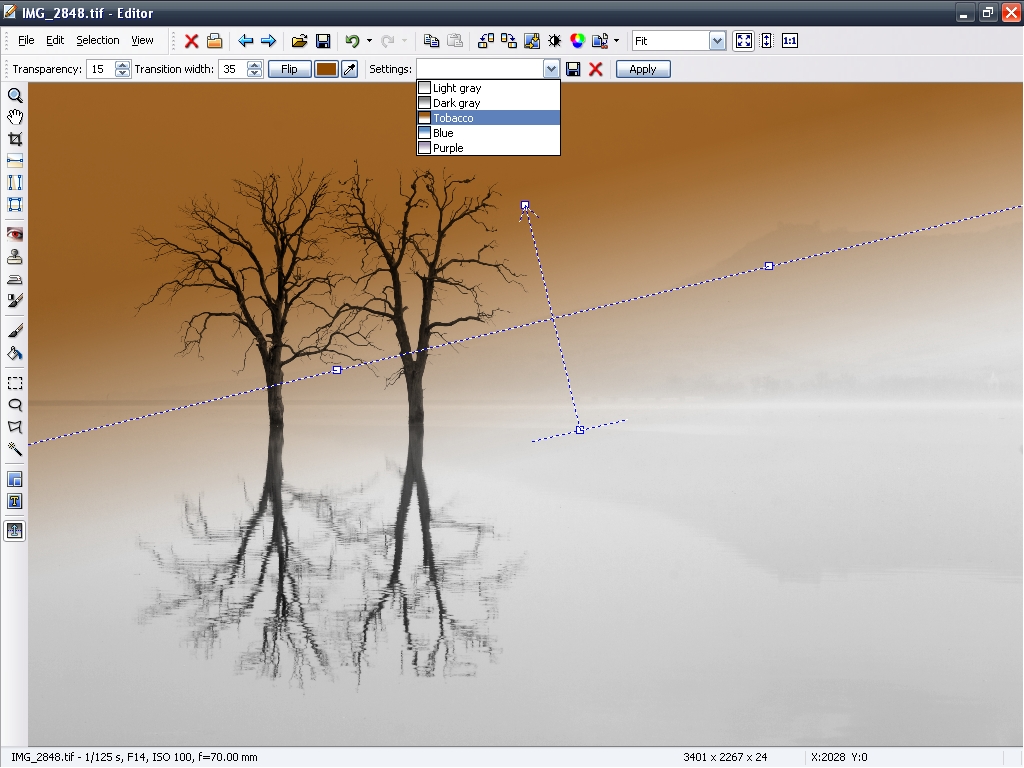
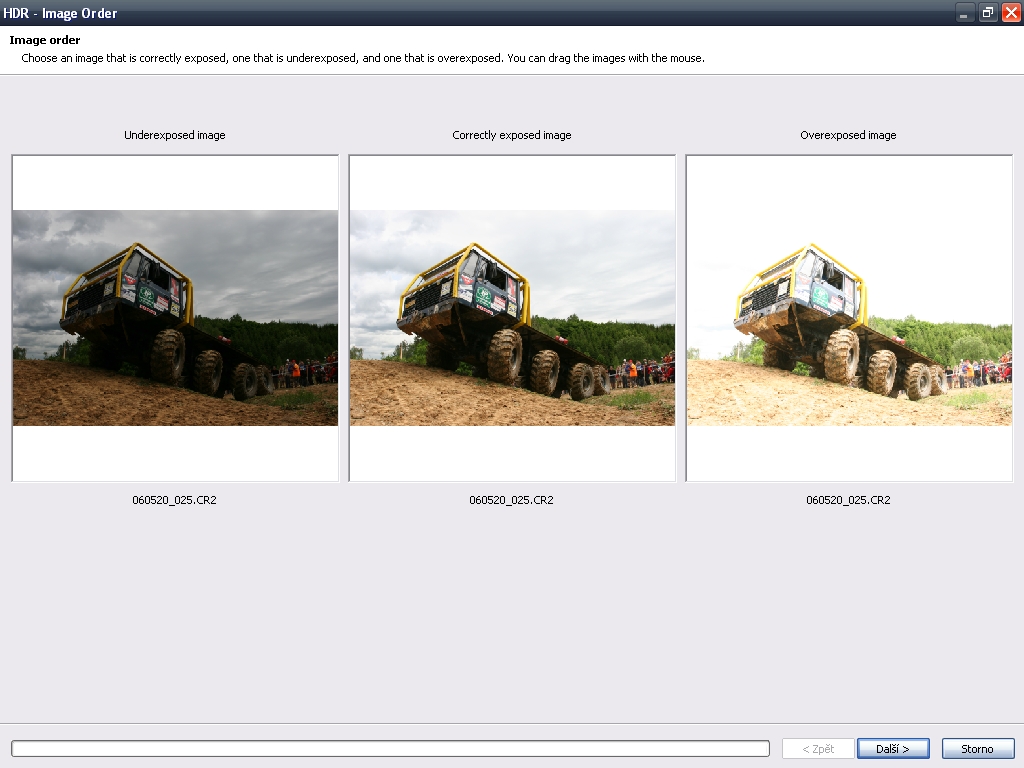
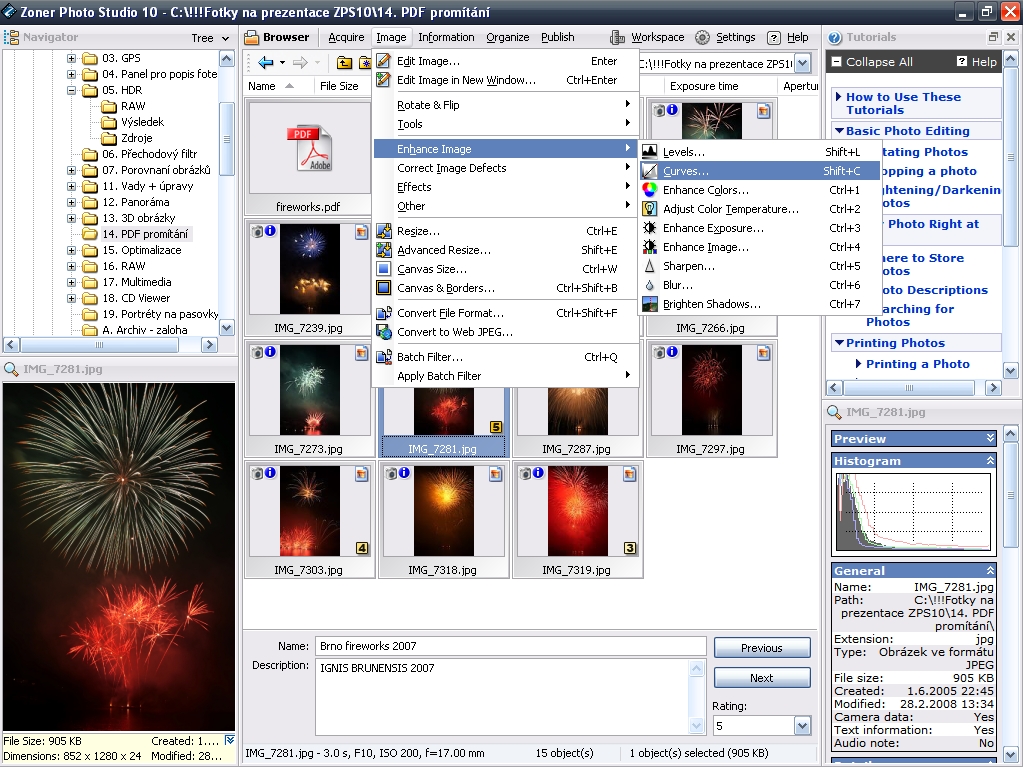
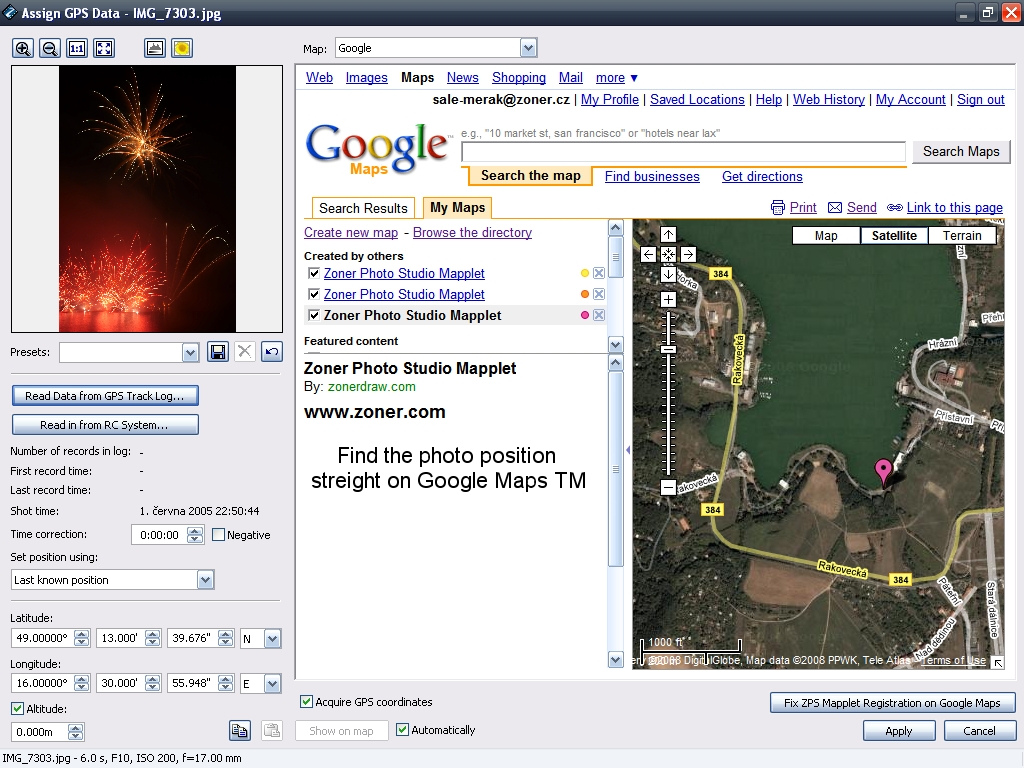
Zoner Photo Studio leads you step-by-step through the process of managing and working with your digital photos: acquiring, editing, archiving, and publishing them. The all-in-one solution is exceptionally easy to use and saves you time and money: create great photos using just one program!
Zoner Photo Studio 11 Xpress is a lighter version of Zoner Photo Studio 11 Professional. Unfortunately, we cannot give out version Professional to Giveaway of the Day, because we have to pay royalties from used technologies, but we are offering this version Xpress with 2 months functionality of version Professional and then the version Xpress stays as full version and you can use it anytime.
New functions of version Professional here.
Try this Pro version for 2 months and then get full version Xpress and we wish you great photos with Zoner Photo Studio 10.
ZONER Inc. special offer: get Zoner Photo Studio 11 Professioal at special price 50% off (save 50 USD), just use this coupon code: GOTD (will be available for two weeks)!
System Requirements:
Microsoft Windows 2000/XP/Vista (cannot be installed on Windows 95/98/ME); Pentium or equivalent 300 MHz or higher; Memory: 256 MB RAM; HDD: 120 MB of free disk space; Resolution: 1024 × 768 High Color; Internet Explorer 6.0 and DirectX 8 (or higher)
Publisher:
ZONER Inc.Homepage:
http://www.zoner.com/ww-en/productsFile Size:
58.9 MB
Price:
$69.99
Featured titles by ZONER Inc.

Zoner Draw 5 is the vector graphics editor for everyone. It's a professional toolkit for achieving great results with drawings, maps, blueprints, illustrations, Web graphics, and more! Zoner Draw 5 provides the best value for money of any illustrator on the market, so it's a great tool not only for small/home offices, but also for equipping corporate staff.
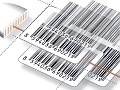
Zoner Barcode Studio 2 is a comprehensive barcoding program that helps you create, export, import, print and archive 17 barcode types. It does what you need for hundreds of dollars less than competing solutions.
Comments on Zoner Photo Studio 11 Xpress
Please add a comment explaining the reason behind your vote.

iPhone app giveaways »





Android app giveaways »





This GoTd matches perfect together with:
-) GIMP:
http://www.pcfreunde.de/download/d8563/gimp/43638-Yk79J8nGn7/
An excellent free Software for editing photos or pictures :)
-) Fast Stone Imageviewer - the best Image Viewer I know - its free available too:
http://www.pcfreunde.de/download/d16686/faststone-image-viewer/43638-Y3UmsRA4JC/
Chears, and keep on going! =D
Save | Cancel
I never received the e-mail containing the activation code
Save | Cancel
There are a multitude of freeware image and graphics applications available on the net. Here are just a few resources.
Free Digital Camera Enhancer=quick and easy photo editor
Also several other nice quick and easy freeware photo editing apps available here
http://www.mediachance.com/digicam/enhancer.htm
These two are complex editors with a multitude of features, add-ons etc....Gimp is often favorably compared to photoshop.
http://www.getpaint.net/
http://www.gimp.org/
Two links that have good lists of a wide variety of graphics & image freeware available
http://www.thefreecountry.com/utilities/imagephotoediting.shtml
http://www.photo-freeware.net/
Save | Cancel
I always hate it when giveaway program developers want you to give them your email address so they can bombard you with ads and other crap mail, sell your email to other advertisers, etc, and otherwise contribute to the already overwhelming load of junk mail that makes me hate even using email. If a giveaway is good, if it interests me enough, if the developer has good product info, help, tutorials, etc and if they also have a good active forum (styopkin is a good example, with a good giveaway and active forum that I joined because I was able to both give and get useful info on it) I'm likely to get involved anyway.
In other words, instead of using registration to force people to give their email addresses....make them WANT to become actively involved, make them WANT to keep coming back. The results of making people WANT to come back or get involved will be much more productive than the result of forcing ppl to give out their email addresses.
Save | Cancel
I installed this and have no idea what version it is. According to the help tab, it's Zoner Photo Studio 11, but I have no idea if that's "Pro," "Home" "Xpress," etc. Someone needs to get this straightened out!
Even as a backdoor sales gimmick using GAOTD to front it, how can anyone even tell what the deal is with this?
Thanks to Eirk at Zoner software for admitting in the comments above that this IS A SALES GIMMICK! However, no comments have been allowed posted for the past 12 hours, so who knows what was posted later today regarding this. I think someone fell asleep.
If GAOTD is now a DIRECT backdoor sales tool, I'll BUZZ OFF. My understanding is the Giveaways are for us to evaluate and if we like them, we tell others and they buy what we get. I've already sent recommendations that resulted in many sales for past GAOTD offerings. But as I said, if this is the new strategy, I'm outahere.
Save | Cancel
I have Photoshop and have used it quite extensively so the editing part of this is kind of useless for me but that's not the point, I'm interested in the publishing side of things and that's where I think this should be judged. People shooting it down because it doesn't measure up to other editing programs aren't thinking it through. I'll decide whether it serves a purpose for me after playing with the publishing aspect for a while. Even if it isn't right for me I appreciate the freebie. Cmon people, can't you appreciate a free program as long as it's not ripping your HD to shreds or leaving 10mb worth of malware behind? If it doesn't work as you'd like don't use it, easy as that. Thanks to Erik for standing by the product and writing responses and not artificially inflating the 'thumbs ups' as it seems a few companies have done recently (or maybe I'm paranoid). I also fully respect your decision to offer a limited version of the expanded program, a sound way to promote it. All in all looks like a pretty good prog for what it's supposed to do.
Save | Cancel
I'm a *serious* Photoshop user, so I'm passing on this one. I just wanted to chime in to say that it's awesome to see a response made here by the developer. That is something we don't often see, and it's something I'd like to see more of!
Save | Cancel
Really decent looking software. It's nice to see decent software offered here, on GAOTD. Too bad that after trial period, this version will revert to a very limited version (more like a demo version without time limitation than a full version). I give it a thumbs down for that.
Save | Cancel
I would also like to add my thank's to EriK for coming on the forum to answer questions.
I have been back and played more with the program and it is certainly fun and very quick to respond and I am sure that the more I play around with it the more I will be able to do with it.
I love the way you can adjust the perspective and also the morphing mesh features.
It is nothing like the Paintshop pro I use but in a way that is a good thing this is especially good for photo correction useful if you are an amateur photographer like me.
I would like to say one thing though....I thought this forum was to test the programs on offer and send our results and opinions through not constantly moan about the product and give lists of what is free.We are all going to have our favorites and what suits one will not be right for another and I find it annoying wading through tons of messages like this.
I just want to see testers results good or bad about the specific product on offer for that day
Save | Cancel
What is it with so many people. Complaining that after two months it changes into a lesser version. Two months gives you time to do a lot of photo work. What do you want for nothing.
GOTD is a site that many software builders use to help promote their products. Some are very good and some are very bad but most are just avorge.
I doubt if GOTD is paying these companies for the license to offer these programs. i would believe these soft ware companies are paying GOTD to offer them and also pays for the advertising they put on the site.
GOTD is not the only place these software builders use to promote their products. There are several other places that i know of and i do not go looking for them.
Save | Cancel
Management tactics to create a limited xpress version for GAOTD users with promo to sell pro version is not very nice hence i will pass. Why the vendors go thru the hoops of creating extra versions when they could simply offer the software honestly in hope of future purchases? From my experience with such softwares, i have purchased atleast 5 titles this year alone so GAOTD, please stop playing such games.
Save | Cancel
To Erik Piper
Customer Support
Zoner Software
Thank you very much for answering my question...I spent half hour before work trying to figure it out and just got home and checked on here and saw your reply! Very appreciated! and thanks for the free GOTD! : )
Save | Cancel
Installed fine on Vista Home Premium. Ran it through a few quick paces and am happy with the results so far. I'm an avid open source user but do occasionally use "closed" programs. This one looks like a nice lil app for quick and nasty editing. Loads fast, processes images fairly quickly and has a few options that others don't.
I am curious as to what will be left out in the express version once it downgrades in 60 days, but am happy that it appears as though you can reinstall the express version if you have a HDD failure using the serial provided in the email.
@ Erik from Zoner: Here's a quick suggestion for advertising your programs.. use a referral program that awards users for referring your product(s) to other users. (i.e. anyone who refers 3-5 users who purchase the product get that product free or for at least a 75% discount). I use the referral model of advertising for a few app extensions that I develop and it works wonders as the revenue from the referrals more than pays for cost of giving the extensions away tot he few people who actually take the timeto refer others.
Save | Cancel
ATTN: Zoner, Inc.
On the purchase page of your website, upon entering the coupon code "GOTD" as described at the top of this page, I received the error message:
"The given code does not exist! Please check."
I'll try again tomorrow...?
Save | Cancel
Thanks, GOTD!
And thanks to Zoner, Inc. for the excellent software.
Do you need it? Picasa or Irfan are great, but limited. PhotoShop is WAY beyond what I need to do. To me, the Zoner Photo Studio 11 Pro version that you can test here seems to be about halfway between these two extremes. I find it well-designed, with "tooltips" telling me briefly and exactly what to do next.
There are about 15 "adjustments" (QuickFix, curves,levels, enhance colors, adjust color temperature, enhance exposure, sharpen, blur, brighten shadows, chromatic, barrel/pincushion, chromatic aberration, vignetting, interlacing) and about 21 "effects" (greyscale, old photo, grain, explosion, oil paint, waves, pencil drawing, pixelize, emboss, detect contours, negative, equalize histogram, variations, envelopes, fading borders, soft shadow, 3-D buttons, and plug-ins).
If you don't know what some of these mean, just plunge in; you can undo quickly.
Excellent software. I'm on my way to buy it at the 50% off price. If you want to work with photos without the extreme expense of PhotoShop and steep learning curve of the GIMP, this is a no-brainer!
Again, thanks to GOTD for bringing this to my attention.
DISCLAIMER: I have NO connection to GOTD or Zoner, Inc...I just detest Microsoft (some of the world's dumbest smart people) and LOVE excellent software!
Save | Cancel
if you make a change to your photos it wil stay that way not like on psp where you can first make a duplicate by prssing shift + D
Save | Cancel
you cant make a duplicate of your photo and you may lose your original one also -
Save | Cancel
If I wanted to try Zoner shareware, I would just download it, evaluate it for the trial period, and either buy it or uninstall it after expiration, but this is a just a bait and switch using GOTD as the bait, so no thanks.
Save | Cancel
i really love this program and I would tell people to download it. It's really great made a good picture great...download this program i know i love it....
Save | Cancel
This is an interesting app -- Thanks GOTD! Zoner Photo Studio 11 Xpress like the developer posts, is NOT your average image editor. The closest I can come to describing it is it's similar in appearance to the free FreshView I've used for years, though FreshView is missing most of the Zonar PS features, and so really isn't a fair comparison. In practice or use, Zonar PS 11 Xpress is the toolkit most of us need to manage our images & do the more basic editing tasks. It isn't P/Shop, & while I'll shy away from saying P/Shop isn't for home users, I'll go on the record saying that most of what P/Shop offers you'll never have a need for.
A less capable solution for managing your images would be the FreshView I already mentioned. As far as editing goes, I remain unimpressed with P/Shop Elements -- I've tried it & have a copy somewhere around here. Microsoft has a few entries on the market that you can sometimes pick up for $2 or less at the surplus software sites, & they're not too bad from the little I've seen teaching folks the basics. The Gimp is both free & a bit more complicated, but capable -- I like the Portable version at PortableApps.com as I've had problems installing/running the normal version in Windows. Ulead used to make a few editing apps that worked, if they were a bit eccentric when it came to the interface, but I haven't had much luck with anything Ulead for the last several years -- that said, they offer trials I think if interested. If you like or need the handholding of wizards, you might want to check out Arcsoft's Photo Impression -- I was impressed with the free version that came with my Epson printer. As a MUCH cheaper alternative to P/Shop many pros & semi pros in video & other fields have switched to Paint Shop Pro. For free, arguably the 4 most popular apps are Paint.Net, Irfanview, Google's Picasa, & the already mentioned Gimp, but again these don't really compare to Zoner Photo Studio... it's closer to FreshView on steroids.
Save | Cancel
If you do graphics, have a look at Cerious Thumbs Plus. Does a lot of graphics transforms. Small footprint. Not a freebie, but a good program. GAOTD - can you talk to them about getting something from their line for us? They do free evals also.
Save | Cancel
This is indeed good software, but unless it is home version of higher, I won't care. Developer says there is $50 off on pro version with the coupon. Yet the price for pro version is listed at $69.99 on the website without the coupon and so the discount is only $20. I am not looking for pro version, home version is all I need. Can the discount be applied to home version as well, which is showing up as $49.99?
A very similar and power tool is ExifPro (http://www.exifpro.com/). Has almost all features of Zoner Home and sells for $20. (They have free version, but it starts throwing a really nagging and long-lasting screen after a month to become non-useable.)
As the developer pointed out, many people are drawing comparisons of the software with other tools that are primarily for photo editing. Zoner tool is a very well balanced tool for all needs (if home version or higher). The tagging/keywords/star-rating capability is great and is not matched by most of the tools (since many which provide those use proprietary databases for storing this).
Save | Cancel
Nice to see the devloper and fans of GOTD being able to give questions and answers, but where the heck is Ashraf's review. I refuse to try any products from here without his wise reviews. Thanks GOTD, this is the best part of my day.
Save | Cancel
I am very impressed with this software. It is much easier to use than many others and quite powerful. I fixed red-eye, adjusted lighting, copied and pasted a childs face from one photo to another and quickly blended the image so that it is hard to tell it wasn't origninal. This is a great tool.
I was reluctant to download, because of some comments comparing paint.net, gimp, etc. I've used them. I find this Photo Studio 11 to be much better for what I need to do. Thanks!
Save | Cancel
Dear Erik (#30),
Could you please tell us what functionality of this Professional version will be turned off after 2 months when it turns Express? Many thanks.
Best regards,
Jon King
Save | Cancel
Well I can say that I am impressed with what I've done with it so far. I know there are many free editors out there because I've used them all, gimp, picasa, photoscape,etc. I have them all installed right now along with Photoshop and Microsoft Digital Suite.
I do a lot of photo editing and have to keep all of these programs because each one has both strong and weak areas. Usually I have to go from one program to another to finish editing one photo. I've never had much success with any of their "auto" fixes either.
However, while I've only done a few photos so far, the ones I've done with Zoner I completed with just that program. The "auto" fixes actually worked! It seems to me much more powerful then the free versions I have been using and would definitely be worth the asking price. Plus I think it is easier to use and learn then many of the other editors--especially photoshop.
Thank you GAOTD and Zoner for what appears to be a very useful program so far!
Save | Cancel
I love this software, thanks. It's a must for everybody who owns a digital camera. The image browser is intuitive and fast. The number of photo editing tools is limited but it contains the most essential and most important ones. I really like the effect dialogs where you can see the original and the preview image. This "two-image" dialog is also very useful when setting up JPEG compression because you can compare the result with the original image.
The size of installer is 58.9 MB so I thought it is a bloatware. But it isn't! I'm satisfied with the program speed. In my opinion it is better than ACDSee. And today it's free. :)
Save | Cancel
After 2 month the program will turn to xpress-version. The xpress version is more limited than even the home version.
Better to take the free XNview instead of todays giveaway!
Save | Cancel
Hey every on this is a great program. There are great Tutorials on my youtube channel, http://www.youtube.com/user/Russkitechnology. Go check out and please Subscribe. Thank you.
Save | Cancel
Addedum to my previous comment #42. If you are a photographer and take pictures of landscapes and buildings you will find the functions : Align Horizon, Collinarity and Perspective very useful and easy to apply. Just test with some pictures with distorted perspective and you learn it an a few minutes. These and Morphing Mesh are features which I don't think you will find in any freeware program. Also the functions for levels and curves very easy to learn and use. Will these really hot features still be there when the program becomes "Xpress"?
Save | Cancel
#30: All kudos to Erik for contributing here: not only is it a rarity to see an actual developer / developer's representative posting here, it's equally unusual to see a developer post that's honest and objective.
(Compare that with the situation a couple of days ago and an uninstaller app: not only did the developer's own support forum contain a crucial, unanswered user question that was 10 months old, the developer failed equally to come on here and deal with the issue -- so it was left to GOTD users to file their reports.)
Zoner has been around a long time. It ain't a fly-by-night operation. Its products have been tested and used by many thousands.
View today's GOTD as a look-and-see offer and there's no reason at all not to take advantage of it -- especially if you're new to this kind of work (and everyone is, at one time or another.)
It's a user-friendly introduction to image handling and one I've recommended to friends in the past. They've then had the option to upgrade to something more powerful from Zoner, or look elsewhere.
For those of us who have labored long and hard with PhotoShop (I actually think the hard labor is the secret of Adobe's success: it takes so long to master the product that once you've finished, you're highly unlikely to start over again with a different app) then no, Zoner isn't a reason to switch from PS.
But Zoner isn't pretending to be a rival. It does what it says on the tin, and much of that it does very well. (And let's also get something clear about Photoshop: at least half of what PS can do is of no relevance at all to the day to day needs of the average home user.) Complexity isn't as big a problem where the legendary GIMP is concerned, but even that can be incredibly daunting to a novice user.
Ten and more years of using Photoshop means I'm one of those who won't be taking advantage of today's offer but that doesn't mean the Zoner offer doesn't deserve a thumbs up as an opportunity, an introduction, and an entirely free way of getting the hang of working with digital imaging via software that's user friendly, robust, and tried and tested.
Thanks, then, to GOTD, to Zoner -- and, again, to Zoner's representative, Erik: would that more developers were prepared to come on a GOTD thread like this.
Save | Cancel
DOWNLOADED ONTO MY VISTA WITH NO PROBLEMS.
AFTER SETUP WENT INTO HELP AND REGISTARED - AFTER REGISRERING I GOT AN EMAIL FROM THE COMPANY - THE EMAIL HAD THE LICIENCE CODE. WHEN REOPENING THE PROGRAM A LICIENCE CODE REQUEST IS ASKED. I FILLED IN THE BOXES WITH THE CODE THAT WAS EMAILED TO ME AND WA-LA - ALL WAS GOOD.
PLAYED A LITTLE BIT AND FROM THAT LITTLE BIT FOUND IT INTERESTING. LOOKING FORWARD TO PLAYING WITH IT MORE TO SEE HOW FAR I CAN GO WITH IT.
THANKS GAOTD AND HOPE THIS HELPS SOMEONE.
Save | Cancel
Can the developer clear up what features will no longer be active after the 2 month period is over for the professional version? I am mainly interested in the advanced features offered by the Professional version, but I haven't been able to find any information on what features the Xpress version has.
Save | Cancel
Yes, but I just did a fast dig online, and I found this MUCH better German made alternative ---> http://www.photools.com/im0002.php and only cost $65 , but it does'nt stop there. Here is one more LARGE FREEWARE package:
----> http://www.studioline.biz/EN/ - the StudioLine products starts with Basic v3.x freeware from http://www.studioline.biz/EN/downloads/photo-basic/default.htm
This is a 60MB download and there is a good PDF user manual.
Happy hunt!
Save | Cancel
I'm sorry, but there is SO MUCH free alternatives for photo editing out there I cannot imagine having to pay for one. Saying that, even should you pay for software, there is also a LOT of great photo editing software out there for less than $70.
A thumbs down today for me.
Save | Cancel
My first impression after a short test run is positive. The programme is rather intuitive and I especially like the easy way you can shift between browser, viewer and editor mode. (The interface of Photoshop or Gimp can not compete here). The program does not seem to put much load on the computer and reacts very fast on commands even when browsing - much better than Picasa or ACDSee. The browse and view mode works similar to Faststone Image viewer, Infran View an XnView but Zoner Photo Studio's editing is much more advanced.
So far I can not honestly say I found anything really negative except maybe the confusion about the versions professional, express and maybe the price.
Other Interesting and more advanced alternative programmes can be found at http://www.mediachance.com/product.htm (shareware not freeware)
Save | Cancel
Well, first off, the giveaway is for XPress - once again, we have a "special" version not actually offered by the company at their website, and nothing published anywhere to explain what is left out of this version. THUMBS DOWN on that non-disclosure. GOTD - you should make it clear to your publishers that if they're going to play this game, they need to state exactly what it is they're giving us.
You can upgrade to "Pro" for a 30-day trial when you register. It's going to revert to Xpress after 30 days so we'll see what functionality is left at that point.
I used 10minuteMail.com to request the registration code - brilliant site (Thanks Asschaff for this tip) . That way - no spam email from the publisher.
-ROj
Save | Cancel
Hi David,
The offer overall is for Zoner Photo Studio 11 XPress - that's what the offer for today is called, etc. You are offered a chance to test-drive the Professional version for 2 months though (a month more than we normally offer, actually). Offering test-drives or not is a bit of a dilemma for Zoner Software:
If we DO do it, then we get people who feel like we are dangling the higher version on a hook, like the comments above.
If we DON'T do it, then we get people thinking that the XPress version is the best version we make, and thus that there is no point in buying Zoner Photo Studio.
If we offer the most expensive version permanently for free, then we've ripped our own selves off of quite a few future sales, which also doesn't work. :)
The team over here thinks this problem through every time we run a GAOTD type action, but so far we still think that offering the test drive is the best road to go - it certainly seems like the best compromise we can make with customers! - but we are always looking for new ideas, especially since none of the above are ideal for us!
Erik Piper
Customer Support
Zoner Software
Save | Cancel
Installed smoothly, declined the trials options, received my reg code by email almost instantly, and with a quick copy-and-paste I was up and running. Very easy, very smooth. Nicely done.
The program initially loaded up a little slower then expected but made up for it with incredibly fast thumbnail generation. It only took a few seconds for it to generate thumbs of more than 10 50mb+ bmp files.
There are a number of convenient editing and sorting features which make it an easy alternative to booting up a full editor. The batch features are also useful.
The only complaint (a personal perspective) is the small preview window caused by the large amount of stuff on the initial screen. However the preview pane can be stretched and the icons scale can also be customized. Other panes can also be removed or adjusted as desired.
In many ways this reminds me a lot of an excellent freeware program called ImageWalker which I have been using for years. In fact I could almost call this an upgraded version. Who knows, maybe it is related.
Over all I think this is a great program honestly worth the standard asking price and we are very fortunate in having it offered to us here for free!
Many Thanks to both the publisher and GotD. :-)
Save | Cancel
Hi all!!
The product is pretty GOOD but looks more like HYPE than substance because this is clearly an attempt to sell the PROFESSIONAL VERSION of ZONER PHOTO STUDIO 11, which is totally DIFFERENT than version Xpress, two months after installing this GAOTD, following more or less the same "formula" of the "free trial" versions that many SW HOUSES offer for download at their original websites.
But what this has to do with GIVEAWAYOFTHEDAY.COM mission, taking also into account that GAOTD TEAM paid to ZONER Inc. the FULL LICENCE to get the right to make this (limited) offer here??
Mystery!!
So 4 HUGE THUMBS DOWN for the FORMULA and 1 THUMBS UP for the PROFESSIONAL VERSION of this product!!
Cheers from Italy!!
Giovanni
Save | Cancel
Thanks Erik Piper for your forum participation.
Nothing wrong with a company trying to sell an upgrade, BUT...
1-What's the diff between Express & Home?
2-What kind of FX are in Express compared to Home?
-Clone?
-Panorama?
-3D?
Save | Cancel
Classic or Xpress - limited editions which are shipped with other products and sometimes released for free in magazines.
Home - contains all features that a digital compact camera user needs.
Professional - is targeted on advanced users. It has RAW development support, color management, 16 bit processing and advanced tools for image editing.
Enterprise - this used to be a special version for corporate customers. In ZPS11 this is a very limited version used by pirates only.
http://forums.zoner.com/viewtopic.php?f=8&t=18
Save | Cancel
Quote:
Any more questions, just write in - I will be here all morning Eastern US time.
Erik Piper
Customer Support
Zoner Software
======================
Your What's new page shows the price at 69.99, so I should be able to buy it for half that or $35.00. Yet when I hit the buy button, it lists the price at 99.99. How do I buy it for $35.00?
Save | Cancel
I decided to try it early this morning. Installed it, clicked on the register link and went to the website and registered. That was early this morning. Still no activation code in my e-mail box....May not keep this one.
Save | Cancel
Hi all,
I have used Uleads PhotoImpact for about ten years now and have always found it superior to most of it's kind. Haveing been involved in publishing and advertising and needing photo manipulation on a large scale, I am used to using this type of software and it wasn't long before I had this baby up & running.
Just a little quirky in places, it is fast, robust and very useable indeed. so much so that I shall cease using my old software for a while to put this'un through it's paces as there appear to be a considerable number of functions in addition to those that I am accustomed to - AND it's FREE!!
Great offering that I would definitely reccommend, so do try this and also mention it to your family. They will be very grateful to you.
Thanks GAOTD and especially to Mr. Erik Piper for this offering AND for your very welcome input.
Happy days y'all.
Save | Cancel
One thing I always appreciate is when a representative of the software company whose offering is up for the day gets involved with the comments. Thank You Erik for monitoring the comments and making yourself available.
I, for one, accept Zoner's statement, "we cannot give out version Professional to Giveaway of the Day, because we have to pay royalties from used technologies." Zoner was (and is) up front about it and that straightforward attitude gives me assurance that they are not pulling a bait and switch. They even made bold the terms. Some may gripe and groan over it but Zoner does have staff and bills to pay.
Save | Cancel
This was offered here in v10 last year. Theres several free alternatives but theres also a lot of freeware that claims Vista compatibility when in truth they cause software conflicts.
So blame Vista! Who cares? I prefer it because it renders pages so much better then XP, period. After using this for a few weeks last time it was offered, I used my upgrade option & got the Pro version & have never been sorry I did. It's my favorite image manipulation program.
Have an open mind & remember, this is free today. It's certainly worth trying & the upgrade at a discounted price is something you might just use.
Thumbs up!
Save | Cancel
Could Erik Piper please comment #29.
Save | Cancel
XnView is a very good alternative to consider for a photo viewer. More configurable than FastStone, much better as a browser than IrfanView or Photofiltre or Zoner. Very strong batch processing, too.
Save | Cancel
Great software!
XnView with PhotoFiltre could be a good freeware alternative for amateur users.
Save | Cancel