Every day we offer FREE licensed software you’d have to buy otherwise.
Giveaway of the day — Wondershare WebVideo Author
Wondershare WebVideo Author was available as a giveaway on September 18, 2008!
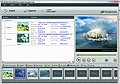
Wondershare WebVideo Author provides an easy way for beginners to quickly and easily complete a video production, which is an excellent alternative to complicated traditional video production tool. It enables users to record the videos from Webcam/DV, or simply import the video clips, and then export to Flash movie (SWF), or Flash Video (FLV). Ideal for setting up a webcast, creating video presentation for web sharing and developing visual learning content.
Features:
- Record videos from Webcam or DV
- Edit videos downloaded from websites, such as YouTube
- Crop video clips, change video resolution and aspect ratio
- Preview, cut off and take snapshots of video clips using player pane
- Organize video intuitively with Story Board
- Convert videos in various formats to Flash (SWF/FLV)
- Create training videos with AICC/SCORM compliance for LMS (Learning Management System)
System Requirements:
Windows 2000/XP/2003/Vista with Microsoft DirectX 9 or later version; Disk Space: 30MB (for program installation), 10GB or above (for flash movies); RAM: 256MB (basic), 512MB (recommended); Video Card: Windows-compatible display with at least 800dpi x 600dpi resolutio; Windows-compatible sound card. Microphone and speakers are recommended for recording narration; Windows-compatible Webcam (required, if you want to record your own video); Macromedia Flash Player 8.0 or above (necessary for previewing flash movie)
Publisher:
Wondershare SoftwareHomepage:
http://www.sameshow.com/webvideo-author.htmlFile Size:
6.51 MB
Price:
$59.95
Featured titles by Wondershare Software

PPT2Flash Professional converts PowerPoint to Flash in one click, integrating with rich multimedia, quizzes and simulations to create professional interactive Flash learning and training content with the special template player which could take presenter’s videos and narrations. No need of any multimedia or professional expertise to create presentation or training content.

Wondershare QuizCreator enables users to easily create interactive Flash-based quizzes in minutes. Users can make quizzes from 9 question types, with images, sounds and Flash movies integrated, and then publish Flash quizzes to Web or SCORM compliant package for LMS (Learning Management System). Furthermore, it can track test results and report scores online with the built-in service Quiz Management System.

Wondershare DemoCreator automatically records exactly what users see on a computer screen, what they say, and how they interact with PowerPoint or any Windows-based application or Web site to create software demos, tutorial videos, and online-help videos for web/Youtube sharing.
Comments on Wondershare WebVideo Author
Please add a comment explaining the reason behind your vote.

iPhone app giveaways »





Android app giveaways »





Dear Wondershare Users,
Thanks for joining Givaway project for Wondershare and choosing Wondershare WebVideo Author!
Based on feedback and reports from our users, our Developer Teams has completed an upgrade project for WebVideo Author and it is updated to Version 1.1.6.
What is new of WebVideo Author 1.1.6
1. Update the source codes to fix the bug of failed start-up.
Sometimes users may experience failed start-up due to unexpected errors and could not use the program. To fix this, source codes has been updated.
2. Optimize the function of project management;
Users now can have two more options to open a project file in WebVideo Author either by Double Click or Drag & Drop on the project file.
3. Add the function of "Save As".
The feature of Save As is added for users to save an existing project as a new one.
For evaluation, you can download a 30 day trial version from our website.
http://www.sameshow.com/download/webvideo-author-download.html
If you want to get a FREE full version as a Giveaway User, please send an enquiry to our support member at support_el@wondershare.com
Regards ! and Wish you have nice Thanksgiving Day!
Support Team
eLearning Division
Wondershare Software
http://www.sameshow.com
Wondershare Holiday Promotion News:
Wondershare Holiday Promotion is OUT now!
Take a Christmas quiz and Win a FREE Family Pack - value of $299.95.
Please visit
http://www.sameshow.com/christmas-promotion.html
Save | Cancel
The all wondershare products I have seen from topsreviews.
Save | Cancel
Looked like a nifty little program, except that it doesn't seem to recognize the audio in the mov files I shot with my Nikon Coolpix 8800 digital camera. Which, since they are almost always from a rock concert, makes the program useless to me. If I were doing silent movies, it would be great though. LOL. Thumbs down from me, unless they can fix the audio problem and offer it again as a download.
Save | Cancel
Update to my comment #138: I have continued to use the software without any errors at all. The system I loaded this program on is an old Alienware, AMD Athlon XP 2400+ (2GHz), ASUS A7N8X Deluxe, Creative SB Audigy 2 Platinum, ATI Radeon X1600 Pro 512mb. XP Pro-SP3, all Microsoft software is up to date. All Drivers are up to date. Video drivers are Modified "Radeon Omega Drivers 4.8.442 (Based on Catalyst 7.12)" I'm not sure why some are having difficulties with the software and others are not. GAOTD users here aren't just some bunch of numbn*ts so there must be a valid glitch or conflict somewhere. It is completely Awesome to see the software company Right Here to offer help. errors like this can be like finding a needle in a haystack and you didnt back off- not once. Thats completely Awesome!
Save | Cancel
I am so excited to use this program! I have a business associate who used this software to create a video for his website and the video ended up looking very professional. I highly recommend giving this a try.
Save | Cancel
I honestly do not know how so many can have so many problems with this program. I went to five different computers from very basic ones that are quite old and net near what is needed for this program and all five accepted this program and it works well on alll of them. I now have it on this computer that is very modern and it still workd well and not once did I have a problem.
Save | Cancel
Installed - told I missed the deadline with 10 minutes to go. Guess I gotta thumbs down on this one.
Save | Cancel
Just like so many others...
XP SP2
“Exception EAccessViolation in module ws_avc.dll at 00005609.
Access violation at address 00815609 in module ‘ws_avc.dll’. Read of address 00000000.”
Perhaps this can be offered another time after the bugs are worked out.
Save | Cancel
Installed & registered fine on XP sp2. Started up fine, nice interface.
My only problem so far stopped me at the gate- it wouldn't import my home videos from a file I directed it to, tried many different files, still wouldn't import them. I will leave info at the company site.
WONDERSHARE- we are extremely impressed that you have cared enough to read our comments & leave your advice here for us! That says a LOT about a company! Thank you so much! It's a nice product & we'll sure be hoping all issues get solved. :)
Save | Cancel
forgot to add on to my previous post....YES! We here at giveawayoftheday ARE guinea pigs. That, in fact, is the POINT of this site. It is NOT to give you free stuff. It is to let the SOFTWARE COMPANIES TEST SOFTWARE. We encounter problems because some of the software is in beta stage or is poorly coded/executed. Sometimes they even sneak some malware in. If you are not willing to be a tester, you have no place here at the WONDERFUL GOTD.
There is no monetary price for these FREE programs, but the price is that you are testing software that a software company wants testing for. Take it as you will.
As always, thanks again GOTD for the opportunity to test great software every day! :D
Save | Cancel
In simplistic words
Windows say "Program no work, me make you close, close program you work on. Close window fool"
It doesn't like something.
Windows XP Pro SP3
Intel CPU 4GB ram
Anti-Virus: Kaspersky Internet suite
ATI video ard 512MB
That should be all you need to know
Please post the fix if there is one or let us know to keep or trash it.
I'd like to use it. For free. But there are other video editors I like if this one doesn't work.
Thanks for the submission though
Save | Cancel
oddly, the software referenced in posts from Wondershare as pre-reqs is not referenced in their system requirements. Any program that necessitates so many pre-reqs should certainly advertise that fact before download.
the fact that SO many systems have returned this program in error says a whole lot to me. I agree with others that I have learned to like Wondershare software, thanks to GOTD. However, this one seems to have some glaring omissions from their documentation.
Wondershare Folks: Please re-write your system requirements to include all hard and soft ware that is required for this program and have GOTD give it away again. Without the notice that we need to install at least 3 other programs that are not installed on all systems, we will not be able to use and evaluate your program with any certain knowledge. Thanks!
Save | Cancel
From Chile
Crashes every time
error message follows:
AppName: webvideoauthor.exe
AppVer: 1.1.5.6
ModName: ws_avc.dll
ModVer: 0.0.0.0
Offset: 00005609
Save | Cancel
Downloaded and installed well. When trying to launch, there was a fatal runtime error. I can't evaluate what doesn't work. I'm using Vista HP
Save | Cancel
For those of you using Vista who get an "Unable to execute file" error message and then find an unregistered version of the program, try these steps. First, right-click on the Activate file and select "Run as Administrator". Follow the prompts. You should get a pop-up from GOTD saying you've activated the program. Next, open the program again. Now you should see a registered version. I originally installed the software using the Administrator account, but had to do these extra steps to get it registered. Hope this helps.
Save | Cancel
Installed OK, but won't start.
GOTD, can you guys talk to wondershare to try this again some time later when they get it fixed?
Thanks,
Save | Cancel
Tried to install it on Vista HP. Seemed to install properly - got the usual successful screens, but the program would not run. I saw a process for it running in task manager, but it must have been hanging up on something. Uninstalled it.
One of the few times that I couldn't get a GOTD program to run.
Save | Cancel
Looks like I'm not the only one to fall victim to the Exception EAccessViolation in module ws_avc.dll at 00005609. Access violation at address 00815609 in module ws_avc.dll. Read of address 000000000
I've got WinXP SP2. This makes 2 VIDEO programs to flop in the past week, the other being AVS Video Editor. Between that and one or two other video-related programs dying when they should have remained registered while all other programs downloaded, installed, ran fine and stayed registered, can't help thinking this isn't a coinkydink. Other Wondershare programs haven't been problematic. It's all video. I'm too tired to play around with it.
Save | Cancel
I havew been working with two different video programs today and find that thie one WONDERSHARE WEBVIDEO AUTHOR is very good however it is limited and not a full editor. The GIVEAWAY OF THE DAY a few days ago AVS VIDEO EDITOR 4 wil do more than what you ever would need in an editor program. Yes it will convert to flash and many other devices. Not hard to understand at all. If I can anyone can.
If you just need this conversion then this is for you. If you wnat more then get more.
Save | Cancel
Sadly, I'm having the same exception errors as so many others... Can this be due to something in GOTD's activation code? Given what I've read here, and your conscientious attempts to help people out, I can't imagine you released a product that would crash on so many systems.
Save | Cancel
One more item, I asked for 12fps, got 30.
JK
Save | Cancel
I only tried it briefly. Some nice features, like the title and caption capability. Some disappointments: the preview window does not show all of the applied effects - particularly cropping and aspect ratio; it also does not show the full storyboard; the final product video has long delays between clips, although that may be adjustable, but I have not found where yet; the thumbnails in the sidebar of the playing final product do not reflect changes made to the clips -- using "old time" movie effect shows a sepia video in the main window, but a full color thumbnail.
JK
Save | Cancel
Well it installed on my XP SP2 just fine but on Vista I have had lots of problems... new laptop from HP & I hate it...
Oh just forget it. I'm so mad at HP I could just scream.
LONG LIVE TOSHIBA & XP!!
Save | Cancel
Nice! I also use Wondershare Photo Story that GOTD had a few months ago. Both are exceptional, I look forward to getting mah grubby hands on other lables from them. : )
Save | Cancel
Same error as #126...xp-pro sp-3
Save | Cancel
Another very useful software from Wondershare to add to the ones I already have! Thanks a lot to Wondershare and GATD!!!
Save | Cancel
# 101,
Dear editor of Webzap,
Thanks for your reply.
Now we still don't receive your Email, could you please re-send again to us at wondersharesoftware@gmail.com. Thanks in advance.
Looking forward to hearing from you.
Save | Cancel
Another bug: using Logitech Quick cam deluxe with mic, and cannot capture with the mic, the software cannot detect that microphone.
And another one: cannot play the preview of file type wmv (produced by logitech webcam software), file type avi (produced by cannot camera). Did generate the flv file and playable, but without sound!!!
Why do we have so many bugs?
Save | Cancel
XP SP2
"Exception EAccessViolation in module ws_avc.dll at 00005609.
Access violation at address 00815609 in module 'ws_avc.dll'. Read of address 00000000."
Uninstalled, rebooted, re-installed. Same result.
Save | Cancel
It seems Wondershare have turned GAOTD visitors into a beta testing community for their WebVideo Author software.
Thumbs down from me.
Save | Cancel
Continue with the comment 130:
Bug: From the maximized state, I tried to Restore, then Maximized again, the program still in weird (described in 130th comment) position. And I cannot resize the program window in either state!
Save | Cancel
I am on a 1.58GHz AMD Sempron 2300+ with 1Gb RAM
video:Sapphire RADEON 9600 Atlantis and OS:WinXP Pro Sp2
WebVideoAuthor installed by setup after activation. I was able to call the program after installation. no problems so far.
i tried opening a wmv file with also no problem.
i use IE6 and WinMed9, and will not go higher version numbers than those.
i am confused by the buttons occasionally and wish i'd get a popup label on the unlabelled icon/buttons. i have brain misfunctions and physical problems which make testing difficult and extremely tiring. i thank Wondershare for opening up tech support for this giveaway. it means i will have time to really find out if the program can work for me.
Wondershare: i don't understand what is interferring with installation or running on various machines. when WhiteRabbit, an old pro with multiple machines, can't get it to go, something really basic And hidden must be at fault. if you want any other stats for my apparently working version, i will be giving my email address to your support_e1 address.
Good luck everybody, and may the electrons flow with you.
Smoke_w
Save | Cancel
On Vista Ultimate 32bit: install with no problem.
However, with widescreen LCD (very common now), I set my taskbar on the left, and the program starts in the maximized mode with a part of it under the taskbar and not occupies the right part of the screen. Guess this is a bug :)
Save | Cancel
I am having same problem as #23 and others here as well, i also have xp svc pack 3. I did although follow up with #37 and wrote to wondershare, explaining my problem and also reminding for a timely answer due to our limitation in installation of the program.
I have not heard from them yet and unfortunately i can't stay up all nite for their program.....
It is now uninstalled...
Too bad it really sounded kinda interesting...
Thanks everyone for your inputs it helps me a lot with these programs as i am not too computer savvy and i go by them a lot.:)
Nancy
Save | Cancel
Well, It just crashes for me the same like at least 20 percent of the other people who commented. That is absolutely a thumbs down. It may or may not be an excellent program...but the ability to install a program without errors is probably a step in the right direction for the developers. Contact me when you fix the problem.
Save | Cancel
To all the users who has encountered problems about registration
Dear Users,
Thanks for all your attention to our product. If you have any questions about registration, please contact us at support_el@wondershare.com , we will contact you ASAP.
Thanks for all your support!
Save | Cancel
So many with so many problems. I still say that it is not the program tht is at fault here. Your computers are the problem. Many of you will have way too much security that causes some of these problems. Some even run two anti virus programs that is absolutely not good for anything. DirectX9 is needed and many do not have it.
There are many reasons people need to re evaluate their own systems. Keep it as simple as you can.
Save | Cancel
Hey "G" - Commenter #121 - those are not "shills", and no one was "pretending" anything - that's the Support Team from Wondershare you "spotted" with your mighty powers of observation!(end/snark)
It's rare enough for ANY developer to participate and comment in this forum as they have, offering help and advice and even making offers, they are most certainly NOT shills, and certainly don't deserve to be castigated for doing a very good thing on top of offering their software for free!
I appreciate your dedication, Team, and wish other developers would follow your good example here on GAOTD. Thank you.
Save | Cancel
Thank you GAOTD for this software offering and Thank you, Wondershare, for caring enough to monitor the posts and help those in need!! You make a great team!!
Save | Cancel
For those having problems registering the software you may try running the Activate.exe file again. That worked for me in Vista Ultimate.
Save | Cancel
(p.s.
The hour starts fron around midnight GMT
Save | Cancel
Please excuse my intrusion onto the applications forum. I just wanted to pass on this message to those who are interested in the daily free games thread over in the forums. Today's free ‘game’ :) will be posted sometime in the next hour. Just follow this link:
http://www.giveawayoftheday.com/forums/topic/3856
After receiving Crysis Warhead this morning, which is a first person shooter with amazing graphics - see the images by following the link below:
http://s109.photobucket.com/albums/n61/Whiterabbit_01/Crysis/
Anyway, I needed to upgrade my graphics drivers to the latest NVidia ones (Beta) that were released a few weeks ago. Anyway; to cut a short story even shorter, the drivers corrupted my windows system files and I've spent several hours today trying to save everything that I've downloaded over the past few weeks. Unfortunately I've lost all my bookmarks to all the free games sites I've amassed (though quite a few of the games I've thankfully saved into an external drive also have a word doc with the download links so I'll be able to find a good percentage of them). Anyway, using Eas-Fix, an application given away back in January, I've managed to roll back my system to the day Around the world in 80 Days was given away.
Sop after a long winded explanation as to why today’s free games haven’t been posted yet, I can finally say, lol.
They will be posted in the next hour, just a little later than usual. Sorry for the inconvenience to those who m ay have been looking out for them. I’ll be posting five games today, all of which are of the same genre. In fact all but one are variations of the same game, but each one has its own peculiarity that makes it worth having them all. The download sizes range from a few Mb to around 10Mb, so none are massive. Check out the daily free games thread in about an hour. I promise I will have posted it by then. I’m just adding useful in formation, video links etc at the moment.
Regards
Stephen
Save | Cancel
Thumbs down. Can not even get the activate.exe to run. This is the first time I have ever had any trouble with an activate.exe. Too bad I would have liked to try this program.
Save | Cancel
There is no registration key however there is a key but no number so I went to the site to register and did them it tells me that that name is already taken so I redid it with my 7 other email address and it still says that email address has been used and I when and add 5 movies to the program with every item they give you but then it won't play unless you register so I cleared all my cookies after uninstalling and reinstalled and the same thing happened all over again. I hardy every complain especially when its free but this time I am. I will not come back and I am taking GOTD off my site.
Save | Cancel
Fails to run - access violation in ws_avc.dll
Save | Cancel
I have to give up on installing this GAOTD. I'm using Vista Home with similar problems to those above. The suggestions up to here have not opened the program. If you find the bug give us the FYI.
Save | Cancel
I also have the same problem like many others here. I get an error message: Exception EAccessViolation in module ws_avc.dll
And I am sure that this is a problem of the Service Pack 3 I have tested this program in three new pc´s with XP Professional SP 3 and no way. This program won´t run. And I don´t think that all my pc´s are wrong (and the people who experienced the same). So I left Wondershare a message in the morning and I still don´t get an answer. Please please if now anybody of Wondershare reads my post here, give us all an answer. We all here have the right to use this programs without getting messed up our computers. If you can´t resolve this problem today, please give us a chance to download it another day. We all apreshiate it. Same rights for everybody. So I will check frequently if there is an answer today or an updated version next days. Thanks for reading my post. Have a great day.
P.D. A suggestion: It would be great if somebody can answer here on this site our cuestions. Let´s say, from 100 posts here, more then the half are only people who says thanks or make suggestions, other 25 are people who only insult (check the German - site) and the rest of 25 people in general are people who have the same problems like me for example. So a qualified person who knows about to resolve tecnical problems not even need to spent too much time. What do you think about my idea? If you like it put a click on "yes", and maybe soebody of the Giveaway-Team sees it and we could have a really perfect downlod site here. I personally like this site and have already downloaded many programs from here. Greetings to Giveaway and Wondershare from Mexico.
Save | Cancel
A form popped up saying that I need a registration # but there isn't one in the 'read me' file! What do I do????? Help!!!
Save | Cancel
doesnt install properly in vista. get this error message:
unable to execute program webvideoauthor.exe
create process failed;code 740
the requested operation requires elevation.
i also get the unregistered version.
Save | Cancel
Having tried 2 installs on Vista Ultimate, 32bit with repeated errors, I gave up & did a system restore to completely clean it from my computer. This was a first with "Wondershare Software" & a big let down. To put it in perspective: It acts more like a beta program then one that's ready to be released.
Save | Cancel