Every day we offer FREE licensed software you’d have to buy otherwise.
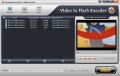
Giveaway of the day — Wondershare Video to Flash Encoder
Wondershare Video to Flash Encoder was available as a giveaway on September 28, 2009!

Wondershare Video to Flash Encoder is an excellent flash video encoder to convert video to flash FLV&SWF which are in small size and high quality. This video to flash converter can convert AVI, WMV, MPEG/MPG, MOV, MP4, 3GP and even convert HD video as M2TS, TP, TRP, TS to flash FLV/SWF with many attached functions.
Key Features:
- Convert video to SWF and FLV flash video;
- Batch convert & merge several video files into one;
- Edit flash video with powerful editing functions, trim video length, crop black video edges, adjust aspect ratio, customize output file size and picture quality;
- Provide beautiful flash players, you can choose your lovely flash player from 12 beautiful Flash player templates;
- Add hyperlink, text, image to your own output flash to cast onto blog, personal space, or websites;
- Easy-to-use with intuitive interface.
System Requirements:
Windows 2000/ 2003/ XP/ Vista/Win 7
Publisher:
Wondershare SoftwareHomepage:
http://www.flash-on-tv.com/video-to-flash.htmlFile Size:
12.1 MB
Price:
$49.95
Featured titles by Wondershare Software
Wondershare Video to Flash Converter Pro is your ideal solution to convert DVD, standard Video and HD video to Flash SWF FLV, it allows you to crop video, adjust video effect, add watermark and subtitle, clip a video into multiple segments, merge multiple files into one file, and join multiple files into slideshow. The Flash Video Converter Pro also can customize your SWF flash video by selecting built-in flash player template, applying special effect, adding text, image or URL as watermark, and customizing flash head and tail etc.
Wondershare DVD to Flash Converter is a versatile yet easy-to-use program to turn your favorite DVD movies into smaller, easily distributable Flash file in SWF and FLV formats.

Wondershare FlashOnTV is a professional Flash to DVD burner designed for users who want to convert FLV to DVD, convert SWF to DVD and put their Flash files on DVD discs. Wondershare FlashOnTV is a very easy to use Flash to DVD converter with powerful DVD editing function, which can convert Flash to DVD with just a few clicks.
Wondershare FLV Converter is easy-to-use and powerful YouTube Video Converter, which is designed to help you convert videos to Youtube FLV format and convert FLV to popular video formats such as mp4, wmv, avi with high speed and excellent quality.
GIVEAWAY download basket




Comments on Wondershare Video to Flash Encoder
Please add a comment explaining the reason behind your vote.

iPhone app giveaways »





Android app giveaways »





Done some further tests on this offering. If I turn back the system date/time to a value within the 24 hour giveaway window this shows as registered perfectly fine, but if I advance the date to the next day it reverts to a 15 day trial and prompts for registration information.
Wondershare have completely dropped the ball on this offering and should not be paid by GAOTD because they only gave a 24hour full license which then expired imediatly afterwards. This could also be why some people who installed this on the day claimed it did not activate properly because they may have been in a timezone that caused the broken date check to think the 24hour period was over so killed the full license. Or their system date/time was wrong. Will there be a re-run?
Save | Cancel
After I downloaded the Wondershare program I activated it--& used it to convert a wedding video I had stored---the program worked fine--until I went to use it a second time---then---guess what---told me I had an unregistered version--wanted $49.95--& splashed an ugly watermark all over any future projects--I'm not sure what you would call it--but I call it deception.
Save | Cancel
I had a good experiance w Wondershare support it was by email but quick and helpful
Save | Cancel
@15
PROS:
· Nice, simple, pleasant, easy-to-navigate Graphical User Interface (GUI).
CONS:
* GUI is dull and drab – could use a bit more sprucing up (IMHO).
Why waste your and our time?
Save | Cancel
I am running win 7 64 bit in a admin account and have a reoccurring problem now. Every time I try to install the software it doesn't register. I know that on softwate in the quick launch you can click run as admin, but that is not offered when I try to run setup and activate. Someone who is getting it to work please give suggestions.
Save | Cancel
decided to uninstall.
perused some suggestions ie word web, translator, and visual thesaurus and decided lingoes was the best and free.
would that be correct my dictionary loving friends?
Save | Cancel
I'm kinda starting to get annoyed by these video converters...But i have also installed some other Wondershare products from GOTD--but they all had some issues! I'm not sure if i want to download this from Wondershare--especially since it's another video converter!
Save | Cancel
Format Factory is clean, wondershare is great but resource intensive (to be expected and Ashrafs reviews rock.
Good giveaway, to be added to my ever growing ARMY of GOTD wondershare software.
Save | Cancel
wondershare video to flash installed and activated fine on win xp sp3. The program works well at converting files but it eats up way too much of my 2.8ghz intel processor it maxs it out to anywhere from 95% to 100% usage. Itried setting the priority for it to low but it did not make any difference at all it still continues to use up processor the same. The player it makes does not have an option to show a preloading screen so if you use a large video flv it takes awhile for it to load and all anyone sees is a black empty box waiting for video to load. All in all a good converter but kind of cpu agressive so you can't really do anything on the computer while its working on converting video.
Save | Cancel
wondershare video to flash installed and activated fine on win xp sp3. The program works well at converting files but it eats up way too much of my 2.8ghz intel processor it maxs it out to anywhere from 95% to 100% usage. Itried setting the priority for it to low but it did not make any difference at all it still continues to use up processor the same. The player it makes does not have an option to show a preloading screen so if you use a large video flv it takes awhile for it to load and all anyone sees is a black empty box waiting for video to load. All in all a good converter but kind of cpu agressive so you can't really do anything on the computer while its working on converting video.
Save | Cancel
Registration doesn't take - followed all instructions and the "wastermark" still appears. I'm pretty sure I'm doing this correctly, I have downloaded dozens of programs before...Maybe you guys ought to Contact Wondershare?????????? SUP?
Save | Cancel
I also have Vista and followed the ReadMe instructions, but once installed and activated, the program said it WAS NOT REGISTERED and that i had 30 days left to register! We cannot register the official way because that requires an e-mail address you gave to Wondershare upon BUYING the program, plus a CODE that they sent you, by e-mail. Obviously, we don't fit within that criteria!!!
Being UNREGISTERED MEANS that a Wondershare WATERMARK will appear on all that you do (according to the Help Files ---which i could only access using the F1 key!!!). Obviously (again) this Watermark thingy renders the program unusable, for all intents and purposes!
FORTUNATELY, #27's 'accident' holds the key!!! I follwed his/her accident path: I Unistalled the Program while UNCLICKING the "Launch...", re-booted (this sets it in the registry), processed the Activation FIRST, then instaleed the program, rebooted agian, and opened the program, and voilà, no more red message concerning the need to register!! Thanks #27 !! Hope this helps!
Save | Cancel
can we stop with wondershare and their really, REALLY crappy products PLEASE!?!?! im so sick of their crap, and it doesnt work most of the time. seriously, its wondershare every other day!
bring back PD Particles or something!
-
-
@ comment #5: there is no virus in format factory. your are obvously adept at computers.
Save | Cancel
Editing + Conversion Walkthrough:
1) Example using a recorded DVD: Open the DVD in (free) DVD Shrink -> set Shrink preferences to DVD9 disc & *Un* check box for split VOB files. Click the button for Re-Author mode -> drag title from list on right to main window on left -> click Backup button.
2) Open Video to Flash Encoder -> click Add Video, navigate to & select large VOB file created by Shrink. Browse to & Set Output Folder.
[I could have imported video directly, selecting whatever video file the same way -- just wanted to show the extra step for DVDs. If you read the log the app loads an impressive number of internal filters, but on import, if/when it fails to find what it needs, it tries to use what you have installed.]
3) Optional: click Edit & crop any garbage recorded on edges of video frame, or depending on what you're doing with Flash video, crop off any letterboxing -> click Effect tab & make any adjustments -> click Watermark tab to add a starting Watermark (text or image) -> click OK.
[One of the choices under Adjustments is De-Interlacing... This can be good for PC or LED only playback, *If/When* you have an Interlaced source, but the methods you can choose from are not the best. Reducing frame size &/or rate usually effectively De-Interlaces, & either VirtualDub or AviSynth have an extensive set of De-Interlacing filters avail. That said, you're often much better off to just leave Interlaced content Interlaced.]
4) Click Clip to cut out video segments *You Want* to use. A segment is defined by the 2 triangles you can drag along the progress bar. You can also type times directly by clicking on the current times displayed for start, end, & duration. And you can click the "[" "]" buttons during (suggest paused) play.
In this case I drag the ball for the progress bar itself, dragging it to the right till the opening credits fade, then back a bit -> click play, then pause at the correct moment, then "[" for my "In". I drag the ball again to the right til the end of the scene, then back, then play -> pause at the right moment -> then "]" for my out. Clicking the "+" button creates segment 2. I create my in & out the same way, creating as many segments as needed -- for this example I'll stick with 2 & click OK. Bear in mind that scene changes on TV usually have a brief fade, & this won't, so choose in & outs carefully.
5) Selecting both segments in the joblist window, I click merge to turn them into a single video -> selecting the new, merged clip I click the Play button on the video preview window on the right to see what the merged file will look like on playback.
6) Wrapping it up, I click the Customize button to bring up the 1st step of the output wizard. There's a profile drop-down up top, which reflects different sets of values -> I choose F4V, which is the only way to get H264 encoding. There is no aspect ratio setting, nor are there frame size presets, so video width & height should be figured beforehand -- the Proportional checkbox only causes the Width & Height to scale together.
[Calculating frame size: W/Screen TV in the US is displayed at ~853 X 480. Cropping the letterboxing top/bottom gives 853 X 368. I want a height of 240, & the width should be proportionate, BUT, modern encoders usually like sides that are a multiple of 4, 12, or 16 -- you can research to find an encoder's preference, but I just went with habit & used 16... the closest to the actual width is 544, which won't be detectable unless you compare frames side by side.]
Back in the 1st window of the wizard, I enter a height of 240 & width of 544, unchecking the Proportional box. For Video bit rate I select 768 from the dropdown (a very common bit rate), then 29.97 fps, which is the NTSC std matching the DVD, since I'm after quality. Under Audio, choosing F4V sets the Encoder to AAC with a bit rate of 128, which is fine. I leave it at stereo, and then run into the only serious limitation of the app so far -- the sample rate won't go above 44.1! [Most everything nowadays is 48, including DVDs & PCs, plus there's no way to gracefully lose the extra data: 48/44.1 = 1.08843537...]
I click Next, & leave everything checked except the Playback settings -- all the files will be generated so I can pick & choose. I click Next again, I click the different tabs to customize my player -- note that if you add an effect it will be there constantly, whether you click play or stop. Clicking OK closes the wizard.
7) Clicking the big Start button brings up the encoding window -- preview is on by default, but you *might* gain a few fps turning it off, using your CPU's horsepower for other things. Without running detailed tests, seems a bit on the slow side.
Browsing to the output folder I've got 4 new files: the flv video itself, an swf player, a jpg thumbnail, & a simple HTML page tying it together. However I also have the FlashPlayer.exe file from Adobe associated with swf files on my system. [Google: download "FlashPlayer.exe"] Double clicking my new swf file opens the player with the new video in that flashplayer.exe program. I go to File, then Create Projector, typing in a new name & clicking OK. I know have a sslf running executable with my new video & customized player.
Save | Cancel
Having same problem, installing on Vista x64, getting registeration screen. Ran activation key before and after program closed and open, its say activated... unistalled and re-installed still have same issue...any ideas
Save | Cancel
Try installing/reinstalling 3 times. Will not register on Vista Home. I installed it in the admin mode.
Save | Cancel
video to flash software, the activator doesn't work. Every time I open it, it asks me for a registration code.
Save | Cancel
Asraf, FormatFactory is not free.
I actually purchased a couple of Wondershare products, their customer service is very poor.
Save | Cancel
Same problem as number 25 above.
Tried the Activate with the program running and not running, but the program want to put a watermark in the middle of the video file.
I am logged in as the only user that my system has (also the admin)
Obviously unacceptable with the water mark.
ideas?
Save | Cancel
@ #12
You said it is bad that it can only output to flash. What are you thinking? Hello??!!
Save | Cancel
Installed and registered on Windows 7 x64 without any problems. Works great. Thank you GOTD and Wondershare.
Save | Cancel
Thanks for the advice for Vista I finally got it up and running. I really like Wondershare and this fits nicely with the others that I have, so thank you GOTD!
I have to remember to read ALL the reviews first, as there is always great advice. (And sometimes just for the chuckle)
Save | Cancel
#5: "I got my computer reformated due to the virus from the FormatFactory, it should be reproted!"
1) if indeed the app included malware, get with the FF developers to report where you downloaded it from.
2) if it didn't (i.e. you got FF from a good source), get with your A/V software developers.
3) in Any case, get disk image backup software, & USE it.
"Wondershare Video to Flash Encoder is amazing to convert your homemade video files into FLV or SWF to stream to YouTube, dude..."
Dude!... Ya Don't wanna *Upload* (???stream???) flv/swf to YouTube! Read their docs, Dude! ;-)
* * *
#8: "absolutly superb, straightforward and very useful for anyone that wishes to convert their digital camera movies (quicktime usually) to FLV/SWF for Youtube or similar."
Well, similar maybe... If you actually go to YouTube & check out their guidelines, you Won't find flv or swf suggested at all. In fact, they tell you when at all possible, DO NOT convert. If you use YouTube you might know they encode your uploads the way they want -- after all, parent Google taking over On2, the very well known flv encoder developers, should mean best quality. Just saying...
* * *
#9: "Ok i can show you more free video converters."
Thanks, but perhaps much simpler just to go to videohelp.com & doom9.org -- more listings, plus reviews & instructions on how to do almost anything with video.
* * *
#12: "* It is better to offer the code for the video embedding to website."
Valid point... To very easily put Flash video on your page you can upload to YouTube (they Do Not prefer flv) & use their code to embed, or use today's GOTD & embed -- Ideally Wondershare should make that as painless as possible & easy to use for casual users.
* * *
#18: "Can anyone suggest free software to record Yahoo and MSN messenger webcams?"
AFAIK recording from any webcam depends on the cam & drivers, unless you want to use one of the screenshot recorders, or software to save the streaming video to your drive -- that would depend on what software & version you use for IM (there are alternatives for either svc). Google.
* * *
#19: "Same as the last GAOTD – it cannot handle .m2ts files."
If Wondershare video converters have a problem importing Your .m2ts video files, you really have 2 choices: try every video app you can get your hands on, or figure out what you've got (both in terms of video & on your PC/laptop) & then learn how to handle it. M2ts is like avi or mov, meaning that that really doesn't say anything about what's really inside the file container. What's inside could even in your case be broken. In many cases Wondershare also tries to use the video decoding software you already have installed -- that could be broken, missing, or incompatible for .m2ts. Blankly stating that Wndershare Video to Flash Encoder won't handle .m2ts import would be false.
Save | Cancel
All of these programs to help us use our computers more effectively & securely are great, but I want to know what has happened to the games
giveaway area? There have been no games at all in the longest time.
Is there a reason? Have you meant to get it in there, but not had the time? When will we see more game give aways? I'm disabled & don't get out much, so your website is one of the few options I, & I'm sure many others, have for getting new games that WE get to choose. Please bring them back! Thank you.
Save | Cancel
Well, I have Vista x64 XP2. I was having trouble getting it to activate. The script said it was activated, but the software told me I had 17 days left to use it. I set the activation script to run in XP Service Pack 2 compatibiltiy mode and to always run as administrator, and it seems to have activated the program.
Save | Cancel
@ timpeva... I had the same problem because I accidentally ran the Activate program before installing the software. I re-downloaded and re-installed the software (re-installed over it - I didn't uninstall first), and ran the Activate program (with the software closed). After it told me that it was activated, I ran the program and it was registered. Hope this helps!
Save | Cancel
Wondershare Video to Flash Encoder, like their MP4 Converter the other day, is a video converter with a single output format. The same benefits apply: buyers aren't paying for features they don't need, & less choice means *potentially* less confusion.
Maybe the biggest (maybe the Only) Gotcha with the Video to Flash Encoder doesn't have anything to do with the app itself, but rather a misunderstanding of what Flash video is, & isn't. It is a video container & format that's both popular & easy to put on-line. It isn't so good otherwise [why so many people want to convert downloaded Flash video to something else]. Note that while many people automatically think of YouTube whenever Flash video converters are featured, YouTube actually would rather you uploaded something else -- they have their own conversion system. [Perhaps the only reason to ever upload Flash video to YouTube was/is to game their conversion system with specially modded files.]
The developers, Wondershare, have a link to a comparison chart on the home page for Video to Flash Encoder, showing the differences between the std. (today's GOTD) & pro versions -- the feature list on that home page includes pro features. One thing they share is the ability to package the Flash video (flv) you create with a player. Flash video by itself will play in some players like VLC, but normally there's a Flash Shockwave (swf) player involved, either as part of the web page or combined with the flv into a single file. There's a separate, stand-alone swf player [projector] from Adobe, that will save most any swf file to an .exe file that plays on its own -- it basically adds itself to the swf file to make the new exe... you can do this on your own -- just a matter of opening a swf in projector & saving as exe -- or it's included in conversion apps.
Long story short, Wondershare Video to Flash Encoder is well worth having, IF you need flv & can use the included player & templates. Like the Wondershare MP4 converter you add video to a joblist, choose your output options, & can crop, size, trim, & adjust colors etc. Because you can merge video clips, you can do simple editing -- think trimming segments to exclude commercials, cutting out portions you don't like, or the out-takes you don't dare post.
Save | Cancel
Using Vista 64 XP2 as an admin.
Will not register. I run the activate program, it says connecting to GAOTHD website, checking key availability, then says activation successful, but software still says unregistered. I have tried with the program open and closed. No change. I know I am an admin user on the system. Any suggestions?
Save | Cancel
Installed easy as usual on XP & Vista. Does exactly as it says and does it well .Its works great like all Wondershare stuff. And to all the neg people, Some of us can't get here everyday so repeat software is always welcome. Some people just arent happy no matter what you do.Thanks Wondershare and GAOTD for another great program. You guys are the best....
Save | Cancel
Does anyone know if this has any additional features that are not in Wondershare Video Converter Platinum which was previously a giveaway?
Save | Cancel
@ Asharf
You always providing decent reviews. Users here should be grateful.
As for the remark about EXE containers … probably that is a very good thing that you “have found no way» to create one :-) That should rather go into “the Good” part
I would suggest to anybody here – never even bother to execute any container with SWF that is the sure and known way to spread infection
If you have SWF container – use the Software like ARFlashplayer from
http://www.vector-ski.ru/vecs/arflashplayer.htm
Get just arflashplayer.zip (1st download link) You don't need the one with “_full” in its name
Just drop EXE container into it – it will extract and play media file only but nothing will be executed
@ Oliver … “Virus in FormatFactory"?!!! What a laughter!
You gotta be kidding and please learn about False Positives detections by your (or any) security.. otherwise you will end up without your OS being inoperable if you are blindly believing in anything that was flagged
Finally, this Software really not needed with so many free alternatives as FormatFactory, Super Player/converter and so on...
Save | Cancel
To #15: HappyPerson and #17: Fubar.
Thanks for letting WINDOWS VISTA users know. :-)
Save | Cancel
#5 oliver:
I've d/l ed FormatFactory many times, installed on many computers, including updating from previous versions. I've never encountered a single problem with it, and can only recommend it.
Getting a virus is unfortunate, but I doubt that it was due to FF. From where did you D/L it? perhaps you got it from a hacker site instead of the official website and the file servers it uses.
Save | Cancel
Same as the last GAOTD - it cannot handle .m2ts files. While objects that remain still in the frame are fine, anything moving is decoded as 3 overlapping shadows, and the audio is jumpy.
Thanks, GAOTD for the offer. Downloads and activates fine.
Stop wasting my time, Wondershare. Actually test your product before claiming it can do things.
Save | Cancel
Can anyone suggest free software to record Yahoo and MSN messenger webcams? Thanks
Save | Cancel
This is much improved over the June 6, 2008 giveaway. Clean install, uses its own codecs in its own folders. Vista users need to right-click Activate and Run as Administrator. Lots of features and options. The addition of the F4V format is especially welcomed. It actually converted faster to F4V than to FLV on my machine, as F4V used all four of my CPU's cores. Gives accurate estimate of output file size. Player appears to keep the original aspect ratio when the optional controls auto-hide, but it doesn't keep the aspect ratio when run full-screen. You can open any webpage for uploading. Colors used on the file list are low-contrast, making it difficult to read at the high resolution I use on my CRT. It's even hard to read on my high-resolution LCD (and people ask why screen magnifiers are handy).
Save | Cancel
Twitter : @cinevid
Well I am very impressed with this software! I am planning to use it for my website at http://cinevid.yolasite.com What do you think?
Save | Cancel
Vista Users Beware: Setup and Activate Process Must Both Be Run in ADMIN MODE for registration to take effect properly.
PROS:
* Smooth download, installation, activation, registration, on Vista x64 SP2 OS, for the most part (see CONS comment below).
* Registered status shows up in Register Section of program.
* Nice, simple, pleasant, easy-to-navigate Graphical User Interface (GUI).
* Local Help Guidance located within program.
* Features numerous audio/video editing and setup utilities.
* Allows user to determine location of output folder for converted videos.
* Allows user to upload converted videos to numerous social network sites after conversions.
* Preview pane feature allows user to view videos during conversion process.
* Smooth, easy, intuitive program operation.
* Allows for batch-conversion of video files.
* Quick conversion of videos - 5 (13-MB) WMV files were simultaneously converted to SWF files in 30 seconds.
* Quality of converted files was equal to quality of source video files.
* Converted file sizes were equal to (or less than) original source-file sizes.
CONS:
* Registration was difficult - ADMIN MODE (for setup and activation) required in order to solve problem. Developer does not mention this.
* Developer contact information not located within program.
* GUI is dull and drab - could use a bit more sprucing up (IMHO).
SUMMARY: - Program quickly and smoothly converts videos to flash format. Two thumbs up for today's GiveAway. Thanks GOTD and Wondershare.
FREEWARE OPTION:
Media Coder
Save | Cancel
#10 & 11 - Todays download is version 4.2.0.16
Save | Cancel
I didn't expect much from this program and I guess it is some better than I thought it might be. Not any better than some of the others but then it does have some nice features and is very self explaining. It is free today and if you do a lot of flash work then why not give this one a spin arund the block as they say.
Save | Cancel
The good:
* It can can most video to web video, like flv, swf.
* It can also help publishing the resulting web video to website with the offered player skin.
* It can do most it claims.
The bad:
* The resulting video formats are limited to flv and swf, which is not enough. For some people also want to publish mov, mp4, 3gp, 3g2..video to website.
* 12 offered player skins are not enough. They should offer more:)
* It is better to offer the code for the video embedding to website.
The alternative is free Moyea Video4Web Converter together with Moyea Web Player. They are both professional tools. You can use Moyea Video4Web Converter to convert all video to Flash video and use Moyea Web Player to make custom web Flash video player with playlist. Here is the tutorial: http://www.playerdiy.com/support/tutorial/customize-flash-video-player.html
We know that 1+1>2. So these two software can offer more functions than Wondershare video to flash encoder.
Save | Cancel
Can anyone tell me what version this is? I have a previous version, 1.1.5, and was wondering is this is an upgrade.
Save | Cancel
Can anyone tell me what version this is, I have a previous version 1.1.5, and was wondering if this offer is an upgrade?
Save | Cancel
Video converter again? Ok i can show you more free video converters. Wish you enjoy it.
Here you can find more free video covnerters:
FormatFactory -- Free and Full
Handbrake -- Free DVD ripper.
Leawo Free MAC Video converter -- Free video converter for MAC OS.
Videora iPod Converter -- Free iPod converter, but too many ads. =[
Leawo Free iPod Suite -- Free iPod converter, dvd to ipod converter and flv to ipod converter in one, but they have function limited.
I have tried so many free video converters. Wish it can help you. =]
Save | Cancel
What can I say, absolutly superb, straightforward and very useful for anyone that wishes to convert their digital camera movies (quicktime usually) to FLV/SWF for Youtube or similar. Excellent quality output and the option to change the soundtrack. I like it; glad I caught this one. Thanks.
Save | Cancel
Top Quality Stuff!!! thanks for sharing......
Save | Cancel
I prefer a simple but versatile tool like it. Thanks very much for the giveaway!
Save | Cancel
Be aware virus from the FormatFactory!!!
I got my computer reformated due to the virus from the FormatFactory, it should be reproted!
Wondershare Video to Flash Encoder is amazing to convert your homemade video files into FLV or SWF to stream to YouTube, dude, I should held up till today for the free version, but it worth the bucks for long term live upgrade anyway, thanks Wondershare for this great software!
Save | Cancel
@wuyouwu
You may use another converter - but ... This is FREE!!!!
Save | Cancel
I always use Aimersoft Video Converter Pro to help me convert video to FLV or SWF file. It can rip DVD to FLV and SWF as well.
Thanks for the offer.
Save | Cancel