Every day we offer FREE licensed software you’d have to buy otherwise.
Giveaway of the day — WinISO Standard 6
WinISO Standard 6 was available as a giveaway on March 22, 2012!

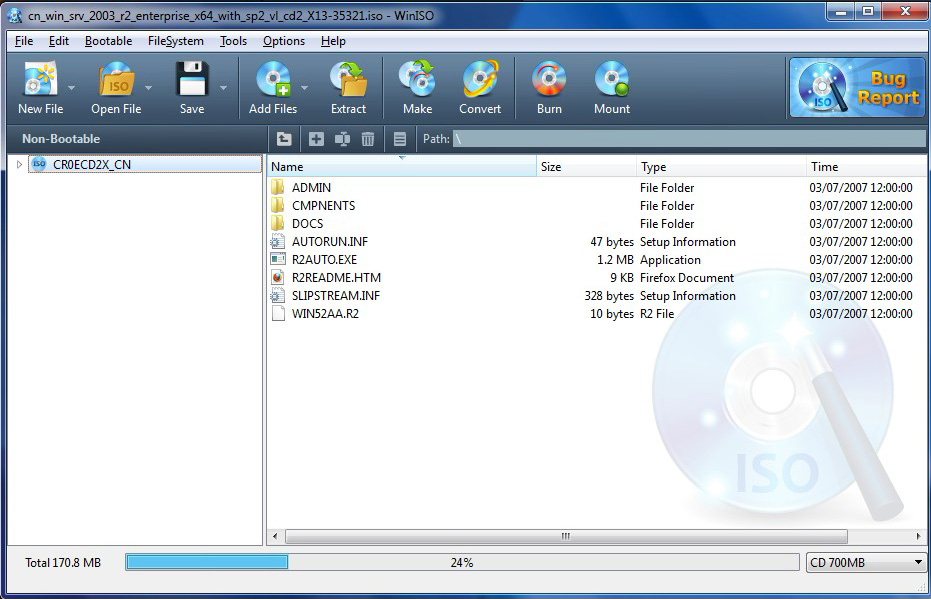
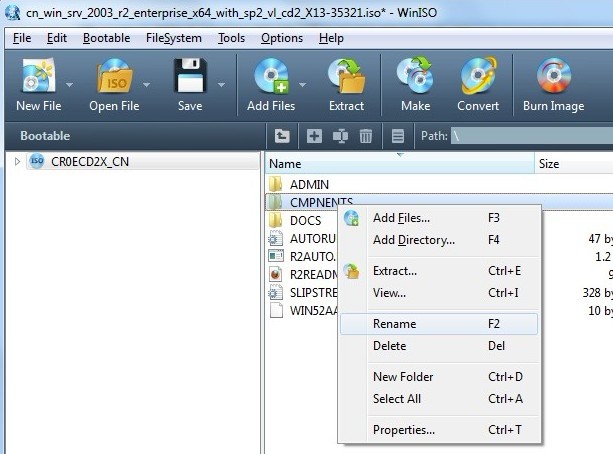
WinISO is a very comprehensive tool which provides everything you need to create, edit, mount, burn and convert disc images. It's just as easy to create new ISO9660, UDF, even HFS+ images or create an image file directly from a CD/ DVD/ Blu-ray Disc.
If you've an image file already (ISO, CUE/ BIN, NRG, MDF, CCD, IMG and DVD formats are supported), you can open it in a click or two, and extract the files you need with a quick drag and drop.
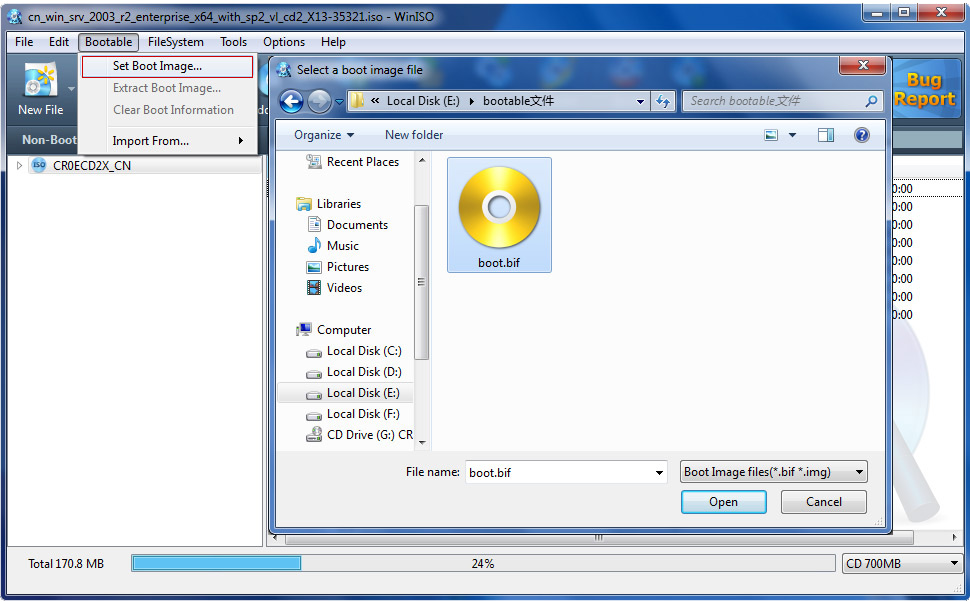
WinISO program has full support for reading and creating bootable image files. A simple conversion tool makes it easy to convert disc images into the format you need, and the program can even mount ISO files as Explorer files, or burn images to disc when you're ready to save them.
System Requirements:
up to Windows 7
Publisher:
WinISO Computing Inc.Homepage:
http://www.winiso.com/File Size:
7.16 MB
Price:
$29.95
Comments on WinISO Standard 6
Please add a comment explaining the reason behind your vote.

iPhone app giveaways »





Android app giveaways »





Says "Conversion Failed" after the copying is fully done... I have tried with more than 3 new dvd disk(windows 7) and same thing is happening, always. I have also checked it with different PCs. I had an earlier version of winiso that worked right. But the problem is happening on the new versions
Save | Cancel
I also asked "What is ISO?" And no one has answered that question yet. Anyone, someone, please . . .
Save | Cancel
I hope I'm not the only idiot who had to look up exactly what ISO files were, and what "mounting" them meant.
Based on the comments here -- and thanks, fran, for that YouTube link --I downloaded WinISO 6 and am going to find out more about this.
Thanks WinISO Computing and GGOTD!
Save | Cancel
Re comment #36:
@William W. Geertsema
You know, the software you download and install during the Giveaway period comes with the following important limitations: 1) No free technical support; 2) No free upgrades to future versions; 3) Strictly personal usage.
But you can use the 50% OFF coupon to get our comprehensive service. Like: upgrade service and our technical support.
Here is the 50% coupon purchase link, you can directly click it to get it.
https://secure.avangate.com/order/checkout.php?PRODS=4385865&QTY=1&CART=1&CARD=1&COUPON=OlWiUr2Y
Save | Cancel
Thanks for GOTD!!! Great offer! This is what I’m looking for.
Save | Cancel
None for Win7 64bits?? It's not extactly Dr Who, we're in 2012!
About the price, erm....The cheaper you sell, the more you profit from it.
Save | Cancel
Simplest, most pain-free registration of all time by following the directions they gave us in Comment #1, above. Thanks so much, GAOTD and WinISO. I've been needing a good program like this one!
Save | Cancel
I had high hopes for this as I was looking for an alternative to Daemon Tools.. Then I got this error when I was testing it out..
Critical: Virtual CD-ROM mount is not supported on 64-bit OS yet, sorry.
Uninstalled.
Save | Cancel
Having used Apple Mac and Linux since 2000 I still can't comprehend why this functionality isn't part of the basic windows functions?
Glad you guys have made an app for it though.
Been using PowerISO on Windows machines... (Not the Virtual Ones which I just mount iSO's via VMWare..)
Save | Cancel
@ArtKns #29 Since this app does not support audio CDs, does anybody have any recomendations for creating ISO images of audio CDs?
When I tried an audio CD with ImgBurn, I got this message:
"ISO is not an appropriate container format for the current disc.
Reason: The disc contains multiple tracks."
The usual equivalent of ISO for audio CDs is a pair of files - ".bin" + ".cue". ImgBurn is one of many programs that can create those. CD copying programs (like Nero) also have proprietary formats.
In the comments of the following page, you can find one work-around (convert to FLAC, create ISO of FLAC files, mount the ISO):
http://club.myce.com/f57/newbie-help-how-do-i-make-iso-audio-cd-doesnt-seem-work-134889/
@asilaydyingdl #39 Question before I download. When you convert a DVD to an ISO image, and then burn that ISO to a DVD disc, will the burnt DVD then play in all standard DVD players?
Generally yes, but some DVD players are finicky. Many DVD copy programs create an ISO image as an intermediate step.
@AugustusPoirot #42 I am a gamer. Many of my older games require the DVD in the D: Drive in order to play the game. Would I be able to use this even if I don’t know what “iso” is?
This program MAY work as the DVD for the game, but I suspect it depends on the game. The DVD requirement is usually to prevent "sharing", so the game may be programmed so that an ISO won't work.
I also have quite a few digital pictures that I would like to send to relatives – but my IP only allows 10mb per email. It would take me FOREVER to mail one attachment per email. And, many of my pictures are over 10mb. If I compress them, the quality of the picture really suffers.
Is today’s GOTD something I could/might use?
This program won't help you email pictures if you're limited to 10mb. You could burn the pictures to a disk and use snail mail, or you could try Dropbox. IIRC Dropbox gives you 2 gb for free, and it's pretty easy to use - I talked a fairly "mature" relative through setup and use.
Save | Cancel
OK ... I ended up 'activating' the program while in Safe Mode. Don't know what the problem was ... since I've loaded/registered many Giveaways ... in the past.
Save | Cancel
Thanks for the nice freebie. For those needing to mount images in 64 bit Windows try out Gizmo Drive found at http://arainia.com/software/gizmo/overview.php?nID=4 as it does work for this task. And you have WinISO for the rest of your imaging needs.
Save | Cancel
I can't seem to get past "Activating" dialog box. Has anyone else had this problem?
Save | Cancel
Great software, but it will NOT mount virtual drives on 64bit operating systems. So you may still need another application.
Save | Cancel
Reiterating what #40 said, if you get the "NSIS Error" window when trying to install this from the GAOTD download, go to the developer's site and download the program from there. The Name and Registration Key from the text file in the Giveaway download will work on it. (Did for me on Vista 32-bit.)
Also, if you're using Norton Internet Security, remember to turn off the SONAR function when installing GAOTD software because it frequently flags the newly-wrapped GAOTD package as suspicious because of low usage.
Save | Cancel
I use YUMI to boot different ISO's via a USB drive and this makes updating the ISO's quite easy. Whether you want to update an email address or add/remove files from an ISO, this does the job.
Thanks GAOTD and WinISO!
Save | Cancel
I have a request for the developer of WinISO (and all other ISO utility programs):
Could you please add a "Test ISO" button? I have had several ISO files I've downloaded over the years with no way to test that I successfully downloaded the entire file without it being corrupted. This test feature would be VERY helpful to me! Thanks!
P.S. If any readers know of a program with this feature, please do tell! =)
Save | Cancel
It says in the system requirements "up to windows 7", but that is NOT true; this package actually requires XP. I found out when I tried to install on a windoze 2K pro laptop, and a dialog box opened and told me so...
Not all of us keep up with the Jones's you know... "Up to" implies it will work anywhere "up to" and including Windows 7, yes?
Thanks anyways... I would really have liked to at least TRY this package...
Save | Cancel
There is a lot it cannot do on win 7 64 bit, and i have the paid up to date version which is not this 6.1 this one wont do anything either. i got rid of the paid version also gave it away.
Save | Cancel
What about netbooks and tablets? -- the modern tech which does not come with CDs?
Can this burn to a SD, usb flash, or other external media so that can restart a system
Save | Cancel
i had no problems with download or installation or registration. dunno why the other guys face them
Save | Cancel
Thanks. Great software!!! Take a look...It's not bad too... :)
http://dottech.org/freebies/windows-freebies/28981/free-allmynotes-organizer-deluxe-v2-59-24-hours-only/
Save | Cancel
XP SP3
v6.1.0
registers simply with the given "email" & code
registered, the registration shows as ...
Email: Giveawayoftheday
Registration Code: Registered, Never expires
THAT LAST PART IS IMPORTANT, because others have
also given away v6.1, & with those, the license
expired after 1-year.
---
(simply copying from an earlier post of mine, from a earlier "give away" ...)
installs into directory of your choice, 30 MB
though also adds 3 MB into \Windows,
a small MSI in \Installer & 3 MB in \winsxs
on opening, asks for registration data, else
says there is a 500MB file saving limit
now, just what do you do with it?
not sure you can MODIFY a file, directly?
perhaps you would need to first DELETE &
then ADD back the (mod'd) file?
& then you would save the ISO?
BUT, in this day of Flash Drives, & where
you can make them bootable, aka bootable
"ISO's", there really is no longer a need
for CD's, as you can make any changes
directly to the files on the Flash Drive.
So ... ?
Save | Cancel
Ultra ISO works on x64 systems. Not free, but OK.
http://www.ezbsystems.com/ultraiso
Else You have the free Lite-version and pay versions of Daemontools
http://www.daemon-tools.cc/eng/downloads
Save | Cancel
Hi, WOW!:), I'm still in a process of learning about how to create ISO image of my System (or what ever is needed to boot Windows using CD in case of difficulties..), and not just entire Drive image, etc.., but this far - I can already say: Today's Offer is responsible for fixing my PC!! (happy bunny, lol)
Well, partly responsible.., below I will describe my PC "situation" and new hope(!) seeing Today's Offer.. I also stress - Apologies in advance if this is simply boring!!
For few weeks now I've been raking my brains how to fix faulting booting. When choosing "normal" start - it would result in Error message: "Security Account Manager failed to initialize", bla bla, and I had to manually select which hard drive I want to boot from, using F12 key.., not realizing fully that it might be the ACTUAL order in BIOS (somehow altered??), and only getting today to BIOS (using del key) and checking there(!) what's going on - I was able to set my actual OS drive ("C") to take First Position on that list, and not External usb drive! - resulting in that Error.. Barking at wrong tree? SAM files..? Deploying all Diagnostic tools under the sun:)? You bet, LOL!
So - Bingo!! I can finally turn my PC off and start it like a normal human being:) Uuuuf!
But - only Reading and Learning about Creating ISO files today - for what ever purposes (and in my case simply for booting Windows to start with..) lead me to thinking that before making something credible and useful (like bootable Win CD) - I first have to make sure that my Booting Section is in order, and doesn't Copy some "mess"..
That being fixed now:) - I got into reading about what additional Software (apart from WinISO) can create bootable iso file of System ( like Paragon, like Marcium Reflet - even free edition, and for Those interested I provide link to slightly lengthy.. Tutorial uTube here: http://www.youtube.com/watch?v=N4b0M8ILC_U&feature=related) - so then WinISO has LESS tasks?:) NOT that it wouldn't necessarily perform described task after learning "how to"!
I'm writing this because someone like me (photo artist primarily:) might have limited knowledge about iso imaging, about which Files of interest to choose, a.s.o - and on top of it - My example might even help someone to "fix" something else?
By all means - Today's Software is for Keeps! It helped me in more ways than one to broaden my horizons..
How true: You learn something new every day!
Many, many Thanks indeed GAOTD and WinISO:)
Save | Cancel
I am a gamer. Many of my older games require the DVD in the D: Drive in order to play the game. Would I be able to use this even if I don't know what "iso" is?
I also have quite a few digital pictures that I would like to send to relatives - but my IP only allows 10mb per email. It would take me FOREVER to mail one attachment per email. And, many of my pictures are over 10mb. If I compress them, the quality of the picture really suffers.
Is today's GOTD something I could/might use?
Save | Cancel
# Adif.
ImgBurn is excellent, but can you edit iso files with it?
Save | Cancel
THIS IS BRILLIENT PROGRAM AND EXTREMELY USEFUL
I did find a problem with the Giveawayoftheday download as it downloads ok, but when it comes to install the wrapper system cannot conect you to install the program and says to try again later. I tried this twice with NO sucess !
Seeing that a lot of people liked this I decided to try another method and that was reading the download read me, and it gives the unlock code, so I went straight to the website of the manufacturers of the program, downloaded a copy, it installed imediatelly, I opened the programe and registered it with the Giveawayoftheday code, closed the programe and restarted it and it worked in full.
A WORD TO GIVEAWAY OF THE DAY, always include the unlock code in the Read me info as the wrapper does NOT alway work as in this case.
Save | Cancel
Question before I download. When you convert a DVD to an ISO image, and then burn that ISO to a DVD disc, will the burnt DVD then play in all standard DVD players?
Save | Cancel
After testing a little bit around i found that
-Add context menu integration for mounting
-Add 64bit support for mounting
-Sign your drivers
-Remove tracking ability of the main program
(outgoing connection attempt- whether update check is on or off)
-Add a minimize to tray function
-Make it accessable from the tray
-Improve translations
would make this app a lot more functional.
Save | Cancel
Is there a way to connect a computer with Win7-64 (and with WinISO but can't mount) with an XP program for the mounting process?
Save | Cancel
Re comment #1:
If I want to purchase the product, how do I apply the 50% coupon deduction? I find nothing about that in the ordering procedure.
Save | Cancel
Is this version of WinISO supposed to be able to open and mount NRG files? When I try to open NRG files created by Nero 6.6, it says "Unable to read." (ISO files work fine.) The NRG files are OK and can be opened by Daemon Tools.
Save | Cancel
This application does not work if you go in with Admin rights, while mounting images. Everytime I try, & click on "Current image has been mounted to drive H." -> click on "Open in Explorer" -> error is produced: "H:\ refers to a location that is unavailable. It could be on a hard drive on this computer, or on a network. Check to make sure that the disk is properly inserted..." a pretty long message.
I am on fully patched Windows Vista 32-bit.
But even as a standard user, mounting is less than straight forward. Having used VirtualCloneDrive, its actually quite a crazy program: no right-click menus, you first have to "Open" the ISO file from "File" menu, then click "Mount".
Secondly, this is a paid application which lacks a digital signature. I always find this unacceptable. It also connects to internet EVERYTIME it is started or an image mounted. What for? To track users what they are mounting like Daemon Tools have done? And all this even after I disabled "Check for updates automatically" [I thought only that component was making the connection, I was wrong].
I was excited by today's giveaway - it turns out to be an utter waste of time. Uninstalled.
Save | Cancel
Thanks to WinISO Computing Inc. + GOTD.
I have MagicDisc and WinBin-to-ISO freewares.
I have tried Daemon Tools Lite and I did not like it.
Maybe this WinISO will be better.
Save | Cancel
Why call it "Standard" version when no Pro version exists?
Save | Cancel
@ 27 Adif Winiso can not only burn iso, but as a iso maker editor mounter
Save | Cancel
Gizmo is a great free alternative
http://arainia.com/software/gizmo/overview.php?nID=4
Isobuster is also good, though it is a shareware, the freeware functionality is enough for normal users
Save | Cancel
Since this app does not support audio CDs, does anybody have any recomendations for creating ISO images of audio CDs?
Note: I do NOT want to rip the audio tracks, I want an image of the CD.
Save | Cancel
Installed & activated fine (XP SP2).
The prime reason for this software for me was to make ISO images of my audio CDs. Big disappointment: "Audio CDs not supported" Bummer
Save | Cancel
I didn't install this GOTD but what's wrong with the freeware ImgBurn ?
small and fast
Save | Cancel
Mounting images doesn't work in Windows 64bit.
"Virtual CD-ROM mount is not supported on 64-bit OS yet, sorry."
The rest of the software is good though, and I have used UltraISO for many years to solve my ISO creational needs.
Save | Cancel
@20 "Skye-hook"
Through menu you can export bootimage from other bootable ISO and import to new project....
Save | Cancel
For $29.95, UltraISO has more features. For free, ImgBurn is a more versatile tool.
In short, nothing new; not better than competitors.
Very poor regarding disc management: simulation, test CD/DVD, drive or C/DVD information, disc spanning, ...
Requires IMAPI, which I disabled on my system. Not for me, then.
For an unknown reason, stores the setup file (6.2 MB) in the program's directory. Save it in case you'll need to reinstall the software.
Other than that, does not look like a bad product. I might even recommend it to my father who is 76 year old. Oh, I almost forgot I installed CDBurnerXP on his computer ---never mind.
Save | Cancel
Before I was using 7-Zip to browse and extract elements, ImgBurn to burn to cd/dvd, WinCDEmu to mount to explorer and XBoot to burn to usb stick. This one seems to handle 3/4 of these tasks.
Save | Cancel
Nice software...but this is only the STANDARD version...right??
This tool is free and better than this giveaway....
http://www.askvg.com/iso-toolkit-freeware-to-create-convert-copy-and-extract-iso-image-files/
Save | Cancel
The icon does not show up when logged in as a standard user, it seems. I never browse the WWW as an administrator, so have to find a workaround to fire it up while browsing as a standard user.
Save | Cancel
3 EZ but important questions-
1.To make a bootable ISO it says you need your boot files- where do I find those?
2. Even a DVD doesn't have room for my whole C drive. Can I also use this to create a bootable copy of my whole C: drive and save it to Drive E on my current disk? Or save it to my external drive?
3. If so, can this be used to make my hardrive have 2 versions of windows that I can use whichever one I want at any time?
Save | Cancel
Installed fine, but had to type in reg key manually as dialogue box wouldn't allow paste even Ctrl+V wouldn't work, bit of a pain but other than that it's all good under the hood.
Save | Cancel
Very good program, although a free alternative is Daemon Tools Lite a very worthy program it can copy, read, write and play DVDS and BLU-RAY Disks
http://www.daemon-tools.cc/eng/products/dtLite
Give this ago...
Save | Cancel