English
Every day we offer FREE licensed software you’d have to buy otherwise.

$34.95
EXPIRED
Giveaway of the day — Video Splitter
Boilsoft Video Splitter will split, cut or trim a large video file into smaller video clips without re-encoding.
$34.95
EXPIRED
User rating:
483
50 comments
Video Splitter was available as a giveaway on February 9, 2013!
Today Giveaway of the Day

Convert, enhance and edit videos in 1,000 formats and more.
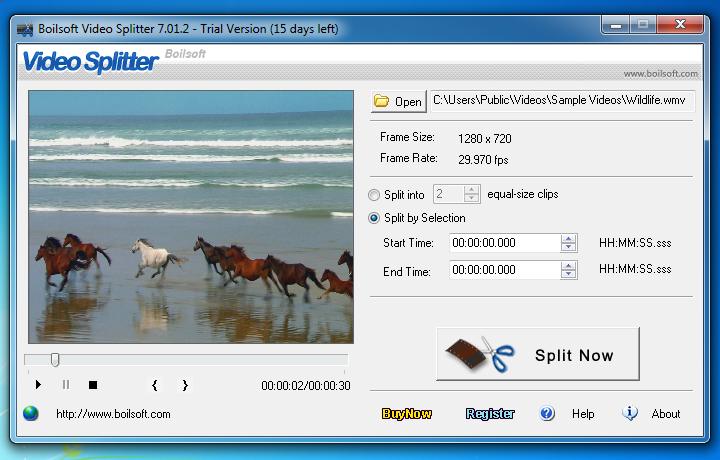
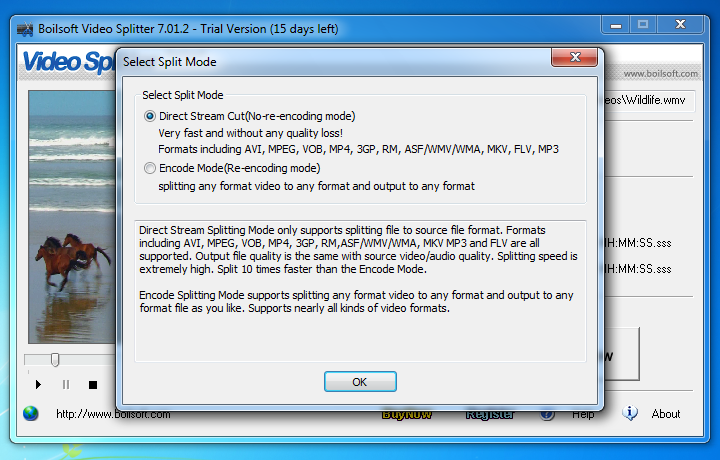
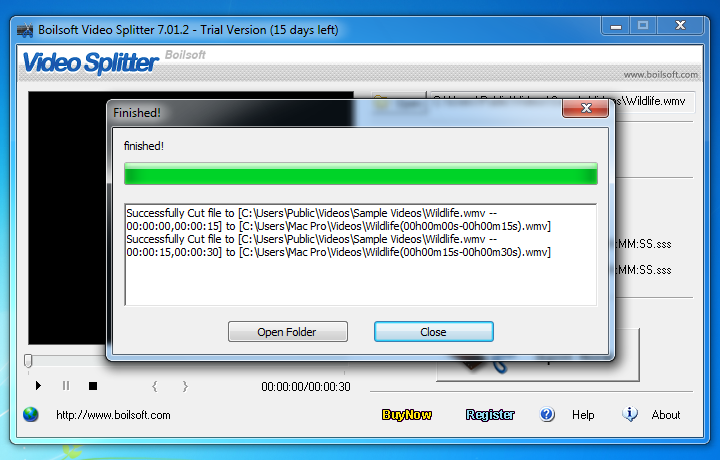
Boilsoft Video Splitter is a powerful video cutter to split, cut or trim a large AVI, MPEG, RM, ASF, WMV, 3GP, MKV, FLV or MP4 Video file into smaller video clips without re-encoding. This video splitter and video cutter software comes with the built-in video player, you can easily split/cut AVI, MPEG, RM, ASF, WMV, 3GP or MP4 video file by time or the selection as needed. Video Splitter is one of the most efficient and fastest in the market.
Features
- Split, cut or trim a large video file into several segments.
- AVI Splitter, MPEG Splitter, RM Splitter, WMV Splitter - all in one.
- Split video files without re-encoding and quality loss.
System Requirements:
Windows 98/ ME/ 2000/ XP/ 2003/ Vista/ 7; Microsoft DirectX 8.1 or later runtime
Publisher:
Boilsoft Systems International Inc.Homepage:
http://www.boilsoft.com/videosplitter/File Size:
19.8 MB
Price:
$34.95
How would you improve Video Splitter?
50
vote
Comments on Video Splitter
Thank you for voting!
Please add a comment explaining the reason behind your vote.
Please add a comment explaining the reason behind your vote.
iPhone app giveaways »

$0.99 ➞ free today

$2.99 ➞ free today

Exercise your brain by improving your vocabulary with the word world and have a good time with unique matches!
$0.99 ➞ free today

$2.99 ➞ free today

$2.99 ➞ free today
Android app giveaways »

Calculate date related operations like total years, months, days, weeks, hours, minutes and seconds between two dates.
$0.49 ➞ free today

$11.99 ➞ free today

$0.99 ➞ free today

The fence has fallen down again, one after the other, no matter how many zombies you have killed.
$0.99 ➞ free today

$1.99 ➞ free today
Same problem here. The program no longer opens and says you have to buy it after 10 uses.
Save | Cancel
I originally downloaded this software when it was offered here as the giveaway of the day Feb. 9, 2013. I used it about 4-5 times and was very satisfied with the end result. Today I tried to use it - I couldn't open it. Got a message saying it can only be used 10 times. ?!?! If this is the condition of this software why wasn't this stated on the page somewhere when I downloaded it? I always thought all software offered here as giveaway of the day was always good to use with no time limitations.
Save | Cancel
Thanks, Roy McCoy.
Steve
Save | Cancel
Download, install and register without any issues. Tested on 30-minute MP4 (300MB) file on a P4 Windows XP PC with 3GB memory. Selected portion of video at start that I wanted to remove and the last portion of the video to be removed. Ran using default settings and was impressed how quickly the software processed the MP4 file and the quality of the resulting file. Removed +30MB from the original file - no loss in video quality or audio quality (audio still in synch with video). A must have program for my video arsenal. Thumbs up. Thank you GAOTD and Boilsoft.
Save | Cancel
Downloaded, installed and registered without any problems. Tried an AVI file first but changed my mind and tried opening an MP4 instead. The program crashed. Re-opened the program and retried the MP4 video. I selected the beginning portion I wanted cut as well as the end I wanted to remove. Ran the program with the default setting and was very impressed how quickly it processed the file. Even more impressed with the resulting file - cut off at least 35MB of unwanted video. Great program. Thumbs up.
Save | Cancel
Install on WinXP and works fine.
I like two things about the installer:
1) Serial number included. No need to provide email address.
2) No dodgy browser toolbars included. They are a real turnoff.
Save | Cancel
Bob Retelle & Dido,
You might want to check out this freeware app at https://mcebuddy2x.codeplex.com/
Save | Cancel
@ Bob Retelle
for AVI & MPEG try Video Edit Master 2.0 from http://www.masterwareroom.com/ as it lets you mark parts you want then joins them. it will have to drop a frame or 2 at the joins, but that's what I use it for!
freeware can rule!
Save | Cancel
Very handy utility! Tried it on several MP4s. Great for quickly and easily creating a lossless section of video you want to keep for whatever reason. Really fast too. I'm glad I got it.
For free splitters and joiners, see here:
G:\DOWNLOADS\FW\MM\EDITORS - Video\Split & Join\Best Free Software to Split, Trim or Join Video Files.mht
Save | Cancel
Good freeware alternative: Iwisoft Video Converter
Save | Cancel
Needs to be able to display and frame advance FLV and mp4 to be competitive with other software including free splitters.
Save | Cancel
#35 Steve
If you want a high quality MPEG editor, check out VideoRedoTVSuite. Not cheap though but, in my opinion, well worth the price. I've been using their editor in it's various versions for more than a decade.
Save | Cancel
MediaCope has similiar features and is free, it will also allow you to extract audio from video.
Save | Cancel
I tried Free Studio (‘Virtual Dub’ module), but kept giving error. Tried Boilsoft - it worked like a charm.
Save | Cancel
not free, but far better alternative (that also works with MS MediaCenter old and new files) is VideoRedo. You can define multiple split segments and it has built-in commercials finder (pretty accurate).
Save | Cancel
When installed on XP SP3, it works as expected on .asf, .wmv and .flv, however multiple attempts to split a .mp4 file failed with an "Err dup track 2" error. Is anyone else getting this error? Any advice on getting this to work on .mp4 files?
Save | Cancel
I'd like to know the answers to 2 issues that are not reflected or improperly stated on the Boilsoft web site
--- From their web site page at http://www.boilsoft.com/videosplitter/
"Powerful and EASY to use
Split large video files, even larger than 2GB.
Support drag-and-drop.
All encoders/codec are built-in."
Question: Larger than 2GB. With the size of HD video files, often larger than 2GB and often even larger.... (4GB - 5GB), what is the limit to the size of the original file? (If it was unlimited, then why raise this limit issue?)
Question: "All encoders/codec are built-in." If all "codec are built-in", then why on the FAQ page does it say:
--- From their F.A.Q. page at http://www.boilsoft.com/videosplitter/faq.html
"1. Can you tell me the reason why I can't open my video files?
please install the K-Lite Codec, which can be downloaded at:
http://www.free-codecs.com/download/K_Lite_Codec_Pack.htm
The standard version is recommended.
2. I can't join, split my AVI files!
The most common reason is that the proper codec can’t be detected or install properly."
------------------------------
Surely Boilsoft would like to answer these questions, as these issues do reflect on the attention to detail as reflected in the Company. Things like this tend to make me shy away from any developer, retailer, etc.
Save | Cancel
Sorry Ashraf, the silly Free Studio (‘Virtual Dub’ module) always gives error (Code=10).
Save | Cancel
Darn, I actually paid full price for this software a month or so ago for slicing up video data converted from Hi-8 tapes. Works fast and is loss-less converting from VOB to MPG. Am recommending friends grab it now while it's free.
Save | Cancel
Tried this because I need to cut Mpeg m2v files. Sadly, it doesn't support cutting those without re-encoding.
Software did NOT cut the video where I told it to.
Software changed the aspect ratio from that I set.
Will not be keeping this.
Save | Cancel
Here's a link to the freeware splitter mentioned earlier - AudVidder
http://download.cnet.com/AudVidder/3000-2194_4-75217131.html?tag=mncol;1
Save | Cancel
@#21 malachz: You could try Free Video Joiner (http://www.freevideojoiner.com/).
Save | Cancel
says only splits and doesn't join, Free Format Factory has joiner for videos so I guess you can use that with this software! Me I am stiil beginning at this stuff!
Save | Cancel
Installed without a problem. I confirmed it would NOT play a mp4 file. Also, there is no frame advance forward and backward making it extremely difficult to make accurate trims. The split into equal parts feature, IMHO, is useless. What I need over and over is to remove the beginning and end of clips and save the file without re-encoding. I will uninstall.
Save | Cancel
I just realized after downloading, that the software doesn't support MKV files. Unfortunate, as these are the common result of a Blu Ray disc rip.
Save | Cancel
This is quite good software for what it does. Lossless editing is always good. It is a little limited in comparison to freeware I know though.
The best freeware I know for video splitting is Audvidder. It supports all the most used file formats and it's lossless.
It can also join files files, but that is a little buggy.
Be aware that this app is quite old and has been replaced by the shareware EZR Videostudio which costs 15 US$. The only download site I know of for the last version is Download.com
A much newer app is machete lite from Machetesoft.
It can only take AVIs and VMWs, but it can split,cut and join files.
It too is lossless.
Save | Cancel
Not good for me, this is not an editor software.
Splitting is irrelevant to me.
Uninstalling
Save | Cancel
Running Win 7 32bit SP 1
Downloaded, installed & activated using the provided code without any problem = Thumbs up
Program is small, no any fancy stuff, program GUI is not re-size able,
works pretty fast (in the no-encoding mode that is) and delivers exactly what it promises...
Definitely a keeper at least from my personal point of view.
Thank you GOTD & the publisher for this little gem...
Save | Cancel
I could use a M2TS file splitter
Save | Cancel
17.@16, when you launch the program, the top portion contains “Boilsoft Video Splitter 7.02.1″
i have no gripes against this fast program except the fact that a program which can split videos must also be able to combine videos.
(the developer offers a separate paid video joiner program)
thanks anyways.
Save | Cancel
@16, when you launch the program, the top portion contains "Boilsoft Video Splitter 7.02.1"
i have no gripes agains this fast program except the fact that a program which can split videos must also be able to combine videos.
(the developer offers a separate paid video joiner program)
thanks anyways.
Save | Cancel
@ Bill: It says in the title bar Video Splitter v7.02.1 so I'd assume that's the version number ;)
Save | Cancel
I don't know what the problem is but the serial provided does not work.
Save | Cancel
I followed the instructions for installation.
All done well exept the registration.
While I copy/paste the registration code given in the .txt file, it returns the error message that this code is invalid.
What am I doing wrong?
Save | Cancel
I do not see the version number.
Current release @ price above is Video Splitter v7.02.1
What version is this?
Am I right in thinking there is no lead in type of thing; it just cuts at point A and next section starts immediately at point B, no fade in/out?
If that is the case it's usefulness is compromised.
Can anyone clarify? The webpage and reviews thus far have not covered these points.
Version Number and answer re. fade in/out, please GAOTD or Developers?
Save | Cancel
@ Bob Retelle...
"I’m looking for something that can remove segments of a video file so you end up with one smaller video. An example would be editing out commercials from a TV show."
VideoRedo does this nicely for me. Not cheap, though.
Save | Cancel
does not support mp4 made by samsung galaxy s2? why? (win8 64)
Save | Cancel
Sorry, but the lack of Flv support makes this a useless for me. So it's uninstall for me
Save | Cancel
About the "Share your ideas"-request "split MOV files":
Simply RENAME(!) mov to mp4 and then split ...
Save | Cancel
I have an older version offered here a while back and it is capable to handle only one cut at a time. Hence, if you want to cut out a few episodes from the movie, rather than only one, you need to cut, split, then cut another episode etc. Very annoying. Is this supposedly newer version capable to handle more cuts and splits at a time? No where have I found any info about the version of this GAOTD? Could anyone advice the version of this software?
Save | Cancel
Excellent and very useful free program, I recommend :
http://betanews.com/2012/12/13/freemore-audio-video-suite-a-one-stop-shop-for-all-your-media-conversion-and-editing-needs/
Save | Cancel
fantastic software
Save | Cancel
Haven't downloaded it yet! seems like it might be usefull for mutiple old tv programs from 50's and 60's that I download off web and have yuk commercials in them! Only an amater in this, looking forward from comments from experts who post here!! maybe one experts can state
old shows post way back machine can be edited with this software?
http://archive.org/details/Classic_50s_TV_694
Save | Cancel
Installed on XP sp3 without a problem.
I tried a few short video clips of different formats. It worked quickly and flawlessly on all of them including FLV and MP4.
Maybe Asharif at #1 used an older version as I also got 'preview' and 'play' on these formats, also I am not sure why you would need a 'batch' facility as cut-off time would be surely be different on each video.
The only gripe I have with this software is the screen size. It is stuck at 'small size' without even a 'full-screen' otion. It is also too expensive at $35. $15 is a more realistic price for this kind of software.
Save | Cancel
Damn, just noticed this one doesn't do mov files. Oh well :-(
Save | Cancel
I will give this a try. I can't get Virtual Dub to open .movs in spite of plugin installed, Aimersoft's splitting quality isn't all that good. Hopefully this one will work well. Thanks.
Save | Cancel
Question about the software:
I'm looking for something that can remove segments of a video file so you end up with one smaller video. An example would be editing out commercials from a TV show.
I'm not certain from the description that "Video Splitter" can do this.
I don't want to "split" a video into smaller pieces, I just want to remove small pieces from the middle of the video.
Any thoughts about whether or not this software would be suitable for what I'm looking for?
Save | Cancel
Installed easily on Windows 7 64-bit.
Unfortunately, it doesn't include .ts (.mts, .m2ts ....) stream splitting!
Mr King of Kings (Giovani) and others, any source for my request (to stream split .ts AV s)
Save | Cancel
Installed easily on Windows 8 64-bit.
Nice and simple interface.
Opened a .vob file and specified to split off from the 3 minute to the 4 minute mark. The new file was produced quickly and the new filename was VTS_01_1(00h03m00s-00h04m00s) which could be very useful if pulling off multiple small pieces.
Played the clip - looks good, audio in sync with video.
Save | Cancel
Pros
*Has the ability to split videos without re-encoding
*Splits all common formats
*Has the ability to split the following some audio formats too
*Has a built-in preview, allowing you to play a video/audio from within the program
Cons
*No batch processing — you cannot queue up multiple splits to happen one after another
*Doesn’t perfectly split files
*Is unable to to preview/play MP4 and FLV files
Free Alternatives
Free Studio ('Virtual Dub' module)
Freemake Video Converter (has cut/trim capabilities)
Final Verdict
Click here for final verdict and full review
Save | Cancel