Every day we offer FREE licensed software you’d have to buy otherwise.
Giveaway of the day — True Launch Bar 5.2
True Launch Bar 5.2 was available as a giveaway on February 10, 2011!

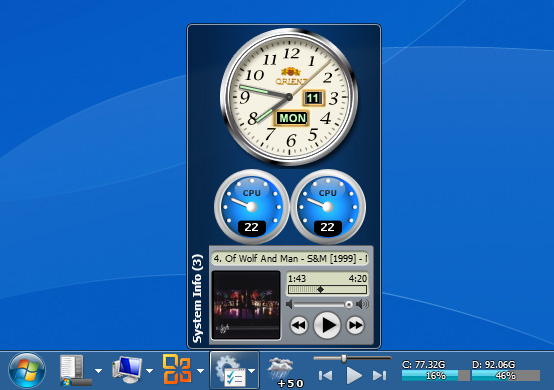
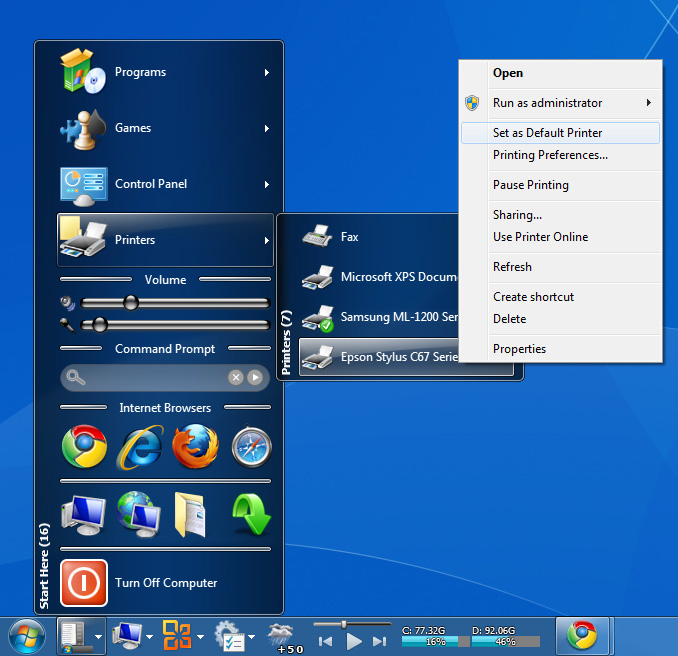
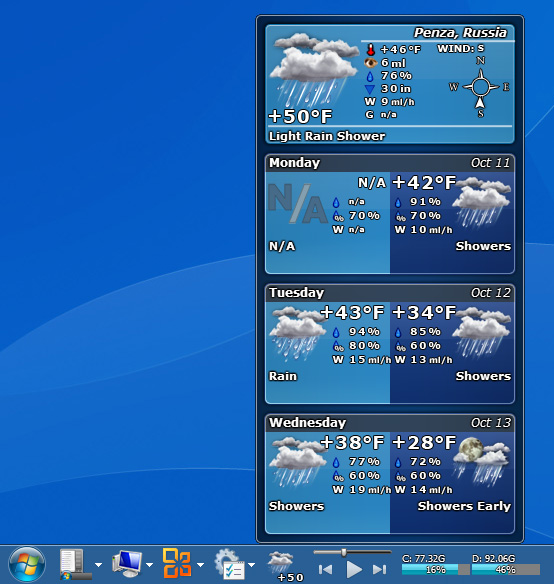
True Launch Bar is a superior replacement for the standard Windows Quick Launch bar and all functions plus more are presented in True Launch Bar. The difference resides in that True Launch Bar allows the user to combine its shortcuts into groups and in form of popup menus.
True Launch Bar has full support to drag and drop technology, keeping the creation and organization simple. The management of shortcuts never has been easier. True Launch Bar will also speed up the launching of all applications.
Rather than using default shortcuts, you can add buttons that work like small applets! Imagine being able to check incoming mail, see weather forecast, track the latest news, manage contacts in a small address book, change music volume, control system parameters, and more – all using the button applets on the taskbar.
True Launch Bar supports skins. Those who have Windows Vista or Windows 7 can make use of all the advantages of the Aero interface – translucent.
Note that 3 best improvement ideas will be rewarded with True Launch Bar Home license (free lifetime updates and support). Use Idea Informer widget to submit your feedback and do not forget to fill in your name and e-mail – otherwise the Developer will not be able to contact you in case you are the one to win!
System Requirements:
Windows XP/ Vista/ 7
Publisher:
TordexHomepage:
http://www.truelaunchbar.com/File Size:
15.3 MB
Price:
$19.90
GIVEAWAY download basket




Comments on True Launch Bar 5.2
Please add a comment explaining the reason behind your vote.

iPhone app giveaways »





Android app giveaways »





Funny thing, I have reinstalled my PC and now when installing TLB from this Giveaway it says it's a Demo Version... Is there a time tlimit for installing this Giveaway? Anyways TBL is a great software and I think I'll buy it for future upgrades...
Save | Cancel
please consider allowing the calculator to be docked on the desktop
Save | Cancel
not bad at all- though I'll be checking out some of the alternatives pointed out- later.
for now, this solves my taskbar space problem just fine...
Save | Cancel
Wow now this really is a good bit of software.
Is there any discounted "deal" to buy during the GOTD period because I cant see any?
What is the license conditions for example: Liftime License with Free Minor Updates & Free Major Upgrades or what?
Save | Cancel
phil (#52 as I write this) if someone had a number of portable apps in one place to be used on any PC they come up to this indeed would be a useful app (could be launched consistently from PC to PC). Or for that matter in a "PE" environment (Bart's PE or "Vista PE"/whatever). Having said that this being a paid program I don't think the developers have any incentive to make this program able to install on any PC at any time with no installer (right?).
If you want a task launcher/task bar-like app that's free and portable see RocketDock (http://rocketdock.com/)
Save | Cancel
its the best of best software i ever seen.... speechless
Save | Cancel
Purchased 18mths ago has proven to be indispensable. Take the time to learn all the ins and outs and you'll be rewarded with an excellent app. Terrific free offer on GAOTD.
Save | Cancel
@ Suggestion 1: "Make it portable, so I can easily use my favourite shortcuts and apps from a variety of PCs."
Guys! This app is not meant to be "portable" so that u may use it on any PC. Reason?
Unless u're using standard programs that ships with Windows OS, your shortcut will NOT point to anywhere if your favourite programs are NOT installed on the target computer!
I know the trend now is to go portable, but this suggestion makes no sense- I wonder if some of the users here who voted for this suggestion actually gave thoughts to it.
Well... giving you the benefit of doubt, i guess everyone's grandma probably uses Photoshop or plays SC2 and WoW. LOL~
Save | Cancel
I was undecided on this until I read through the comments. Plus I think if I get it now and decide I don't want it I can uninstall it. But if I don't get it now and decide I want it... well my options are limited then. So far I like what I see. Thank you all that took the time to write comments especially for me # 20 Vova. I liked the video. As always thank you GAOTD team for all of your efforts and thank you to the publisher, Tordex, for this gift.
Save | Cancel
#30, r0lZ, the right-click context menu clearly lists "Show hidden". Real hard. I wasn't going to comment when your comment was getting thumbs-down, but then the people who just assume every negative comment is correct started giving your comment thumbs-up. Plug-ins aren't designed to compete with full-featured programs. They are very simple little applets for your convenience, you can always add a full-featured program to True Launch Bar. I don't have a need for launchers, and Win7 has all sorts of UI changes over previous versions of Windows--programs pinned to taskbar, jump lists, per-program recent lists, numerous Windows Search improvements, etc. Start Search is much faster than mousing around (as always, performance will be greatly improved with an SSD).
#29, Francis Vandenplas, did you unlock the taskbar when trying to change it, then lock it back when done? Media Center is substantially changed in Win7 over Vista. Mine is much faster than Vista's. Win7 removed the tuner limits, I have 4 digital and 3 analog. Same as Vista, Win7 will drop the analog tuners if the signal is bad, which is a major problem with my cable provider. On the downside, in Vista I could have a complete digital guide and schedule programs which were only available via my cable box. Of course, they wouldn't record, but I could see them in the schedule and use my cable box manually or record using it. Win7 won't give you guide information for any channel which it can't tune, which is a major pain.
Save | Cancel
Doesn´t activate on Win7HP. Executed tlb_reg.exe during installation for a long time (if this matters) but shows up as unregistered version in demo mode when starting the software after the setup!
Where´s the info for registering the software???
Save | Cancel
ooops! almost forgot!
THANK YOU GOTD AND TORDEX FOR A GREAT GIVEAWAY (AND FOR ALLOWING ME TO LEAGALLY INSTALL MY FAVORITE UTILITY ON A SECOND PC
Chuck
Save | Cancel
This is one fine piece of software! I'm downloading it to use on my laptop! I've been using (the paid version) for years and it's hard to imagine doing without it! It CAN BE a bit tricky to set up, but once you're there, Wow! It uses Windows own task bar mechanisms (and so uses little in the way of resources) and takes them much further. It is far better tool than any of the frewares or other sharewares I've tried! Absolutely the best desktop/start menu/programs organizing tool for the PC I've come accross!
What really Ticks me off is the ratings 291 thumbs-up / 268 thumbs down??? Give me a break!!!! I cant understand why anyone would give it a thumbs down unless they didn' understand it or hadn't bothered to actually look at it
Disclaimer: no company affiliation other than being a highly satisfied customer!!!
Save | Cancel
Have used Freelaunchbar by the same people for a long time now. On XP and 7-64bit
Basically it adds back the quicklauch bar which was made more difficult to access in win 7, but with extra features. Admittedly there are plent of them, and initially it can take a while to configure, but the access improvement is worth it.
You can add "menu"s or better put folders on the bar, which when selected will provide a fold up list which can be defined as multi column or single. You can also add Section seperators and title them for easier navigation You could for example have 1 menu for video apps, another audio, another utilities etc.
Personally i had no need of the advance features of Truelaunchbar, so went for the free one.
The only downside i found was in the free version youu can not span multiple monitors for even more shortuts. I assume this is also teh case here.
I will however download and give it a further test
Save | Cancel
I use FLS Launcher and I don't really think I would give it up for today's giveaway. FLS Launcher is a container for shortcuts which you may define by yourself and group them under any name you like. FLS Launcher sits hidden in the upper left corner of your screen, from where you may invoke it by moving your mouse coursor there. Simple, friendly, neat and for FREE.
Save | Cancel
I have Fences too along with Object Dock. I can't use Fences on XP with Deskscapes. Does anyone know if this will work with Deskscapes?
Save | Cancel
The best bar manager! I have used for many years the TLB and FLB.
Save | Cancel
Having the same problem reported by two earlier commenters:
It's only showing registered under the admin account.
I've got 3 user accounts on this PC, all three show "DEMO VERSION", I have to log in as admin to see it registered. Is there a fix for this? (the guy getting thumbs-down for this same issue is running XP, but I'm seeing this on Win7 x64)
Save | Cancel
I've had a problem (Vista Home Premium 64), that often the task bar will not auto-hide, even though the auto-hide option is selected in properties. Will this change that, do you think?
Save | Cancel
@Ken #34:
Stardock Fences are nothing more then simple containers for your icons. That's all they do. I use them myself and am happy with them. But you're comparing Apples to Submarines here, two great things in life but totally different.
I suggest you reread the description of both programs again.
Save | Cancel
As has been said by others before, this has been one of the best investments in utility software I have ever made, if not *the* best. I always feel lost when I have to work at computers that don't have it installed. It's a great piece of software, can't live without it. It takes some time to tweak and set up the way you want it but every minute spent is worth it. It saves you lots of time later on. And it's totally unobtrusive. I had tried many other launchers with lots more of eye-candy but none of them can only try to hold a candle to it.
Save | Cancel
P.S. Standlone True Launch Bar is included. You'll see it availablle after install. Just use that instead of the default TLB if you're like me and don't want to mess with Windows taskbar or the old XP Quick Launch menu.
@ Paul: you might want to take a look at many new features added as well as improved skins and performance since TLB 4.1. :)
Save | Cancel
I purchased True Launch Bar several years ago and have never been happier with a software purchase. I run it on all my personal computers which includes Win XP, Vista, 7 and 7 x64.
I think the Win 7 taskbar is too beautiful and functional to mess with, so I pin only a few special icons there. On the other hand, I hate going into Start Menu -> All Programs. So I use standalone True Launch Bar which doesn't mess with the taskbar at all. Mine is set to auto-hide on the left side. Everything I use regularly is neatly organized in TLB menus. Between TLB and typing names in the Win 7 search box, I rarely go in All Programs anymore and don't have to worry about constantly reorganizing it like I did in my pre-TLB days.
Many skins available, but the default Windows 7 skin with transparency adjusted to taste looks awesome--like a native Win 7 Aero component. Folks are correct when they mention a little learning curve up front, but once you get things the way you like, Backup Wizard can be used with import feature to easily copy your toolbar to other systems. (Of course a little tweaking may be needed if the systems are dissimilar.)
Very generous license and support too. Personal license description from their website:
•For personal use on one or more computers
•Free lifetime updates
•Free support
Save | Cancel
I paid for this years ago and I'm glad. It's a great product and I can't live without it.
Save | Cancel
I have been using GOTD's True Launch Bar version 4.1 since 2007. I have tried scores of launch bars and this is the best. It is my number one "must have." Having said that, I see no reason to upgrade to version 5.2. I just don't believe that I could possibly need the 10.7 MB (15.3 MB - 4.6 MB) of additional bulk. TLB 4.1 works great for me. I am grateful to both GOTD and TLB and recommend this software.
Save | Cancel
Cool--I've owned and used this software for years. May favorite feature is to be able to categorize the shortcuts into different cascading folders on the quick launch bar (that you can't do with explorer). I also like the media player sitting in the task bar. Much better than using widgets that take up your desktop space.
Save | Cancel
I like the look of it but what does it give me over "Fences" from Stardock?
Save | Cancel
This is an extraordinarily configurable utility that can make your programs presented exactly like you want it... But it can chew up resources on older systems. You must read the help available. Worth it if you have a newer, faster system and want a system set up the way you want it.
One trick that works with all systems, is quick & negligible on resources that most people do not realize is that you can create your own toolbars.
I created a "My Toolbar" folder in "My Documents" and then right-click on the task bar, select "Toolbars", then "New Toolbar..." I set up the toolbar to be docked against one of the 4 sides, autohide and icons only. It then only pops up when you move your mouse to the edge you want (you could set up 3 (or 4) pop-up toolbars this way). Create shortcuts for your quick-access programs to your deskctop and then move them to your toolbar (you can select the order & number of rows), and if you want, you can group them into each of your 3 (or 4) personal toolbars. I generally set the size of the toolbar to 2 rows (or columns), and my primary toolbar docked to the left side has plenty of space for all our regular programs. I usually set up between a choice of course dependent toolbars docked to the right side. You also don't have to worry about the "Quick Launch" toolbar exploding in size and being rearranged by annoying installers (I just ignore the quick launch toolbar altogether). This setup is easily backed-up.
Using this regularly ignored built-in Windows function is the way I have student systems set up, and with shutdown & logoff icons, it means that nobody normally ever needs to hit the start button!
Save | Cancel
It's a nice program, but it has several serious problems and bugs.
There are some discrepancies in the design of the interface. Too many options IMO, and not well organized. For instance, why is the Component Manager a standalone application? It should be a section of the manu Setup window IMO.
Also, there are problems when using the toolbar. For example, you can hide an applet or icon, but once hidden, there is no way to unhide it. I had to uninstall the hidden plugin, re-install it, and re-configure it to be able to use it again! And, when I have open the folder containing the original plugin, I've found that it is still there. Deleting the file manually worked, but what a pain!
Some plugins do not work at all. For example, the Virtual Desktop plugin blocks completely my Win7 x64, and I had to reboot! I have had also several crashes of the Windows Explorer when I have tried some plugins (I don't remember which ones).
Some plugins have also big discrepancies in their own GUI. The RSS News Reader, for example, is configured by default with 4 RSS feeds, including the infamous CNN. If you hide them, again, there is no way to unhide them, and furthermore, they continue to download the feeds (and play the nofification sound to inform you that new news are available, but you cannot read them)! I have finally understood that it is possible to delete the unwanted feeds, but it's the same button that is used to delete the whole plugin and to delete a feed, depending of the context. Not very intuitive! Furthermore, there is no way to configure it as the default RSS news reader (which makes it incompatible with Internet Explorer), and no way to open it from FireFox. So, the only way to add a new feed is to know its URL, and paste it in the configuration GUI. It's not at all how the RSS Feed buttons in a web page is supposed to work!
But I don't want to be absolutely negative: there are good things in this program, and some good plugins. I appreciate, for example, the Media Player plugin, that works well with foobar2000. Very good point!
Conclusion: If you want to spend several hours in configuring this windows tweak and you are not scared by the possibility to crash your system or make it unstable, try it. It can probably be useful to some users. Otherwise, continue to use the standard QuickLaunch bars of Windows, that works well, but is not as powerful and configurable.
(BTW, it is possible to create sub-menus in the Windows QuickLaunch bar. Just open its folder, create a new folder, rename it, and put shortcuts in that new folder. They will appear as a sub-menu in the task bar.)
Save | Cancel
I do not understand those people who criticize software before properly trying it out. In this case I have to admit that it is going to take a lot of work to organize things the way I want them (at least it gives me the opportunity), including all the applets I downloaded. I like to organize my applications and files the way I want and where I want (MS being the worse culprit here). Not only do they often want to nestle in the Program Files Root if not the root "tout court", but even when they leave me a choice, they will not allow for a proper location in the start menu to keep things well organized (BTW, although using a free installer, almost all GAOTD Apps let me put things the way I want!). I do think this GAOTD is just worth it for those reasons.
By the way, did those critics bother to even take a look at the excellent Help File (that, for once, does not redirect you to a Website - I hate this -, even if it's easier for them to keep up to date).
The first reason I wanted to try this out is that 3 days after the fourth reinstall of Vista in 27 months, the last one after 4 days! (on an HP Vista machine - and I'm not a Vista basher, just a guy with about 30 years or "experience" in the PC world, fed up with Vista and unable (retired) nor willing to pay for a 7) I am absolutely unable to change the width of the QuickLaunch bar on the taskbar any more (to show those few Apps I use most often, a way I've been working for years). This one seems to do the job!
Joe (#19). Sorry, but "it" does not "take over the entire task bar" if you don't want to. Adjust the width as you would with QuickLaunch and uncheck QuickLaunchBar if you want to get rid of it (I obviously did).
Bari (#23). I guess this program is, logically, unable to install something for Apps that are no on your system. BTW "Foobar" is one of the rather popular Mediaplayers out there, but as it is not on my system, I didn't check it, nor its fellow of Kin, Seamonkey and a few others: still (un)happy with Bill's Media Center (it does the job, but the interface is sooo painfully slow and installing-reordering TV senders, a pain in the proverbial... ass). GAOTD users, any suggestion for the better alternative? I've downloaded some but installed none, for fear the MS thing would stop working and not sure the other one will... Never change a winning team they say, even if it doesn't play that nicely...
Save | Cancel
I cannot comfortably use a computer that does not have this installed.
Obviously AV is everyone's most important utility, but my most useful utility is this one. Yes, it's a little difficult to get beyond the most basic set-up, but once you begin climbing the learning curve things come more naturally. Once it's up and running, then True Launch Bar snips away worktime and keystrokes.
The basic TLB is a massive time-saver. Then there is an encyclopedia of add-ons and plug-ins that over time will make computing life much, much easier. Run, don't walk, to your download button...
A terrific tool, and not just for the power user.
Save | Cancel
I've been using the Free version for years, and splurged for the paid version for my primary computer. This is one of those things MS should have done, but these folks probably did it better!
Configuring it does take a little time and effort, but once you have it set up you'll love it!
Save | Cancel
One hundred times better is free powerpro.
Save | Cancel
Installed in Windows XP but looks nothing like the screenshots. All it does is add the words "True Launch Bar" on the Quick Launch pop up menu and put icons on the Task Bar taking away space for the windows status space. Useless.
Save | Cancel
Installed fine on Win7 X64, easy to install components, and easy to get updates. Thanks GOTD
Save | Cancel
In selecting update I keep getting an error to complete it. I just lick next and let it decide where to place the files and do the install but it keeps saying "The path you have selected is not a MediaMOnkey installation path..." and the same happened for "FooBar2000" (whatever that is) - so I just click cancel. Just happened for winamp too. So after update it says regarding the components that Media Control Player Support, foobar2000, MediaMonkey support and Winamp suport failed to install.
Save | Cancel
Steve (#16). This to be the exce^top,ç When I clicked on the udate button in Steve (#16). This is to be the exception. When I clicked on the update button in the installation menu, nothing happened. But as stated by #2 & 6, you can load those "updates" through the Components Manager.
In fact they should rather be considered as "Add-ins" and I guess the author does not want to impose every user with a plethora of features or Apps he doesn't want or need.
Save | Cancel
I normally wouldn't bother with this type of utility since I don't use them, but this doesn't replace the Start menu (although you can) so I installed it. Uses the Microsoft Installer, which is good, but doesn't create a restore point. However, the install was clean, most plugins are just a DLL. When installing, I checked the option which downloads and installs all plugins (makes them available, but you have to later select which you want to use). Tremendous number of options, flexibility, all sorts of plugins. You absolutely must read the Help, there's an awful lot to this, you can configure things endlessly. I installed this on Win7x64, which normally doesn't have a Quick Launch bar, so this didn't replace anything (of course, had to adjust the taskbar after selecting True Launch Bar). You can backup and restore your configuration, which could be handy when changing the endless configuration options. There's a lot of nonsense in the comments and suggestions, you can already resize the icons, run the Standalone version (not the typical meaning, runs separately from the taskbar), export settings to another computer, configure hotkeys, etc. Read the Help before commenting. For now, I'll leave this installed just to play with some of the large number of plugins. As usual, you should also check the developer's website, there are FAQs, etc. Before installation, you can check out some of the endless features.
FYI, Adobe released Flash Player 10.2. Depending upon your video card and drivers, can perform hardware acceleration. Some performance features require updated software on the servers, which is presently mostly only major sites like YouTube, etc. I've had some problems with it, but I'm sure there will be frequent updates.
Save | Cancel
Found the "Getting Started with True Launch Bar" video here. I guess this can be useful for some one.
Save | Cancel
This "application" takes over the entire task bar, repeats the icons from the Windows quick launch bar in itself, squeezes open folders and windows to the right and once run, it adds 2 entries named True Launch Bar to the right click menu, only one of which is checked. You have to uncheck it to shut this stuff down, then unlock the task bar and manually move open folders and apps to the left. You can also run it as a standalone app, in which case it will stick itself to the upper left corner of your browser and squeeze the browser window. Imagine a GPS for a car that obscures the windshield with unnecessary info and you'll get an idea of what this thing does. Don't see much use for it.
Save | Cancel
Cannot get it to work. Tried it on my windows xp in a virtual machine but somehow a neede tlb plugin does not start. Tried it several times. but no luck. To bad because it really looks like a nice program.
Save | Cancel
I have installed this on my win 7 machine with no problems. I like the way it works. A little fiddly until you get to know what you are doing but worth it. I like the way you can put the icons in ''groups'' under a named divider (in the multiple column setting. I haven't added any ''apps'' yet, maybe later.
I already had the quick launch toolbar working (which can be fiddly to find in Win7) but this looks nicer, so I have disabled it.
The only thing I noticed was that it asks you to check for updates on installation. I guess that could cause problems as we don't get updates with GOTD software...
Save | Cancel
I have been using this app since 2005, I was looking for a quicklaunch that didnt take up too much space and more customizable and this one took the cake, for me. The author was VERY responsive every time I had any issue or suggestion what so ever. I do not buy much software, but I bought this one. I love the plugins, although I do admit I do not use many of them and I also like having the ability to add a folder to the bar and then making it a menu that automatically opens when your mouse hovers over it. There are so many options it is crazy. Another thing to keep in mind is you can place the bar on any side of the screen seperate from the Windows Start bar on Windows 7 by running the Standalone Bar, that way you do not take up any real estate on your start bar. So make sure you look at the settings for this bar so you can see what is possible!!
Way to go GAOTD, this is a nice offering.
Save | Cancel
Windows XP - Seems to be fine on the Administrator account, but shows 'Demo Version' on a non-admin account.
Save | Cancel
I installed on windows vista 32 bit with no problem but some of the ad dons I could not find the installation folders and had to cancel installing them, why the hell do they make this program so hard to use! it is definitely not user friendly but nice once you figure it out.
Save | Cancel
I've been using an older version of this for (just about) 10 years and THIS is quite possibly the single best utility in the pc computing world. Hyperbole? Try it before you judge that statement. It is what Microsoft's gadget bar *should* have been; allowing you to keep everything at your fingertips BUT unobtrusively out of the way.
Thanks GAOTD
Save | Cancel
I have been using Free Launch Bar [freeware version of True Launch Bar] on my computers for several years. I prefer it to dock type programme launchers and navigate to programmes via menus/sub menus or hotkeys. FLB is not compatible with Win 7 Starter on my netbook, whereas True Launch Bar is - thank you GOTD for making it available! I also like the extra customization features and plug ins on TLB.
Save | Cancel
This puts your quick launch bar on steroids(that launch/tab area between your tray and the start menu button).
If you've ever right clicked that area>>>Toolbars>>> (and you get address, links, tablet pc input panel, etc by default) or made your own 'toolbar', this is a a deluxe version of that which integrates in with the windows operating system. It allows for widget-like things on the toolbar (calculator, address list, volume control, etc.) The calculator had me going, (imagine having the auto-hide toolbar pop up and there be a calculator embedded right on the toolbar). the volume control/mute is nice too for when you need a quick mute. If you are into that, then in my opinion this is pretty cool and you owe it to yourself to download the program.
I really liked this program but decided not to keep it as it wasn't portable. I used to be into tweaking toolbars like this (and for me they take alot of time to get them right). However, for launchers I now use the Rocket Dock and the Pocket Start Menu(both of which are free portables and as portables are safer from system crashes). I use the MoffFreeCalc on the Rocket Dock (a portable free calculator) which is almost as convenient as the embedded calculator here when put on the rocketdock and has the added advantage of having a tape that keeps track of my transactions.
That's part of the problem with basic plug-ins, location may make them more convenient on a toolbar, but they aren't usually as good as your favorites.
All in all this is an excellent (non-portable) toolbar app. But it isn't quite for me as I have portables that perform the same functions for me (even if they don't do the same thing as this program does).
Save | Cancel
I had to fiddle around a bit to familiarise myself with the program but once I got a grasp on it, it was quite a neat program. It let me organise better than having a tonne of shortcuts on my desktop.
Btw, If you're using windows XP, disable the quick launch toolbar or else you get double amount of icons on there. The quick launch and the true launch toolbar.
Save | Cancel
I've been using the free version of this for years and will definitely be downloading and installing this one! Thanks for another great giveaway!
Save | Cancel