Every day we offer FREE licensed software you’d have to buy otherwise.

Giveaway of the day — Tabbles
Tabbles was available as a giveaway on September 11, 2009!

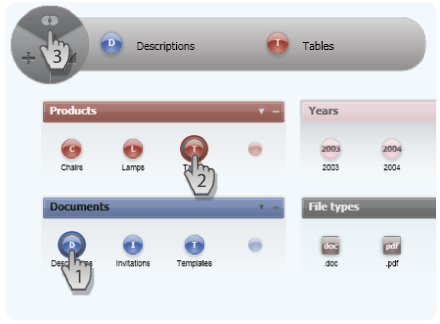
No matter how organized you are with your files, at some point you must have faced the problem "should I put this file in this one folder or in that other folder?"..."and will I remember where the file is if I put it in this folder?"..."or should I just make a copy?". With Tabbles all of that is gone!
Tabbles allows you to categorize your files/folders by placing them in as many tabbles (tag-bubbles) as you like and then find them back by remembering what that file was about and "combining" the tabbles (tabble = concept) that make you think of that file, in a natural and dynamical way. Your files and folders will NOT be moved, duplicated or messed up with.
For example, using Tabbles you can find all the "Pictures" where you can see your "Children" in the "Mountains" with 4 CLICKS!
WARNING: Tabbles has a lot of features that do not exist in any other application: so PLEASE-PLEASE-PLEASE read the 4 points BEFORE starting to use it else you will have hard time figuring out how it works:
- A tabble (the colored bubbles) is a TAG and a VIRTUAL FOLDER at the same time.
- A tabble behaves like a folders: copy&paste or drag&drop files and folders into it. Double click to open it.
- The same file can go into several tabbles WITHOUT BEING DUPLICATED on your hard drive.
- The COMBINE function is the key: i.e. click on "Bills", on "2007" and then 'Combine' to see all the files YOU linked to "Bills" and "2007".
Our first training video: http://www.youtube.com/watch?v=LEPOyEzFOuE
System Requirements:
Windows XP and Vista
Publisher:
TabblesHomepage:
http://www.tabbles.net/index.phpFile Size:
8.76 MB
Price:
39.99$
GIVEAWAY download basket




Comments on Tabbles
Please add a comment explaining the reason behind your vote.

iPhone app giveaways »





Android app giveaways »





#122, rod, Tabbles has its good points, but there's no value in recreating Windows Search 4. Here are Windows Search 4 expressions to find your examples. Note that the GOTD comment tags use the greater-than and less-than symbols, so I'll use GT for the greater-than and LT for the less-than symbols. These examples are with natural language queries and partial matches enabled.
type (excel or word) and "company x" and date createdGT=2008LT=2010
Note that there are many, many types of dates, so it's best to specify which particular date-type you're interested in, otherwise, you're very likely to get extraneous hits.
folder pictures and not type jpeg
Example to find filenames containing "Company X":
name "company x"
As I've stated, Search 4 is far too complex to say much about here. In general, multi-word values (as opposed to property names) need to be quoted:
folder "recorded tv"
Windows Search 4 supports (downloaded) email queries (for Outlook).
Save | Cancel
Sorry if someone has alredy mentionned this point: the combine function is great, but it would be much better if we could combine the criterion with other operator than "And". Sample request: "I want to find all excel OR word files of company X with year BETWEEN 2008 and 2010". Or all files BUT jpeg. It would also be great to be able to combine "tabble" criterion with "normal" (provided by Windows Explorer) ones such as file name or contains word.
Last tip: have you got any plan to manage emails as well ?
Regards
Rod
Save | Cancel
@96 (Glen) as I stated before, you can press 'continue' to make it skip the empty drives, you could also put a card in or load a image.
There is no need to disconnect any hardware, the software just finds ALL stations your system has and some will be 'invalid'.
I guess it'll see any 'virtual CD/DVD drive' too.
Save | Cancel
Code version: 1.1.1
-------------------- Level 0 -------------
Exception type = System.ApplicationException
Message = The system cannot find the path specified. (Exception from HRESULT: 0x80070003)
StackTrace = at System.Threading.ThreadPool.BindIOCompletionCallbackNative(IntPtr fileHandle)
at System.Threading.ThreadPool.BindHandle(SafeHandle osHandle)
at System.IO.FileSystemWatcher.StartRaisingEvents()
at System.IO.FileSystemWatcher.set_EnableRaisingEvents(Boolean value)
at Tabbles_logic.file_system_watch_init(FileSystemWatcher fw)
at Tabbles_logic.add_watcher_to_new_drives@12073-1.Invoke(DriveInfo dr)
at Microsoft.FSharp.Collections.ArrayModule.iter[T](FastFunc`2 action, T[] array)
at Tabbles_logic.add_watcher_to_new_drives@12065(DriveInfo[] drs)
at Tabbles_logic.f@1-5(Boolean flash_new_disks, Unit unitVar0)
at Tabbles_logic.detect_new_disks_and_create_tabble_uiels_and_db(Boolean flash_new_disks)
at Tabbles_logic.init(Canvas canvas_meta, Canvas canvas0, Canvas canvas_1, Canvas canvas_2_bg_moving, Canvas canvas_2_img_fixed, TextBlock txt_log, Window mainWindow, ScrollViewer a_scroll_viewer, ScrollViewer sv_debug, TextBox a_txt_filter, Button btn_history, Button btn_view_tabbles, Slider slider_zoom, Border border_for_anim_history, Button btn_options, Label lbl_new, Label lbl_search, Label lbl_recent, Label lbl_view, Label lbl_options, Canvas canvas_toolbar_e_popup, Border border_log, DockPanel dp_itb_outer, Border a_border_toolbar_files, Button a_btn_add_tabbles_to_atb, Button a_btn_drop_tabbles_from_atb, Button a_btn_add_files_to_active_tabbles, Border a_border_for_anim_add_tabbles_to_atb, StackPanel a_sp_atb, Border a_border_for_dragging_to_atb, StackPanel a_sp_itb2, Label a_lbl_scroll_percent, Label a_lbl_total_files, Border a_border_scroll_percent, Canvas canvas_anim, Image a_img_close_this_floor, Border a_border_close_this_floor, Button a_btn_go_to_parent_folder, Button a_btn_collaborate, Border a_border_for_anim_misc, Button a_btn_create_new_tabble, Border a_border_navigator, Path a_btn_nav_right, Path a_btn_nav_left, Path a_btn_nav_up, Path a_btn_nav_down, Rectangle a_btn_nav_view_all, Canvas a_canvas_view_all_pressed, Canvas a_canvas_view_all_depressed, Button a_btn_zoom_in, Button a_btn_zoom_out, Button a_btn_atb_misc, Label a_lbl_archive, Label a_lbl_collaborate, ScrollViewer a_sv_itb, Button a_btn_back, Button a_btn_forward, Label a_lbl_back, Label a_lbl_forward, DockPanel a_dockpanel_navigator_and_close, TextBlock a_lbl_there_are_no_tabbles, Button a_btn_selected_files_floating, Canvas a_canvas_selection_rects, selected_tabble_box a_stb, Button a_btn_open_selected_tabbles_and_replace, Border a_border_for_anim_open_selected_tabbles_and_replace, FrameworkElement a_separator_collab, Rectangle a_rect_selected_files_volatile, Button a_btn_navigator_menu, Border a_border_nav_slider, Boolean changed_g_reg_state_in_initial_wizard, StackPanel a_sp_back_forward_pic, Path a_previous_pic, Path a_next_pic, Button a_btn_quick_tagging, Border a_border_for_anim_quick_tag)
Save | Cancel
INstalled.
Looks nice.
I LOVE the concept.
Just not sure about having it run all the time, since usually I like a very lean (around 39-45 tasks) running system. (Win XP Pro SP3).
It uses 82 MB RAM on my WinXP Pro system - at least in beginning with nothing categorized. Which honestly is not an issue as I have 2 GB RAM.
It was weird to have a DOS window open to run a .NET 3.5 Client install - especially as I already have .NET 1.1, 2.0, 3.0, 3.5 installed.
Maybe this "Client" thing is a different piece???
I agree that while it looks nice, the menus are completely non-standard, so it is a bit off-putting to find no File, Edit, View, Tools, Help. And as I work with a visually impaired person, I could see how that could throw things off. FYI, he uses "JAWS" as his screen reader.
SO I will have to work with it a bit.
As I say, conceptually it sounds grand. I hope it helps me to stay more on-top-of my files.
Thx.
Save | Cancel
HELP !!!!! is all I can say. If this really does work, does find things (something I find difficult to do with "search" if you don't recall exactly what you might have named something!), I'd love to try it.
HOWEVER, it stopped @ 90% when downloading!! Have tried throughout the day @ various times to get it to RESTART, tho' it says it does have that capability, and it will *NOT* restart, so I haven't been able to get it!!
ALSO, tried that "MIRROR" site, whatever/wherever it is. THAT would not even START!!
PLEASE ... send it via email ... or something!! Even if it's tomorrow, would that be OK, since I've tried ***ALL DAY*** to get this thing!! Soooooooo sad ............
Thanks.
g
Save | Cancel
#43 Mentions alternative "Personal Brain" - it is freely downloadable but with usage limitations. It is great for keeping track of files and links can easily be created in multiple folders to the single original.
Drawback though is that these all become useless if the original file is re-named or relocated.
That is where TABBLES scores big time, IMHO, and reason why I will be giving it a fair run.
The candid and constructive responses from the developer are well appreciated and reassuring - keep up the good work Andre.. :)=)
Save | Cancel
This software installed but did not work when I open the application. I have reinstalled it a few time and give up. Too bad seemed like a nice software to use but thumbs down for me on this one.
Save | Cancel
#77 and #84: Oh, now I get it. Because everybody else is dishonest, and because it's too expensive and inconvenient to be honest, it's therefore ok for the developers of this software to be dishonest. Is that how it works?
And, for the record, the EULA is very much part of the software. If I ever purchase software, I am bound by the EULA, whether I like it or not. (If it's not part of the software, then why not remove the whole thing? - who needs extra bits that are not part of the software?). You may have noticed that, which is why your EULA generated so much interest.
Save | Cancel
Thank you! It can help me remember which pictures I have sent to whom. And MAYBE I can use it with books - some have several authors, common covers...different formats. Then there are series written by multiple authors that I can't divide to different folders.
Will try and see.
Save | Cancel
Re my previous comment:
I was messing around trying to find a fix and it seems I found one.
As far as I can tell, Tabbles started showing text properly when I changed my windows appearance display to Aero. Weird. Very.
So if anyone else is having this problem, it's worth a try.
Save | Cancel
Installed O.k., tried to use. 3 Bad crashes ,Troublesome ,time wasting
BEWARE.
Save | Cancel
I feel for you Andrea, so many softheads here who, without even giving your application a proper test run, click thumbsdown or even worse make comments where you can tell they have no clue about what they are doing. #2: Not ONE of your bad points are even valid, and no thank you to any of your reviews. They are never of any use to me as I have found out from your general knowledge of computer literature, you seem to be only one foot ahead of the softheads here. I do hope this is due to wanting them to understand your non-informative reviews, but I seriously doubt this. So I end this with the softhead response of the day:
* Uses put quite a bit of RAM.
Even if you did explain yourself properly there, you NEVER backup your claims.
Save | Cancel
I've tried installing and running Tabbles on several occasions today and not once have I had any luck. After each failed attempt I did a complete uninstall of the program and attempted to reinstall. I always get the same error code, which is as follows:
Exception type = System.ApplicationException
Message = The system cannot find the path specified. (Exception from HRESULT: 0x80070003)
There's a lot more infortation than the above in the error message, too much to place here. I did submit a bug report also, but no response as yet and since these free offers generally provide no techinical support, perhaps none will be forthcoming. Does anyone have any idea what may be causing this problem. I'd like to try the program but thus far no luck at all. I'm running XP home with SP 3 and netclient 3.5. I'm completely out of ideas.
Thanks for any suggestions in advance.
Save | Cancel
I am having a strange problem with Tabble. When I ran the program the majority of the text shows as boxes, even all the menus and the window for selecting language is boxes, the labels under the buttons show normal text though.
I am running Vista home premium, set to english
I have run Tabble as regular user and as admin, no change.
Any ideas?
Save | Cancel
I started the install, it wanted to install .Net 3.5 but I already have it installed. Forcing me to install your download (has it been "improved"?) is the action of malware ("To see this content you have to update your viewer, click on this handy dandy, ever so convenient link to my site to install it"). How do I know it is current version? From the install, I can't tell exactly which version it is or where it is coming from. Sorry I choose not to risk my nice clean OS re-installation (it's a "newborn", only a week old). Call me paranoid, or call me an internet realist. Install should be able to identify that required framework is already there, if it isn't I should be able to go to MS site to download the official .Net install.
Other than that, it sounds like interesting software. Count me with the people who are glad to see active participation of developers in these comments, resolving problems and answering simple questions. Keep it up, and I hope to see more from future developers.
Earlier comment suggested using Favorites/shortcuts and "Everything". I use that combination. Everything is one of the apps I start immediately every day. It is very effective at finding file names (I use very long names). But it also has limitations, mainly either you include all tags in the filename (making it very long) or using multiple shortcuts to single file.
The issue with favorites is the amount of space they use. Check the properties of a favorite. The useful "content" of the favorite may be only a couple of hundred bytes, but as a "file" it takes up one sector on your HD, between 4 and 16kb each (unless of course you turn on file compression). So if this tool can provide multiple cross links to my document and favorites collection at a lower "cost" great.
80mb ram sounds like a lot placing it at #2 on my app list, right between FireFox and MS Word, but take a look at it in perspective. Most "current" machines have at least 1GB of RAM (plus swap file space). 1GB is 1024MB (or 1000MB if you are a disk drive manufacturer :) ). 80MB is less than 10% of 1 GB. For those of us lucky enough to have 2 or more GB it's even less of an issue.
Save | Cancel
Interesting. At least it isn't another converter. The one thing I saw as a flag for me was the fact it hogs RAM. Personally, I do not have a problem remembering where files go when saved.
However, I will tweet this freebie as someone else who may find this useful can take advantage of it!
Save | Cancel
Very impressed with the developer responsiveness re: clarification... well done! I'll be giving this a try to see if it can help me with my scatterbrained absentminded professor approach to organization (I end up with copies of copies in multiple directories). I already spin myself in circles as it is so won't mind putting in a little 'tagging' effort to see how this does. Thanks!
Save | Cancel
Installs ok in Vista 64 ultimate and win7 RC (32 & 64) but will not register. run activate as admin, but still says trial software, 14 day evaluation. not much use in trying if it all evaporates in 14 days.
Save | Cancel
Thanks to the developer for the additional information and quick replies to the preceding comments. Your attention to QC and other is commendable. I have installed this program on a home computer with XP SP3 and a laptop with Vista Home Premium with no problems. I can see the value in this software and will be using it, especially on the laptop since it a recent acquisition and the file system is essentially "virgin", except for the thousands of photographs I have added to it (Tabbles, here I come, not withstanding Picasa). And a big thanks to the GOTD team for today's GOTD, something OUT-OF-THE-ORDINARY, but much appreciated and quite useful. Also, it seems like since the installation and activation are separate "items" and if one were to save the installation .exe and use the Tabbles "Misc" "Enter registation key" to "remember" your key then one could reinstall this magnificent software if or when necessary. Good luck to the Tabbles group and thanks for making my file organization (and finding) tasks easier.
Save | Cancel
I've tried installing (and uninstalling)and installing (and uninstalling) the program three times now and each time I come up with the following error.
Exception type = System.ApplicationException
Message = The system cannot find the path specified. (Exception from HRESULT: 0x80070003)
I sent in a bug report and I was really hoping to give this program a try but thus far no luck and I haven't a clue as to what else to try.
Running Win XP home SP 3 with the proper MS netclient application installed. I guess some things just aren't meant to be.
Save | Cancel
Definitely, who care about EULA. The firewall will stop all rogue transmission. But to be honest, when one install a software, the firwall will ask if you want to trust the program or not. The moment you click to trust the program, you implicitly allow it to access the internet. I am using Online Armor, a GAOTD firewall.
Anyway, the question I like answered is what will happen if one backup all the files externally but not following its original path. Will this break Tabbles ability to map the shortcuts later on should we build the files back in a restore situation?
I think the answer would be yes, it will break Tabbles ability to link all the shortcuts that were created. Yes? No?
Save | Cancel
Ref # 85. Sorry. Got my machines mixed up. The windows - No disk error came up ny Win XP sp2 system....I'm trying my Vista machine next..
Save | Cancel
I Like This. A very nice application. I liked yesterday´s giveaway too.
Good work GOAD team.
Save | Cancel
I have Vista Home Premium 32 bit. It's not a Turkish machine. I am getting the "Windows - No Disk error message. "Exception Processing Message c0000013 Parameters 75b6bf9c 4 75b6bf9c 75b6bf9c"
Cancel Try again Continue If I click on cancel twice, Tabbles will come up and seems to run "OK."
Save | Cancel
BTW, I forgot to say that I agree with those who have said that this is a very nice-looking application. I haven't actually tried using it yet, but it does look beautiful!
Save | Cancel
To those who are having problems running Tabbles under 64-bit systems:
I installed it and have it running without problems on my Vista Ultimate x64 laptop. I did both install and run it as Administrator; have you tried that?
Save | Cancel
@84 - Andrea, I have no plans on tearing my computer apart and unplugging my 7 in 1 card reader from my motherboard. I would think that you should have tested and repaired this problem before deploying your product, hopefully when you get the problem fixed then you will offer us a free upgrade to the fully functional version.
Save | Cancel
I don't know why so many minuses for me, so...I gave one to myself so I can feel as a part of the rest of society here. I don't have 40 bucks and if I have it I would buy it, and I will repeat...it reminds me on virtual desktop and I like it, but what do I know...Anyway, I just uninstall program so make more minuses on my comment....obviously, you don't need truthful answers.
Save | Cancel
#55 harpo2448,
Tag2Find's developer has pledged there will always be a free version of it for home users. However that was 3 years ago. Now Tag2Find is about to go open source... so ya.
Save | Cancel
I guess that told you, Ken! @71
What's a EULA anyway?
Save | Cancel
Hi Guys
MUCH RESPECT TO ANDREA from "Yellow blue soft" - ( I could list the @ line numbers BUT - since there have been so many of them - it would look less like a lottery ticket & more like a PHONE BOOK ) !!!! :o)
( I know - It'S a slight exageration but - what the hell - U get the point ! )
Usually we're lucky to get a single line from a developer - never mind someone who studies the comments & THEN ANSWERS THEM QUICKLY !!!
@ No.75 (U32) "What is a bit strange to me, is that an author of such rather expensive software is here to comment all the negative reports.
Ok! Nice of you! Are you here with your expensive software to collect bug reports ? If so… Why not releae it as BETA :)
This is not really PRO when you run a company that uses GAOTD to commercialize it for you. That alone! tells me to keep away!
No more to add except.. Stay away from todays offer"
. . . I don't believe I read that !!! ARE U NUTS ???
A developer who actually gives a damn what their customers thinks seems to be a rare luxury these days as we've found with several publishers - & yet U mock this one ???
Sorry but I don't get Ur problem with this !!!
The fact that Andrea has been so On The Ball / Honest & Up Front with us IS THE EXACT REASON I AM DOWNLOADING IT TO TRY !!!
One user requested that the software be made available after they've formated their hard drive . . . & Andrea replied "contact us to sort it out" . . . WHEN DID U EVER HEAR OF A COMPANY OFFERING TO EXTEND A GIVEAWAY ON THEOSE SORTS OF GROUNDS ???
Those who have read any of my posts in the months gone by will be well aware that I'm opposed to those people who sound like an advert for the product / developer for NO REASON - especially SHILLS !!!
BUT I ALSO BELIEVE IN GIVING PRAISE WHERE PRAISE IS DUE !!!
Andrea COULD have just looked at the complaints & questions AND IGNORED THEM LIKE MOST PUBLISHERS DO - BUT INSTEAD SHE ASSISTED THOSE WHO NEEDED IT & ANSWERED ALL THE ASKED QUESTIONS - PROMTLY !!!
I can only HOPE that we get MORE developers in future who follow Andrea's example & interact with all of us on this page !!!
Thanks to GAOTD & Yellow blue :o)
Cheers For Now
- - Mike - -
( Macs PC )
Save | Cancel
I don't think I have a need for this... But I have to say I'm impressed by the level of care the developer is taking to answer most questions. They should all be this interested in feedback from the users. Especially when some have problems.
Save | Cancel
Harpo and others interested in tag2find...
Their license agreement states that you are getting a "technical preview". When this is over, you are required to purchase the new version within 14 days to continue to use it. (Can't remember if you can still use your old version or if you are actually required to purchase the new one according to the license.)
So it is really not freeware, it is a beta test that you will be expected to buy the product when it is completed.
Save | Cancel
Downloads and installs on Windows XP SP3 no problem. Works exactly as the training videos shows. Interesting concept, but the problem I have with it is too memory intensive. It simple needs to be streamlined in its use of resources, its using too much memory for me to use on my system.
Save | Cancel
the installer wanted to install net.framework 3.5 on my eeepc 901 although it is already installed. it said it needed 324 MB but there was only 299 MB available on my disk. hey, it is late and what can I say? I am just pissed because I would have loved to try it out, but tomorrow it is not free anymore and today it is too late to clean up diskspace.
Save | Cancel
Yes, this software does just what it is supposed to. Funny thing is the standard search tool available in Windows finds it by any imaginable way as well, works in little time, placing the choices that you really do need to see and doesn't cost a penny more.
For free this is nice, but I don't feel the need to continually pack on the gigs with worthless sh-t, just because I can get a terabyte of storage for $60 US.
Most of the 'free' software here, really isn't free. It's the beta/trial version no matter how you want to define it.
Save | Cancel
@84 - Andrea - you probably mean all EULAs are boilerplates - quite different from plagiarism and very legal indeed (as opposed to plagiarism).
Save | Cancel
Excellent, excellent, excellent! And serious kudos to the Andrea D'Intino and the Tabbles Team for being so extremely responsive!
Save | Cancel
Developers' notes:
@ALL: the "missing disk" issue is probably due to some removable card readers... try unplugging it
@52 (nofity): not sure about it... please send a bug at bugs@tabbles.net
@54 (Dan): there is a "backup database" function: check in Misc>Maintenance
@56 (chaotic): thanks! :-)
@58 (infotech): I use it with Vista Ultimate 64! Please write at bugs@tabbles.net
@59 (Chaotic): YOU ARE BRILLIANT
@60 (NB): check @59 (Chaotic)
@61 (glen): check @59 (Chaotic) + this is NOT what's written in the message. What's written there is that if you FIRST shut Tabbles down and THEN rename your files, then Tabbles won't be able to find them again. If you leave Tabbles on it will "listen" the file system and track any file which has been renamed or moved.
@63 (Fubar): good points - join our forum please! The wrong video link is my fault... :-| About Search 4: saved searches are not like Tabbles ... hard to explain in 2 lines though.
@69 (JustMe): is not in the forum yet: join the forum and there we'll describe how to do that. Sorry but We aalready received 100+ emails today...
@71: (Ken Masters) all EULA all plagiarisms - meaning that this line exists in ANY EULA. Which according to me is not a good reason to stil have it. Since we can't afford 100k$ in legal consultancies about one line in the EULA, I DECIDED to apologize with the audience for that.
Generally, I guess we're here to talk about software, not about EULAs.
@72: (Clancolin) check @59 (chaotic)
Save | Cancel
Hello,
First off I want to applaud the staff of this company for there high amount of interaction and regard to the questions and problems being posted here!
Unfortunately, due to non windows standard GUI and controls the application is of no use to me, due to it not interacting properly with the screen reader application I have to use to access/interact with my computer!
this is truly unfortunate since I am a type of writer, and the format used in my writing style requires me to generate quick links and multiple copies of key files for fast referencing, and it seems this application could have lightened the overall load and multiple copies I currently have to keep, to keep things accessible on the fly which is entirely necessary to writing of role playing game manuals
I really wish I could use this, though the overhead is a bit large for me and my machine, it could have cut down and/or simplified a great many things on my comp.
I'm not sure if your forum will be accessible to me either, but I will attempt to get on it later today to see if 1. You’re interested in attempting to make the interface more screen reader friendly; and 2. If your forum is able to handle screen readers for the blind, and if not, see about fixing that as well.
If you are interested, and have not herd from me by tomorrow afternoon, you can contact me at:
inthaneelf@roadrunner.com
Regards,
BCU
Save | Cancel
This offer looks interesting but a little too 0.9 for my taste, I regret to have to say. For a hand-organised databased multi-aspect cataloguer in a different field I can't go past the latest incarnation of Windows Live Photo Gallery. For photos, obviously.
Photos can't be categorised except for their filenames and locations but WLPG makes the manual assigning of (embedded) tags and face identities about as easy as it is conceivable to be. And it's a very clean GUI. Photo-editing isn't quite as schmick as in Picasa but you really have to wrestle with that program, and it's untidy. WLPG lets you assign indexes to items, items to indexes, rename, group, uncombine, sort, exclude. Think of it and you can do it. Mouse and/or keyboard. Available free. Tabbles should be WLPG for all file types.
The killer I came across in the video for Tabbles (!?!) was the statement "..if you don't know if you've assigned a file to a tab, don't worry, you can do it again." The Horror!! These are computers we use. They do those things. They should. They should answer those queries, inherently. And re Mike's question ('are references deleted when an original is deleted?'); answer: no; why not?!?!? They relate, Tbls is active, it should embrace related functionality. Therefore, regrettably, 0.9.
Save | Cancel
Regarding tag2find: I first bookmarked their site in June 2007; the version then was 0.10.1.3. They are now at version 0.10.2.5, still offering free downloads for testing. I wouldn't worry too much about the program going into production any day now.
Save | Cancel
#44 yjoji: Yes some of us are poor but we also don't live with Mom and Dad and we have to pay our mortgage, bills, and we also have to put food on the table. I'm happy for you if you don't have those worries, but a lot of us do, so please think before you speak.
Save | Cancel
Nice to see the Developer are here to discuss the software, thumbs up!!!
Save | Cancel
For me, I am an average home user. I know what files I save and where I save them. But I can see where this would be very useful for a work type environment. I would install this at my work site but I don't have admin rights. I do want to thank Andrea. It is so nice to hear from the publishers here. That tells us you are interested in your product and are willing to help us here. Many vendors post programs here then forget about it. Thank you GAOTD team. Your efforts are always appreciated.
Save | Cancel
@29 and 33, Keep up your good work and Turkish people... Stay away!
What is a bit strange to me, is that an author of such rather expensive software is here to comment all the negative reports.
Ok! Nice of you! Are you here with your expensive software to collect bug reports ? If so... Why not releae it as BETA :)
This is not really PRO when you run a company that uses GAOTD to commercialize it for you. That alone! tells me to keep away!
No more to add except.. Stay away from todays offer.
Save | Cancel
Looks promising so far!! Thanks for active participation in this forum as well, developers!
Save | Cancel
Developers
Tabbles install seemed fine, but while running it keeps displaying
"There is no disk in the drive. Please insert a disk into the drive \Device\HardDisk1\DR1"
Is there a way to fix this please?
Save | Cancel
Was sitting on the fence until I saw "I deeply apologize for this. Our EULA is just a copy’n'paste of some other EULA, " They plagiarised someone else's eula? And then they happily admitted it on a public site? Yikes.
Save | Cancel