Every day we offer FREE licensed software you’d have to buy otherwise.
Giveaway of the day — Staff Logger 3.0
Staff Logger 3.0 was available as a giveaway on October 11, 2009!

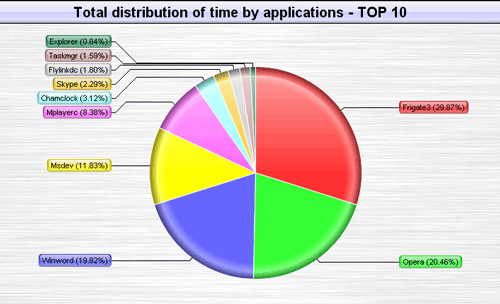
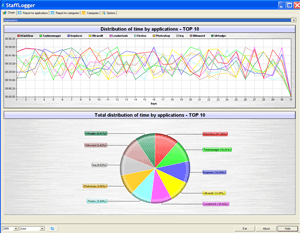
Staff Logger is a time tracking & PC time-keeping tool. The program logs the exact time when the user worked with the applications and you will see on what kind of work your time has been spent. The internal program database stores the information on each day so you’re able to watch the every day data in details. The program is easy-to-use and has low system requirements.
Staff Logger is a program that will be useful for those people who spend a lot of time working with the computer and want to know what they actually spend their time on.
System Requirements:
Windows 98, Me, NT, 2000, XP, 2003, Vista; 10 Mb Hdd; 64Mb RAM
Publisher:
Almeza CompanyHomepage:
http://www.stafflogger.com/File Size:
2.81 MB
Price:
$29.95
Comments on Staff Logger 3.0
Please add a comment explaining the reason behind your vote.
iPhone app giveaways »





Android app giveaways »





The screenshots shown sure didn't show up in my version and with no help file or any help on the developer's website I uninstalled...
Save | Cancel
The uninstall does not work! This thing stayed on after I used the uninstaller and restarted Windows.
I finally found the program (called SysDrvMon.exe, for whatever reason) in :
C:\Documents and Settings\USER_NAME\Application Data\Almeza\StaffLogger
I killed it via Task Manager and deleted the directory. I hope I've managed to kill it for good.
Save | Cancel
* No local Help file nor is the developer’s website very helpful.
C YA
Save | Cancel
I love this....it makes me to monitor how much time i use on the computer. Thanks GAOTD
Save | Cancel
This is a load of garbage, tried it and it locked up my pc, had to roformat as many files were corrupted, lost everything pictures emails etc
Save | Cancel
Thanks Ashraf, saved me the time figuring out that this is NOT A KEEPER and I respectively pass thanks GOTD.
Save | Cancel
Yeah, this would definitely be a plus factor for people who wanted to track down the applications being used at the end of the day, specially when they get home while the kids used it all day.
Save | Cancel
Funny thing: the installer installs Staff Logger, but EULA calls the software "Boss Assistent".
Save | Cancel
I easily lose myself while on the computer. This program may just give me a jolt up the behind lol.
Save | Cancel
Speaking of time..... let's talk about how much this offering wastes our time. How much does the average home user care how much time they spend in an ap? I would guess very few. I don't care about this type of time management. For those that worry about this type of thing... get a life. That is my thoughts.
Save | Cancel
#11: "I really don’t see the point of this program, for the home computer user."
I certainly see your point -- for the average user it's not like you're documenting billing hours working for different clients/customers -- but some folks do use apps like Staff Logger & find them very useful. If you have problems at the end of the day figuring out why your To-Do list looks far too much like it did when you 1st woke up, this sort of program tells you a bit about how you spent your time, on the PC at least. ;-)
The Almeza site also hints at monitoring others... I could see Staff Logger or something like it being used at home to help monitor younger children's time on the PC as well.
Save | Cancel
This is a handy program for solicitors if they can change it to clients timing instead of programs.. thanks anyway I am sure someone out there will make use of it .
Save | Cancel
This program looks not even a quarter way baked. The GUI is very nondescriptive. There was no option to create the pretty graphs as shown in the screenshots. Password protection was useless, as it only prompts when you use Ctrl-Alt-F7, while nothing when accessed from the tray (extreme loophole). The installer installs to AppData for some reason, most likely to hide itself. But one has to think that this program'll be used on every account, not just one, so reinstalling it to every user would be time consuming and take up unnecessary space.
The program can easily be killed using a process manager, rendering it useless. It'd be better if the program was installed as a service, so non-privileged users can't kill it.
Overall, this program is not ready, at all. And for the price, $29.95, is just way too high for a program that works like an alpha. Big thumbs down. 0.5/10
P. S. You can change the Registered Name from GAOTD to your own name by editing almezawla2.key in the program's folder. Even though they say "do not edit," you can safely change the name field to whatever you want, but nothing else.
Save | Cancel
@Ashraf
You can blame Google for this program defaulting to install in the AppData folder instead of the Program Files folder. Chrome does this to get around User Account Control in Vista. I knew it was only a matter of time before everyone else followed suit.
Save | Cancel
It work but need improvements and more languages.Also i like visual stlye and what can do Manic,free alternative.In entire Internet,non exist free alternative for soft who embedding video in pdf.Also soft like:Text to speach for more languages,exceptions:english,spanish,etc.show a deficit.Also translation with translators show a deficit.Browsers and navigations it is still in classic mode(waiting 3D mode).In browsers non exist possibility to navigate from country to other country and always everything to be translated automatic in your language.Can someoane make something in this directions?.
Save | Cancel
I downloaded the program, and as the first comment pointed out, it installs in my appdata folder, which is a hidden folder on Vista. Also, once downloaded, I found it hard to track programs because it doesnt show the name, and I can't seem to find out more about a specific program. I also tried the "Password Protection" function, only to result in continuous access without entering the password that I've set. Overall, this program is useless. Don't download if you don't want 3MB of trash on your computer.
Save | Cancel
I really don't see the point of this program, for the home computer user.
Save | Cancel
This looks to be something for business purpose and not for home use. So I will not be downloading this. Cannot see how this would be helpful for a single endpoint user.
Save | Cancel
There are lots of time-tracking applications, StaffLogger 3 doesn't cut it. Ashraf reviewed an earlier version, which apparently had a few features. StaffLogger 3 doesn't do much of anything, and doesn't see some application use. You can create, edit, and delete categories, and move applications between categories, and you get the one chart, unlike what's shown on this page and their website. Useless. As for the bizarre installation, you can create a shortcut, but I'm never going to use this.
The free, standalone, super-small Bisystems Hronos is better. If you want to create rules and use some external software for reports, there's the standalone open-source TimeTracker (read the manual before using). One of the more powerful and useful time-trackers is the open-source PC Fare Meter, which also now has a standalone version. However, it's for people who are willing to figure out a somewhat complex and non-standard interface, with no help. ManicTime has a number of useful features and is visually-oriented and easy to use, although it tries to communicate over the Internet, which I block. Moving up to time-trackers which also capture screens, there's the many-times giveaway, Uconomix SnapLogger (commercial), which has been stagnant for a long time. I much prefer the much more powerful and versatile TimeSnapper Pro (commercial), although it also has a complex interface and no help. The free version doesn't do much. Apart from the online services, which I don't trust, wouldn't pay for, and don't see the value in being online to use, there are all sorts of commercial products, such as Neuber Visual TimeAnalyzer, TwoLogs TimeTraces, NesterSoft WorkTime, A!K Research Smart WorkTime Tracker 2, etc.
Different people have different needs. Personally, I like PC Fare Meter (free) and TimeSnapper Pro (commercial), but both have quirky interfaces and little help. ManicTime (free) is also good. If you're serious, I'd also download and test trial versions of the commercial products.
I also use the commercial products TimeSnapper Pro, AnVir Security Suite (recently updated) with logging to disk, and Agnitum Outpost Security Suite (it literally has a couple of dozen logs) to keep track of what is happening and has happened on my PC.
Save | Cancel
adding to my coment above (#2):
Wondering if such misleading marketing like showing the inattainable reporting formats as the screenshots on the download page show - if at all that is s legal form of marketing?
For your information: It would never be legal to advertize like that in my country (Denmark)!!
Save | Cancel
Amazing... downloading it, and there I sit.... STUCK! There is no HELP file - only a link to the general LEADERTASK website, which provides no help.
Interesting to see screenshots that do no match the screens I get on MY screen. The two reporting screens (as in the screenshots above on the GAOTD download page) cannot be found anywhere...
I get only a column showing today's total log-on time ("Distribution of time by categories") and the Chrome/IE/Notepad categories (however no time log for the individual programs).
No indication of WHERE/HOW to create other reporting formats (à la screenshots on the download page).
I was so happy reading about the features of the software - and I became utterly disappointed of the 'discount version' that one gets by downloading today's GAOTD offer.
Save | Cancel
Staff Logger is a simple but good time tracking tool to know how you spend your time on your computer.
Thanks GOTD :-)
Save | Cancel
Is this program crippled? The great looking piechart screenshots on the GOTD and author’s web page are not available. Just a simple vertical colored 3D bar. No real ‘Help’ anywhere. Under the ‘Info’ icon at the top of the program screen, the links listed there are blocked. The program does seem to keep timed use of other programs.
Save | Cancel
To my colleagues (MadAlPal & Others) - yes, yesterday, Agnesofhtekc did plagiarize my comments. I decided to take the high road and not say anything about it (because this is my nature) but I did want to give you an answer (since you asked me this question.) Thank you very much (MadAlPal) for pointing this out to everyone. My heartfelt appreciation to you for your honesty and integrity, which is more than I can say for Agnesofhtekc. Now, on to my review.
___________________________________________________________________________________________________________________________________
PROS:
* Successful download, installation, activation on Vista Home Premium x64 SP2 OS.
* Smooth program access without needing to use Admin. Mode.
* Simple, clear, pleasant, easy-to-use, easy-to-navigate GUI.
* 2 languages supported: English and Russian.
* User can choose: Autostart or Not Autostart upon Windows startup.
* User can choose: Hide to System Tray or Not Hide to System Tray upon Windows startup.
* Program allows user to set a password to secure program access.
* Program provides right-click context menu to: create, delete, edit categories.
* Date and Year of Staff Logger activites are displayed in top-right-corner of main screen.
*Program displays tree of available category folders on left side of main screen, alongside the right screen that displays output graphic.
CONS:
* Password security function is completely non-functional. In other words, it does not work.
* There is no Help Guidnace within program or on developer's site.
* Program generates only one type of graphic (chart) and nothing else.
* Program meaninglessly lists other program icons (programs that have nothing to do with Staff Logger program) on left-sid-pane, within tree menu.
* Price Point is high compared with alternative freeware options that are equally-capable, and much more feature-rich than Staff Logger.
SUMMARY: - Program is too simple, basic, and limited. It also is non-functional when it relates to its password-protect function. For these reasons, I give today's GiveAway a thumbs down vote. I'm uninstalling it right away. Thanks anyway, GOTD and Almeza.
Save | Cancel
It's really useful , I can mange my time reasonably while using the computer !
Save | Cancel
It is very easy to install, and a small program.
It is nice how simple it is, and how it just gives you this graphs you want, no ifs ands or buts, but really, there isn't much point. All it does is take a snapshot of your running processes once in a while, then prints them out, which can also be done by any well made batch file.
Overall, It is well made, serves its purpose, and is easy to use, but nonetheless isn't that useful.
Save | Cancel
The Good
* Displays time spent on programs in multiple different ways (table and charts/graphs).
* You can organize time spent on programs by categories.
The Bad
* Wants to install in my AppData folder instead of the traditional Program Files folder for some reason.
* Too simplistic; tracks programs strictly by the executable's name and does not display any more information than that.
* Sometimes you have to hit the "refresh" button to make it show the latest collected data.
* Password protection doesn't do anything >.>'.
* No local Help file nor is the developer's website very helpful.
Free Alternatives
ManicTime
For final verdict, recommendations, and full review please click here.
Save | Cancel