Every day we offer FREE licensed software you’d have to buy otherwise.
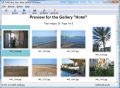
Giveaway of the day — SoftOrbits HTML Web Gallery Creator
SoftOrbits HTML Web Gallery Creator was available as a giveaway on September 4, 2009!

Do you have pictures that you would like to show to people all over the world and you just don't know how to put them on the internet and create a links to all of them? SoftOrbits Html Web Gallery Creator is the right thing for you. Program creates friendly web pages on which it puts your photos.
Every page has a link to the previous picture and the next picture, and to the main index file that SoftOrbits Html Web Gallery Creator creates for you. You can choose the page colors, fonts, number of thumbnails per page and other settings. Then you can preview created web gallery in your favorite browser and your web album is ready to be published!
The application is very easy to use but very powerful. If you want to post your digital photos to the internet, chosing SoftOrbits Html Web Gallery Creator is the right decision! You will find out that you like using SoftOrbits Html Web Gallery Creator very much.
System Requirements:
Windows NT4/2000/XP, 2003 or Vista (Win32)
Publisher:
SoftOrbitsHomepage:
http://www.softorbits.com/html-web-gallery-creator/index.htmlFile Size:
2,08 MB
Price:
$29.95
Featured titles by SoftOrbits

Batch Picture Resizer is software specifically designed for fast and simple automation of such tasks as picture resizing, conversion and watermarking.

Advanced Woman Calendar is a precise and user-friendly personal ovulation calendar that monitors the menstrual cycle. It calculates safe days for sexual intercourse, and helps you to achieve or avoid pregnancy, or even predict a baby's gender.

GRT Data Recovery helps you to recover lost data from FAT16, FAT32 and NTFS Partitions.
Batch Picture Protector is a powerful and easy-to-use batch image watermarking tool. It protects your digital images and artwork by adding professional transparent watermarks that combine text, illustrations and graphics.

Private Photo Album is a private photo album you can take on the go. It’s perfect for loving couples or teens who want to keep their private photos on the computer private. The application includes a built-in image viewer and slideshow capabilities.
Comments on SoftOrbits HTML Web Gallery Creator
Please add a comment explaining the reason behind your vote.
iPhone app giveaways »





Android app giveaways »





Why would anyone buy (or use - even for free) this when there is Picasa, Flickr, EasyShare, and hundreds of other free photo-sharing services? Buggy whip- Solution looking for a problem - bottom line this might have been handy 10 yrs ago but today web services have this functionality covered.
Save | Cancel
Shutterfly.com is a very good alternative no software to download.
Save | Cancel
No good IMO.
The biggest issue is it's output is garbage. It outputs OLD OUTDATED code that is not valid and uses depreciated tags...oh.my.God. Font tags? Conme on!!!!
Also doesn't give you an option to keep images at the original sizes. You HAVE to specify a 'resize. No good with different sized and different orientated images. If you specify a size on the long side, which you HAVE to for example a landscape orientated image, then your portrait orientated images are going to be FUBAR.
This type of gallery is old and outdated, and would make updated a pain.
Also when installing this program it asks you if you want to install something that will check for updates. If you aren't paying attention you are going to get a 'phone home' type application installed as well.
Honestly....if you want something like this there are plenty of free ones out there. But my suggestion would be to go for something more modren.
To the developers - You need to fix the code that this thing outputs. HTML 4 and font tags are long gone.
Save | Cancel
Morpheus Photo Morpher is similar and free.
Save | Cancel
This software worked great. Easy to install and worked with no issues. This gets the job done. I was able to view all the photos from summer vacation this year.
Thank you GOTD!
Sincerely,
Adriel Yapana
Save | Cancel
At great risk of negative comment points (for not having interest in today's freebee), my favorite for web albums is the (still freeware, at present) Vicman's Web Photo Album: http://vicman.net/webalbum/
GAOTD still rocks!!
Save | Cancel
Not so good. I'm sorry man. Gave it a try, but wasn't like blown away or something. Program surface doesn't grow on me. Rather gives me like the creep. A shiver.
Save | Cancel
Looks interesting, but when I try to activate, it says "Unable to connect"
Save | Cancel
I usually find that one of the most useful functions of the comments section is the recommendations of alternative freeware equivalents. I am mightily surprised that so far nobody has put a word in for harmware's "Batch Thumbs" freeware peogram which also creates HTML galleries with ease and has the same ability to err umm make batches of thumbs. Note that the size of the thumbs is entirely up to you, and is by no means limited to the usual tiny images that one usually asociates with
the term "thumbnail".In fact I regularly use it to make
web site and forum friendly 640 maximum "thumbs" from the megapixel images taken by my digital camera
Save | Cancel
FWIW...
Far as I can tell the advantages of using SoftOrbits HTML Web Gallery Creator might be that it's stand-a-lone, meaning you can use it (& any galleries you've created) with different software should you change hosting services, & it sticks to plain HTML, again maybe a plus for/if swapping your gallery from one host service to another.
Otherwise the on-line or downloaded software that comes with most any hosting service will include web galleries, as will most any site development or creation software, & those will probably be easier to use -- integrating [importing] your already made gallery pages with some site creation tools can be challenging.
At just over 1 MB on disk, SoftOrbits HTML Web Gallery Creator's single file doesn't have a huge impact on your system -- should be pretty harmless to give it a try.
Save | Cancel
I installed and activated this program w/out any difficulties, on a 64-bit Vista Ultimate system w/4Gb RAM, a 500 Gb Raid, and an Nvidia Geforce 9800 GT w/1GB memory (although I am not sure how relevant it is which video card it is that I am using)
For my test, I used a folder containing 224 photos from a recent overseas trip which included shots taken through aircraft and automobile windows, in addition to the normal shots I took once I arrived (this is an important detail later).
My first complaint is that I couldn't find a help manual ANYWHERE! It is not in the program, and I looked all over the developers website and couldn't find anything! I even looked on the websites for other reviewers (like Ashraf)! No joy. Fortunately, it works relatively intuitively. It's “how much time is left to process” function wasn't very accurate – it usually took less time to process than it said it would while this might not make much difference to most, when I am working through my "To Do" list, and one of my projects includes working w/THOUSANDS of photos, the accuracy of those predictions has a lot more impact. Also it was inconvenient to have to mouse down to select the photo, then mouse up to the menu to apply any of the edit functions – a right-click context menu would REALLY help. A major flaw which is the reason I will not recommend this program to clients or friends is that it does not have an “undo” option.
On the plus side, I REALLY liked it's Auto contrast and Auto Levels colour enhancement functions. They made a BIG difference in the appearance of the through-the-window shots, especially through the aircraft windows. I also liked how easy it was to use. I will admit that while I've been working with computers for decades, I haven't totally gotten comfortable with today's sophisticated PC apps (such as PhotoShop). For me, and for non-professionals, its lack of complexity and its spare menu are not such an awful thing. I think it would appeal to the non-IT folks who are trying to create their own personal webpages, and for that market, the $29.95 price tag would be reasonable.
So, in conclusion, my opinion is professionally, I would not recommend this program to my friends or clients (the flaws I mentioned earlier are too important), but I think that I'll keep it on my computer and mess around with it a little.
Save | Cancel
While I don't think too much of this, some of the criticism has been unfair. #1, Ashraf, I didn't have any problem with background images. There was a code injection attempt on the Explorer dialog box, I'm never sure whether those are real or due to conflict, but I block them when they're not needed. Your attempts at characterizing resource usage are meaningless and misleading. Of course it uses CPU when resizing, it's even designed to utilize multiple cores, which you can configure (File, Preferences). I don't really care about the misspelling, but you're right that it shouldn't be there. You can always edit the HTML. #12, Keith Alston, I use IE8 and haven't encountered any errors. Instead of just saying "some error occurred on my PC", tell us what the error was; so far, it appears unique to your system/configuration. #16, Happy Person, it's neither necessary nor recommended to run things with administrator rights in this case.
Save | Cancel
Deviantart.com does this and is very easy to use. It also has its own community of other people who post their own pictures, allowing people to comment on others' photos. For the more professional photographer, there is even a portfolio creator. Oh, and its all FREE. Here is an example using my account: http://itstallion23.deviantart.com/
Save | Cancel
It was a nice program,that is a good idea for a program! It would be perfect for a beginner who is interested in starting websites!
Save | Cancel
I've tried all of the freeware alternatives mentioned so far and finally settled on Porta (http://www.stegmann.dk/mikkel/porta/). It's got a couple of niggles but it's the best photo album generator I've used to date, including the non-freeware ones.
Save | Cancel
What a nightmare
Does not read my JPEG photos from my network drive.
Error "could not find pictures"
Save | Cancel
For who want amazing free soft for create slideshow with:music,pictures,video and beautifull efects put in search at download.cnet this:Wondershare PSP Slideshow and other is:Wondershare Ipod Slideshow.Is not important to have:Ipod or PSP,results you can see on PC.It was commercial and now(from december,but i discover yestarday) became free.
Save | Cancel
Two excellent free alternatives:
WebAlbumGenerator from ornj.net. Creates standards compliant albums with a variety of css driven styles.
http://www.ornj.net/webalbum/
VisualLightbox creates albums based on the Lighbox script and does all the work for you.
http://lightbox2.com/lightbox-with-image-map.html
Save | Cancel
For blogging purposes i use tumblr. pics, videos, text, links, ect and integrated with facebook and twitter. And Free
www.tumblr.com
Save | Cancel
Very ugly galleries, I will uninstall this and keep the freewares which are a lot better.
Thumbs down for this and a recommendation for a superb freeware:
VSO PhotoOnWeb which have very nice galleries.
www.photoonweb.com
Save | Cancel
Wow is all i can say, i have looked for software like this for a long long time! Thanks, you guys are super!
Save | Cancel
Another free alternative is here: http://download.cnet.com/Web-Album-Maker/3000-12511_4-10624222.html?tag=mncol
Save | Cancel
nope, too many other programs (lots of them free) for this to appeal at all. facebook and myspace are even less attractive, thanks.
IIRC even the wal-mart grab-a-cd free photo organizer can do this.
photoscape, certainly- Paul van Roekel's photography page has a good 2 dozen custom templates for it- all free.
take a look here for the following and more, all free:
Gallery Wizard
Web Album Generator
Galleroo
httphotos
PhotosReViewer
Save | Cancel
PROS:
* Smooth download/installation/activation on Vista Home Premium X64 SP2 system (despite what GOTD program description says).
Note - I ran "setup.exe" & "activate.exe" files as "Administrator" to ensure everything went smoothly - which it did.
* Smooth program operation (after installation) without needing to use Run As Administrator rights feature.
* Simple, clean, intuitive, easy-to-understand, easy to navigate Graphical User Interface (GUI).
* Developer contact information (web address and e-mail) contained fully within the program in the About section.
* Program allows user to edit/select various different operating/configuration features for the: processor, mouse, images, gallery properties.
* Program has preview pane for created picture gallery.
ACTUAL PROGRAM OPERATION:
Successfully created gallery of 30 jpg images (converted from bmp original image-sources) in about 1 minute.
CONS:
* No Help File contained within program.
* GUI is too drab, simple, and visually unappealing - needs major sprucing up (IMHO).
FREEWARE OPTIONS:
Pranas.net Web Gallery Creator 4 - CNET User Rating 5/5.
Save | Cancel
Installs fine on XP SP3. Simple straight forward prog, does what it says. however one features is missing (slideshow), also added extra words in title.
I use Jalbum for most of my personal album creation. I could use this one for work related quick album creation.
Thanks GAOTD Team. Thumbs UP.
Save | Cancel
Despite all that has been said, i think i would 've liked to try "Private Photo Album" more than this.. because an HTML picture gallery is just so easy to make and many online services also have this capability for free..
Save | Cancel
Pros
Installs fine on xp sp3. program is simple to use and does just what it says, creates a no frills .html page.
Cons
The default output folder grabs all the images that you want to use and compiles them together, not putting them in an assets folder like you would expect. Not a problem if you are using the page as a stand alone image gallery but may cause problems if you plan to use it along side an existing site.
Save | Cancel
Downloaded and installed - apparently OK, on Vista Home Premium.
Tried 4 projects, the options varied, and web gallery made. The resultant code was not viewable in Explorer 8, coming up with an error.
Running the index.html direct from the gallery folder gave the same error. There is no help, so I cannot comment further - it's doesn't work and is a waste of time.
Save | Cancel
Wow! this is nice. I am a blogger and I wanted to have a photo gallery. I know I can make a gallery with WordPress but I wanted a dedicated solution. I feel this will be a great solution for me.
Thanks GAOTD Team. Thumbs UP.
Save | Cancel
Only works with folders, seems to work OK but if you tell it to display all image information it will display original size, etc., but it doesn't link to the original image, it only displays the resized image. Clicking on an image will advance to the next. Dumps its configuration file into System32, which it shouldn't, and which Vista will virtualize per-user. Has some automatic image adjustments which can be applied to the entire gallery, and some to the selected picture (doesn't do multi-select).
Save | Cancel
Simple and easy,is all I can say for it.
Save | Cancel
Can this feature be incorporated into a 'free' website? Is there a way to use it to enhance my website?
Save | Cancel
Picasa offer something similar for free.
Save | Cancel
Personally,i always like making a PowerPoint photo album using my photos and pictures,and then i will convert it to video so that i can share them on video-sharing website,that's cool!
Save | Cancel
As an alternative IrfanView has been able to create an HTML file from pictures for several years now.
Save | Cancel
Does what it says and works nice.
Save | Cancel
www.facebook.com, www.myspace.com also do this
Save | Cancel
The Good
* Straightforward and very easy to use.
* Automatically creates JPG or PNG thumbnails for all your pictures.
* Allows you to batch resize your images.
* Automatically sorts images into pages if you have many images.
* Has appealing mouse-rollover effects for thumbnails.
* Can rotate images from within the program.
* Can create a .ZIP to allow people to download all images.
* Adds a navigation bar when viewing images in full view.
* Works very fast.
The Bad
* Program crashes and/or does not add image when trying to add a background image.
* Output needs to be organized better.
* If you output to the same folder, your previous output will be overwritten without warning.
* Uses up a lot of CPU.
* Galleries are too simple... not very aesthetically pleasing.
* Miss spelling for a button tooltip.
* A feature to publish directly to website/server would be nice.
Free Alternatives
Google Picasa
JAlbum
For final verdict, recommendations, and full review please click here.
Save | Cancel