Every day we offer FREE licensed software you’d have to buy otherwise.

Giveaway of the day — Soft Organizer 3.40
Soft Organizer 3.40 was available as a giveaway on April 9, 2014!

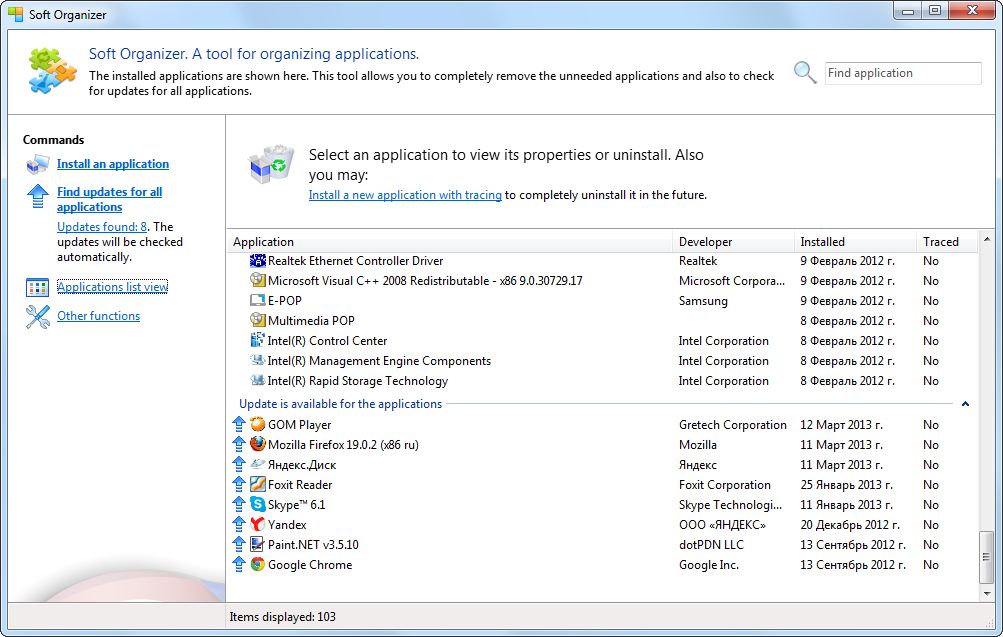


Soft Organizer is an excellent and very easy to use application to install and uninstall programs completely. Applications can be installed with tracking, which means the tool records all places in the system where the installed program leaves traces. In the future, these data allow removing that program completely, including all leftovers that may stay in the system after regular uninstalling using the Control Panel.
Soft Organizer is also equipped with a search mechanism to find traces of programs that were not tracked automatically. For programs you prefer to keep installed, Soft Organizer can check for available new versions and notify you about them with a special symbol in the application list. The built-in rating system provides a way to locate and get rid of unneeded and low-quality products.
System Requirements:
Windows XP, Vista, 7, 8, 8.1 (x32/x64); RAM: from 256 Mb; Disk space: 50 Mb
Publisher:
ChemTable SoftwareHomepage:
http://www.chemtable.com/soft-organizer.htmFile Size:
12.5 MB
Price:
$30
GIVEAWAY download basket




Comments on Soft Organizer 3.40
Please add a comment explaining the reason behind your vote.

iPhone app giveaways »





Android app giveaways »





Jay #45 and everybody interested
I was talking about portabilizing almost any application in an identical fashion as the Portableapps.com format which is based on NSIS, or WinPenPack.com which is based on the AutoIt scripting language.The trouble with NSIS is that it's quite complicated to master (for me it's chinese!). I know how to do things with AutoIt, but anyhow both NSIS and AutoIt use their own registry formats, so registry entries need to be adapted or translated which in my view is an unnecessary complication, it's much easier (and faster!) to use a series of windows already-built-in command prompts.
There are only a few command prompts you need to master, namely xcopy and/or copy,regimport or regwrite,runwait,rmdir and/or del,regimport or regdelete.
Put those commands into a .bat or .cmd file which performs as your application launcher, when you doubleclick on it, everything (program files,appdata,registry entries,etc) gets copied (installed) into the pertinent folders,your app gets started and runs until you close it down, at this point everything (program files,appdata,registry entries,etc) gets deleted (uninstalled) leaving no traces behind, except those that you want to stay (my documents,preferences or whatever) -- stealth portable!
In order of being able to do this, of course you need the right software tools:
a program installation monitor, snapshooter, analyzer, registry exporter, and program uninstaller (TU Pro) besides some knowledge and experience.
Have a look at comment #38, which isn't just a comment, but a well-written tutorial about all this (congratulations, mike!)
Anybody interested in getting a deeper insight just email me at
c9e2253f@opayq.com
and I'll answer your questions for FREE in accordance to the spirit of GOTD!
stay healthy!
Save | Cancel
Hi, my second post today. Many Users (including myself) raised concerns about earlier Versions of Soft Organizer, especially that called 'Full Uninstall' being REMOVED without permission by installation of this latest one. I'm sure the Publisher took interest in reading some feedback here, because there was one entry of Chem Table Software Team in response to different concern. It would be so kind if Publisher could put people's minds at rest by simply stating: Yes, earlier Versions of Soft Organizer can be kept on PCs - as long as this one is installed on different Drive, or location? That simple!
I only found it out myself by installing Today's Offer (in the end) on my portable Drive and indeed the other one (earlier version) stayed intact this way. So I have two now. One setup to see Programs in alphabetical order (easier to find specific Software), the other (today's) have list of my Programs by Dates. To me it makes perfect sense to have choice which one to use according to need without changing settings each time. Hope that helps Those wondering.
As for 'Full Uninstall' I truly don't know if Soft Organizer replaced it because it was installed in the same directory (I didn't have it on my machine), or somehow 'searched' for it, found it and removed anyway. In any case - Users ought to be INFORMED beforehand what might happen. That would be only fair?
Save | Cancel
QUESTION for Frank D ( #34 ). Where can you get Comodo Programs Manager ( 2.0 beta )? Comodo site only has v.1.3.2.30. Thanks
Save | Cancel
Turned out it worked once I disabled Bit defender fo 5 minutes.
Thanks for the tip!
Save | Cancel
I also could not get this to install. Got the "Failed to launch the program" error! Happenned even after extracting the zip and running setup by hand...
Woould like to try it, but....
Save | Cancel
Help needed. I believe I am following the Readme directions placing the of the GAOD programs Setup.gcd file in the same folder I have the installer in but most of the time afer clicking on the Setup file I am getting an error message that the file is corrupted & directing to get a new copy of the software. This happens more than half of the time I try to install a downloads offered here. It never goes through the set up, just stops cold with the error message & the page comes up that the software has been activated but it never installed. At times I will go to the software company's page to get the program & install that & enter the seriel number from GAOD when 1 comes with the offer but today's program doesn't have that so I am missing out on it. I have a previous version on my system but want to get this new version since it works well for me.
Thanks for any help! ;-))
Save | Cancel
You need to change the name. From the description it's plainly an uninstaller, not an organizer.
Save | Cancel
advanced uninstaller is the best!! Thumbs up...
Save | Cancel
I installed this last time it was on offer and use it quite a bit (mostly on GOTD downloads!).
I'l pass on this and keep the previous version as bally (#5) has reported a bug in this version. Thumbed up though.
Save | Cancel
I have downloaded and unzipped 3 times. When I try to install it keeps telling me the file is corrupted and try again. I have older 3.26 version on PC. Any thoughts?
Save | Cancel
@ #33 (David Robinson) and #35 (Tek)
Windows 7 Pro SP1 32-bit
Failure to install may occur in several flavors (I enjoyed both):
1. Error message "Could not open program". Cause: GOTD Setup.exe (or rather: another Setup.exe which it spawns temporarily) is blocked on the run by BitDefender or another AV program. Solution in my case: i temporarily (5 or 15 minutes) inactivated BitDefender.
2. Error message "The setup files are corrupted, or are incompatible, etc.". Solution: First download soft-organizer-download.exe from the ChemTable site; run it which will install the trial version of Soft Organizer; then run the GOTD-provided setup.exe which will install the fully licensed GOTD version.
In this way (and only in this way) did I got the program to run, fully licensed.
NOTE: GOTD's setup.exe, when checked by e.g. BitDefender, is clean; it is the temporarily spawned OTHER setup.exe which is caught on the run by BitDefender ... You can find the location of that spawned process in the BitDefender virus report, but it will no longer be on disk, because the file is temporary ...
William W. Geertsema
Save | Cancel
"Ask yourself, what other info this software is programmed or will be re-programmed to send out of your computer, how about your doc files or passwords?
I refuse to install anything that has capabilities to send anything in the background to any server on the web."
If you have a decent firewall, and pay attention to it, this isn't an issue. Allow the program access during install, so it can be registered, then block it. Nothing on my system is allowed online access unless that is necessary for its functioning (even windows, which gets unblocked once a month for its updates).
Save | Cancel
#40 Moriss, I think you are talking about some other software, defo not this one.
install was easy and quick on win 7 64bit and it works a treat
a keeper, revo uninstalled
thank you Gotd and Chem Table
Save | Cancel
I cannot believe the timing!
A quick story to share...
A few weeks ago I installed Avast Free AV to give it a try. It messed things up and got my system running oddly. One of the programs impacted was Full Uninstall which I had been using since 2012. After installing Avast, whenever I tried to open F.U., I got a message something about "cannot access files...". Uninstalling Avast and doing a System Restore fixed most issues except I still could not access F.U. Needless to say, I am thrilled to see this today!
I have used Advanced Uninstaller, Revo Uninstaller and Wise Program Uninstaller and all seem to work well to uninstall but I really like that with F.U., and now Soft Organizer, installs can be done directly through it as well. A.U. does have a background install monitor, if you activate it, but it is in the background while with S.O. you can launch and run the install right through their GUI.
As far as those people stating concern about what information is being sent back, the reality is that any program you load can be a potential hazard and sometimes you just have to trust a developer/company (with a clean reputation) to do the right thing. I'd be far more concerned with using Facebook then using this program!
My only complaint with S.O. is that as I have somewhat bad eyesight, I have a large default font set on my machine but their GUI does not recognize that so the text on their menus and messages that are more than one line end up overlapping each other. I've learned to adapt but that plus the fact that the GUI could just be 'prettier' :-) would be my only issues.
Thank you very much to the teams at both ChemTable and GOTD for this giveaway!
P.S. @KevP #2; No, this does not prevent installing GOTD (or GGOTD). You just choose "install an application" and then select the setup file from the unzipped folder.
Save | Cancel
Andreas #32
Hi! I have also been a long time user of Total Uninstall and see no reason to change from using this excellent software. I am aware that TU creates a back up when an app is uninstalled, which you can reinstall if needed, at a later time. Are you referring to that backup when you said " make any app stealth portable"?
Grateful for your reply!
Thank you and regards
Jay
Save | Cancel
What about this?
Free forever, and no tracking & sending of any kind of informations "home" .........
http://www.glarysoft.com/absolute-uninstaller/
Save | Cancel
Any software that collects data without giving the option to deny is to say the least risky, who knows other data is collected and sent. I use my PC for work and hold a lot of sensitive info on it so I'll pass on this one. Might as well send them your bank card and pin.
Save | Cancel
thankxx.....waited for this a long time
Save | Cancel
This is a great software. I first got it back when it was still named "Full Uninstall" and liked it so much I later bought it. In answer to #10 about Revo uninstaller, that one is very good also but I like the added feature this one has of tracing an installation so that it can later be completely un-installed. Thanks GAOTD for all the great software.
Save | Cancel
Ask yourself, what other info this software is programmed or will be re-programmed to send out of your computer, how about your doc files or passwords?
I refuse to install anything that has capabilities to send anything in the background to any server on the web.
Save | Cancel
Matt #3, yes, my Full Uninstaller was replaced/deleted too. On Win8.1 X64.
Save | Cancel
Nice software and is my current choice for uninstallers since Advanced Uninstaller Pro started including a disk cleaner that you can't opt out of OR disable; all the while asking you to pay for it (the cleaner).
I've found Soft Organizer's install tracker comparable to Total Uninstall in completeness and far better than Revo Pro while being *slightly* better than my previous payware preference, Uninstall Tool.
This is definitely worth getting, IMHO.
Save | Cancel
@ abba: > "Nice except doesn’t show what reg keys changed pre-existed install and what the pre-install values were."
Hi, it shows that; try to explorer the tree - you will see the same value name with different value data.
Save | Cancel
Hello,
Any remedy, could not try out program; got Failed To Launch Program Message when trying to install.
Thanks,
Tek
Save | Cancel
@TheBigOldDog (#13): I've been using Comodo Programs Manager (1.3 and then 2.0 beta) for over a year, and I wouldn't be without it! It's a gem. Not only does it do complete uninstalls, but it monitors every installation automatically in the background, and enables you to make exe installers for programs that you don't want to lose (such as GotD freebies), and which can't be reinstalled due to the time/date limitations. I haven't tested today's offering yet, but I'll be carefully comparing how they operate ASAP.
Save | Cancel
Unfortunately I ran into an installation glitch. The installation program triggered a 'Could not open program' error. I tried doing both a regular install and install as administrator and the results were the same. I checked to see if my antivirus was blocking the installation and this did not appear to be the case. My laptop's OS is Windows 8.1 and was updated yesterday to Win 8.1 Update One. I would love to try Soft Organizer but unless I can get past the error it is unlikely that I will have the chance. Any suggestions would be most welcome.
Thanks
Save | Cancel
It's more than obvious the very first comment came from... Chemtable itself.
-LOL!
Please allow me to say something to this regard:
I've been using Total Uninstall since it appeared in its early stages as a freeware can't remember how many years ago, but certainly since windowsXP came out brand-new, so I could watch how it developed into what it is today besides learning a lot about analyzing software installations, uninstallations, file structures, registry entries, software protection and lastly ...even to read programmers mentality!
I'm no "I.T. Professional", but just an insignificant amateur who can put almost any application I like under Total Uninstall's magnifying glass in order to make any app stealth-portable, not by using Thinapp, Spoon, NSIS or Cameyo, but by writing a single batch file (which actually puts the whole file-structure onto Windows and can import several thousand registry entries in an eye's blink, runs the app, waits until I finish and close the app, and then does the reverse process in a split-second leaving no traces behind, all with a single click!) ... YEAH!
This is just an example of what you can do using the right tool and believe me when I say Total Uninstall stands far apart from similars,there are none. Total Uninstall is the non-plus-ultra which stands alone in a class by itself.I understand it is the brainchild of a single individual, a one-man business, his name is Gavrila Martau and he's from Romania, check his website:http://www.martau.com/
I don't have any affiliation with this person or company.
That being said, I put today's Giveaway under "the magnifying glass" and guess what? No need to portabilize this one, just copy the installation folder (usually on C:Program Files(x86) onto your USB-stick or somewhere else(Desktop,MyDocuments or whatever) and bingo! just doubleclick on SoftOrganizer.exe
IMHO there are only two worthwhile alternatives:
Comodo Program Manager (FREE): automatically monitors everything you install (including frameworks,runtimes,updates), can make a self-extracting re-installation file of most monitored apps, including program settings, licensing entries, preferences, etc. except those apps with kernel components (drivers, services and so) It works on windowsXP-64bits, but it's a pity it doesn't work on win8-64bit. Haven't tried on win7
Revo Uninstaller (FREE or Pro)
Both of them are quite effective to perform Giovanni's Hint, but not so AdvancedUnistaller,which IMHO is a piece of junk (sorry, Gio)
stay healthy!
Save | Cancel
Anyone know which uninstaller allows You to uninstall and later reinstall same software again ?
Save | Cancel
@ abba: > "Also doesn’t from interface enable deleting change logs"
I agree too! It needs to allow that.
It needs also an option to 'Remove from Log' for each app. only!
Other than that is a good uninstaller. Thanks to GAOTD and ChemTable Software!
Save | Cancel
I use both Revo & older version of Soft Organizer. However, I now always use & have complete confidence in Soft Organizer. A fantastic program,no bugs that I found. Many thanks to the developers.
Save | Cancel
Excellent freeware alternative: Puran Uninstaller
http://www.puransoftware.com/Uninstaller.html
Save | Cancel
I have been using Geek for uninstallation. It doesn't monitor anything though. But it does let you choose between what traces you want to remove.
I uninstalled a simple color-picker program using Advanced Uninstaller Pro and it decided to search every single folder in my programs folder to see if there were any traces of the little application to be found. Why it had to search the entire directory is beyond me. I also don't like the Windows8 style control panel. It's clumsy and confusing and rather un-Windows like for a Windows 7 user. BUT you do get to choose what traces to remove.
I tried the Soft Organizer given away here today. It is nice and fast, but you don't get to choose what traces to remove - it's either all or nothing for trace removal. Now, I like the way it shows what changes were made during installation. But @abba is right, it doesn't show you what the previous values were, so there's no way to know *what* was changed - you only get to see what *has* been done by the installer. You have to think of it as "value replacements" instead of "value changes".
Save | Cancel
Hi, going by experience of Matt in post 3 (Today's installation of Soft Organizer 3.40 REMOVED 'Full Uninstall' without consent or permission of User) - will the same happen to my Soft Organizer build 3.04 ??
I use this Program frequently and am happy with it, but belong to 'old school' when it comes to keeping/not keeping certain versions of the same Software, as in my experience NOT ALWAYS all features are improved for better, SOMTIMES what one is used to and familiar with DISSAPEARS and in it's place different 'egg' pops up..
I am not against improvements per se, but like the Judgement of what I prefer to be left to me, not Software Vendors!
Save | Cancel
I've been using Soft Organizer since its last giveaway and it is hands-down the best uninstaller in a somewhat crowded niche. It catches _every_ change made to the system (regardless of what made those changes) and you can look at those changes at any time and choose what changes are undone during uninstallation.
Its UI is also easy to use--I don't know why so many uninstallers insist on a gimmicky cramped interface.
Save | Cancel
Nice except doesn't show what reg keys changed pre-existed install and what the pre-install values were. Also doesn't from interface enable deleting change logs They are here:
C:\Users\User\AppData\Local\ChemTable Software\Full Uninstall\ChangeLogs
Re. Giovanni's Advanced Unistaller: Takes 6 minutes each to make pre and post install snapshots. Ridiculous. And behind the clean first screen it is very clunky.
Save | Cancel
DL and installed - no problem. Interface - huge problem. The interface does not compensate itself for system modifications for text size resulting in commands that are half hidden on the UI. I took a screen shot.
[IMG]http://i58.tinypic.com/2w53ic6.jpg[/IMG]
Save | Cancel
#18 I think you forgot to mention your software is not free. Soft Organizer....Free to try (Limited functionality); $30.00 to buy.
Save | Cancel
#3 Matt. Try a System Restore. Might get your old program back.
#10 Codger Doc. Have used Revo for years and can't see any reason to change.
This one interests me because it tracks every bit of what is installed, but I don't like unknowns when I have something that works for me already.
Thanks, but I'll pass.
Save | Cancel
I tried to uninstall a programme that had craftily installed itself on my machine using both Windows and IObit Uninstaller but neither did the job. I downloaded and used Soft Organizer, which found and uninstalled the rogue programme. Very impressed
Save | Cancel
I'm sorry but tried the software. It worked ok but I had Advance Uninstall on my system and I found it worked better.It removed stuff that should have been removed by this GOTD program. I had to use my Advance Uninstall program to finish the job.Thanks for the opportunity to try this new software but I think I'll stay with Advance Uninstall.
It was free as well.
Save | Cancel
Delighted with this software, used it already and got rid of very stubbon software. Thank you
Save | Cancel
Imagination has taken a back seat. Looks exactly like the windows uninstall program, unexciting & drab. I would probably have let today's giveaway stay on, had it not been for the amazing software "Should I Remove it?" [SIRI?]. "SIRI?" seems to have taken a peek at Soft Organizer, cuz there is a column showing the no. of people uninstalling a particular sw. Ya, it did copy some features from Soft Organizer. Now here's the fun trivia. Soft Organizer says only 2% of the users uninstall it but 4% uninstall "SIRI?". "SIRI?" says 4% uninstall it and 7% uninstall Soft Organizer! Obviously someone is lying! Deduce that my watson's n sherlocks! :D :P
"SIRI?" shows the description of the softwares and if a particular product isn't in their database, they promise to add it within the next 48 hrs. That's professionalism my friend. And best of all, its FREE! :)
The only thing that bothers me is that the window cannot be resized. It can be broadened but requires patience.
http://www.shouldiremoveit.com/
Have fun guys!!
Save | Cancel
As with any Software, your taking a risk , use with care, and if you dont know how it works , find the help or read me file, there are a few Free alternatives that do a good job without monitoring your system. Thanks to GOTD for all your Support and Good programs.
Save | Cancel
Already given away several times in the past, this app is definitely one of the BEST uninstaller on the market right now.
Best feature is its installation monitor function, which enables you to keep track of all changes in your windows registry occurred during a program installations (and I let you imagine what you can do with that...hint, hint...LOL!).
So THUMBS UP, even though ADVANCED UNINSTALLER PRO by Innovative Solution can do even more for FREE:
http://www.advanceduninstaller.com
So 30 bucks is a little bit ovepriced: do you agree with me, dudes?!
Enjoy!! ^_^
Save | Cancel
I noticed this running in processes without my doing anything which call it crazy i found odd I have been using Advanced Uninstaller Pro (free) what they call the swiss army knife of uninstallers and it doesn't monitor in the processes unless i am uninstalling something and then its gone . But hey to each his own whatever works for that individual likes
Save | Cancel
Comodo Programs Manager is a free alternative which also monitors installation to aide in removing programs completely
http://tinyurl.com/mgxr7lv
Maybe somebody who has tried both can compare them for us
Save | Cancel
If i remember clearly this was given before.
Although i used it for a month of so, but now i plan to keep this as my default uninstaller.
So far i didn't find any bugs.
Thank you for this.
Save | Cancel
Obviously, the update checker of Soft Organizer fails to find all available updates. It didn’t list many programs which I haven’t updated because I prefer an older version, because I don’t want to pay for an upgrade or because it is a giveaway.
Oh, and don’t try uninstalling Soft Organizer with Soft Organizer (sometimes I can't resist trying stupid things). It will just freeze...
Save | Cancel
One question: How does this compare to Revo Uninstaller as far as uninstalling goes?
Save | Cancel
@ Chemtable Software
Thank you for this information! I think you should made a comment about this in your software description.
The information in the program window "the version data will be sent to the servers" is misleading, and the new implemented rating system is more misleading.
Greetings to Russia!
Save | Cancel