Every day we offer FREE licensed software you’d have to buy otherwise.

Giveaway of the day — Process Lasso 6.0
Process Lasso 6.0 was available as a giveaway on September 28, 2012!

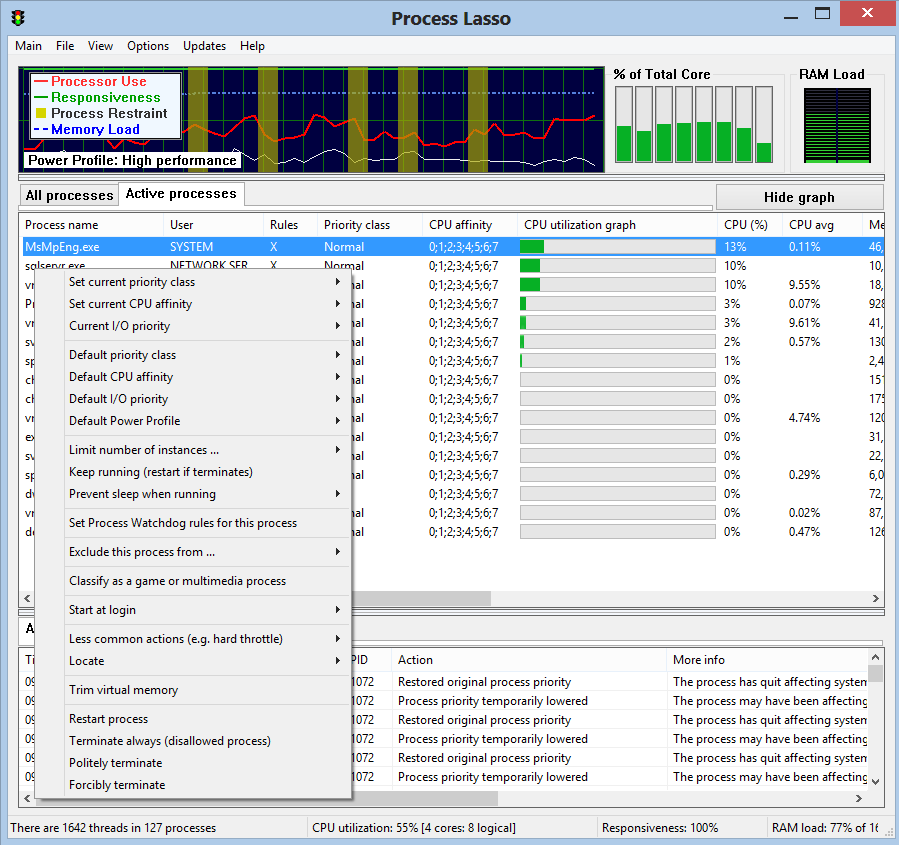
Process Lasso is NOT yet another task manager; it is a process, power, and CPU optimization and automation utility. One of Process Lasso's most popular features is a unique technology called ProBalance (Process Balance) that can improve your PC's responsiveness and stability during high CPU loads. Windows, by design, allows programs to monopolize your CPU without sufficient restraint -- leading to hangs and micro-lags. ProBalance intelligently adjusts the priorities of running programs on-demand so that badly behaved processes are less likely to negatively impact the responsiveness of your PC. It does this NOT by raising process priorities, but instead by temporarily lowering the priorities of background processes that may be interfering with PC responsiveness. It can also perform other operations on these processes, such as adjusting their I/O priorities or CPU affinities.
Another popular feature is called Energy Saver. It switches the active Power Profile after you have gone idle for mere seconds (configurable). This allows you to run your PC in the High Performance power profile, yet conserve power when you aren’t active.
In addition to these, there are countless features allowing the user to take full automated control of the processes on their PC. You can have a wide range operations performed, or settings applied, each time a process is run.
If you are x64 OS user, please download the installation materials here (file size 7.66 MB).
System Requirements:
All editions of Windows 2000 (older versions only), XP, 2003, 2008, Vista, 7, 8, and 2012
Publisher:
Bitsum TechnologiesHomepage:
https://bitsum.com/prolasso.phpFile Size:
7.61 MB
Price:
$24.95
GIVEAWAY download basket




Comments on Process Lasso 6.0
Please add a comment explaining the reason behind your vote.

iPhone app giveaways »





Android app giveaways »





I downloaded Process Lasso on September 28, the date of the GOTD offer. I evidently installed it incorrectly because two days later when I had the time to examine the program in detail, the program showed the installed version as the freeware version. I sent an email to support at Bitsum Software and Jeremy Collake personally responded to my request and forwarded a program registration number.
That type of excellent service is not in the business plan for most software vendors. Needless to say - I AM IMPRESSED. Thank you Jeremy for the service and thanks GOTD for the program. For what it does - it is excellent and I am keeping it!
Michael
Oregon
Save | Cancel
#57:Let the PC run normally.
If the makers of OS and PCs felt that such was really necessary, they would have built it in their newer versions already.
----------------
You're kidding right?
If what you say is true then ALL software that isn't sold by the OS & PC companies isn't needed either.
In fact only IBM should be selling home computers.
Save | Cancel
Able to install 64-bit version (eventually) in safe mode.
Bill Zigrang
Save | Cancel
Unfortunately I've only ever found this adds a 7-10% CPU load. Moving the cursor becomes somewhat slower and stickier with this running.
In particular, it seems to conflict with Online Armor, causing OAsrv.exe to run intensively. (I must have tried other versions previously with other firewalls and Windows versions)
'Process Tamer' by contrast- in managing process priorities and restricting load- has no discernible impact.
Save | Cancel
I downloaded, installed & registered. after registering I shut down computer & when I restart computer & look at the action log I notice 1 line says "This is the standard free edition" & on another line it says "This is the PRO edition". Am I neither here nor there or where?
Save | Cancel
Repeated NSIS errors on 64-bit version, even with anti-virus turned off - Molly/Jeremy, give me a hand here, I'm dyin'.
Bill Zigrang
Save | Cancel
Hi,
The #1 post said you can " continue using the build you have", meaning using the version with the updates received during the one month, so that would be more than a trial, since it is a full version of the paid product. If there is a problem, you would have to quote from where. It is very possible the developer is in snoozeland at the moment.
It would be good to have the Pro issue explained.
Steven
Save | Cancel
Been using this program for a long time but this time I cannot find any place to enter the key code. It is nowhere under the help menu. I am thinking that since the install basically just upgraded to the newest version, my key code is not required, but if that is not the case, I am afraid this is going to expire on me.
I know it has been asked several times already but HAS ANYBODY FIQURED OUT WHERE TO ENTER THE KEY CODE? Only 2 more hours before offer expires and I don't want to buc caught with a trial version.
Someone please help us before it's too late.
Jeremy HELP!
Save | Cancel
I have had this program for a year, having originally snagged it from Giveaway of the Day, and actually bought a copy of it four months ago. It's really helpful. It shows you the RAM load, the CPU core usage, and the individual CPU use of each active program. And if you have programs in your Startup that you don't want to run but can't remove via Run > msconfig because your PC prompts you reinstate the Startup items, you can add them to Process Lasso's Disallowed Processes list. On my PC, which is a Dell, Dell Support got corrupted so I can't use and can't remove it, but it runs and uses up resources. Once I put the three Dell Support processes into Process Lasso's Disallowed Processes list, however, they are terminated once Process Lasso is enabled after each reboot.
One thing Process Lasso is *really* handy for is making you aware of when Firefox has caused your RAM load to climb too high. Once you are aware, quit out of and re-start Firefox. Firefox has had this sort of problem for years, now. With Process Lasso, you are able to see exactly how tapped out your RAM is so you can gauge when to re-start Firefox.
Process Lasso is a very small program (the setup file is only 1.3 MB) and makes older systems like Windows 2000 and Window XP run more quickly and smoothly.
Save | Cancel
You don't need this if You use Vista, 7 or 8. They work perfectly without this.
Save | Cancel
#34, #66: I just installed and registered today's version, and in the Help/About dialog it says it's Process Lasso Pro version 6.0.1.36.
Save | Cancel
#68 joe
Did you ever read the Update policy: on the registration page of Bitsum or the registration page in general?
"This code is good for any version of Process Lasso ever released, except the Server Edition".
"You may use the last released version in your update subscription indefinitely."
"You can even come back and download that old version and activate it 10 years from now!"
Download, install, register on the site and the program with your key and use the version as long as you want (and reinstall like you want), with your unique and valid license for the version that can be used with (actually all previous versions including v6.0.1.36 as the latest). You have 1 month free update period (not license key period) and for the same time you can use the (normally only for paid customers) premium support if you need it. What do you want more? Before you format your pc write down your login details for the Bitsum site onto paper, that is all you need (and for sure, you might need the latest setup file that is available at least on the last day of the free 1 month update period before it expires).
And for other peoples, did you ever heard from "About" dialogues in applications? In 99% of the programs worldwide you can find there: Programs name, Version number, Edition, Homepage, Name of the creator/vendor. ;)
It might confuse a little bit since in the application window the title says "Process Lasso" instead of "Process Lasso PRO" after registration but you will find PRO in the "About" dialogue.
Anyway, i already purchased Process Lasso some months ago, just because i used the v5.1 from an older giveaway for free and that actually is the only way i can show my support for this great program (and always be up-to-date).
I wish we could find more developers and vendors with such an effort put into a little business like that (and with personal support, too).
Thanks for the offer today. Regards, Lewis.
Save | Cancel
I have been using ProcessLasso for over 2 years now (purchased version) and must say it is a godsend for gamers.
I have 2 particular games that will only use core 0 (or the first one for the uninitiated) on a 4 core system, which when I go to browse the interwebz for information for a particular problem/quest/feature, check my emails, fire up media players noticeably shows a 'lag' in starting those other programs and they will respond a lot slower (on average a 40-50% reduction in load time and responsiveness).
For the above problem I use Process Lasso to set those particular games to actually use all 4 cores and the 'lag' has no ceased.
As mentioned earlier, I also use a 3D program that when rendering (when other major applications are running in the background) will considerably slow my system down and takes 3 times as long to render (trialled this with a small rendering project). By setting the 3D program to a higher priority has also alleviated this problem.
In conclusion, for the small $24.95 price this has completely solved, what to me were major problems when doing specific tasks on my PC.
For those 'nay' sayers, download it, try it, and if you find it does effectively 'improve or solve' your problems, after the 'trial' period is up, blow the dust and cobwebs off your wallet/credit card and support this one-man-band developer.
Can not rate this program highly enough.
Cheers
Save | Cancel
Hey, bitsum.com, we want the Turkish language
Save | Cancel
Program installed over previous copy. I then got a message that my license needed to be re-evaluated. It showed that the license had expired and asked if I wanted to go back to an earlier version. I answered no. The new version started and shows that it is registered to me.
Save | Cancel
GET THIS NOW!! Essential part of your PC's toolkit. Don't be a schnook, GET THIS NOW!!
Save | Cancel
64 keeps giving me a failed to load program error.
Save | Cancel
Never got an answer to my question #35, so was never able to request the registration key -- but ProcessLasso seems to be running on my computer right now and the GAOTD "Activated" page did open. So now I'm completely confused. If I close ProcessLasso tonight will I not be able to open it again in the morning???
Save | Cancel
#34 & #66: Installed on Win7x64, no problems. Registered it and it shows as PRO version on the About Process Lasso screen.
Save | Cancel
I had this previously and am thrilled to see it offered again. I highly recommend this download.
Save | Cancel
Having problems. The program won't open after closing it following activation. I sent an email about it to support@Bitsum.com. I was very pleased with a previous GOTD version of Process Lasso I had on my old computer, and I want to get the commercial version soon for a business I'll be starting, but figure I'd better resolve the glitch with this GOTD version I downloaded first. To those who are unfamiliar with this software... don't let the glitch that I'm experiencing stop you from trying Process Lasso. It's a GREAT program and an upgrade to whatever type paid license appropriate to your particular use is a good investment.
Save | Cancel
@ 66, and anyone else who can't read: the developer clearly posted at #3 that he would be happy to answer any questions if they're emailed to him. His post carries his name in blue ink, denoting a link. The link goes to the Bitsum website. The website gives contact details. Those details include the developer's email address:
support@bitsum.com
Sheesh.
Save | Cancel
#66
It was I who wrote #34. I discovered from http://bitsum.com/howfree.php
that it turns to Pro version when you register, which is in fact what happened...:-)...
Save | Cancel
#67 Joe
Once you activate it with today's free code, it is a full version! Forever! Please read!
The only thing you don't get is lifetime updates!
Save | Cancel
GAOTD: FOR SOME REASON I HAVE NOT RECIEVE MY ACTIVATION KEY IS THERE ANY WAY YOU CAN HELP ME, I TRY MY JUNK FOLDER AND NO JOY. IT IS BEEN LIKE 4 HRS NOW.
THANKS
Save | Cancel
Process Lasso 6.0 very good tool, but beware wants to go to a network!
Comodo firewall-disable.
Save | Cancel
I've been running PL 5.1.0.44 since it was featured on this site. I can't say I've seen any change in performance, but I trust that it's keeping my machine running smoothly.
I can say that the keyboard locks up every once in a while and then comes back all by itself for not obvious reason (perhaps that's PL at work?). When it's not working I use a secondary keyboard that I've plugged in to USB, and this one doesn't ever lock up.
The one thing that annoys me about PL is that it has been nagging me to upgrade (or update?) every day or every few days. I hope this new version won't do that.
--H
Save | Cancel
This is a great piece of software, but the distribution here is the .96 beta version. One would hope this is an oversight, but I would say you probably ought to just go ahead in buy this software instead. If you need it, it is very good at its job.
Save | Cancel
I used the previous giveaway until a reformat meant I lost it. I found it so useful before that this giveaway was a reminder of how blooming good it was, so I went bought it today. This is exactly what GOTD is for, try the giveaway and if you like it (and can afford it) then do buy the software that is being offered.
Save | Cancel
I was hoping if it would be possible to limit the use of CPU in such a way that 10% of CPU always remains free. That is to say 90% CPU usage would amount to 100% usage, only that my processor won't heat up crazy.
thanks.
Save | Cancel
#66, waiting: Here's the link to the differences between "Free and "Pro" - http://www.bitsum.com/prolasso_purchase.php#about_pro, and here's the link to the version changes - https://bitsum.com/changelog/pl/changes.htm
Save | Cancel
I found Process Lasso while trying to balance and tune "BOINK/SETI at home" performance and overheating issues on my 3 PCs. IT was so very useful for discovering and fixing various Win7 performance issues that I paid for the pro version. I want to take this opportunity to thank Bitsum and recommend this to everyone. The free version is very useful and the fact that I (cheapskate that I am) paid for the pro version tells the story.
Save | Cancel
It's Christmas already! Oh yeah! Thanks so much GAOTD and Bitsum Technologies! -does the happy dance-
Save | Cancel
I have the last GAOTD version installed until now, and it's a rock solid program. Ever since, my system has been much stabler, no freeze anymore. If a program causes trouble and the screen is unusable, it takes no longer than a few seconds to get back to my work. Before, I should restart the computer or forcibly kill the program via task manager, not a pretty option if you haven't saved since you started.
I think this is worth using. It has great range of toolset for everyone from beginner to geek, though I agree that its interface can be daunting at first.
Save | Cancel
To the people who want to know where to put the license key.
Close PL, and then restart it. You'll get a window asking for a new key, or wanting you to modify an old one. Enter the new key and it will be validated.
At least that's what happened for me.
Save | Cancel
Had the previous give away. Liked it a lot. Lost it in a pc cleanup. I don't plan on buying it so a free trial - of any length - is useless. You don't want to give away your software, fine. That's fare. I completely understand. But don't try to trick us into downloading a free trial on a GIVE-AWAY site!
Save | Cancel
I wish someone from Process Lasso would answer ques #34 as I think there are a few of us with that same question!
(It's now #34, not sure how that happened!)
"Dear Jeremy,
I have Process Lasso PRO 64 v. 5.1.0.34. Is today’s giveaway not a Pro version? Couldn’t find different versions on your website. Will today’s 6 have fewer functional features than my old 5? Thanks."
Save | Cancel
I've used this program on XP for many years. Especially, it can lower the background processes and let you focus on one or two programs. Greatly improved the responsiveness of these one or two programs (even on my netbook). Great program and glad to try the X64 version. Expecting it be the same quality as the previous version.
Save | Cancel
Process Lasso is an Essential PC Utility
I had the good fortune of buying a lifetime license offered when version 3 was current. I have used Lasso ever since and consider it an essential utility.
Lasso absolutely does what it claims--and then some!
Lassso controls PC processes and restrains those processes that attempt to use excess PC resources. It prevents processes from over-taxing the CPU. It corrects unresponsiveness in a PC system. Also, it allows you to manually adjust the priority and resource usage of each active process. All that may sound complicated, but Lasso makes it easy. This program is intuitive.
Plus, by opening its program window, one can quickly and easily see how much CPU usage and memory that each active process is consuming. It provides a much clearer picture than the Processess and Performance tabs of Windows Task Manager.
The developer Jeremy Collake deeply cares about his software and his customers. He never stops improving Lasso. He regularly releases updates. He is always quick to respond to customer emails. Honestly, Microsoft and Adobe can learn what real customer service means from Jeremy.
I have over 300 software applications installed on my PC...and I rank Jeremy as my favorite developer...he EARNED my deep respect.
I strongly recommend that you grab this GAOTD...and your PC will run better as a consequence.
THANK YOU Jeremy for sharing Lasso with the GAOTD community.
And my HEARTY Congratulations on reaching the milestone of version 6!
Sincerely,
Preston F. Mitchell
Save | Cancel
This is a great piece of software. I lost it on my last reinstall.
It seems they have made a lot of improvements as well, so it will be even better. Definite download if you don't have it.
I would love to have had a lot of what was offered in the last week or so. Unfortunately , since the introduction of the Themida wrapper, I have not been able to get anything to work. I have tried every suggestion out there to no avail. I still come here hoping I can get something to work at some point.
Save | Cancel
This programme just works. It does not really matter what type of PC/Laptop you have. PL will do its stuff without troubling you and to a large extent it replaces the Windows Task Manager.
I did not have my previous copy backed up :( when I had to reformat my laptop. I got the free version (which is good) and then emailed Support (Jeremy) to ask him for help. He came up trumps and supplied a full Pro License. These are the sort of people we should note to deal with.
Jeremy IS BITSUM and I've promised (off my own back) to buy the version that I will be adding to my new (replacement) desktop. That is the least I can do for a one man company supplying software that actually serves a purpose.
If you can, you might donate but, if you just want a great programme, download and use it.
I've got v.6 so I'll pass - Thanks to Jeremy and GAOTD.
[No, I do not know the man and am 2,000 miles away: this is not a plant --- doesn't need one anyway]
#43 - Me too Anvir and PL are to me now essential tools. I have used them to detect processes or services that were malware and must have piggy-backed on something downloaded. Also excellent for searching full details of processes that are essential but obscure.
Save | Cancel
I downloaded and installed. I sent in the registration information and they sent a message that an email was being sent. Never have received it. I have contacted their support but suspect that I'll never hear frm them. Guess this is an uninstall. Too bad!
Save | Cancel
Sorry, registration resolved my problem.
Save | Cancel
On the contrary.
I do not use this or similar.
If your system seizes up then it is a sign that you are overloading it.
Just like the human body gives you pain as feedback when you over strain a muscle. It is a warning not to overdo it even more.
Let the PC run normally.
If the makers of OS and PCs felt that such was really necessary, they would have built it in their newer versions already.
Save | Cancel
this is a great program & well worth the download after using from a passed Giveaway of the Day i bought it !
Save | Cancel
Guys, this one is a keeper. The main feature I like about this program is that it will stop keyboard freeze ups in most cases if some program goes nuts. With one CPU the affect is very dramatic. With more CPUs it may not show up as much.
i.e. you may not notice a dramatic speed increase in normal usage but it is in there trying all the time. And on a quick glance this version is better than the previous versions.
By seeing what is running on your computer it can help you find stuff that is running that you really don't need at the time. There is a huge documentation file on the website that explains how the program works etc.
http://bitsum.com/about_probalance.php#probalance
#39: A big thumbs up for your suggestion of stop asking for portable versions. There ARE portable versions on the BitSum website that they could buy if it is that important to them.
Save | Cancel
Installed x64 no problem, then visited the website, put the info and no email yet...it's been about 30 minutes.
Save | Cancel
Process Lasso is one of the few programs That I have subscribed to, and would recommend to others. I have been a customer for 2+ years now, the software does what I paid for and jeremy takes care of my requests when asked. Job well done.
Save | Cancel
@Amit #39:
I don't think people are asking for the GAOTD edition to be portable. They are asking to have a portable version available for purchase.
(However, I don't see how a program such as Process Lasso could be made portable in a practical way.)
Save | Cancel
I downloaded and installed the x86 version which detected that I run Win 8 x64 and asked me if it should download and install the 64 bit version.
I confirmed and everything went fine until entering the activation code. It had prefilled it and I pressed "Proceed to validate my license".
The pop up that followed said: "Your key has expired. Please renew it, or go back to an older build. Would you like to go and get an older build?"
Of course, I didn't want that.
This now happens every time I start the program.
Any help would be greatly appreciated.
Save | Cancel